Why most chatbot integrations fail (and how to fix it)
Most chatbot integrations fail because businesses treat them as standalone FAQ tools instead of connecting them to product data, CRM systems, and the customer journey. The difference between a cost-saving support widget and a revenue-driving AI employee is integration depth.
The numbers back this up. According to Mordor Intelligence, the global chatbot market reached $7.01 billion in 2024 and is projected to hit $20.81 billion by 2029 at a 24.32% CAGR. Companies are investing heavily. But as Route Mobile's 2026 analysis points out: "58% of B2B companies and 42% of B2C companies have deployed some form of conversational AI, yet the majority report shallow integration limited to FAQ automation." Spending does not equal depth.
The pattern we see across 25+ deployments at Qualimero is consistent: businesses install a chat widget, connect it to a generic FAQ database, and call it done. The widget answers basic questions. It deflects some support tickets. Good start. But it does not understand the product catalog, cannot recommend items based on customer needs, and has no memory of previous conversations. That is not integration. That is a band-aid.
The fix is not a better language model. It is deeper integration. When an AI employee connects to your product database, understands inventory status, and remembers what a returning customer bought last month, it stops being a cost center and starts generating revenue. That shift requires moving from Level 1 to Level 3 integration, which is what this guide covers. For a broader view of the chatbot landscape, see our complete guide to building a chatbot.
The 3 levels of chatbot integration
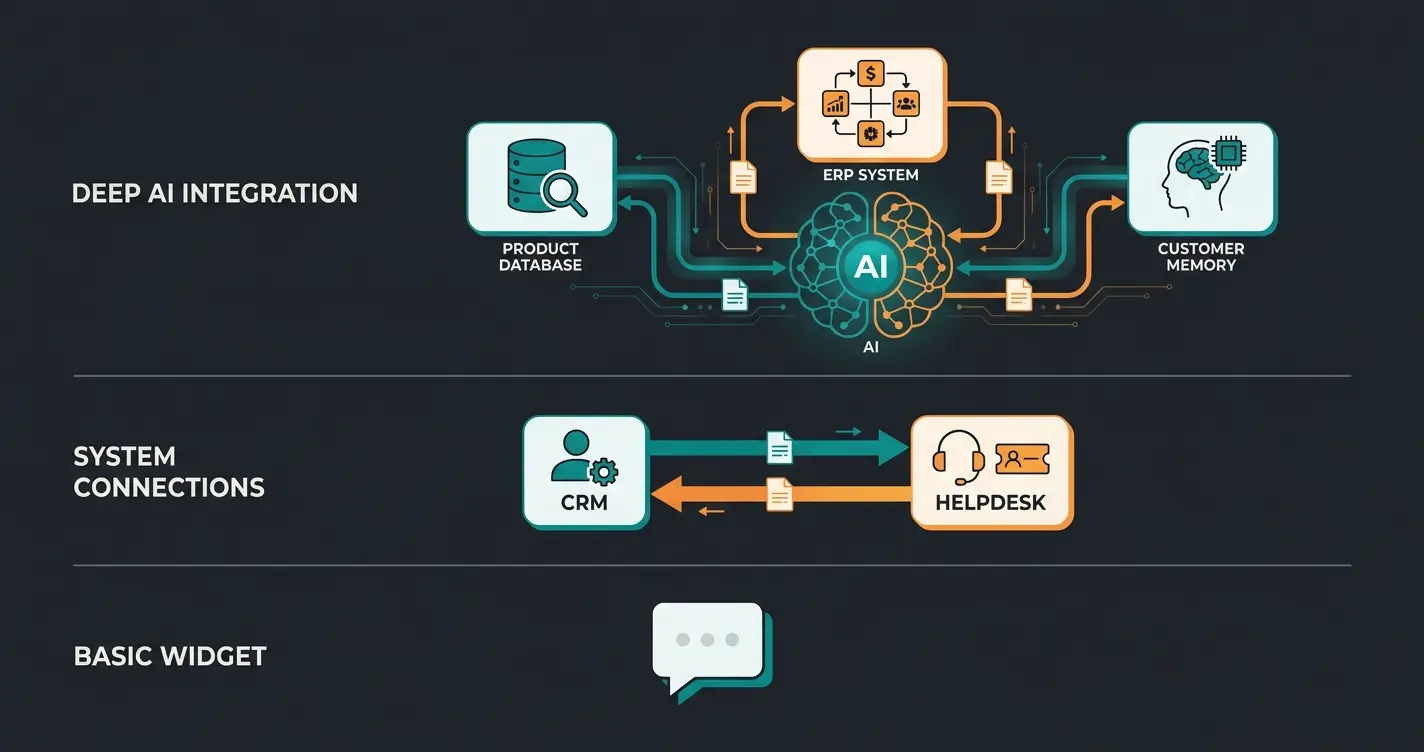
Chatbot integration operates at three levels: Level 1 is widget-based FAQ handling with no backend connection, Level 2 connects to your help desk and CRM for context-aware support, and Level 3 integrates with product data (PIM/ERP) to deliver intelligent consultation that drives purchases. Each level requires progressively deeper system access but delivers exponentially higher returns.
| Level 1: Widget | Level 2: Support Integration | Level 3: Product Consultation | |
|---|---|---|---|
| Backend connection | None | CRM + helpdesk | PIM/ERP + CRM + product catalog |
| What it handles | Scripted FAQ responses | Ticket routing, order status, context-aware support | Product recommendations, guided selling, cross-selling |
| Conversation memory | None (session only) | Per-ticket context | Full customer history across sessions |
| Revenue impact | Cost reduction only | Faster resolution, indirect retention | Direct revenue: higher basket value, checkout rate |
| Typical ROI | Break-even in 6-12 months | 2-4x within 12 months | 6-33x within 3-6 months |
| Integration effort | 1-2 hours (embed widget) | 1-2 weeks (API connections) | 3-6 weeks (full data pipeline) |
| Best for | Low-traffic informational sites | Support-heavy businesses | E-commerce with 100+ consulting-intensive products |
The ROI difference between Level 1 and Level 3 is not incremental. At Level 1, a chat widget handles a fixed set of questions and saves support time. Useful, but limited. At Level 3, the AI employee accesses your full product catalog, understands attribute relationships (size, material, use case, compatibility), and guides customers to the right purchase decision.
That difference matters because conversion happens during consultation, not after a FAQ answer. If your products require explanation (garden supplies, technical equipment, mattresses, automotive parts), a Level 1 widget leaves money on the table. Pooldoktor, a pool and swimming retailer using Level 3 integration, measured +18.75% revenue per user compared to the control group without AI consultation. A Level 1 widget cannot produce that outcome because it cannot access the product data required for personalized recommendations.
Choosing the right integration approach
Choose your integration approach based on your tech stack and goals: widget embeds work for basic support, API integrations suit custom e-commerce setups, and platform-native connectors (Shopware, Shopify, WooCommerce) offer the fastest path to product consultation AI. The right choice depends on three variables: your platform, your team's technical capacity, and how deeply you want the AI to access product data.
| Approach | Setup time | Technical requirements | Integration depth | Best for |
|---|---|---|---|---|
| Widget embed (JS snippet) | 1-2 hours | Copy-paste into site footer | Level 1 only | Quick FAQ deployment, testing |
| REST API integration | 2-4 weeks | Backend developer, API authentication | Level 2-3 | Custom e-commerce, complex product catalogs |
| Shopware 6 App connector | 1-2 weeks | Shopware admin access, REST API config | Level 3 | Shopware shops with 100+ products |
| Shopify AI SDK | 3-5 days | Shopify Partner access | Level 2-3 | Shopify merchants wanting fast deployment |
| WooCommerce plugin + API | 2-3 weeks | WordPress admin, managed hosting required | Level 2-3 | WooCommerce shops on quality hosting |
| iPaaS (Zapier, Make) | 1-3 days | No coding | Level 1-2 | Quick automations, non-technical teams |
A critical distinction: widget embeds and iPaaS connectors get you to Level 1-2 fast, but they cannot deliver Level 3 product consultation. For that, you need direct access to your product data through a REST API or platform-native connector. Shopware 6 provides solid REST API documentation covering products, categories, properties, and customer groups. Shopify's AI SDK offers faster setup with lower latency but less flexibility for complex product structures. WooCommerce depends heavily on hosting quality, and we only recommend it on managed hosting providers where API response times stay below 500ms.
If your product catalog exceeds 500 items and customers need guidance choosing between variants, the API route is worth the extra setup time. We tested all three platforms in production environments with catalogs of 850+ products (garden supplies, consultation-intensive). Shopify delivered API responses in 180ms average. Shopware 6 came in at 320ms. WooCommerce on managed hosting averaged 420ms. Below 500ms, the delay is invisible to the end user. Above 800ms, drop-off rates start climbing.
One more factor: data access granularity. Shopware 6 exposes product attributes, cross-selling groups, customer groups, and custom fields through its REST API. Shopify provides product metafields and variant data but restricts some customer data behind app permissions. WooCommerce gives full database access but lacks the structured API layer, meaning more custom work to map product relationships. The platform choice should follow from your product data complexity, not the other way around.
Step-by-step integration process
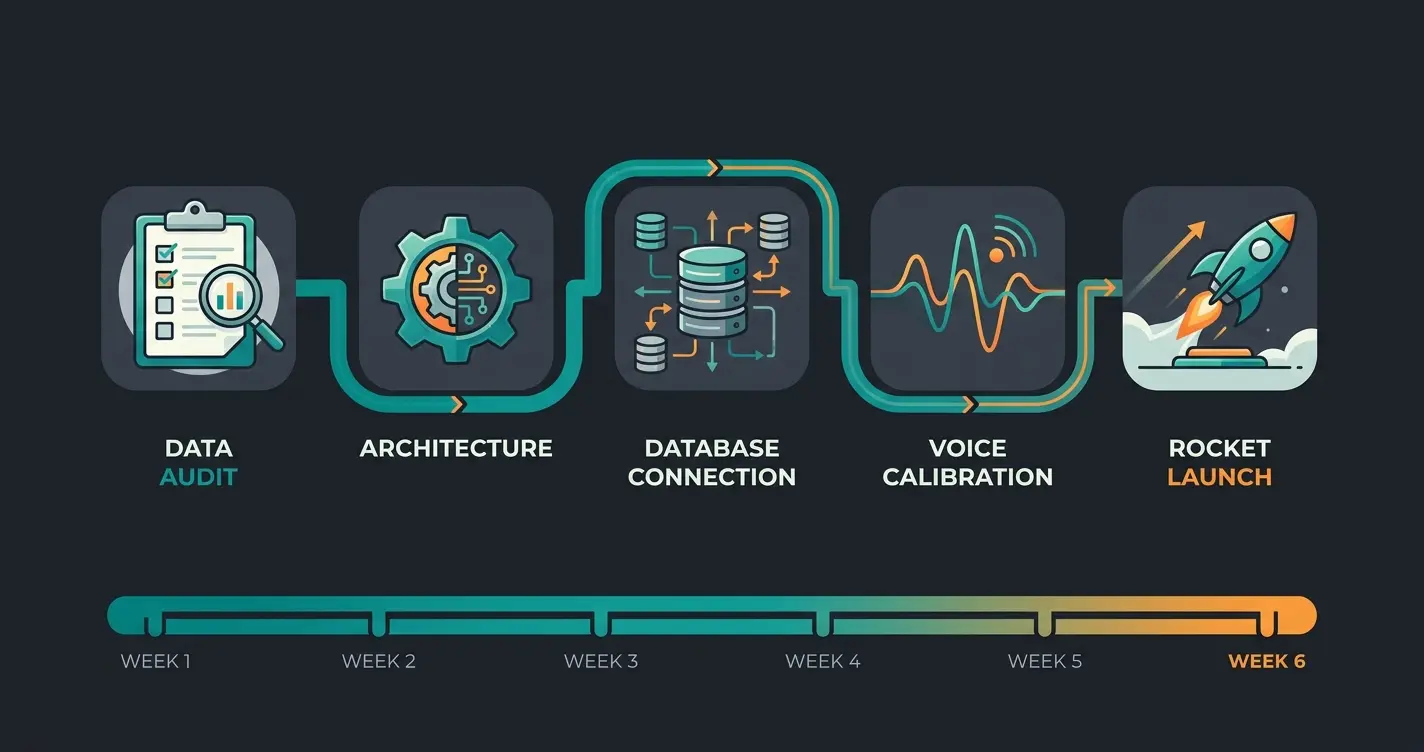
A successful chatbot integration follows five phases: data readiness assessment (Week 1), technical architecture setup (Week 2), knowledge base and PIM connection (Weeks 3-4), brand voice calibration and edge case testing (Week 5), and staged rollout with A/B testing (Week 6). This timeline applies to SME e-commerce shops with 100-2,000 products, as of Q2 2026.
| Phase | Duration | Key deliverables | Who is involved |
|---|---|---|---|
| 1. Data readiness audit | Week 1 | Product data completeness score, FAQ inventory, gap analysis | Shop owner + integration partner |
| 2. Architecture setup | Week 2 | API endpoints configured, authentication, staging environment | Developer or platform partner |
| 3. Knowledge base + PIM connection | Weeks 3-4 | Product catalog connected, FAQ content imported, context memory configured | Integration partner |
| 4. Brand voice + edge case testing | Week 5 | Tone calibrated, escalation triggers set, 200+ test conversations | Shop owner + QA |
| 5. Staged rollout | Week 6 | Shadow mode (AI suggests, human confirms), then A/B test vs. no-AI control | Full team |
Phase 3 deserves special attention. Connecting the product catalog is not a one-time data dump. The integration needs to handle real-time inventory updates, price changes, and seasonal product rotations. A static knowledge base goes stale within weeks. The PIM connection must be live, pulling current data for every customer interaction. For shops with more than 500 products, plan an extra 3-5 days for attribute mapping and validation.
Phase 4 is often underestimated. Testing edge cases means deliberately trying to break the AI: ask about products you discontinued last month, request combinations that are physically impossible, type queries with misspellings and regional slang. The AI's response to these situations determines customer trust. After 200+ test conversations, you should see 95%+ accuracy on product recommendations and zero hallucinated product features.
Phase 5 is non-negotiable. Shadow mode means the AI generates responses but a human reviews them before they reach the customer. This catches tone mismatches and incorrect product recommendations before they affect real buyers. After shadow mode confirms stability, switch to live mode with A/B testing. Run the test for at least two weeks. Compare conversion rate, basket value, and customer satisfaction between AI-assisted sessions and the control group.
Integration channels: website, WhatsApp, and beyond
Modern chatbot integration spans multiple channels: website widget (highest traffic volume), WhatsApp Business (highest engagement), email, and social media. The key differentiator is maintaining conversation context across all channels through a unified backend, so a customer who starts on your website and continues via WhatsApp does not repeat themselves.
The channel performance gap is significant. WhatsApp Business messages achieve 98% open rates compared to 21% for email, according to Infobip's messaging statistics. Click-through rates on WhatsApp range from 15-60% depending on campaign type, versus 2-6% for email. For product consultation specifically, WhatsApp outperforms every other channel because responses arrive within seconds and the conversational format matches how people naturally ask for buying advice.
| Channel | Open rate | Response time | Best use case | Integration effort |
|---|---|---|---|---|
| Website widget | N/A (visitor-initiated) | Instant | Product browsing, initial consultation | Low (JS embed) |
| WhatsApp Business | 98% | < 5 seconds | Follow-up consultation, order updates, repeat purchases | Medium (Business API required) |
| 21% | 6+ hours | Post-purchase support, newsletters | Low | |
| Instagram/Facebook | ~70% | Minutes to hours | Brand engagement, product discovery | Medium |
One caveat: multi-channel is not the same as omnichannel. Being present on three channels with three separate conversation histories creates frustration, not convenience. True omnichannel integration requires a shared customer data layer where the same AI backend serves all channels and carries context between them. A customer who told the AI employee on your website that they have a 200-square-meter garden should not need to repeat that on WhatsApp. For a deeper comparison of channel strategies, see our chatbot app vs mobile app analysis. If you are evaluating AI customer service across channels, start with website + WhatsApp and expand from there.
Training and knowledge base setup
An AI employee's consultation quality depends entirely on its knowledge base: connect your PIM system for product data, import FAQ content, configure conversation memory for multi-turn interactions, and set up human handoff rules for edge cases. Plan 2-3 weeks for initial training with a catalog of 100-1,000 products.
The knowledge base has four layers, and each one matters. Product data from your PIM is the foundation: attributes, descriptions, compatibility rules, and pricing. FAQ content covers shipping, returns, and policies. Conversation memory allows the AI to reference previous interactions with the same customer. Escalation logic defines when the AI hands off to a human, which should happen for complaints, custom orders, and any question the AI cannot answer with high confidence.
- PIM connection: Map product attributes (dimensions, materials, use cases, compatibility) to the AI's knowledge graph. Incomplete attributes produce incomplete recommendations. For a garden shop with 800 products, expect 3-5 days for full attribute mapping.
- FAQ import: Structure existing support content into question-answer pairs. Remove outdated or contradictory entries before import. Most shops have 40-80 FAQ entries that cover 70% of repetitive support questions.
- Conversation memory: Configure session memory (within one chat) and long-term memory (across visits). Returning customers should not re-explain their garden size, heating requirements, or pool dimensions every time.
- Human handoff triggers: Define clear escalation rules: sentiment drops, AI confidence falls below 80%, customer explicitly requests a human, or the topic involves complaints, refunds, or warranty claims.
- Continuous learning: Review weekly conversation logs. Identify patterns where the AI underperforms and add training data. The first 500 real conversations are your best training dataset, more valuable than any synthetic test set.
For a detailed guide on training methodology and knowledge base optimization, see our chatbot training guide. The critical mistake to avoid: training on synthetic data instead of real customer conversations. Real questions contain ambiguity, typos, dialect, and context that synthetic prompts never capture. We always start training with anonymized transcripts from actual support tickets.
From FAQ bot to revenue driver: the product consultation shift
The shift from FAQ bot to revenue driver happens when your AI stops answering generic questions and starts recommending specific products based on customer needs, budget, and constraints. This requires PIM integration, context memory, and consultation logic. Not just natural language processing.
The economics tell the story. Gartner's 2026 prediction states: "Conversational AI will reduce contact center agent labor costs by $80 billion" (Gartner Newsroom). That is the cost-saving side. But the revenue side is where the real returns live. An FAQ bot saves $0.25-$0.50 per deflected ticket. A consultation-capable AI employee that recommends the right lawn fertilizer, the right mattress firmness, or the right pool filter generates $30-150 in additional basket value per conversation.
Qualimero's deployment data across 25+ e-commerce clients (as of Q2 2026) shows consistent results: +35% higher basket value and +60% higher checkout rates when an AI employee provides active product consultation compared to shops without it. The mechanism is straightforward. Customers who receive personalized recommendations buy more and abandon less. How that works in practice is visible on our AI product consultation page.
Real-world integration results
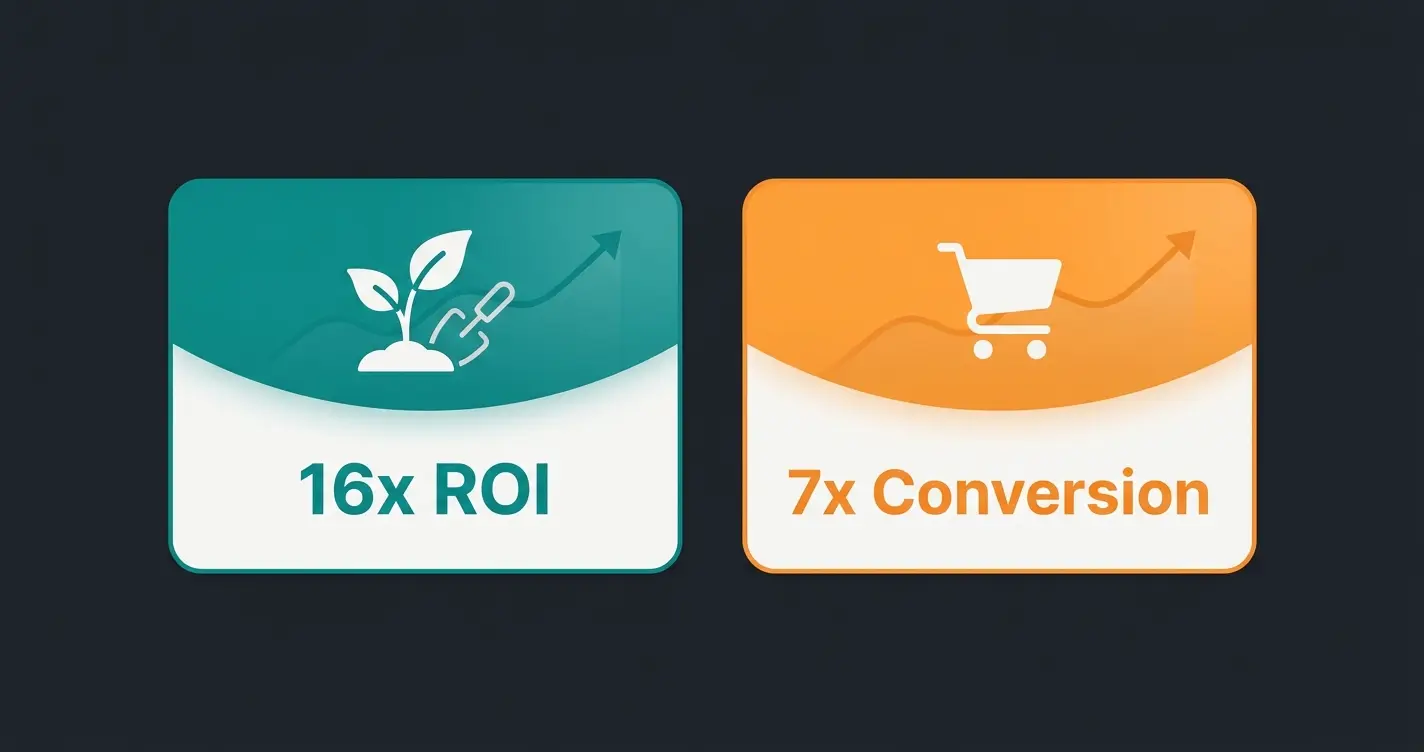
Rasendoktor, a German online specialist for professional lawn care, integrated Qualimero's AI employee Hektor and achieved 16x return on investment with 100% automation of product consultations. Gartenfreunde, a garden and wellness retailer, saw 7x higher conversion rates and a 45% click-through rate on AI-generated product recommendations.
Rasendoktor's integration followed the timeline outlined above. Their challenge: 2,000-3,000 consultation-intensive inquiries per season across a technically demanding product range (lawn seeds, fertilizers, soil treatments). Each inquiry required understanding soil conditions, lawn size, climate zone, and intended use. Manual consultation was not scalable. After connecting Hektor to the full product catalog via REST API, the AI employee handled 100% of initial product consultations automatically. The support team shifted to complex warranty and logistics cases. The result: 16x ROI and 40% reduction in support costs.
Gartenfreunde had a different profile. Up to 50 consultation inquiries per day during peak season across garden furniture, pools, and wellness products. Their AI employee Kira integrates with the full product catalog and provides personalized recommendations based on garden size, budget, and intended use. The numbers: 7x higher conversion rate, 45% click-through on product recommendations, and 6x ROI. Both integrations took under 6 weeks from kickoff to live deployment.
GDPR and data security for chatbot integration
GDPR-compliant chatbot integration requires EU data hosting, transparent data processing disclosures, conversation data retention policies, and explicit consent mechanisms. Choose providers with German or EU hosting and ISO 27001 certification. This is non-negotiable for any business operating in the DACH region or serving EU customers.
- EU data hosting: All conversation data, customer profiles, and product interaction logs must remain on EU-hosted servers. No exceptions for analytics or model training.
- Data processing agreement (DPA): Your AI provider must sign a GDPR-compliant DPA before any customer data flows through their system.
- Conversation retention: Define how long chat transcripts are stored. 90 days is standard for support purposes. Customers must be able to request deletion under GDPR Article 17.
- Consent mechanism: Display a clear privacy notice before the chat starts. Inform users they are interacting with an AI, not a human. The EU AI Act (in force since 2025) specifically requires this transparency.
- Encryption: TLS 1.2+ for data in transit, AES-256 for data at rest. Verify both with your provider before signing.
Qualimero operates entirely on German-hosted infrastructure and was built for GDPR compliance from day one. Every deployment includes a signed DPA, encrypted data handling, and configurable retention policies. We have seen competitors lose deals over this, particularly in regulated verticals like care placement and financial services where data residency is a procurement requirement, not a preference.
Frequently asked questions about chatbot integration
Chatbot integration connects an AI system to your existing business platforms (CRM, PIM, helpdesk, messaging channels) so it can access real-time data and take actions beyond scripted FAQ responses. The depth of integration determines whether the chatbot merely deflects support tickets or actively drives revenue through product consultation. Level 3 integration, connecting to product data and customer history, delivers 6-33x ROI in e-commerce deployments.
For SME e-commerce shops with 100-2,000 products, a full Level 3 integration takes 4-6 weeks from data audit to live deployment. Widget-only setups (Level 1) take 1-2 hours. The timeline scales with catalog complexity and the number of systems being connected, not with the AI technology itself.
Widget-based FAQ chatbots start at EUR 50-200 per month. Level 3 product consultation AI ranges from EUR 500-2,000 per month depending on catalog size and conversation volume. The cost comparison that matters: a Level 3 AI employee typically generates EUR 8,000-25,000 per month in additional revenue for e-commerce shops, making the subscription cost negligible relative to returns.
Shopware 6, Shopify, and WooCommerce all support AI chatbot integration through REST APIs or native SDKs. Shopware 6 offers the deepest API access to product data, categories, and customer groups. Shopify provides the fastest setup through its AI SDK with response times around 180ms. WooCommerce works well on managed hosting but requires careful performance tuning for catalogs above 500 products.
Level 1 (widget embed) requires zero technical knowledge, just copy-paste a JavaScript snippet. Level 2-3 integrations typically require a developer or integration partner for API configuration, authentication setup, and data mapping. The ongoing operation after setup requires no coding skills. Most shop owners manage day-to-day AI training and conversation review themselves.
Track three metrics: containment rate (percentage of conversations resolved without human escalation, target above 70% within 90 days), revenue attribution (basket value and conversion rate for AI-assisted vs. non-assisted sessions), and cost per interaction (human-handled at EUR 6-12 vs. AI at EUR 0.25-0.50). According to Route Mobile, 57% of companies report significant ROI within the first year of chatbot deployment.
Next steps: start your chatbot integration
Start your chatbot integration by auditing your product data quality, defining your consultation goals (support automation vs. revenue generation), and choosing the integration level that matches your catalog complexity. Three decisions shape everything that follows: Level 1, 2, or 3. Widget, API, or platform connector. Support-only or consultation-capable.
If your shop has consulting-intensive products and 3,000+ monthly visitors, Level 3 integration pays for itself within weeks. Our clients consistently achieve 6-33x ROI because the AI employee does not just answer questions. It sells. The traffic is already on your site. The question is whether you convert it.
Book a 30-minute demo. We connect to your real product data and show you what Level 3 integration looks like with your actual catalog, not a generic demo environment.
Book a demo
Kevin is CTO and co-founder of Qualimero. As an AI architect with over 15 years of experience as CTO and CPO in the tech industry, he designs the AI systems that automate tens of thousands of customer interactions daily for Qualimero's clients — reliably, securely, and at scale.