Shopify Amazon Integration in 2026: Apps, Setup, Pricing, and Troubleshooting
Compare the best Shopify Amazon integration apps for 2026. Full pricing breakdown, FBA vs FBM vs MCF, step-by-step setup, and troubleshooting for multi-channel sellers.

Why integrate Shopify with Amazon?
Last month I spoke with a Shopify merchant selling specialty kitchen tools. Revenue was solid but flat. She had 4,000 monthly visitors and a 2.8% conversion rate. Good numbers. Not growing. Then she listed her top 50 products on Amazon. Within 90 days, Amazon accounted for 40% of total revenue. Same products, same margins, entirely new audience.
That pattern repeats constantly. Amazon has over 300 million active customer accounts worldwide. In Germany alone, Amazon holds approximately 50% of online retail market share. Selling on Amazon is not about replacing your Shopify store. It is about reaching buyers who will never find your store through Google.
Multi-channel sellers generate 143% more revenue than single-channel sellers, according to CedCommerce's 2025 multi-channel report. The conversion rate on Amazon averages 4.2x higher than standalone e-commerce stores because buyers arrive with purchase intent, not browsing intent.
- Reach: access Amazon's 300M+ active buyers without additional marketing spend
- Trust: Amazon's brand trust and Prime badge increase conversion rates significantly
- Diversification: reduce dependence on a single sales channel and traffic source
- Centralized management: sync inventory, orders, and pricing from one Shopify backend
- Fulfillment options: use Amazon FBA, MCF, or your own fulfillment for flexibility
The integration itself comes in two flavors. Listing management apps sync your Shopify products to Amazon, handle orders, and keep inventory in sync. Fulfillment integrations let Amazon ship orders placed on your Shopify store (Amazon MCF). Some apps do both. The choice depends on your volume, your fulfillment setup, and whether you want Amazon handling logistics for all your channels. For the broader multi-channel approach beyond just Amazon, see our Shopify multichannel strategy guide.
Best Shopify Amazon integration apps compared
I tested and reviewed six integration apps that are actively maintained and have meaningful user bases in 2026. This is not a list of every app in the Shopify App Store. It is a shortlist of the ones that actually work reliably for mid-market merchants.
| App | Free tier | Paid price | Product limit | Order sync | Inventory sync | FBA support | Rating | Best for |
|---|---|---|---|---|---|---|---|---|
| Shopify Marketplace Connect | 50 orders/mo | 1% per order (max $99/mo) | Unlimited | Yes | Real-time | Yes | 4.5/5 (1,138) | Small-mid sellers, budget-conscious |
| CedCommerce Amazon Channel | Yes (limited) | $15-89/mo | Varies by plan | Yes | Near real-time | Yes | 4.5/5 (800+) | Mid-market, multi-marketplace |
| Amazon MCF by ByteStand | No | $25-45/mo per marketplace | Unlimited | Yes | Real-time | Yes (MCF) | 4.9/5 (428) | FBA/MCF-focused merchants |
| Amazon MCF by WebBee | Yes (limited) | $19/mo+ | Varies | Yes | Scheduled | Yes (MCF) | 4.7/5 | MCF fulfillment only |
| LitCommerce | 2 channels free | ~$44/mo (3 channels) | Varies | Yes | Scheduled | Partial | 4.7/5 | Multi-marketplace beginners |
| Channable | No | Custom pricing | Unlimited | Yes | Real-time | Partial | 4.2/5 | Enterprise, feed management |
Shopify Marketplace Connect (recommended for most sellers)
This is Shopify's official solution, built on the Codisto engine they acquired. It connects Shopify to Amazon, eBay, Walmart, and other marketplaces. The free tier covers 50 orders per month, which is enough for most sellers starting on Amazon. Above that, the 1% per-order fee with a $99/month cap makes pricing predictable.
Strengths: native Shopify integration, real-time inventory sync, supports all major Amazon marketplaces (US, UK, DE, FR, IT, ES, JP), and handles FBA orders. Weaknesses: the app's UI can be overwhelming for first-time users, and some merchants report slow support response times. For sellers also interested in eBay, it handles that too, making it a natural companion to a Shopify eBay Integration setup.
CedCommerce Amazon Channel
CedCommerce is the strongest third-party option for merchants who need more hands-on support. Their plans range from free (limited products) to $89/month (Enterprise), with dedicated account managers on higher tiers. The app handles product listing, order sync, inventory management, and supports FBA.
Strengths: excellent customer support (consistently praised in reviews), multi-marketplace support, template-based listing creation that saves time on bulk uploads. Weaknesses: the free tier is very limited, and the pricing tiers can be confusing with feature gates at each level.
Amazon MCF by ByteStand
If your primary goal is using Amazon's fulfillment network to ship orders from your Shopify store (not just Amazon orders), ByteStand is the specialist. At 4.9 stars with 428 reviews, it has the highest rating of any app in this category. It routes Shopify orders to Amazon MCF automatically, handles tracking updates, and supports multiple marketplaces.
Strengths: best-in-class MCF integration, fast setup, reliable order routing. Weaknesses: it only handles fulfillment, not product listing or marketplace management. You need a separate app (like Marketplace Connect) for listing sync. Pricing is $25-45/month per marketplace.
Step-by-step: how to connect Shopify to Amazon
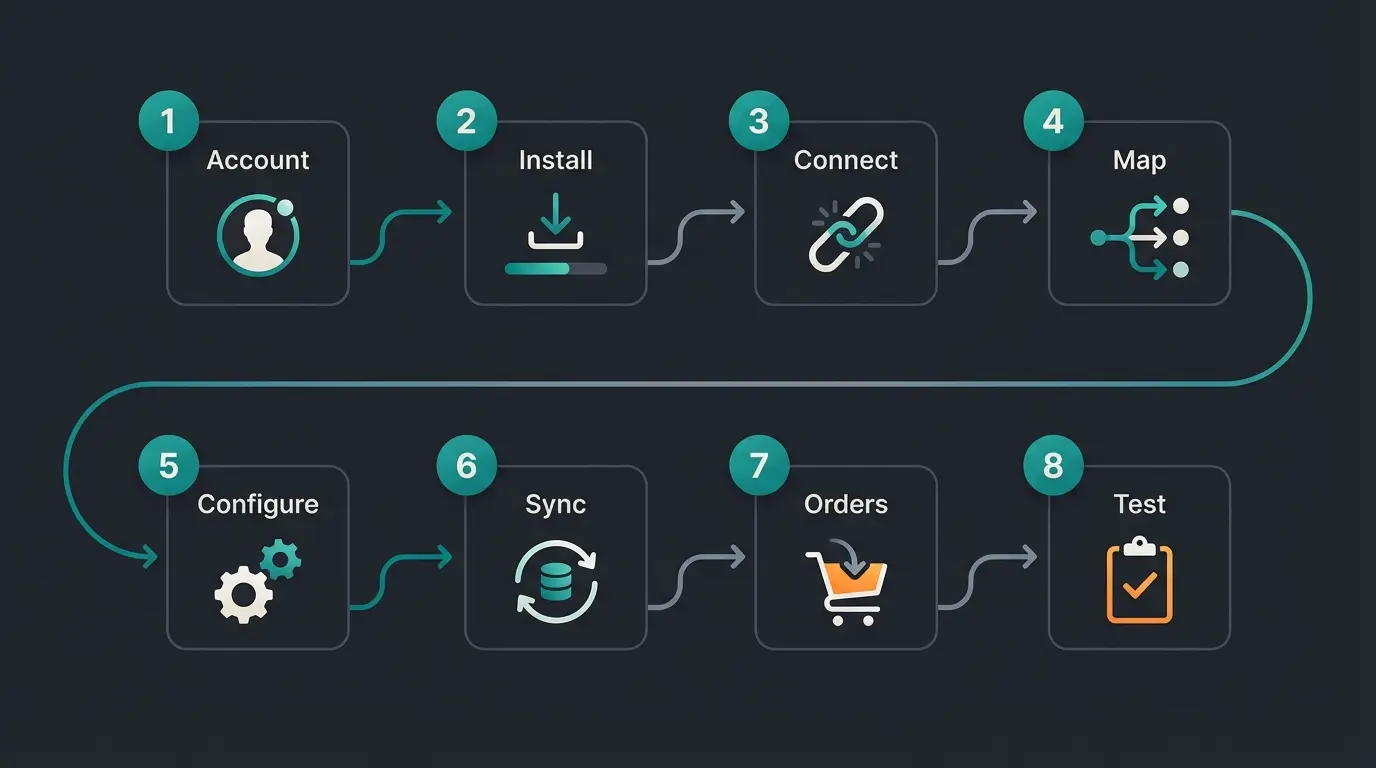
This walkthrough uses Shopify Marketplace Connect, the most common setup. The process takes 30-60 minutes for the initial connection, plus time for product mapping depending on your catalog size.
- Create an Amazon Professional Seller account at Amazon Seller Central. The Professional plan costs $39.99/month and is required for API-based integrations. Individual seller accounts do not support third-party app connections.
- Install Shopify Marketplace Connect from the Shopify App Store. Open your Shopify admin, go to Apps, search for Marketplace Connect, and install it.
- Connect your Amazon account. In the app, select Amazon as a marketplace, choose your Amazon marketplace region (e.g., Amazon.com, Amazon.de), and authorize the connection through Amazon's OAuth flow.
- Map your product categories. The app will prompt you to match your Shopify product categories to Amazon's Browse Tree Guide (BTG) categories. This step determines where your products appear in Amazon's search and navigation.
- Configure product listings. Choose which Shopify products to list on Amazon. For each, map the title, description, price, images, and variants. If matching products already exist on Amazon (by UPC/EAN/ASIN), the app links them instead of creating duplicates.
- Set up inventory sync. Enable real-time inventory sync to prevent overselling. This is critical: if a customer buys the last unit on Shopify while another buys it on Amazon, one order will fail without real-time sync.
- Configure order flow. Decide whether Amazon orders import into Shopify for fulfillment tracking. Most merchants enable this for centralized order management.
- Test with a small batch. List 5-10 products first. Verify that inventory changes on Shopify reflect on Amazon within minutes. Place a test order on Amazon and confirm it appears in Shopify.
FBA vs FBM vs Amazon MCF: which fulfillment option works best with Shopify?
Fulfillment is where most Shopify-Amazon integration decisions get complicated. You have three options, and the right choice depends on your volume, margins, and whether you want Amazon handling logistics for all your sales channels.
| FBA (Fulfillment by Amazon) | FBM (Fulfillment by Merchant) | MCF (Multi-Channel Fulfillment) | |
|---|---|---|---|
| What it is | Amazon stores, picks, packs, and ships your Amazon orders | You fulfill Amazon orders yourself | Amazon fulfills orders from ANY channel (Shopify, eBay, your site) |
| Prime eligible | Yes | No (unless Seller Fulfilled Prime) | No (but fast shipping) |
| Cost per unit | $3-8 (storage + pick/pack + shipping) | Your own shipping costs | $4-10 (higher than FBA, includes multi-channel surcharge) |
| Best for | High-volume Amazon sellers, Prime-dependent categories | Custom packaging, low margins, fragile items | Merchants wanting Amazon logistics across all channels |
| Shopify integration | Via Marketplace Connect or CedCommerce | Manual or via order sync apps | Via ByteStand, WebBee, or Buy with Prime |
| Inventory location | Amazon warehouse | Your warehouse | Amazon warehouse |
| Returns handling | Amazon handles returns | You handle returns | You handle returns (most cases) |
FBA is the default choice for most Amazon sellers because of the Prime badge. Prime-eligible products convert at significantly higher rates. The trade-off is cost: FBA fees increased by $0.08 per unit in 2026, and long-term storage fees can eat into margins for slow-moving inventory.
MCF is the interesting option for Shopify merchants. It lets you store inventory at Amazon and fulfill orders from your Shopify store using Amazon's logistics network. Amazon introduced MCF Preferred Pricing in 2026, offering up to 15% off MCF fees for merchants who use the Buy with Prime badge on their Shopify store. The catch: MCF orders do not get the Prime badge, and per-unit costs are $0.30-0.41 higher than FBA.
FBM keeps your margins intact but requires your own fulfillment operation. It makes sense for merchants selling large, heavy, or custom items where FBA fees would be prohibitive. About 9% of Amazon sellers use a hybrid FBA + FBM approach, using FBA for fast-moving products and FBM for the rest.
Under 100 units/month? FBM is fine. Over 100? FBA starts making economic sense.
If your category is Prime-dominated (electronics, household), FBA is almost required for Buy Box.
Selling on Shopify too? MCF lets Amazon fulfill both channels from one inventory pool.
FBA adds $3-8 per unit. If your margin is under 30%, FBM or MCF may preserve more profit.
Use FBA for top 20% sellers, FBM for the rest. This is the approach 9% of successful sellers use.
What data syncs between Shopify and Amazon?
Understanding what does and does not sync automatically is critical for avoiding manual work and data errors.
What syncs automatically: product titles, descriptions, images, prices, variants (size, color, etc.), inventory levels (real-time with most apps), orders from Amazon to Shopify, shipping and tracking information from Shopify to Amazon, and product status changes (active/inactive).
What does NOT sync automatically: Amazon customer reviews, A+ Content (Enhanced Brand Content), Amazon advertising campaigns and data, Amazon-specific pricing (coupons, Lightning Deals), customer email addresses (Amazon blocks direct access), and return/refund data (handled within each platform separately).
The email address limitation is important for customer service. When a customer buys on Amazon, you do not get their real email. This makes post-purchase communication and support harder. An AI employee that handles inquiries across both your Shopify store and Amazon messaging can bridge this gap, providing consistent service regardless of where the customer purchased.
Shopify Amazon integration costs: full pricing breakdown
The total cost of selling on Amazon from Shopify includes four layers: the integration app, Amazon seller fees, Amazon fulfillment fees (if using FBA/MCF), and Shopify's own transaction fees.
| Cost component | Budget setup | Mid-tier setup | Premium setup |
|---|---|---|---|
| Integration app | Marketplace Connect: $0-40/mo | CedCommerce: $49/mo | Marketplace Connect + ByteStand: $99 + $45/mo |
| Amazon Professional Seller | $39.99/mo | $39.99/mo | $39.99/mo |
| Amazon referral fees | 8-15% per sale (varies by category) | 8-15% per sale | 8-15% per sale |
| FBA fees (if applicable) | $0 (FBM) | $3-8 per unit | $3-8 per unit |
| Shopify plan | From $39/mo (Basic) | From $105/mo (Shopify) | From $399/mo (Advanced) |
| Estimated total (excl. referral) | $79-119/mo + referral fees | $237-302/mo + referral fees | $583-641/mo + referral fees |
The referral fee is the largest variable cost. Amazon charges 8-15% per sale depending on the product category, with most categories at 15%. On a $50 product, that is $7.50 per unit. For a merchant doing 200 orders per month at $50 average, referral fees alone are $1,500/month. Factor this into your margin calculations before listing.
Keep in mind that Shopify itself charges transaction fees on top of Amazon's fees if you use a third-party payment provider. On the Basic plan, this is 2% per transaction. On Shopify Plus, it drops to 0.2%. These fees apply to orders processed through Shopify, not to Amazon-direct orders. For a full breakdown of what Shopify charges, see our Shopify fees guide.
Optimize your Amazon listings for more sales
Listing your products on Amazon is step one. Getting them found and converting buyers is step two. Amazon's search algorithm (evolved from A9 to A10) ranks products based on relevance, performance, and seller authority.
- Title structure: front-load your primary keyword. Amazon titles should be 150-200 characters and follow the pattern: Brand + Product + Key Feature + Size/Color/Variant. Do not copy your Shopify title directly. Amazon titles need different optimization.
- Bullet points: use all five bullet point slots. Each should start with a capitalized benefit keyword and include one specific, measurable claim. Focus on what the product does for the buyer, not specifications.
- Backend search terms: add up to 250 bytes of backend keywords in Seller Central. Include synonyms, common misspellings, and related terms your title and bullets do not cover.
- Product images: minimum 6 images. Main image on white background (Amazon requirement). Include lifestyle images, size comparison, feature callouts, and packaging. Products with 6+ images see higher conversion rates.
- A+ Content: if you have Brand Registry, use A+ Content (Enhanced Brand Content) to add rich media below the fold. A+ Content has been shown to increase conversions by 3-10% on average.
- Pricing strategy: Amazon's Buy Box algorithm factors in price. If your Amazon price is significantly higher than your Shopify price, you risk losing the Buy Box. Keep pricing consistent or use Amazon-specific margin calculations.
One mistake I see repeatedly: merchants copy their Shopify product descriptions directly to Amazon. This does not work. Amazon buyers scan bullet points. Shopify buyers read paragraphs. Your Amazon listings need to be reformatted for the marketplace's reading patterns. The title alone accounts for a significant portion of Amazon search ranking weight. Invest time in getting it right.
Common issues and troubleshooting
Inventory sync failures are the number one complaint across every Shopify-Amazon integration app. Here are the most common issues and how to fix them.
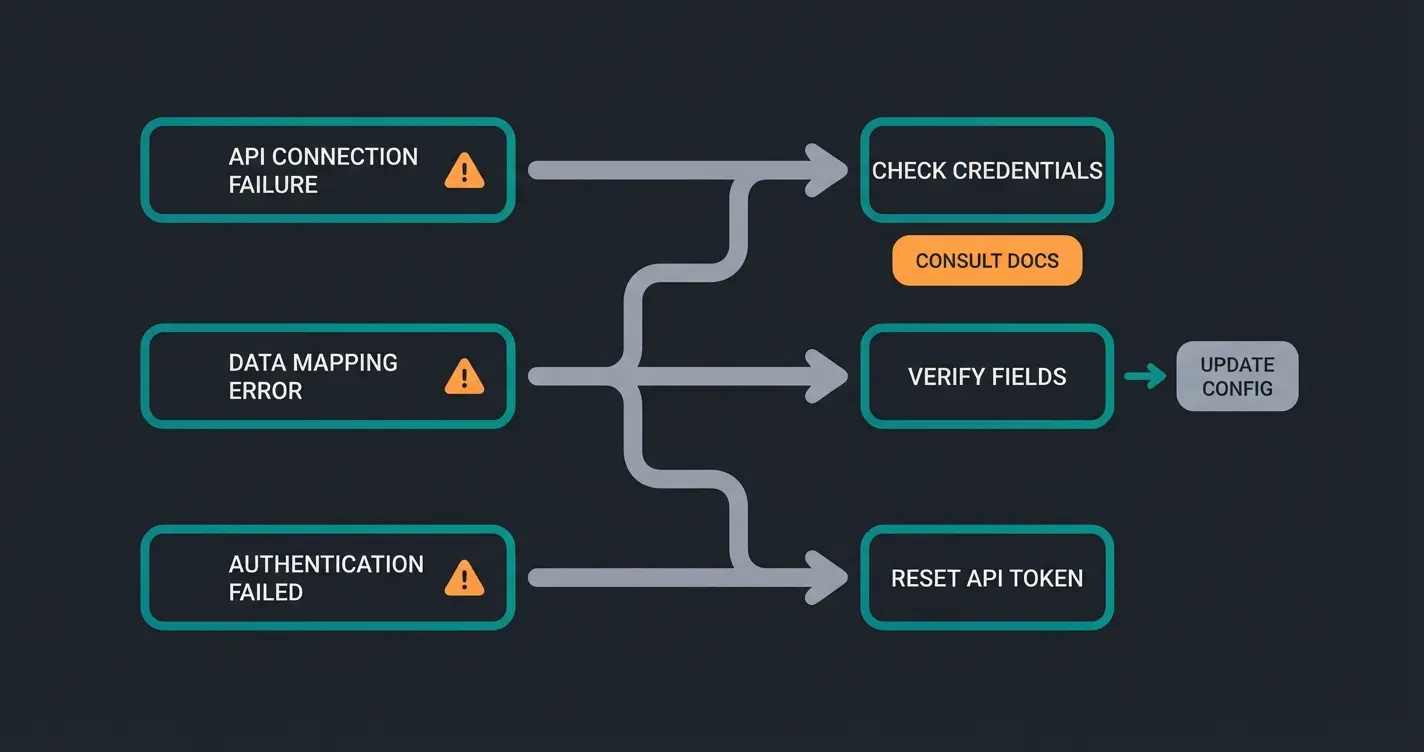
Inventory mismatch / overselling. Cause: the integration app uses scheduled sync (every 15-60 minutes) instead of real-time sync. A customer buys the last unit on Shopify, but the Amazon listing still shows stock for another 15 minutes. Fix: switch to an app with real-time or webhook-based inventory sync. Both Marketplace Connect and ByteStand offer this. If your current app only supports scheduled sync, reduce the interval to the minimum.
Duplicate ASIN creation. Cause: listing products on Amazon without matching them to existing ASINs via UPC, EAN, or GTIN. Amazon creates a new product page instead of linking to the existing one. Fix: always provide the product's barcode (UPC/EAN) during listing. If duplicates already exist, use Amazon Seller Central's merge tool or contact Amazon support to combine listings.
Order import failures. Cause: API rate limits, authentication token expiry, or the integration app losing connection to Amazon's API. Fix: check the app's connection status dashboard. Re-authorize the Amazon connection if the token has expired. Most apps show a sync log where you can identify failed order imports and retry them manually.
Category mapping errors. Cause: products assigned to incorrect Amazon Browse Tree Guide categories. This affects search visibility and referral fee rates. Fix: review your category assignments in the integration app. Use Amazon's BTG Lookup tool to find the most specific category for each product type. Recategorizing existing listings requires updating the product in Seller Central.
Price sync conflicts. Cause: different pricing rules on Shopify and Amazon, or the integration app overwriting Amazon prices during sync. Fix: configure your integration app to use separate pricing for Amazon if your margins differ. Most apps support marketplace-specific pricing rules.
Which Shopify Amazon integration is right for you?
After testing these apps and talking to dozens of merchants who use them daily, here is the decision framework.
Starting out or under 50 Amazon orders/month: use Shopify Marketplace Connect. It is free at this volume, it is Shopify's official solution, and it covers listing, orders, and inventory. You can always upgrade later.
50-500 orders/month, need support: CedCommerce Amazon Channel at the $49/month tier gives you dedicated account management, which matters when things break. Their support team is consistently rated higher than Marketplace Connect's.
Using FBA and want Amazon to fulfill Shopify orders too: add ByteStand MCF alongside your listing app. The combination of Marketplace Connect (free tier for listing) + ByteStand ($25-45/month for MCF) is the most cost-effective way to get Amazon logistics across all your channels.
Enterprise, multi-marketplace (Amazon + eBay + Walmart): Channable or LitCommerce. These handle feed management across many marketplaces from a single interface. The cost is higher but the centralized management saves time at scale.
Whichever app you choose, the integration is only half the equation. Once you sell on multiple channels, customer inquiries multiply: product questions on Amazon, shipping queries on Shopify, returns across both. An AI employee handles these conversations across channels automatically, so your team does not drown in support tickets as order volume grows. For the broader strategy on combining Shopify with Amazon, see our Shopify Amazon guide.
More channels mean more customer inquiries. An AI employee handles product questions, order status, and returns across Shopify and Amazon automatically. Our clients see +35% cart value and response times under 10 seconds.
Book a free demoFrequently asked questions
Yes. Shopify connects to Amazon through integration apps like Shopify Marketplace Connect (official, free up to 50 orders/month), CedCommerce, and others. These apps sync products, inventory, and orders between both platforms automatically.
The integration app itself ranges from free (Marketplace Connect under 50 orders) to $99/month. On top of that, you need an Amazon Professional Seller account ($39.99/month) and will pay Amazon referral fees of 8-15% per sale. Total cost for a typical SME is $80-300/month plus referral fees.
Yes, through Amazon Multi-Channel Fulfillment (MCF). You store inventory at Amazon warehouses and Amazon ships orders placed on your Shopify store. Apps like ByteStand and WebBee automate this. MCF costs $4-10 per unit, which is higher than FBA but lets you use Amazon logistics across all channels.
For most sellers, Shopify Marketplace Connect is the best starting point: it is free up to 50 orders/month, official, and handles listing, orders, and inventory sync. For merchants needing better support, CedCommerce is the top alternative. For MCF-focused fulfillment, ByteStand has the highest rating (4.9/5).
Integration apps like Marketplace Connect and CedCommerce sync inventory automatically. Real-time sync updates stock within seconds of a sale on either platform. Scheduled sync (every 15-60 minutes) is cheaper but risks overselling. Always choose real-time sync if your products sell frequently.
Yes, for up to 50 marketplace orders per month. Above that, it charges 1% per order with a maximum cap of $99/month. Product listing and inventory sync are included in the free tier with no product limits.

Lasse is CEO and co-founder of Qualimero. After completing his MBA at WHU and scaling a company to seven-figure revenue, he founded Qualimero to build AI-powered digital employees for e-commerce. His focus: helping businesses measurably improve customer interaction through intelligent automation.