
Why your Shopware backup strategy can make or break your business
A Shopware backup strategy is the documented combination of what you copy, how often you copy it, where the copies live, and how fast you can put them back. For a Shopware 6 shop it has to cover three layers at once: the filesystem, the MySQL or MariaDB database, and external service state. Miss one of them and a restore becomes a partial recovery.
Now the scene every operator recognises. It is Black Friday, traffic is at its annual peak, and a plugin update takes the shop down at 14:00. What happens next is not decided by your marketing budget.
It is decided by your last dump.
The cost side is easy to underestimate. ITIC's 2024 Hourly Cost of Downtime survey, which polled over 1,000 firms worldwide between November 2023 and March 2024, found that more than 90% of mid-size and large enterprises put a single hour of downtime above $300,000. An SME shop sits far below that figure, obviously. The ratio still holds though: one hour offline costs more than a full year of backup storage.
And the trigger is rarely dramatic. The same ITIC research names security incidents and human error, ahead of software flaws, as the chief causes of unplanned downtime. That matches what we see: in our client projects the most common reason anyone reaches for a backup is not a cyberattack or a failed disk, but a plugin migration that did not survive contact with production data. Which is why taking a full copy before every Shopware update is not optional housekeeping.
The fundamentals: what actually needs to be backed up?
A complete Shopware 6 backup covers three layers. The filesystem holds code, plugins, themes and uploaded media. The database holds products, orders, customers and configuration. External dependencies, meaning payment provider state, ERP sync cursors, the search index and AI consultation history, live outside both and are the layer most operators forget.
Before choosing tools, it helps to know the anatomy of a Shopware installation and what your Shopware hosting setup already covers on your behalf. A backup is only as good as the data inside it.
1. The filesystem
Program code and static assets. The parts that matter for a restore are narrower than people assume.
- Core and plugins: the Shopware code itself (`/vendor`, `/custom/plugins`).
- Media: product images, PDFs and documents (`/public/media`, `/files`). On larger shops these often sit on S3 or a CDN and have to be handled separately.
- Configuration: the `.env` file holds database credentials and API keys. Without it the rest of the archive is inert.
- Theme assets: compiled CSS and JS. Regenerable, but keeping them saves time under pressure.
2. The database (MySQL / MariaDB)
Catalog data, orders, customer accounts, sales channel settings and plugin configuration all live here. So does anything your AI tooling writes: conversation logs, vector references, and the learned preference data behind personalised recommendations.
3. External dependencies (the forgotten layer)
Modern shops are not islands. Elasticsearch or OpenSearch indices can be rebuilt, but on a large catalog that rebuild runs for hours while your search results stay wrong. Redis is volatile and needs no backup. Third-party configuration in your ERP, PIM or AI provider has to be synchronised with whatever database state you restore, or the two drift apart silently.
One measurement worth taking before you design anything: run `du -sh public/media var vendor` and compare it against your dump size. The split between database and media decides whether your bottleneck is transfer time or import time, and it differs enough between shops that borrowing someone else's answer is useless.
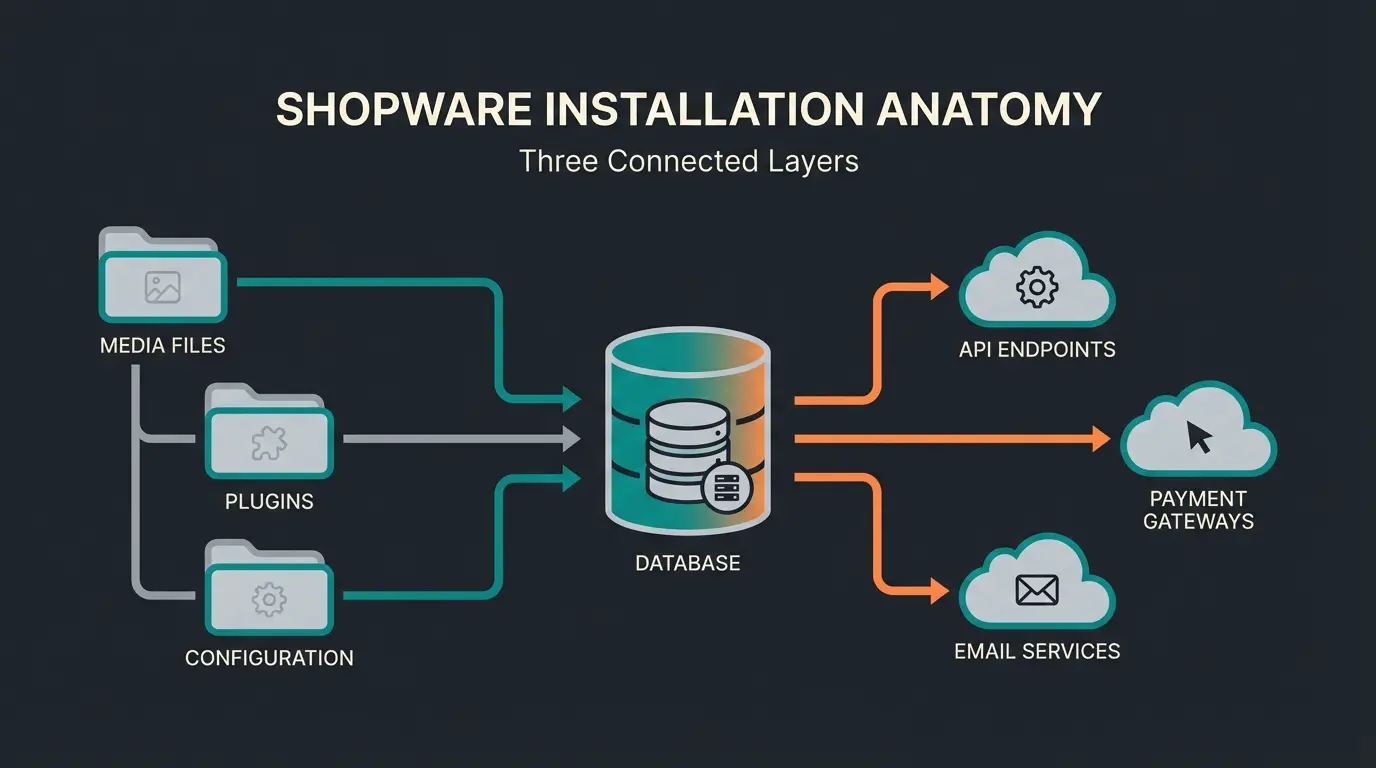
Filesystem, database and external dependencies must all be in scope
Between a 3:00 AM nightly dump and a 2:00 PM incident
But under half hold the elements needed to execute it (Veeam 2025 Ransomware Trends)
Method 1: the developer way (manual backup via SSH)
The CLI route gives full control and no plugin overhead. Dump the database with `mysqldump` using `--hex-blob`, `--single-transaction` and `--routines` to survive Shopware 6 binary UUIDs and stored routines, strip `DEFINER` statements so the dump imports on a different server, then archive the filesystem with `tar` while excluding `var/cache`, `var/log`, `public/thumbnail` and `node_modules`.
Step 1: database backup (the right dump)
A plain `mysqldump` is not sufficient for Shopware 6. Shopware 6 stores primary keys as binary UUIDs where Shopware 5 used auto-increment integers, and a dump without `--hex-blob` will corrupt them on the way out. Here is the command we use:
```bash mysqldump -u [DB_USER] -p[DB_PASSWORD] -h [DB_HOST] [DB_NAME] \ --hex-blob \ --single-transaction \ --routines \ --no-tablespaces \ --column-statistics=0 \ | sed -e 's/DEFINER=[^]\/\/' \ | gzip > shopware_backup_$(date +%F).sql.gz ```
Step 2: file backup (smart exclusion)
Do not archive everything. `var/cache` inflates the backup and causes permission errors on restore. The Shopware developer documentation is unambiguous about the `var/` directory, describing it as "Cache, logs, temporary files. Can safely be deleted (Shopware rebuilds it)." Excluding it costs you nothing.
```bash tar --exclude='./var/cache/' \ --exclude='./var/log/' \ --exclude='./public/thumbnail/*' \ --exclude='./node_modules' \ -czf shopware_files_$(date +%F).tar.gz . ```
Measure your own restore time
Here is where most guides hand you a number, and where we will not. Restore duration on Shopware 6 depends on database size, index count, storage class and CPU, and the spread between a 4 vCPU shared instance and dedicated NVMe hardware is wide enough that any published benchmark is noise for your setup.
What is consistent is the shape: importing a dump takes considerably longer than producing it, because MySQL rebuilds every index on the way in. So measure it once, on staging, with `time mysql -u [USER] -p [DB_NAME] < backup.sql`, and write the result down. That figure is your RTO. Everything else in this article is a way of making it smaller.
Method 2: plugins and automation
Plugins trade control for convenience. The Shopware Store backup plugin (SWPA) schedules database and media backups to FTP, SFTP or Amazon S3 from the admin panel. StageWare creates one-click staging clones. Hoster snapshots are the lowest-effort option of the three, but they restore an entire server rather than a single shop.
The Shopware Store backup plugin is the default recommendation, and its trust signals are thinner than its ranking suggests: as of August 2026 it holds 4.4 out of 5 stars from just 8 ratings, priced between EUR 15 and EUR 150. It covers database, media and system files and includes a maintenance mode toggle. The constraint is architectural rather than commercial. Plugin backups execute inside PHP, so on large media directories they run into PHP execution timeouts long before they run into disk limits. Above roughly 100 GB, the CLI method is simply more stable.
StageWare deserves a caveat. It is genuinely useful, because a staging clone doubles as a tested restore, but most of the indexed documentation still covers the Shopware 5 edition. Verify Shopware 6 compatibility with the vendor before you buy rather than after.
Hoster snapshots are the third option, and the one most frequently mistaken for a backup strategy. They are fast, they are usually included in the price, and they are entirely dependent on your provider remaining reachable and cooperative. If you migrate hosts or your account is suspended, those snapshots go with it. Good managed Shopware hosting makes them a strong first line of defence. It does not make them your only one.
| Criterion | CLI (mysqldump + tar) | Backup plugin (SWPA) | Hoster snapshot |
|---|---|---|---|
| Control over scope | Full, table and folder level | Partial, preset scope | None, whole server |
| Typical RPO | Whatever you cron, down to hourly | Scheduled, usually daily | Daily, provider-defined |
| RTO driver | Import speed, fully in your control | PHP runtime and transfer | Provider queue and restore slot |
| Cost | Free, plus storage | EUR 15 to EUR 150 | Usually bundled |
| Skill required | SSH and MySQL literacy | Admin panel only | Support ticket |
| Custom AI tables covered | Yes, if scripted | Only if in preset scope | Yes, by accident |
| Survives losing the host | Yes, with offsite target | Yes, with S3 or SFTP target | No |
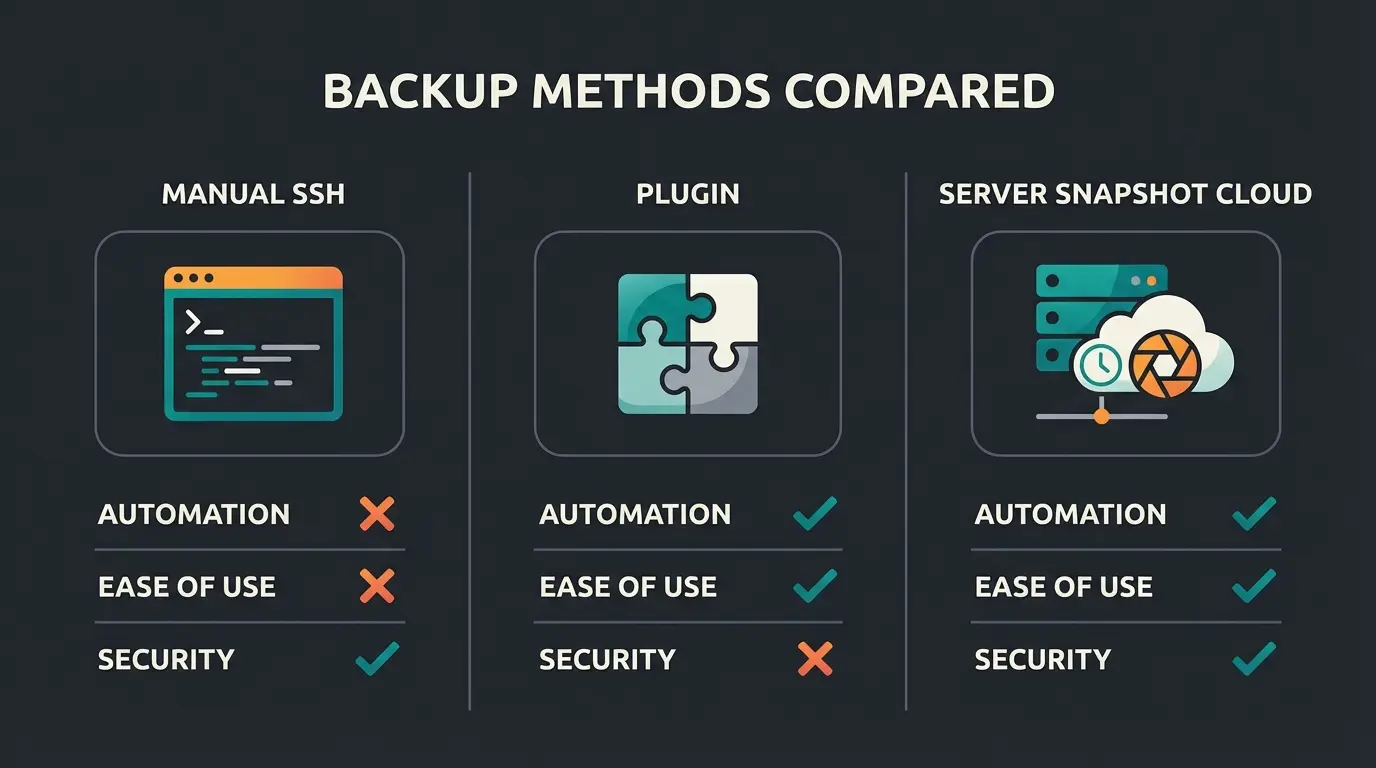
Decide whether your team is comfortable in SSH or needs an admin-panel workflow
Above roughly 100 GB of media, PHP-based plugin backups start hitting execution timeouts
High-transaction shops need hourly database dumps, which most plugins do not schedule
Pick object storage with separate credentials, not a second folder on the same server
Advanced strategy: the 3-2-1 rule for enterprise shops
The 3-2-1 rule means three copies of your data, on two different media or devices, with one copy offsite. For Shopware this translates to the live database, a nightly dump on the hosting infrastructure, and an encrypted offsite copy in object storage that ransomware running on the web server cannot reach.
That last clause is the one people implement badly. An offsite copy reachable with the same server credentials is not a third copy. It is the same copy in a different postcode.
The threat model justifies the paranoia, and the preparedness gap is wider than most teams believe. The Veeam 2025 Ransomware Trends Report surveyed 1,300 organisations, 900 of which had been attacked in the previous 12 months. It found that 98% had a ransomware response playbook, but fewer than half held the elements needed to actually execute it. Confidence tells the same story: 69% considered themselves well prepared before an attack, and that figure fell by more than 20 points afterwards.
Backblaze, which has been publishing on this rule since long before it was fashionable, put it plainly in their May 2024 revision: "the 3-2-1 rule is becoming more of a starting point rather than a complete data backup solution in today's world." Their own 2023 survey found only 11% of computer owners back up daily, which tells you how wide the gap between the standard and the practice really is.
- Copy 1, local: a nightly dump on the web server for fast recovery from small mistakes.
- Copy 2, offsite: automated upload to S3, Google Cloud Storage or Wasabi, using credentials that exist nowhere on the web server.
- Copy 3, immutable: an Object Lock bucket where nothing can be deleted or altered for a fixed retention window, typically 7 to 30 days.
- Encryption: applied before upload, with the key held outside the shop infrastructure.
Object storage pricing makes this cheap enough that the decision is really about discipline rather than budget, and if you are already evaluating cloud hosting for your Shopware shop, the offsite target is often a configuration choice rather than a new contract.
The hidden danger: restore and data gaps
Backup frequency defines your RPO, meaning how much data you lose. Restore speed defines your RTO, meaning how long you are offline. A shop backed up nightly at 3:00 AM that crashes at 2:00 PM loses eleven hours of orders, customer accounts and consultation history. The backup worked exactly as designed, and the data is still gone.
1. The gap problem
Eleven hours of a normal trading day is not an abstraction. It is every order placed since breakfast, every account created, every consultation your AI employee ran. Those orders were paid for. The payment provider has a record; your restored database does not, and reconciling the two by hand is the part nobody budgets for.
Two fixes exist, and they attack different halves of the problem. Increasing dump frequency to hourly shrinks the RPO cheaply, because a compressed database dump is small compared to media. Point-in-Time Recovery, if your host offers it for MySQL, replays the binary log and shrinks the gap to minutes. Hourly dumps cost storage. PITR costs setup complexity. Most shops should start with the first.
2. The blindfolded restore
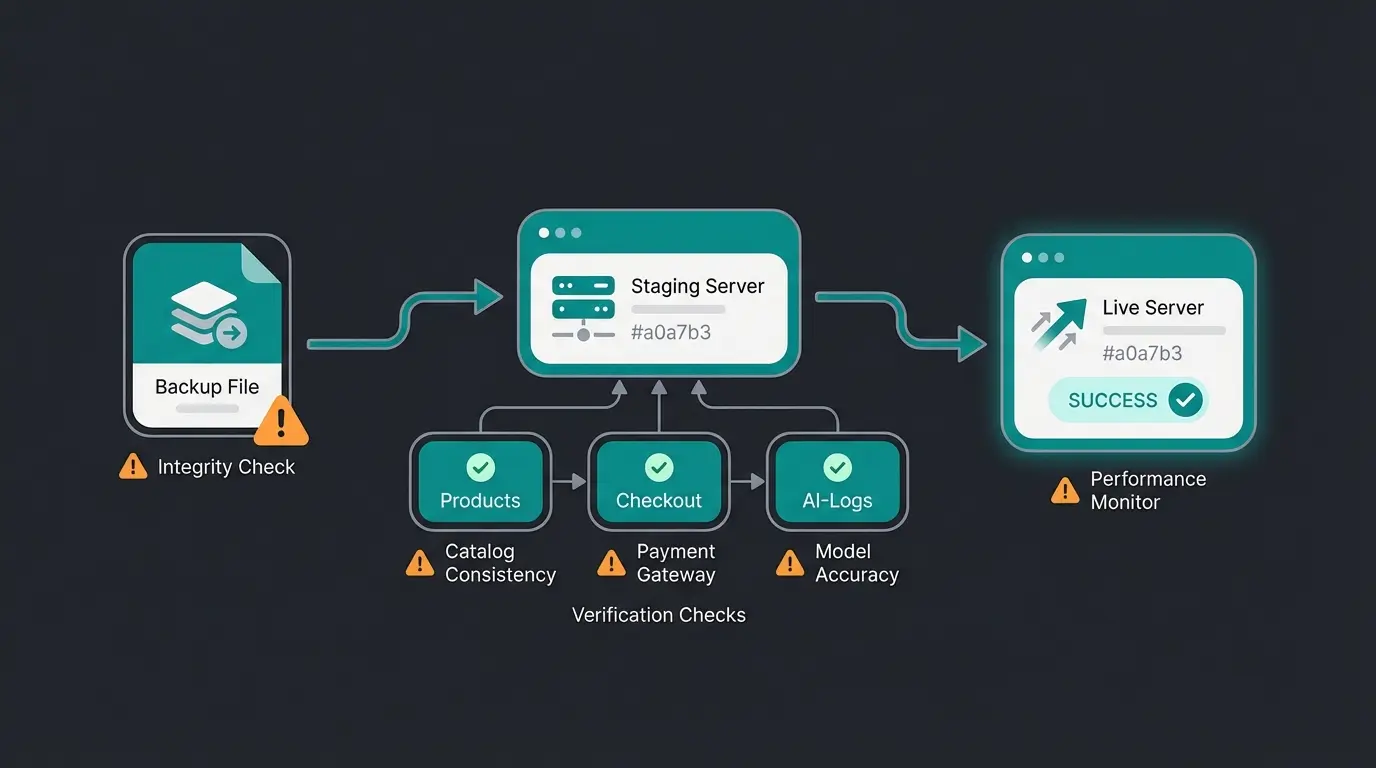
Never import a backup straight into a live shop unless there is genuinely nothing left to lose. You do not want to discover that the dump is truncated while it is overwriting your only working copy.
Restore into a Docker staging environment instead. The sequence is short: import the dump, adjust the `sales_channel_domain` table so the shop resolves under the staging URL, then verify products, checkout, and whether your AI consultation records survived. Only then promote to live.
```bash # 1. Import database mysql -u [USER] -p [DB_NAME] < backup.sql # 2. Clear cache (mandatory) php bin/console cache:clear # 3. Regenerate thumbnails (if excluded from the archive) php bin/console media:generate-thumbnails # 4. Rebuild indices (search and SEO) php bin/console dal:refresh:index ```
Step 4 is the one that gets skipped, and the failure mode is quiet. The shop looks fine, the checkout works, and the search returns stale results for as long as it takes someone to notice.
Why AI and complex consultations need better backups
AI consultation state is not in the standard backup scope. Conversation history, learned product-matching context and lead qualification data often live in separate tables or an external service, so a database-only restore brings the shop back with an AI employee that has forgotten every customer it ever advised.
This is where the abstract argument gets concrete. Rasendoktor.de, a specialist retailer for professional lawn care, was handling between 2,000 and 3,000 consultation-intensive enquiries per season before deploying Hektor, their AI employee. Hektor now answers 100% of webchat enquiries automatically, cut support workload by 40%, and returned 16x on the investment.
Now consider what a careless restore does to that. The catalog comes back. The orders come back. The regional application logic Hektor learned about lawn treatment timing, and the consultation history behind every recommendation, come back only if someone put those tables in scope.
- The risk: standard backup plugins back up standard Shopware tables. Custom tables holding chat history or vector references are frequently outside the preset scope.
- The consequence: the shop is online and the personalisation is gone, which is worse than an outage because nobody notices immediately.
Run `SHOW TABLES` after installing any AI extension and note which tables are new. Add them to your dump explicitly if you run selective backups. It takes ten minutes and it is the difference between a restore and a reset. If you are still evaluating what AI product consultation can do for a consultation-heavy catalog, the data it accumulates is the part worth protecting from day one.
Checklist: is your Shopware shop secure?
A Shopware backup setup is production-ready when it passes six checks: backups run automatically, one copy is offsite with separate credentials, restores are tested on staging at least quarterly, the restore procedure is written down somewhere accessible during an outage, external and AI service state is explicitly in scope, and someone has actually measured the restore time.
- 3-2-1 fulfilled: local, offsite, and one immutable or offline copy
- Configuration included: the `.env` file is in the archive
- Exclusions applied: `var/cache`, `var/log` and `node_modules` are skipped
- Restore tested: a full restore succeeded on staging within the last 3 months
- AI data in scope: custom tables from third-party and AI extensions are covered
- Emergency access: SSH and storage credentials are reachable when the backend is not
The last one catches more people than it should. Storing your only copy of the SSH credentials in a password manager that authenticates against the shop domain is a circular dependency, and you find out about it at the worst possible moment.
Frequently asked questions about Shopware backups
Database backups should run every 1 to 2 hours during trading hours, with a full filesystem archive nightly. The right frequency is whatever RPO you can afford: a nightly-only schedule means accepting up to 24 hours of lost orders. Database dumps are small and cheap to run frequently, so frequency is rarely the constraint.
No. Shopware 6 ships no native one-click backup, which is why the topic has been an open community question on the official forum since 2017. Your three options are CLI scripts via SSH, a Shopware Store plugin such as SWPA, or snapshots from your hosting provider. Most production shops combine at least two.
No, not directly. Shopware 6 uses binary UUIDs as primary keys where Shopware 5 used auto-increment integers, and the schema differs throughout. Moving data between them requires the Shopware Migration Assistant, which maps entities across versions. A raw SQL import will fail or produce an unusable database.
It depends on database size, index count and storage speed, so measure it rather than estimating. Importing a dump takes substantially longer than creating one because MySQL rebuilds every index during import. Time a full restore on staging with `time mysql -u user -p db < backup.sql` and treat the result as your RTO.
As one layer, yes. As your only layer, no. Snapshots live inside the same provider account as the shop, so a migration, a billing dispute or a suspended account takes your recovery option with it. Keep at least one copy in storage you control independently, following the 3-2-1 rule.
Identify which database tables your AI extension creates by running `SHOW TABLES` before and after installation. Custom tables holding conversation logs or vector references are often outside a backup plugin's preset scope. Add them explicitly to your dump, and check whether any state lives with an external provider instead.
Conclusion: backup is business continuity
If you take one thing from this guide, make it the two numbers. Your RPO is how much data an incident costs you. Your RTO is how long your customers wait. Everything else, the flags, the exclusion lists, the object storage tier, is just implementation detail in service of those two figures.
So write them down. Not the aspiration, the measured reality: dump frequency for the first, a timed staging restore for the second. Most operators discover their real RTO is several times what they assumed, and that discovery is much cheaper on a Tuesday afternoon than during an outage.
Then decide whether those numbers are acceptable for the shop you are running as of Q3 2026, given what a modern Shopware installation now holds. A catalog can be rebuilt from a supplier feed. The consultation intelligence your AI employee accumulated over months of real customer conversations cannot.
A solid backup keeps your orders safe. An AI employee is what makes those orders worth more: Qualimero customers see up to 35% higher basket value and 16x ROI from automated product consultation. See what one would learn about your catalog.
Start your free trial
Kevin is CTO and co-founder of Qualimero. As an AI architect with over 15 years of experience as CTO and CPO in the tech industry, he designs the AI systems that automate tens of thousands of customer interactions daily for Qualimero's clients — reliably, securely, and at scale.