
What is Shopify order management?
Shopify order management is the process of receiving, verifying, fulfilling, tracking and closing customer orders inside the Shopify admin. Every Shopify plan includes it. No separate order management system is required to start selling. The built-in toolset covers three things: order capture across sales channels, fulfillment status, and customer notification.
So the top question people ask Google here answers itself. Yes, Shopify has an order management system, and it is not an add-on. Shopify's OMS definition frames it at enterprise scale, which is fair for a company selling Plus contracts and useless if you ship 200 orders a month.
The scale is real. Shopify reports $1.1 trillion in cumulative merchant sales and states that an entrepreneur makes a first sale on the platform every 26 seconds (figures on Shopify's pricing page, checked August 2026). Most of those merchants never buy a dedicated OMS. They do not need one.
What the built-in system does not do is tell you when you have outgrown it. That is the whole subject of this article. Order management sits one layer above Shopify fulfillment, which covers who physically picks, packs and ships. This page covers the order record itself: its states, its daily handling, the tooling around it, and the customer inquiries it generates downstream.
The Shopify order lifecycle: every status explained
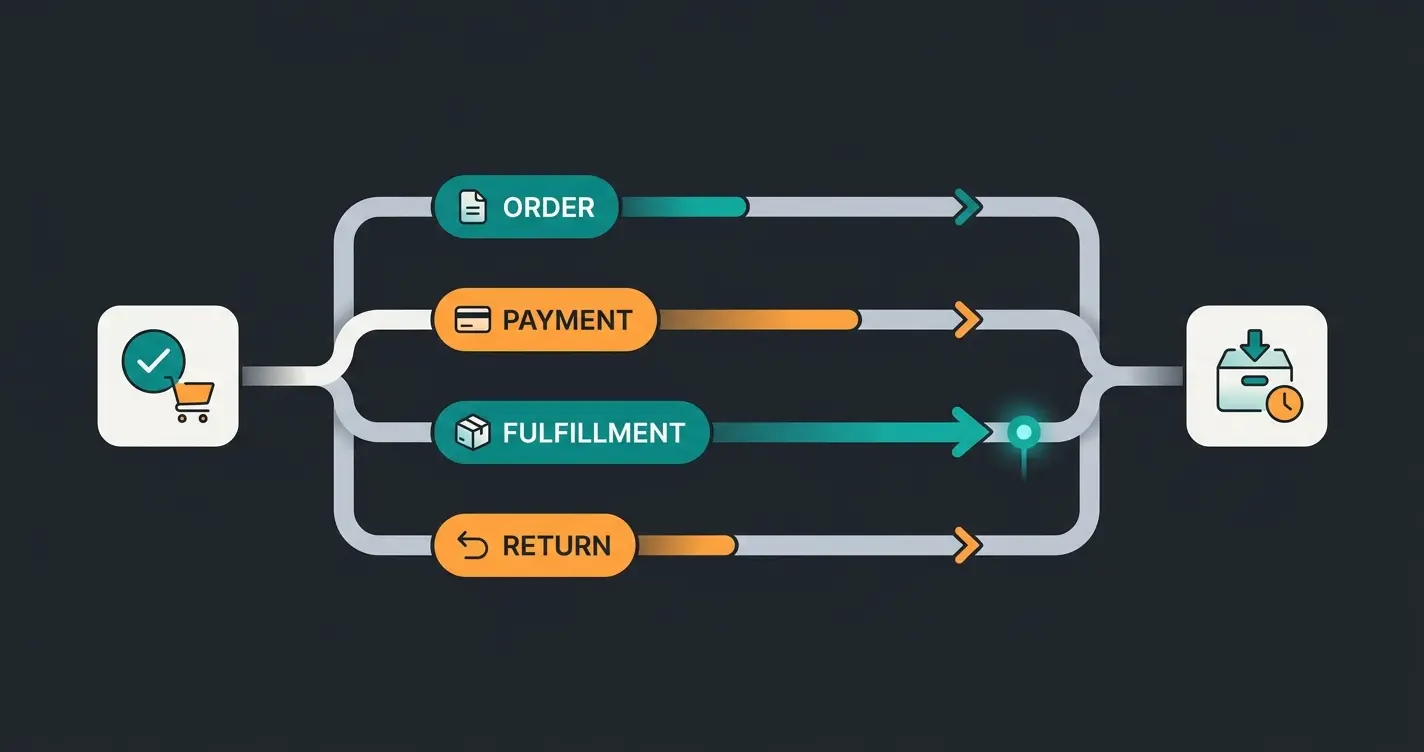
A Shopify order does not have one status. It carries four independent fields, and merchants confuse them constantly: order status, payment status, fulfillment status and return status. Delivery status is a fifth field that lives on the fulfillment record, not the order. An order can be paid and unfulfilled, or fulfilled and undelivered.
This is the single most common source of support confusion in a Shopify shop, and it is not the merchant's fault. Shopify documents these fields across separate pages. Here they are in one place, taken from Shopify's order status documentation and the FulfillmentDisplayStatus enum in the Admin API, both checked in August 2026.
| Status field | Values | What moves it | What you do about it |
|---|---|---|---|
| Order status | Open, Archived, Canceled | Order creation, manual or automatic archiving, cancellation | Nothing directly. Open means work remains somewhere in the other four fields. |
| Payment status | Pending, Authorized, Due, Expiring, Expired, Paid, Partially paid, Partially refunded, Refunded, Voided, Unpaid | Payment provider events, manual capture, refunds, payment terms | Capture before an Authorized payment expires. Chase anything sitting in Due. |
| Fulfillment status | Unfulfilled, In progress, On hold, Scheduled, Partially fulfilled, Fulfilled, Fulfillment not required | Picking, packing, holds, subscription fulfillment dates, order edits | This is your daily work queue. Filter on Unfulfilled and In progress. |
| Delivery status (on the fulfillment) | Label printed, Label purchased, Submitted, Confirmed, Picked up by carrier, In transit, Out for delivery, Delivered, Attempted delivery, Delayed, Not delivered, Failure, Ready for pickup | Carrier scan events pushed back to the fulfillment record | Exception handling only. Delayed, Attempted delivery and Failure are the ones worth alerting on. |
| Return status | Return requested, Return in progress, Inspection complete, Returned | Customer self-serve requests or a return created in the admin | Approve or decline, inspect, restock, refund. |
Read the table once and a lot of odd admin behaviour stops being odd. Where Shopify's status fields describe the order, delivery status describes the shipment, which is why an order shows Fulfilled while the customer is still waiting. That gap is where Shopify order tracking does its work, and it is also where most support tickets are born.
The terminal states matter for reporting. Refunded and Returned close an order financially, but they are not the same event and Shopify tracks them separately. Return volume in particular is not a rounding error: the National Retail Federation's 2025 Retail Returns Landscape puts the online return rate at 19.3%, against 15.8% across all retail channels.
"Returns are no longer the end point of a transaction," said NRF Vice President of Industry and Consumer Insights Katherine Cullen. "They provide an opportunity for retailers to create a positive experience for customers and can translate to brand loyalty." How you operate that opportunity is a topic of its own, covered in our guide to Shopify returns.
Managing orders in the Shopify admin: the daily workflow
The daily loop has six steps in a fixed order: review new orders and check fraud risk, capture payment where capture is manual, pick and pack, buy the label and fulfill, notify the customer, then work the exceptions. Everything else on the Orders page is filtering and bulk action layered on top of that sequence.
Open the Unfulfilled view. Shopify's built-in fraud analysis flags high-risk orders before you ship them.
Only relevant if you capture manually. Authorized payments expire, and Shopify shows an Expiring badge two days before the deadline.
Mark orders In progress so the rest of the team can see what is already being handled.
Bulk-purchase labels and print packing slips in one action rather than order by order.
Shipping confirmation fires automatically. The tracking number attaches to the fulfillment, not the order.
Address failures, holds, address problems and delayed shipments. This is the step that grows fastest with volume.
Four features carry most of the weight in that loop, and they are underused. Saved filtered views let you build a queue per team member instead of everyone working the same list. Order tags turn ad-hoc rules into filters. Bulk actions collapse fifty label purchases into one. Draft orders handle phone, in-person and B2B sales that never touch the storefront checkout.
Editing is where the walls appear. You can add or remove products, change quantities, adjust shipping charges and apply discounts on an open order. Once a line item is fulfilled, order editing can no longer remove it. From that point your options are a refund or a return, which is a different record with different accounting.
The full procedural detail sits in Shopify's order management documentation, which is genuinely good reference material. It just will not tell you which of these steps to automate first. Label buying and rate selection are covered separately in our Shopify shipping setup guide, since that is the step where most of the per-order time actually goes.
Built-in order management vs a dedicated OMS
Shopify's built-in order management is enough for single-channel merchants who fulfill from one or two locations. A dedicated OMS earns its cost once you sell across several channels, hold stock in more than a handful of locations, or need routing rules Flow cannot express. Channel count drives the decision more than order volume does.
Two hard numbers set the boundary, and both come straight off Shopify's own pricing page as of August 2026. Inventory locations cap at 10 on Basic, Grow and Advanced, while Plus raises the ceiling to 200. Marketplace order sync is free up to 50 orders a month, then costs 1% of those orders, capped at 99 EUR a month.
| Capability | Shopify built-in | Shopify Flow | Dedicated OMS app | ERP-integrated OMS |
|---|---|---|---|---|
| Multi-channel order consolidation | Yes, native for Shopify channels and connected marketplaces | No, it acts on orders already in Shopify | Yes, including channels Shopify does not connect natively | Yes, plus reconciliation against finance |
| Multi-location inventory | Up to 10 locations, 200 on Plus | No | Typically unlimited | Unlimited, with warehouse-level bin logic |
| Order routing rules | Rule-based routing by proximity and stock | Conditional tagging, holds and alerts on a single order | Allocation logic across a location network | Allocation plus cost and capacity optimisation |
| B2B and wholesale | Up to 3 catalogs, unlimited on Plus | Can tag and route B2B orders | Varies widely by vendor | Native, with credit terms and price lists |
| Returns automation | Self-serve returns, return rules, restocking | Can trigger on return events | Usually a separate returns app | Integrated into reverse logistics |
| Cost | Included in the plan | Free app | Roughly $20 to $125 a month (Order Desk tiers, August 2026) | A project budget, not a subscription line |
| Setup effort | None, it is already there | Hours per workflow | Days to weeks | Months, with a data migration |
| Who it fits | Single-channel merchants, one or two locations | Any merchant with repeatable order rules | Multi-channel merchants past the location cap | Merchants whose ERP is already the system of record |
The distinctions in that table are sharper than the marketing suggests. Flow expresses conditional logic on a single order, whereas a dedicated OMS expresses allocation logic across a network of locations. Built-in routing picks a location; an ERP-integrated OMS picks a location and a fulfillment path, then writes both back to finance. Those are different problems, and buying the wrong one is expensive.
Here is the honest part. Shopify's built-in order management is better than the app ecosystem wants you to believe, and in our merchant work the more common mistake is buying an OMS a year too early rather than a year too late. If you are on one sales channel and under the location cap, an OMS app mostly adds a sync surface that can break.
If you are building custom order tooling instead of buying it, the Shopify order management apps API documents how apps take over fulfillment on a merchant's behalf. That path makes sense when your routing logic is genuinely proprietary. It rarely makes sense for standard multi-location allocation, which vendors have already solved.
When to upgrade: order volume thresholds
Three operating phases, and each one breaks at a predictable point. Manual handling in the admin works to roughly 50 orders a month. App-assisted automation carries you to a few hundred. Past that, ERP or 3PL integration stops being an upgrade and becomes structural. These are operating heuristics from our merchant work, not measured universals.
| Monthly orders | What still works | First thing that breaks | The signal |
|---|---|---|---|
| Under 50 | One person, manual capture, manual labels, no apps | Nothing. Automating here is premature. | None. Spend the money on traffic instead. |
| 50 to 500 | Saved views, order tags, bulk label purchase, Flow automations | Fulfillment lag. Orders sit unfulfilled over weekends and holidays. | Your Unfulfilled queue is never empty at end of day. |
| 500 to 2,000 | A dedicated OMS app, a returns app, a second fulfillment location | Support backlog. Order-status questions outpace the person answering them. | Response times slip past 24 hours during normal weeks. |
| Over 2,000 | ERP or 3PL integration as the system of record | Stock desync. Channels oversell because inventory truth is split. | You are manually reconciling stock counts more than once a week. |
Note the ordering of failures, because it is consistent across the shops we work with. Fulfillment lag arrives first, support backlog second, stock desync third. Merchants usually notice the third one first because it costs money visibly, then fix it, then discover the other two were the actual cause.
One more difference worth naming: manual handling scales linearly with headcount, whereas automation costs stay roughly flat as order volume rises. That is the entire economic argument for crossing a threshold, and it is why the crossing point is a ratio rather than a number. If your order count doubled and your operations hours doubled with it, you are already past it.

Automating order management with Shopify Flow
Shopify Flow is Shopify's free automation app, and it is not preinstalled. You install it from the App Store, and it runs on Basic, Grow, Advanced and Plus. For order work, three automations pay for themselves fastest: tagging orders by value or destination, holding high-risk orders for review, and firing internal alerts on status change.
Worth correcting a common claim here, because plan availability has moved over the years. Flow is free, but unlike the Orders page it is not simply there. And two capabilities are gated: the Send HTTP Request action requires Grow, Advanced or Plus, and tasks built by custom partner apps require Plus. Both details are documented in Shopify's Flow manual, checked August 2026.
Workflows are trigger, condition, action. Two that earn their keep immediately:
WORKFLOW 1 - Hold and flag high-value orders
Trigger:   Order created
Condition: order.totalPriceSet > 500 AND customer.numberOfOrders == 1
Action:    Add order tag "review-highvalue"
           Add fulfillment hold
           Send internal Slack/email alert to ops

WORKFLOW 2 - Route by destination and pre-sort the queue
Trigger:   Order created
Condition: order.shippingAddress.countryCode != "DE"
Action:    Add order tag "export-customs"
           Add order tag matching carrier zone
           (Grow+ only) Send HTTP Request to customs doc service
The second workflow shows the gate in practice. Everything up to the tags runs on Basic. The outbound HTTP call does not. If your automation plan depends on talking to an external system, price in the Grow plan before you design the workflow, not after.
The hidden cost of order management: where-is-my-order tickets
Every order you ship carries a probability that the customer will ask where it is. WISMO inquiries are the largest single category of ecommerce support volume, and they scale with order count, not with team size. The fix is not faster ticket handling. It is removing the question, through proactive status updates and automated real-time order lookups.
This is the part every page-one result for this keyword skips, and it is the part that actually costs money. The numbers are not subtle.
Share of ecommerce support volume that is WISMO, per ShippyPro (2026)
Time spent looking up tracking numbers and answering repetitive status questions (Salesforce)
Say a poor customer experience deters them from buying from that brand again (Salesforce State of Service)
Salesforce works a concrete example: a retailer shipping 5,000 orders a month receives roughly 1,200 WISMO inquiries. That is close to one question for every four orders shipped. Apply the handling cost and the arithmetic gets uncomfortable fast.
| Orders shipped per month | Estimated WISMO contacts | At $5 per contact | At $15 per contact |
|---|---|---|---|
| 500 | ~120 | $600 | $1,800 |
| 1,000 | ~240 | $1,200 | $3,600 |
| 5,000 | ~1,200 | $6,000 | $18,000 |
| 10,000 | ~2,400 | $12,000 | $36,000 |
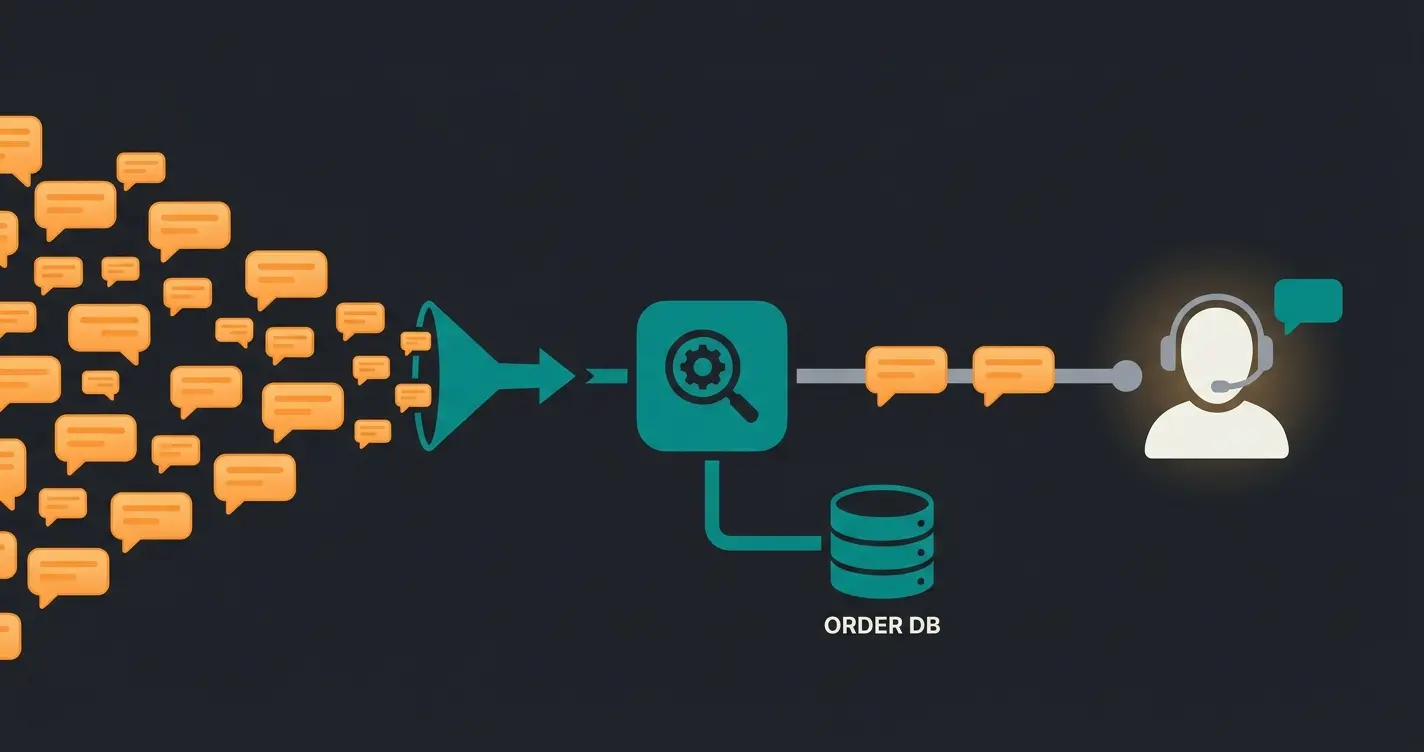
There are two ways to attack this, and they are complementary rather than alternatives. The first is proactive: dispatch, in-transit, out-for-delivery and delay notifications, plus an order status page the customer can reach without asking anyone. The second is reactive but automated: something that reads live order data and answers the question in seconds, on whichever channel the customer used.
Built-in notifications tell the customer what happened. An AI-powered customer service employee answers what the customer actually asked, which is usually narrower and more specific than any notification template covers. "Did my order ship before you closed on Friday" is not a status field.
The honest caveat: none of this fixes a warehouse that is genuinely behind. If orders sit unfulfilled for four days, automating the answer just tells customers faster that you are late. Deflection works on the information gap, not on the operational one. Fix the fulfillment lag first, then remove the questions it used to generate.
Order management at seasonal peaks
Seasonal merchants do not have an average order volume, and sizing order operations to the annual mean guarantees a failure in week 47. Staffing and manual steps that hold up in June break predictably at peak. Shopify's own peak data shows the shape of the problem: sales hit $5.1 million per minute on Black Friday 2025.
That figure comes from Shopify's BFCM 2025 report, which also logged $14.6 billion in weekend sales, peaks of 30,000 transactions per minute, and more than 94,900 merchants recording their single highest selling day. The platform absorbed it. The question is whether your order process does.
- Run your Flow automations in September, not in November. A rule that has never fired in production is not an automation, it is a hypothesis.
- Pre-tag your exception paths. Know in advance which order tags mean hold, expedite and customs, and make sure everyone on the temp staff knows too.
- Set your fulfillment-lag alert threshold to peak reality, not to normal reality. An alert that fires on every order at peak is an alert nobody reads.
- Decide now which questions the AI answers and which escalate. Peak is the worst possible time to be tuning an escalation rule.
Rasendoktor is the clean version of this. Professional lawn care, which means a demand curve shaped like a cliff: between 2,000 and 3,000 consultation-heavy inquiries per season, arriving in a window. Their AI employee Hektor now answers 100% of webchat inquiries, with 40% support savings and a 16x return. The seasonality did not change. The staffing pressure did.
Returns follow the same curve one beat later, and retailers plan for it: NRF reports that merchants expect 17% of holiday sales to come back. "Return policies and their overall process have transformed into a strategic touchpoint for retailers," said David Sobie, co-founder and CEO of Happy Returns, in the same NRF release. Peak planning that stops at the shipping label is half a plan.
Frequently asked questions about Shopify order management
Yes. Shopify includes a built-in order management system on every plan, with no separate purchase required. It captures orders from your online store, point of sale and connected marketplaces into one Orders page, tracks payment and fulfillment state, and sends customer notifications. Dedicated OMS apps exist for multi-channel routing and multi-location allocation beyond what the built-in system handles.
Payment status describes money, fulfillment status describes goods, and they move independently. An order can read Paid and Unfulfilled at the same time, which simply means you have the money and have not shipped yet. Shopify documents 11 payment status values and 7 fulfillment status values, and filtering on the wrong one is the most common reason orders get missed.
Yes. The Shopify mobile app gives you the Orders page, order details, fulfillment, refunds and customer contact from a phone. It is well suited to exception handling and spot checks while away from a desk. Bulk work such as purchasing fifty labels at once is still faster in the desktop admin.
The order status page is generated automatically for every order and is the page customers land on after checkout. You configure it under your shipping and delivery settings, where you can add tracking information display and enable self-serve returns. Pointing your notification emails at this page rather than a raw carrier link is the single cheapest WISMO reduction available.
Yes, within limits worth knowing. Shopify consolidates orders from your online store, POS, social channels and connected marketplaces into one Orders page. As of August 2026, 50 synced marketplace orders per month are free, above which Shopify charges 1% of those orders capped at 99 EUR monthly. Channels Shopify does not connect natively need a dedicated OMS app.
Once a line item is fulfilled, order editing can no longer remove it. Your two paths are a refund, which returns money against an order that stays on the books, or a return, which creates a separate record you can inspect and restock against. Cancelling is only available while the order is still open, and it ends the order entirely.
There is no single best app, and the honest answer is a decision rule rather than a name. Under 10 inventory locations and one sales channel, Shopify's built-in tooling plus Flow beats any paid app. Past that, choose on your specific constraint: routing complexity, marketplace coverage or ERP fit. App tiers typically run $20 to $125 a month.
Order management is an operations decision, not a tooling one
Match the tooling to your channel count and location count first, order volume second. Then treat the support load your orders generate as part of the system rather than as a separate problem for a separate team. That second half is where most Shopify merchants leave money on the table.
The reframe worth taking away: a system that produces 1,200 questions a month has not finished processing those orders. It has just moved the work to a different inbox. Every order management evaluation should include a line for inquiry volume, priced at the $5 to $15 per contact that Salesforce puts on it, and most evaluations do not have that line at all.
So the practical sequence. Get your status fields straight, because your team cannot fix what it cannot read. Automate the repeatable decisions with Flow while you are still small enough for that to be quick. Cross to a dedicated OMS when the location cap or the channel count forces it, not when an app roundup suggests it. And close the loop on order-status questions before peak, not during it.
A Qualimero AI employee reads your live Shopify order data and answers status questions across chat, WhatsApp and voice in seconds. Rasendoktor automates 100% of webchat inquiries at a 16x return. See it running on a shop like yours in 30 minutes.
Book a demo
Kevin is CTO and co-founder of Qualimero. As an AI architect with over 15 years of experience as CTO and CPO in the tech industry, he designs the AI systems that automate tens of thousands of customer interactions daily for Qualimero's clients — reliably, securely, and at scale.