What the right of withdrawal requires from Shopware merchants in Q2 2026
Every Shopware B2C store must provide a 14-day withdrawal right, a legally compliant withdrawal notice (Widerrufsbelehrung), and a sample withdrawal form, all accessible before purchase completion. As of Q2 2026, a third mandatory element joins the list: the electronic withdrawal button under § 356a BGB, effective June 19, 2026.
That last point is what separates this guide from anything written before March 2026. Most withdrawal articles online still describe a world where a PDF form and a footer link are enough. They are not. Not since the European Accessibility Act applied in June 2025, and not since the German legislature published the implementing law for the withdrawal button in late 2025.
I have spent the last months watching Shopware merchants scramble to understand what changed. The confusion is understandable. Two separate regulations hit within twelve months, both affecting the same process. Here is the full picture, structured by what you need to do and when.
Of annual turnover for non-compliance
Legal foundations: withdrawal notice, sample form, and the new button
A legally compliant Shopware store in Q2 2026 needs three withdrawal-related elements, not two. The withdrawal notice (Widerrufsbelehrung) informs customers about the 14-day period, process, and consequences. The sample withdrawal form gives customers a standardized template they can use but are not required to. And the withdrawal button, mandatory from June 19, 2026, provides an electronic function for submitting the withdrawal directly within the store.
According to ADVANT Beiten, the button must be clearly labelled, directly accessible from every sub-page, and visually distinguishable from standard navigation links. The legal term in Germany is 'Vertrag widerrufen' or an unambiguous equivalent in the store's language.
Both the notice and the form must reach the customer before purchase completion and appear again in the order confirmation email. This has not changed. What has changed is the bar for how customers exercise that right.
B2B vs. B2C: when the withdrawal right applies
| Customer type | Right of withdrawal | Withdrawal button required | Shopware setup |
|---|---|---|---|
| B2C (consumers) | Mandatory 14-day period | Yes, from June 19, 2026 | Default settings + button feature in 6.7.9.0 |
| B2B (business customers) | No legal requirement | No | Use Rule Builder to hide withdrawal elements |
| Mixed B2B/B2C shops | Depends on customer classification | Yes, for consumer transactions | Rule Builder: 'Customer is a company' rule for dynamic display |
If you run a mixed shop, the Shopware Rule Builder is your friend. For a broader introduction to the platform, see our guide on what Shopware is and how its admin tools support legal compliance. Create a rule filtering by customer type and apply it to the visibility of withdrawal elements in the checkout and footer. Pure B2B transactions do not trigger withdrawal rights, and forcing a withdrawal notice on commercial buyers creates confusion, not compliance.
The withdrawal button under § 356a BGB: what exactly must change by June 19, 2026
The withdrawal button is not a suggestion or a best practice. It is a binding legal obligation under § 356a of the German Civil Code, implementing EU Directive 2023/2673. Every online shop that concludes B2C distance contracts via a website or app must offer an electronic withdrawal function by June 19, 2026, regardless of company size.
The Noerr law firm analysis breaks down the requirements. The function must be prominently displayed. It must be reachable from every sub-page. It must remain available throughout the entire withdrawal period. And clicking it must lead to a structured confirmation page where the customer can submit the withdrawal without needing to log in, covering guest orders as well.
What about digital products and services?
Digital goods add a layer of complexity, similar to how Shopware product variants require careful configuration for correct display and pricing. Customers purchasing e-books, software downloads, or streaming access must explicitly consent to immediate delivery and waive their withdrawal right. In Shopware 6, products marked as 'Digital' in product settings trigger the required checkout checkbox automatically.
Skip this step and the customer retains a 12-month extended withdrawal right, even after downloading the product. I have seen this happen to a client selling PDF templates. They lost EUR 8,000 in refunds over three months before a lawyer flagged the missing checkbox. Straightforward fix, expensive lesson.
Setting up the withdrawal button in Shopware 6.7.9.0
Shopware shipped a native withdrawal button feature in release 6.7.9.0 (April 2026), with a backport to version 6.6 for merchants who have not yet upgraded. The feature is part of the core system, available for the Community Edition and all higher plans, with no additional license fees. That is the good news.
The Shopware announcement confirms the feature covers the full legal workflow: an integrated online form placeable via Shopping Experiences, electronic submission, and automatic confirmation of receipt. For standard storefront users, integration requires minimal effort.
Check your Shopware version in the admin area under Settings > System > Shopware Update
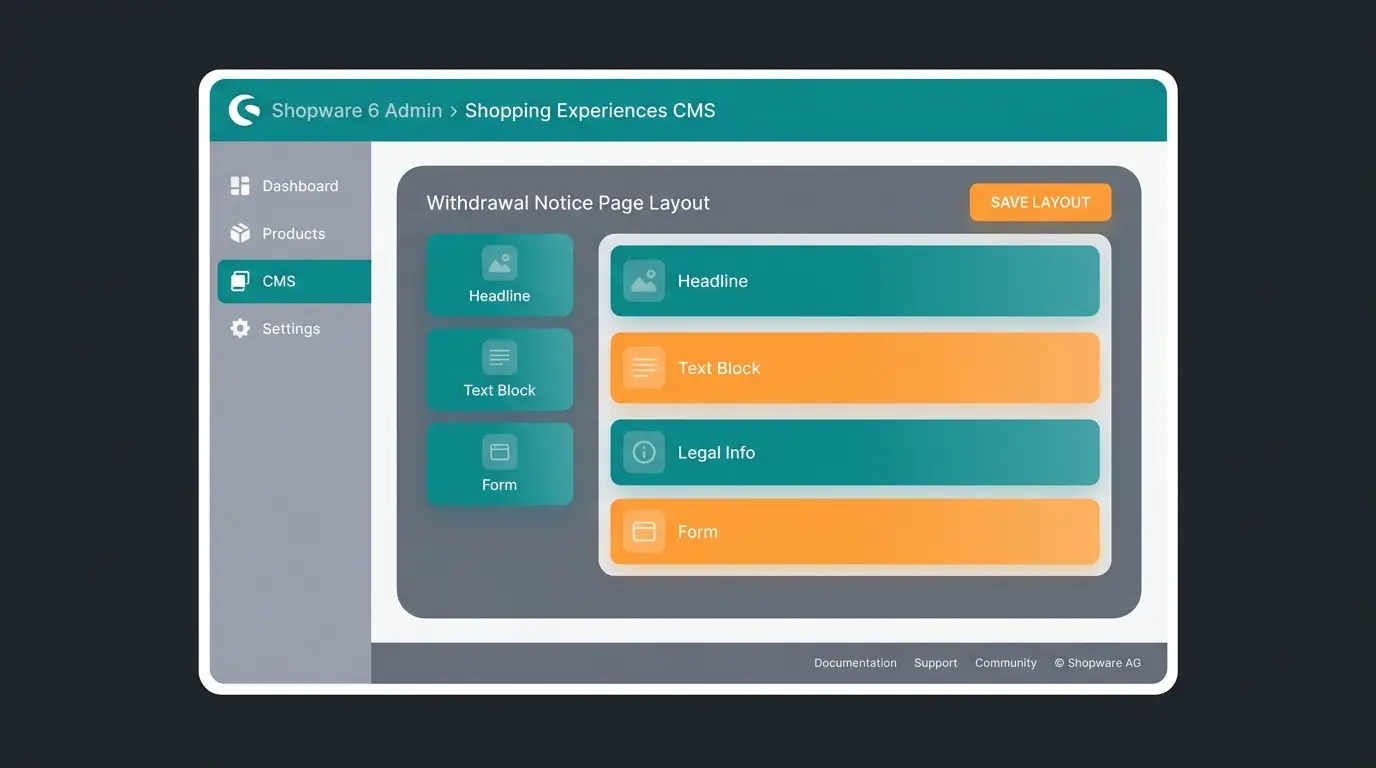
The withdrawal form element is now available as a native CMS block in your Shopware Admin area
Create a Shop page layout and add the withdrawal form block. Assign it under Settings > Shop > Basic Information
Add the withdrawal page to your footer navigation under Catalogues > Categories. Legal requirement: reachable from any page
Verify that non-logged-in customers can submit a withdrawal. The law explicitly requires this
The system automatically sends an electronic confirmation of receipt. Check your email templates to ensure it works
Right of withdrawal and the European Accessibility Act (EAA)
The European Accessibility Act (EU Directive 2019/882) has applied across the EU since June 28, 2025. It requires all e-commerce services, including withdrawal processes, to meet the technical standard EN 301 549, which adopts WCAG 2.1 Level AA as its baseline. This is not a future obligation. It is already enforceable.
What does this mean for your Shopware withdrawal page specifically? According to Bird & Bird, all interactive elements in the withdrawal process, the button, the form, the confirmation page, must be keyboard-navigable, screen-reader compatible, and properly labelled with ARIA attributes. Form fields need associated labels. Error messages need programmatic identification.
Fines for EAA non-compliance vary by member state but can reach EUR 100,000 per infringement according to Siteimprove. And here is the part most merchants miss: the EAA applies to microenterprises only if they have 10 or more employees and EUR 2M+ annual revenue. Below that threshold, you are exempt but still encouraged to comply.
- Withdrawal form: all input fields must have visible labels and programmatic associations
- Withdrawal button: must be keyboard-focusable, with sufficient colour contrast (4.5:1 minimum)
- Confirmation page: success messages must be announced to screen readers via ARIA live regions
- PDF withdrawal forms: if you still offer a PDF download, it must be tagged and accessible (most are not)
- Mobile: the entire withdrawal flow must work with assistive technologies on mobile devices
Common mistakes with the right of withdrawal (top 5 warning triggers in 2026)
After reviewing withdrawal setups across dozens of Shopware stores and speaking with e-commerce lawyers, these are the five issues most likely to trigger an Abmahnung (cease-and-desist warning) in 2026. Every single one is preventable.
1. Missing or incorrectly placed withdrawal button
The most obvious risk after June 19, 2026. According to Freshfields, consumer protection associations will very likely pursue formal implementation errors shortly after the deadline. The button must be reachable from every sub-page, not buried three clicks deep in a support section.
2. Missing digital product checkbox
If you sell downloads, software, or digital content without the explicit waiver checkbox in checkout, customers retain a 12-month withdrawal right after delivery. Shopware handles this automatically when products are marked as 'Digital' in settings, but many merchants forget to set this flag, especially for bundled physical-digital products.
3. Outdated withdrawal notice text
Legal text providers like IT-Recht Kanzlei and Händlerbund update their templates regularly. Running a withdrawal notice from 2024 or earlier means you are likely missing references to the withdrawal button and possibly the EAA. As of Q2 2026, your notice must reflect the electronic withdrawal option.
4. Withdrawal form missing from order confirmation email
The withdrawal notice and sample form must be delivered on a durable medium before or at the time of contract conclusion. The order confirmation email counts. Many Shopware stores include the notice text but forget to attach or link the sample form. Check your email templates under Settings > Email Templates.
5. Inaccessible withdrawal process (EAA violation)
Since June 2025, a withdrawal form that is not keyboard-navigable or lacks proper form labels violates the European Accessibility Act. This is the newest risk vector and the one fewest merchants have addressed. Run a basic WCAG audit on your withdrawal page using Lighthouse or a screen reader. If you cannot tab through the form and submit it without a mouse, you have a problem.
Step-by-step: integrating withdrawal texts in Shopware 6
The withdrawal notice and sample form in Shopware 6 live in Shopping Experiences (CMS), not in simple text fields like Shopware 5. This offers more flexibility but confuses merchants who expect a straightforward settings page. Here is the exact workflow.
Create the layout in Shopping Experiences
- Navigate to Content > Shopping Experiences in the Shopware Admin area
- Click Create new layout, select type Shop page
- Choose 'Full width' layout for legal texts
- Name it 'Withdrawal Notice & Form'
- Add a Text block and paste your legally compliant texts from your legal service provider (IT-Recht Kanzlei, Händlerbund, or equivalent)
- Include the sample withdrawal form either as inline text below the notice or as a PDF download link
Assign the page and ensure visibility
- Go to Settings > Shop > Basic Information and select your layout for 'Withdrawal Notice'
- Navigate to Catalogues > Categories and select your footer navigation tree
- Create a new category 'Right of Withdrawal', set category type to Page, and assign the layout
- Activate the category so the link appears in the footer on every page
For multilingual Shopware stores, repeat this process for each language. The withdrawal notice text must exist in every language your store serves. If you sell to German consumers from an English-language store, you still need the German withdrawal button label or its equivalent.
Add the withdrawal form to order confirmation emails
Navigate to Settings > Email Templates, find the 'Order Confirmation' template, and add a link to your withdrawal form page or attach the PDF. Test with a real order. This step is legally required and skipping it is one of the top warning triggers in 2026.
The checkout checkbox: still confusing, still misunderstood
No topic generates more forum threads in the Shopware community than the checkout checkbox. 'Must the customer confirm they read the withdrawal notice before buying?' The short answer has not changed in 2026: for physical goods, no.
According to prevailing case law and legal experts like IT-Recht Kanzlei, displaying a clear reference to the withdrawal notice above the 'Buy' button is sufficient for physical goods. An active confirmation checkbox is not required and can actually trigger warnings if interpreted as an inadmissible purchase hurdle.
The exception remains digital goods and immediate services. Here, the customer must actively agree to immediate execution and waive the withdrawal right. Shopware 6 handles this automatically when products are correctly flagged as 'Digital' in product settings.
| Product type | Checkbox required? | Consequence if missing | Shopware setting |
|---|---|---|---|
| Physical goods | No | None (information display sufficient) | Default settings |
| Digital downloads | Yes | 12-month extended withdrawal right | Product marked as 'Digital' |
| Immediate services | Yes | Customer retains full withdrawal right | Custom checkbox via Rule Builder |
| Mixed cart (physical + digital) | Yes, for digital items | Apply strictest requirement | Automatic per-item detection |
Automating the withdrawal process with Flow Builder
The legal sample withdrawal form is a static PDF. The customer prints it, fills it in by hand, scans it, emails it to your support address. That is media discontinuity from 2015, and it creates unnecessary work. According to EHI Retail Institute, the average return in German e-commerce costs between EUR 5 and EUR 10 to process, with complex product categories reaching EUR 20 or more.
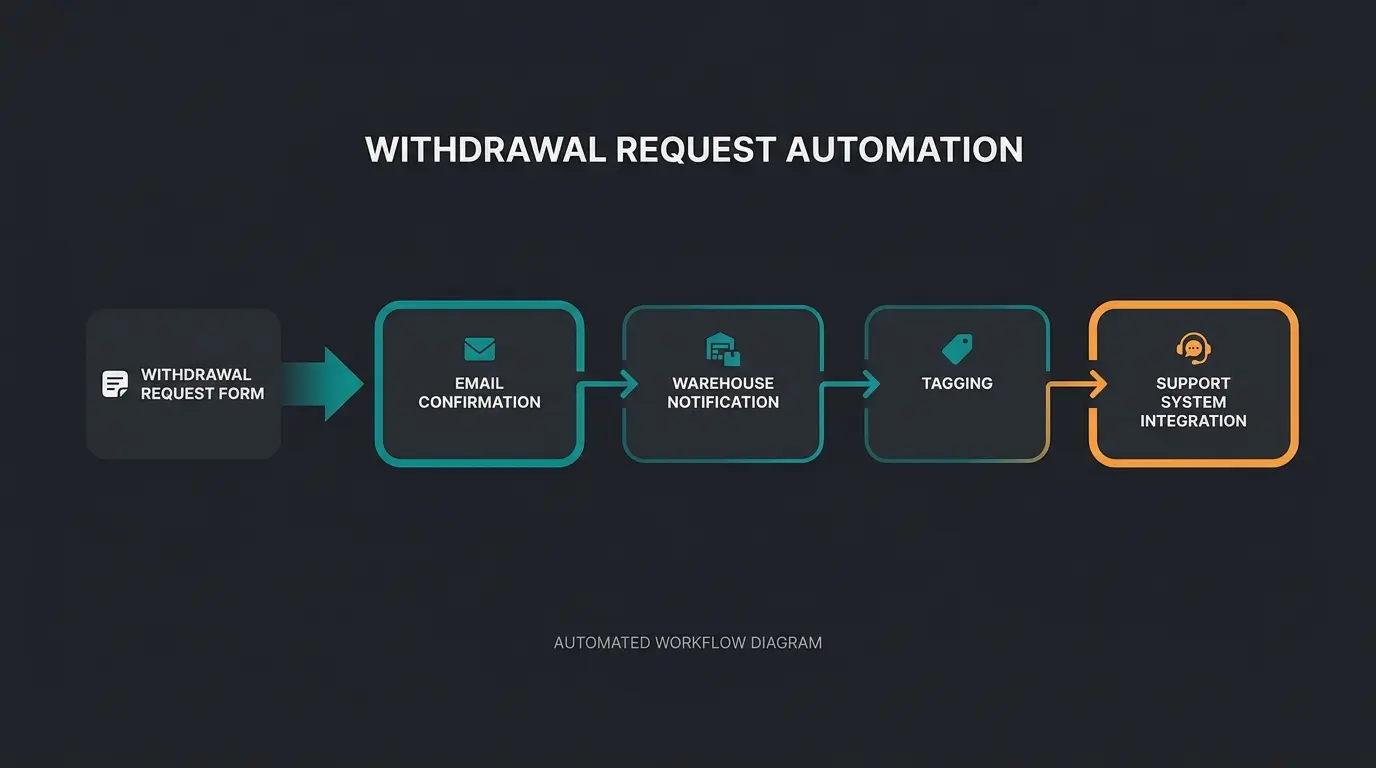
A modern Shopware store replaces the PDF with a digital form connected to Flow Builder automation. The result: withdrawal requests are processed in minutes, not hours.
Build a 'Returns Form' using the Form Editor with fields for order number, item, and reason
Create a flow triggered by 'Contact form submitted', filtered for your returns form
Send immediate email: 'We received your withdrawal request for order [number]'
Auto-notify fulfilment: 'Return for order XY announced, expected within 14 days'
Set tag 'Return_Announced' on the order for tracking and reporting
Send data to Zendesk, Freshdesk, or Intercom via webhook for support team visibility
With the new withdrawal button feature in Shopware 6.7.9.0, the electronic submission step is handled natively. Flow Builder then picks up the downstream processing. The combination of button (legal compliance) and Flow Builder (operational efficiency) is where modern Shopware stores gain their edge.
Preventing returns with AI product consultation
Most guides on the right of withdrawal stop at compliance. Handle the legal texts, automate the process, move on. That misses the biggest lever entirely. The most effective withdrawal strategy is making sure customers buy the right product in the first place.
According to Eightx research, the average e-commerce return rate sits at 19% overall as of 2026, with fashion and apparel reaching 25% or higher. In Germany specifically, ecommercenews.eu reports an 11% return rate for online purchases. The primary reason in most categories: the product did not match expectations.
This is where AI-powered product consultation changes the equation. Instead of leaving customers alone with filters and product descriptions, a digital team member asks targeted questions: 'What will you use this for?', 'What dimensions does your space have?', 'Which existing products do you need compatibility with?' The customer buys the right item. The withdrawal never happens.
At Rasendoktor, a lawn care e-commerce retailer using Qualimero's AI product consultation, the results speak clearly: 16x return on investment, 100% automation rate, and 40% reduction in support workload. Their customers get matched to the right lawn care product based on soil type, garden size, and season, before they purchase.
Neudorff, a garden supplies manufacturer, deployed Qualimero's AI employee Flora for product consultation and achieved 97% accuracy in product recommendations at 99% lower cost than human agents. When a customer asks 'which product works against aphids on my roses?', the AI knows the answer, the product data, the application details, and the compatibility warnings. The customer buys confidently. No withdrawal.
| Area | Standard approach | With AI product consultation |
|---|---|---|
| Customer pre-purchase questions | Static FAQ pages | Real-time AI consultation, 24/7, personalized to product data |
| Return rate reduction | Industry average 19% (Eightx) | Up to 30% lower through targeted product matching |
| Withdrawal info accessibility | Legal text buried in footer | AI proactively communicates return policies during chat |
| Processing time per withdrawal | 15-30 minutes manual handling | Under 2 minutes with Flow Builder automation |
| Product recommendation quality | Basic category filters | Context-aware: use case, dimensions, compatibility, season |
One thing I want to be honest about: AI product consultation does not eliminate returns entirely. Customers change their minds. Products arrive damaged. Size charts will never be perfect for every body type. But the returns that stem from 'I did not understand what I was buying' or 'nobody told me this would not fit my setup', those are preventable. And in our experience across 25+ merchant implementations, they account for the majority.
Your Q2 2026 withdrawal compliance checklist
- Update Shopware to 6.7.9.0 (or install 6.6 backport) for native withdrawal button
- Place withdrawal button on a page reachable from every sub-page via footer navigation
- Test guest order withdrawal: non-logged-in customers must be able to submit electronically
- Update legal texts: withdrawal notice must reference the electronic withdrawal option (Q2 2026)
- Digital product flag: verify all downloads/digital content are marked as 'Digital' in product settings
- Email template check: withdrawal form linked or attached in order confirmation email
- WCAG 2.1 AA audit: run Lighthouse on your withdrawal page for keyboard navigation and form labels
- Flow Builder automation: replace PDF form with digital form connected to automated workflow
- Custom frontend check: if using Composable Frontends or custom templates, verify button placement
- AI consultation pilot: test product advisory to reduce withdrawal-causing purchases for complex products
FAQ: Shopware right of withdrawal in 2026
Shopware 6 does not ship a pre-made legal text. You insert the withdrawal notice and sample form into a Shopping Experience (Shop page) using texts from your legal provider, such as IT-Recht Kanzlei or Händlerbund. The withdrawal button feature shipped natively in Shopware 6.7.9.0 (April 2026) and is also backported to version 6.6.
The legal obligation under § 356a BGB takes effect on June 19, 2026. Before that date, it is not legally required. However, Shopware shipped the native feature in April 2026, and early implementation signals consumer-friendliness and avoids last-minute scrambles.
Use the Rule Builder in Shopware 6. Create a rule 'Customer is a company' and apply it to the visibility of the withdrawal page in the footer and checkout. Only B2C customers will see the notice and button. B2B transactions do not require withdrawal rights under German law.
Without the explicit waiver checkbox for digital content, customers retain a 12-month extended withdrawal right, even after downloading the product. In Shopware 6, mark products as 'Digital' in product settings and the system shows the required checkbox automatically at checkout.
Yes. Since June 28, 2025, the EAA (EU Directive 2019/882) requires all e-commerce services to meet WCAG 2.1 Level AA. Your withdrawal form must be keyboard-navigable, properly labelled, and screen-reader compatible. Fines can reach EUR 100,000 per infringement depending on the member state.
AI-powered product consultation helps customers find the right product before purchase, reducing 'wrong product' returns significantly. Qualimero clients like Rasendoktor achieved a 16x ROI through AI product advisory, with automated matching based on use case, dimensions, and compatibility. Returns from purchase uncertainty drop substantially.
Traffic alone does not drive revenue. The right product recommendation does. Qualimero's AI employees consult your customers in real-time, matching them to the product that fits. Our merchants see up to 7x higher conversion rates and up to 35% higher cart values. The withdrawal that never happens is the cheapest one to process.
Book a demo
Lasse is CEO and co-founder of Qualimero. After completing his MBA at WHU and scaling a company to seven-figure revenue, he founded Qualimero to build AI-powered digital employees for e-commerce. His focus: helping businesses measurably improve customer interaction through intelligent automation.