Introduction: Why Just Any Connection No Longer Suffices
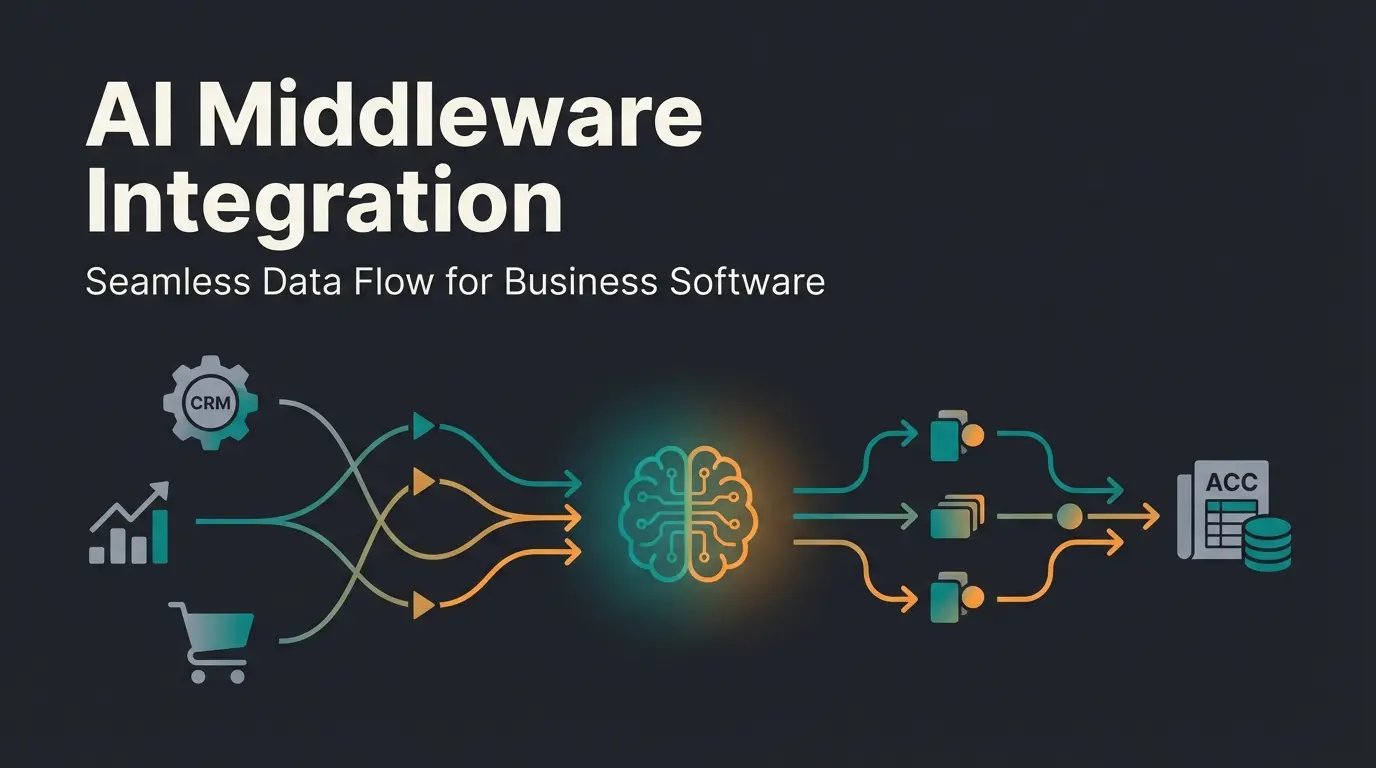
In modern financial accounting, the DATEV integration serves as the central nervous system connecting operational systems (such as online shops, ERPs, or invoicing tools) with tax compliance reality. Yet for many companies and even IT departments, the term remains nebulous. Is a CSV export already an integration? Do I need an API? And what exactly happens when I click "Send"?
The reality in German SMEs often looks like this: While work is done digitally, at the end of each month, ZIP files are still being sent via email or, worse, data is manually typed in. This is not only inefficient but, considering the e-invoicing requirement starting in 2025 according to DATEV, will soon become legally risky as well.
This article is not a simple "how-to" guide for specific software. It's a strategic guideline. We examine the DATEV integration from a consultant's perspective: analyzing the architecture, comparing technical options (from DATEV Connect to the API), and demonstrating how you can use AI to not just connect your accounting but intelligently automate it. Just like our AI Employee Flora revolutionizes product consultation, smart integrations can transform your financial workflows.
What is a DATEV Integration? (The Basics)
At its core, a DATEV integration refers to the technical process of transferring accounting-relevant data from a source system (e.g., Lexware, Shopify, Pleo) to your tax advisor's DATEV software (usually DATEV Kanzlei-Rechnungswesen).
Why is This Critical for German SMEs?
Germany has one of the strictest regulatory frameworks worldwide with the GoBD (Principles for the Proper Management and Storage of Books, Records, and Documents in Electronic Form and for Data Access). A clean DATEV integration ensures that:
- Document image and booking record remain linked: No more searching for the invoice belonging to a transaction.
- Data is immutably recorded: A must-have for tax audits.
- Collaboration with your tax advisor flows seamlessly: Instead of "shoebox accounting," you deliver structured data sets.
The 3 Ways to Connect DATEV (Technical Comparison)
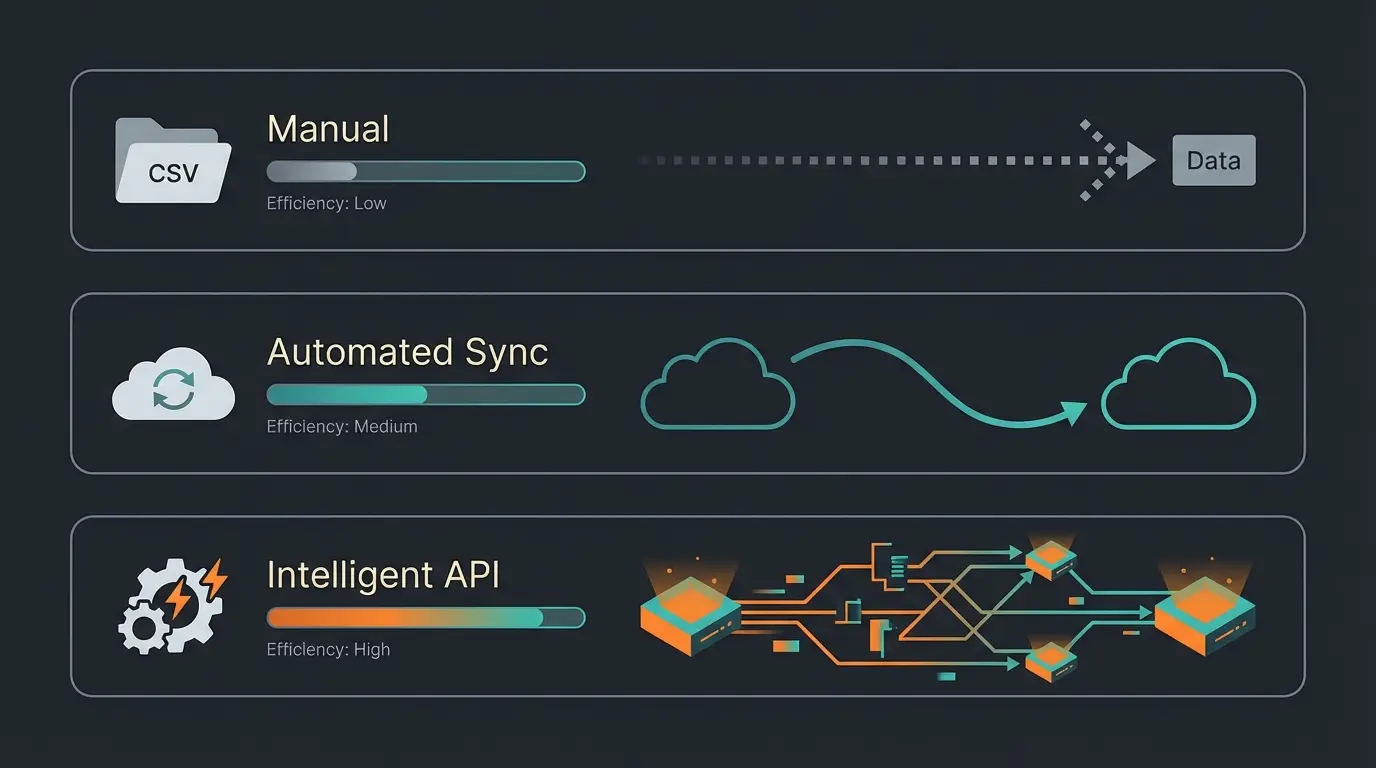
To connect DATEV properly, you have three fundamental technological levels available. Choosing the right level determines your internal process costs and efficiency gains.
Level 1: Manual Export (CSV / DATEV Format)
This is the oldest and most rudimentary form of DATEV coupling. Your system generates a file that you download and provide to your tax advisor via email or upload. Similar to how manual processes can be enhanced through AI-powered customer service, accounting workflows can also be dramatically improved.
- Format: Usually CSV in the specific "DATEV format" (EXTF files).
- Requirement: The file must meet extremely strict format specifications (header lines, date format DDMMYYYY without separators, etc.) as documented by DATEV.
- Risk: Error-prone. A wrong delimiter or encoding error (ANSI vs. UTF-8) can block the entire import at your tax advisor's office, as discussed in the DATEV Community.
- Suitability: Only for very small volumes or systems that don't offer an API.
Level 2: Classic Interface (DATEV Unternehmen Online)
Here you use DATEV Unternehmen online (DUO) as an intermediate storage. Source systems upload documents (PDFs/JPEGs) via DATEV Connect online to the cloud.
- Workflow: Document is uploaded -> OCR reads data -> Tax advisor retrieves documents.
- Advantage: Established standard, works with almost any scanner/tool.
- Disadvantage: Often only the images are transferred, not the finished booking records. The tax advisor still has to "book" (or use DATEV's OCR).
Level 3: Intelligent API Integration (The Data Services)
This is the gold standard for a modern DATEV integration. Here, systems communicate directly via the DATEV API. However, beware: DATEV meticulously distinguishes between different services, which often leads to confusion as explained by DATEV Community experts and in the Trialog Magazine.
| Feature | Rechnungsdatenservice 1.0 | Rechnungsdatenservice 2.0 | Buchungsdatenservice |
|---|---|---|---|
| Focus | Document image + metadata | Structured invoice data (e-commerce) | Complete booking records + document image |
| Data Flow | Source system -> DUO (Documents online) | Source system -> DATEV data center -> Firm | Source system -> DATEV data center -> Firm |
| What Arrives? | Image + rough data (date, amount) | Image + XML (line items, tax rates) | Complete booking batch (account/contra account) |
| Target Group | Simple tools (e.g., travel expenses) | Online shops (JTL, Shopify via middleware) | ERPs, professional tools (Lexoffice, SevDesk) |
| Automation | Medium | High | Maximum |
Important: The Rechnungsdatenservice 2.0 is specifically designed for outgoing invoices from shop systems and enables higher detail depth (e.g., OSS cases), while the Buchungsdatenservice is intended for systems that can already "book" themselves (pre-accounting), as detailed in the DATEV Magazine.
When switching from CSV to API integration
With pre-validation before DATEV transfer
For Buchungsdatenservice subscription
For documents in DATEV Cloud
Strategy: How to Choose the Right Integration Architecture
As a consultant, I wouldn't simply recommend a tool to you, but rather analyze your "data flow." Much like how our AI Employee Kira helps customers find the right products, a strategic approach helps you find the right integration architecture. Ask yourself the following questions before setting up a DATEV integration:
1. Where Does the Booking Logic Take Place?
Scenario A (Dumb Source): Your source system (e.g., a simple invoicing tool) only generates PDFs.
- Recommendation: Use Rechnungsdatenservice 1.0. Let DATEV's AI or your tax advisor handle the account assignment.
Scenario B (Smart Source): Your system (e.g., Pleo, Moss, Billbee) already knows G/L accounts, cost centers, and tax keys.
- Recommendation: You must use the Buchungsdatenservice. If you only transfer images here, you're destroying valuable data that your system has already generated.
2. What is Your Transaction Volume?
For 10 invoices per month, "Documents online" (Level 2) is sufficient. For 1,000 e-commerce transactions (Level 3), you need a solution that transfers collective bookings or structured data via Rechnungsdatenservice 2.0 to prevent costs at your tax advisor from exploding.
3. The Consultant Checklist for Your Decision
- Does the tool support DATEV Connect or the new cloud services?
- Are OSS procedures (One-Stop-Shop) correctly mapped? (Critical for e-commerce) according to Pathway Solutions.
- Can cost centers (KOST1/KOST2) be transferred?
- Is there validation before export (to avoid error #REW00305)?
Shop, ERP, or invoicing tool generates raw transaction data
Pre-accounting, anomaly detection, and tax key verification
Secure transfer via Buchungsdatenservice or Rechnungsdatenservice
Receives clean, ready-to-process booking batches
Step-by-Step: How the Technical Setup Works
Setting up a DATEV API connection often fails not due to technology but due to permissions. DATEV protects data extremely strongly. This is where proper planning, similar to implementing AI lead generation strategies, becomes essential.
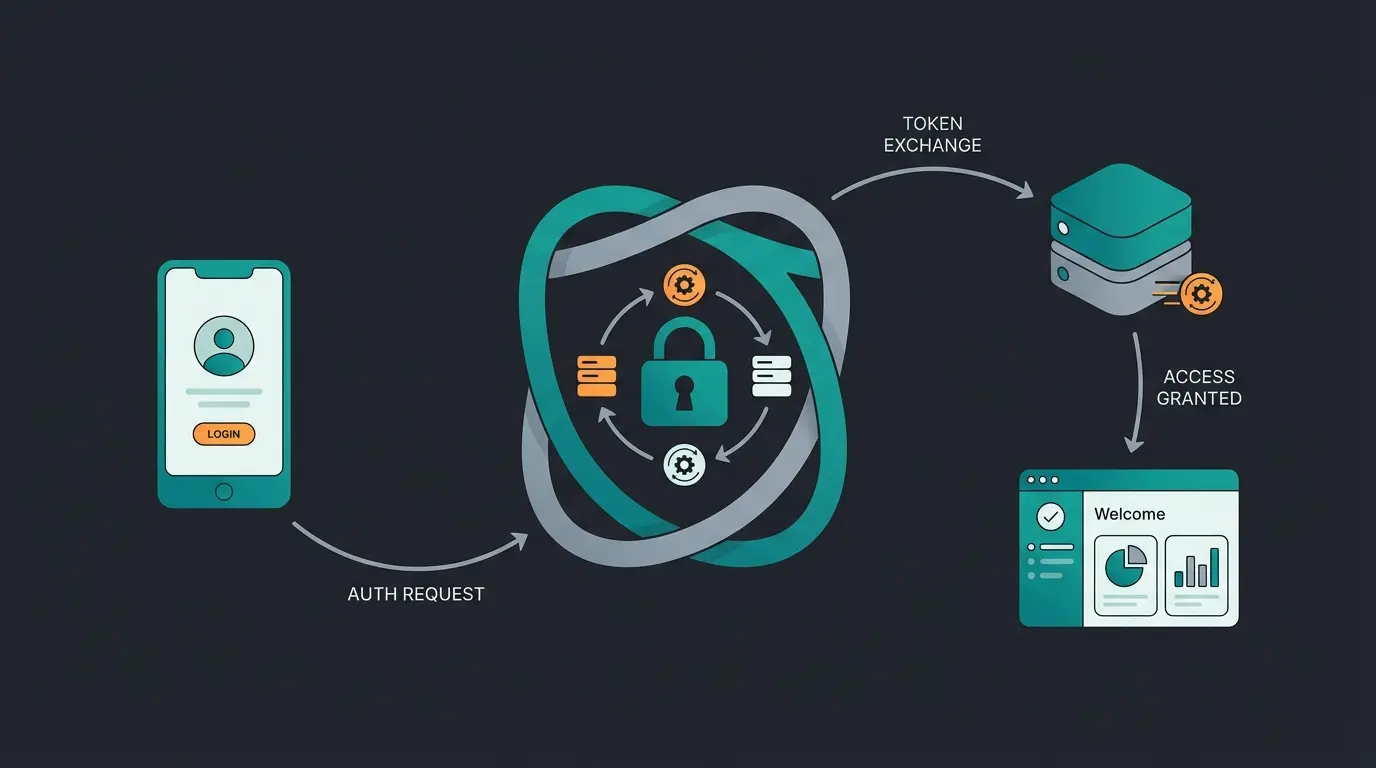
Step 1: Authentication (The Gatekeeper)
You cannot simply enter a username/password. You need:
- DATEV SmartLogin: An app on your smartphone.
- DATEV mIDentity: The classic USB stick (more common for accounting firms).
- Order: Your tax advisor must order the respective data service (e.g., Buchungsdatenservice) for your client number at a cost from the DATEV shop as explained on DATEV's official site. Without this order, every API request goes nowhere.
Step 2: Align Chart of Accounts (SKR03 vs. SKR04)
Before you couple DATEV, you need to know which language your tax advisor speaks.
- SKR03: Sorted by process structure (balance sheet accounts 0-9).
- SKR04: Sorted by financial statement structure (balance sheet accounts 0-2).
- Error source: If your tool sends SKR03 but your advisor uses SKR04, revenues suddenly end up in fixed assets. A classic disaster.
Step 3: Tax Keys and Automatic Accounts (The Most Common Error Source)
This is where error #REW00305 occurs, driving thousands of accountants crazy according to DATEV documentation.
- The Problem: DATEV has accounts with "automatic function" (e.g., account 8400 in SKR03 automatically applies 19% VAT).
- The Error: If your source system now additionally sends a tax key (e.g., "Key 3" for 19%), DATEV says: "Redundant, that doesn't work" and throws error #REW00305.
- The Solution: Either your source system sends no tax key for automatic accounts, or it must send the BU key 40 ("cancellation of automation") as detailed in the DATEV guidelines. Good interface tools manage this automatically.
Don't rely on trial and error. As experts in intelligent automation, we analyze your tech stack and design the optimal data flow—from shop orders to finished balance sheets in DATEV.
Book Free Strategy ConsultationDeep Dive: E-Commerce & E-Invoicing (Special Cases)
E-Commerce: Connecting Shopify & Co.
Shopify itself has no direct, deep DATEV integration. You need middleware. Just as AI product consultation bridges the gap between customers and products, middleware bridges the gap between your shop and DATEV.
- The Challenge: Shopify doesn't know German booking rules (no GoBD write protection, no DATEV tax keys).
- Solution: Tools like Pathway Solutions, Billbee, or Taxdoo function as translators according to eBakery and Sommerpartner. They fetch the raw data from Shopify, enrich it with the correct OSS tax keys (e.g., account 8320 for OSS revenues per Ansys documentation), and send them via Buchungsdatenservice to DATEV.
- Cost Trap: Pay attention to whether tools charge per transaction. In e-commerce, this can get expensive quickly.
The E-Invoicing Requirement 2025
Starting January 1, 2025, companies in the B2B sector must be able to receive e-invoices according to the DATEV Magazine.
- What does this mean for the integration? A pure PDF transfer (Level 2) will no longer be sufficient in the long term. Your interface must be able to read the structured XML data (ZUGFeRD or XRechnung) contained in the e-invoice and transfer it to DATEV, as explained by Häner Partner.
- Action Required: Check now whether your source system (e.g., your incoming invoice tool) is "e-invoice ready" and not only displays these formats but also forwards the XML data via API.
Beyond the Basics: The Role of AI in DATEV Integration
This is where the "dumb" interface differs from the "intelligent" consulting solution. Why do imports fail? Because of "dirty data." AI (Artificial Intelligence) is the filter that prevents this—similar to how our AI Employee Theresa filters and qualifies customer inquiries.
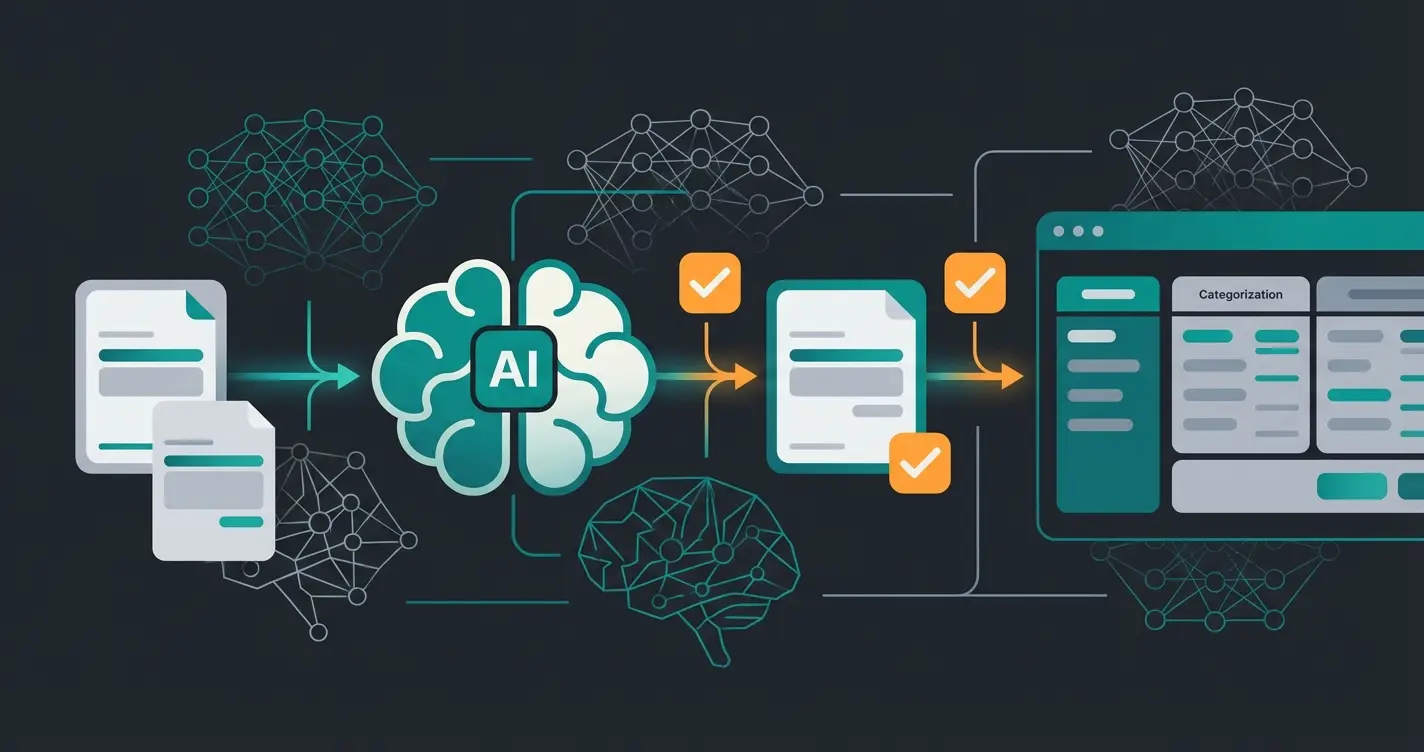
1. Predictive Categorization (Pre-Accounting)
Tools like Candis, Pleo, or Moss use AI to analyze expenses according to Candis and Moss.
- Without AI: You have to manually assign "Travel expenses" to each receipt.
- With AI: The system recognizes "Starbucks," "Hotel Adlon," and "Deutsche Bahn" and automatically suggests account 4670 (Travel expenses). The DATEV integration then transfers the finished booking record.
2. Anomaly Detection
Before data is sent to DATEV, an AI checks for inconsistencies—much like AI lead qualification validates potential customers before passing them to sales:
- "This invoice looks like a duplicate."
- "The 19% tax rate doesn't match the supplier from the USA."
- This prevents faulty batches from landing in DATEV, which would have to be painstakingly corrected there (keyword: general reversal per YouTube tutorials).
3. Invoice Automation Service (DATEV's Own AI)
DATEV itself now also offers AI. The "Invoice Automation Service" uses AI to analyze document images in Unternehmen online and generate booking suggestions according to Betriebs-Berater. This is the solution for companies that don't have an intelligent source system (Scenario A).
Common Integration Pitfalls (And How to Solve Them)
Based on our experience helping businesses implement intelligent automation—similar to how AI sales consulting optimizes customer interactions—here are the most common pitfalls we encounter:
Pitfall 1: Wrong Chart of Accounts Mapping
Sending SKR03 data to an SKR04 environment creates chaos. Always verify your tax advisor's setup before configuring any integration.
Pitfall 2: Duplicate Tax Key Assignment
The infamous #REW00305 error often results from double-assigning tax information. Your source system sends a tax key while the target account already has automatic taxation enabled.
Pitfall 3: Missing Authentication Setup
Many integrations fail simply because the Buchungsdatenservice wasn't ordered in the DATEV shop. This administrative step is easy to overlook but crucial for any API-based connection.
Pitfall 4: Encoding and Format Issues
CSV exports in UTF-8 encoding instead of ANSI can break entire import batches. Similarly, date formats must follow DDMMYYYY without separators—not the international YYYY-MM-DD format.
| Pitfall | Symptom | Solution |
|---|---|---|
| Wrong SKR | Revenues in fixed assets accounts | Verify chart of accounts with tax advisor before setup |
| #REW00305 Error | Import rejected with tax key conflict | Use BU key 40 or disable tax keys for automatic accounts |
| Missing Service Order | API calls return authentication errors | Order required data service through DATEV shop |
| Encoding Issues | Import blocked or garbled characters | Export as ANSI encoding, verify date format compliance |
The DATEV Integration Readiness Checklist
Before connecting any system to DATEV, run through this consultant-level checklist to ensure smooth implementation:
- SmartLogin Activated? Ensure you or a designated employee has DATEV SmartLogin installed and configured.
- Data Service Ordered? Confirm your tax advisor has ordered the required service (Buchungsdatenservice or Rechnungsdatenservice) for your client number.
- Chart of Accounts Clarified? Know whether you're using SKR03 or SKR04—this affects every account mapping.
- Tax Keys Mapped? Document which accounts have automatic taxation and which require manual tax key assignment.
- Test Batch Prepared? Create a small test batch before going live to identify potential mapping issues.
- Rollback Plan Ready? Know how to reverse a faulty import (general reversal) if something goes wrong.
FAQ: Common Questions About DATEV Integration
The costs consist of three components: (1) Source system costs (e.g., Billbee, Pleo, Pathway), (2) DATEV costs for the Buchungsdatenservice with monthly fees around €2-3 base fee plus volume-dependent costs according to DATEV pricing, and (3) Storage fees for documents in DATEV Cloud (about €3.50 per GB according to Qonto). Many SaaS providers include the interface in higher packages, while DATEV usually charges the tax advisor, who passes it on to you.
Yes, if it's officially certified. DATEV uses OAuth 2.0 for authentication. You never enter your credentials directly in the third-party system but log in once via DATEV SmartLogin to transfer the "token." This ensures your credentials remain protected while enabling secure API communication.
DATEV itself is a Windows world. However, since modern DATEV integrations run via the cloud (DATEV Unternehmen online / APIs), you can easily use Mac-based source systems (like Lexoffice or Moss). The actual processing takes place on DATEV servers or at your tax advisor's office.
The "DATEV format" (CSV) is rigid and line-based. DATEV XML (used in Rechnungsdatenservice) is more flexible and can better represent hierarchical structures (like invoice line items). For modern integrations, XML/API is always preferable to CSV files due to its richer data capabilities.
Not directly. Both Shopify and WooCommerce require middleware solutions like Pathway Solutions, Billbee, or Taxdoo. These tools translate your shop data into DATEV-compatible formats, handle OSS tax compliance, and transfer data via the appropriate data service.
Future-Proofing Your DATEV Integration
The accounting technology landscape is evolving rapidly. Here's how to ensure your integration remains relevant:
API Over CSV: The Modern Choice
Legacy CSV exports will become increasingly obsolete as real-time data requirements grow. Position your systems for API-based communication now to avoid costly migrations later.
AI as the Bridge
AI solutions manage the complexity between legacy systems and modern API requirements. They validate data, ensure compliance, and adapt to changing regulations—much like how an AI recruiter adapts to changing candidate profiles.
E-Invoice Readiness
With the 2025 mandate approaching, ensure your systems can not only receive but also properly process structured XML invoice data. This isn't optional—it's a compliance requirement.
Conclusion: Consultation Over Tinkering
A DATEV integration in 2025 is more than just a technical checkbox in your settings. It's a strategic decision about your data architecture—comparable to how product consultation strategies determine customer experience success.
- Use APIs (data services) instead of manual exports wherever possible.
- Pay attention to validation before transfer to avoid errors like #REW00305.
- Rely on tools that offer AI-supported pre-accounting to relieve your tax advisor (and thus reduce costs).
The difference between a frustrating integration experience and a seamless one often comes down to proper planning and architecture. Don't treat your DATEV connection as an afterthought—make it a cornerstone of your financial operations strategy.
Consider how AI product consultation has transformed customer interactions in e-commerce. The same principles of intelligent automation can revolutionize your accounting workflows when applied correctly to your DATEV integration.
Ready to move beyond manual processes and embrace intelligent accounting automation? A free initial consultation can help you map out the optimal path forward for your specific business needs.
Don't rely on trial and error. Our experts analyze your tech stack and design the optimal data flow—from shop orders to finished balance sheets in DATEV. Get your personalized integration roadmap today.
Get Your Free Strategy Session