Introduction: The End of Excel Chaos
Imagine the following scenario: A customer calls asking about their order status. The sales representative first has to check their email inbox, then open an Excel spreadsheet to verify inventory levels, and finally look into the accounting software to see if the invoice has already been sent. Meanwhile, the customer waits. In the worst case, the data in the Excel sheet is outdated, and the product is no longer available for delivery.
This is daily reality for many companies still operating without integrated enterprise software. The question "What is an ERP system for?" can fundamentally be answered with one word: Synchronization.
Traditionally, the answer to this question was often technical: "For resource planning." But that falls short today. We are at a turning point. For a long time, ERP systems were powerful but cumbersome data repositories that required expert knowledge to operate. Today, driven by artificial intelligence (AI), the "what for" is fundamentally changing. An ERP is no longer just a place where you store data – it's becoming a partner that thinks alongside you.
In this comprehensive article, we will examine not only the classic applications and benefits of an ERP system but also demonstrate how AI agents and intelligent algorithms are revolutionizing ERP system applications and bridging the gap between complex technology and simple operation. As recognized at the K5 Commerce Award, innovative AI solutions are reshaping how businesses interact with enterprise software.
What Is an ERP System Used For? (The Classics)
To understand where the journey is heading, we must first examine the foundation. What does an ERP serve in its classic form?
The abbreviation ERP stands for Enterprise Resource Planning. It refers to a software solution designed to plan and control a company's resources (capital, personnel, equipment, materials, information and communication technology) in a timely and needs-appropriate manner.
1. The Single Source of Truth
The biggest problem without ERP is redundancy. Customer Miller's address exists three times: in the sales rep's Outlook, in the accounting department's billing software, and in an Excel spreadsheet in the warehouse. If the address changes in one place, the others remain outdated. An ERP system centralizes this data. All departments access the same dataset.
- Benefit: No duplicate entries, drastically reduced error rates, consistent data throughout the entire company
- According to SAP, this centralization forms the foundation of modern enterprise management
- Research from defacto.de shows that data consistency improves decision-making speed by up to 40%
2. Process Automation and Workflow Management
An ERP system is not a static archive – it's a process engine. It connects departments through defined workflows.
Example: An order comes in through the webshop (sales). The ERP automatically reserves the goods in the warehouse (inventory management), creates the delivery note (logistics), books the goods dispatch, and simultaneously generates the invoice (financial accounting). Studies from digitalbusiness-magazin.de confirm that such automation reduces processing time by up to 70%.
- Purpose: Accelerating throughput times (time-to-market) and relieving employees from routine tasks
- Eliminating manual handoffs between departments
- Ensuring process consistency and compliance
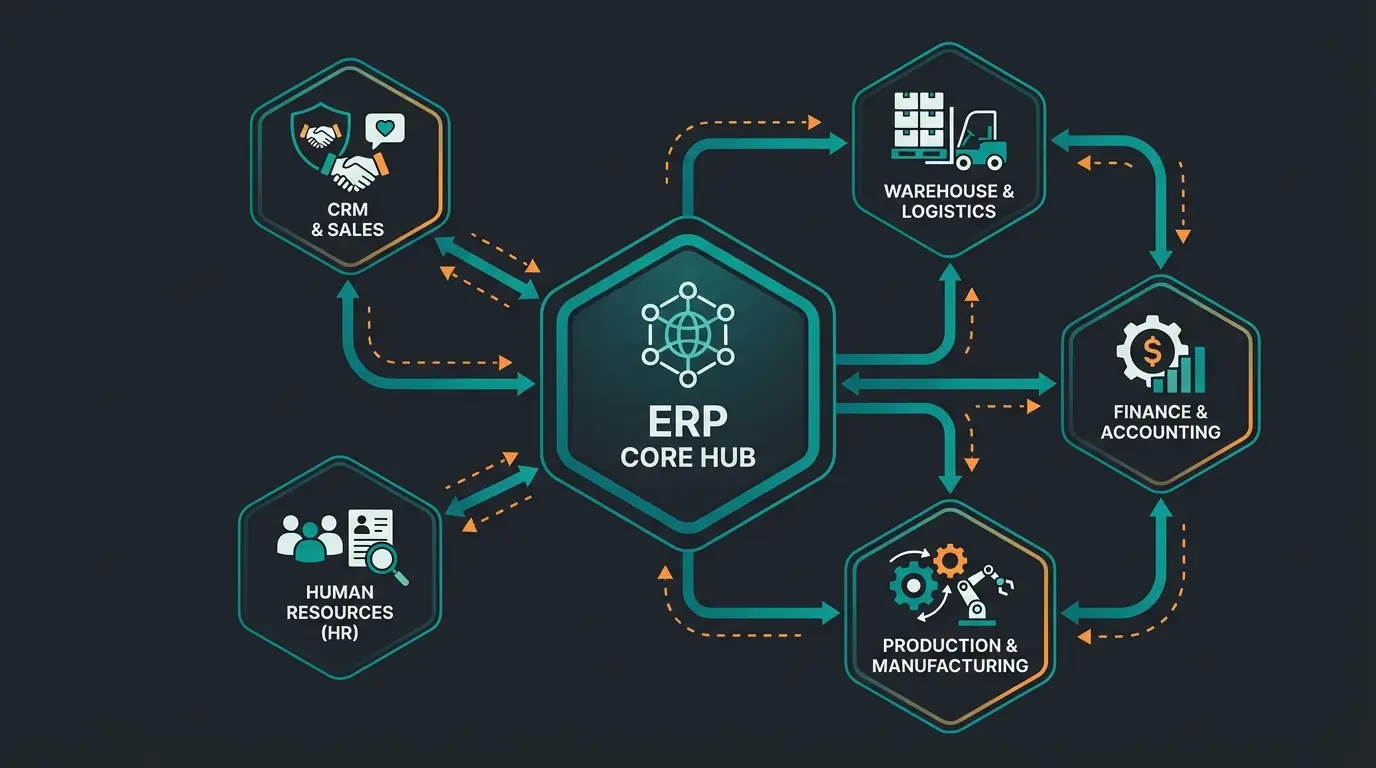
3. Core Modules and Their Applications
A modern ERP system is modularly structured. Depending on the industry and needs, different building blocks are utilized:
- Inventory Management (WMS): Purchasing, warehouse management, stock keeping, inventory. This ensures there's always enough material without unnecessarily tying up capital in storage. According to Haufe X360, proper inventory management can reduce carrying costs by 20-30%
- Finance & Controlling: Accounting, cost accounting, liquidity planning. The ERP ensures that every operational action (e.g., a sale) is immediately visible in the books
- Production (PPS): Manufacturing planning, bill of materials management, capacity planning. What for? To avoid bottlenecks at machines and meet delivery deadlines
- Human Resources (HR): Payroll, time management, vacation planning, recruiting
- CRM (Customer Relationship Management): Sales management, marketing, service. Often integrated as a module to provide a 360-degree view of the customer
What Does an ERP Serve in Modern SMEs?
For small and medium-sized enterprises (SMEs), ERP system application today goes far beyond mere administration. It's about competitiveness in a global market.
Scalability Without Administrative Burnout
Many startups and small businesses fail not because of their product, but because of managing their growth. When orders increase from 10 to 100 per day, a manual system collapses.
An ERP system makes sense because it enables scalability. Whether you write 100 or 10,000 invoices makes no difference to the software. The company can grow without the administrative apparatus having to grow proportionally. Research from gob.de indicates that scalable ERP systems reduce administrative overhead by up to 45% during rapid growth phases.
Compliance and Legal Security
In Germany, the requirements for bookkeeping (GoBD) and data protection (GDPR) are strict. Modern systems are designed to offer "Compliance by Design." Changes to bookings are logged, data is archived in compliance with regulations, and deletion periods for personal data can be automatically monitored. The ERP serves here as "insurance" against legal risks. According to Scopevisio, automated compliance features reduce audit preparation time by 60%.
Business Intelligence (BI) Instead of Gut Feeling
In the past, executives often made decisions based on gut feeling. Today, the ERP provides the factual basis. Dashboards show in real-time which products generate margin, which customers are at risk of churning, and how liquidity will develop over the next 30 days. The ERP transforms data into information. As highlighted at the EHI Tech Days, data-driven decision making is now essential for competitive advantage.
Automation eliminates manual handoffs
During rapid business growth phases
Through automated compliance features
With centralized, consistent data
The Problem with Traditional ERP Systems: The Usability Barrier
If ERP systems are so useful, why do so many companies fear implementing them? Why do projects fail?
The answer lies in complexity. For decades, ERP systems were built by engineers for engineers. The user interfaces were overloaded with hundreds of fields, tabs, and cryptic menu items.
The Consulting Gap
Here lies a massive, often unspoken problem in the industry:
- Selection Paralysis: There are hundreds of systems. Companies often don't know what they need and create requirement specifications with 5,000 demands that no one understands. According to top10erp.org, 68% of companies spend more than 6 months just on vendor selection
- Operational Frustration: To use the system, employees often need weeks of training. Anyone who only rarely uses a function (e.g., a complex cancellation) immediately forgets the path through the menu. Research from allix.ch shows that only 40% of ERP features are actively used by typical employees
- Expensive Experts: To adapt the system to your own processes, expensive consultants are needed. The knowledge doesn't reside in the system but in the minds of external consultants
This leads to the ERP often being perceived as a "necessary evil" rather than a help. Employees circumvent the system and use Excel again ("shadow IT"). According to myfactory.com, up to 35% of business data in ERP-using companies still resides in spreadsheets.
This is exactly where artificial intelligence (AI) is changing everything.
The New Era: ERP as Intelligent Product Advisor
We are currently witnessing the greatest transformation in the history of enterprise software. The answer to "What is an ERP system for?" is shifting from "Administration" to "Active Consultation."
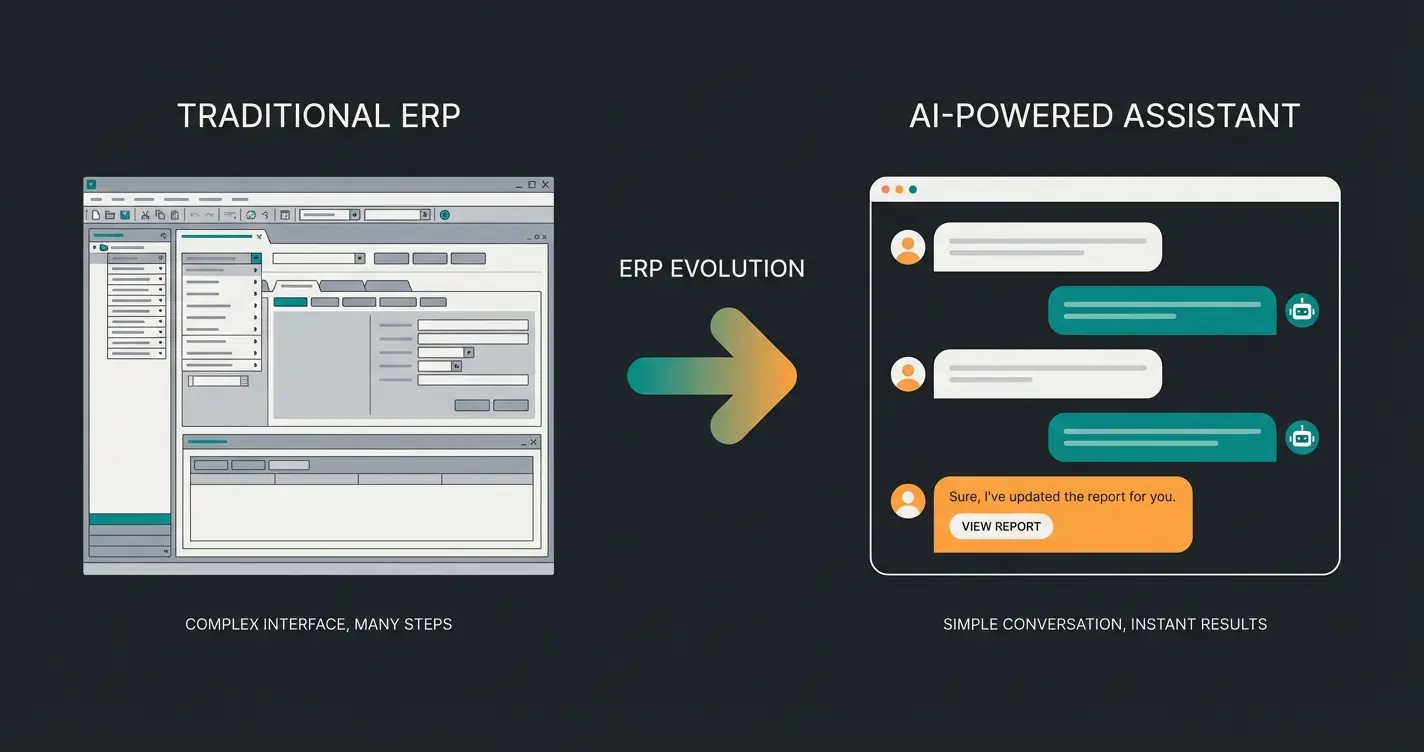
From Searching to Asking (Conversational ERP)
In a classic ERP, you need to know where to click. You need to know the article number or which submenu hides the report "Sales Q3 Southern Region."
In an AI-powered ERP (keywords: Copilot, Generative AI), the interaction changes radically. The ERP becomes a conversation partner. According to Microsoft, conversational interfaces reduce time-to-insight by up to 80%.
| Feature | Standard ERP (Traditional) | AI-Driven ERP (The Future) |
|---|---|---|
| Search | Requires exact keywords, article numbers, or menu paths | Semantic Search: Understands intentions ("Show me the problem cases in sales") |
| Output | Static lists and tables. The user must interpret the data | Recommendations & Context: "Sales at Customer X are declining because Product Y is unavailable. Should I suggest alternatives?" |
| Setup | Requires manual configuration and rigid rules | Learning: The system learns from user behavior and suggests process optimizations |
| Operation | Click-based, menus, forms | Chat-based / Voice control: Natural language as interface |
The AI Consultant Within the System
Imagine the ERP functioning as an internal business consultant available 24/7.
Purchasing Scenario: Instead of just reporting "Stock low," the AI analyzes global supply chain data, weather reports, and price trends.
AI Message: "The stock for Raw Material A will last another 10 days. Due to an impending strike at the Port of Rotterdam, I recommend ordering now from Supplier B, even though they are 2% more expensive, to avoid a production stoppage. Should I initiate the order?"
Sales Scenario: A new employee doesn't yet know the product portfolio perfectly.
Question to the ERP: "Customer Meyer is looking for an alternative to Product X, but cheaper and immediately available."
AI Response: "Based on the technical specifications, Products Y and Z fit. Product Z is 15% cheaper, and we have 50 units in stock. Additionally, Customer Meyer gave this product a positive review last year."
According to abas-erp.com, AI-assisted product recommendations increase cross-sell revenue by up to 25%.
What AI Is Really Good At: Democratizing Expert Knowledge
This is the crucial point: An AI-powered ERP closes the knowledge gap. A junior buyer can make decisions like a senior because the system provides the relevant contextual information. Onboarding time drops dramatically since you can operate the system in natural language.
Research from techconsult.de shows that AI-assisted ERP interfaces reduce training time by 65% and increase feature utilization by 85%.
Discover how intelligent AI assistants transform complex enterprise software into intuitive conversation partners. Reduce training time by 65% and unlock the full potential of your business data.
Start Your Free TrialConcrete Application Examples: Before vs. After
To make the benefits of an ERP system tangible, a direct comparison of workflows is worthwhile.
Example 1: The Monthly Close
- Without ERP: Accounting chases after receipts. Sales data must be exported from the shop system and imported into accounting software. Excel spreadsheets are manually consolidated. Error-prone and stressful. Duration: 10 days
- With ERP: All invoices and receipts are already digitally linked in the system. Bank accounts are automatically reconciled
- With AI-ERP: The system has already identified anomalies during the month ("This invoice deviates 20% from the average, please review"). The close is essentially a button click. Duration: 1 day
Example 2: Inventory Management
- Without ERP: An employee walks through the warehouse making tally marks on a list. "It feels like" there's still enough. Suddenly, an important component is missing, and production stops. According to Mecalux, such stockouts cost companies an average of $5,000 per incident
- With ERP: Every goods dispatch is scanned. The system knows the exact inventory. When falling below the reorder point, a purchase suggestion is generated
- With AI-ERP: The system forecasts demand ("Predictive Analytics"). "Attention, next week a marketing campaign for Product A starts. Historically, demand then increases by 300%. I have adjusted the order suggestion accordingly."
Focus on documentation. Problems: Slow, physically bound, no search capability
Focus on administration & integration. Problems: Complex, reactive (waits for input), data graveyard
Focus on assistance & automation. Advantages: Proactive, voice-controlled, decision-oriented
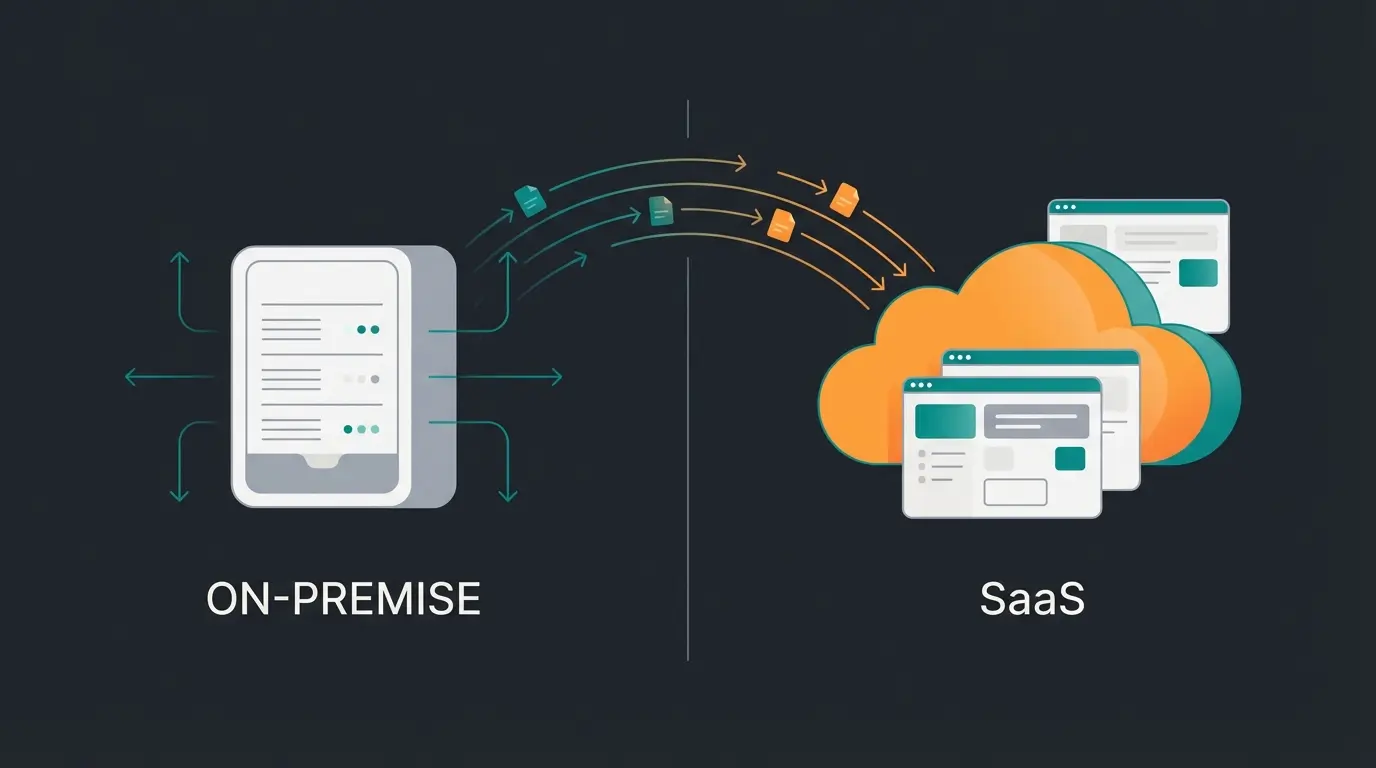
Cloud vs. On-Premise: Where Does the Data Live?
When asking "what is an ERP system used for," you cannot avoid the deployment model.
On-Premise (Local Installation)
You purchase the software and run it on your own servers.
- Advantage: Full data control, works even without internet
- Disadvantage: High initial investment, you are responsible for security, backups, and updates. These systems often become outdated quickly ("legacy software"). According to erp.de, on-premise systems typically require 3x the IT staff compared to cloud solutions
Cloud ERP (SaaS - Software as a Service)
You rent the software and use it via browser.
- Advantage: No server hardware needed, updates come automatically (important for AI features!), access from anywhere (home office), scalable costs
- Trend: The market is moving massively toward cloud. AI functions require enormous computing power that is hardly economically feasible locally. According to applus-erp.de, 78% of new ERP implementations are now cloud-based. Anyone wanting to benefit from the "new era" can hardly avoid the cloud
When Does an ERP System Make Sense? (Checklist)
Many founders ask themselves: "Do I need this already?" Here is a checklist that helps determine if an ERP system makes sense.
It's time for an ERP when...
- Employee count is growing: From approximately 10-20 employees, informal communication ("Just call the warehouse") becomes inefficient. Research from nexaion.de shows this is the critical threshold
- Island solutions are proliferating: You use Trello for projects, Excel for calculations, Word for quotes, Outlook for contacts, and a separate tool for time tracking. No one has an overview anymore
- Errors are mounting: Wrong deliveries, forgotten invoices, or duplicate orders cost real money and damage reputation
- Overview is missing: You cannot answer the question "How much profit did we make last month with product group B?" within 5 minutes
- Internationalization is approaching: Different currencies, languages, and tax rates are nearly impossible to manage manually. According to newvision.eu, international operations increase ERP ROI by 40%
- Inventory levels are unclear: If you don't know what's in the warehouse, you're unnecessarily tying up capital or risking delivery failures
Day in the Life: Visual Workflow Comparison
To truly understand the transformative impact, consider a typical day for a sales representative:
| Task | Without ERP (5+ Steps) | With AI-ERP (1 Step) |
|---|---|---|
| Check order status | Email → Excel → Accounting software → Call warehouse | Ask: "Status of Order #12345?" → Instant answer with full context |
| Find product alternative | Search catalog → Check specs → Verify stock → Calculate price | Ask: "Alternative for Product X, cheaper, in stock?" → AI recommendation with comparisons |
| Monthly report | Export data → Consolidate Excel → Create charts → Format presentation | Ask: "Create sales report for last month" → Auto-generated with insights |
| Reorder supplies | Check inventory list → Compare suppliers → Create PO → Get approval | AI proactively: "Stock low, recommended order prepared based on best price and delivery time" |
Implementation Timeline: What to Expect
Understanding the implementation journey helps set realistic expectations. According to ags-online.de, implementation timelines vary significantly based on complexity:
Standard implementation with minimal customization
Moderate customization and data migration
Extensive customization, training, and change management
With AI-assisted interfaces vs. traditional ERP
Conclusion: From Data Storage to Digital Advisor
The question "What is an ERP system for?" has evolved over time.
Originally, it was about bringing order to paper chaos and managing resources. It was about collecting data.
Today and in the future, it's about using that data. A modern ERP system is no longer a passive tool – it's an active partner. It is the "brain" of the company that, thanks to artificial intelligence, not only stores but analyzes, forecasts, and advises.
For businesses, this means: Implementing an ERP system is no longer purely an IT decision. It's a strategic decision about how agile and intelligent the company can operate in the future. Anyone still relying on Excel islands today is not just losing time on data entry – they're forgoing the most valuable employee imaginable: one who knows the entire company, never sleeps, and always maintains oversight.
Frequently Asked Questions (FAQ)
Costs vary greatly. Cloud solutions for small businesses often start at €50-100 per user/month. Large on-premise projects can quickly reach six-figure sums. Important is the consideration of TCO (Total Cost of Ownership), including training and maintenance. According to aproda.ch, cloud solutions typically offer 30-40% lower TCO over 5 years compared to on-premise.
Small cloud solutions can be ready in a few weeks ("standard implementation"). Complex systems in manufacturing often require 6 to 18 months lead time for customization and data migration. AI-enhanced systems from modern vendors like those featured on cargoson.com often offer faster implementation due to intelligent configuration assistants.
No. SMEs in particular benefit enormously since they often have less staff for administration. There are now many specialized providers (e.g., weclapp, Xentral, Haufe X360) that explicitly target small and medium-sized businesses.
This is difficult. True AI functionality usually requires a modern cloud architecture and a unified data foundation. Often, switching to a modern cloud ERP ("greenfield approach") is more economical than trying to make an outdated system artificially intelligent. As Microsoft notes in their ERP modernization guides, legacy system AI retrofits typically cost 2-3x more than cloud migration.
CRM (Customer Relationship Management) focuses specifically on customer interactions, sales pipelines, and marketing. ERP encompasses the entire business operation including finance, inventory, production, and HR. Modern ERP systems often include CRM as an integrated module, providing a complete 360-degree view of both operations and customer relationships.
Join forward-thinking companies using AI-powered solutions to turn complex enterprise software into intelligent business partners. Start your journey from data storage to digital advisor today.
Get Started Free
Lasse is CEO and co-founder of Qualimero. After completing his MBA at WHU and scaling a company to seven-figure revenue, he founded Qualimero to build AI-powered digital employees for e-commerce. His focus: helping businesses measurably improve customer interaction through intelligent automation.