Why Webhooks Are the Key to Modern Automation
In modern product development and customer success, speed is the currency that matters. When a customer asks a question, they expect an immediate, context-aware response. Many companies use Intercom merely as an inbox—a passive tool that waits for a human to find time to respond.
The webhooks Intercom integration fundamentally changes this game. Instead of your developers or tools knocking on Intercom's door every few minutes asking "Are there new messages?" (polling), Intercom turns the tables. As soon as an event occurs—a new message, a new user, a closed ticket—Intercom actively sends this data to your server.
Think of the difference like this:
- Polling (API): You walk to the mailbox every 10 minutes to check if there's mail. Most of the time it's empty. That's a waste of time and resources.
- Webhooks: The mail carrier rings your doorbell as soon as they have a letter. You receive the information immediately.
For businesses in the US and Europe, there's an additional layer to consider: data sovereignty and efficiency. By implementing Intercom webhooks, you can not only process data faster but also route it specifically into your own GDPR-compliant infrastructure before passing it to third-party tools.
This article isn't a superficial marketing piece. We go deep into the technical implementation, show you how to close the most common security gaps, and explain how to use webhooks to build an AI-powered product consultant that goes far beyond simple auto-replies. As AI Chatbots transform customer interactions, webhooks become the critical infrastructure enabling this transformation.
Why Intercom Webhooks? The Strategic Perspective
Before we write code, we need to understand what we're building. Most guides focus on simple use cases like "Send a message to Slack when a new user is created." That's useful, but it only scratches the surface of what's possible with a proper webhooks Intercom integration.
Standard Use Cases: The Basics
- CRM Synchronization: A lead enters their email in Intercom. A webhook (`contact.created`) fires and immediately creates the contact in Salesforce or HubSpot, as documented by eesel.ai.
- Internal Alerts: A VIP customer reports a problem. A webhook notifies the engineering team in a dedicated Slack channel.
- Data Warehousing: Store all conversations in your own database (e.g., Snowflake) for deep analytics and reporting.
The Advanced Use Case: Building an AI Product Consultant
Here lies the true potential for product managers and technical marketers. Instead of viewing webhooks merely as a "data pipeline," we consider them the nervous system of an AI brain. This approach aligns with how AI Product Consultation providers are revolutionizing customer interactions.
The Scenario:
A user asks in the chat: "How do I configure the SMTP settings in your Enterprise plan?"
- Without Webhooks (Dumb Bot): The standard bot responds: "I'll forward this to support. Response time: 2 hours."
- With Smart Webhooks: Intercom fires `conversation.user.created` → Your server receives the text → Your server sends the text to an AI (e.g., OpenAI API) that's fed with your technical documentation (RAG - Retrieval Augmented Generation) → The AI formulates a precise technical answer → Your server uses the Intercom API to post the response as a draft or direct message.
The result: The customer receives a technical solution in seconds, not just an acknowledgment of receipt. This is exactly how AI Customer Service solutions are expected to perform in 2025.
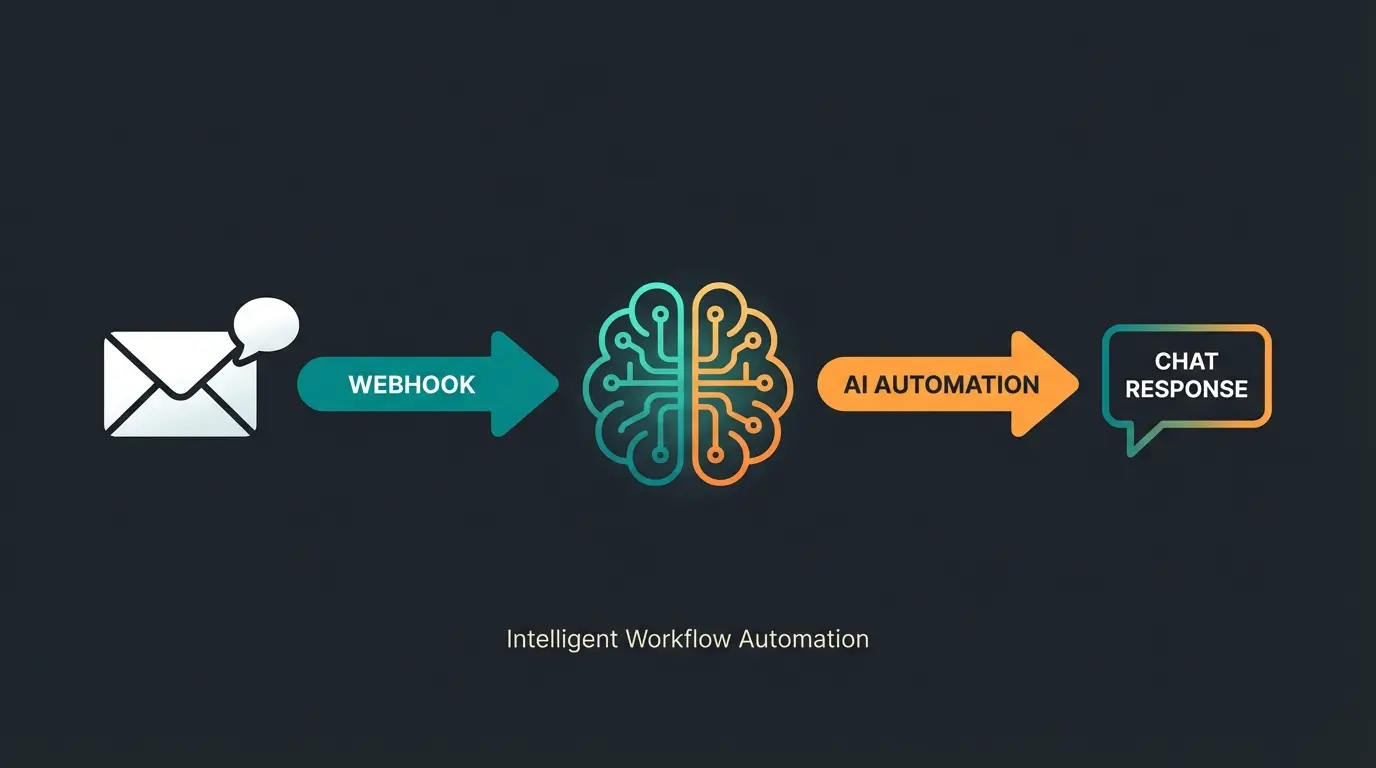
Customer sends a message or performs an action in Intercom chat
Intercom detects the event and prepares webhook payload
Intercom sends HTTPS POST request to your configured endpoint
Your server validates signature and queues the job
Background worker processes data through AI/ML systems
System responds via Intercom API or triggers other automations
Step-by-Step Webhooks Intercom Integration Guide
Let's set up the webhooks Intercom integration properly from the ground up.
Prerequisites for Integration
- An Intercom Workspace with admin access
- Access to the Developer Hub in Intercom
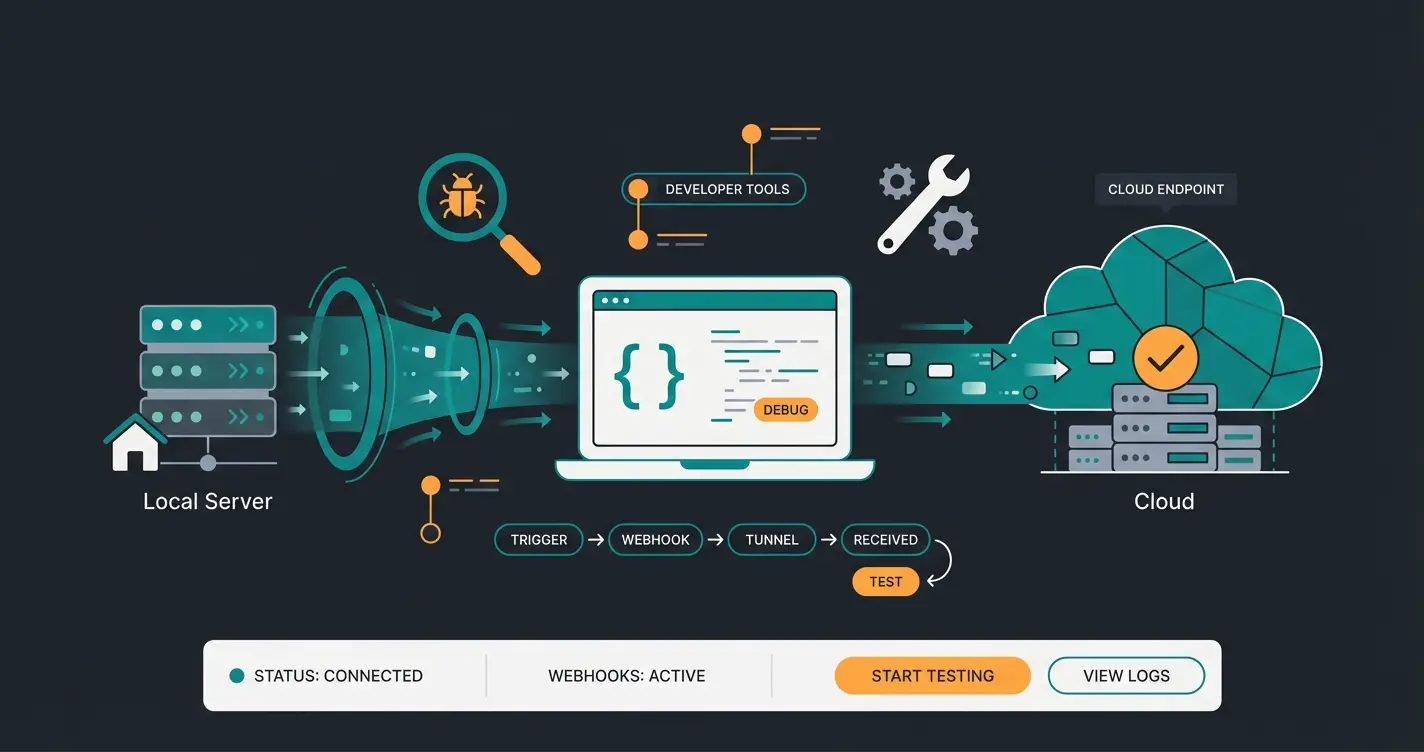
- An endpoint (URL) that supports HTTPS (for local testing, we recommend ngrok as detailed in their integration guide)
Step 1: Creating the App in Developer Hub
To use webhooks, you don't necessarily need to build a public app for the App Store. A "Private App" is perfectly sufficient for internal purposes.
- Navigate in Intercom to Settings > Apps & Integrations > Developer Hub
- Click New App
- Give the app a name (e.g., "AI Consultant Bridge") and select your workspace
Step 2: Configuring the Endpoint
- Select Webhooks in the left sidebar of your new app
- Here you'll see the Endpoint URL field
- Tip: If you don't have a server yet, start `ngrok http 3000` in your terminal and paste the generated `https://...ngrok-free.app` URL here. Intercom only accepts HTTPS
- Don't click save yet—we need to select the topics first
Step 3: Subscribing to the Right Topics
The selection of topics is crucial to avoid flooding your server with unnecessary data (noise). For our AI consultant and most integration scenarios, the following topics are essential according to Intercom's webhook documentation:
| Topic | Description | Important For |
|---|---|---|
| conversation.user.created | A user starts a new conversation | AI analysis trigger (first message) |
| conversation.user.replied | A user replies in an existing conversation | Ongoing AI support |
| user.created | A new user is created in Intercom | CRM sync / onboarding emails |
| contact.created | A lead (not yet a user) is created | Lead scoring systems |
Understanding these topics is fundamental when building solutions like an AI Chatbot for E-Commerce that needs to respond intelligently to customer queries.
The Technical Deep Dive for Developers
Here's where we separate the wheat from the chaff. Many tutorials only show how to receive data. We'll show you how to process it securely and correctly for a robust webhooks Intercom integration.
Understanding the Webhook Payload
When an event fires, Intercom sends a JSON object. It's important to understand the structure to avoid parsing errors. The Intercom API documentation provides complete payload specifications:
```json { "type": "notification_event", "app_id": "your_app_id", "topic": "conversation.user.created", "id": "notif_unique_id_123", "delivery_attempts": 1, "data": { "item": { "type": "conversation", "id": "123456789", "source": { "body": "<p>How do I configure SMTP?</p>", "author": { ... } }, "user": { ... } } } } ```
- `topic`: Use this field to decide in your code which function gets called (routing)
- `data.item`: This is where the actual information lives (message text, user ID)
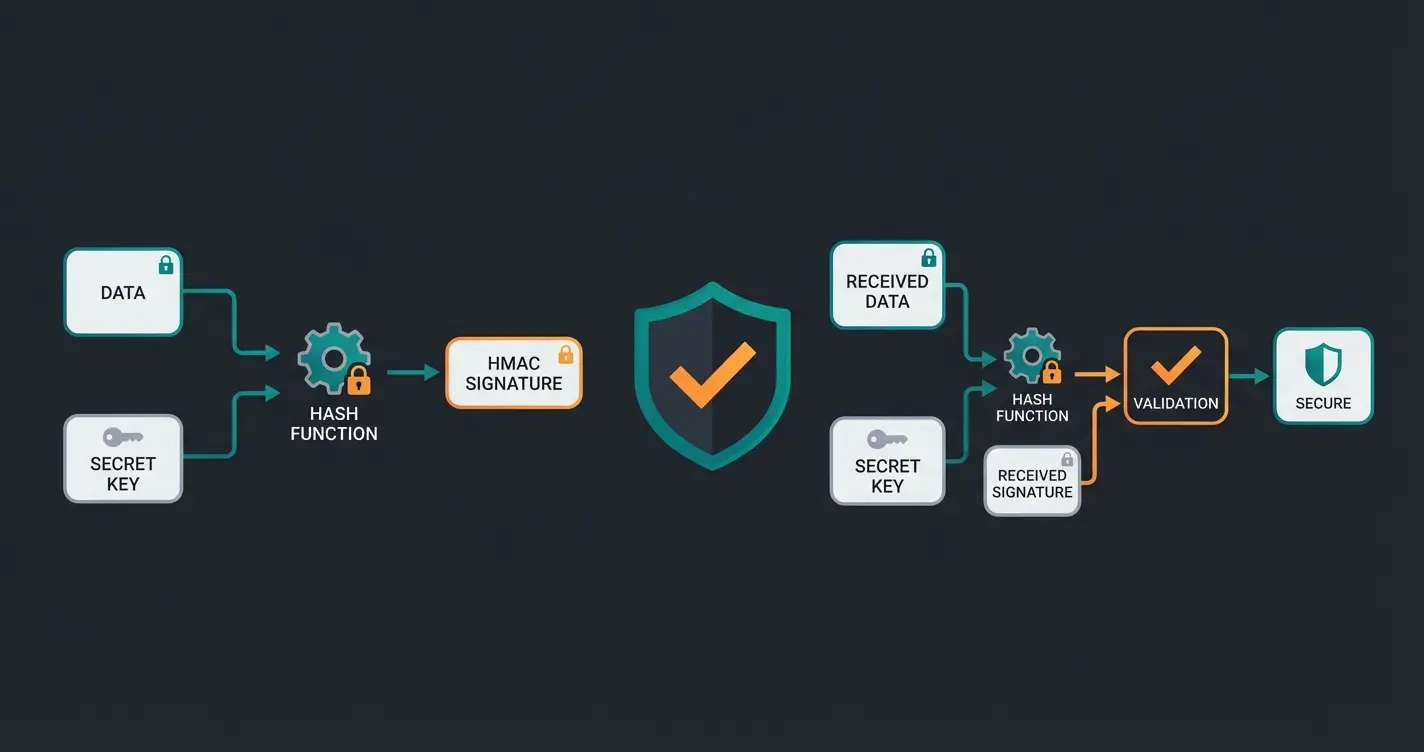
Security: X-Hub-Signature Verification (Critical)
The internet is a public place. How do you know that the POST request to your server really comes from Intercom and not from a hacker trying to inject false data?
Intercom signs every request with an `X-Hub-Signature` header. This contains a hash calculated from the request body and your `Client Secret`. This security measure is thoroughly explained in the Intercom webhook security documentation.
Here's a copy-paste-ready snippet (Python/Flask) that solves this problem:
```python import hashlib import hmac import json from flask import request, abort def verify_intercom_signature(request_data, signature_header, client_secret): """ Verifies whether the webhook actually originates from Intercom. """ if not signature_header: return False # Extract the hash from the header (format: "sha1=xyz...") sha_name, signature = signature_header.split('=') if sha_name != 'sha1': return False # IMPORTANT: Intercom calculates the hash on the raw body. # In Python, we must ensure we use the exact byte string. # If we needed to use json.dumps (e.g., for tests), separators=(',', ':') would be necessary. # Here we directly use the raw bytes of the request. payload_bytes = request_data # HMAC SHA1 calculation mac = hmac.new(client_secret.encode('utf-8'), payload_bytes, hashlib.sha1) expected_signature = mac.hexdigest() # Comparison (hmac.compare_digest prevents timing attacks) return hmac.compare_digest(expected_signature, signature) # Example usage in Flask route @app.route('/webhook', methods=['POST']) def handle_webhook(): signature = request.headers.get('X-Hub-Signature') if not verify_intercom_signature(request.get_data(), signature, "YOUR_CLIENT_SECRET"): abort(400, "Invalid Signature") # ... processing logic ... return "OK", 200 ```
Idempotency: Preventing Duplicate Processing
Networks are unreliable. It can happen that Intercom doesn't receive confirmation (200 OK) from your server (e.g., due to a timeout) and resends the webhook.
Store the `id` of the webhook event (e.g., in Redis) and check with each incoming request whether you've already processed this ID. If so, immediately return `200 OK` without executing the logic again. This prevents your AI bot from responding to the customer twice—a critical consideration when implementing AI Agents autonomous systems.
Transform your Intercom setup into an intelligent product consultation system that responds to customers in seconds, not hours.
Start Your Free TrialBuilding the AI Product Consultant
Let's put theory into practice. How do we build the "smart webhook" that powers AI product consultation?
The Architecture Overview
- Trigger: `conversation.user.created` fires in Intercom
- Gateway: Your server receives the webhook, verifies the signature, and immediately returns `200 OK` (to avoid timeouts—see troubleshooting section)
- Async Worker: The server pushes the job to a queue (e.g., Celery or BullMQ)
- Processing: The worker extracts `data.item.source.body` (the user's question), cleans the HTML code (Intercom sends HTML), and sends the text to your AI logic (e.g., OpenAI + vector database)
- Action: The AI generates a response. The worker uses the Intercom REST API (`POST /conversations/{id}/reply`) to send the answer
Maximum response time before Intercom marks request as failed
Errors in 15 minutes that trigger automatic webhook pause
Continuous errors lead to permanent webhook deactivation
Optimal server response time for reliable operation
Why Asynchronous Processing Matters
Intercom has a hard timeout limit. If your server doesn't respond within 5 seconds, Intercom marks the attempt as failed according to their webhook handling documentation.
An AI request to OpenAI often takes longer than 5 seconds. This is why asynchronous processing is non-negotiable:
- Wrong approach: Receive webhook → Wait for AI → Respond. (Leads to timeout)
- Correct approach: Receive webhook → Push to queue → Immediately send 200 OK → Let AI work in the background
This architecture is exactly how Conversational AI evolves to handle complex customer interactions at scale.
Standard Chatbots vs. AI Product Consultants
Understanding the fundamental difference helps clarify why webhooks are so powerful for enabling intelligent customer interactions:
| Capability | Standard Chatbot | AI Product Consultant (Webhook-Enabled) |
|---|---|---|
| Response Time | Minutes to hours (human escalation) | Seconds (automated AI response) |
| Context Understanding | Keyword matching only | Deep semantic analysis with RAG |
| Product Knowledge | Static FAQ responses | Dynamic access to full documentation |
| Learning Capability | None | Continuous improvement from interactions |
| Integration Depth | Surface-level triggers | Full payload processing with external AI |
| Personalization | Generic responses | Context-aware, personalized consultation |
This comparison illustrates why AI powered sales consultants outperform traditional chatbot solutions in complex sales scenarios.
Troubleshooting and Common Pitfalls
Even professionals stumble over these quirks of Intercom webhooks. Here's what to watch out for:
The Detachment Problem: Automatic Deactivation
Intercom is strict about errors. According to their webhook error handling documentation:
- 1000 errors in 15 minutes: Intercom pauses your webhooks for 15 minutes
- Persistent errors (7 days): If your endpoint returns only errors for 7 days, the subscription gets suspended (deactivated). You'll receive no more data until you manually click "Set live" in the Developer Hub
- 410 Gone: If your server returns status code `410` once, Intercom deactivates the webhook immediately. Never use this code for temporary errors!
Handling Timeouts Effectively
As mentioned: 5 seconds. Everything that takes longer counts as an error. Optimize your code for speed. Database write operations or API calls to third parties should always happen asynchronously (in the background). This is especially important for AI Customer Service implementations where response time directly impacts customer satisfaction.
IP Allowlisting for Enterprise Firewalls
If your server sits behind a firewall (common in enterprise environments), you need to whitelist Intercom's IP addresses.
Intercom publishes this list dynamically as JSON via their IP ranges endpoint. You should ideally fetch this list automatically since it can change:
- Important: Look for the service type `INTERCOM-OUTBOUND` in the JSON
- The IPs differ by region (US vs. Europe/Australia). Check where your Intercom workspace is hosted
GDPR Compliance and Data Privacy Considerations
For businesses operating in Europe or serving European customers, data privacy isn't optional—it's mandatory. This is a significant gap in most webhook guides that the Intercom privacy documentation addresses.
Key considerations for GDPR-compliant webhook implementation:
- HTTPS Mandatory: Intercom enforces HTTPS for all webhook endpoints, ensuring data in transit is encrypted
- PII in Payloads: Webhook payloads contain personal data (name, email, message content). Your endpoint must handle this appropriately
- Data Retention: Don't store webhook logs indefinitely. Implement automatic purging policies
- Third-Party Transfers: If you forward data to US services (like OpenAI), you must cover this in your privacy policy with a Data Processing Agreement
- Server Location: Consider hosting your webhook endpoint within the EU if you primarily serve European customers
These considerations become especially important when building AI product consultants that process sensitive customer inquiries.
Frequently Asked Questions
Webhooks are generally tied to Developer Hub access. While you can test apps in the "Development Workspace" for free, productive use in your main workspace often requires a plan that includes API access. Check your current plan details, as Intercom occasionally changes package structures. Most business plans include webhook functionality.
Yes, but the responsibility lies with you. The webhook transmits personal data (name, email, message content) encrypted within the HTTPS body. You must ensure your endpoint uses HTTPS (Intercom enforces this anyway), implement appropriate data retention policies, and disclose any third-party data transfers in your privacy policy. Server location within the EU is recommended for European businesses.
Use ngrok or Localtunnel. These tools create a tunnel from your localhost (e.g., localhost:3000) to a public HTTPS URL. Enter this URL in the Intercom Developer Hub. You can then set breakpoints in your IDE and debug real Intercom events in real-time, making development and troubleshooting much easier.
Intercom implements a retry policy: immediate retry after timeout, retry after 1 minute, then exponential backoff (wait time doubles). After too many failed attempts (or more than 2 hours delay due to rate limits), the message is discarded. Plan for redundancy if webhook reliability is critical to your operations.
Always verify the X-Hub-Signature header using your client secret. Implement rate limiting on your endpoint, use IP allowlisting if possible (Intercom publishes their IP ranges), and never trust incoming data without validation. The signature verification code snippet in this guide provides a secure foundation for implementation.
Conclusion: Transform Your Support Into Intelligence
The webhooks Intercom integration is far more than just a technical feature for developers. It's the connecting link that transforms an isolated support tool into an integrated component of your enterprise architecture.
For markets demanding high standards for automation while maintaining data privacy, webhooks offer the perfect balance: you retain control over your data while still being able to integrate cutting-edge AI technologies. As AI Selling revolutionizing demonstrates, the companies that master this integration gain significant competitive advantages.
Summary of Best Practices
- Use Signature Verification (`X-Hub-Signature`) to guarantee security
- Process events asynchronously to avoid hitting the 5-second timeout
- Filter topics strictly to minimize server load
- Build intelligent workflows (AI Consultant) instead of just mirroring data
- Implement idempotency to prevent duplicate processing
- Consider GDPR requirements when handling European customer data
Start today by creating your first "Private App" in the Developer Hub, and transform your support from reactive to proactive.
Stop just logging data—start delivering instant, AI-powered consultative responses that delight customers and close deals faster.
Get Started Free
Kevin is CTO and co-founder of Qualimero. As an AI architect with over 15 years of experience as CTO and CPO in the tech industry, he designs the AI systems that automate tens of thousands of customer interactions daily for Qualimero's clients — reliably, securely, and at scale.