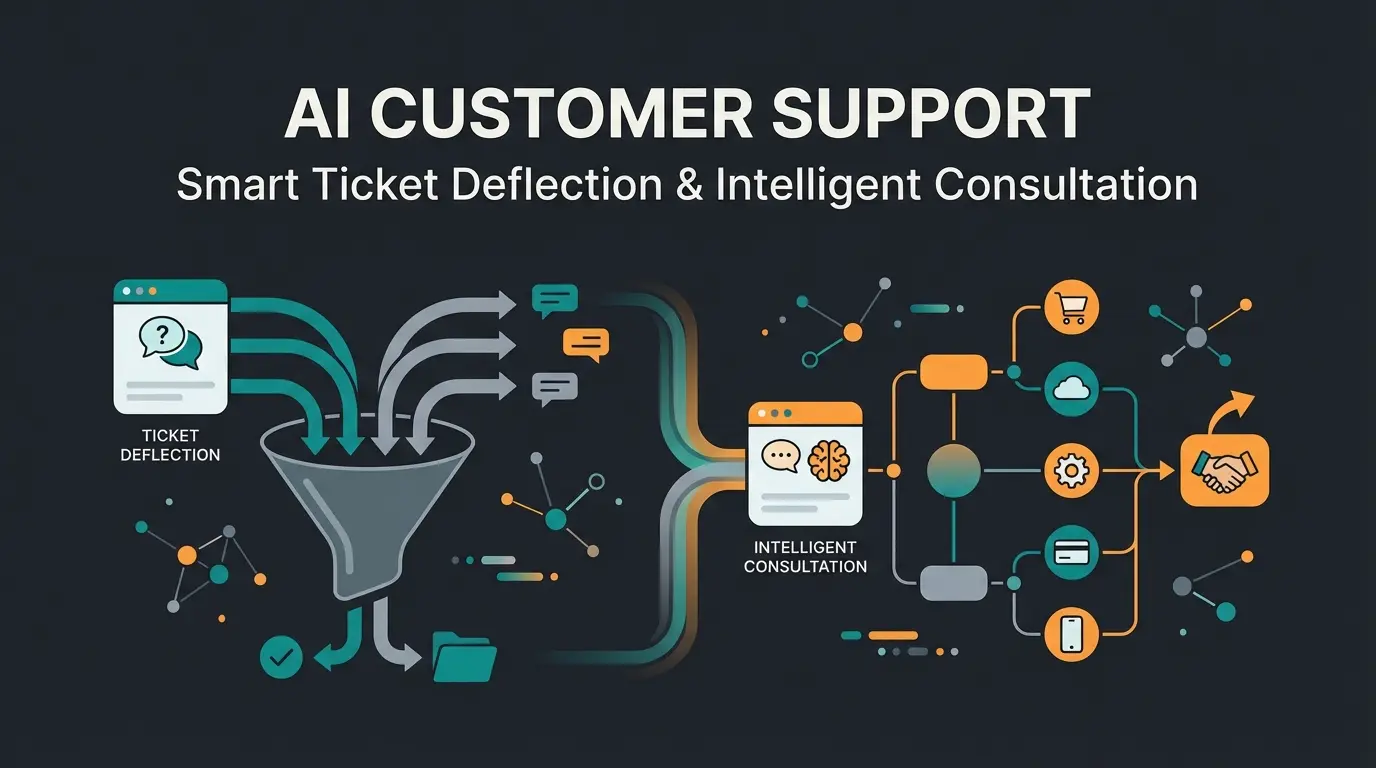
Why Static FAQs Are Dead in 2026
Imagine walking into a store and asking a salesperson for a recommendation. Instead of answering you, they silently point to a massive shelf with thousands of manuals and say: "Look it up yourself."
That's exactly what companies have been doing to their customers online for years. They build enormous "knowledge graveyards"—static FAQ pages that users have to painstakingly wade through. But in 2026 (and already today), customer expectations have radically shifted. Customers don't want search results; they want answers. Immediately.
This is where the Intercom Help Center comes into play—but not in the way you might remember from the past.
Most companies still use Intercom Articles as mere storage space for problem solutions. That's wasted potential. In an era where AI agents like Intercom's "Fin" can conduct complex conversations, the Help Center transforms from a passive library into the active brain of your customer communication.
This guide is different from the generic "Ultimate Guides" you find elsewhere. We're not focusing on how to click a button (you can find that in the official docs), but rather on how to build an AI-Ready Knowledge Base specifically tailored to the German market (GDPR, legal notice requirements, trust). As Conversational AI evolves, your approach to knowledge management must evolve with it.
We'll show you how to transform your Help Center from a cost center into an automated product consultant.
Your Help Center Is Now Your AI's Brain
The biggest mistake companies make today is writing help articles exclusively for human readers. When you publish an article in the Intercom Help Center today, it has two audiences:
- The Customer: The (rare) case where someone manually clicks through your page.
- The AI Agent (Fin): The (frequent) case where the AI scans the content, interprets it, and delivers a precise answer to the customer in chat.
The Shift: From Self-Service to AI Consultation
Previously, the goal was "Ticket Deflection"—keeping the customer from bothering support. Today, the goal is "Resolution & Consultation." Understanding AI customer service fundamentals is essential for making this transition successfully.
| Feature | Traditional Help Center (Static) | AI-First Help Center (Dynamic) |
|---|---|---|
| Primary Goal | Ticket avoidance (Deflection) | Instant problem resolution & consultation |
| Search Logic | Keyword-based ("invoice") | Semantic ("Why is my invoice higher?") |
| User Experience | Search, Scroll, Read, Interpret | Ask question -> Receive precise answer |
| Content Structure | Long text walls | Modular blocks, clear H2s, snippets |
| Role in Company | Support cost center | Automated Sales & Success Agent |
Understanding the RAG Principle
Intercom's AI (Fin) uses a technology called RAG (Retrieval-Augmented Generation). Simply put: when a customer asks a question, the AI doesn't hallucinate an answer. It searches your Help Center for relevant text components, "understands" them, and formulates an answer from them. According to eesel.ai, this approach ensures responses are grounded in your actual documentation rather than generic AI-generated content.
This means: Your Help Center is the training dataset. If your articles are unstructured, outdated, or contradictory, your AI will appear "dumb." An excellent Intercom Help Center today is less of a website and more of a structured database for your most important employee: the AI. Implementing AI customer service automation starts with getting this foundation right.

Visual Breakdown: Best Intercom Help Center Examples
To understand what a modern Help Center looks like—one optimized for both humans and machines—let's examine real Intercom Help Center examples. We're not just analyzing design here, but the information architecture.
Example 1: Pitch.com – Design Meets Functionality
Pitch, the presentation software from Berlin, uses Intercom extensively and is considered the gold standard for design and UX. As documented by Intercom's own showcase, Pitch demonstrates exceptional Help Center implementation.
- First Impression: The Help Center doesn't feel like a "support portal" but rather an extension of the product. It's seamlessly integrated into the brand experience.
- Structure: Pitch groups articles not by features (e.g., "Editor", "Export"), but by User Goals (e.g., "Create your first deck", "Collaborate with your team").
- Why It Works for AI: The articles are extremely modular. One article addresses one specific problem. This makes it easy for the AI to extract exactly that snippet as an answer without delivering irrelevant context.
- Takeaway: Use custom icons and clear, airy typography. A Help Center that looks good signals: "You'll get help here," not "Problems are managed here."
Example 2: Framer – Community & Docs Hybrid
Framer (Website Builder) has an interesting strategy. They use a mix of official docs and community content, as highlighted in Framer's documentation approach.
- Search: The search bar is the dominant element. Framer knows users don't want to browse.
- Video Integration: Many articles begin with a short Loom or YouTube video.
- Critical Note: AI can't (yet) watch videos. Framer solves this by placing a concise text summary (Transcript/Summary) below each video. This is crucial! Without the text, the content would be invisible to the bot.
- Takeaway: If you use multimedia, always add a text alternative. It's good for accessibility and essential for your Intercom AI.
Example 3: Personio – The B2B Giant (Complexity Management)
Personio (HR Software) must cover extremely complex, legal topics. Their approach, documented in their comprehensive help portal, shows mastery of enterprise-level knowledge management.
- Segmentation: They use "Collections" very aggressively to strictly separate topic areas (e.g., "Payroll" vs. "Recruiting").
- Internal Linking: Articles are heavily interlinked. This helps not just the user but signals semantic relationships to the AI.
- Legal Notices: Important warning boxes ("Note" / "Important") are visually highlighted. Intercom's editor allows colored callout boxes. Use them! Fin AI often recognizes these as critical context information.
Modular article structure improves AI response accuracy
Goal-based organization vs. feature-based categorization
When AI provides precise answers from well-structured content
German Compliance Checklist for Intercom
This is where most US guides fail. Operating an Intercom Help Center in Germany requires more than just translation. If you want to avoid legal warnings and build trust, you need to check off these points.
EU Data Hosting: The Frankfurt/Dublin Factor
German customers (especially in B2B) often ask first: "Where is my data stored?". Intercom offers Regional Data Hosting.
- The Check: Look at your URL. US Hosting: `app.intercom.com` | EU Hosting: `app.eu.intercom.com` (Servers in Dublin, AWS)
- Important: You cannot simply "move" an existing US workspace. You often need to open a new workspace in the EU region and migrate data. Plan this before launch.
- Trust Signal: Explicitly write in your Help Center footer: "Hosted in the EU / We securely host your data in the EU."
According to Intercom's regional hosting documentation, EU workspaces provide the data residency guarantees that German businesses require for compliance.
Legal Notice (Impressum) & Privacy Policy
Germany has legal notice requirements—even for support pages. A link on the main page often isn't enough when the Help Center runs on a subdomain (e.g., `help.mycompany.de`) and appears as a standalone page. As explained by iubenda's compliance guide, proper placement is legally mandatory.
How to set it up in Intercom:
- Go to Settings > Help Center > Configure & Style.
- Select the Styling tab, then Footer.
- Use the Footer Links option.
- Create a "Legal" column and add links to `Impressum` and `Datenschutz` (Privacy Policy).
Cookie Consent & Tracking: The GDPR Trap
By default, Intercom sets cookies for the Messenger and tracking. In Germany, you often may only set these after explicit consent (opt-in).
The Problem: The Help Center often loads the Messenger automatically.
The Solution (The "Safe Zone" Hack): You must configure the Intercom Messenger so it only "boots" when the user has consented via the cookie banner (e.g., Usercentrics, Cookiebot). Intercom's GDPR documentation provides the technical foundation for this implementation.
- Code Adjustment: You can inject custom code in the Help Center header (only in higher plans or via GTM integration).
- Logic: Use the `window.intercomSettings` command with `disabled: true` as default. Only when the consent event fires, call `Intercom('boot', ...)`.
- Google Analytics 4 (GA4): Don't integrate GA4 directly through Intercom settings if you need granular control. Instead, use the Google Tag Manager (GTM) container in the Help Center to fire GA4 only after consent.
Ensure your workspace URL shows app.eu.intercom.com for EU data residency
Add Impressum and Datenschutz links in Help Center footer settings
Configure Messenger to boot only after explicit user consent via banner
Verify all tracking respects consent states before going live
Our AI consultants specialize in transforming static knowledge bases into dynamic customer consultation engines. Get personalized guidance for your German market compliance.
Start Your Free ConsultationStructuring Intercom Articles for Consultation
Forget the classic FAQ structure. We're now building a structure that sells and advises. This approach aligns with modern AI Product Consultation strategies.
Step 1: Order Collections by Customer Journey
Instead of "Technical Settings," name your Collection "First Steps to Success."
- Pre-Sales: "Is [Product] right for me?" (This is where pricing explanations and comparisons belong).
- Onboarding: "Your first result in 5 minutes".
- Troubleshooting: "Solve problems quickly".
Step 2: Write Intercom Articles for AI (SEO for Robots)
For Fin AI to optimally use your Intercom Articles, you must write "machine-readable." According to Mava's AI optimization guide, structured content dramatically improves AI response quality.
- The Title (H1): Must be a concrete question or clear topic. Bad: "Settings" | Good: "How do I change my billing address?"
- Structure (H2/H3): Use H2s as subheadings for logical sections. Fin uses these to quote only the relevant part of a long article.
- Lists & Bullet Points: AI loves lists. When explaining steps, use numbered lists. When listing features, use bullet points.
- No Jargon: Use your customers' language. If customers say "Login," don't write "Authentication Protocol."
This methodology supports effective Training AI Chatbots that can accurately retrieve and present information.
Step 3: Use Snippets (The Secret Weapon)
Intercom offers "Snippets"—short text blocks that don't need to be visible as public articles but can be used by the AI. As noted by Fin AI's documentation, snippets provide rapid response capabilities for time-sensitive information.
- Use Case: A bug occurs.
- Action: Create a snippet: "Yes, we currently have an issue with PDF export. We're working on it. Workaround: Use screenshot mode."
- Result: Fin responds immediately and correctly to inquiries without you having to write a long article and delete it later.
| Content Type | Visibility | AI Access | Best Use Case |
|---|---|---|---|
| Published Article | Public | Full | Evergreen help topics |
| Draft Article | Hidden | None | Work in progress |
| Snippet | Hidden | Full | Temporary issues, quick responses |
| Internal Note | Hidden | Optional | Agent-only information |
Advanced Tactics: Product Consultation AI Integration
Now it gets exciting. We're transforming the Help Center from a passive page into an active seller. This is where the distinction between standard support and Consultative AI becomes clear.
Fin AI Guidance & Tone of Voice
A German support bot must sound different than an American one. According to Intercom's Fin customization guide, tone calibration significantly impacts customer satisfaction.
- Tone of Voice: In Fin settings, you can adjust the tone. For the DACH market, "Professional" or "Neutral" is often recommended. "Friendly" can sometimes feel too casual or artificial in German (too many emojis).
- Guidance (Rules): You can give Fin explicit rules. Example: "When a customer asks about 'cancellation,' respond empathetically, but always first offer a conversation with the Success team."
Custom Answers for High-Value Questions
Don't rely on generic AI responses for critical questions (e.g., Pricing, Data Protection).
- Create Custom Answers in Intercom. These are firmly defined responses triggered by specific keywords or questions.
- Strategy: For the question "What does Enterprise cost?", the AI shouldn't just read the pricing table, but explain the value and send a "Book a demo" link.
This approach transforms your Help Center into a powerful AI in customer service asset that drives both satisfaction and revenue.
Multilingual Support (DE/EN)
Many German tech companies operate internationally. Intercom's multilingual documentation details the complete setup process.
- Setup: Intercom allows multilingual articles. Create the article first in the default language (usually English) and then add the German translation.
- Important: Fin automatically detects the user's language and searches in the corresponding language index. Make sure your German translations aren't just machine-translated, as nuances in technical terms are often lost and can confuse the AI.
For businesses exploring additional channels, AI Product Consultation via WhatsApp follows similar multilingual principles.
Visual Assets to Maximize Impact
To make this article even more valuable for your readers, consider incorporating these graphics as described (here as concepts for design):
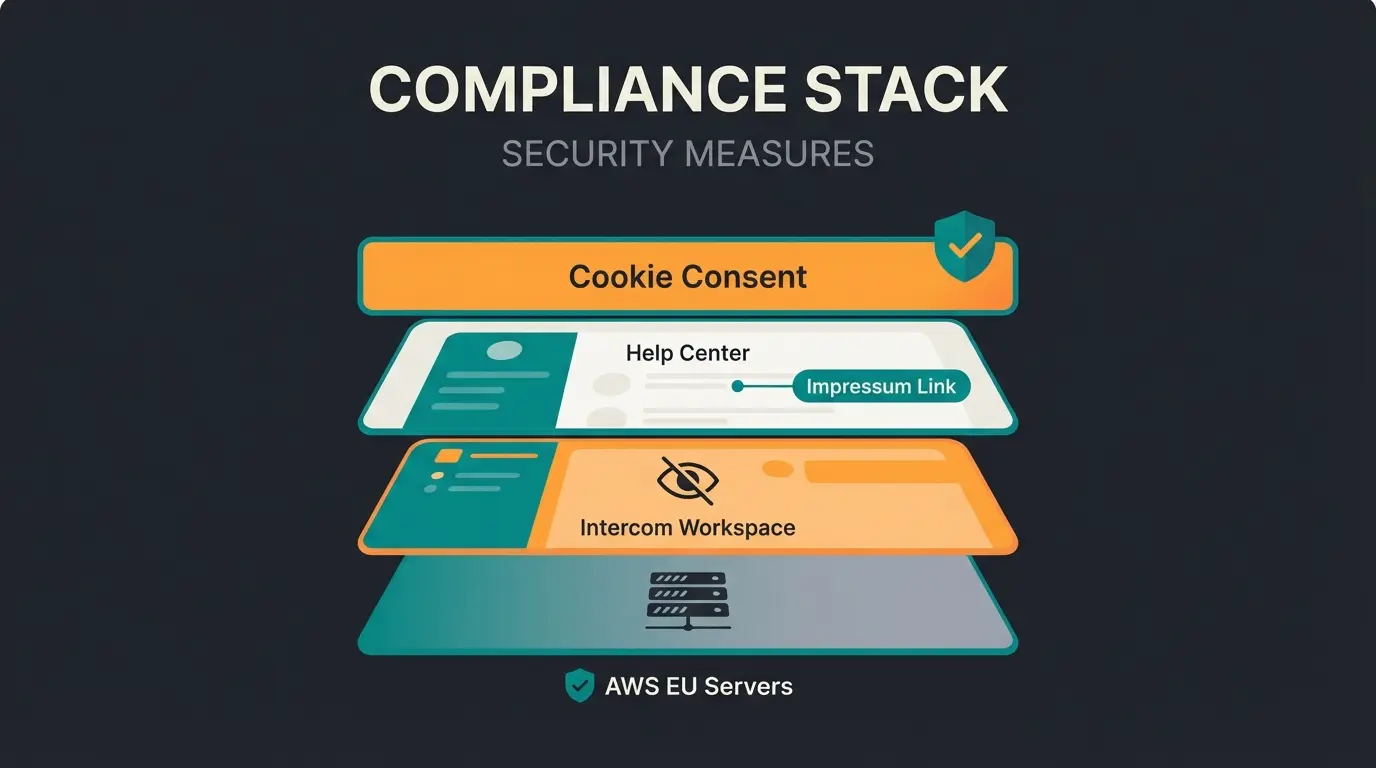
Asset 1: German Compliance Stack Infographic
Visualization: A layered model showing the complete compliance architecture:
- Base: AWS Server (Region: EU-West-1 / Dublin)
- Middle: Intercom Workspace (Settings: IP Anonymization ON)
- Interface: Help Center (Footer: Impressum Link)
- Gatekeeper: Cookie Banner (blocks Messenger script until consent)
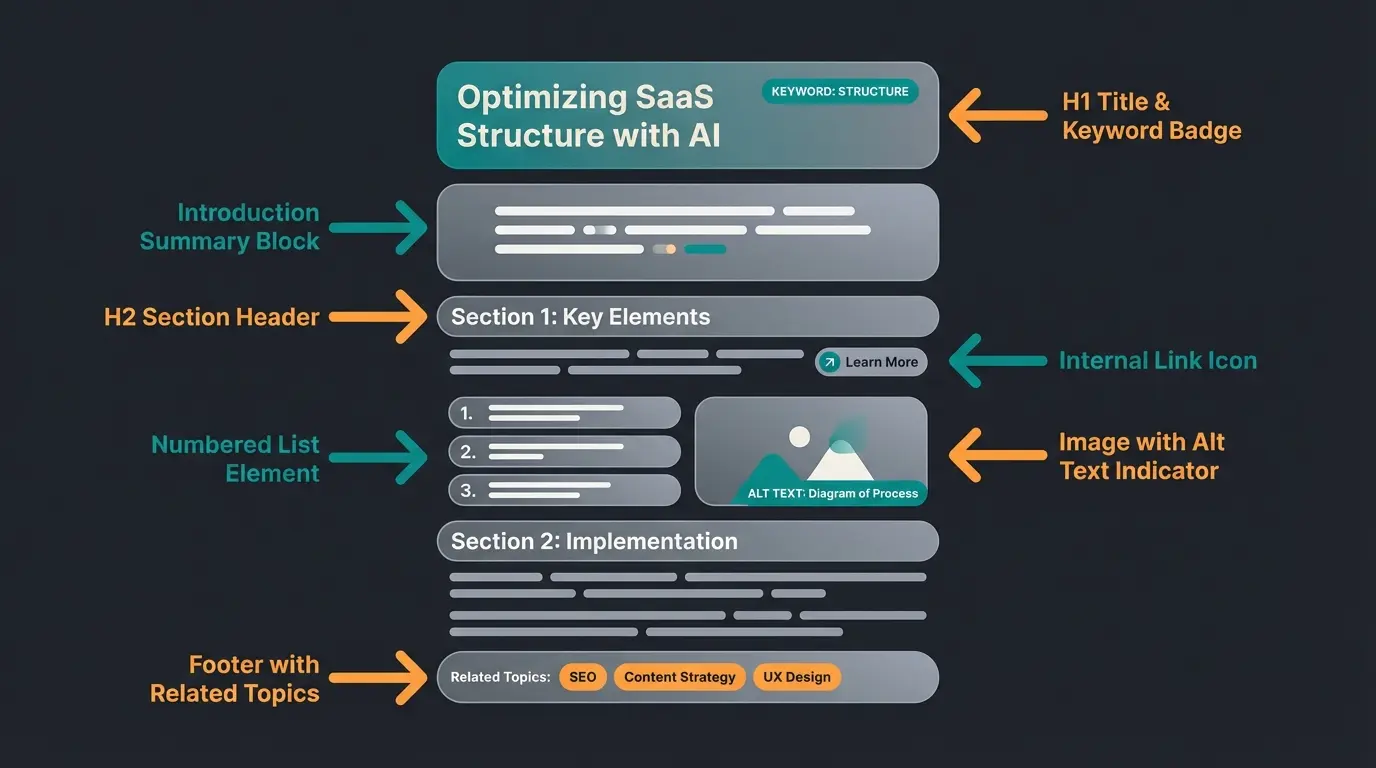
Asset 2: Annotated Screenshot – Anatomy of a Perfect AI Article
Show a sample article with arrows pointing to specific elements:
- H1: Contains the main keyword ("How do I integrate X?")
- Intro: Brief summary (for AI preview)
- Body: H2 headings for sub-steps
- Media: Screenshot with alt text (so the AI "sees" the image content)
- Footer: Link to related topics (Internal Linking)
Understanding the difference between basic chatbots and sophisticated AI Chatbot integration helps frame these architectural decisions.
Comparing Traditional vs. AI-First Help Centers
The following comparison highlights why AI product consultants outperform traditional support approaches:
| Dimension | Static Knowledge Base | AI Knowledge Hub |
|---|---|---|
| Content Goal | Deflection (avoid tickets) | Consultation (solve + advise) |
| Search Experience | Keyword matching | Semantic understanding |
| User Interaction | Self-service browsing | Conversational Q&A |
| Update Frequency | Periodic reviews | Real-time snippets |
| Business Impact | Cost reduction | Revenue generation |
| Scalability | Linear (more articles = more maintenance) | Exponential (AI learns connections) |
Companies implementing AI consulting e-commerce strategies see these differences most clearly in conversion metrics.
Real-World Implementation Success
To see these principles in action, consider how companies like Gartenfreunde transformed their customer experience with an AI Employee. Their Help Center now serves as the foundation for automated product consultation, handling complex gardening queries that previously required human expertise.
For businesses evaluating their options, comparing Intercom alternatives reveals how different platforms approach the Help Center architecture challenge—but the principles of AI-first content structuring apply universally.
Frequently Asked Questions
Most companies can complete a basic restructuring in 2-4 weeks. This includes auditing existing content, reorganizing collections by customer journey, and reformatting articles with clear H2 structures. The initial migration doesn't require rewriting everything—focus first on your top 20 most-viewed articles, then iterate based on Fin's performance reports.
Absolutely. AI-first structuring improves human readability too. Clear titles, logical H2 breaks, and modular content help all users find answers faster. When you eventually activate Fin, your content will already be optimized. Think of it as future-proofing your knowledge base.
Intercom recommends at least 50 quality articles covering your core use cases. However, quality trumps quantity. 30 well-structured articles will perform better than 100 poorly organized ones. Use your support ticket data to identify the top questions and ensure comprehensive coverage for those first.
Conflicting information confuses both humans and AI. Conduct regular content audits using Intercom's "Articles" report to identify duplicates. Establish a single source of truth for each topic and use internal linking to connect related content rather than repeating information.
EU hosting typically adds 10-15% to your Intercom costs, but for German B2B companies, this investment pays for itself in customer trust and legal compliance. Many enterprise deals in the DACH region require proof of EU data residency, making it effectively mandatory for certain market segments.
Conclusion & Your Audit Checklist
Building an Intercom Help Center in 2026 is not a one-time task but an ongoing process of "training" your AI. Those who do it right not only save support costs but gain a 24/7 sales consultant who never sleeps and always stays friendly.
Your Audit Checklist for Today:
- Hosting Check: Is my data stored in the EU (`app.eu.intercom.com`)?
- Legal Check: Are Impressum and Privacy Policy linked in the footer?
- Content Audit: Do I have articles with clear H2 structures optimized for Fin?
- Gap Analysis: What questions do customers ask in chat for which there's no article yet? (Use the "Topics" Report in Intercom).
- Tone of Voice: Have I configured Fin to match my German brand?
Start today transforming your static FAQs into a dynamic knowledge network. Your customers (and your support team) will thank you for it.
Stop building knowledge graveyards. Our experts help you architect Intercom Help Centers that actually consult, convert, and comply with German regulations.
Get Your Free Help Center Audit
Lasse is CEO and co-founder of Qualimero. After completing his MBA at WHU and scaling a company to seven-figure revenue, he founded Qualimero to build AI-powered digital employees for e-commerce. His focus: helping businesses measurably improve customer interaction through intelligent automation.