
Why Standard Pipedrive Intercom Integration Falls Short
In the modern sales landscape, Pipedrive and Intercom are two of the most powerful tools in any company's tech stack. Pipedrive organizes the sales process with visual brilliance, while Intercom tears down the barrier between businesses and customers through real-time communication. Yet connecting these two giants—the Pipedrive Intercom integration—is often a source of major frustration.
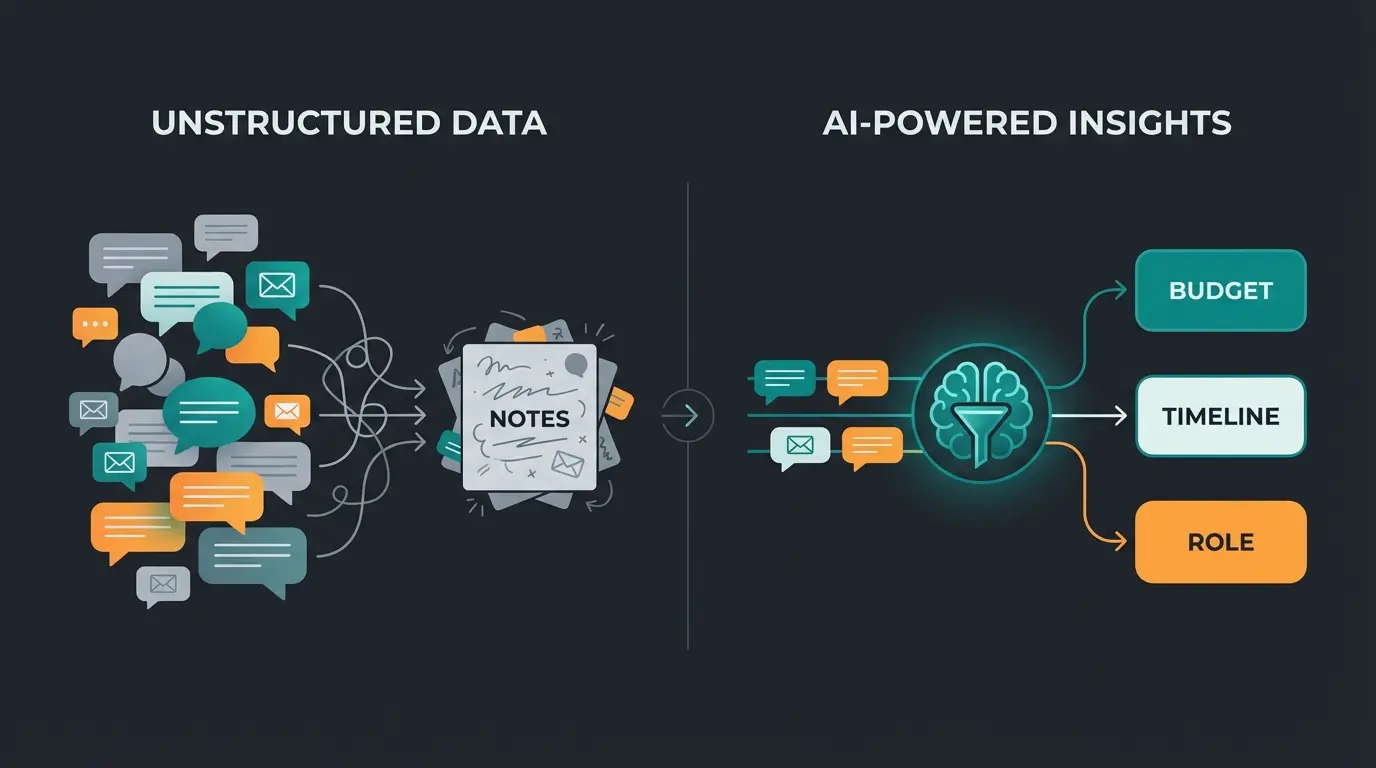
Why? Because most integrations merely "dump" data. They push unstructured chat transcripts into notes fields, create duplicates, and force sales representatives to scroll through endless walls of text just to find simple information like "budget" or "timeline." According to Ruler Analytics, this fundamental limitation is why many sales teams find the native integration insufficient for complex sales cycles.
This article isn't your typical "click here to install" guide. We go deeper. We'll show you how to build a Pipedrive Intercom integration that doesn't just synchronize data, but functions as an intelligent product consultant. We transform unstructured chats into clean, qualified deals—optimized with a focus on data hygiene and GDPR compliance. With AI employees for sales automation, this transformation becomes achievable at scale.
The Core Problem: Unstructured Data Chaos
When you search for "Intercom Pipedrive integration," you typically find guides showing you how to install the native app from the Pipedrive Marketplace. That's a good first step, but for scaling sales teams, it's often insufficient.
The native integration does exactly what it says on the box: it synchronizes. When a lead is created in Intercom, they land in Pipedrive. When a chat occurs, the transcript gets attached as a note to the deal. This is documented in Intercom's official help center.
That sounds good, but in practice, it leads to the following problems:
- Information overload: A sales rep must read the entire chat history to figure out why the lead is qualified.
- Missing fields: Important qualification data (budget, company size, pain points) ends up in the free-text notes instead of being mapped to custom fields in Pipedrive. This makes the data non-filterable and unusable for reports.
- Pipeline clogging: Every chat, including support requests or simple "hello" messages, can potentially create a deal, clogging your pipeline with "junk leads."
The reality: The native app has mixed reviews in the Pipedrive Marketplace (approximately 3 stars), often because users expect more control over data synchronization than the standard solution provides.
Sales reps spend nearly half their time reading chat logs instead of selling
Native integration rating reflects limited functionality
Unfiltered integrations create deals from non-qualified contacts
The Strategy: From Chatbot to AI Sales Consultant
To unlock the true value of a Pipedrive Intercom integration, we need to change our mindset. We can't view Intercom as a mere "inbox" that forwards messages. We must view it as an active pre-qualifier. This is where AI-powered customer service transforms the entire approach.
The AI Product Consultant Concept
Imagine you had an employee who sits on your website 24/7. This employee:
- Greets the visitor
- Asks targeted questions (budget, needs, timeline)
- Understands the answers
- Enters the answers cleanly into your CRM
- Creates the deal only when the lead is truly qualified
This is exactly what's possible with modern tools. Instead of "chat transcript to note," the new logic reads: "Extract [Budget] from chat -> Write to Pipedrive Field [Budget_EUR]." Understanding how Conversational AI evolves helps you leverage these capabilities effectively.
Why This Matters for International Markets
Companies, especially in the DACH region (Germany, Austria, Switzerland), place extreme value on process efficiency and data quality. A CRM full of unqualified leads and duplicate records is a nightmare for any sales manager. The "AI Consultant" approach acts as a gatekeeper, allowing only high-quality, structured data into your sacred space (Pipedrive).
This aligns perfectly with AI lead generation strategies that focus on quality over quantity. The Pipedrive Blog emphasizes that centralizing quality data is the key to sales efficiency.
Native Pipedrive Intercom Integration Setup Guide
Before we dive into advanced automation, we need to understand the basics. For small teams or simple use cases, the native integration is often the starting point. Understanding AI Customer Service fundamentals helps you see how these tools work together.
Step-by-Step Installation Process
Based on official documentation from Intercom and Pipedrive, the setup works as follows:
- Visit the App Store: Go to your Intercom App Store and search for "Pipedrive."
- Installation: Click on "Install now."
- Authorization: You'll be prompted to grant Intercom access to your Pipedrive account. Confirm this ("Allow and Install").
- Configuration: Define which pipeline and deal stage should be used for new chats (default is usually the first stage). Set up rules for email matching to avoid duplicates.
What the Native App Can (and Cannot) Do
- Deal creation: You can manually click "Create Deal" in the Intercom inbox. This creates a deal in Pipedrive and links it with the contact.
- Visibility: You can see in Intercom which stage a deal is in within Pipedrive (e.g., "Negotiation").
- Sync direction: Conversations are marked as "Done" and synchronized into Pipedrive activities or notes.
Advanced Workflow: Intelligent Data Structuring
Here we leave the standard path and build an Intercom Pipedrive integration that gives you competitive advantages. We use middleware tools like Zapier (see Zapier's integration guide) or Make (formerly Integromat) (detailed at Make.com), as these enable granular control over data fields.
The Goal: Structured Data Instead of Text Walls
We want Pipedrive fields to be automatically populated. For example:
- Intercom Question: "How large is your team?" -> Answer: "50-100"
- Pipedrive Field "Company Size": Automatically set to "50-100"
This approach mirrors what AI Product Consultation achieves—extracting meaningful data from conversations automatically. There are helpful YouTube tutorials showing how to build these workflows step by step.
Create custom fields for all data you want to qualify (Budget, Timeline, Product Interest)
Use Custom Bots to query data and store answers in Intercom Attributes
Configure Zapier/Make to trigger on qualified leads with specific tags
Check for email address and quality thresholds before creating deals
Map Intercom attributes directly to Pipedrive custom fields
Step 1: Preparation in Pipedrive
Create Custom Fields in Pipedrive for all information you want to qualify. According to Pipedrive's custom fields documentation, you should consider:
- Budget (Currency)
- Timeline (Single Option)
- Product Interest (Multiple Option)
- Company Size (Single Option)
- Decision Maker (Yes/No)
Step 2: Data Capture in Intercom (The Consultant)
Use Intercom's "Custom Bots" or "Operator" to query this data. Store the user's answers in Intercom Attributes (not just in the chat history). Reference Intercom's automation documentation for setup details.
Example: When the bot asks "What is your budget?", store the answer in the Intercom attribute `lead_budget`. This is where AI product consultation proves invaluable.
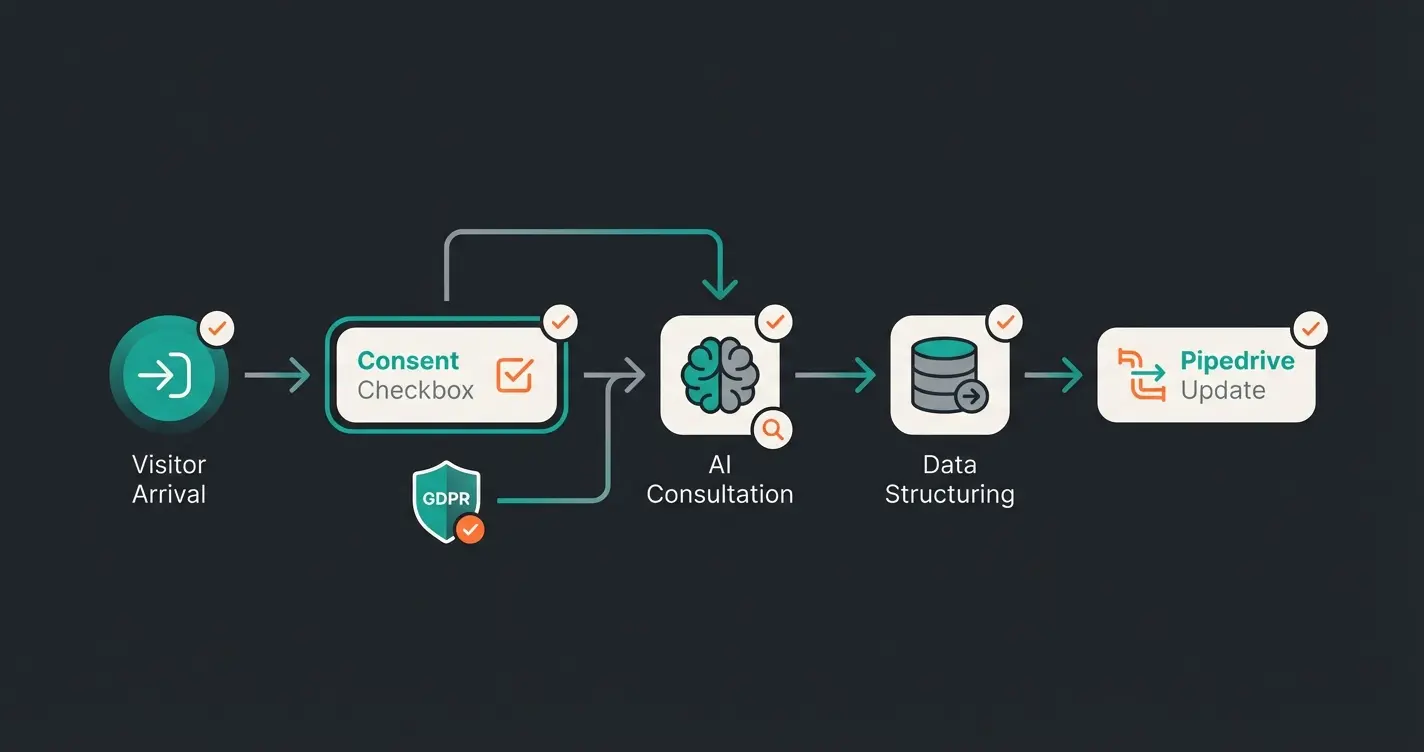
Step 3: Building the Bridge (Via Zapier or Make)
Instead of letting the native app handle everything, we build a "Zap" or "Scenario."
The Workflow Example
Trigger (Initiator):
- Intercom: "New Lead" or better "Lead Qualified" (e.g., when a tag "Sales-Ready" is assigned)
- Why: Prevents every website visitor from immediately landing in Pipedrive
Filter/Router (The Intelligence):
- Check: Does the lead have an email address? (No email = no CRM entry)
- Check: Is the budget > X? (Quality filter)
Action (Action in Pipedrive):
- Search Person: First search whether the person exists in Pipedrive (by email) to avoid duplicates. As documented by Zapier's Pipedrive integration, this "Find or Create" step is crucial.
- Create/Update Person: If not present, create. If present, update.
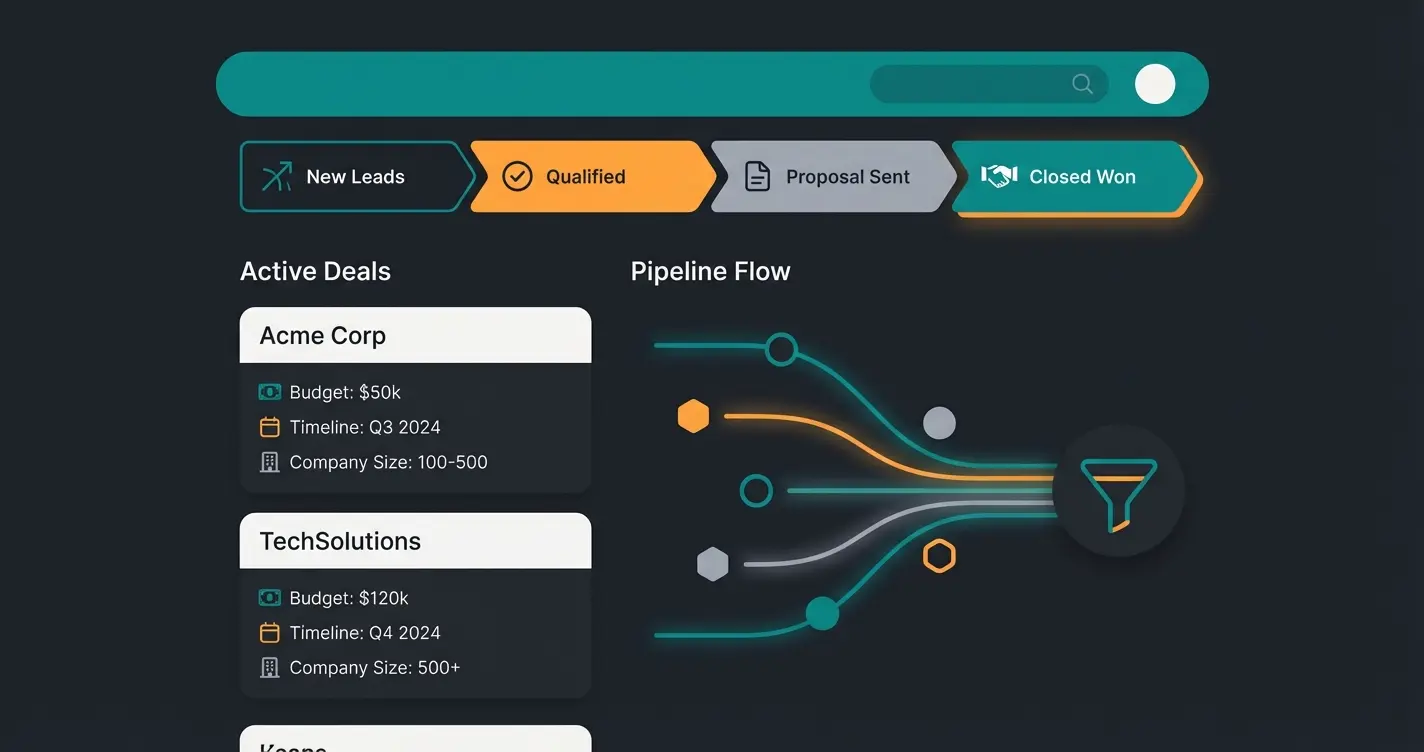
- Mapping (The Crucial Part): Map `Intercom Attribute: lead_budget` -> `Pipedrive Custom Field: Budget`. Map `Intercom Attribute: company_size` -> `Pipedrive Custom Field: Company Size`.
- Create Deal: Create a deal only for qualified leads and set it directly to the appropriate stage (e.g., "Qualified" instead of "New")
The Value of This Approach
Your sales team opens Pipedrive and sees a deal where budget, needs, and role are already filled in. They don't have to read—they can sell immediately. That's the difference between data management and sales support. This principle is explained further in our guide on AI sales forecasting, which shows how structured data enables predictive analytics.
Stop wasting time reading chat logs. Our AI-powered solution automatically extracts and structures lead data, so your sales team can focus on closing deals.
Start Your Free TrialData Hygiene & GDPR: The European Perspective
For companies operating in Europe, especially the DACH region, the Pipedrive Intercom integration is not just a technical challenge but also a legal one. Understanding AI in HR demonstrates how data compliance extends across all business functions.
1. The Duplicate Problem (Data Hygiene)
A common problem with integration is the creation of duplicates. When a user starts a new conversation in Intercom but has deleted cookies, they could be recognized as a new lead. According to Insycle's data management research, this is one of the most frequent complaints from integration users.
Solution: When integrating (via Make/Zapier), always use the "Find or Create Person" step. Search primarily by email address.
Pipedrive Feature: Regularly use the "Merge Duplicates" function in Pipedrive to keep the database clean. Pipedrive's duplicate management documentation provides detailed instructions.
2. GDPR (General Data Protection Regulation) Compliance
Both Pipedrive and Intercom process personal data. Understanding compliance is crucial, as detailed by Simple Analytics' GDPR analysis.
Server Location: Pipedrive hosts data for European customers in Frankfurt (AWS), which is a major plus. This aligns with guidance from Zeeg's compliance documentation.
Consent Management: When pushing data from Intercom to Pipedrive, ensure you have the user's consent.
- Practice: Add a query in the Intercom bot: "May we store your data for contact purposes?"
- Mapping: Store this consent in a Pipedrive Custom Field (e.g., `GDPR_Consent = TRUE`). Reference Metawork Studio's integration guide for consent workflow examples.
Deletion Deadlines: When a customer exercises their "right to be forgotten" in Intercom, you must ensure the record is also deleted in Pipedrive. This often requires a manual process or a complex "Delete" trigger via API.
Comparison: Standard Bot vs. AI Consultant Approach
To visualize the difference, here's a direct comparison of the two integration strategies. This comparison helps you understand why AI Chatbots transforming customer interactions are becoming essential for competitive sales teams.
| Feature | Standard Intercom Bot (Native App) | AI Product Consultant (Custom Integration) |
|---|---|---|
| Goal | Routing to support/sales | Qualification & consultation |
| Pipedrive Data | Full transcript (unstructured in notes) | Custom fields (structured: Budget, Need) |
| Sales Effort | Rep reads entire chat history | Rep reads 3-point summary in deal |
| CRM Hygiene | High clutter (every chat = deal) | Excellent (only qualified leads = deal) |
| Deal Stage | Always "Stage 1" | Dynamic (based on lead score) |
| Setup Time | 5 minutes | 1-3 hours (one-time) |
| ROI Timeline | Immediate but limited | 2-4 weeks but exponential |
As you can see, the initial investment in a custom integration pays dividends through cleaner data and more efficient sales processes. The AI Chatbot for enterprise deployment guide explains these ROI calculations in detail.
Common Pitfalls and Solutions (Troubleshooting)
Even with the best intercom pipedrive integration, problems occur. Here are the most common ones, based on user experiences and support tickets documented across various platforms.
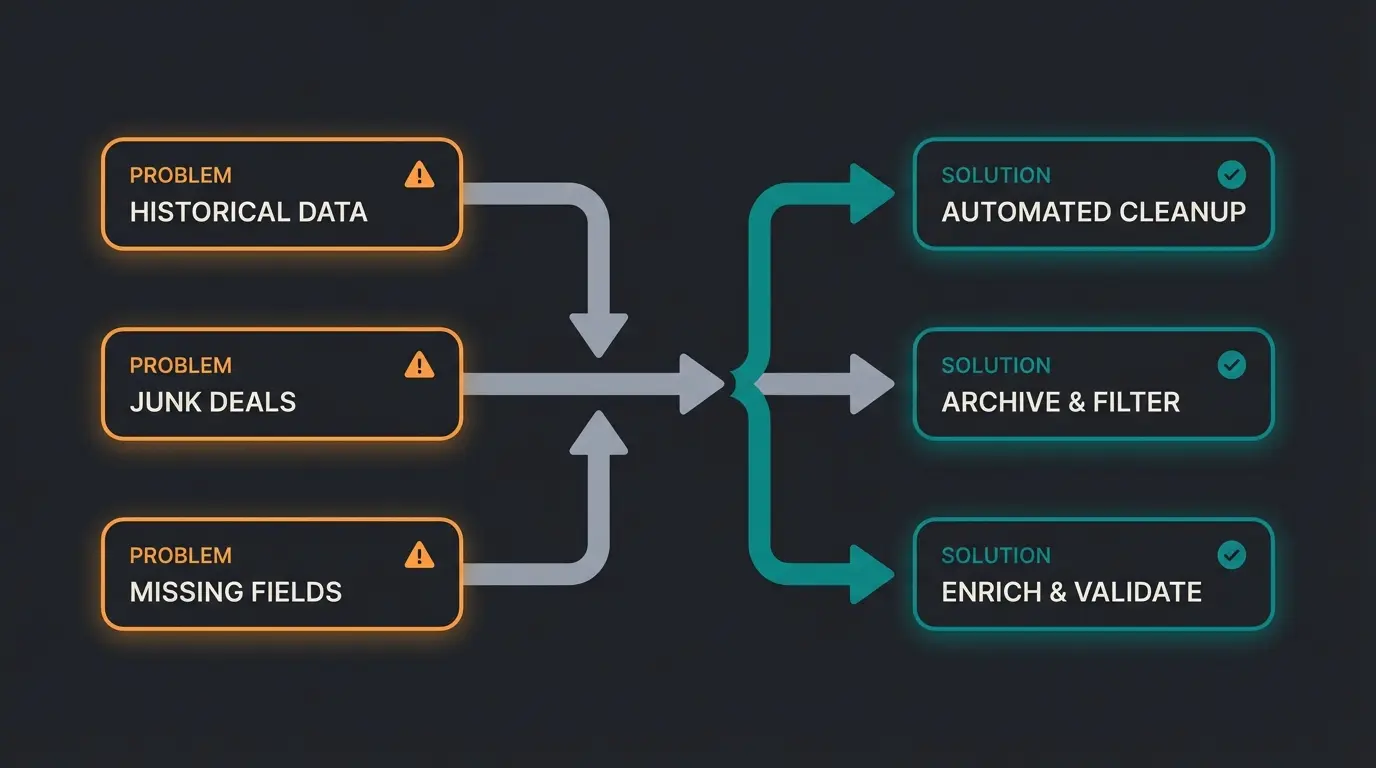
Problem 1: Historical Data Not Synchronized
Many users install the app and wonder why old chats are missing.
Fact: The native integration doesn't work retroactively.
Solution: For importing old data, you need to do a CSV export from Intercom and import it into Pipedrive, or run a migration script via the API. This limitation is clearly documented in Intercom's help documentation.
Problem 2: Junk Deals from Support Chats
An existing customer asks in chat for a copy of their invoice -> The integration mistakenly creates a new "sales deal."
Solution: Use filters in your middleware (Zapier/Make).
- Rule: "If email domain = [Existing Customer], then DO NOT create a deal, but create an 'Activity' or a 'Ticket' instead."
Problem 3: Custom Fields Not Displaying
You've created a field in Pipedrive, but Zapier/Intercom can't find it.
Solution: Refresh the connection ("Refresh Fields") in Zapier/Make. Pipedrive Custom Fields often need to be reloaded for the API to recognize them. Also note limits on the number of options in dropdown fields, as explained in Pipedrive's field customization guide.
Problem 4: Webhook Failures and Sync Delays
Sometimes data appears in Pipedrive hours after the Intercom conversation.
Solution: Check your webhook configurations and ensure your middleware (Zapier/Make) plan has sufficient task quotas. High-volume accounts may need to upgrade to premium plans for real-time synchronization.
Success Story: AI-Powered Sales Transformation
To see these principles in action, consider how businesses are transforming their sales processes. Our AI Product Consultation success story demonstrates how structured data extraction from customer conversations led to a 40% increase in qualified leads and a 60% reduction in sales rep research time.
The key insight? When your CRM contains structured, qualified data from the first interaction, every subsequent touchpoint becomes more valuable. Sales teams stop being data archaeologists and start being relationship builders.
Frequently Asked Questions
No, the native integration only syncs conversations that occur after installation. For historical data, you'll need to export from Intercom as CSV and import into Pipedrive, or use the API for a custom migration script.
Always use the "Find or Create Person" step in your middleware (Zapier/Make) and search by email address as the primary identifier. Additionally, regularly use Pipedrive's built-in "Merge Duplicates" feature or tools like Insycle for bulk deduplication.
Both platforms can be configured for GDPR compliance. Pipedrive hosts European customer data in Frankfurt. Ensure you capture explicit consent in Intercom before syncing personal data to Pipedrive, and store this consent in a custom field for audit purposes.
The native integration offers basic functionality but lacks granular control. Middleware tools allow you to filter leads by quality, map data to custom fields instead of notes, set dynamic deal stages based on lead attributes, and prevent junk deals from clogging your pipeline.
The native app takes about 5 minutes to install. A properly configured custom integration using Zapier or Make typically requires 1-3 hours of initial setup, but this one-time investment pays dividends through dramatically improved data quality and sales efficiency.
Conclusion: Automate Consultation, Not Just Data Transfer
The connection between Pipedrive and Intercom is more than just a technical necessity—it's a strategic opportunity. Anyone who still relies in 2025 on sales representatives manually evaluating chat transcripts is wasting valuable time and risking data chaos.
Summary of Action Recommendations
- Start simple: The native app is okay for the beginning, but know its limitations.
- Structure your data: Use custom fields in Pipedrive and attributes in Intercom.
- Use middleware: Tools like Make or Zapier are the key to transforming a "chat log" into a "qualified deal."
- Think compliance: Pay meticulous attention to duplicate prevention and GDPR compliance to keep your CRM clean.
- Invest in AI: Consider how intelligent automation can pre-qualify leads before they ever hit your pipeline.
By upgrading your Pipedrive Intercom integration from a passive conduit to an active filter, you give your sales team back the most valuable thing there is: focus on the deals that truly matter.
Further Resources & Tools
- Pipedrive Marketplace: For the native app and reviews
- Make (Integromat): For complex, cost-effective workflows
- Insycle: For professional data cleaning and deduplication
- Intercom Help Center: For details on attributes and bots
Don't just integrate—automate the consultation. Let AI extract, structure, and qualify your leads so your sales team can focus on closing deals that matter.
Get Started Free