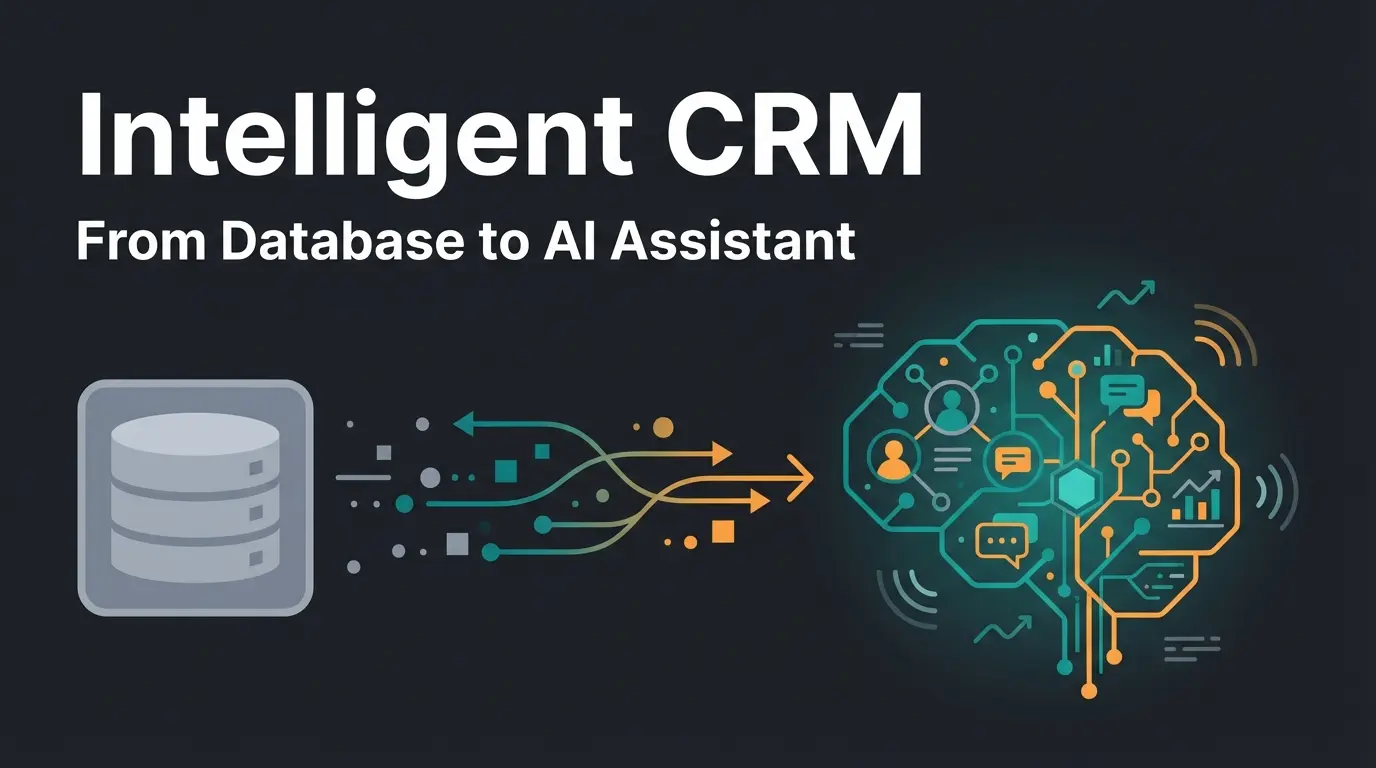
Introduction: Why You're Using Intercom Wrong
Most companies in the DACH region use Intercom as a glorified answering machine. A customer has a problem, writes in the chat, and a support agent (or a simple bot) puts out the fire. This is classic 'Reactive Support Management.'
But if you're only using Intercom to put out fires, you're missing the opportunity to ignite the fire in the first place—namely, the fire of purchasing interest.
In an era where Intercom CRM functionality is increasingly merging with artificial intelligence, the platform is transforming from a pure support tool into a Relationship Engine. Especially for markets where data privacy (GDPR) and efficiency come first, the combination of real-time communication and CRM data provides a powerful weapon against long sales cycles. Understanding how AI Chatbots transform customer interactions is essential for this shift.
This article is not a superficial review. It's a strategic deep-dive that shows you how to transform Intercom from a cost center (Support) into a profit center (Sales). We'll clarify the question 'Is Intercom a CRM?', illuminate the critical role of Intercom customer data, and show you how to use AI not for deflection, but for consulting your customers.
Intercom as CRM: What It Can (and Can't) Do
The most common question SaaS founders and sales leaders ask is: Can I skip HubSpot or Salesforce and just use Intercom as my CRM?
The short answer: No. The strategic answer: Yes, but only for the 'Front-Office.'
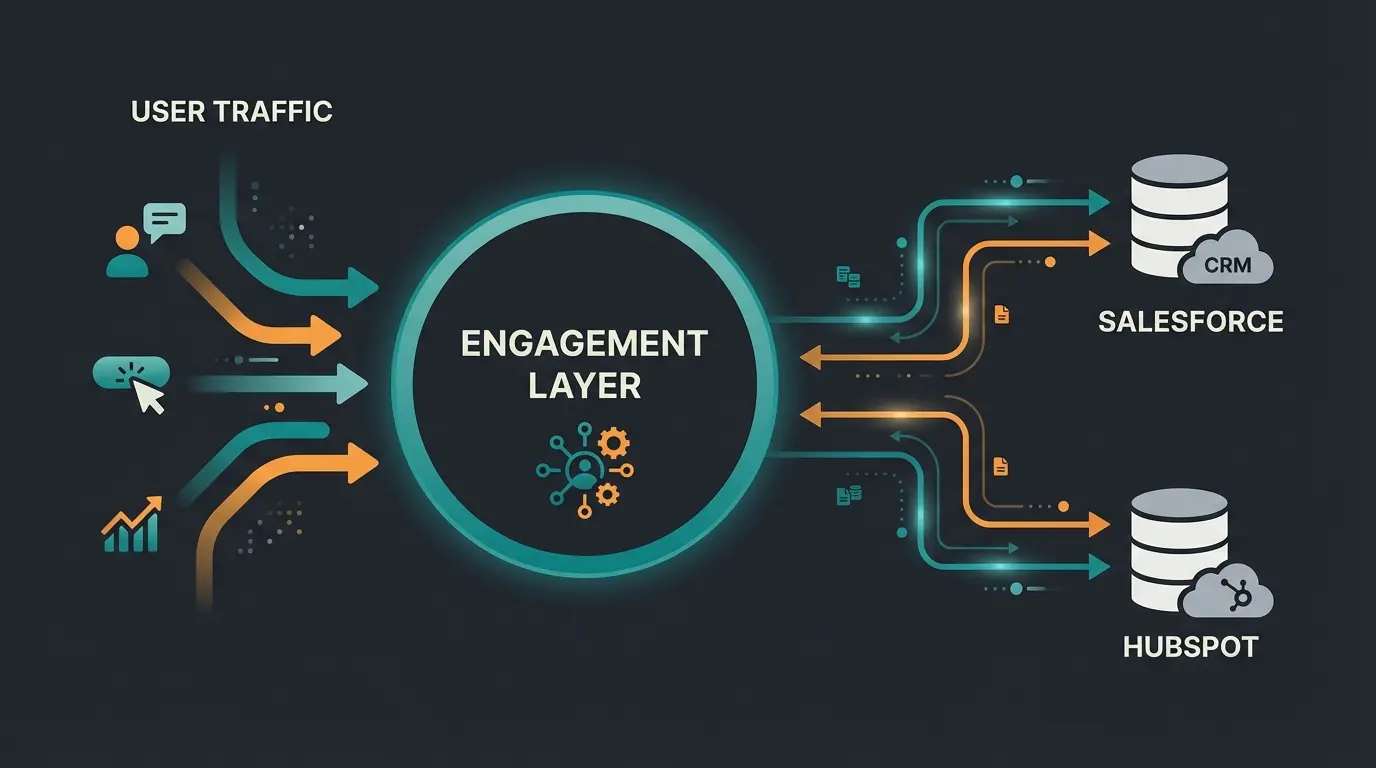
The System of Record vs. the System of Engagement
To properly classify Intercom CRM functions, we need to distinguish between two types of CRM:
- System of Record (The Memory): These are tools like Salesforce, HubSpot, or Pipedrive. They store master data, complex deal pipelines, contract details, and historical revenue. They are static and serve administrative purposes.
- System of Engagement (The Voice): This is Intercom. This is where the action happens. Chats, emails, in-app messages, and product tours.
According to Pipedrive, Intercom itself no longer positions as a CRM replacement but as the layer that sits on top of your CRM. This architecture insight from Ruler Analytics shows how engagement platforms complement rather than replace traditional CRMs.
The 'Lite' CRM Features of Intercom
Even though it's not a full-fledged enterprise CRM, Intercom offers native features that are often sufficient for small sales teams or PLG (Product-Led Growth) companies. Our comprehensive Intercom software guide covers these capabilities in detail:
- Intercom Contacts & Leads: Every visitor who interacts with you is stored as a lead or user.
- Company Profiles: You can group users into companies and see aggregated data (e.g., 'Total Spending').
- Conversation History: Arguably the most powerful part. Unlike static CRMs, you see the context here—what did the customer ask? Which help article did they read?
- Tags & Segments: Dynamic lists based on user behavior (more on this later).
Where the Limits Are (Deal-Breakers for Sales Teams)
Why you (probably) can't use Intercom as your sole CRM:
- No Real Pipeline Management: There's no native 'Kanban board' view for deals like you know from Pipedrive. You can't drag-and-drop leads through phases like 'Negotiation' or 'Contract Closing.'
- Reporting Weaknesses in Sales: Intercom's reports are designed for support metrics (response time, CSAT), not sales metrics (conversion rates per deal stage, forecasts).
- Complex Data Relations: In Salesforce, you can link a 'Vehicle' object with an 'Insurance' object. In Intercom, the data structure is flatter (User -> Attributes).
Mastering Intercom Customer Data: The Fuel for Your AI
This is where 90% of implementations fail. An AI bot or a sales rep is only as smart as the data available to them. If your Intercom customer data is dirty, your AI will hallucinate or ask irrelevant questions.
The Problem: 'Messy Data'
In many Intercom instances, you'll find duplicates: 'John Smith' (Lead) and 'John Smith' (User) exist in parallel. Or worse: Critical information like 'Budget' or 'Industry' is completely missing.
Why this is deadly: If you use the new Fin AI Agent, every 'Resolution' costs money (approximately $0.99). If the bot first has to ask the customer for their name, even though it should already be known, you're wasting money and annoying the customer. This is why understanding chatbot cost comparison is crucial before implementation.
The Solution: Custom Attributes
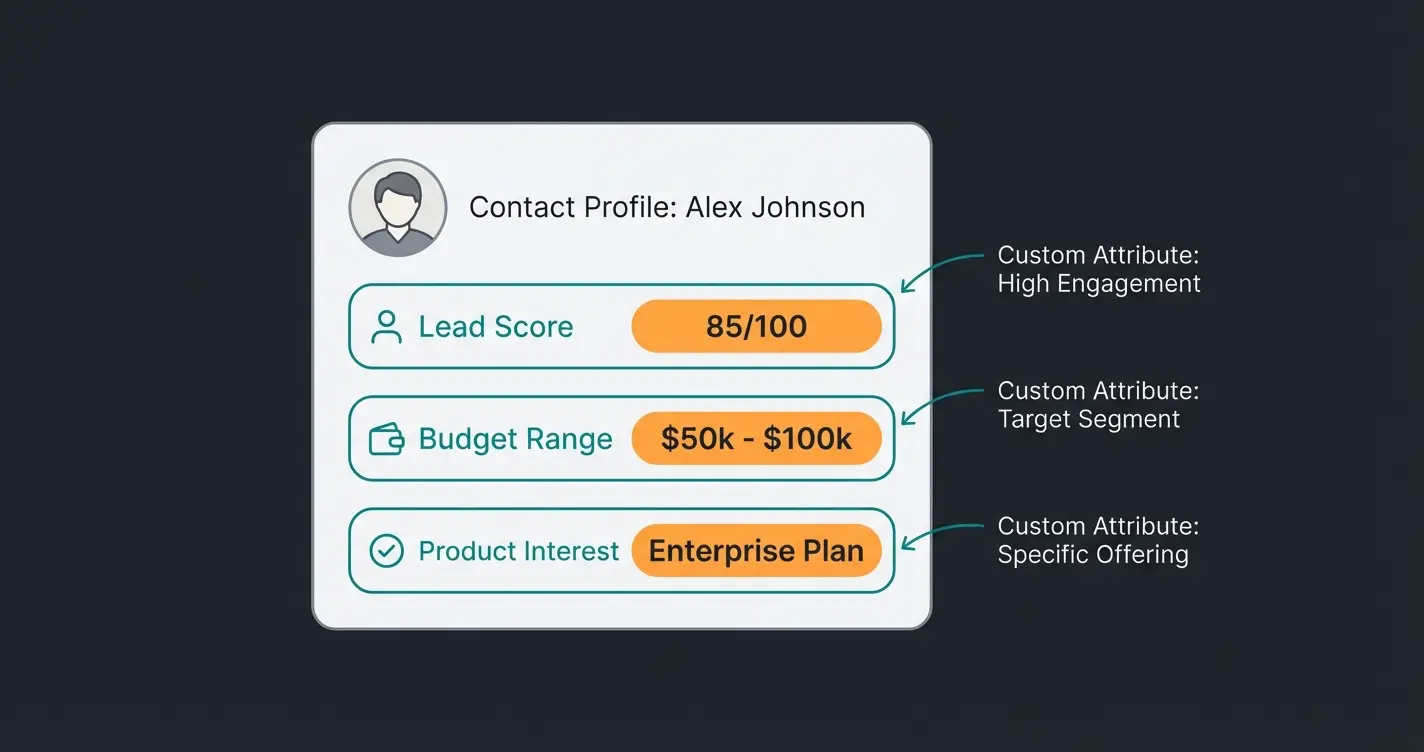
The heart of your Intercom CRM strategy is Custom Attributes. These are data fields that you create specifically for your business.
Best Practice for B2B-SaaS: Don't just create master data, but behavior-based data.
| Attribute Name | Data Type | Purpose | Example Value |
|---|---|---|---|
| role_decision_maker | Boolean | Identifies decision-makers for Sales | True |
| pricing_page_visits | Number | Trigger for proactive outreach | 4 |
| tech_stack | List | Helps AI suggest integrations | HubSpot, Slack |
| last_product_viewed | String | Context for conversation opener | Enterprise Plan |
Segmentation: The Art of Grouping
Instead of treating all Intercom contacts equally, you need to build segments. A segment in Intercom is a dynamic list that updates in real-time.
Strategic Example: Create a segment called 'High Intent - Enterprise.'
- Filter: `Web Sessions` greater than 5
- AND: `Pricing Page` was visited
- AND: `Company Size` is 'Enterprise'
The Trick: This segment doesn't just serve your newsletter. It's the trigger for your AI or your sales team to immediately become active. For more insights on leveraging customer data effectively, check out our guide on AI product consultation.
From FAQ Bot to AI Product Consultant
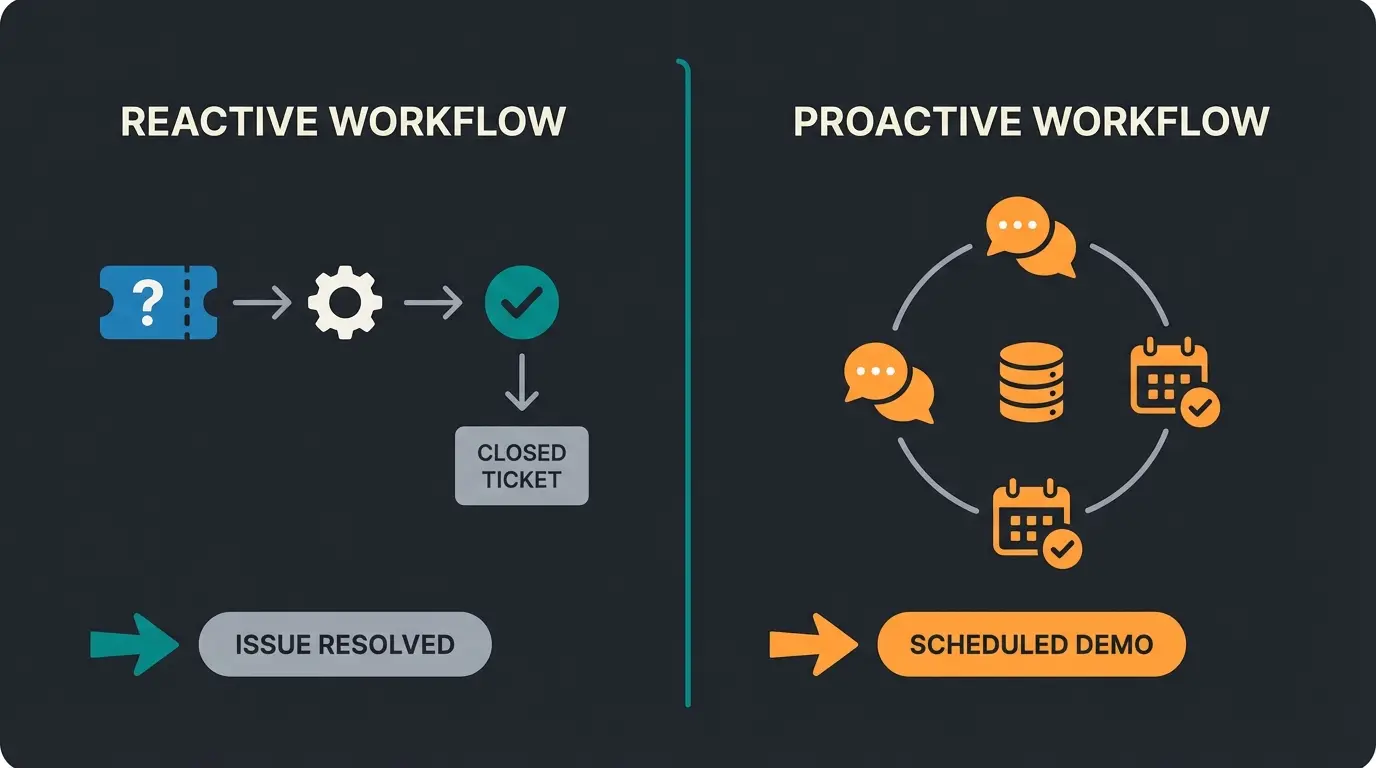
This is your USP (Unique Selling Proposition). Most companies use Intercom's 'Fin' AI only to deflect support tickets ('How do I reset my password?'). That saves costs but generates no revenue.
We're flipping the script: Use AI for Consultative Sales.
The Difference: Support Bot vs. Sales Consultant
| Feature | Support Bot (The Standard) | AI Sales Consultant (The Strategy) |
|---|---|---|
| Goal | Close ticket (Deflection) | Open opportunity (Conversion) |
| Data Source | Help Center Articles (Knowledge Base) | Product Specs, Pricing PDFs, Case Studies |
| Trigger | Customer asks for help | Customer views pricing (Proactive) |
| Success Metric | 'Customer has no more questions' | 'Customer books demo' or 'Starts Trial' |
Fin AI's price point makes sense for sales, not just support
When AI converts leads instead of just answering FAQs
Standard support bot metric vs. revenue generation opportunity
How to Train Fin to Be a Salesperson
Intercom's Fin AI uses GPT-4 technology to generate answers from your content. For Fin to sell, you need to feed it differently. Learn more about Intercom Fin alternatives to understand the full landscape of options available.
- Sales Content Instead of Support Content: Don't just upload guides. Feed Fin with 'Sales Arguments', 'Comparison Tables (Us vs. Competitors)', and 'ROI Calculators.'
- Custom Answers for Pricing Questions: When a customer asks 'What does it cost?', the answer shouldn't be 'Check the pricing page.' According to Intercom, properly trained responses dramatically improve conversion rates.
- The 'Hand-off' Moment: Configure Fin so that it immediately hands off to a human agent for certain keywords (e.g., 'Enterprise', 'Quote', 'Security').
Good AI Response (Trained): 'That depends on your team size. For small teams, we start at $39/month. Are you looking for a solution for support or sales?' Compare this approach with different Consultative AI comparison methodologies to see why consultative responses outperform standard deflection.
Essential Integrations for Your Tech Stack
Since Intercom isn't a full-fledged CRM, your strategy stands or falls with integration. Two players dominate: HubSpot and Pipedrive.
HubSpot & Intercom: The Love-Hate Relationship
HubSpot and Intercom now compete strongly (HubSpot Service Hub vs. Intercom). Nevertheless, many use both.
- Data Sync: Use the native 'HubSpot Data Sync' App as described by HubSpot. It allows a two-way sync (Bi-Directional Sync) of contacts and companies.
- Advantage: When a sales rep changes the status to 'Customer' in HubSpot, Intercom knows immediately and stops, for example, aggressive sales messages.
- The Ticket Trap: Caution! Tickets are often not cleanly synchronized. If you do support in Intercom and sales in HubSpot, use tools like Interhubz or Zapier to ensure that a closed ticket in Intercom is also logged in HubSpot.
Pipedrive: The Sales Favorite
For pure sales teams, the Pipedrive integration is often smoother than HubSpot's:
- Deal Creation from the Inbox: An agent chats in Intercom with a lead. With one click on 'Create Deal' in the sidebar, the lead is created in Pipedrive and the chat history is transferred.
- Context: When the lead returns later, the support agent immediately sees in Intercom: 'Attention, open deal worth $50,000 in Pipedrive.' They will therefore treat the customer preferentially.
Data Privacy & EU Hosting (Critical for GDPR)
This is where you need to pay attention. Intercom offers 'Regional Data Hosting' in Europe (AWS Dublin). However:
- Only for New Customers: According to Eesel.ai, EU hosting is only available if you create a new workspace.
- No Migration: There's no 'button' to move existing data from US servers to Europe. You would need to export and re-import—often losing chat history in the process.
- Plan Requirement: Often only available in the 'Advanced' or 'Expert' plans, not in the 'Essential' plan.
Discover how AI-powered product consultation can turn your Intercom investment from a cost center into a revenue driver. See real results from businesses already making the switch.
Start Your Free TrialPricing & Value Analysis: What It Really Costs
Intercom's pricing is notorious for being complex. For your budget planning, you need to add three components.
1. The Base License (Seat Cost)
Prices were adjusted and restructured in 2025 according to SaaS Price Pulse and SaaS Genie:
- Essential: approximately $39 per Seat/month. Good for startups, but often without advanced automation.
- Advanced: approximately $99 per Seat/month. The standard for professional teams (including Workflows).
- Expert: approximately $139 per Seat/month. For Enterprise (SSO, security features).
For a detailed breakdown of all costs involved, check out our Intercom pricing breakdown which covers every scenario.
2. The Fin AI Agent (The Variable Cost Factor)
Here's where it gets interesting. As Intercom confirms, they charge $0.99 per Resolution.
- A 'Resolution' is defined as a conversation that the AI successfully ends without a human needing to intervene.
- The Math: If you have 1,000 support tickets per month and Fin solves 50% of them, you pay $495 extra.
3. The ROI Case for Sales
Why the $0.99 is worth it: Compare the costs not with a chatbot ($0), but with a Sales Development Rep (SDR).
- An SDR costs approximately $4,000+ per month.
- If Fin AI conducts a product consultation, qualifies the lead, and books a demo, that 'Resolution' cost you $0.99.
- Even if Fin only converts 10% of leads, the Cost-per-Lead (CPL) is unbeatable compared to Google Ads or human labor time.
Review Intercom contacts, delete duplicates, define 5-10 strategic Custom Attributes (role, budget, interest)
Connect Intercom via Data Sync with HubSpot or Pipedrive, ensure deal status flows back to Intercom
For new implementations, explicitly request an EU workspace (Advanced Plan required)
Feed Fin AI with sales material, not just FAQs. Test: Can the AI sell the product or just explain it?
Create automated messages for pricing page visitors (High Intent segment) offering decision-making help
The Evolution: AI Consultation in Practice
The transformation from support tool to sales machine requires a fundamental shift in how you think about AI interactions. Traditional support bots operate in a reactive mode—they wait for problems and attempt to close tickets as quickly as possible. The new paradigm of AI product consultation flips this model entirely.
Consider the difference in approach. A standard bot interaction might go: Customer asks 'Where is my order?' → Bot provides tracking link → Ticket closed. A consultative AI interaction looks different: Customer views pricing page for the third time → AI proactively engages: 'I noticed you're comparing our plans. What specific challenges are you trying to solve?' → Conversation leads to qualified demo booking.
This shift requires feeding your AI different types of content. Instead of just knowledge base articles about product features, you need to include competitive positioning documents, ROI calculators, customer success stories with specific metrics, and objection handling frameworks. The Intercom AI product consultant approach represents this evolution in real-time customer engagement.
Building Your Consultative AI Framework
For businesses investing in professional AI consulting capabilities, the framework requires three core elements working together:
- Intent Recognition: Training your AI to identify buying signals vs. support needs based on page behavior, conversation history, and custom attribute data
- Contextual Response Libraries: Building response frameworks that adapt based on company size, industry, and where the prospect is in their journey
- Seamless Escalation Protocols: Knowing exactly when to hand off to human sales reps—neither too early (wasting human time) nor too late (losing the sale)
Frequently Asked Questions
No, Intercom is not a traditional CRM. It's a Customer Engagement Platform that functions as a 'Front-Office' system for real-time interactions, while tools like HubSpot or Salesforce serve as the 'Back-Office' System of Record. Intercom excels at engagement and conversation but lacks pipeline management, sales forecasting, and complex deal tracking capabilities found in dedicated CRMs.
Fin AI Agent costs $0.99 per successful Resolution (a conversation completed without human intervention). If you have 1,000 monthly support tickets and Fin resolves 50%, expect approximately $495/month in AI costs on top of your base seat license. The base licenses range from $39/seat (Essential) to $139/seat (Expert) per month.
Unfortunately, no direct migration path exists. EU data hosting (AWS Dublin) is only available for new workspaces created on Advanced or Expert plans. Existing US workspaces cannot be migrated—you would need to export data, create a new EU workspace, and re-import, often losing conversation history in the process.
Fin AI Agent speaks directly with customers and costs $0.99 per resolution. Fin AI Copilot assists your human agents by suggesting responses and is typically priced as a flat monthly fee per seat ($29-$35). The Agent replaces interactions; the Copilot enhances human agent efficiency.
Focus on three areas: First, clean your customer data and implement strategic Custom Attributes that identify buying signals. Second, train Fin AI with sales content (ROI calculators, competitive comparisons, case studies) rather than just FAQ articles. Third, create proactive messaging campaigns targeting high-intent segments like repeat pricing page visitors.
Conclusion & Implementation Checklist
Intercom is far more than a chat window in the bottom right corner of your website. Properly configured, it functions as a real-time CRM that qualifies leads, enriches data, and prepares sales while your team sleeps.
The transformation from support tool to sales machine requires work on the data foundation. As Sparrow Desk research shows, companies that invest in proper Intercom configuration see dramatically different results than those using out-of-the-box settings.
Your Step-by-Step Implementation Guide
- Data Audit: Review your Intercom contacts. Delete duplicates and define 5-10 strategic 'Custom Attributes' (e.g., Role, Budget, Interest).
- Integration Check: Connect Intercom via 'Data Sync' with HubSpot or Pipedrive. Ensure the deal status flows back to Intercom.
- Hosting Check: If you're starting new, explicitly request an EU workspace (Advanced Plan).
- AI Training: Feed Fin AI not only with FAQs but with sales material. Test: Can the AI sell me the product or just explain it?
- Proactive Messages: Create an automated message for visitors on your pricing page (Segment: High Intent) that offers help with decision-making—not just 'Support.'
The Next Step: Stop viewing Intercom as a cost center. Invest in setting up the Intercom CRM functions and use AI as your cheapest and fastest sales representative.
Join forward-thinking companies already using AI-powered product consultation to turn support interactions into revenue opportunities. Get started with a personalized demo today.
Book Your Free Demo
Lasse is CEO and co-founder of Qualimero. After completing his MBA at WHU and scaling a company to seven-figure revenue, he founded Qualimero to build AI-powered digital employees for e-commerce. His focus: helping businesses measurably improve customer interaction through intelligent automation.