Why automate WhatsApp customer service - and why now
WhatsApp customer service automation reduces response times from hours to seconds, cuts support costs by up to 80%, and scales your team without hiring. With over 3 billion monthly active users on the platform and a 95% message open rate, no other channel combines reach, engagement, and automation potential the way WhatsApp does.
I spoke with a home and garden retailer last month who was drowning in 200+ unanswered WhatsApp messages every day during peak season. Three support agents, all occupied. Response times averaging four hours. Customers buying from competitors who replied within minutes.
That scenario is not unusual. According to Gartner, agentic AI will autonomously resolve 80% of common customer service issues by 2029, leading to a 30% reduction in operational costs. The shift is already underway. Businesses that automate customer service on WhatsApp today are not experimenting, they are securing a structural advantage.
The channel economics make the case on their own. WhatsApp messages achieve open rates between 95% and 98%, compared to 20-25% for email, according to AiSensy. Click-through rates range from 15% to 60% depending on campaign type, versus 2-6% for email. When your support message is almost guaranteed to be read, every automated reply generates measurable value.
And the cost difference is substantial. A human-handled customer service interaction costs approximately $6.00 on average. An automated interaction through an AI-powered system costs $0.50. That is a 12x reduction in cost per conversation, according to Freshworks. For a retailer handling 500 WhatsApp inquiries per month, that translates from $3,000 in monthly support costs to under $250.
Three trends are converging right now. WhatsApp Business Platform offers free service messages within 24-hour windows since the July 2025 pricing update. AI technology has matured beyond rule-based replies to understanding product catalogs and customer intent. And your competitors are already there, which is why our WhatsApp Customer Service guide covers the full channel strategy.
Using WhatsApp Business products globally
The three levels of WhatsApp automation
WhatsApp automation operates at three distinct levels: free auto-replies in the Business App, API-powered workflow automation for growing teams, and AI employees that understand your products and advise customers in real time. Each level fits a different stage of business growth, and the right choice depends on your message volume, product complexity, and customer expectations.
| Feature | Business App (Free) | Business API | AI Employee |
|---|---|---|---|
| Setup time | 5 minutes | 1-3 days | 2-4 weeks |
| Monthly cost | Free | $50-500+ (BSP fees + per-message) | Custom (includes training) |
| Team size | Up to 5 devices | Unlimited agents | Unlimited + autonomous |
| Automation type | Greeting, away, quick replies | Templates, workflows, CRM triggers | Context-aware, product-trained RAG |
| Response quality | Static text only | Rule-based routing | Personalized product recommendations |
| CRM integration | None | Full (HubSpot, Salesforce, etc.) | Full + conversation memory |
| Best for | Solo operators, <50 msgs/day | Growing teams, 50-500 msgs/day | Consulting-intensive, 200+ msgs/day |
Level 1, the free Business App, handles basic scenarios. A customer writes at 11 PM and gets an automatic greeting. Useful, but limited to static text with no ability to route conversations or pull product data.
Level 2, the API, connects WhatsApp to your existing systems. CRM triggers can send shipping updates automatically, abandoned cart reminders go out without manual effort, and multiple agents handle conversations simultaneously from one shared inbox. This is where businesses typically see their first real efficiency gains, with response times dropping from hours to minutes.
Level 3, the AI employee, is where the quality leap happens. Instead of routing a customer through a decision tree, an AI employee reads your product database, understands the question in context, and delivers a recommendation that a trained sales associate would give. The difference between Level 2 and Level 3 is the difference between 'Your order ships in 3-5 days' and 'Based on your lawn size and soil type, I recommend this specific fertilizer, applied every 6 weeks starting in April.'
For a deeper dive into common questions about using WhatsApp as a service channel, see our WhatsApp for Customer Service FAQ. If you need to reach WhatsApp's own support team for account issues, here is our guide on WhatsApp Support.
Setting up WhatsApp automated replies - quick start
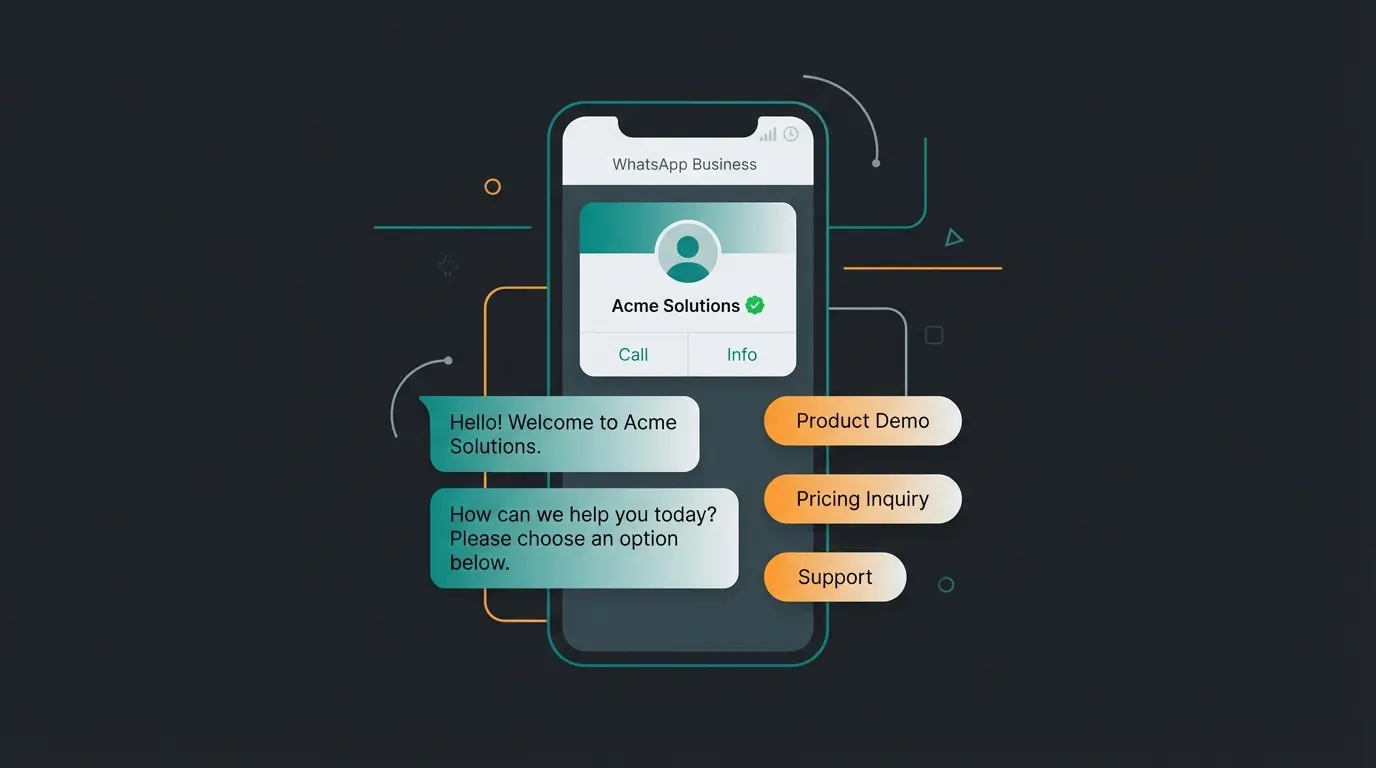
Setting up automated replies in WhatsApp Business takes under five minutes and requires no technical knowledge. Open the app, navigate to Business Tools, and configure three core features: greeting messages, away messages, and quick replies. These three cover the most common first-contact scenarios without any API or third-party tool.
- Download WhatsApp Business from the App Store or Google Play. It is free and separate from the personal WhatsApp app.
- Set up your business profile. Add your company name, address, business hours, website, and a short description. A complete profile builds trust before the first message.
- Enable greeting messages. Go to Business Tools > Greeting message. Toggle it on, write your greeting, and select which contacts receive it. This fires automatically when someone messages you for the first time or after 14 days of inactivity.
- Configure away messages. Business Tools > Away message. Set your schedule (always send, custom schedule, or outside business hours). Write a clear message that sets expectations: 'Thanks for reaching out. We reply within 2 hours during business hours (9-18 CET).'
- Create quick replies. Business Tools > Quick replies. Set up shortcuts for your most frequent answers. Type '/shipping' to instantly send your shipping policy. You can store up to 50 quick replies.
- Test everything. Send a message from a personal WhatsApp number and verify that greetings and away messages trigger correctly. Check that quick replies load with the right shortcut.
WhatsApp Business API - automation for professionals
The WhatsApp Business API is the automation layer for businesses that outgrow the free app. It supports unlimited team members, CRM integration, message templates for proactive outreach, and programmable workflows. Since July 2025, Meta charges per message delivered rather than per conversation, and service messages within 24-hour customer-initiated windows are entirely free.
You do not access the API directly. You work through a Business Solution Provider (BSP) such as Twilio, MessageBird, or 360dialog. The BSP handles the technical infrastructure, provides a dashboard or API endpoint, and manages Meta's approval process for your business account. Most BSPs charge a monthly platform fee ranging from $50 to $500 on top of Meta's per-message costs.
Choosing a BSP depends on your integration needs. Twilio offers maximum flexibility for custom development with deep API access and developer tools. MessageBird focuses on ease of use with a visual flow builder for non-technical teams. 360dialog provides direct API access at lower cost but with less built-in tooling. All three are official Meta partners with verified WhatsApp Business API access.
The API unlocks capabilities the free app simply cannot offer. Automated order confirmations, shipping notifications, abandoned cart reminders, appointment scheduling, and post-purchase surveys all become programmable workflows. According to Nucleus Research, companies using marketing automation see a 14.5% increase in sales efficiency. On WhatsApp, with its 95% open rate, that effect compounds.
| Message category | Price range (per message) | When it applies |
|---|---|---|
| Service (within 24h window) | Free | Replying to customer-initiated messages |
| Marketing | $0.01-0.13 | Promotions, offers, re-engagement campaigns |
| Utility | $0.001-0.05 | Order updates, shipping, account alerts |
| Authentication | $0.001-0.05 | OTP codes, verification messages |
AI employees vs chatbots - the quality leap
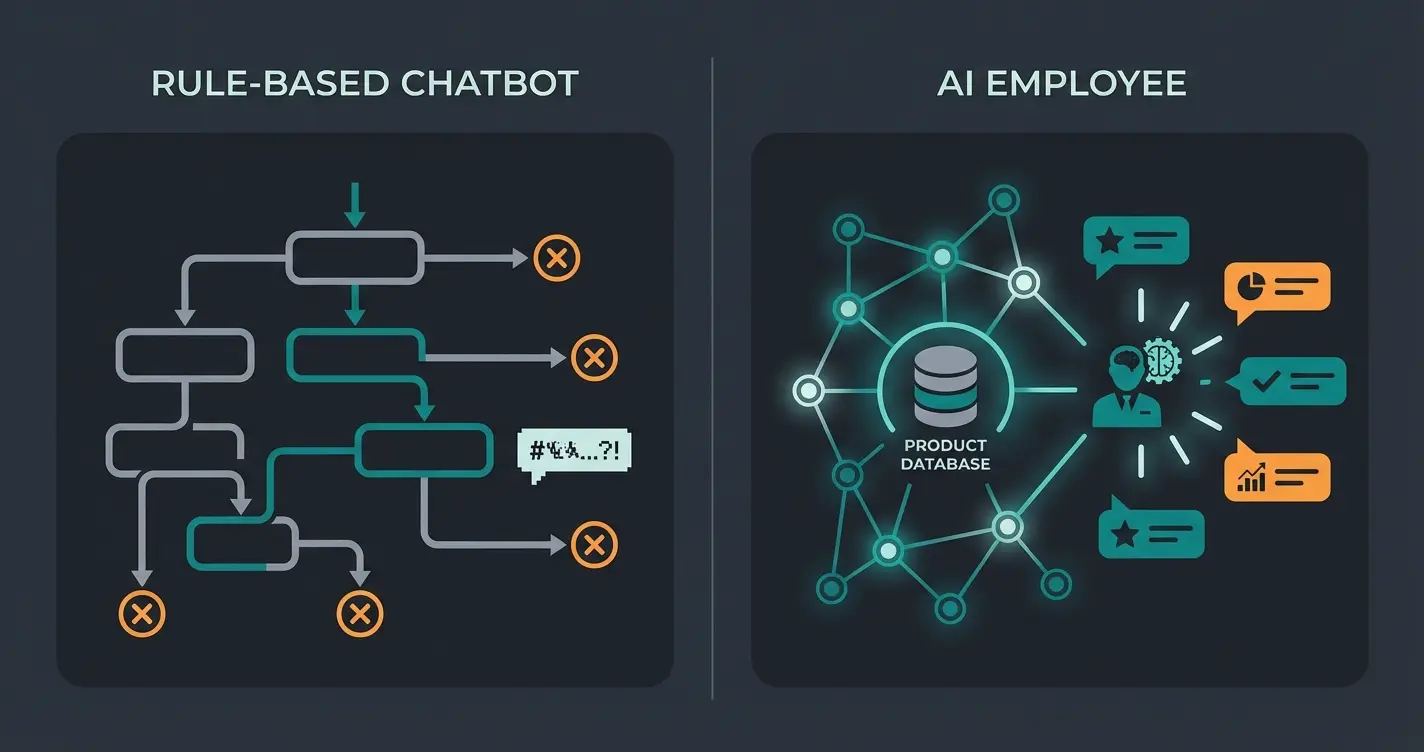
AI employees differ from traditional chatbots in one critical way: they understand your products, your customers, and the context of each conversation. While chatbots follow scripted decision trees and fail the moment a question falls outside their programmed paths, AI employees use retrieval-augmented generation (RAG) to pull live product data and deliver personalized recommendations in real time.
The distinction matters more than it sounds. A chatbot can tell a customer that you sell lawn care products. An AI employee can ask what type of grass they have, check the soil conditions in their region, cross-reference your product database, and recommend the exact fertilizer with the correct application schedule. That is the difference between answering a question and providing consultation.
RAG, retrieval-augmented generation, is the technology behind this capability. The AI employee connects to your product database, knowledge base, and order management system. When a customer asks a question, the system retrieves the relevant product data, combines it with the conversational context, and generates a response that is both accurate and natural. No decision tree design required. No flow maintenance. The AI employee learns your catalog and adapts to how your customers ask questions.
The business impact scales with product complexity. Simple products with few variants see moderate improvements. Consulting-intensive products, where customers need guidance on compatibility, specifications, or application, see dramatic results. This is exactly the segment where traditional chatbots fail because the number of possible question-answer combinations exceeds what any decision tree can cover.
I had expected this technology to take longer to deliver real results. It did not. Drink&Paint, a creative event company, deployed a Qualimero AI employee via WhatsApp to automate artist onboarding and venue matching. The results: 15x ROI, 80% onboarding automation, and 70% support team relief. The AI employee actively matched artists with suitable venues based on their profiles and event requirements.
Drink&Paint, creative events industry
Onboarding fully automated via WhatsApp
Compared to 4+ hours with manual response
No staffing constraints, no shift schedules
For e-commerce businesses with consulting-intensive products, this is where the economics shift. Rasendoktor, an online lawn care specialist, automated 100% of web chat inquiries with an AI employee, achieving 16x ROI and 40% support cost savings. The AI employee handles 2,000-3,000 seasonal inquiries with precise product recommendations, including regional soil and climate considerations.
If you want to see what an AI employee looks like handling real product questions from your catalog, book a live demo.
ROI calculation - is automation worth it?
The average return on investment for AI-powered customer service is $3.50 for every $1 spent, with leading implementations reaching 8x ROI or higher. The primary cost driver is straightforward: an automated interaction costs roughly $0.50, compared to $6.00 for a human-handled conversation, a 12x difference per interaction, according to Freshworks.
| Metric | Manual support | API + automation | AI employee |
|---|---|---|---|
| Cost per interaction | $6.00 | $2.00-3.00 | $0.30-0.50 |
| Monthly cost (500 tickets) | $3,000 | $1,000-1,500 | $150-250 + platform fee |
| Response time | 30 min - 4 hours | Instant (templates) | Instant (contextual) |
| Availability | Business hours only | 24/7 (templates only) | 24/7 (full consultation) |
| Upselling capability | Depends on agent skill | None (rule-based) | Automated cross-sell |
| Scalability | Linear (more staff = more cost) | Moderate | Near-unlimited |
A Forrester study found that modeled customers achieved 210% ROI over three years with payback periods under six months. Most companies see initial benefits within 60-90 days. The AI customer service market reflects this momentum: projected to reach $47.8 billion by 2030, up from $12 billion in 2024, at a 25.8% annual growth rate.
Curious how these numbers look for your specific product catalog and message volume? Our team maps out the projected savings in a free 30-minute consultation.
GDPR and data privacy in WhatsApp automation
WhatsApp automation is fully GDPR-compliant when you use the official Business API with explicit customer opt-in, a signed data processing agreement (DPA) with your BSP, and EU-based data hosting. The free WhatsApp Business App encrypts messages end-to-end by default, but API integrations route data through third-party servers, which requires additional safeguards.
This matters especially for businesses selling to EU customers. The General Data Protection Regulation imposes strict requirements on how customer data is collected, stored, and processed. Violations carry fines of up to 4% of annual global turnover or EUR 20 million, whichever is higher. Getting the data handling right from the start is not optional, it is a business-critical requirement.
- Explicit opt-in required. Customers must actively consent to receiving messages. Pre-checked boxes do not count under GDPR. Document when and how consent was given.
- Data processing agreement (DPA). Sign a DPA with your BSP specifying data storage location, retention periods, and processing purposes. Meta provides a standard DPA for WhatsApp Business API users.
- EU data hosting. Choose a BSP that stores conversation data on EU-based servers. If your provider routes data through US servers, ensure Standard Contractual Clauses or equivalent safeguards are in place.
- Right to erasure. Implement a process to delete customer data upon request, including conversation history, contact details, and data stored in connected CRM systems.
- Data minimization. Only collect data necessary for the service interaction. Do not use WhatsApp conversation data for unrelated marketing without separate consent.
The Business App's end-to-end encryption is a strong baseline, but it does not cover data stored in CRM systems, analytics platforms, or AI training datasets. When deploying an AI employee, verify that the provider stores training data and conversation logs within the EU and does not use your customer conversations to train models for other clients.
FAQ - WhatsApp customer service automation
Automated customer service on WhatsApp uses technology to handle customer inquiries without manual intervention, ranging from simple auto-replies to AI employees that understand product catalogs and deliver personalized recommendations. According to IBM, customer service automation encompasses any technology that reduces human involvement in resolving support requests. Implementations range from $0.50 per interaction for fully automated AI systems to $6.00 for traditional human-handled conversations.
Yes, WhatsApp officially supports automation through two channels. The free Business App offers basic auto-replies including greeting messages, away messages, and quick replies. The Business API enables advanced automation including message templates, CRM workflows, and AI-powered agents, all compliant with Meta's Business Messaging Policy.
Service messages within 24-hour customer-initiated windows are free. Marketing messages cost $0.01-0.13 per message, utility messages $0.001-0.05, depending on the recipient's country. BSP platform fees typically range from $50-500 per month. The pricing model changed from per-conversation to per-message in July 2025.
WhatsApp automation is GDPR-compliant when implemented correctly with explicit customer opt-in, a signed data processing agreement with your BSP, EU-based data hosting, and processes for data deletion on request. The Business App's end-to-end encryption provides a baseline, but API integrations require additional safeguards for data stored in CRM systems and analytics platforms.
A chatbot follows pre-programmed decision trees and fails when questions fall outside its scripts. An AI employee uses retrieval-augmented generation (RAG) to access your product database in real time, understand context, and deliver personalized recommendations. Qualimero clients achieve 15-18x ROI with AI employees, compared to marginal efficiency gains from basic chatbot implementations.
More WhatsApp messages are only half the equation. A Qualimero AI employee turns those conversations into qualified consultations, with personalized product recommendations that increase cart value by 35% on average.
Book a live demo
Lasse is CEO and co-founder of Qualimero. After completing his MBA at WHU and scaling a company to seven-figure revenue, he founded Qualimero to build AI-powered digital employees for e-commerce. His focus: helping businesses measurably improve customer interaction through intelligent automation.