Introduction: Why Free Chatbots Aren't Always Free
Customers expect real-time answers today—24 hours a day, 7 days the week. If you respond to an email inquiry only after 24 hours, you've often already lost the customer to the competition. The solution seems obvious: A free chatbot on your website that handles initial communication and provides 24/7 product consultation.
But be careful: When you search Google for 'free chatbot,' you often end up in a dead end. The search results mix two completely different worlds: Private users looking for a free alternative to ChatGPT to write texts, and businesses that need a service widget for their website.
This article is aimed at business owners, marketing managers, and support leaders. We compare genuine 'Free Forever' plans with mere trial phases and show you how to not only block support tickets but hire a digital employee who actively sells. According to Amio, many businesses fail to distinguish between these fundamentally different use cases, leading to poor tool selection.
Key Points: What This Guide Covers
- Intent Clarification: This article clearly distinguishes between private 'toys' (like ChatGPT for homework) and professional website bots that generate leads and provide support.
- Cost Truth: Many 'free' chatbots are deceptive packages. We analyze the hard limits (e.g., 50 chats/month at Tidio) and hidden costs.
- Sales vs. Support: While competitors focus on support automation, this article shows how a bot can function as an active sales consultant (Sales AI) generating revenue.
- GDPR Focus: A critical look at server location and data protection, which is essential for businesses operating in Europe and beyond.
What Is a Free Chatbot and What Can It Achieve?
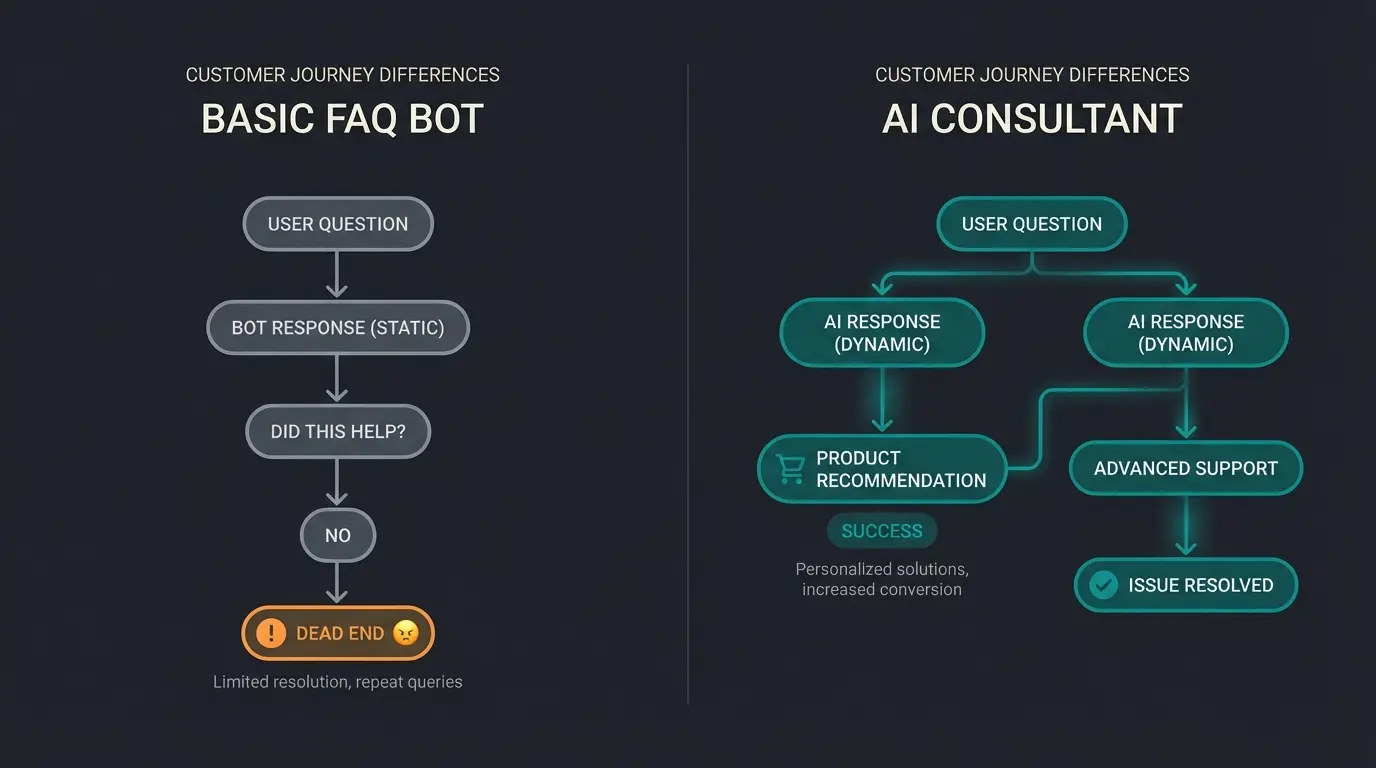
Before we compare tools, we need to make a fundamental distinction. Not every chatbot without costs works the same way. The market divides into two camps in 2025, and understanding this difference is crucial for making the right choice. The evolution from FAQ bots to AI represents one of the most significant shifts in customer service technology.
1. The 'Gatekeeper' (Rule-Based Bots)
This is the classic variant that you'll find in the free versions of tools like HubSpot or Userlike. These bots follow predetermined paths and can't deviate from their scripts.
- How it works: A decision tree (If customer clicks X, show answer Y).
- Advantage: 100% control, no hallucinations or unexpected responses.
- Disadvantage: As 'dumb' as a form. If the customer asks a question not in the script, the bot fails.
- Use case: Simple lead qualification (collecting name/email) or FAQ navigation.
2. The 'Product Consultant' (AI & LLMs)
Here's where modern solutions come into play (often based on GPT-4 or Claude), which 'read' your website data and respond freely. These AI expert consultants represent the cutting edge of conversational AI technology.
- How it works: Generative AI, trained on your data.
- Advantage: Can answer complex questions ('Which running shoe fits my weight and running style?').
- Disadvantage: In free versions often extremely limited (e.g., only 50 responses/month).
- The USP potential: While most companies only use bots to reduce support costs ('Ticket Deflection'), the real gold lies in the Conversion Rate. An AI bot can function as a Sales Consultant that actively advises visitors and leads them to purchase completion, instead of just sending return labels.
Average support volume reduction with basic FAQ bots
Potential revenue increase with AI sales consultants
Revenue-focused bots vs. cost-focused bots
The 3 Biggest Dangers of 'Free Solutions'
A free chatbot sounds tempting, but in the B2B environment, you often pay with a different currency than money: data, trust, or time. Understanding these hidden costs is essential before committing to any solution, whether you're implementing AI Chatbots for E-Commerce or general customer service.
1. The '50-Chat Trap' (Hidden Costs)
Many providers advertise 'Free Forever' but conceal the hard limits in their marketing. A classic example is Tidio: The free plan often includes only about 50 conversations per month, as noted by PagerGPT in their comprehensive analysis.
2. The GDPR Bomb
For businesses operating in Europe, 'free' often equates to 'US servers.' Many international tools (like Chatbase or pure OpenAI wrappers) host data by default in the USA. According to Botpress, proper data handling is crucial for compliance.
The Risk: Without a proper DPA (Data Processing Agreement) and EU server location, you risk legal action. Using a free chatbot can quickly become expensive if it sets cookies without consent or transmits IP addresses unencrypted. Lime Technologies emphasizes that businesses must verify compliance before deployment.
3. The 'Powered by' Branding
Free versions serve providers as advertising space. Your chat widget then prominently displays 'Powered by HubSpot' or 'Made with Tidio.'
The Risk: It signals to your customers: 'We're cutting costs on service.' For a hobby site, that's okay, but for a premium service provider, it's a no-go. This is where the distinction between digital sales consultants and basic free tools becomes critical.
Estimate monthly conversations based on website traffic
Compare against free tier limits (usually 50-200/month)
Confirm server location and DPA availability
Evaluate if 'Powered by' affects brand perception
Factor in lost sales from bot limitations
Top 7 Free Chatbot Software Comparison (2025)
We analyzed the market leaders and evaluated them based on their usefulness for Sales & Support. Here's the overview for businesses seeking the right solution. Whether you need Consultative AI chatbots or simple FAQ automation, this comparison will help you decide.
Comparison Table: Free Chatbot Plans
| Provider | Type | Free Limit | Server Location | Best For... |
|---|---|---|---|---|
| 1. Userlike | Rule-based | Unlimited Chats (1 Widget) | 🇩🇪 Germany (GDPR King) | Data Protection & Support |
| 2. Tidio | Hybrid (AI+Rules) | 50 Chats/Month | 🇺🇸 US / 🇪🇺 EU | E-Commerce Startups |
| 3. HubSpot | Rule-based | Unlimited (heavily limited features) | 🇺🇸 US (EU Option in Paid) | CRM Integration |
| 4. Typebot | Visual Builder | 200 Chats/Month | 🇫🇷 France (Self-host possible) | Lead Capture |
| 5. Smartsupp | Hybrid | 100 Chats/Month | 🇨🇿 Czech Republic (EU) | Webshops with Video Tracking |
| 6. Chatbase | AI (GPT Wrapper) | 20 Messages/Month | 🇺🇸 US | Quick AI Demos |
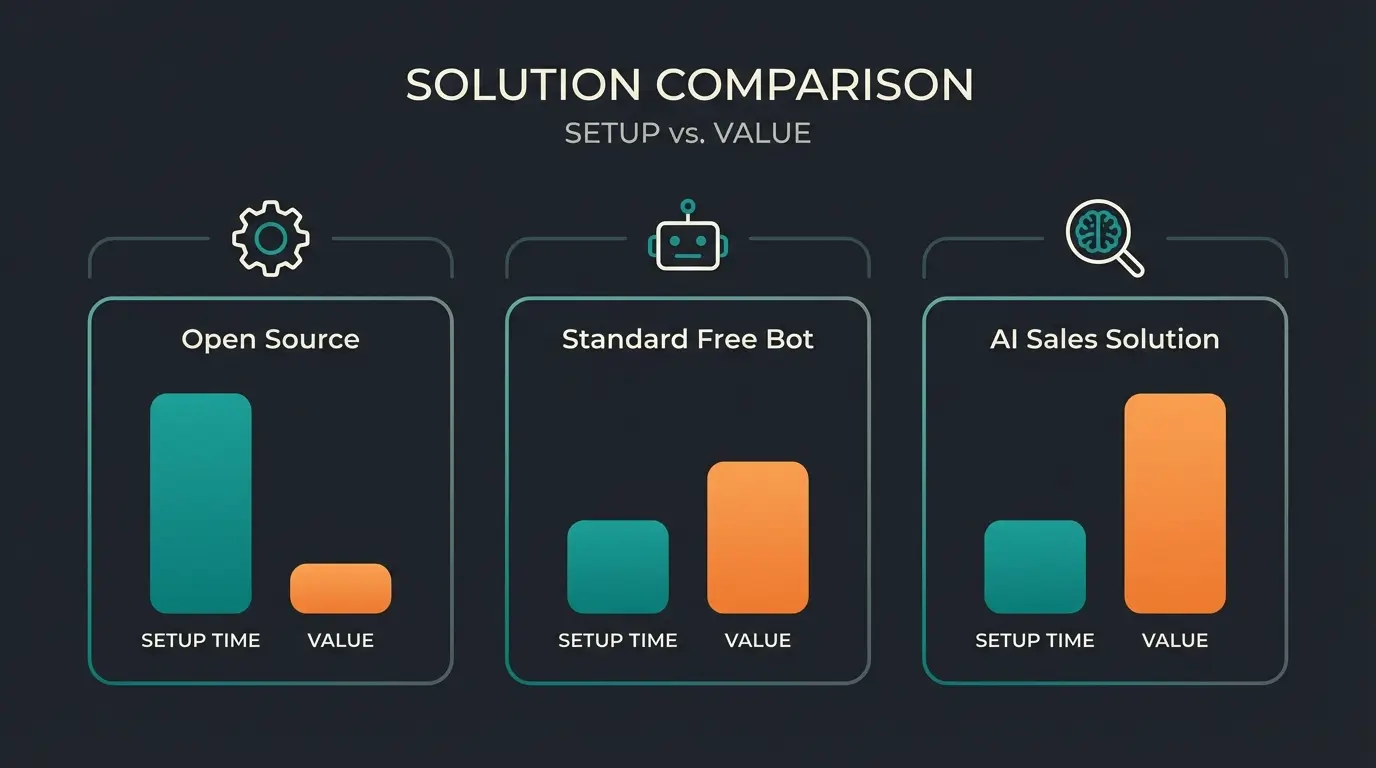
| 7. FlowiseAI | Open Source | Unlimited (Self-Hosted) | 🌍 Your Server | Developers & Tinkerers |
Detailed Provider Analysis
1. Userlike – The German Data Protection Champion
Userlike is one of the few providers that allows unlimited conversations in the free plan, as confirmed by ITQlick and Saufter in their reviews.
- Advantages: Servers in Germany, extremely GDPR-compliant, WhatsApp integration (in Paid), very professional design.
- Disadvantages: No AI features in the Free plan, only 1 widget and 1 operator seat.
- Verdict: The best chatbot without costs for SMBs that primarily want to offer live chat and prioritize data protection.
2. Tidio – The E-Commerce Favorite
Tidio is extremely popular with Shopify users. It combines live chat with 'Lyro,' an AI solution that can handle complex customer inquiries.
- Advantages: Very easy installation, good mobile app, AI features ('Lyro') are strong.
- Disadvantages: The limit of 50 chats/month in the Free plan is extremely low. Once the limit is reached, you must upgrade (from approx. $29/month).
- Verdict: Good for testing, but too quickly becomes paid for serious business use.
3. HubSpot – The CRM Powerhouse
HubSpot offers a chatbot builder as part of its 'Free Tools' package. According to ChatSignals, while powerful for CRM integration, the free bot capabilities are limited.
- Advantages: Seamless integration into HubSpot CRM. Every chat lands directly in the customer file.
- Disadvantages: The free bot is 'dumb' (only rule-based). No AI automation in the Free tier. The branding is very prominent.
- Verdict: Ideal if you already use HubSpot as CRM and only need simple appointment booking or qualification.
4. Typebot – The Lead Magnet
Typebot takes a different approach: The chat looks like an interactive form. According to Typebot's official documentation, it offers unique customization options.
- Advantages: Excellent user experience (UX) for lead capture. Open-source approach. The cloud free plan offers 200 chats/month.
- Disadvantages: Less suitable for classic support ('Where's my package?'), more for marketing funnels.
- Verdict: Hidden gem for marketing agencies and landing pages.
5. Smartsupp – The Analyst
Smartsupp offers video recordings of visitor behavior alongside the chat. SMBGuide and Smartsupp highlight its unique analytics capabilities.
- Advantages: Servers in the EU (Czech Republic). Video recordings show where customers get stuck.
- Disadvantages: Limited to 100 conversations/month in the Free plan.
- Verdict: Exciting for e-commerce optimizers who want to understand why customers don't buy.
6. Chatbase / SiteGPT – The AI Quick Starters
These tools allow you to upload a PDF or URL and instantly create a ChatGPT-like bot. Reviews from Eesel and SiteGPT highlight both capabilities and limitations.
- Advantages: Extremely fast ('done in 2 minutes'). Impressive AI responses.
- Disadvantages: The free plans are almost unusable for live operation (e.g., only 20-100 messages/month). They serve more as demos.
- Verdict: Good for the 'wow effect' in meetings, but not productively usable in the Free tier.
7. FlowiseAI – For Techies & Developers
Flowise is an open-source solution (low-code) for building your own LLM apps. According to YouTube tutorials and FlowiseAI documentation, it offers maximum flexibility.
- Advantages: Complete freedom. No monthly subscription costs for the software (only for your own servers/API keys).
- Disadvantages: High technical barrier. You must host it yourself (self-hosted) and pay for API keys (e.g., OpenAI) yourself.
- Verdict: The most powerful solution if you have developer resources.
Stop losing sales to silent website visitors. Our AI product consultants actively engage, advise, and convert—going far beyond basic FAQ automation.
Start Your Free TrialTutorial: Create Your First AI Consultant in 10 Minutes
Many lists tell you which tool to use, but not how to use it strategically. Here's the path from 'support blocker' to 'sales consultant.' This approach transforms your chatbot from a cost center into a revenue-generating product consultant.
Step 1: Define Your Goal (The Pivot)
Stop seeing the bot only as an FAQ machine. The difference between mediocre and exceptional results lies in your strategic framing.
- Wrong goal: 'I want to answer fewer emails.'
- Right goal: 'I want every visitor on the product page to receive purchase consultation.'
This shift in perspective transforms your approach to AI Product Consultation. You're not just deflecting queries—you're actively driving revenue.
Step 2: Data Preparation (Knowledge Base)
A free chatbot (especially AI variants like Chatbase or trial phases of paid tools) is only as smart as its data. The quality of your knowledge base directly determines your bot's effectiveness.
- Don't just upload your terms and conditions.
- Create a list of 'sales objections' (Objection Handling).
Step 3: Strategic Embedding
Use tools like Typebot or Userlike to place the bot strategically. The placement determines whether your bot becomes an effective AI product consultant or just another ignored widget.
- Don't embed the bot globally on every page the same way.
- On the pricing page, the bot should proactively ask: 'Do you have questions about the packages?'
- On the support page, it should ask: 'How can I help you?'
This contextual approach is what separates autonomous digital consultants from basic chat widgets.
GDPR Compliance Checklist for Chatbots
Before you put a free chatbot on your website, check these 4 points. Violations can be more expensive than any premium subscription. According to E-Recht24, proper compliance is non-negotiable for European businesses.
- Server Location: Is the data stored in the EU? (Userlike, Smartsupp, Typebot Self-Hosted: ✅ / Many US tools: ⚠️).
- DPA (Data Processing Agreement): Does the provider offer a data processing agreement? Without this, you may not process personal data.
- Cookie Consent: The chatbot may only load (and set cookies) after the user has consented in the cookie banner. Many 'embed codes' load immediately—that's a violation.
- Right to Be Forgotten: Can you delete chat logs upon a customer's request? With simple free tools, this is often technically difficult.
German servers, full DPA, GDPR-native
Smartsupp, Typebot with proper configuration
Require additional legal framework for EU use
Sales Bot vs. Support Bot: Understanding the Value
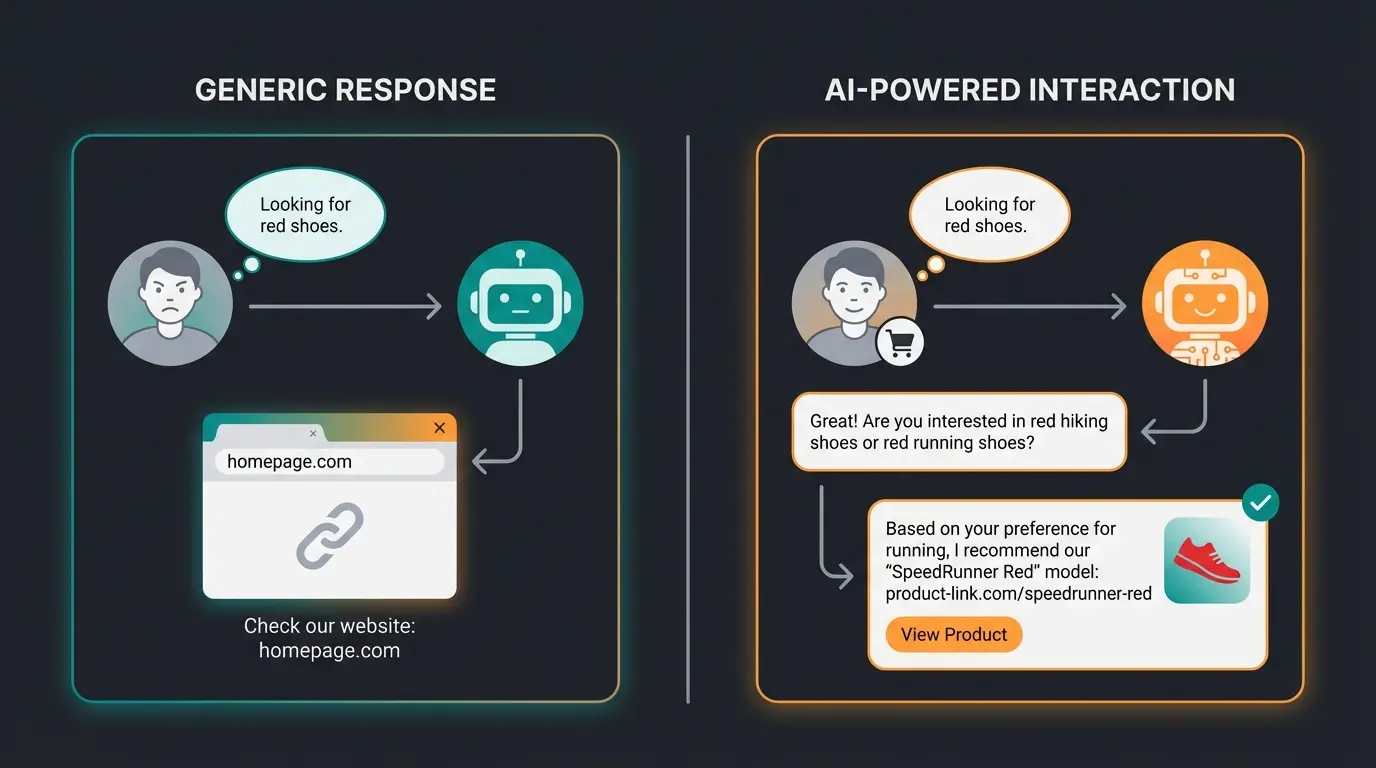
The most significant gap in current chatbot discussions is the distinction between cost-saving and revenue-generating applications. While 90% of content focuses on customer support (answering FAQs like 'Where is my package?'), the real opportunity lies in active product consultation.
The Traditional Approach: Ticket Deflection
Most businesses implement chatbots to reduce support costs. The bot answers common questions, deflects tickets, and saves staff time. While valuable, this approach only addresses the cost side of the equation.
The Revenue Approach: Sales Consultation
AI product consultants take a fundamentally different approach. Instead of waiting for problems, they proactively engage visitors with personalized product recommendations. The AI Employee Conversion Rate data shows dramatic improvements when this approach is implemented correctly.
Conclusion: When Is an Upgrade Worth It?
A free chatbot is the perfect entry point to test acceptance among your customers. Tools like Userlike (for data protection focus) or Typebot (for lead generation) offer excellent free versions that let you start without needing budget approval.
But be honest with yourself: Once the bot starts making money (through leads or sales), upgrading becomes mandatory.
- If you generate 50 leads per month, Tidio's limit is reached.
- If you want to appear professional, the 'Powered by' logo must go.
- If you want real AI consultation, you can't avoid paid tokens (OpenAI/Anthropic).
Our recommendation: Start with Userlike for the safe, unlimited live chat entry or use the trial phase of an AI solution to calculate the ROI. When the bot brings in more revenue than it costs, 'free' is no longer the most important criterion.
FAQ: Common Questions About Free Chatbots
Yes, open-source solutions like FlowiseAI or the self-hosted version of Typebot are license-free. However, you pay for hosting and potentially AI API costs (e.g., to OpenAI). Among SaaS solutions, Userlike with unlimited chats in the Free plan is very generous.
No. ChatGPT (the web interface) is for private use. To integrate GPT technology on your website, you need the OpenAI API (paid by usage) and an interface (like Chatbase or Flowise). The API costs can add up quickly depending on volume.
AI responses cost computing power and money. Every answer an AI bot generates costs the provider fractions of a cent. Therefore, 'Free Plans' for AI bots are usually limited to few messages to control costs while demonstrating value.
Rule-based bots follow predetermined scripts (if-then logic) and can only handle questions they're programmed for. AI chatbots use language models to understand context and generate natural responses, making them capable of handling unexpected questions and providing personalized recommendations.
Check four key areas: 1) Server location (EU preferred), 2) Data Processing Agreement availability, 3) Cookie consent integration (bot should only load after consent), and 4) Ability to delete chat logs on request. European providers like Userlike typically offer better compliance out of the box.
Join businesses already using AI product consultants to increase conversions. Start free and upgrade only when you see results.
Get Started Free
Lasse is CEO and co-founder of Qualimero. After completing his MBA at WHU and scaling a company to seven-figure revenue, he founded Qualimero to build AI-powered digital employees for e-commerce. His focus: helping businesses measurably improve customer interaction through intelligent automation.