Why "Fast" Must Be Redefined in 2026
In e-commerce, speed has long been a purely technical game: How quickly does the server deliver the first byte (TTFB)? How fast is the largest image visible (LCP)? But in 2026, that's no longer enough. The rules have changed—both through Google and through user expectations.
While many store operators are still trying to shave milliseconds off their load times, they're losing sight of what really matters: perceived performance and the efficiency of the user journey. If you're considering platform alternatives, our guide on Magento to Shopware migration explores the strategic options available.
Since March 2024, Google's INP score (Interaction to Next Paint) no longer just measures how quickly a page loads, but how quickly it responds to inputs according to GlowMetrics and Search Engine Land. A store that looks fast but briefly freezes when you click "Add to Cart" will be penalized.
At the same time, we face a paradox: stores are becoming technically more complex (more tracking, more chatbots, more personalization), yet they need to be faster. This guide shows you not only the essential technical foundations for Magento 2.4.x (including version 2.4.8 and PHP 8.4), but also how to use modern tools like AI to increase your revenue without ruining your performance scores. For comparison, see how Shopware page speed optimization approaches similar challenges.
The Business Case: Why Magento Performance Is Your Key Revenue Lever
Before we dive into the depths of `nginx.conf` and Varnish caches, let's talk about money. Performance isn't a "nice-to-have" for the IT department—it's hard currency in marketing.
The Hard Numbers (2025/2026 Data)
Current data reveals a brutal reality for slow stores. According to RedStag Fulfillment and Forbes Advisor, the impact is significant:
Per 1-second delay in load time
Users leave if page takes over 3 seconds
Average e-commerce conversion in 2025
For a $5M store with 1-second delay
As noted by Kanuka Digital and Envisage Digital, the 3-second threshold represents a critical conversion cliff. Those who lag behind technically quickly slip below 1.5% conversion rates.
The New Concept: Time-to-Product
Classic performance guides focus on load time. We need to think further toward Time-to-Product—how quickly can a user find and purchase what they're looking for?
- Scenario A (Classic): The store loads in 0.8 seconds. But the user must click through 5 categories and set 3 filters to find the product. Total duration: 3 minutes.
- Scenario B (AI-powered): The store loads in 1.2 seconds (slightly slower due to scripts). But an intelligent AI search guides the user directly to their goal. Total duration: 45 seconds.
The Technical Foundation: Hosting & Server Setup
A Magento store on shared hosting is like a Ferrari in traffic. No matter how good the engine is, it can't move forward. For serious Magento optimization, you need a dedicated stack. When exploring hosting options, compare approaches like Magento 2 hosting for AI-powered shops to understand the infrastructure requirements.
The Holy Trinity of Magento Speed
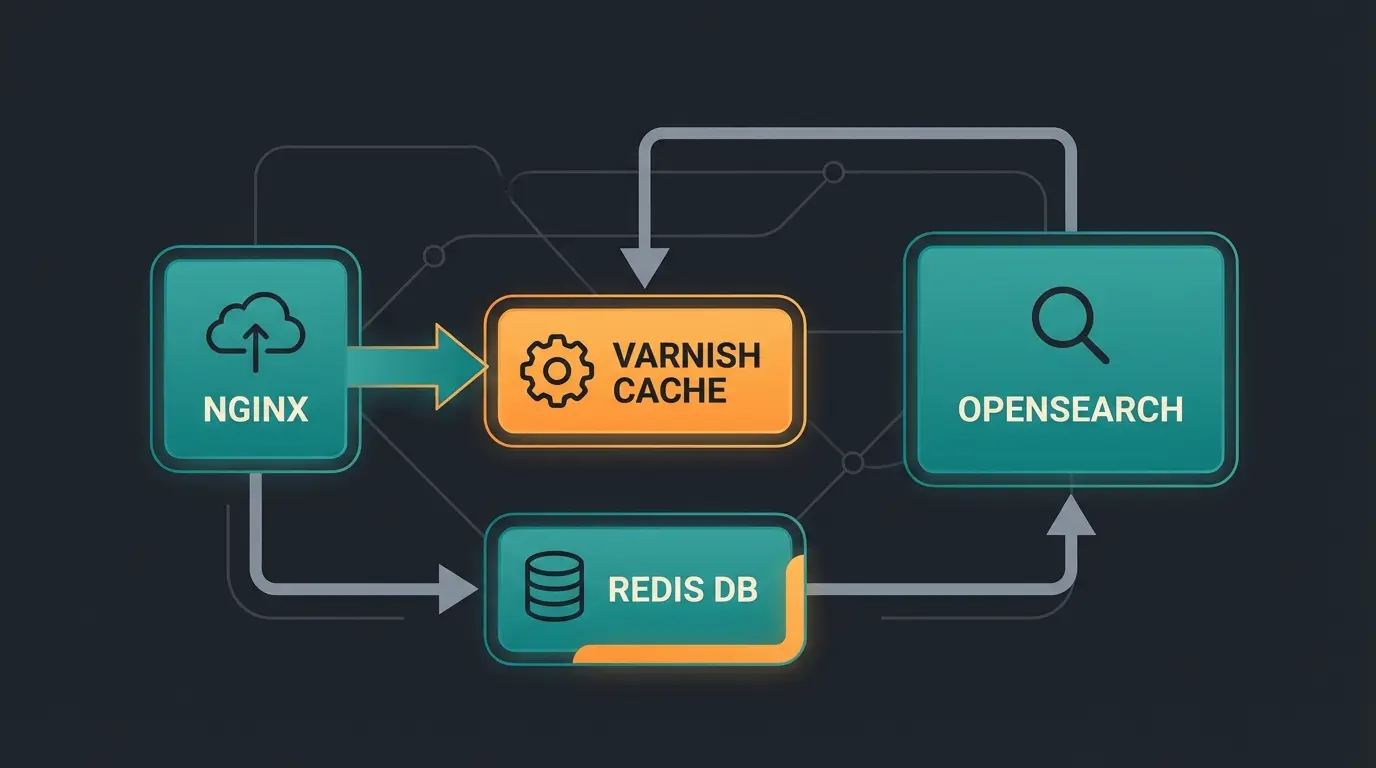
For maximum speed, there's no way around this combination:
Handles thousands of concurrent connections more efficiently than Apache, better for serving static content
Stores complete HTML responses in RAM, reducing TTFB from 500-1000ms to under 50ms
Moves sessions and configurations from filesystem to RAM, dramatically speeding up backend and checkout
Modern search engine replacing Elasticsearch as the standard for Magento 2.4.7+
Important for Varnish: It must be correctly configured to punch "holes" in the cache for cart updates or login status (ESI - Edge Side Includes) so that dynamic content still works. For similar hosting optimization strategies, see how modern Shopware hosting approaches these challenges.
Elasticsearch vs. OpenSearch: The New Standard
Until recently, Elasticsearch was the standard. With newer Magento versions (from 2.4.7 and especially looking at 2.4.8), the landscape has shifted. According to Epartment and KiwiCommerce, Adobe has established OpenSearch as the default search engine.
PHP Versions: Stay Current for Magento Speed
With the release of Magento 2.4.8 in April 2025, support for PHP 8.4 was introduced according to Ten50 and OnTap Group.
- Why upgrade? Each new PHP version brings performance improvements through more efficient code execution (JIT Compiler)
- Benchmark: The jump from PHP 8.1 to 8.3/8.4 can increase execution speed of complex scripts by 10-15%
- Caution: PHP 8.1 is no longer supported by newer Magento versions according to RockTechnoLabs
Frontend Optimization & Core Web Vitals: The Gamechanger
This is often where the battle for Google ranking is decided. The backend makes the store fast; the frontend ensures it feels fast. For comparison, explore how Shopware performance optimization tackles similar frontend challenges.
INP (Interaction to Next Paint) Replaces FID
Since March 2024, FID (First Input Delay) is history. Google now measures INP according to Google's official documentation.
- What is INP? It measures the time between a user action (click, keypress) and the moment the browser paints the next frame
- The Problem: If you click a button and the browser "freezes" for 500ms while processing JavaScript, you have a bad INP score
- Solution: Avoid "Long Tasks" in the Main Thread (JavaScript tasks lasting longer than 50ms), use Web Workers to offload heavy computations, and reduce DOM complexity
The Theme Dilemma: Luma vs. Hyvä
Magento's standard theme ("Luma") is based on outdated technologies (RequireJS, Knockout.js, jQuery) that load massive amounts of JavaScript. This is the main reason for poor INP scores.
The Solution: Hyvä Theme - Hyvä has revolutionized the Magento world by streamlining the entire frontend stack. According to Neklo case studies and HumCommerce comparisons, the results are impressive:
- Technology: Instead of hundreds of JS files, Hyvä uses only Alpine.js and Tailwind CSS
- Result: Reduction of loaded data by often 90%, perfect Core Web Vitals out of the box
- Case Studies: Performance improvements of 60% to 75% after migration
- Recommendation: If you're planning a relaunch or have massive performance problems, switching to Hyvä is often more economical than trying to optimize Luma
JavaScript Bundling: A Dangerous Myth
In many old guides (and unfortunately in some agency minds), the tip persists: "Enable JS Bundling." According to Mobecls and Magento StackExchange discussions, this is counterproductive.
| Optimization Method | Old Approach | 2026 Best Practice |
|---|---|---|
| JavaScript Loading | JS Bundling (5-10MB bundles) | HTTP/2 Multiplexing (many small files) |
| CSS Optimization | Merge all CSS files | Critical CSS + Lazy load rest |
| Catalog Structure | Flat Catalog enabled | Flat Catalog DISABLED |
| Performance Metric | FID (First Input Delay) | INP (Interaction to Next Paint) |
| Frontend Framework | Luma (RequireJS/Knockout) | Hyvä Theme (Alpine.js/Tailwind) |
Reality 2026: Native Magento JS Bundling combines all JavaScript files into huge packages (5-10 MB). The browser must load and parse these enormous files before the page is usable. This blocks the Main Thread and destroys your INP score. Better: Use HTTP/2 Multiplexing. Modern browsers can load many small files in parallel. Leave JS Bundling disabled in Magento unless you use specialized tools like Magepack or Baler (though even these become obsolete with Hyvä).
Images: WebP, AVIF and Layout Shifts
- Formats: Use WebP or AVIF. These are 30-50% smaller than JPG/PNG at the same quality. Magento supports this natively.
- CLS (Cumulative Layout Shift): Always give images `width` and `height` attributes in HTML. This allows the browser to reserve space before the image loads, preventing the annoying content "jumping" that Google rates negatively.
Our AI-powered analysis identifies your biggest performance bottlenecks and shows you exactly how to achieve 90+ PageSpeed scores while improving user experience.
Get Free Performance AnalysisThe Hidden Killer: Third-Party Scripts & The AI Strategy
Here's your chance to stand out from the competition. Most stores slow down as soon as the marketing team installs tracking pixels, chatbots, and review widgets. Understanding how AI eliminates waiting times can help you balance functionality with performance.
The Problem with Third-Party Scripts
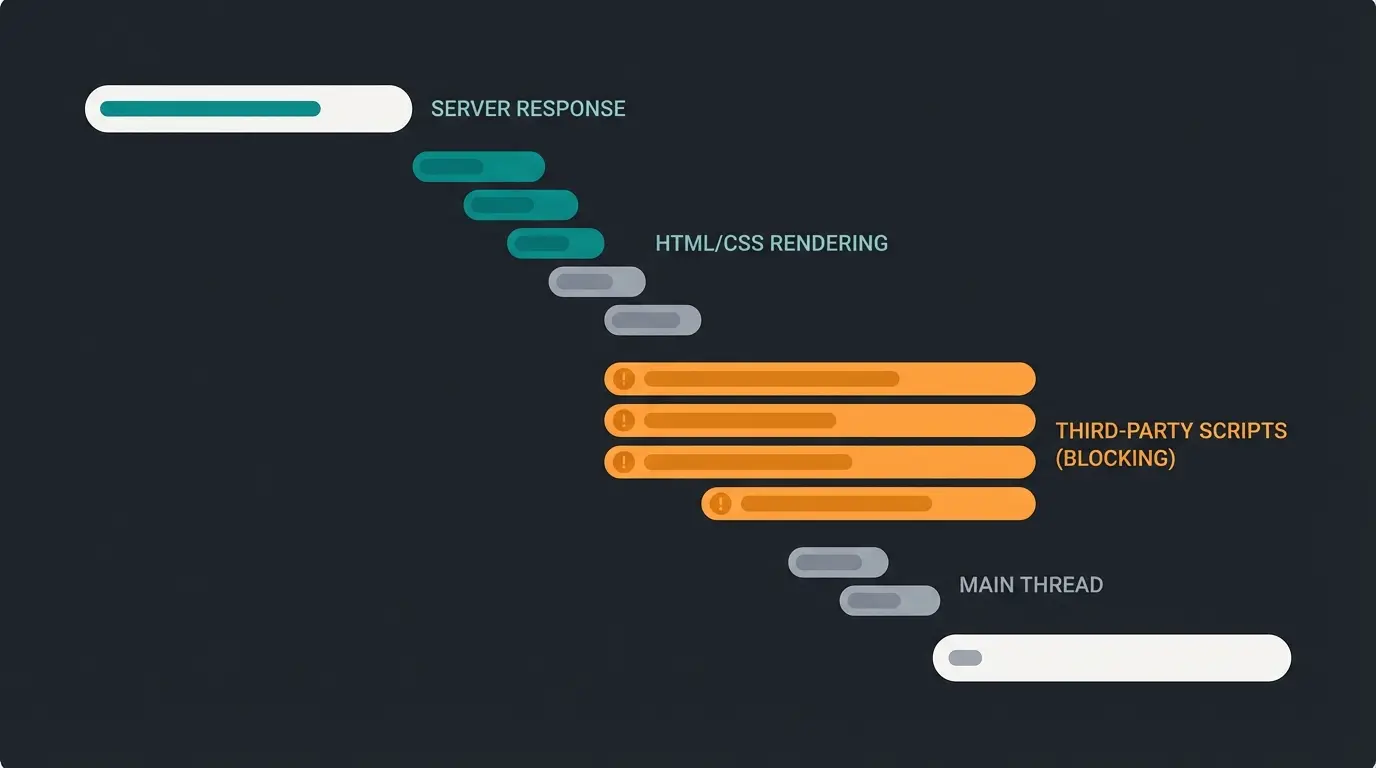
Every external script (Facebook Pixel, Hotjar, Zendesk) must be loaded, parsed, and executed. When these scripts load synchronously in the `<head>`, they block page rendering. This is one of the most overlooked aspects of Magento optimization.
The Solution: Asynchronous Loading & Deferring
- Strategy: Load scripts that aren't immediately necessary for page rendering with a delay
- Technique: Use attributes like `defer` or `async`. Even better: Load heavy tools (like chatbots) only when the user starts scrolling or moves the mouse (User Interaction Trigger)
- Impact: This approach can improve your INP score by 30-50% without losing any functionality
Your Differentiation: Performance-Optimized AI
Many store operators shy away from AI consultants or chatbots for fear of performance loss. This concern is unfounded when done correctly. Working with an experienced Magento freelancer in Germany can help you implement AI solutions properly.
Technical Integration Done Right:
- A modern AI assistant should be embedded as a lightweight JavaScript snippet that loads asynchronously
- It must not affect the LCP (Largest Contentful Paint). The chat icon appears only when the page is visually complete
- This keeps the Google PageSpeed Score at 90+ while you still offer high-end functionality
Psychological Performance: When a user lands on a category page with 500 products, they're overwhelmed (Analysis Paralysis). An AI that asks: "Are you looking for running shoes for asphalt or trail?" and immediately filters to the matching 3 products saves the user minutes of search time. The store feels blazing fast to the customer because they reach their goal faster—even if the technical load time is identical. Explore how AI-powered sales assistants can transform your customer experience.
Database & Backend Maintenance: Cleaning Up for Pros
An often overlooked area is the database. Over time, Magento accumulates millions of log entries that slow everything down. Proper hosting infrastructure is essential—see our comparison of Shopware cloud hosting options for infrastructure best practices.
Flat Catalog: A Relic of the Past
In old Magento 1 days and early Magento 2 versions, the "Flat Catalog" was the cure-all. It copied attributes into a flat table to avoid SQL joins. According to MGT Commerce and Magento StackExchange, this approach is now outdated.
- Status 2026: DO NOT use Flat Catalog anymore
- Why? Since Magento 2.3+ and the introduction of Elasticsearch/OpenSearch, Flat Catalog is counterproductive. It causes indexing problems and performance losses
- Action: Set `Use Flat Catalog Category` and `Use Flat Catalog Product` in the configuration to `No`
Log Cleaning & Maintenance
- Logs: Ensure cron jobs run that regularly clean old database logs (e.g., `report_event`, `customer_visitor`)
- Reindexing Strategy: Use "Update on Schedule" instead of "Update on Save" for your indexers
- Update on Save: Indexes immediately when saving a product. This makes saving in the backend slow
- Update on Schedule: A cron job processes changes in the background (usually every minute). This relieves the store during live operation
Checklist: Make Your Magento Faster
Use this list for a quick audit of your store or as a briefing basis for your agency. For additional SEO optimization guidance, check our comprehensive Shopware SEO guide which covers similar technical fundamentals.
| Area | Action Item | Priority |
|---|---|---|
| Hosting | Varnish Cache activated & configured? | 🔥 High |
| Hosting | Redis for Session & Backend Cache active? | 🔥 High |
| Hosting | PHP Version at least 8.2 (better 8.3/8.4)? | Medium |
| Search | OpenSearch (instead of MySQL Search/Elasticsearch) in use? | 🔥 High |
| Frontend | Hyvä Theme evaluated/in use? | 🔥 High |
| Frontend | Images in WebP/AVIF format + Lazy Loading? | Medium |
| Frontend | JS Bundling DISABLED? | 🔥 High |
| Metrics | Focus on INP instead of FID? | Medium |
| 3rd Party | Tracking/Chatbots loaded asynchronously (defer)? | 🔥 High |
| Database | Flat Catalog DISABLED? | Medium |
| Database | Indexers set to "Update on Schedule"? | Medium |
Case Study: Performance Transformation Results
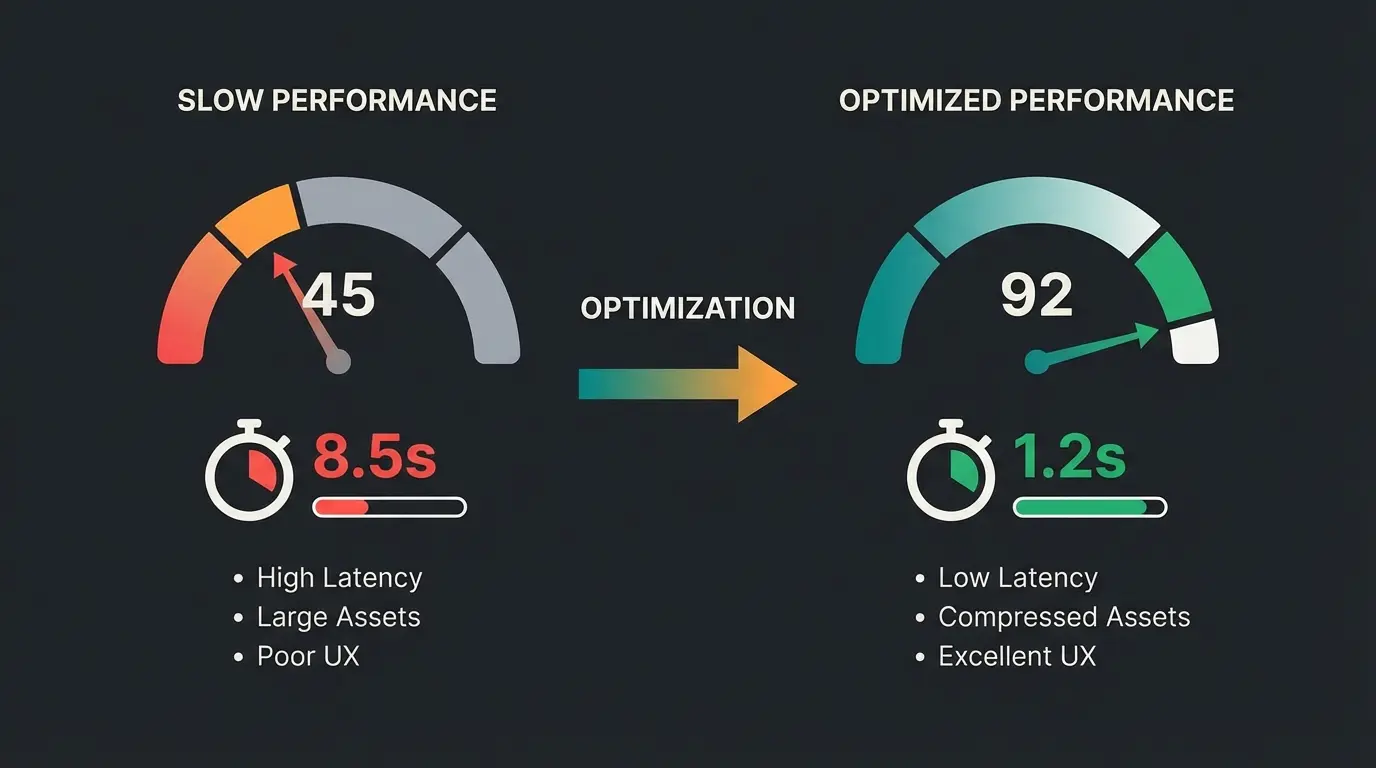
To illustrate the real-world impact of these optimization strategies, consider this typical transformation scenario. Implementing AI customer service chatbots alongside technical optimizations can produce remarkable results:
Mobile performance improvement
Time to interactive reduction
Interaction responsiveness
After full optimization stack
These results were achieved through a combination of: hosting upgrade (Varnish + Redis), Hyvä theme migration, asynchronous loading of third-party scripts including AI tools, and proper database maintenance. The investment typically pays for itself within 2-3 months through increased conversions.
Conclusion: Speed Is Strategy, Not Just Technology
Magento performance in 2026 is more complex than before, but also offers greater opportunities. Those who only stare at the server will lose. The winners are those merchants who pursue a holistic strategy:
- Modern Foundation: Switching to Hyvä and a clean hosting setup (Varnish/OpenSearch) solves 80% of technical problems
- Focus on INP: Ensure a responsive interface to keep both Google and users happy
- Intelligent Extension: Use AI tools to shorten time-to-product, but integrate them technically clean (asynchronously)
A fast store isn't a cost factor—it's your strongest salesperson. When you minimize technical load time while simultaneously optimizing user guidance through AI, you create a shopping experience that makes the competition look old. According to Amra & Elma research, mobile expectations continue to rise, making optimization more critical than ever.
Frequently Asked Questions About Magento Performance
INP (Interaction to Next Paint) measures how quickly your page responds to user interactions like clicks and keypresses. Google replaced FID (First Input Delay) in March 2024 because INP provides a more comprehensive view of page responsiveness throughout the entire user session, not just the first interaction. A good INP score is under 200ms.
For most Magento stores struggling with performance, yes. Hyvä reduces loaded data by up to 90% and achieves perfect Core Web Vitals out of the box. Case studies show 60-75% performance improvements. The migration cost often pays for itself within months through increased conversions and reduced hosting costs.
The key is asynchronous loading. Implement AI tools as lightweight JavaScript snippets that load after the main content is painted (after LCP). Use User Interaction Triggers—loading the chat widget only when users scroll or move their mouse. This approach maintains 90+ PageSpeed scores while still offering full AI functionality.
No. Native Magento JS Bundling creates 5-10MB bundles that block the main thread and destroy your INP score. Instead, use HTTP/2 Multiplexing, which allows browsers to load many small files in parallel. Only consider specialized tools like Magepack if you're not using Hyvä theme.
Magento 2.4.8 supports PHP 8.4, which offers 10-15% performance improvements over PHP 8.1 through the JIT compiler. At minimum, use PHP 8.2, but upgrading to 8.3 or 8.4 is recommended for optimal Magento speed. Note that PHP 8.1 is no longer supported in newer Magento versions.
Stop losing customers to slow load times. Our AI-powered analysis identifies exactly what's slowing your store and provides a prioritized action plan to achieve 90+ PageSpeed scores.
Start Your Free Analysis
Kevin is CTO and co-founder of Qualimero. As an AI architect with over 15 years of experience as CTO and CPO in the tech industry, he designs the AI systems that automate tens of thousands of customer interactions daily for Qualimero's clients — reliably, securely, and at scale.