Why your B2B shop takes orders but does not sell
Most B2B shops function as digital order forms rather than sales channels because they lack the consultative features that drive purchasing decisions. Customer portals, dynamic pricing, and guided ordering workflows are table stakes in 2026, yet most Shopware installations still treat them as optional extras. The result is a shop that processes existing demand without generating new revenue.
If you have been evaluating Shopware as your B2B platform, you are entering one of the fastest-growing segments in commerce. The global B2B e-commerce market is on track to hit $36 trillion in 2026, according to Experro. That scale reflects a fundamental shift: procurement teams now expect digital-first buying experiences that match the ease of consumer shopping.
The buyer preference data is unambiguous. Gartner research from 2025 shows that 61% of B2B buyers prefer a rep-free buying experience. A separate study found that 84% of B2B buyers say self-service tools are critical when choosing a vendor. Your shop either provides that experience or loses those buyers to competitors who do.
As of Q2 2026, the gap between shops that capture B2B intent and those that convert it into revenue is widening. This guide evaluates each layer of the Shopware B2B stack systematically: Suite vs Components, customer portals, pricing, ordering, invoicing, wholesale, dealer portals, field sales, and the AI layer that ties it all together.
Shopware B2B Suite vs B2B Components
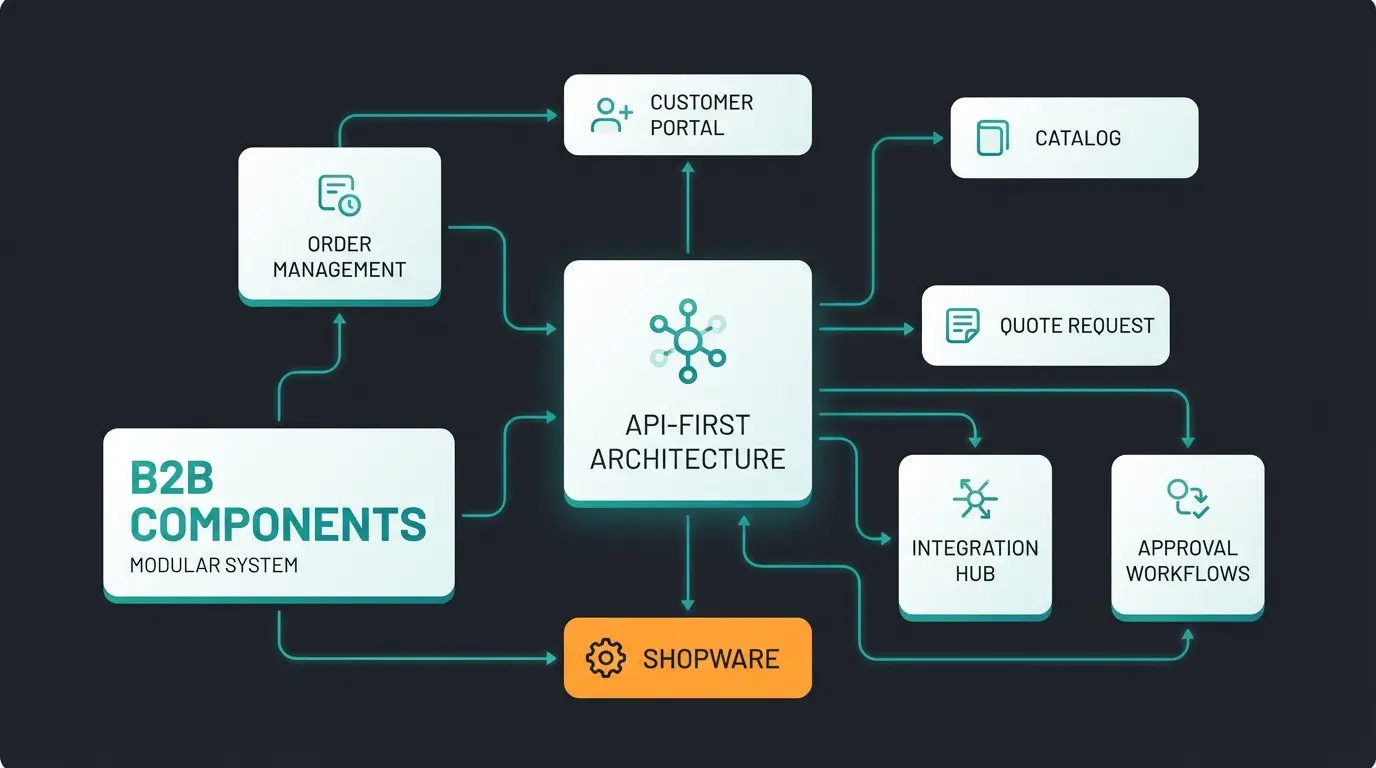
Shopware B2B Suite is the legacy all-in-one plugin for Shopware 5, while B2B Components are modular, API-first extensions built for Shopware 6. Most new projects should use Components for flexibility and future-proofing, since Suite support ends with Shopware 6.8.
The architectural difference matters more than the feature list. The Shopware B2B Suite was designed when e-commerce platforms were monolithic systems: you installed a plugin and got a fixed set of B2B features bundled together. That approach worked for its era. The B2B Components model reflects how modern platforms are built: individual modules you activate, configure, and extend independently through APIs.
The official Shopware B2B Suite page confirms the Suite is in maintenance mode. Shopware's investment is firmly in the Components architecture, which supports headless deployments, composable storefronts, and the deep customization that DACH manufacturers require. If you are starting a new project, the choice is clear. If you are running Suite, you need a migration timeline.
Shopware's continued investment in this direction is reflected in third-party recognition. Shopware was named a Visionary in the 2025 Gartner Magic Quadrant for Digital Commerce for the sixth consecutive year. That recognition signals architectural direction validated at the analyst level, not a platform coasting on legacy approaches.
| Dimension | B2B Suite (Legacy) | B2B Components (Current) |
|---|---|---|
| Architecture | Monolithic plugin, tightly coupled | Modular, API-first, loosely coupled |
| Integration | Shopware 5 and early Shopware 6 | Shopware 6 native, headless-ready |
| Customization | Hook-based overrides, limited flexibility | API extension points, full composability |
| Future support | Maintenance mode, ends at Shopware 6.8 | Active development, roadmap investments |
| Pricing | Separate license cost | Included in Evolve (~EUR 2,400/mo) and Beyond (~EUR 6,500/mo) |
| Headless readiness | Limited, storefront-dependent | Full headless support via Storefront API |
| Ideal use case | Existing installations not yet migrated | All new projects and migration targets |
Pricing context matters here. Based on Atwix analysis, the Evolve plan starts at approximately EUR 2,400 per month and the Beyond plan at approximately EUR 6,500 per month. Both include B2B Components, which means you are not paying an additional license fee on top of your platform cost. That bundling changes the total-cost-of-ownership calculation compared to assembling B2B features through third-party plugins.
B2B customer portal and buyer self-service
Shopware's B2B customer portal gives buyers a branded self-service hub where they can manage company accounts, set buyer roles and budgets, view order history, and reorder with one click, reducing support load by up to 40%. This shifts the operational burden from your service team to the buyer, who gets faster outcomes without waiting for a rep.
The 84% self-service statistic is not a preference signal, it is a vendor selection criterion. Buyers who find your portal inadequate will qualify you out before your sales team even gets a call. Shopware's implementation covers the core dimensions: company account management with multiple buyer seats, role-based permissions that mirror how procurement teams actually work, and budget controls that let finance teams set spending limits per department or individual.
Approval workflows are particularly important for DACH buyers operating under procurement compliance requirements. A junior buyer can build an order, which routes to a budget holder for approval before submission. That workflow happens inside the portal without phone calls, emails, or manual coordination. Order history with reorder capability completes the loop: a buyer who needs to repeat last quarter's order can do so in seconds rather than rebuilding from scratch.
Gartner's projection that "by 2025, 80% of B2B sales interactions will happen through digital channels" underlines why portal quality is now a competitive differentiator rather than a nice-to-have. Buyers who cannot self-serve efficiently will migrate to suppliers who let them.
The operational benefit is measurable. Customer self-service portals reduce ticket volume by 40-60% according to Atwix case studies across multiple Shopware B2B implementations. For a mid-size wholesaler handling hundreds of orders per day, that reduction translates to direct headcount savings or reallocation to higher-value customer interactions.
Role and permission architecture
Shopware's role system maps to real-world procurement hierarchies. You can define roles like Buyer, Budget Approver, and Administrator, each with different access to catalogs, pricing visibility, and checkout permissions. A buyer sees curated products at negotiated prices. An approver sees pending orders with budget context. An administrator manages the company account structure. That separation prevents accidental orders and ensures compliance without requiring manual oversight from your team.
B2B pricing models and customer-specific pricing
Shopware supports tiered pricing, volume discounts, customer-group pricing, and individual price lists, enabling the complex pricing structures that B2B buyers expect, from net prices to negotiated contract rates. A single SKU can carry dozens of price points depending on who is viewing it.
B2B pricing complexity is not accidental. B2B deals average $134,000 compared to $147 for B2C according to Wave Connect. At that deal size, a 2% pricing error on volume discounts is a material financial impact. Buyers also negotiate hard: your key accounts will have contract rates that differ from your standard price list by 10-30%. Shopware's pricing engine needs to reflect that reality, not approximate it.
| Pricing Model | Description | Shopware Implementation |
|---|---|---|
| Tiered pricing | Price decreases as quantity thresholds are crossed | Advanced Prices with quantity steps per variant |
| Volume discounts | Percentage or fixed discount above a minimum quantity | Rule Builder conditions combined with Advanced Prices |
| Customer-group pricing | Different base prices per defined customer group | Customer group assignment with group-specific price lists |
| Individual pricing | Unique price per customer, overrides group pricing | Customer-specific Advanced Prices on individual accounts |
| Contract-based pricing | Locked prices for a defined period, tied to ERP contract | ERP sync via API, price lists imported per contract cycle |
The Rule Builder is the mechanism that makes dynamic pricing practical. Instead of manually maintaining price lists for every customer segment, you define conditions: if the customer belongs to Group A, is ordering more than 50 units, and the product is in Category X, then apply this price rule. Rules stack and can be prioritized, so complex contract terms can be modeled without custom development.
Net price display is another critical dimension for DACH B2B. Your buyers are businesses purchasing for resale or internal use, meaning they see and compare net prices, not consumer gross prices. Shopware handles this through customer-group settings that suppress VAT display for registered B2B accounts. That sounds simple, but the implementation touches tax calculation, invoice generation, and ERP sync simultaneously.
Individual price lists deserve particular attention for key account management. Your top 20 accounts almost certainly have negotiated rates that are not publicly shared. Shopware allows you to assign a distinct price list to a specific company account, so when their buyer logs in, they see their contract prices throughout the catalog, in search results, in recommendations, and at checkout.
B2B ordering: quick order, reorder, and bulk import
Shopware's B2B ordering tools, including Quick Order for SKU-based entry, one-click reorder from history, and CSV bulk import, cut order placement time significantly compared to browsing a catalog. Buyers who know what they want should not have to navigate your entire product tree to get it.
Quick Order is the entry point for experienced B2B buyers. A procurement manager who orders the same 40 SKUs every month does not need your search functionality or product recommendations. They type the article number, enter the quantity, and add to cart. Shopware's Quick Order component supports SKU lookup with autocomplete, quantity entry, and multi-line input so an entire order can be built in under two minutes.
CSV and Excel bulk import extends this to purchasing systems that export order files automatically. Your buyer's ERP generates a file of article numbers and quantities based on inventory reorder points, and they upload it directly to your shop. That integration eliminates re-keying errors and makes your shop a natural endpoint for automated procurement workflows rather than a manual step in the process.
Shopping lists that can be shared across buyer teams address a common B2B scenario: a product manager builds a list of approved items, which the purchasing team then orders from repeatedly. Unlike a one-off cart, a shared shopping list persists, can be updated centrally, and ensures that buyers are selecting from approved SKUs at negotiated prices. Minimum order quantities enforce commercial terms at the product level, preventing orders that fall below your viable fulfillment threshold.
The efficiency gains from this toolset are documented. BUFA Chemicals reduced order processing time by approximately 60% after implementing Shopware's B2B ordering components, according to Atwix case study data. Compared to phone ordering or email-based PO submission, digital self-service ordering consistently cuts order cycle time by more than half.
For sales-driven B2B workflows, quote creation is equally important. Shopware lets sales teams Create Quote in Shopware directly within the admin, attach customer-specific pricing, and convert accepted quotes into orders without re-entering data. This bridges the gap between consultative selling and digital ordering.
Reorder from history
The reorder feature turns your order history into a shortcut library. A buyer views their previous orders, selects one, and adds all items to a new cart with current pricing applied. This is particularly valuable for consumables and replenishment orders where the product mix rarely changes.
B2B invoicing and payment terms
B2B payment in Shopware goes beyond card processing. It supports invoice payment with net-30/60/90 terms, purchase orders, credit limits, and integration with ERP billing systems that DACH companies rely on. Getting this layer right is not optional for German B2B buyers.
The data on German B2B payment expectations is stark. According to ibi Research via Stripe, 95% of B2B buyers want invoice payment when shopping online. That is not a preference, it is an expectation so dominant that offering only card payment will cause most German B2B buyers to abandon checkout. A separate Atradius report confirms that 47% of B2B sales in Germany are made on credit, with average payment terms of 60 days.
Shopware supports invoice payment through extensions that manage credit limits per company account, define allowed payment terms per customer group, and generate invoices that reference purchase order numbers. That PO reference is critical for enterprise buyers whose accounts payable systems require it to process an invoice. Without it, payment is delayed regardless of the agreed terms.
Germany's e-invoicing mandate adds a compliance dimension. As of January 2025, German businesses must be capable of receiving structured e-invoices in XRechnung or ZUGFeRD format. The mandate for sending structured e-invoices extends to 2027. ERP integration is typically the cleanest path to compliance, since modern ERPs handle format conversion as part of their billing module.
SEPA direct debit is the other DACH-specific payment method worth configuring. For recurring customers with established relationships, SEPA authorization simplifies cash flow management on both sides. Combined with ERP billing sync, Shopware can trigger SEPA collection automatically when an order ships.
Wholesale and dealer portal features
Shopware's wholesale and dealer portal capabilities let manufacturers run separate storefronts for resellers, with dealer-specific catalogs, exclusive pricing tiers, and territory-based access controls. This separates your reseller channel from your direct business without requiring separate platform instances.
Wholesale pricing in Shopware operates at the intersection of volume and relationship. Pallet pricing, where a full pallet of an item triggers a different unit price than a mixed-case order, is implementable through the Rule Builder combined with product-level pricing rules. Minimum order quantities enforce the commercial logic that wholesale channels require: your wholesale price only makes sense if the buyer is actually buying at wholesale volume.
Dealer portals add a layer of channel management on top of wholesale pricing. A manufacturer running dealer portals through Shopware can create separate storefronts or catalog views that are only accessible to authenticated dealers. Those dealers see their territory's allocated products, their contracted pricing, and potentially co-branded materials. Territory management ensures that dealers in different regions see appropriate assortments and cannot inadvertently purchase stock allocated to another territory.
The scale at which B2B buyers are making self-service purchases is growing rapidly. According to Shopify research, 39% of B2B buyers now spend over $500,000 per order through self-service channels, up from 28% two years ago. That increase means your dealer portal is handling transactions that previously required dedicated account management.
Co-branding support within dealer portals addresses the marketing dimension of channel management. A dealer who can access your product data, imagery, and technical documentation through the portal is better equipped to sell your products. Combining that with customizable portal landing pages allows you to give key dealers a differentiated experience that reinforces the commercial relationship.
Field sales integration
Shopware's headless API architecture enables field sales reps to place orders on behalf of customers using mobile apps or tablets, syncing real-time with inventory, pricing, and CRM data. This turns your field team into a channel that operates from the same data foundation as your online shop.
The customer impersonation feature is the core mechanism for field sales use cases. A sales rep logs into the shop with their credentials, selects a customer account to act on behalf of, and then browses the catalog and pricing as that customer would see it. The order is placed under the customer's account with the appropriate pricing, payment terms, and shipping settings. No separate quoting system, no manual data entry after the fact.
Mobile ordering capability depends on how your Shopware instance is deployed. A headless Shopware setup with a React or Vue frontend can be wrapped into a progressive web app that field reps use on tablets during customer visits. Offline-capable scenarios require additional middleware but are architecturally supported by the API-first approach.
CRM sync completes the field sales picture. When a rep places an order on behalf of a customer, that order activity should feed back into your CRM as a touchpoint. Shopware's API makes this bidirectional: the CRM can push customer data into Shopware, and Shopware can push order events back. Compared to platforms that treat mobile and field sales as afterthoughts with limited API coverage, Shopware's architecture gives you genuine flexibility to build the field sales tooling your team needs.
B2B vs B2C in Shopware: key differences
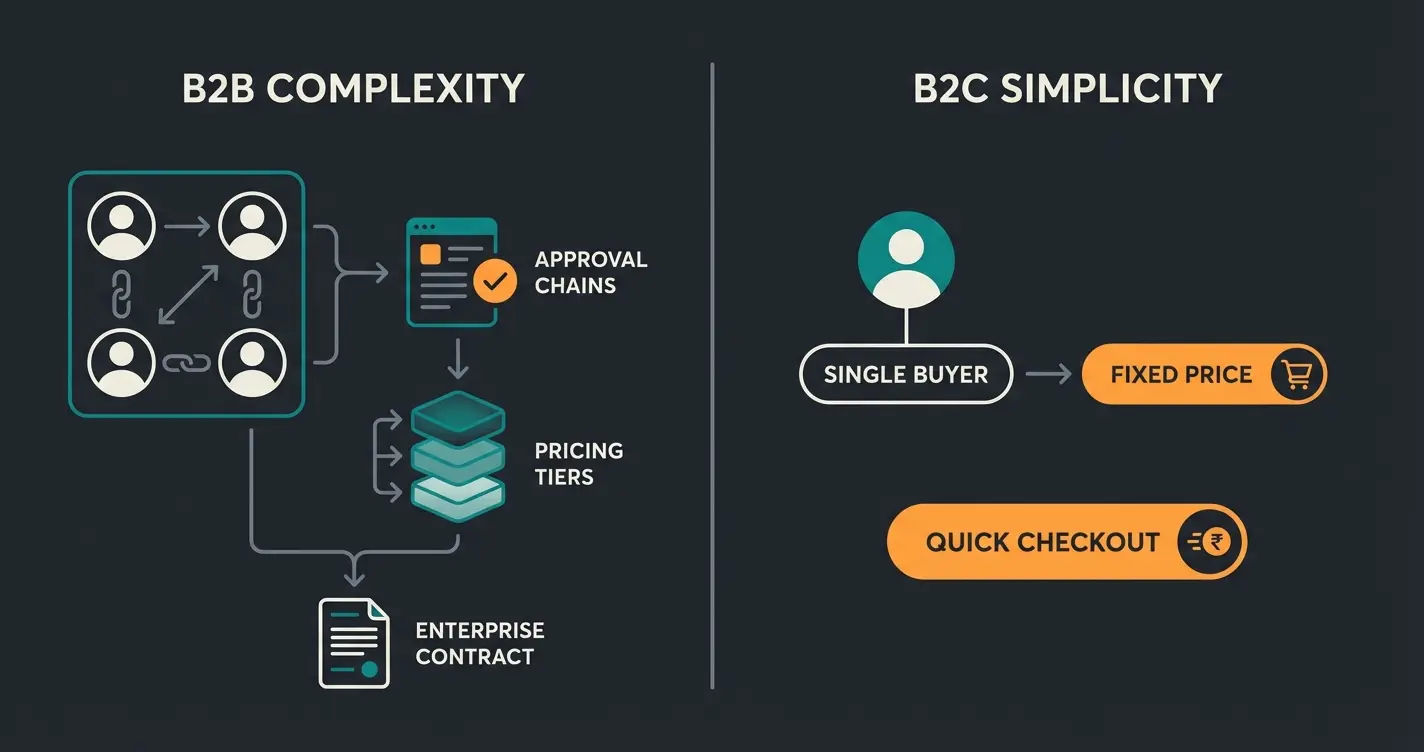
The core difference is complexity. B2B requires company accounts with multiple buyers, approval workflows, custom pricing per customer, and ERP integration, while B2C focuses on individual shoppers with fixed prices and simple checkout. The operational surface area of B2B is significantly larger.
The decision-maker dynamic alone illustrates the gap. B2B transactions involve 6-10 decision-makers according to Wave Connect. A single order might need input from a technical buyer, a procurement manager, a budget approver, and a logistics coordinator. Your shop needs to support that workflow, not assume a single person makes the decision and pays in one step.
| Dimension | B2B in Shopware | B2C in Shopware |
|---|---|---|
| Accounts | Company accounts with multiple buyer seats, roles, budgets | Individual consumer accounts, single-user |
| Pricing | Tiered, volume, customer-group, individual contract pricing | Fixed public prices, promotional discounts |
| Ordering | Quick Order, CSV import, reorder, shopping lists, approvals | Standard cart, wishlist, guest checkout |
| Payment | Invoice with net terms, PO reference, credit limits, SEPA | Card, PayPal, instant payment methods |
| Catalog | Role-based visibility, customer-specific assortments | Full public catalog, promotional landing pages |
| Checkout | Multi-step with approval gates, PO number, delivery date | Streamlined single-page checkout |
| Shipping | Split delivery, freight, minimum order routing | Standard carrier options, flat rates |
| Compliance | E-invoicing mandates, GDPR for business data, export controls | Consumer GDPR, returns directive |
Running B2B and B2C simultaneously in Shopware is achievable through sales channel segmentation. You create separate sales channels for each audience, with shared product data but differentiated pricing, catalogs, and checkout flows. A customer-group check at login determines which experience the buyer enters.
ERP integration: the backbone of B2B automation
ERP integration transforms Shopware from a standalone shop into a connected business system, syncing customers, products, pricing, inventory, and orders bidirectionally with SAP, Microsoft Dynamics, or cloud ERPs like WeClapp. Without this sync, your B2B shop is operating on stale data.
The DACH ERP landscape is specific. SAP Business One dominates mid-market manufacturing. Microsoft Dynamics 365 is common in distribution and professional services. Cloud ERPs like WeClapp and Xentral have seen strong adoption among smaller manufacturers and e-commerce-native wholesalers who want modern interfaces and API access without SAP implementation complexity. The Shopware developer documentation covers the API surface that ERP connectors use.
Cloud ERP adoption in Germany stands at 65%, and the German ERP market is projected to exceed EUR 2.8 billion in 2025 according to Statista. That adoption rate means your integration options are broader than they were five years ago. Cloud ERPs expose modern REST APIs, which makes bidirectional sync with Shopware far simpler than legacy EDI or flat-file approaches.
The real-time vs batch sync decision has direct commercial implications. Real-time inventory sync means a buyer sees accurate stock levels during order placement. Batch sync means the inventory data might be hours old, leading to orders for stock that is not available. For fast-moving consumables, real-time sync is not optional. Middleware options like Alumio, Celigo, and custom-built connectors each have different latency characteristics and cost profiles.
AI-powered B2B customer experience
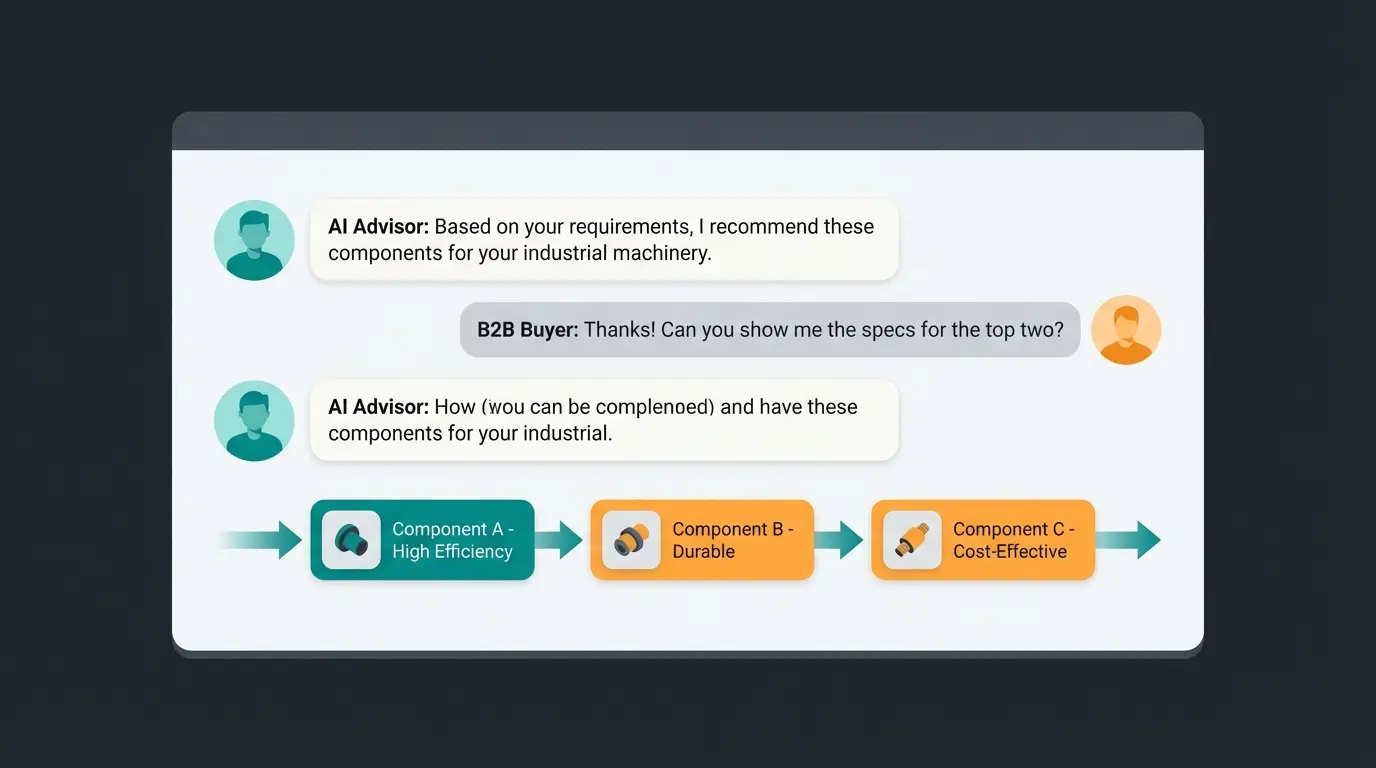
While Shopware's AI Copilot helps merchants with product descriptions and translations, a consultative AI layer on the frontend, like Qualimero's AI employees, guides B2B buyers through complex product selection, increasing conversion rates significantly. The distinction matters: backend AI optimizes operations, while frontend AI generates revenue.
Shopware's built-in AI Copilot is a merchant-facing tool. It drafts product descriptions, suggests SEO copy, and translates content across language markets. Those capabilities reduce content production costs and accelerate catalog management. They do not, however, address the buyer-facing problem: a procurement manager who lands on your shop looking for the right variant of an industrial component and does not know which of your 40 similar SKUs fits their application.
| Dimension | Shopware AI Copilot (Backend) | Qualimero AI Employee (Frontend) |
|---|---|---|
| Primary user | Shop administrator, content team | B2B buyer, website visitor |
| Core function | Product descriptions, translation, SEO | Interactive product consultation, needs analysis |
| Revenue impact | Indirect: faster catalog management | Direct: higher conversion, larger basket size |
| Interaction model | Admin panel tool, one-time use per task | Real-time conversational interface during buyer session |
| Customization | Prompt templates for product categories | Industry-specific knowledge base, technical specs |
| Measured outcomes | Time saved on content tasks | Up to 16x ROI, 7x higher conversion rates |
The Rasendoktor case study demonstrates what frontend AI delivers. Rasendoktor achieved 16x ROI, 100% automation rate on product consultations, and 40% savings on support costs after deploying a Qualimero AI employee. The AI handles product selection questions that previously required a human expert, and it does so at scale, without queue times, and with consistent accuracy.
Gartenfreunde achieved a 7x higher conversion rate and 6x ROI through the same approach: replacing passive catalog browsing with guided AI product consultation. The pattern holds across categories where product selection requires matching buyer requirements to technical specifications. B2B shops see proportionally stronger outcomes because the stakes per order are higher and the product complexity is greater.
Gartner's projection that "by 2025, 80% of B2B sales interactions will happen through digital channels" makes the frontend AI investment straightforward to justify. If the majority of your sales interactions are digital, the quality of that digital interaction is your primary commercial lever. An AI employee that guides buyers through complex product selection is the digital equivalent of your best sales rep, available at every session, for every buyer.
See how Rasendoktor achieved 16x ROI with AI product consultation.
Implementation strategy for DACH companies
A phased approach works best. Start with Shopware core B2B features like customer groups and basic pricing, add B2B Components for portals and ordering, then layer on AI-powered consultation. Each phase delivers measurable ROI before the next investment is made.
Phase sequencing matters because it manages risk and builds organizational confidence. A DACH manufacturer building a B2B online store for the first time does not need every feature on day one. The foundation phase establishes the data architecture: customer groups, basic pricing rules, ERP integration for inventory and product sync, and the customer account structure. This phase typically takes 8-12 weeks and produces a functional shop that handles standard orders.
Customer groups, basic pricing, ERP integration for product and inventory sync, company account structure, invoice payment. Timeline: 8-12 weeks.
B2B Components: customer portal, quick order, approval workflows, advanced pricing rules, bulk ordering, reorder. Timeline: 6-10 weeks additional.
AI-powered frontend consultation, dealer portals, field sales integration, advanced analytics, personalization. Timeline: ongoing iteration.
The automation phase activates the full B2B Components stack. Customer portals reduce support load. Approval workflows eliminate manual routing. Advanced pricing rules replace spreadsheet-managed exceptions. The Shopware developer documentation provides the technical reference for each component's configuration and extension points.
The enhancement phase is where differentiation happens. AI consultation, dealer portal segmentation, and field sales tooling are not features every competitor has deployed. Companies that complete Phase 3 are operating a sales channel, not just an order management interface.
When Shopware B2B is the right choice
Shopware B2B is the strongest fit for DACH-based manufacturers and wholesalers with 100-10,000 SKUs who need deep ERP integration, complex pricing, and a platform that supports both German and English markets natively. Outside that profile, alternatives may be worth evaluating.
The B2B e-commerce platform comparison covers the full decision framework, but the key criteria for Shopware are: DACH market focus (German-language admin, DACH tax rules, e-invoicing compliance built in), ERP ecosystem fit (established connectors for SAP, Dynamics, WeClapp, Xentral), pricing complexity (Rule Builder handles most B2B pricing scenarios without custom development), and composable architecture (Components model supports both storefront and headless deployments).
Compared to Magento (now Adobe Commerce), Shopware offers lower total ownership cost for mid-market DACH companies, a more active German-speaking partner ecosystem, and a roadmap driven by European commerce requirements. Compared to Shopify Plus, Shopware provides deeper ERP integration options, more flexible pricing architecture, and better support for DACH compliance requirements. The trade-off is implementation complexity: Shopware B2B requires more careful scoping and a qualified implementation partner than Shopify's more opinionated stack.
FAQ
The Shopware B2B Suite is in maintenance mode as of 2026, receiving security patches but no new features. Support ends with Shopware 6.8. All new projects should use B2B Components from the start.
B2B Components are included in the Evolve plan (from approximately EUR 2,400 per month) and the Beyond plan (from approximately EUR 6,500 per month). The Rise plan does not include B2B Components, making it unsuitable for full B2B deployments.
B2B pricing in Shopware is managed through Advanced Prices and the Rule Builder. You can define multiple price points per SKU based on quantity thresholds or customer group, with conditional logic for complex contract terms. Tiered, volume, customer-group, and individual pricing are all supported without custom development.
Shopware integrates with SAP Business One, Microsoft Dynamics 365, WeClapp, and Xentral through native connectors and middleware platforms like Alumio and Celigo. Shopware's API-first architecture means any ERP with a REST API can be connected. Real-time and batch sync modes are both supported.
B2B adds company accounts with multiple buyer seats, role-based permissions, approval workflows, customer-specific pricing, invoice payment with net terms, and ERP synchronization. B2C uses individual consumer accounts with fixed public pricing. B2B transactions involve 6-10 decision-makers per order compared to a single consumer in B2C.
Yes. Shopware supports invoice payment with net-30, net-60, and net-90 terms through extensions that manage credit limits, PO number requirements, and SEPA direct debit. According to ibi Research, 95% of German B2B buyers expect invoice payment, and 47% of B2B sales are made on credit with 60-day terms.
Shopware's AI Copilot handles backend tasks like product descriptions and translation. Frontend AI like Qualimero's AI employees guides buyers through complex product selection in real time. Clients deploying Qualimero see up to 16x ROI and 7x higher conversion rates compared to catalog-only browsing.
A dealer portal is a separate storefront or catalog view accessible only to authenticated resellers. Dealers see their territory's allocated products, negotiated pricing tiers, and co-branded materials. Territory-based access controls prevent cross-region ordering. It is configured through Shopware's sales channel architecture with customer-group segmentation.
More traffic is only half the equation. A Qualimero AI employee converts B2B visitors into buyers with real-time product consultation. Our clients see up to 16x ROI and 7x higher conversion rates.
Book a demo
Kevin is CTO and co-founder of Qualimero. As an AI architect with over 15 years of experience as CTO and CPO in the tech industry, he designs the AI systems that automate tens of thousands of customer interactions daily for Qualimero's clients — reliably, securely, and at scale.