What Shopware plugin development actually involves
Shopware plugin development means building custom extensions for Shopware 6 using PHP and the Symfony framework, from small storefront tweaks to backend logic that changes how orders, pricing or product data behave. Plugins hook into Shopware's event system rather than modifying core files, which is what keeps them update-safe.
The stack is not negotiable. Shopware 6.7 runs on PHP 8.2, 8.3 or 8.4, needs Node.js 20 or higher for asset compilation, and MySQL 8.0.17 or MariaDB 10.11 upward (Shopware update guide 6.7). If your hosting is still on PHP 8.1, the plugin question is premature. Fix the runtime first.
A plugin lives in `custom/plugins` and runs inside the same PHP process as the shop. That is the whole point. It can register services in the dependency injection container, add database migrations, define custom entities in the Data Abstraction Layer, add Symfony routes and CLI commands, and extend both the Storefront and the Administration. Nothing else in the Shopware extension model reaches that deep.
The catch is the same sentence read backwards. Full access means full responsibility for every core change that lands underneath you.
Most merchants never need to write one. As of August 2026 the Shopware Store lists 3,465 extensions, and the majority of standard requirements, payment providers, shipping carriers, cookie consent, feed exports, are already solved there. Our guide to Shopware plugins covers the selection side of that. This article covers the part where the marketplace runs out and you build. If you are still at the earlier stage of setting up a Shopware store, come back to this once the shop is live and the gaps are visible.
Plugin vs. app vs. theme extension: which one you need
Choose a plugin for deep backend logic and database work, an app for cloud-compatible integrations with lower maintenance, and a theme for pure storefront styling. The deciding factor is your hosting model rather than your feature list: Shopware Cloud shops cannot install plugins at all, and apps cannot modify the database schema.
This is the decision the entire English-language search results page for this topic skips, and it is the one that costs the most to get wrong. Rebuilding a finished plugin as an app because the merchant later moves to Cloud is not a refactor. It is a second project.
| Capability | Plugin | App | Theme |
|---|---|---|---|
| Where the code runs | Inside your shop, on your server | On an external server, over HTTP | Inside your shop, on your server |
| Installable in Shopware Cloud | No | Yes | Only when delivered as an app |
| Modify the database schema | Yes | No | No |
| Add custom entities | Yes | Yes | No |
| Add Symfony routes and CLI commands | Yes | No, logic runs externally via webhooks | No |
| Add administration modules | Yes | Yes | No |
| Control template and style inheritance | Yes | Yes | Yes, this is its purpose |
| Breakage risk on a core update | High, you depend on internal APIs | Low, the HTTP contract is stable | Medium, template changes propagate |
| Typical use case | Pricing rules, ERP sync, checkout logic | Payment providers, external tooling, analytics | Brand styling, layout, custom blocks |
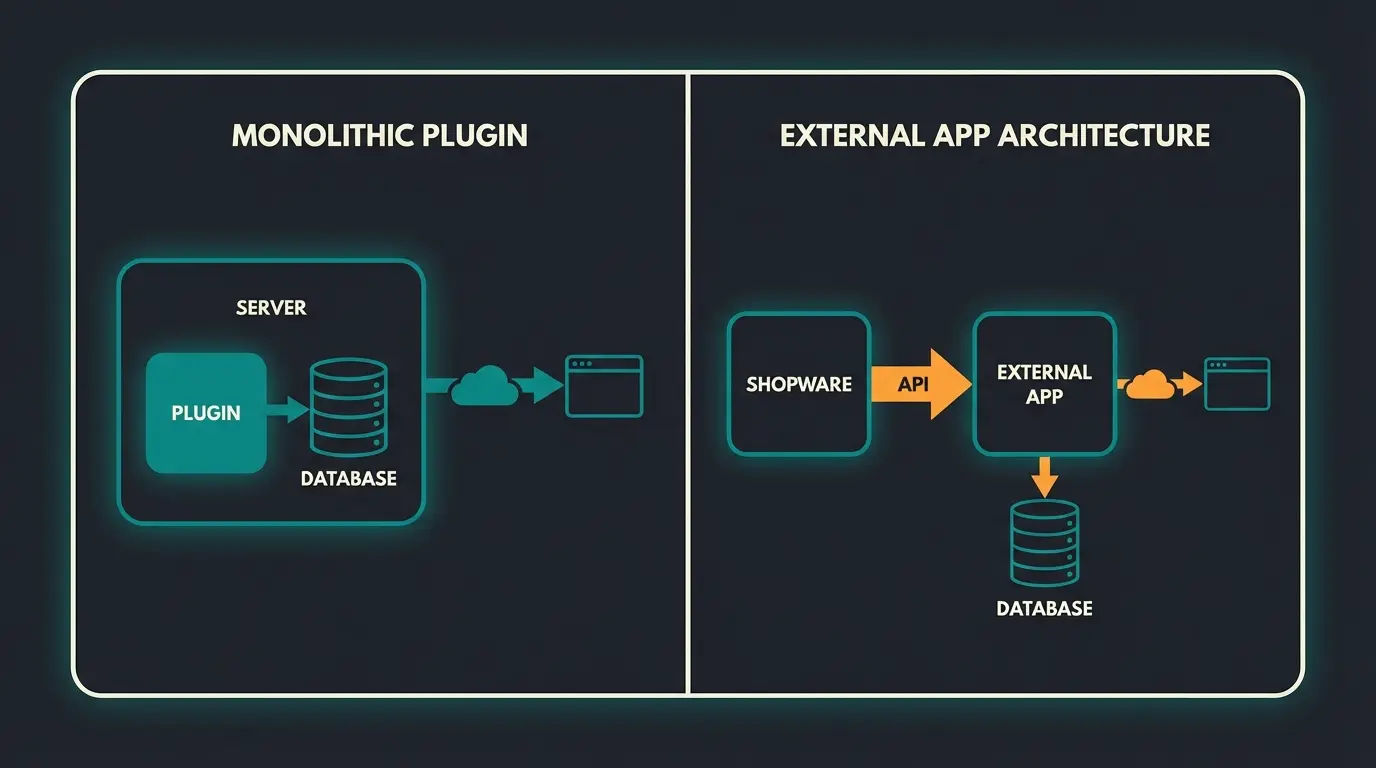
Work through it in this order. If the shop runs on Shopware Cloud, the answer is an app and the discussion is over. If the feature needs its own database tables or has to intervene in the cart calculation before it is persisted, it is a plugin. If the requirement is that the product listing looks different, it is a theme, and you should read our breakdown of Shopware themes before you write a single line of SCSS.
Apps have been installable on self-hosted shops since 6.4.0.0, so "self-hosted" no longer forces the plugin route. Shopware's own framing in the Shopware App System documentation is explicit: apps "don't run code directly inside the shop system" and instead follow an event-driven, remote-extension model. Less intrusive, less powerful. For anything that talks to a system outside Shopware, an ERP, a CRM, a recommendation service, that trade is usually worth taking.
How to build a Shopware 6 plugin: step by step
Building a Shopware 6 plugin takes five steps: set up a local environment with ddev or Docker, generate the plugin skeleton with composer.json and a base class, register services through dependency injection, hook into the event system with a subscriber, then install and activate via CLI. A working skeleton takes under 30 minutes.
Production readiness is a different number. In our Shopware projects a plugin with real business logic, configuration, tests and an admin module takes two to five developer days before it is safe to put in front of traffic. The skeleton is never the expensive part.
ddev or Docker with PHP 8.2+, Node.js 20 and MySQL 8.0.17. Never develop against the production database.
Run bin/console plugin:create SwagProductNotice from the project root. Shopware writes the directory, the base class and composer.json.
composer.json needs type shopware-platform-plugin, a require on shopware/core, extra.shopware-plugin-class and PSR-4 autoloading.
Define your services in src/Resources/config/services.xml and let the DI container inject dependencies. No manual instantiation.
Implement EventSubscriberInterface and subscribe to a public Shopware event, or decorate an existing service. Do not override core classes.
Install, activate, then run static analysis and PHPUnit in CI so the plugin ZIP is reproducible before it reaches staging.
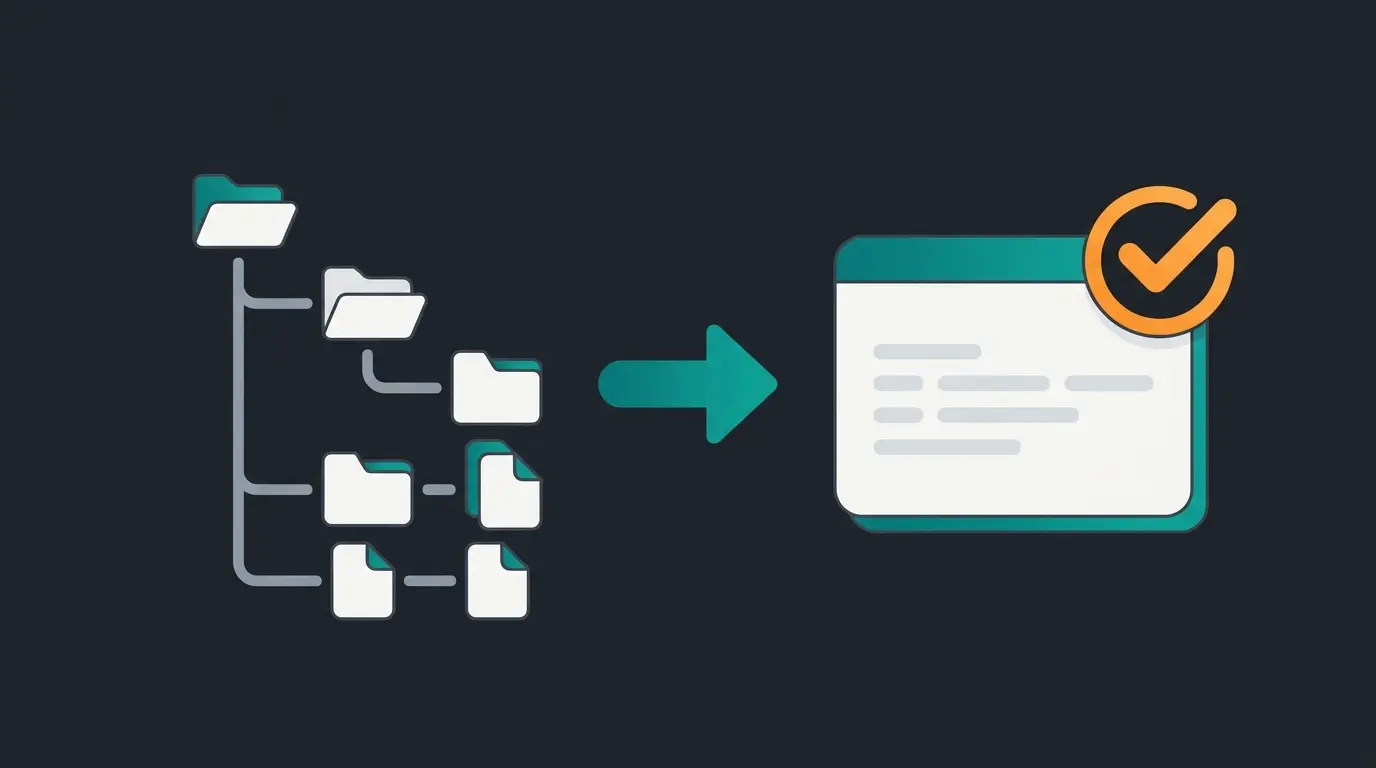
The plugin base class is almost empty, and that is correct. Its job is registration and lifecycle, not logic. Everything real happens in services that the container wires together.
<?php declare(strict_types=1);

namespace Swag\ProductNotice;

use Shopware\Core\Framework\Plugin;

// Every plugin extends Shopware's abstract Plugin class.
// Shopware locates it through extra.shopware-plugin-class in composer.json.
// Keep lifecycle logic here minimal: install, uninstall, activate hooks only.
class SwagProductNotice extends Plugin
{
}
<?php declare(strict_types=1);

namespace Swag\ProductNotice\Subscriber;

use Shopware\Storefront\Page\Product\ProductPageLoadedEvent;
use Symfony\Component\EventDispatcher\EventSubscriberInterface;

class ProductPageSubscriber implements EventSubscriberInterface
{
    // Subscribe to a public event instead of overriding the core controller.
    // This is the difference between a plugin that survives 6.7 and one that does not.
    public static function getSubscribedEvents(): array
    {
        return [ProductPageLoadedEvent::class => 'onProductPageLoaded'];
    }

    public function onProductPageLoaded(ProductPageLoadedEvent $event): void
    {
        $page = $event->getPage();

        // Attach your own data to the page object here,
        // then read it in a Twig template extension. No core file is touched.
    }
}
Register that subscriber in `services.xml` with the `kernel.event_subscriber` tag and Shopware picks it up on the next cache clear. The full flow, including plugin configuration, database migrations, scheduled tasks and diagnostics, is documented in the official Shopware Plugin Base Guide, which is the single most useful page in the entire documentation set for this topic.
{
  "name": "swag/product-notice",
  "description": "Adds a delivery notice to the product detail page",
  "type": "shopware-platform-plugin",
  "license": "MIT",
  "require": {
    "shopware/core": "~6.7.0"
  },
  "autoload": {
    "psr-4": {
      "Swag\\ProductNotice\\": "src/"
    }
  },
  "extra": {
    "shopware-plugin-class": "Swag\\ProductNotice\\SwagProductNotice",
    "label": {
      "en-GB": "Product delivery notice"
    }
  }
}
One detail catches people out. The `autoload.psr-4` namespace must match your directory layout exactly, so if you drop the `src/` folder, the composer.json has to say so too. Mismatch and the plugin simply will not appear in `plugin:refresh`, with no useful error.
Custom plugin vs. marketplace: costs and the build-vs-buy decision
Marketplace extensions run from free to roughly EUR 500 one-off, or EUR 10 to 50 per month, while custom development lands between EUR 5,000 and EUR 50,000 depending on integration depth. Building custom pays off only when no marketplace extension models your business logic, or when several licence fees together exceed a one-time build.
The number that decides this is almost never the build cost. It is the three-year total, and maintenance is where estimates quietly fall apart. GoodFirms puts annual maintenance for German software projects at 15 to 25% of the initial build budget, covering dependency updates, security patches and compatibility work. On a EUR 20,000 plugin that is EUR 3,000 to 5,000 every year, and it does not stop.
| Cost factor | Marketplace extension | Extend an existing one | Custom build |
|---|---|---|---|
| Initial cost | EUR 50 to 500 | EUR 3,000 to 20,000 | EUR 5,000 to 50,000 |
| Annual maintenance | EUR 0 to 600 subscription | EUR 1,500 to 5,000 | 15 to 25% of build cost |
| Three-year total, mid-range | approx. EUR 1,800 | approx. EUR 15,000 | approx. EUR 28,000 |
| Time to production | Hours to days | One to four weeks | Two to eight weeks |
| Upgrade risk | High, vendor decides | Medium, two dependencies | Low, you control the code |
| Fits unique business logic | No, configuration only | Partly | Yes, by definition |
| What happens if the vendor disappears | You migrate or fork | Your extension breaks with it | Nothing |
That last row is not hypothetical. An analysis of the Shopware Store by easy.bi found that roughly 34% of listed extensions had received no update in the previous twelve months, and that the average Shopware shop runs 15 to 25 of them. Multiply those two figures and the picture is uncomfortable. Every unmaintained extension in the stack is a future upgrade blocker sitting in `custom/plugins` doing nothing visible.
So the decision rule, in plain conditional form. Buy when the functionality is standardised and every competitor solves it identically: cookie consent, carrier labels, analytics tracking, feed exports. Extend when a marketplace extension covers most of what you need and the rest can be added through service decoration or an event subscriber without touching its source. Build when the logic is the thing that makes your business different, or when it sits on the checkout path and you need to own every millisecond.
One honest caveat on the build side. Integration projects are where budgets break: GoodFirms puts a single third-party API integration at USD 6,000 to 30,000 depending on the quality of the counterpart's API, and ERP connections routinely land at the top of that range because the ERP was not designed to be integrated with. Budget for the other system's flaws, not just your own code. If you are still weighing specific marketplace options, we have Shopware 6 plugins compared side by side.
AI plugins: automating product consultation
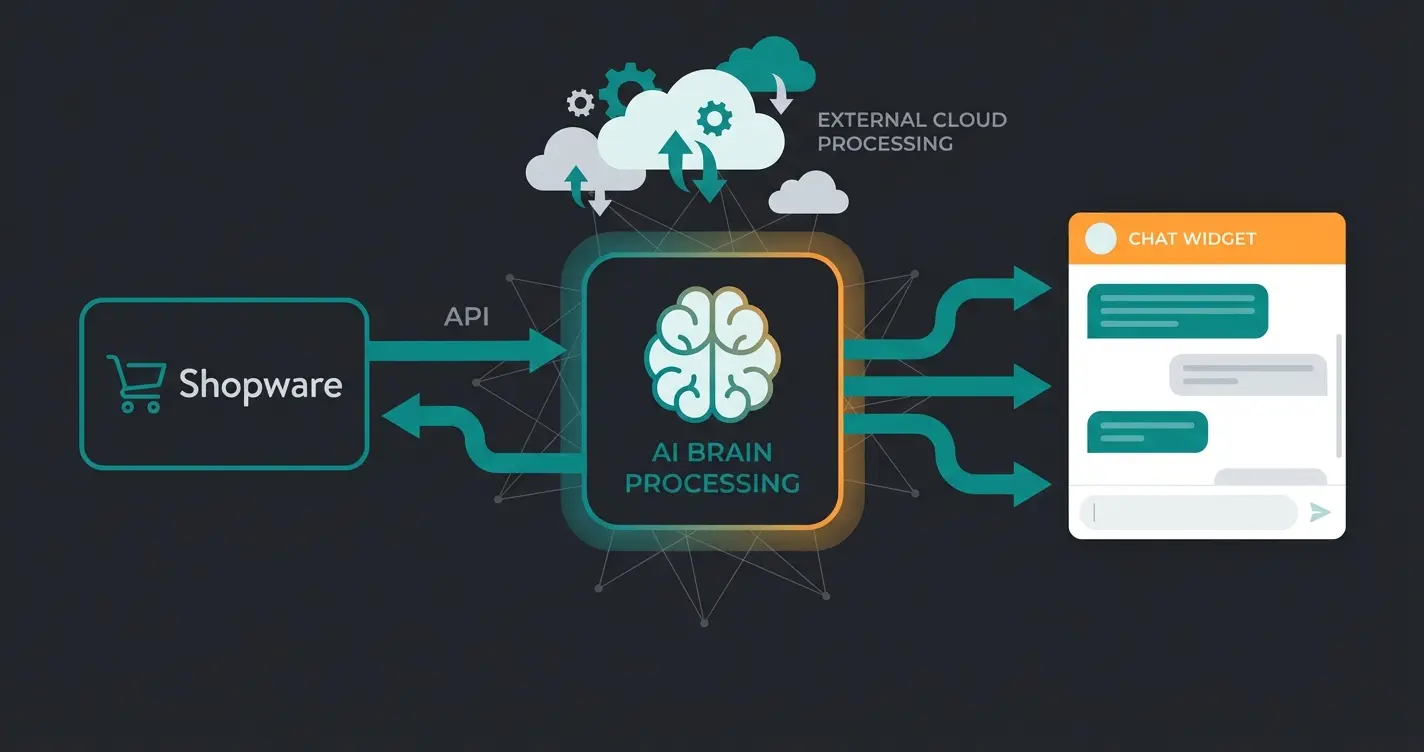
AI plugins extend a Shopware store past filtering and search into actual advice, matching a customer's stated problem to the right product in conversation. Built as thin connectors that call an external service, they keep the heavy logic out of PHP, which means a Shopware core update touches the connector and nothing else.
The architecture matters more than the model. Shopware holds products, prices, properties and availability. A lightweight connector plugin exposes that data over API. The retrieval, the reasoning and the conversation state live in an external service. A JavaScript widget renders the interface in the storefront. Four components, one of which is inside your shop.
Compare that to the monolithic version, where a vector index, an inference call and a conversation state machine all sit in the same PHP process as the checkout. PHP is a request-response runtime. It is a poor host for a process that waits two seconds on a third-party inference API, and every one of those seconds is served from the same worker pool your product listing needs. That is not an argument about model quality. It is an argument about where the work runs.
The outcomes are measurable, which is the only reason this section is in a development guide. Rasendoktor, a lawn care specialist handling 2,000 to 3,000 consultation-heavy inquiries per season, now runs 100% of its web-chat inquiries through an AI employee, with 40% support savings and 16x ROI. "It's impressive how precisely Hektor applies our expertise," says René Deutsch, CEO of TURF Handels-GmbH. "He now handles 100% of our web-chat inquiries automatically, in line with how we advise. Our team now focuses fully on the demanding cases." The full numbers are in the Rasendoktor case study.
Neudorff, in garden and plant care, sits under strict legal constraints on what may be recommended for which pest. Their AI employee reaches 97% automation with a response time under five seconds and a 99.2% lower cost per consultation. "Flora combines our expertise with AI efficiency and handles 97% of our product consultation around the clock, in exactly the quality Neudorff stands for," says Michael Horn, Head of Digital at Neudorff. The build detail is documented in the Neudorff AI product advisor story, and the capability itself is described on our AI product consultation page.
The friction worth naming: this only works when the product data is clean. Properties half-maintained, missing technical attributes, inconsistent category assignment, and the advice degrades to guesswork no matter what sits behind the API. Data quality is the actual prerequisite, and it is the step most projects underestimate.
Plugin installation and deployment
Shopware plugins install three ways: through the Admin UI for marketplace extensions, via CLI with `bin/console plugin:install` for custom builds, or through Composer for version-controlled deployments. Production stores should use Composer plus a CI pipeline, so plugin changes ship with the rest of the codebase and can be rolled back like any other commit.
The CLI path is three commands and you will type them hundreds of times.
# Make Shopware aware of the new plugin directory
bin/console plugin:refresh

# Install and activate in one step
bin/console plugin:install --activate SwagProductNotice

# Clear the container cache so services and subscribers register
bin/console cache:clear
A warning about the missing `version` field in composer.json during `plugin:refresh` is expected and harmless. Ignore it. Anything else in that output is a real problem.
For production, the Admin UI is the wrong tool. Installing an extension by clicking in the backend means the state of production no longer matches your repository, and the next deployment either overwrites it or conflicts with it. Composer-managed extensions, pulled through Shopware's Packagist instance with an auth token, keep the plugin set in version control where the rest of your infrastructure already lives.
Three deployment habits separate the shops that upgrade calmly from the ones that do not. Migrations must be idempotent, because they will run twice at some point and you will not be watching. Activation must happen on staging first with the full production plugin set loaded, since conflicts only surface in combination. And rollback has to be a tested path rather than a theory, which in practice means database migrations that do not destroy data on the way down. Once the plugin is live, verify it against real behaviour, and Shopware Google Analytics tracking is usually the fastest way to see whether the change did anything at all.
Common mistakes and best practices
Three failures break Shopware plugins on update: modifying core files instead of subscribing to events, ignoring deprecation notices across minor versions, and shipping without database migrations. Using service decoration and Shopware's public extension API instead keeps a plugin compatible when the core moves underneath it.
Shopware's own documentation states the principle more compactly than I can: "Upgrades are easier when the plugin surface area is small and well-structured." Every mistake below is a variation on ignoring that sentence.
- Copying a core class into your plugin to change four lines. Use the decoration pattern instead. Shopware lets you wrap any service with your own implementation, so the original keeps updating and your change stays intact.
- Depending on internal classes rather than the public API. Public APIs follow semantic versioning and only break in major releases. Internal implementation can change in any minor version, which is where surprise breakage comes from.
- Skipping migrations and editing the schema by hand. Works once, on one machine. Fails the moment a second environment exists.
- Treating deprecation notices as noise. They are the only advance warning you get, and they arrive one to two minor versions before the removal.
- Writing event subscribers without measuring their cost. A subscriber on a storefront event runs on every request. Anything above 10ms there is a conversion problem, not a code style problem.
- Assuming one admin build covers every version. Shopware 6.7 moved the admin toolchain from Webpack to Vite and out of Vue 3 compatibility mode, so plugins with administration components need separate versions for 6.6 and 6.7 (Shopware update guide 6.7).
One opinion that not everyone shares: I would rather maintain one larger plugin than six small ones. Shopware's documentation recommends grouping related functionality into a single repository with shared CI and shared static analysis, and that matches what we see in practice. Six repositories means six upgrade paths, six sets of test config, and six chances to forget one.
FAQ
Custom Shopware plugin development costs between EUR 5,000 and EUR 50,000 depending on integration depth, plus 15 to 25% of the build cost per year in maintenance (GoodFirms, 2026). A marketplace extension covering the same standard functionality costs EUR 50 to 500 one-off.
A working skeleton takes under 30 minutes with `bin/console plugin:create`. A plugin with real business logic, configuration, an admin module and test coverage takes two to five developer days before it is production-ready, and two to eight weeks for a full agency project including specification and QA.
A plugin runs inside your shop as PHP and can modify the database schema, add Symfony routes and register CLI commands, but only works on self-hosted installations. An app runs on an external server and communicates over HTTP, which makes it the only option for Shopware Cloud.
No. Plugin development requires PHP and working knowledge of Symfony, Twig and the Shopware Data Abstraction Layer. What you can do without code is configure marketplace extensions or connect an external service through an existing connector, which covers a large share of real requirements.
Not for small extensions if you already have a PHP developer. For anything touching checkout, pricing or ERP synchronisation, agency experience pays for itself, since German senior developer rates of USD 108 to 151 per hour (GoodFirms, 2026) are cheaper than a broken checkout.
Shopware 6.7 supports PHP 8.2, 8.3 and 8.4, alongside Node.js 20 or higher and MySQL 8.0.17 upward. Plugins with administration components also need separate builds for 6.6 and 6.7 because 6.7 replaced Webpack with Vite.
A custom plugin extends what your shop can do. It does not answer the customer who cannot decide between two products. That is what a Qualimero AI employee does: real product consultation, connected to your live Shopware catalogue, with clients reporting up to 16x ROI and 97% of consultations handled automatically.
Start free
Kevin is CTO and co-founder of Qualimero. As an AI architect with over 15 years of experience as CTO and CPO in the tech industry, he designs the AI systems that automate tens of thousands of customer interactions daily for Qualimero's clients — reliably, securely, and at scale.