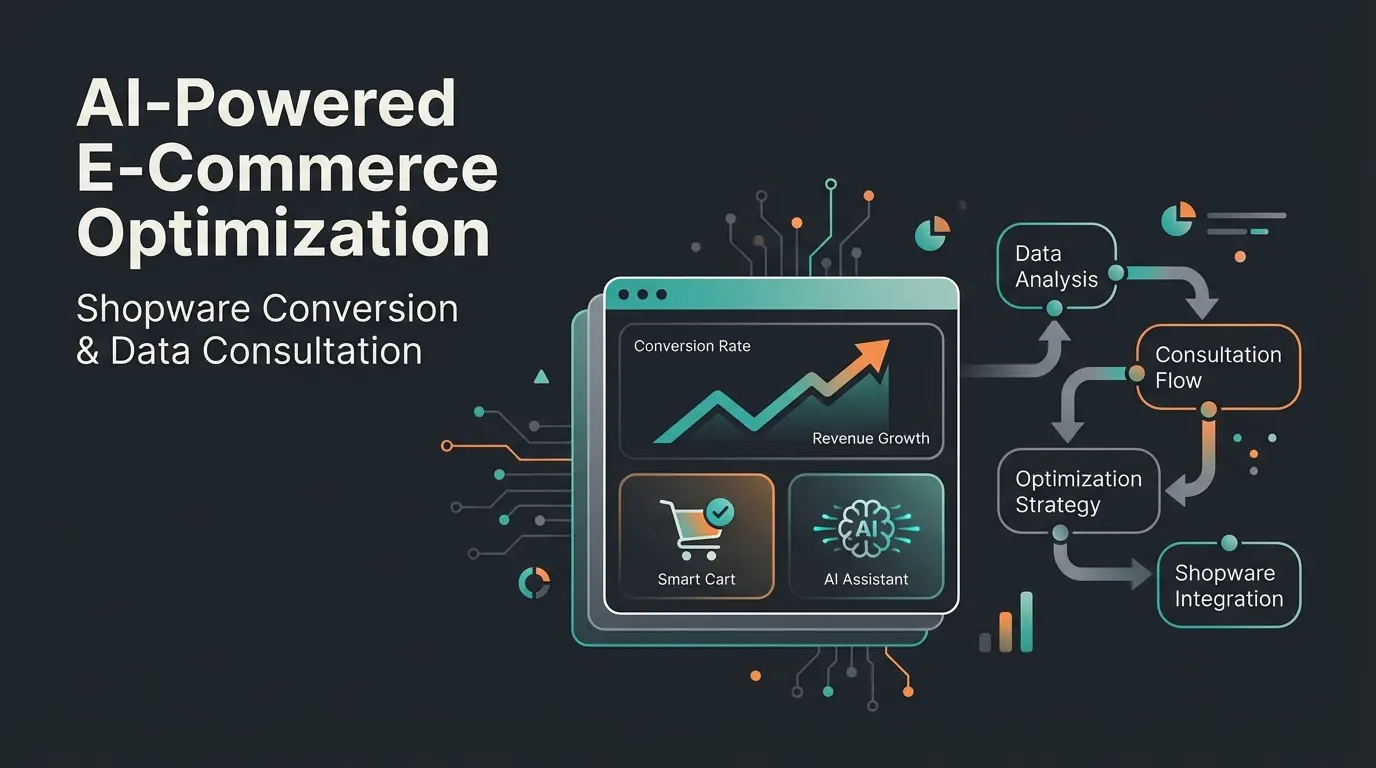
Key Points to Know First
Before diving into the technical details, let's clarify some important fundamentals that will shape your entire Shopware upselling strategy. Understanding these distinctions separates successful e-commerce operations from those that simply annoy their customers with random product suggestions.
- Terminology clarity: In Shopware, everything technically falls under "Cross Selling" in the backend. However, strategically, Upselling means selling a better version (upgrade), while Cross-Selling means selling accessories (complementary items).
- Native limitations: Shopware 6's standard features (Manual Assignment & Dynamic Product Groups) are based on static rules ("If Category X, then show Y"). They essentially guess what the customer wants without understanding context.
- The AI potential: Real revenue growth with complex products doesn't come from more popups—it comes from consultative selling. AI tools can understand customer needs ("I'm drilling into concrete") and recommend the right premium product, instead of just displaying "Customers also bought" suggestions.
- Economic leverage: Upselling to existing customers is 60-70% more likely to succeed than selling to a new customer, and it can increase Customer Lifetime Value (CLV) by 20-40%.
Why Your Shopware Store Needs More Than "Also Bought"
Every store owner knows the statistic: it costs five to twenty-five times more to acquire a new customer than to sell to an existing one. Yet most Shopware stores leave massive potential on the table. They use standard features to half-heartedly display a few accessories beneath a product and call it an "upselling strategy." The global e-commerce market is projected to generate $4.32 trillion in revenue by 2025, making it critical to capture every available opportunity.
In today's competitive e-commerce landscape, simply putting products in the window isn't enough anymore. Your competitors aren't sleeping, and customers expect personalization. The question isn't whether to implement upselling—it's how to do it in a way that actually converts without damaging trust and brand perception. Modern Shopware AI features are beginning to address this gap, but understanding the full landscape is essential.
The Problem with "Shopware Upselling" Search Results
When you search Google for "Shopware Upselling," you'll mostly find technical tutorials explaining how to navigate the "Cross Selling" tab in the backend. This reveals the first major misconception that plagues most store operators:
- Cross-Selling (Complementary sales): "Would you like fries with that burger?" (Accessories, complementary items). In Shopware: The HDMI cable for the TV.
- Upselling (Upgrade sales): "Would you like the XXL meal instead of the small burger?" (Upgrade, more expensive variant). In Shopware: The 65-inch OLED TV instead of the 50-inch LED TV.
The Basics: Native Shopware Cross-Selling Setup
Before we discuss artificial intelligence, we need to understand the foundation. Shopware 6 offers solid "out of the box" tools that many merchants use only superficially. Technically, this runs under the term Cross Selling in the backend, even though you can strategically use it for upselling purposes. Understanding these native capabilities is crucial before exploring more advanced solutions like AI product consultation tools.
Option A: Manual Assignment (Maintaining Control)
This method is perfect for small product ranges or very specific bundles where you know exactly which accessories fit. According to Firebear Studio, this approach gives you maximum control over what appears alongside each product.
Step-by-Step Instructions:
- Log in to your Shopware 6 Administration panel.
- Navigate to Catalogues > Products and select the desired product.
- Click on the Cross Selling tab.
- Click on Add new Cross Selling.
- Name: Give the section a title that will appear in the frontend (e.g., "Matching Accessories" or "Our Recommendation").
- Type: Select Manual Assignment.
- Assign Products: Search in the search field for the specific products that should be displayed and add them.
- Activate: Make sure the "Active" switch is set.
- Save your changes.
Advantage: You have 100% control. No unsuitable products will be displayed, and you can craft specific narratives around why these products belong together.
Disadvantage: Enormous maintenance effort. If the assigned product reaches "End of Life," nothing will be displayed until you manually change it. According to 2Hats Logic, this approach becomes unsustainable as your catalog grows beyond a few hundred products.
Option B: Dynamic Product Groups (The Automation)
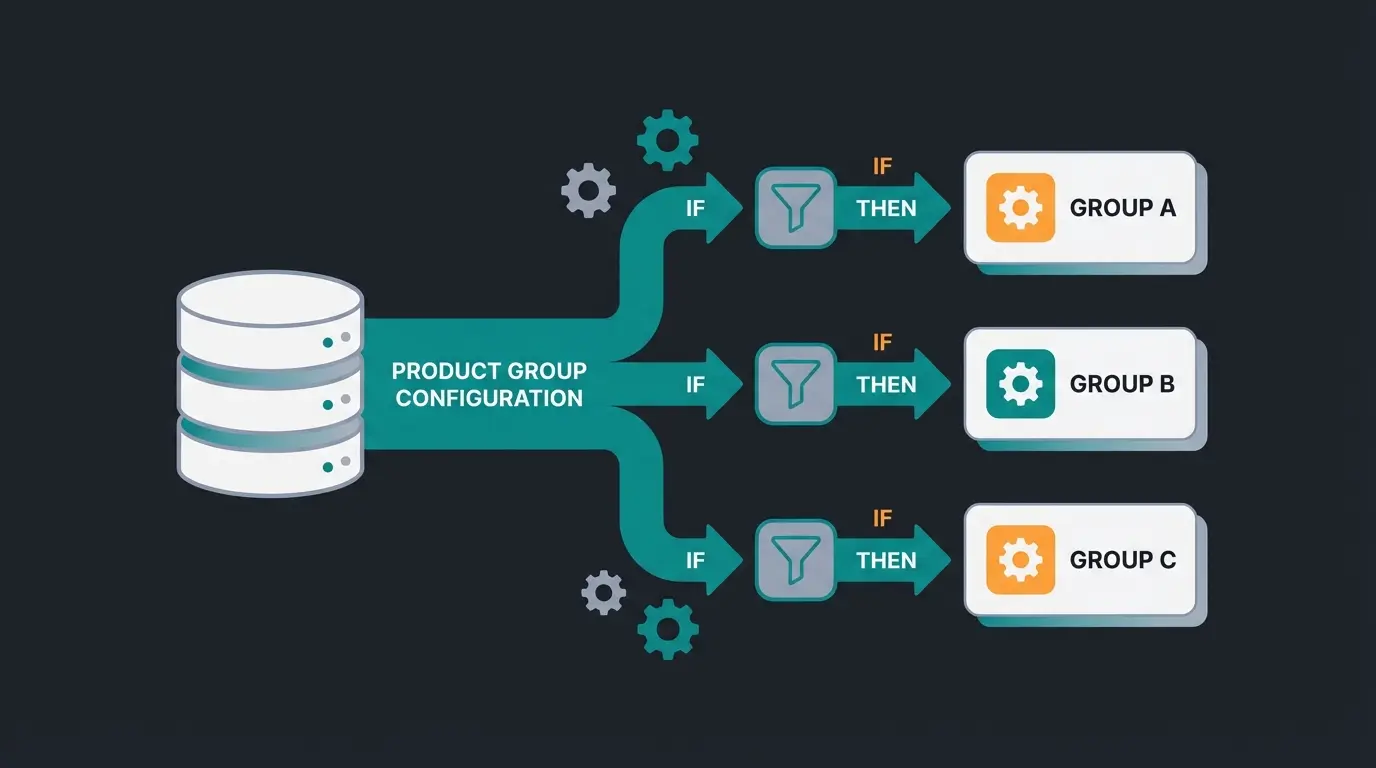
For larger shops, manual maintenance is impossible. This is where Dynamic Product Groups come into play. This is a powerful feature based on Shopware's Rule Builder, allowing you to create sophisticated logic without constant manual intervention.
How to Set It Up:
- Go to Catalogues > Dynamic Product Groups.
- Click on Create Product Group.
- Define Conditions: Here you create the logic. - Example for Upselling: "Show all products from the same category whose price is > 20% higher than the current product." - Example for Cross-Selling: "Show products from the 'Accessories' category that are from the same manufacturer."
- Save the group.
- Go back to the product (or use Bulk Edit) in the Cross Selling tab.
- Select Dynamic Product Group as the type and assign the group you just created.
The Logic Behind It: Shopware now checks live with every page view: "Which products fulfill these conditions?" and displays them accordingly. This saves time and keeps the shop "fresh" with automatically updated recommendations. As explained in Shopware's official documentation, dynamic groups recalculate in real-time based on your defined rules.
Why Native Features Often Fall Short
Despite these features, many shops see stagnating Average Order Value (AOV). According to Uptain, the reasons are fundamental to how these systems work:
- Lack of Context: A dynamic rule like "Show top sellers from the same category" doesn't know why the customer is viewing the product. Are they looking for an entry-level model or a professional tool?
- Static Logic: The rules are rigid. "Customers who bought this also bought that" (Collaborative Filtering) only works well with high data volumes and often just perpetuates the mass buying behavior instead of advising individual customers.
- Overwhelming Choice: Often, customers are simply shown more products, which can lead to the "Paradox of Choice"—the customer ends up buying nothing at all because they can't decide.
The Next Level: Rule-Based Upselling Plugins
To overcome the limitations of standard features, many merchants turn to plugins from the Shopware Store. These typically extend functionality around triggers and placement. According to iCreative Technologies, these plugins can significantly boost conversion rates when used correctly.
Typical Features of Upselling Plugins
- Pop-ups after "Add to Cart": As soon as the customer clicks, a window appears: "Wait! For just €10 more you get the premium set."
- Checkout Promotions: "Only €5 away from free shipping—add these socks too."
- Cart Slider: "Other customers also bought..." directly in the off-canvas cart, capturing attention at a critical decision moment.
The Strategy Trap: "Annoying" vs. "Helpful"
These plugins are effective for impulse purchases (low price, low risk). They work well for the digital equivalent of the chocolate bar at the supermarket checkout. However, they become problematic for complex purchasing decisions.
- Works well: Chocolate bar at the supermarket checkout, phone cases, small accessories.
- Fails badly: Insurance policy when buying a car, professional tools, B2B equipment.
The problem with complex products (B2B, electronics, furniture): A popup trying to sell a customer who just put a €500 drill in their cart an €800 machine often comes across as pushy and can lead to cart abandonment. The conversion rate drops because trust is disrupted. This is where Shopware 6 chatbots can make a significant difference by providing context-aware assistance.
Here lies the gap: How do we sell the more expensive product without annoying the customer?
The Future: AI-Driven Consultative Upselling
Here we leave the realm of "features" and enter the realm of strategy. While cross-selling (accessories) works well with static rules, true upselling (upgrades) requires understanding the customer at a deeper level. This is where AI-driven consultation technology is revolutionizing e-commerce.
The Concept: From Seller to Consultant
Imagine the difference in a physical store:
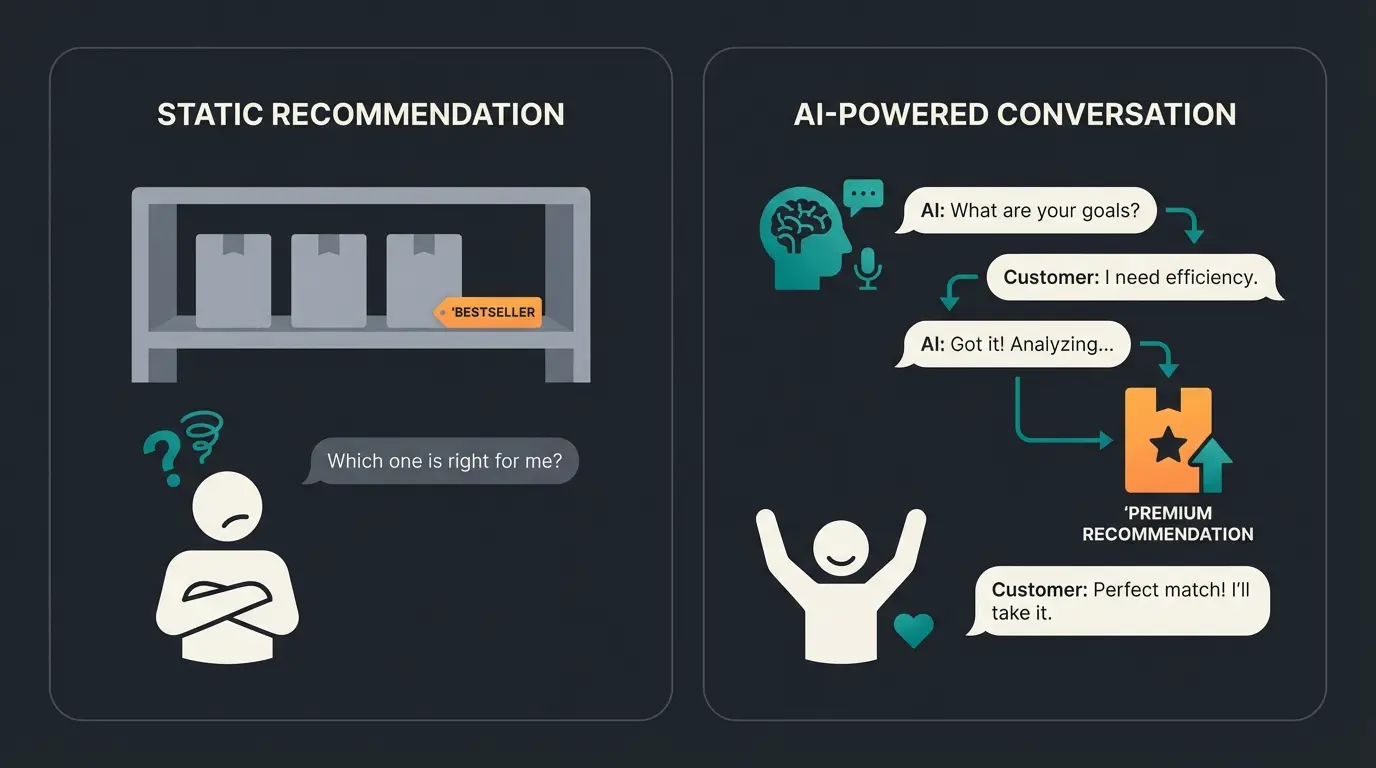
- The Standard Approach: You stand in front of a shelf of drills. A sign says: "Bestseller." You're left to figure out which one suits your needs.
- The AI Approach: A salesperson approaches you and asks: "What will you be using the machine for? Just wood or also reinforced concrete?" - You say: "Reinforced concrete." - The salesperson: "Then don't take the machine you're holding. It will overheat. For €50 more you get the model with hammer action and brushless motor—it will last forever and handle concrete perfectly."
That is Consultative Upselling. The customer doesn't feel "sold to" but rather "advised." They happily buy the more expensive product because they understand the added value. This is the fundamental principle behind effective AI product finder solutions.
How AI Enables This in E-Commerce
Modern AI solutions (and partially Shopware's new AI Copilot) are beginning to close this gap by not just using statistical correlations but understanding content and context. This represents a fundamental shift from reactive to proactive selling, powered by AI expert consultants that can scale human-like interactions.
1. Intent Recognition: Instead of just counting clicks, AI analyzes search behavior and session data. Is the customer searching for "durable," "professional," or "budget"? According to Bloomreach, personalization through AI can increase revenue by 10-30%.
2. Conversational Commerce: Chatbots and AI assistants can actively ask questions. When a customer lingers on a product page for a long time, the AI can ask: "Are you unsure if this part fits your needs?" Based on the answer, an upsell can be strategically placed. According to Powr.io, companies using AI chatbots often see a 15-25% revenue increase in cross-selling. Explore how Conversational Commerce is transforming customer interactions.
3. Dynamic Value Argumentation: Standard plugins only show the product image. AI can dynamically explain why the upgrade makes sense using AI-generated content capabilities. Example: Instead of just showing "Model X Pro," the AI generates the text: "Since you've also been browsing outdoor equipment: The Model X Pro is waterproof—the standard model isn't."
Through AI-powered personalization according to Bloomreach research
Upselling to existing customers vs. new customer acquisition
Revenue increase with AI chatbot implementation
Customer Lifetime Value increase through effective upselling
Shopware AI Copilot: The First Step
Shopware has already integrated features with the AI Copilot that point in this direction. Understanding these capabilities is essential for any store looking to implement AI Chatbot integration effectively:
- Custom Checkout Message: An AI-generated message after purchase, personalized based on the cart contents. This strengthens the bond and can be used for "Post-Purchase Upsells" that feel helpful rather than pushy.
- Review Summaries: Helps customers decide faster by summarizing reviews—this reduces cart abandonment and promotes trust in higher-priced items where social proof matters most.
- Customer Classification: The AI automatically tags customers (e.g., "Bargain Hunter" vs. "Premium Buyer"). You can use these tags via the Rule Builder to show the premium customer only upsells and the bargain hunter only discounts, dramatically improving relevance.
Discover how AI-powered product consultation can increase your average order value by understanding customer intent and recommending the right upgrades at the right moment.
Get Started FreeComparison: Static Recommendations vs. AI Consultation
To clarify the differences, here's a direct comparison of the approaches. Use this table to decide which strategy makes sense for which product category. Companies implementing digital product consultants are seeing significant improvements across all metrics.
| Feature | Native Shopware Cross-Selling | Standard Upsell Plugins | AI-Consultative Upselling |
|---|---|---|---|
| Trigger | Page view (Passive) | Cart button / Checkout (Reactive) | Behavior / Dialog / Intent (Proactive) |
| Logic | Static ("If Cat A, then Prod B") | Rule-based ("If cart > €50") | Dynamic & Context-aware |
| Personalization | Low (Same products for all) | Medium (Segmented by rules) | High (Individual per user) |
| Best Used For | Accessories, spare parts (Cables, batteries) | Impulse purchases (Socks, care products) | Complex upgrades (Tech, B2B) |
| Maintenance Effort | High (Manual) to Medium (Dyn. Groups) | Medium (Rule management) | Low (Self-learning) |
| Goal | Fill the cart (Cross-sell) | Short-term AOV increase | Increase trust & CLV (Upsell) |
Implementing an Upselling Strategy: Step-by-Step
You don't have to switch everything to AI immediately. A healthy strategy uses all three levels in what we call "The Upsell Hierarchy." This approach allows you to maximize results while gradually building toward more sophisticated solutions.
Categorize products into Good/Better/Best tiers and map necessary vs. optional accessories
Use Dynamic Product Groups for standard cross-selling of accessories and spare parts
Implement popup plugins for impulse purchases under 20% of main item value
Deploy AI-powered consultation for complex upgrade decisions and premium products
Step 1: Create the Data Foundation (Categorization)
Before you set up tools, you need to logically structure your products. This foundational work pays dividends across all your upselling efforts:
- Good / Better / Best: Identify a "Better" and a "Best" alternative for each of your main products. Document the key differences and value propositions for each tier.
- Accessory Mapping: Which products are necessary accessories (batteries, cables)? Which are optional accessories (cases, extended warranties)? This distinction affects placement and messaging.
Step 2: Use Native Features for Bread and Butter
Use Shopware's Dynamic Product Groups for classic cross-selling of accessories. This is your baseline that should be working flawlessly before adding complexity:
- Rule Example: "Product is Accessory" AND "Manufacturer = Manufacturer of main product".
- Placement: On the Product Detail Page (PDP) under "Matching Accessories." This is expected behavior and doesn't need to be "intelligent," just correct and consistently maintained.
Step 3: Use Plugins for Impulse Purchases at Checkout
Use a plugin for the cart or off-canvas area. Keep it simple and non-intrusive:
- Strategy: Only offer products here that cost less than 20% of the main item and require no explanation (care sets, warranty extensions, small accessories).
- Avoid: Offering complex alternatives here. This confuses the customer right before completing the purchase and can dramatically increase cart abandonment rates.
Step 4: Deploy AI for the Decision Phase
This is where the Consultative Approach comes into play. This is where the real revenue optimization happens, as documented in our AI Employee 'Kira' success story:
- Use Shopware AI Copilot Customer Classification to identify high-value customers who are more likely to respond positively to upgrade suggestions.
- Integrate tools that intervene on the product detail page before the customer adds something to the cart.
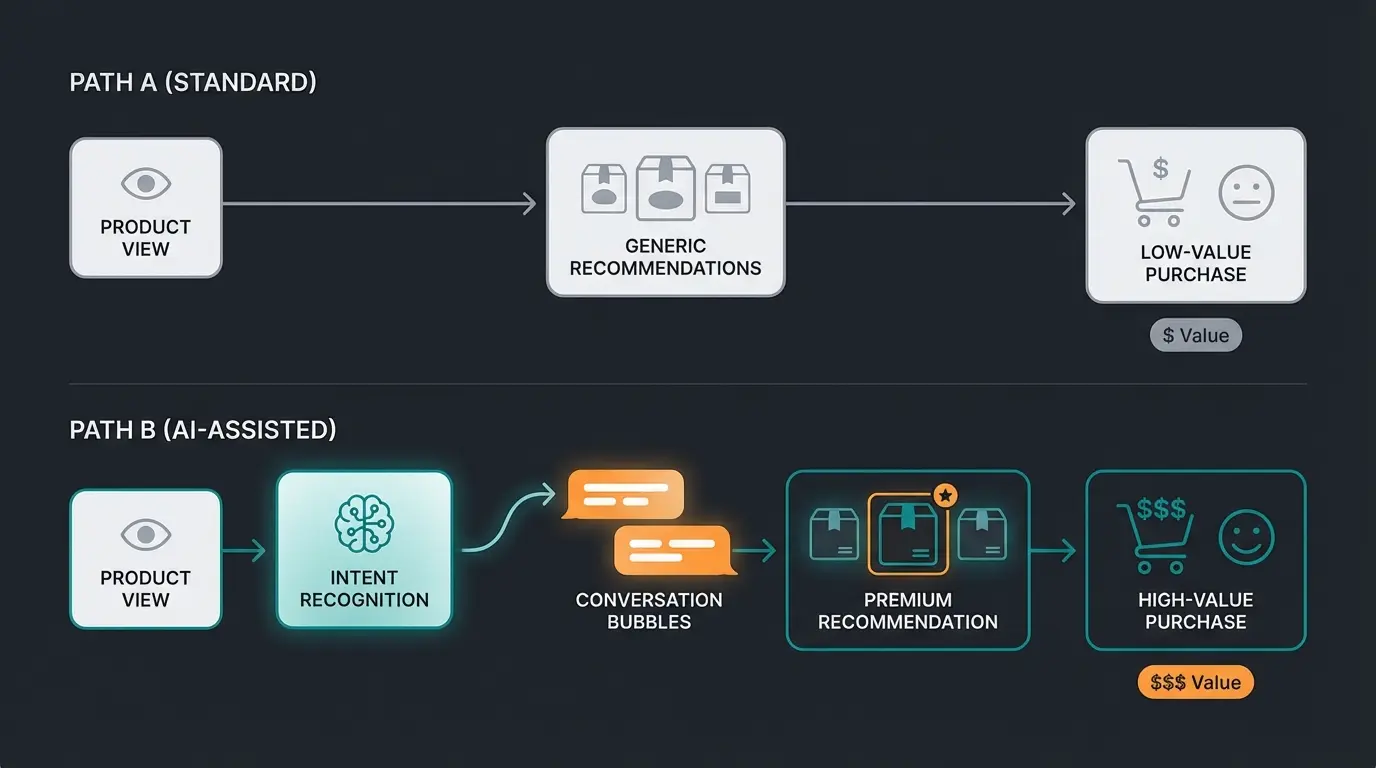
- Scenario: When a customer views an "entry-level product" but shows "professional behavior" through their click patterns (reads technical specs, compares extensively, views warranty information), a module via Shopping Experiences should highlight the premium product as "Recommendation for Professionals."
The key difference is that Path B feels like helpful guidance rather than aggressive selling. The customer makes a more informed decision and leaves satisfied, increasing the likelihood of repeat purchases and positive reviews. Implementing active product consultation transforms your store from a catalog into a trusted advisor.
Real-World Application: The Upsell Hierarchy
Most Shopware stores stop at the bottom of the upsell hierarchy. They implement basic cross-selling, maybe add a popup plugin, and wonder why their Average Order Value doesn't budge. The highest margins lie at the peak—consultative upselling—but few stores invest the effort to reach it.
Picture this as a pyramid structure:
- Bottom Layer (Base): "Cross-Selling" (Native Shopware - Cables, Batteries). Essential but low-margin additions that customers expect.
- Middle Layer: "Impulse Upselling" (Plugins - "Add to cart" popups). Quick wins that can boost AOV by 5-10% but risk annoying customers if overused.
- Top Layer (Peak): "Consultative Upselling" (AI - Guiding user to the Premium version based on needs). Highest margin, highest customer satisfaction, but requires sophisticated implementation.
According to LaunchTip, upselling can increase revenue by up to 30%, but this figure assumes you're doing it intelligently. Simply showing more products isn't upselling—it's cluttering your interface. True upselling means helping customers understand why the premium option serves their needs better.
FAQ: Shopware Upselling Questions Answered
In Shopware's backend, both strategies fall under the 'Cross Selling' feature. However, strategically they differ significantly: Cross-selling offers complementary accessories (HDMI cable with a TV), while Upselling encourages purchasing a higher-quality, more expensive version (65-inch OLED instead of 50-inch LED). The native Shopware tools work well for cross-selling but require AI assistance for effective upselling of complex upgrades.
Navigate to Catalogues > Products, select a product, and click the Cross Selling tab. You can either manually assign specific products or create Dynamic Product Groups with conditions like 'same category, higher price.' While this works for basic setups, it lacks the context-awareness needed for convincing customers to upgrade on complex products.
Standard plugins rely on static 'if-then' rules and popup triggers that often annoy customers rather than help them. A popup offering a €800 product when someone has a €500 item in their cart can feel pushy and break trust. AI-powered consultation solves this by understanding why the customer is shopping and explaining the genuine value of upgrading, making the recommendation feel helpful rather than salesy.
According to industry research, AI personalization can increase revenue by 10-30%, and upselling to existing customers has a 60-70% success rate compared to new customer acquisition. Companies implementing AI chatbots for consultative selling report 15-25% revenue increases in cross-selling activities. The exact ROI depends on your product complexity, average order value, and implementation quality.
Shopware AI Copilot offers foundational features like Customer Classification (tagging buyers as 'Bargain Hunter' vs. 'Premium Buyer'), Review Summaries, and Custom Checkout Messages. These enable smarter segmentation and post-purchase engagement. For full consultative upselling with conversational AI that actively asks questions and guides decisions, you may need to integrate specialized AI product consultation tools.
Conclusion: Quality Over Quantity
The term "Shopware Upselling" is often misunderstood as "show as many products as possible." However, analyzing search results and market data shows: The most successful shops don't bombard their customers with advertising—they help them make a better purchasing decision. According to Envive.ai, this consultative approach is becoming the standard expectation among online shoppers.
Summary of the Strategy
- Clean up: Use Shopware Cross-Selling (Manual/Dynamic) properly for accessories. Get the basics right before adding complexity.
- Be careful: Use popup plugins only for simple impulse purchases under 20% of the main item value. Anything more aggressive damages trust.
- Become a consultant: Implement AI solutions (like Shopware AI Copilot or specialized AI sales tools) to understand customer context and sell genuine upgrades that serve customer needs.
Statistics show that upselling can increase revenue by up to 30% according to research from OpenSend. But in 2024 and 2025, this is no longer achieved with static rules alone—it requires intelligent consultation. The stores winning market share aren't those with the most aggressive popups; they're the ones providing genuine value through personalized recommendations.
Start today by transforming your Shopware installation from a "self-service store" into a "Digital Sales Consultant." The technology exists, the proven strategies are documented, and your customers are waiting for a better shopping experience. The only question is whether you'll implement it before your competitors do.
Join forward-thinking Shopware merchants who are using AI-powered consultation to increase average order values and build lasting customer relationships. Start your free trial today.
Start Your Free Trial
Lasse is CEO and co-founder of Qualimero. After completing his MBA at WHU and scaling a company to seven-figure revenue, he founded Qualimero to build AI-powered digital employees for e-commerce. His focus: helping businesses measurably improve customer interaction through intelligent automation.