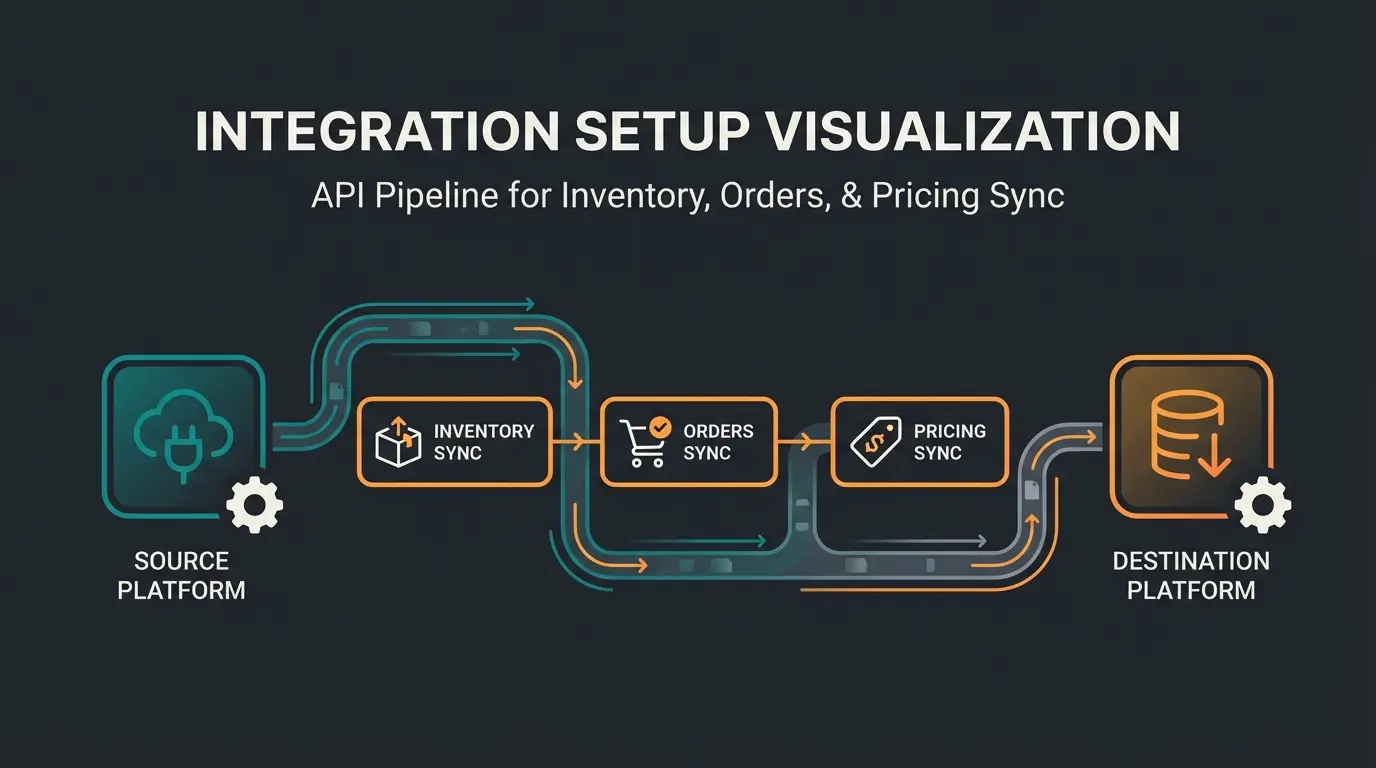
Why Your Shop Is Only as Strong as Its Connections
Imagine running a physical retail store. You have fantastic products on the shelves, but complete chaos reigns in the warehouse because nobody knows what's in stock. Even worse: there's not a single employee in the sales area to advise customers. Customers come in, look around, get confused, and leave.
This exact scenario plays out daily in thousands of WooCommerce shops. Many store owners focus exclusively on design and products. But scalable e-commerce success stands and falls with your WooCommerce integration strategy. There are two critical levels that are often confused or neglected:
- The Administration Layer (Backend): Here, WooCommerce interfaces to inventory management systems (WaWi) or ERPs ensure that stock levels are accurate and invoices are written automatically. This saves time.
- The Sales Layer (Frontend): Here, new, intelligent WooCommerce connections (like AI consultants) ensure that customers – similar to a specialty store – are guided and led to make a purchase. This generates revenue.
In this comprehensive guide, we close the gap that most technical tutorials leave open. We don't just look at how to connect JTL or Billbee to save time, but how you can transform your shop from a silent catalog into an active sales floor through modern AI integrations. As AI Chatbots are transforming the e-commerce landscape, understanding these integrations becomes essential for staying competitive.
Of competitor content focuses only on backend integrations like ERP and shipping
Almost no content discusses AI-powered sales consultation integrations
Average time saved with proper WaWi integration for order processing
What Exactly Is a WooCommerce Interface?
Before we dive into the tools, we need to clarify terminology. In the WooCommerce universe, everything is often labeled as a "plugin," but technically there are significant differences that determine your shop's stability.
Plugin vs. API Connection
- Internal Plugins: These are installed directly in your WordPress installation. They extend functionality (e.g., a "wishlist plugin"). The downside: too many plugins make the shop slow and prone to conflicts.
- External Interfaces (API): Here, WooCommerce communicates with external software (e.g., your accounting software). The heavy computational work happens outside your server. The connection usually occurs via the REST API.
| Aspect | Internal Plugins | External API Integration |
|---|---|---|
| Installation | Direct in WordPress | External system connection |
| Server Load | Increases with each plugin | Minimal - processing happens externally |
| Conflict Risk | High with multiple plugins | Low - isolated systems |
| Scalability | Limited by server resources | Highly scalable |
| Maintenance | Updates can cause conflicts | Independent update cycles |
The Role of the REST API (and the WooCommerce 9.0 Update)
The WooCommerce REST API is the heart of every professional integration. It's the "gatekeeper" that allows external programs to securely read and write data (orders, products).
As thecommerceshop.com notes, this change has significant implications for shops using legacy connectors. The solution is to either update your software to REST API V3 or temporarily install the official "WooCommerce Legacy REST API" plugin – though this is only a transitional solution.
Essential Backend Integrations: The Foundation
Without these integrations, professional commerce is nearly impossible. They form the backbone of your administration. If you ship more than 10 packages a day, manual processing in the WooCommerce backend is economic suicide.
1. Inventory Management (WaWi) & ERP Systems
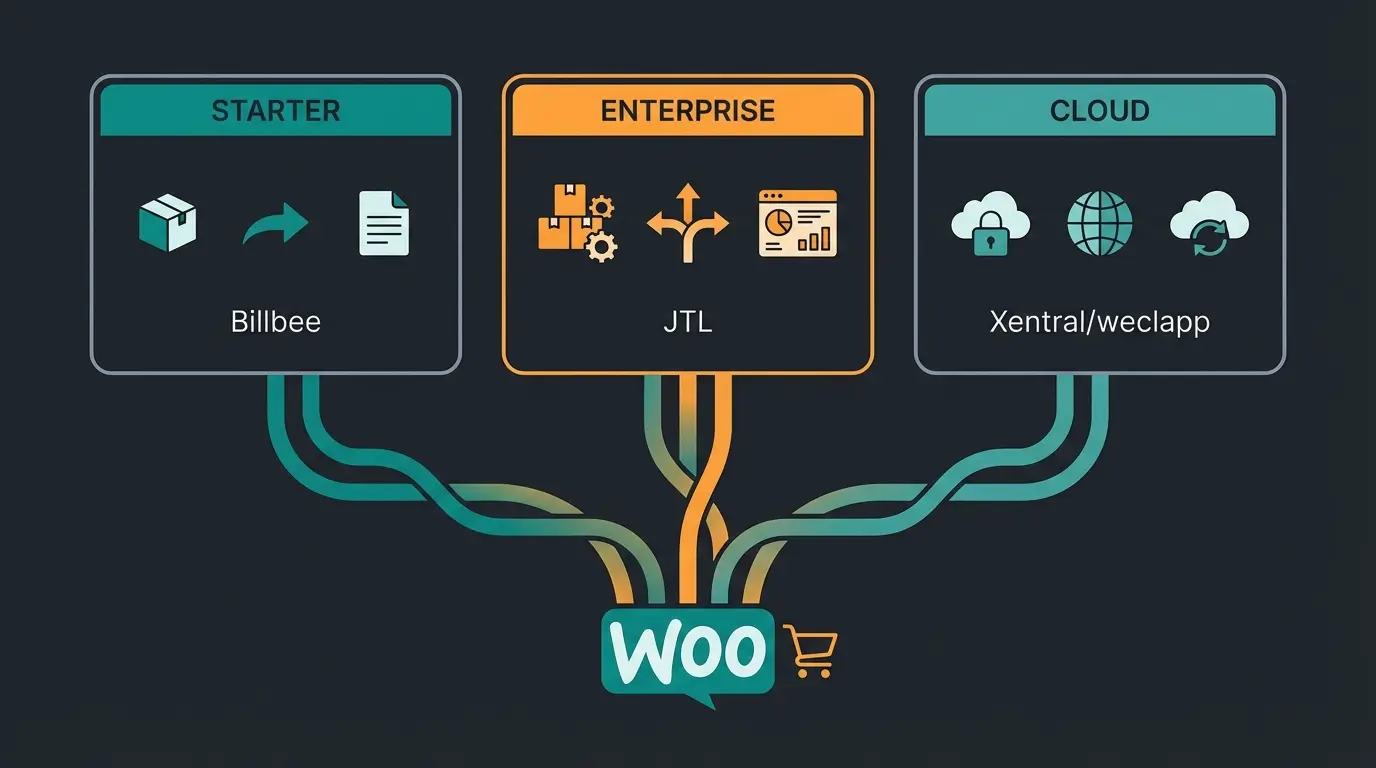
The question "Which inventory management system for WooCommerce?" is one of the most common in German forums. Based on current market analyses and user reviews from sources like systemhaus.com and xentral.com, solutions can be divided into three categories:
A. The Starter & Multichannel Champion: Billbee
Billbee is technically not a full-fledged ERP but middleware that's extremely well-suited for startups and D2C brands.
- Advantages: Cost-effective, extremely easy WooCommerce integration, covers invoicing, shipping labels, and inventory synchronization.
- Ideal for: Shops with 10 to 500 orders/day that also sell on Etsy or Amazon.
B. The Market Leader: JTL-Wawi
In Germany, there's hardly any way around JTL. It's powerful, free in the basic version, but complex to set up.
- Advantages: Scalable up to enterprise level, its own warehouse management system (JTL-WMS), huge community.
- Disadvantage: The "JTL-Connector" to WooCommerce is a complex piece of software that requires maintenance.
- Ideal for: Merchants who need full control over complex warehouse processes.
C. The Cloud Scalers: Xentral & weclapp
These systems are modern cloud ERPs. They don't require their own server (unlike JTL) and offer deep process automation.
- Advantages: Browser-based, modern API structures, often more intuitive than old desktop software.
- Ideal for: Fast-growing startups that want to automate processes. Similar to Shopware ERP integration, these cloud solutions offer seamless connectivity.
2. Payment & Shipping Integration
The market has consolidated here. A direct WooCommerce interface to service providers is mandatory to avoid typos in addresses.
- Shipping: Tools like Sendcloud or direct plugins from DHL and DPD automate label printing.
- Payment: PayPal Plus and Stripe are standard. Important: Use modern integrations that natively support SCA (Strong Customer Authentication) and 3D-Secure 2.0 to minimize cart abandonment.
The New Frontier: Frontend & Sales Integrations
This is where the wheat is separated from the chaff. While 90% of your competitors only optimize their inventory management, you can actively increase your revenue through frontend integrations.
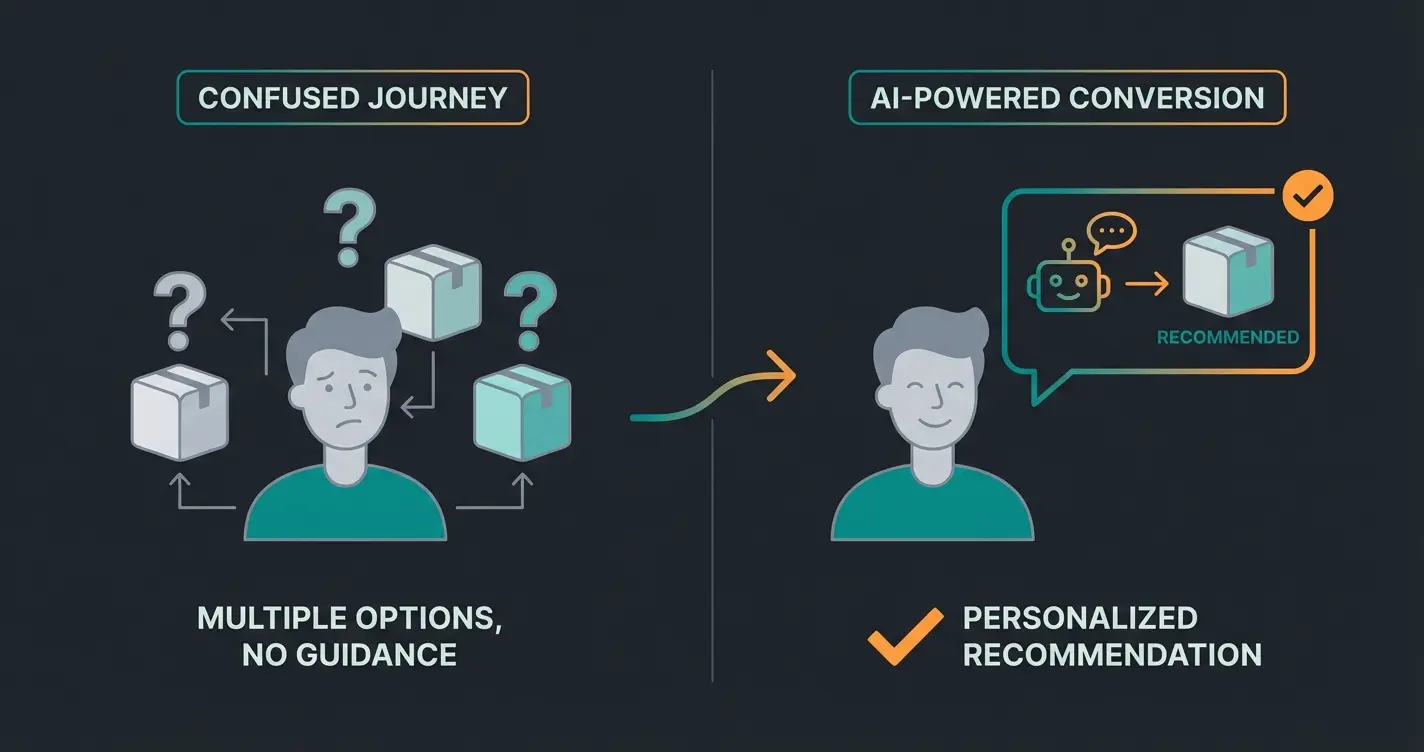
The problem with many online shops is the "silence." The customer enters the shop, perhaps doesn't immediately find the right thing, and leaves. Nobody asks: "Can I help you?" or "Are you looking for something specific?" This is exactly where digital sales consultants make all the difference.
ERP, shipping, and payment integrations keep your shop running efficiently
AI sales consultants and marketing tools actively drive revenue
WooCommerce REST API connects all systems seamlessly
Unified data flow enables personalized shopping experiences
The Evolution: From Chatbot to AI Expert Consultant
For a long time, chatbots in WooCommerce were just dumb FAQ machines ("Where's my package?"). Through generative AI (like GPT-4 models), the tables have turned. We're no longer talking about support bots but about Sales Agents. Today's AI expert consultants can handle complex product recommendations with human-like expertise.
Why AI Integrations Make the Difference
An analysis of top search results shows a massive gap: much is said about administration, but little about selling. According to research from alhena.ai, this represents a significant opportunity for forward-thinking merchants.
| Feature | Standard Support Bot | AI Sales Consultant |
|---|---|---|
| Knowledge Source | Static FAQs | Live product feed & catalog data |
| Primary Goal | Resolve support tickets | Actively sell products |
| Interaction Style | Reactive - waits for problems | Proactive - engages customers |
| Product Knowledge | Limited to programmed responses | Complete catalog understanding |
| Personalization | Generic responses | Tailored recommendations |
| Revenue Impact | Cost reduction only | Direct revenue generation |
Top Tools for AI Integration in WooCommerce
Based on current research from aibudwp.com, these are the leading solutions for 2025:
| Tool | Focus | Special Feature | Ideal For |
|---|---|---|---|
| Alhena AI | Sales & Support | "Hallucination-Free" (doesn't invent facts), deep catalog integration | Brands that value correct brand communication |
| WoowBot | Native Integration | Plug-and-play, runs directly on server, no monthly subscription for basic version | Smaller shops seeking a quick solution |
| Tidio + AI | Hybrid | Strong combination of live chat (human) and AI bot (machine) | Shops that still have a human support team |
According to woowbot.pro and wordpress.org, native WooCommerce AI solutions are gaining significant traction among merchants who want to implement AI product consultation without complex technical overhead.
Deep Dive: The Digital Expert Consultant
Imagine you sell running shoes. Here's how an AI Chatbot for E-Commerce transforms the shopping experience:
- Without Integration: The customer filters by "Size 42" and "Red." They see 20 shoes and are overwhelmed.
- With AI Integration: The bot asks: "Do you run more on asphalt or in the forest?" The customer answers "forest." The AI filters in the background and says: "For forest terrain, I recommend the TrailMaster 3000 because it has a reinforced sole. Should I add it to your cart in size 42?"
That's the difference between interface (pushing data) and integration (creating value). This approach is similar to how AI product consultation has transformed customer experiences for leading e-commerce brands. By implementing an AI product finder, you can guide customers to exactly what they need.
Stop losing customers to silence. Implement AI-powered product consultation that guides visitors to the perfect purchase – just like your best in-store salesperson.
Start Your Free TrialStrategic Guide: Making the Right Integration Choice
Not every WooCommerce integration makes sense. An overloaded shop converts worse. Use these criteria for your decision, whether you want to build AI sales agents or implement simpler solutions:
1. ROI Calculation (Return on Investment)
A WaWi connection often pays off starting at 5 orders per day (time savings of about 10 minutes per order). An AI sales integration pays off when your product requires explanation. For simple commodities (e.g., printer paper), the consultation need is low. For fashion, technology, or nutritional supplements, the leverage is enormous.
The key is understanding that revenue-generating product consultants deliver measurable ROI through increased conversion rates, higher average order values, and reduced cart abandonment.
2. Data Privacy & GDPR (The German Special Case)
This is the most important point for German shop operators. Many US plugins don't take data protection very seriously. According to max2-consulting.de and devowl.io, these are the critical checkpoints:
- Server Location: Where is the data processed?
- DPA (Data Processing Agreement): Does the provider offer one?
- Consent: Does the chat window only load after consent in the cookie banner?
Tools like Alhena AI or European providers like Tidio (Poland) often have advantages over pure US solutions since they must act GDPR-compliant.
3. Stability & Support
Check before installation:
- When was the last update? (Should not be older than 3 months)
- Is it compatible with the current WooCommerce version (and HPOS - High Performance Order Storage)?
- Does the provider offer dedicated support channels?
Step-by-Step: How to Connect External Tools
Most modern integrations (whether Billbee or an AI) need access to your API. Here's the universal way to securely set up a WooCommerce connection, as documented by WooCommerce and Hostinger.
Step 1: Create a Backup
Never operate on an open heart without a safety net. Use plugins like UpdraftPlus or your host's backup solution.
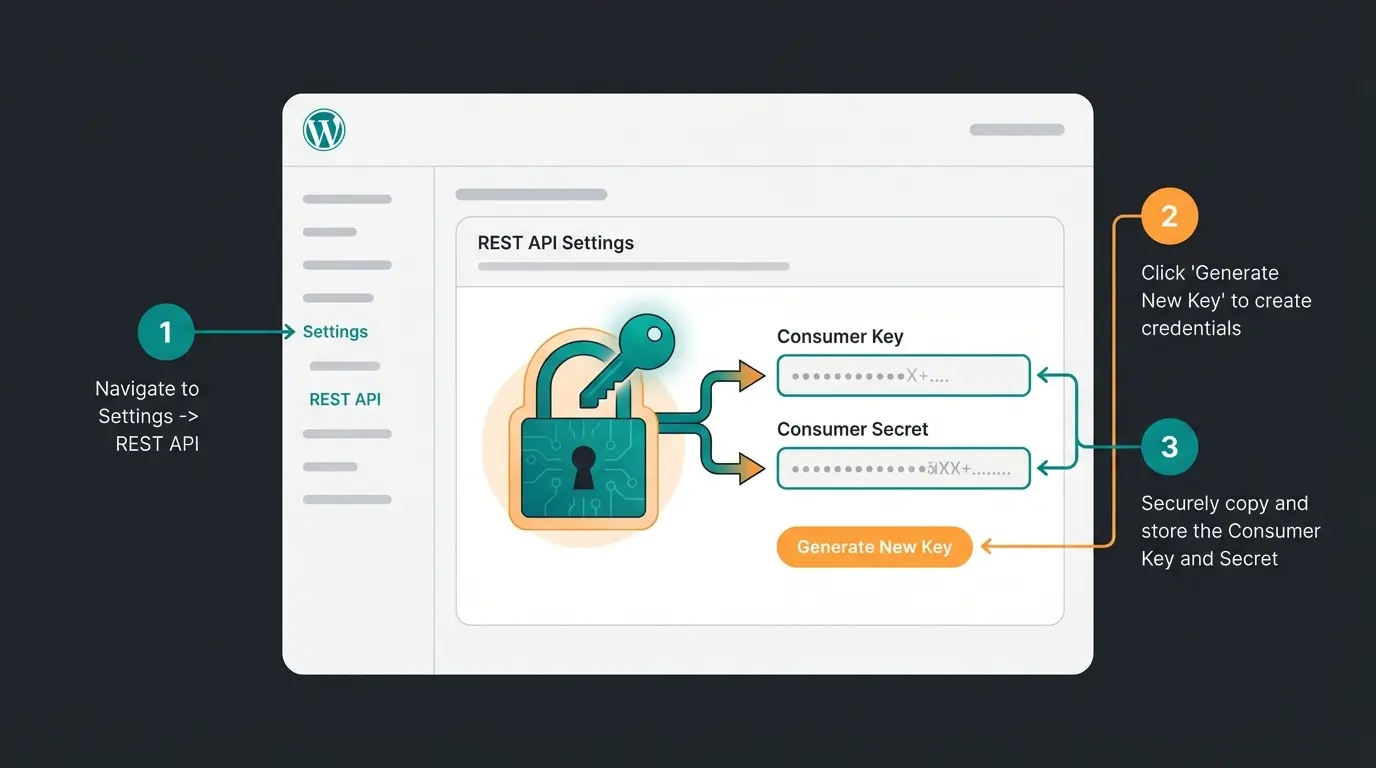
Step 2: Generate API Keys
This is the process you'll need for almost any external software:
- Log into your WordPress dashboard.
- Go to WooCommerce > Settings.
- Click on the Advanced tab, then the REST API submenu.
- Click Add Key.
- Description: Enter a name (e.g., "Connection to Billbee") so you'll know later who uses this key.
- User: Select an administrator account (or Shop Manager).
- Permissions: Select Read/Write. Most inventory systems need to be able to write stock levels.
- Click Generate API Key.
Step 3: Test the Connection
Enter the keys in the external software. Start a test sync (e.g., import of 5 products) before activating the full sync.
Step 4: Check Webhooks (For Professionals)
A good integration doesn't just use the API (polling) but webhooks. This means: WooCommerce "calls" the inventory system as soon as an order comes in ("Hey, new order #1234!"). Check under WooCommerce > Settings > Advanced > Webhooks whether these have been set up correctly. This enormously reduces server load since it doesn't have to query every 5 minutes whether there's something new.
Future Trends: From Synchronization to Autonomy
Where is the journey heading for WooCommerce integration?
We're moving away from pure data synchronization toward Agentic Commerce. This evolution mirrors what we're seeing with AI-driven consultation across all e-commerce platforms.
- Today: You connect Mailchimp to send newsletters to buyers.
- Tomorrow: An AI agent analyzes buying behavior, autonomously writes a personalized email ("Hey Thomas, your dog food is almost empty, here's 10% off for a refill") and books the coupon directly in the system.
The interfaces of the future will be less "rigid." Instead of fixed data fields, AIs will dynamically decide which data needs to be exchanged between systems to achieve the goal (revenue). Anyone who already relies on clean data structures and modern APIs (REST V3) today is prepared for this future. This is similar to how AI Chatbot for E-Commerce solutions are evolving from simple responders to autonomous sales agents.
AI agents will autonomously manage customer interactions and sales
Expected improvement in recommendation accuracy with AI integration
Of customer interactions can be handled by intelligent AI systems
Frequently Asked Questions (FAQ)
Here we answer the most burning questions about WooCommerce integration, structured for quick readability. For more specific guidance on AI consultation, check out our AI product consultation resources.
There's no universal "best" solution, only the right one for your size. For beginners and pure online merchants, Billbee is often the price-performance winner. For merchants with physical stores and complex warehousing, JTL-Wawi is the standard. Fast-growing startups often choose Xentral or weclapp for their cloud-native capabilities.
The connection is usually made by creating API keys (Consumer Key & Secret) in the WooCommerce backend under Settings > Advanced > REST API. These keys are then stored in the external software to authorize data exchange. Always ensure you're using REST API V3 for compatibility with WooCommerce 9.0+.
This depends heavily on the provider. Make sure the provider offers a Data Processing Agreement (DPA) and ideally uses servers in the EU. For US providers (like OpenAI-based plugins), you must verify whether data transfer is secured by Standard Contractual Clauses (SCC) and whether the user can consent before chat activation (e.g., via cookie banner).
WooCommerce 9.0 removed support for the "Legacy REST API." If your external software used this old interface, the connection no longer works. You must either update the software (to REST API V3) or temporarily install the official "WooCommerce Legacy REST API" plugin to restore functionality – though this is only a transitional solution!
A support chatbot reactively answers questions like "Where's my order?" and focuses on cost reduction. An AI sales consultant proactively engages customers, understands your entire product catalog, and makes personalized recommendations to drive sales – essentially acting as a digital expert salesperson that increases revenue.
Conclusion: Administration vs. Smart Selling
A WooCommerce integration today is far more than just technical "plumbing." While connecting to an inventory management system is your duty to work efficiently, integrating intelligent sales tools (AI) is your competitive edge to survive in the marketplace.
Check your "tech stack": Are you just managing, or are you already selling smart? The shops that thrive in 2025 and beyond will be those that master both the backend efficiency game AND the frontend sales game through intelligent AI integrations.
Ready to take your shop to the next level? Start with an analysis of your current interfaces and take the step toward AI-powered consultation. The future of e-commerce belongs to those who can deliver the personalized, expert advice that customers expect – at scale.
Join hundreds of e-commerce brands using AI-powered product consultation to boost conversions, increase average order value, and deliver exceptional customer experiences.
Get Started Free Today
Lasse is CEO and co-founder of Qualimero. After completing his MBA at WHU and scaling a company to seven-figure revenue, he founded Qualimero to build AI-powered digital employees for e-commerce. His focus: helping businesses measurably improve customer interaction through intelligent automation.