Why Most Chatbots Fail (And How to Succeed)
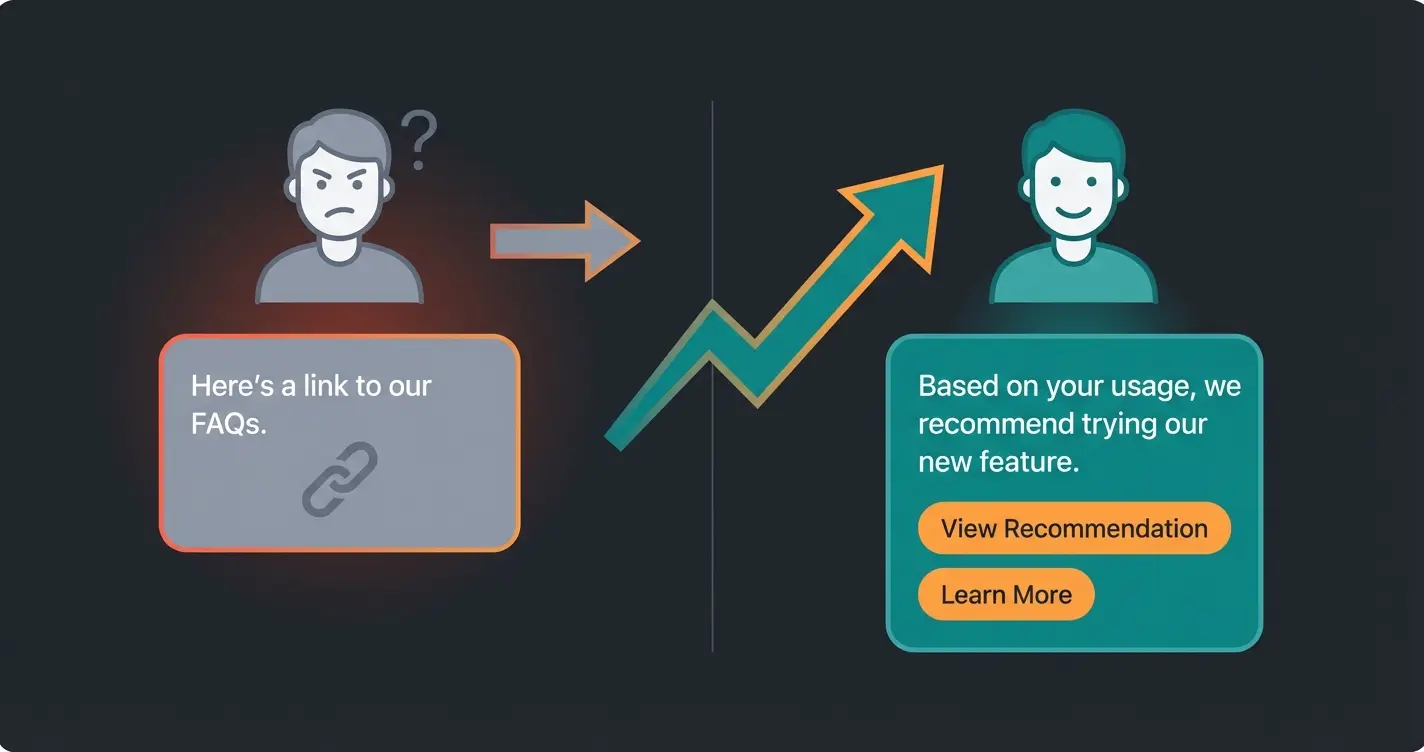
Have you ever tried asking a chatbot a complex question, only to receive the frustrating response: "I'm sorry, I didn't understand that. Here are our FAQs"?
If so, you're not alone. The first generation of chatbots was often disappointing—rigid rule systems that functioned more like glorified search bars than actual conversation partners. But 2025 marks a turning point. The technology has evolved from simple "if-then" rules to generative AI that understands context and interprets nuances. As AI chatbots evolving shows, we're witnessing a fundamental transformation in how businesses communicate with customers.
Yet many companies still fail at the project of creating a chatbot. Why? Because they're pursuing the wrong goal. They build bots to save costs in support (deflection) instead of building bots that increase revenue (conversion).
The data speaks clearly: While conventional online shoppers have an average conversion rate of about 3.1%, this number jumps to an impressive 12.3% for users who interact with an intelligent AI chatbot, according to research from HelloRep.ai and AgentiveAIQ. That's nearly a quadrupling of purchase probability.
In this comprehensive guide, you'll learn not only how to technically create your own chatbot but how to strategically develop a digital product advisor that understands your customers, provides consultation, and leads them to purchase. We'll leave behind superficial "Top 10 Tools" lists and dive deep into the architecture of a sales-effective AI assistant. If you're also considering a managed approach, our CaaS Guide covers Chatbot as a Service models in detail.
Three Proven Ways to Build Your Chatbot
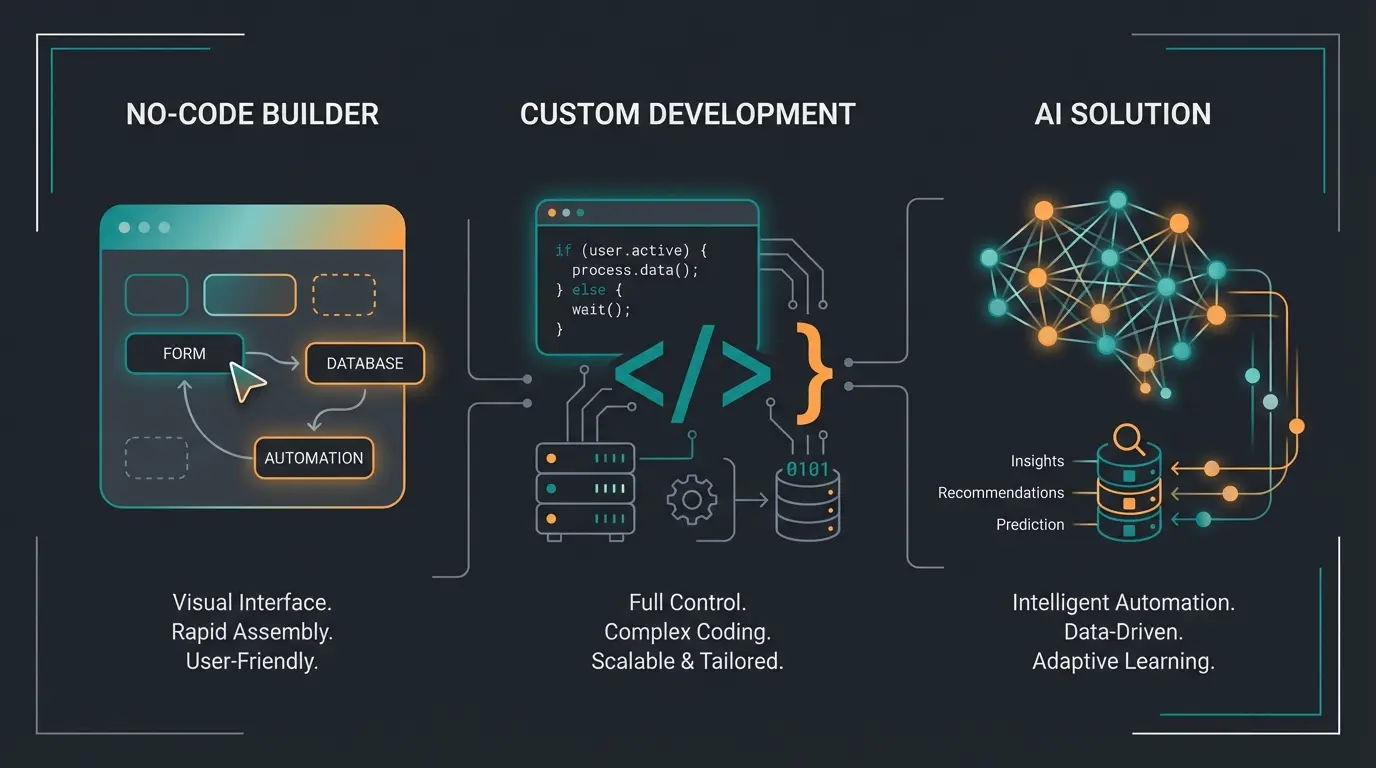
Before we dive into strategy, we need to clarify the technical landscape. When you want to build a chatbot today, you essentially have three paths available. Understanding the different types of chatbots is essential, as the choice depends massively on your resources and goals.
The No-Code Builder Approach
This is the entry point for many businesses. Platforms like Tidio, Chatbase, or ManyChat offer visual editors ("drag-and-drop") where you can click together conversation flows.
- How it works: You define triggers and responses. Example: When customer types "shipping" -> Show text block "Shipping costs".
- Advantages: Quick setup, no programming knowledge required, often affordable entry prices (e.g., Tidio starting at around $25/month or free basic versions according to Toollers).
- Disadvantages: Rigid and inflexible. As soon as a customer asks a question not exactly in the script ("Does the red shoe go with blue pants?"), the bot fails.
- Best suited for: Simple FAQ bots, business hours inquiries, status checks.
Custom Development Solution
Here, the bot is developed from scratch, often using programming languages like Python or Node.js and frameworks like Microsoft Bot Framework or LangChain.
- How it works: You have full control over the code, database connections, and logic. You integrate APIs from OpenAI (GPT-4) or Anthropic directly.
- Advantages: Maximum flexibility. You can deeply integrate the bot into your inventory management system.
- Disadvantages: High development effort, maintenance costs, requires specialized developers. Programming a chatbot often implies months of project timelines.
- Best suited for: Large corporations with their own IT departments and very specific security requirements.
Specialized AI Solutions (Domain-Specific AI)
This is the modern "sweet spot" for e-commerce and sales in 2025. These are platforms that use generative AI (like GPT-4) but "ground" it with your specific business data. This approach is particularly powerful for AI Product Consultation use cases.
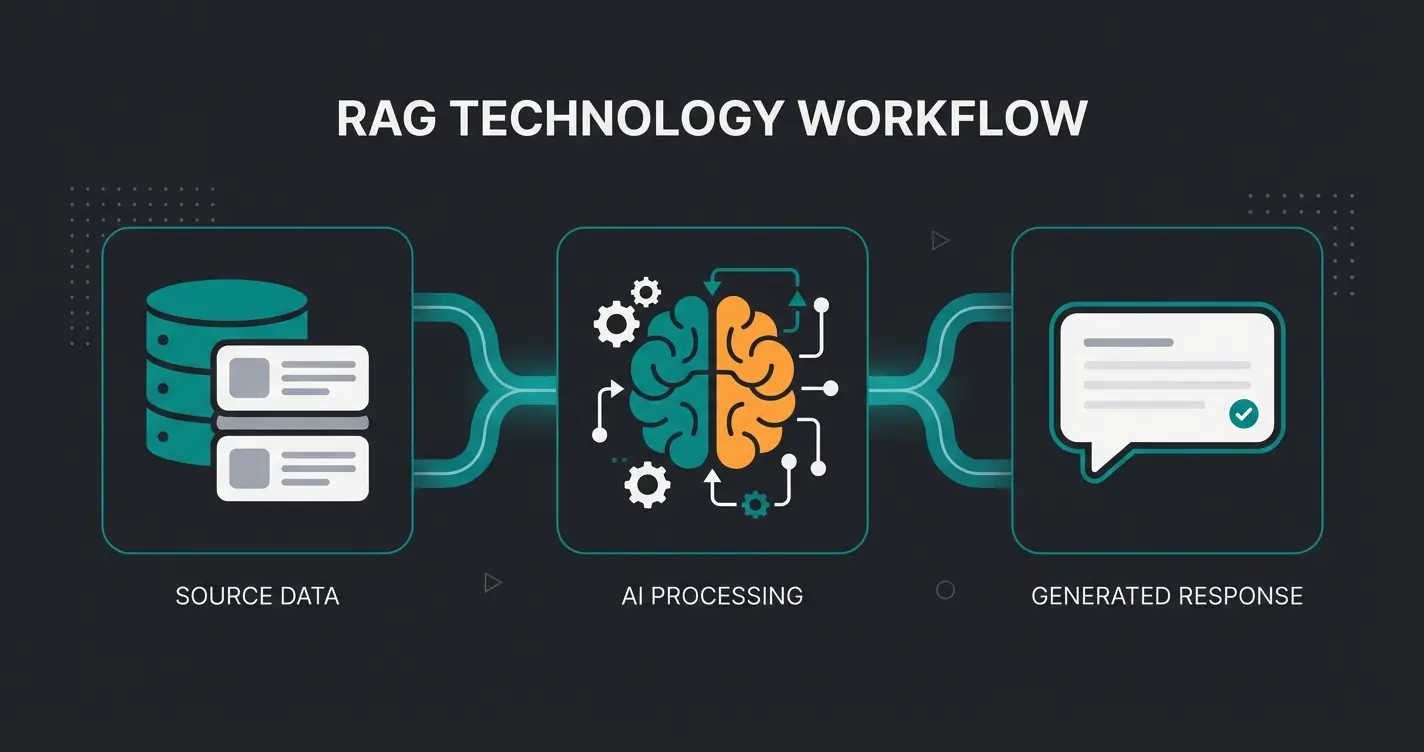
- How it works: You don't upload scripts but your knowledge (PDFs, product feeds, website URLs). The AI uses a technology called RAG (Retrieval Augmented Generation) to dynamically generate answers from your data, as explained by Webkul and AISoma.
- Advantages: The bot understands relationships ("This shoe runs small, better take size 10") and hallucinates less because it's bound to your data.
- Disadvantages: More expensive than simple builders, requires clean data foundation.
- Best suited for: Product consultation, sales bots, complex service inquiries.
Are you selling products or just reducing support tickets? Support only → Use a simple rule-based builder.
Do you have programming expertise (Python/JS) in-house? If yes → Consider custom development for maximum flexibility.
Simple products → Use tools like Chatbase with PDF uploads. Complex inventory with variants → Seek an E-Commerce AI Solution with direct shop integration.
No-code builder for FAQs, custom development for enterprise needs, or specialized AI for product consultation and sales.
Strategic Preparation: From Support Agent to Sales Expert
Before you write a single line of code or sign up for a tool, you need to define your goal. This is where you'll find the biggest leverage for success.
The Mindset Problem: Support vs. Consultation
Most companies view chatbots as a "cost brake." The goal is to keep tickets away from human support. That's legitimate but wastes the revenue potential. An AI product consultant approaches customer interactions completely differently than a support deflection tool.
| Feature | Classic FAQ Bot (Support) | AI Product Advisor (Sales) |
|---|---|---|
| Primary Goal | Ticket avoidance (Deflection) | Conversion increase & cart value |
| Data Basis | Static text blocks (FAQs) | Structured product data & attributes |
| Conversation Style | Reactive ("What's your question?") | Proactive ("Looking for running shoes for asphalt or trails?") |
| Success Metric | Resolved tickets / Time saved | Conversion rate / Revenue per chat |
| Technology | Rule-based / Simple NLP | Generative AI + RAG (Retrieval Augmented Generation) |
Why Product Consultation Is the Market Gap
Analysis of search results shows: Almost all guides on creating chatbots focus on support scenarios. But in e-commerce, customers often aren't looking for help with problems but orientation in the product range. This is where AI-powered sales consultants excel.
- The Problem: A customer faces 50 different laptops in the shop. They're overwhelmed.
- The Solution: A bot that asks: "What do you primarily use the laptop for? Gaming, office work, or image editing?" and recommends 3 models based on that.
Studies confirm that 47% of users are willing to purchase products directly through a chatbot, according to Route Mobile. If you don't serve this channel, you're leaving revenue on the table. Understanding the intersection of conversational commerce and AI is crucial for modern e-commerce success.
Step-by-Step Guide: Build Your Product Chatbot
Here's the concrete roadmap to build a bot that doesn't just answer but actually sells. This is where we transform simple support into intelligent product guidance.
Step 1: Data Preparation (The Foundation)
An AI advisor is only as smart as the data it has. Many make the mistake of simply letting the bot "scrape" (read out) the website. That's enough for FAQs but not for consultation.
- Why Scraping Often Fails: On a product page, there's lots of marketing text ("The best shoe ever"). But an advisor needs attributes: Material (Leather), Fit (Narrow), Waterproofing (Yes/No).
- The Solution: Use structured data (e.g., CSV, XML, or JSON feeds from your shop system like Shopify or Magento).
- Pro Tip: Create "knowledge cards" for your top sellers. What questions do customers always ask about this product? (e.g., "Is this part dishwasher-safe?"). This information must be explicitly included in the AI's database.
Step 2: Define the Persona
Nobody likes robots pretending to be human. But nobody likes boring robots either. Give your bot a role.
- The Assistant: Polite, brief, efficient. (Good for B2B).
- The Enthusiast: Uses emojis, is proactive, praises product choices. (Good for Lifestyle/Fashion).
- The Expert: Technically deep, uses industry terms, appears serious. (Good for Tech/Hardware).
Step 3: Technology Selection (RAG Is Essential)
To create a chatbot that recommends products effectively, you cannot bypass RAG (Retrieval Augmented Generation). This technology is what separates an effective AI product finder from generic chatbots.
What is RAG? Imagine the AI (the brain) is allowed to look in an open book (your product data) during an exam (customer question) before answering.
- Customer asks: "Do you have vegan hiking boots?"
- Retrieval: The system searches your database for "hiking boots" + attribute "vegan".
- Augmentation: The found product information is sent to the AI.
- Generation: The AI formulates the answer: "Yes, we have Model X and Model Y, both are 100% vegan."
Without RAG, the AI might hallucinate and invent products you don't even carry, as LeadMetrics explains in their research on grounding techniques.
Step 4: Testing and Training (Avoiding Hallucinations)
Before the bot goes live, it needs to be put through its paces. Test not only for correctness but for sales psychology. This is how AI Chatbots transform customer service into revenue generation.
- The "No" Test: Ask for a product you don't carry. Bad: "We don't have that." Good: "We don't carry this specific model, but Model Z is an excellent alternative with similar features."
- The "Why" Test: Ask: "Why do you recommend this shoe to me?" The bot must be able to connect the attributes (e.g., cushioning) with your need (e.g., knee pain).
Stop deflecting customers with frustrating FAQ bots. Create an AI product advisor that understands your catalog and drives conversions 24/7.
Start Building NowCosts and Effort: What Does a Chatbot Cost?
The question "What does it cost to create a chatbot?" can't be answered universally, but we can create categories. The market is growing rapidly and is expected to reach a volume of over $46 billion by 2029 according to Exploding Topics and Communications Today, which leads to a broad price range.
Low-Budget / Entry Level ($0 - $50/month)
Tools like Tidio or basic versions of Chatbase offer free entry points.
- Costs: Often free up to about 50 conversations/month. Then approximately $20-50/month.
- Performance: Simple FAQs, limited AI responses.
- Hidden Costs: Your own time for setup. If you take "DIY chatbot" literally, you're paying with work hours.
Professional / Mid-Market ($100 - $500/month)
Here you'll find powerful AI solutions that use RAG and can process larger data volumes (e.g., Chatbase Pro, Custom GPTs with API connection). Understanding how KI-Produktberatung outperforms support helps justify this investment.
- Costs: License fees plus often usage-based costs for AI tokens (credits), as detailed by Eesel AI and PagerGPT.
- Performance: Custom data sources (PDFs, website crawl), design customization (white labeling), integration with shop systems.
- ROI: If the bot generates just 5 additional sales per month, it has often already paid for itself.
Enterprise / Custom Development ($5,000+ Setup + Ongoing)
For large brands that want to deeply integrate the bot into CRM (Salesforce, HubSpot) and ERP (SAP). This is where AI sales agents reach their full potential.
- Costs: High initial costs for development, then maintenance contracts.
- Performance: Complete customization, highest data security, on-premise hosting possible.
The global chatbot market is projected to exceed $46 billion
AI chatbot users convert up to 4 times more frequently than non-users
Nearly half of users are willing to buy directly through chatbots
Compared to 3.1% for standard online shoppers
Best Practice Examples: Excellent Consultation in Action
To illustrate the difference between an annoying bot and a genuine advisor, let's look at a dialogue. This demonstrates why AI customer service is evolving beyond simple ticket handling.
Negative Example (The FAQ Bot)
Customer: "I'm looking for a cream for dry skin."
Bot: "We have many creams. Here's the link to our 'Facial Care' category."
Result: Customer must click through 100 products. High abandonment probability.
Positive Example (The AI Product Advisor)
Customer: "I'm looking for a cream for dry skin."
Bot: "Happy to help with that! Is your skin more sensitive or do you tolerate fragrances well? And are you looking for something for day or night?"
Customer: "Sensitive and for nighttime."
Bot: "I understand. I recommend our 'Calm Night Repair'. It's fragrance-free and contains ceramides that regenerate particularly well overnight. Should I add it to your cart?"
Result: Customer feels understood. The path to purchase is extremely shortened.
Why Does This Work?
- Qualification: The bot asks follow-up questions to narrow down the need.
- Expert Knowledge: It justifies the recommendation ("contains ceramides").
- Call-to-Action: It leads directly to closing the sale.
Assets for Success: Checklists and Decision Aids
To make implementation easier, we've summarized the key points in clear formats. The history of chatbots shows how far we've come, and these tools represent the cutting edge.
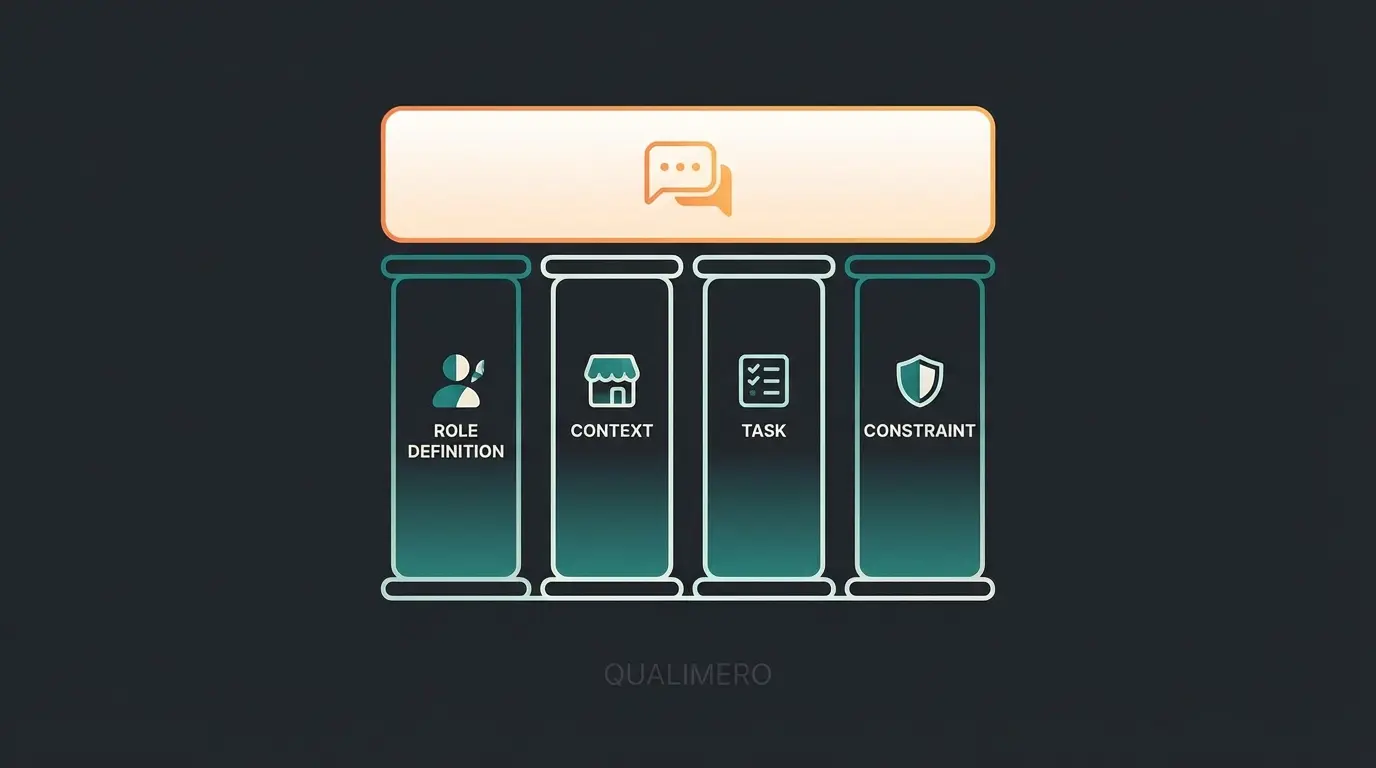
The Anatomy of a Perfect System Prompt
When configuring your bot ("System Prompt"), pay attention to these 4 pillars:
- Role: "You are a friendly barista..."
- Context: "...in an online shop for specialty coffee."
- Task: "Advise customers based on their taste preferences (acidic vs. bitter) and brewing method."
- Constraint (Safety): "Don't invent products. If you don't know something, offer to connect them with a human."
| Prompt Element | Purpose | Example |
|---|---|---|
| Role Definition | Sets the AI's personality and expertise level | "You are an experienced skincare specialist" |
| Product Context | Grounds the AI in your specific domain | "...for a premium natural cosmetics brand" |
| Conversation Guidelines | Defines how the AI should interact | "Ask clarifying questions before recommending" |
| Safety Constraints | Prevents hallucinations and off-topic responses | "Only recommend products from the provided catalog" |
The Future Belongs to Advisory Bots
The era of dumb text block dispensers is over. Anyone who wants to create a chatbot in 2025 should not ask: "How can I save on support staff?" but rather "How can I digitally clone my best salesperson?"
The technology is here. With RAG and modern LLMs (Large Language Models), you can build a bot that knows your products as well as you do—and is available 24/7 for your customers. The statistics show that customers are ready: They want quick answers, precise recommendations, and a seamless purchasing process.
Your Next Step: Analyze your top 10 sales conversations or email consultations. What do customers ask? What arguments convince them? Take exactly this knowledge and feed it into your first AI database. Don't start with the goal of perfection, but with the goal of relevance.
Creating your own chatbot is no longer rocket science today—it's an indispensable tool for modern e-commerce growth.
Frequently Asked Questions
Yes, absolutely. Modern no-code platforms and AI tools allow you to create powerful bots purely through configuration and data upload. Tools like Tidio, Chatbase, or ManyChat offer visual editors that require no coding knowledge. For basic FAQ bots, you can be up and running in a few hours.
A classic chatbot often follows rigid rules (scripts). An AI agent (based on LLMs like GPT-4) understands language flexibly, can draw logical conclusions, and solve tasks more autonomously. AI agents can handle complex, multi-turn conversations and adapt their responses based on context, while traditional chatbots are limited to predefined conversation flows.
The key is RAG technology (Retrieval Augmented Generation). It forces the bot to generate answers only based on your provided data (knowledge base) instead of freely 'fantasizing.' By grounding the AI in your product catalog, documentation, and FAQs, you ensure it only discusses products and information you actually offer.
Yes. Small teams benefit especially since the bot handles standard questions and provides consultation when no employee is available (e.g., evenings or weekends). The conversion rate increase often justifies the monthly costs of $30-100. Even a single additional sale per month can provide positive ROI.
With modern AI platforms, you can have a basic product advisor running within 1-2 days. The key steps are: uploading your product data (catalog, attributes), defining the bot's persona and conversation guidelines, and testing with real customer scenarios. Enterprise implementations with deep CRM integration typically take 4-8 weeks.
Join leading e-commerce brands using AI product advisors to boost conversions by 4x. Get started with your intelligent chatbot in minutes, not months.
Create Your AI Advisor
Lasse is CEO and co-founder of Qualimero. After completing his MBA at WHU and scaling a company to seven-figure revenue, he founded Qualimero to build AI-powered digital employees for e-commerce. His focus: helping businesses measurably improve customer interaction through intelligent automation.