What is the Shopify API?
The Shopify API is a set of programmatic interfaces that let external applications read, write, and manage data in a Shopify store. Products, orders, customers, inventory, fulfillment, pricing: everything that happens in your Shopify admin can be controlled through API calls.
If you have ever connected an ERP system to Shopify, synced inventory across channels, or built a custom checkout experience, you have used the Shopify API, whether you realized it or not. Every major Shopify app in the App Store communicates through these interfaces. For a broader overview of the Shopify platform itself, see our Shopify Guide [URL PENDING].
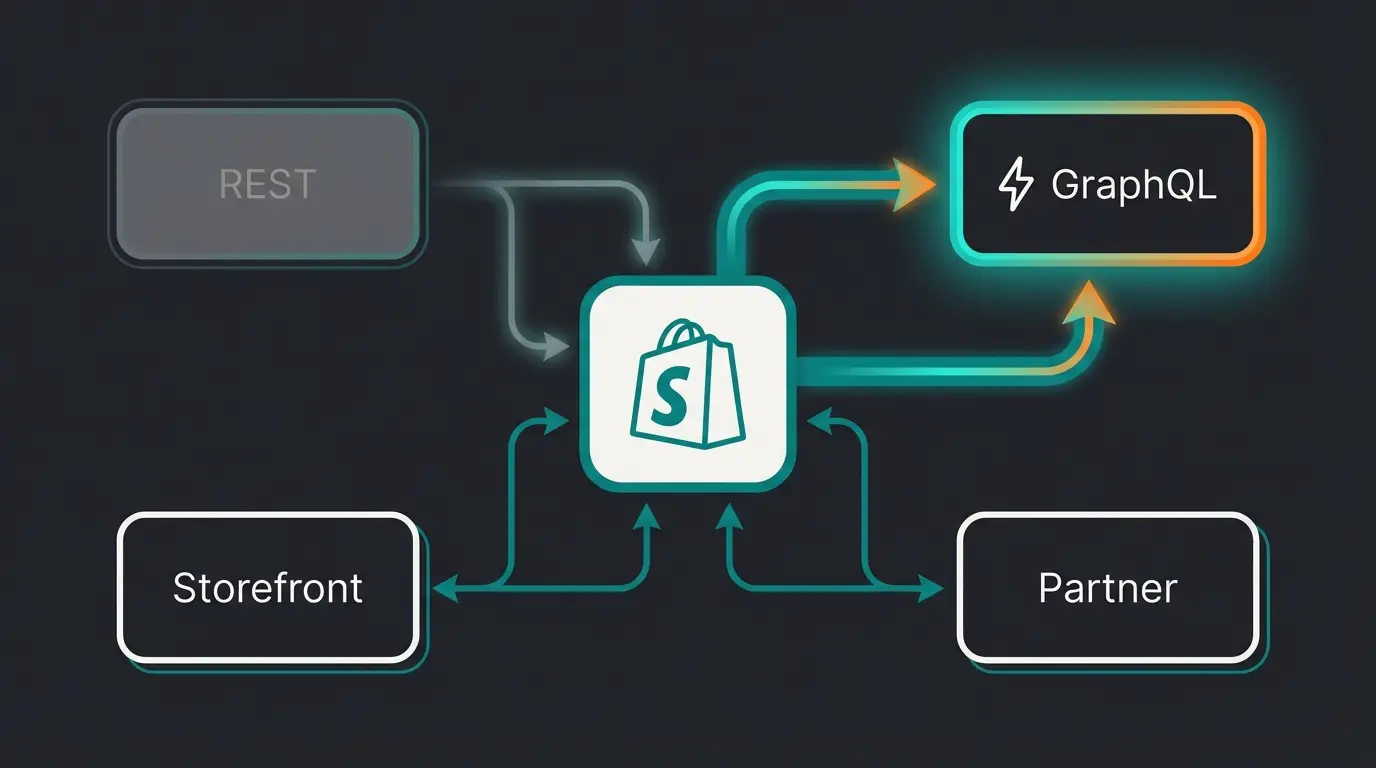
Shopify provides four distinct API types, each designed for a specific use case. Understanding which API to use for which task is the difference between a clean integration and months of debugging. The four types: the Admin REST API (legacy), the Admin GraphQL API (primary), the Storefront API (customer-facing), and the Partner API (app management).
The scale of the Shopify API ecosystem is worth noting. Over 3 million stores run on Shopify globally. The App Store contains thousands of apps, all built on these APIs. Shopify processes billions of API calls daily. When you build on the Shopify API, you are building on infrastructure that handles Black Friday traffic for some of the world's largest direct-to-consumer brands. The reliability is proven, and the documentation is among the best in e-commerce.
Overview: which Shopify APIs exist?
Before diving into specifics, here is the landscape. Shopify maintains four API types, each with distinct authentication, rate limits, and intended use cases. Choosing the wrong one is a common source of frustration for developers new to the Shopify ecosystem.
| API | Protocol | Primary use | Rate limit | Status |
|---|---|---|---|---|
| Admin REST | REST (JSON) | Backend CRUD operations | 40 requests/second per app | Legacy (since Oct 2024) |
| Admin GraphQL | GraphQL | Backend operations (primary) | 50 points/second (standard), 500 for Plus | Active, primary API |
| Storefront | GraphQL | Customer-facing experiences | No request-count limit | Active |
| Partner | GraphQL | App and store management | Varies | Active |
The most important shift in 2025-2026: Shopify declared the REST Admin API legacy in October 2024. Starting April 2025, all new public apps must be built exclusively with the GraphQL Admin API. Existing REST integrations continue to work, but the direction is clear. GraphQL is the future, and building new REST integrations is building on a shrinking foundation.
The Partner API is relevant primarily for app developers managing multiple installations. Most merchants and integration developers will work with the Admin GraphQL API and, if building custom storefronts, the Storefront API.
Shopify releases API versions quarterly: January, April, July, and October. Each version (e.g., 2026-01) is supported for approximately 12 months before deprecation. The current stable version is 2026-01, with 2026-04 available as a release candidate. Always pin your integration to a specific version in the URL path rather than using the generic endpoint.
All four APIs share a common authentication layer but differ in access patterns. The Admin APIs require server-side authentication with private access tokens. The Storefront API can be called from client-side code using a public access token (Storefront Access Token), which is safe to expose in browser-side JavaScript since it only grants read access to public data and cart operations.
Admin API: REST vs GraphQL
I worked with a fashion retailer last year who had built their entire ERP sync on the REST Admin API. Every product update triggered 4-5 separate REST calls: one for the product, one for each variant, one for inventory levels, one for metafields. Their integration hit rate limits constantly during bulk updates. Switching to GraphQL cut those 5 calls into a single query. The rate limit problems disappeared.
That is the fundamental advantage of GraphQL: you request exactly the data you need in a single call, nothing more. REST returns fixed data structures, often with fields you do not need, and requires multiple requests to assemble related data. GraphQL lets you compose a precise query and get everything in one response.
GraphQL Admin API: the primary path
The Shopify GraphQL Admin API Reference is the definitive resource. All new features ship here first and, since April 2025, here exclusively. Rate limits use a cost-based system: each query consumes a calculated number of points based on complexity. Standard plans get 50 points per second, Shopify Plus gets up to 500. For a deeper look at query structure, mutations, and cost optimization, see our Shopify GraphQL guide.
A simple product query might cost 2-3 points. A bulk operation that processes thousands of products runs as a background job with its own limits. The cost-based model is more flexible than REST's flat request limit, but requires developers to understand query cost optimization.
Mutations (write operations) follow the same cost-based model. Creating a product, updating inventory, or processing an order refund are all mutations. The key difference from REST: mutations return data in the same call. You create a product and immediately get back whatever fields you need from the created resource, without a separate GET request.
For large-scale operations (importing 10,000 products, updating prices across the catalog), the Bulk Operations API runs queries asynchronously. You submit a query, receive a job ID, and poll for completion. The result is delivered as a JSONL file. This is significantly more efficient than paginating through thousands of individual queries.
# Fetch a product with variants and inventory in a single query
query {
  product(id: "gid://shopify/Product/123456789") {
    title
    status
    variants(first: 10) {
      edges {
        node {
          title
          price
          inventoryQuantity
          sku
        }
      }
    }
    metafields(first: 5) {
      edges {
        node {
          namespace
          key
          value
        }
      }
    }
  }
}
REST Admin API: still running, no longer growing
The REST Admin API uses standard HTTP methods (GET, POST, PUT, DELETE) with JSON payloads. The rate limit is straightforward: 40 requests per second per app, using a leaky bucket algorithm. You can monitor your remaining capacity via the X-Shopify-Shop-Api-Call-Limit response header.
# REST API: Fetch a product (returns ALL fields, no filtering)
curl -X GET \
  "https://your-store.myshopify.com/admin/api/2026-01/products/123456789.json" \
  -H "X-Shopify-Access-Token: your-access-token"
The REST call above returns the entire product object with every field, whether you need them or not. With GraphQL, you specify exactly which fields to return. For a single product lookup, the difference is minor. For bulk operations processing thousands of products, the bandwidth and processing savings are substantial.
| Scenario | REST | GraphQL |
|---|---|---|
| New project (2026) | Not recommended | Use this |
| Existing integration | Continue, plan migration | Migrate when feasible |
| Bulk operations | Multiple calls needed | Single query or bulk API |
| Simple webhook response | Quick and simple | Equally viable |
| Complex nested data | Multiple requests | Single query |
| Rate limit pressure | 40 req/sec flat | Cost-based, more flexible |
Storefront API and headless commerce
The Storefront API is Shopify's customer-facing API. While the Admin API manages backend operations, the Storefront API powers what shoppers actually see and interact with: product listings, collections, cart management, and checkout. It uses GraphQL exclusively and, critically, has no request-count rate limit.
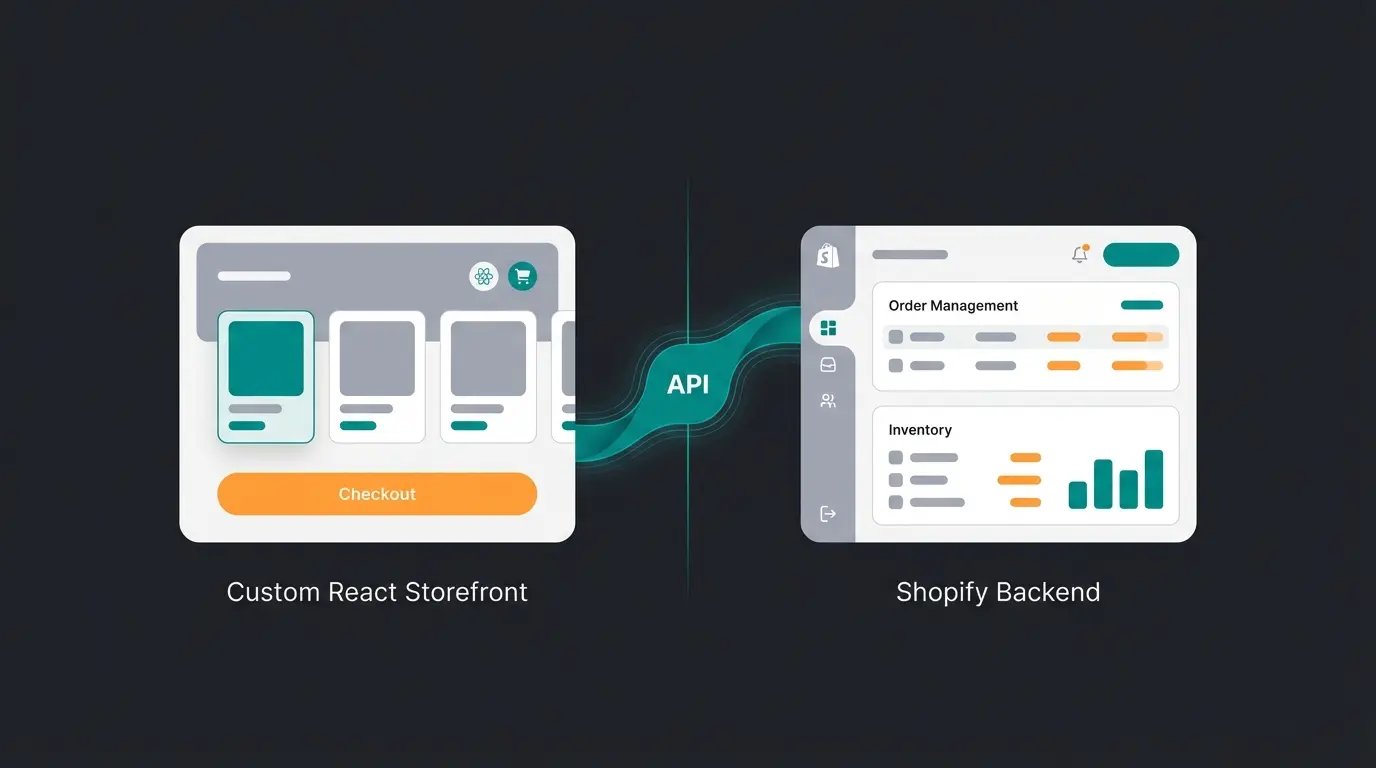
This API is the foundation for headless commerce on Shopify. Instead of using Shopify's default theme system, you build a completely custom frontend (React, Next.js, Vue, or any framework) and use the Storefront API to pull product data, manage carts, and process checkouts. The official documentation is at Storefront API Documentation.
The biggest development in 2026: Shopify's Hydrogen framework, built on React Router, is now the recommended way to build headless Shopify storefronts. Deployed on Shopify Oxygen (Shopify's edge hosting), Hydrogen storefronts deliver sub-second page loads with built-in Storefront API integration. For a deep dive into this framework, see our Shopify Hydrogen guide.
Your React/Next.js/Hydrogen app renders the storefront UI
GraphQL queries fetch products, collections, pricing in real-time
The Storefront API manages cart state and initiates checkout
Order processing, payments, fulfillment handled by Shopify
A major addition in the Hydrogen Winter 2026 Edition: Storefront MCP (Model Context Protocol). This lets AI agents interact directly with your headless storefront, querying real-time product data, managing carts, and guiding checkout. Your store becomes discoverable by AI shopping assistants like ChatGPT and Perplexity, opening an entirely new channel for product discovery.
The Storefront API also supports Shopify's predictive search, recommendations engine, and localized pricing. For international stores, you can query products with prices in the buyer's local currency and language. This makes the Storefront API suitable for multi-market storefronts that serve customers across regions from a single codebase.
Performance consideration: Storefront API responses are cached at Shopify's edge. Frequently accessed products and collections are served from cache, resulting in response times under 100ms globally. Cart operations (add, update, remove) bypass cache since they involve session state. This architecture means your headless storefront can handle traffic spikes without degradation on read-heavy operations.
Setting up the Shopify API: step by step
Getting API access requires a few steps that have changed significantly since January 2026. Legacy custom apps created directly in the Shopify Admin are no longer an option for new integrations. All new apps must go through the Developer Dashboard or the Shopify CLI. For additional developer tooling and resources, see our Shopify Developer Resources [URL PENDING] guide.
Step 1: Create a Shopify Partner account
Go to partners.shopify.com and sign up. This is free and gives you access to the Developer Dashboard where you create apps, manage API credentials, and access development stores. Even if you are building a custom integration for a single store, you now need a Partner account.
Step 2: Create an app in the Developer Dashboard
In the Developer Dashboard (dev.shopify.com), create a new app. Select the scopes (permissions) your app needs: read_products, write_orders, read_customers, and so on. Only request permissions your app actually requires. Shopify reviews apps for excessive scope requests. Refer to the Official Shopify API Documentation for the complete scope reference.
Step 3: Authentication with OAuth 2.0
Since 2026, all new apps use OAuth 2.0 for authentication. The flow works as follows: your app redirects the merchant to Shopify's authorization page, the merchant approves the requested permissions, Shopify redirects back to your app with an authorization code, and your app exchanges that code for an access token. For custom domain setups and how they interact with API authentication, see our Shopify Custom Domain guide.
// Exchange authorization code for access token
const response = await fetch(
  `https://${shop}/admin/oauth/access_token`,
  {
    method: 'POST',
    headers: { 'Content-Type': 'application/json' },
    body: JSON.stringify({
      client_id: API_KEY,
      client_secret: API_SECRET,
      code: authorizationCode
    })
  }
);
const { access_token } = await response.json();
Step 4: Make your first API call
With the access token, you can now make authenticated API calls. Include the token as an X-Shopify-Access-Token header on every request. Here is a simple GraphQL query to fetch your store's name and product count:
// First GraphQL API call
const response = await fetch(
  `https://${shop}/admin/api/2026-01/graphql.json`,
  {
    method: 'POST',
    headers: {
      'Content-Type': 'application/json',
      'X-Shopify-Access-Token': accessToken
    },
    body: JSON.stringify({
      query: `{
        shop {
          name
          productCount: productsCount { count }
        }
      }`
    })
  }
);
const data = await response.json();
Security note: never expose your Admin API access token in client-side code. Admin tokens grant read and write access to your store's backend data. If leaked, an attacker could access customer information, modify orders, or delete products. Use environment variables for token storage, and restrict API calls to server-side code only. The Storefront API token is the only token safe for client-side use, and even then, it only grants access to public store data.
Webhooks and real-time data
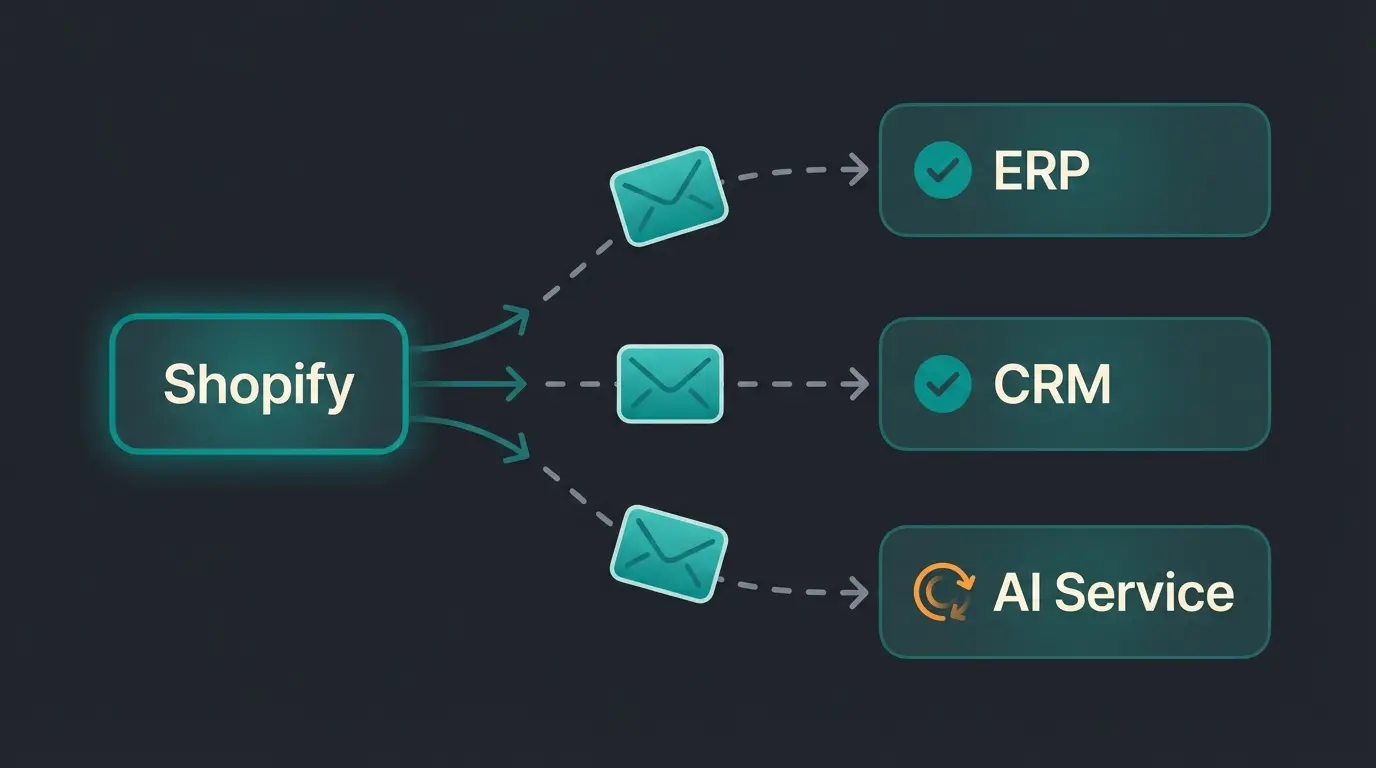
APIs are pull-based: your application requests data when it needs it. Webhooks are push-based: Shopify sends data to your application when something happens. Order placed, product updated, customer created, inventory changed. Instead of polling the API every few seconds, webhooks notify you in real-time.
Setting up webhooks requires registering a subscription for specific event topics. You specify the topic (e.g., orders/create), the callback URL where Shopify sends the data, and the format (JSON). Shopify signs each webhook payload with an HMAC header so you can verify authenticity.
- orders/create and orders/updated: trigger fulfillment, sync to ERP, update analytics
- products/update: sync product changes to external systems, update search indexes
- inventory_levels/update: real-time inventory sync across channels
- customers/create: trigger welcome sequences, CRM updates
- app/uninstalled: clean up data when a merchant removes your app
Three webhook topics are mandatory for any app distributed through the Shopify App Store: customers/data_request, customers/redact, and shop/redact. These are GDPR compliance webhooks. If your app does not handle them, it will be rejected during review.
Webhook payloads include the full resource data at the time of the event. An orders/create webhook delivers the complete order object: line items, shipping address, payment status, and customer information. This means you rarely need a follow-up API call to get additional data, making webhooks highly efficient for event-driven architectures.
Implementation best practice: process webhooks asynchronously. Accept the webhook with a 200 response immediately, then process the payload in a background queue (Redis, SQS, or similar). If your webhook handler takes too long to respond, Shopify may mark the delivery as failed and retry, potentially causing duplicate processing.
Practical examples: Shopify API integrations
The API becomes powerful when you connect it to business processes. Here are the integration patterns we see most often across our merchant implementations.
ERP and inventory sync
The most common integration: connecting Shopify to an ERP system (SAP, Microsoft Dynamics, Xentral, Weclapp) for order and inventory synchronization. The Admin GraphQL API handles product creation, inventory level updates, and order retrieval. Webhooks trigger the sync in real-time when orders are placed or inventory changes.
A typical ERP integration uses webhooks for orders/create, orders/updated, and inventory_levels/update as the primary data flow. The Admin GraphQL API handles the reverse direction: pushing inventory adjustments, price changes, and new products from the ERP into Shopify. The critical design decision is conflict resolution: what happens when inventory is updated in both systems simultaneously. Most production integrations designate the ERP as the source of truth for inventory and Shopify as the source of truth for orders.
AI-powered product advisory
This is where the API meets modern commerce. An AI employee connects to the Shopify API to access product data, variant information, pricing, and availability in real-time. When a customer asks a question, the AI queries the product catalog through the Storefront API, matches the question to relevant products using semantic search, and delivers a personalized recommendation.
Our clients using this pattern see measurable results: +35% higher cart values, +60% checkout rates, and 16x ROI. The API is the bridge that gives the AI employee access to your entire product knowledge base, not just a static FAQ.
The technical architecture: the AI employee uses the Storefront API to query product catalogs in real-time, ensuring recommendations always reflect current availability and pricing. Customer interaction data flows through the Admin API for order history and preference analysis. This dual-API pattern provides comprehensive context without exposing admin-level access on the client side.
Multi-channel automation
Shopify merchants increasingly sell on multiple channels: website, WhatsApp, Instagram, marketplaces. The Admin API enables centralized order management and inventory sync across all channels. Combined with webhooks for real-time updates, you can build fully automated multi-channel operations where inventory adjustments in Shopify cascade to every connected platform within seconds. For no-code automation between Shopify and hundreds of other apps, a Shopify Zapier integration is the fastest path to connecting your stack.
Qualimero AI employees integrate directly with the Shopify API to provide real-time product advisory. +35% higher cart values, +60% checkout rate. No custom development needed.
Book a demoCommon mistakes and best practices
After years of building and reviewing Shopify integrations, the same mistakes keep appearing. Here is how to avoid them.
- Ignoring rate limits. Monitor the X-Shopify-Shop-Api-Call-Limit header (REST) or the extensions.cost object (GraphQL). Build in backoff logic before you hit throttling.
- Over-requesting scopes. Only request permissions your app actually needs. Excessive scopes delay app review and erode merchant trust.
- Not handling pagination. Shopify GraphQL uses cursor-based pagination. Always check hasNextPage and use the endCursor to fetch subsequent pages. Missing this means missing data.
- Skipping webhook verification. Always verify the HMAC signature on incoming webhooks. Without verification, any external source could send fake events to your endpoint.
- Ignoring API versioning. Shopify releases new API versions quarterly (e.g., 2026-01, 2026-04). Old versions are deprecated on a rolling schedule. Pin your integration to a specific version and update proactively.
- Building on REST in 2026. If you are starting a new project, use GraphQL. REST receives no new features and will eventually reach end of life.
One practice that saves significant debugging time: use Shopify's built-in GraphiQL explorer (available in the Shopify Admin under Apps > Develop Apps) to test queries before implementing them in code. The explorer shows query cost, response structure, and available fields interactively.
Another overlooked practice: implement idempotency for write operations. If a network error occurs during a mutation, your code might retry and accidentally create a duplicate product or charge an order twice. Use mutation input idempotency keys where available, and always check for existing resources before creating new ones.
For production applications, set up monitoring for API response times, error rates, and rate limit proximity. Shopify's API is reliable, but external factors (network latency, DNS resolution, TLS handshake) can introduce variability. Dashboards that track p95 response times and throttling events help you catch integration issues before they affect your business operations.
Frequently asked questions
Yes, API access is included with every Shopify plan. There are no per-call charges. However, rate limits vary by plan: standard plans get 50 GraphQL points per second, Shopify Plus gets up to 500 points per second.
Any language that can make HTTP requests works with the Shopify API. Shopify provides official libraries for Node.js, Ruby, Python, and PHP. Third-party libraries exist for Go, Java, C#, and most other languages.
The GraphQL Admin API allows 50 points per second on standard plans, 100 on Advanced, and 500 on Shopify Plus. The REST Admin API allows 40 requests per second per app. The Storefront API has no request-count rate limit.
Use GraphQL for all new projects. The REST Admin API has been legacy since October 2024, and all new public apps must use GraphQL exclusively since April 2025. GraphQL also offers more flexible rate limits and precise data fetching.
Not directly, but tools like Zapier, Make (Integromat), and Shopify Flow provide no-code interfaces that use the API behind the scenes. For custom integrations, coding knowledge in JavaScript, Python, or Ruby is needed.
Shopify releases new API versions quarterly (January, April, July, October). Each version is supported for approximately 12 months. Pin your integration to a specific version in the API URL and upgrade proactively before deprecation.
The Admin API manages backend operations (products, orders, inventory, customers) and requires authentication. The Storefront API powers customer-facing experiences (product display, cart, checkout) and can be called from client-side code with a public access token.
Qualimero AI employees use the Shopify API to deliver real-time product advisory. Trusted by 25+ merchants. 4.9/5.0 on OMR Reviews.
Start your free trial
Lasse is CEO and co-founder of Qualimero. After completing his MBA at WHU and scaling a company to seven-figure revenue, he founded Qualimero to build AI-powered digital employees for e-commerce. His focus: helping businesses measurably improve customer interaction through intelligent automation.