Introduction: The End of Micro-Optimization
If you're still debating whether your "Add to Cart" button should be green or orange in 2025, you're leaving money on the table. Don't get me wrong: Shopware A/B testing remains the backbone of any data-driven e-commerce strategy. But the era when simple UI tweaks could double your revenue is over.
We've entered a phase of e-commerce where the User Experience (UX) and consultation quality make the difference—not pixel colors. While your competition scratches the surface with client-side tools and ruins their load times in the process, innovative Shopware merchants have long recognized: The real lever lies in macro-optimization.
In this comprehensive guide, we'll dive deep into the technical and strategic reality of A/B testing in Shopware 6. We'll analyze why classic tools often fail against Shopware's caching architecture, how to master GDPR hurdles in Germany, and why the test "Static Filters vs. AI product consultation" is the most important test you'll run this year.
Modern Shopware AI features have transformed what's possible in conversion optimization. Rather than endlessly tweaking interface elements, forward-thinking merchants are now testing fundamentally different approaches to customer engagement—and the results speak for themselves.
Part 1: The Status Quo – A/B Testing in Shopware 6
Shopware 6 is a technological powerhouse. Yet precisely this strength—especially the aggressive caching architecture for high performance—makes classic A/B testing challenging. Anyone who blindly embeds a JavaScript snippet here risks not only corrupted data but also technical problems.
The Technical Hurdle: HTTP Cache, Varnish & Fastly
To understand why many A/B tests fail in Shopware, we need to look under the hood. Shopware 6 uses an HTTP cache by default (often reinforced by reverse proxies like Varnish or Fastly) to deliver pages lightning-fast. According to maxcluster.de, proper cache configuration is essential for Shopware performance.
The Problem: When User A arrives at your page and sees Variant A, the server stores this version in the cache. When User B arrives milliseconds later, the Varnish cache delivers the stored Variant A—even if the A/B testing tool actually wanted to show Variant B.
Three Testing Methods in Shopware
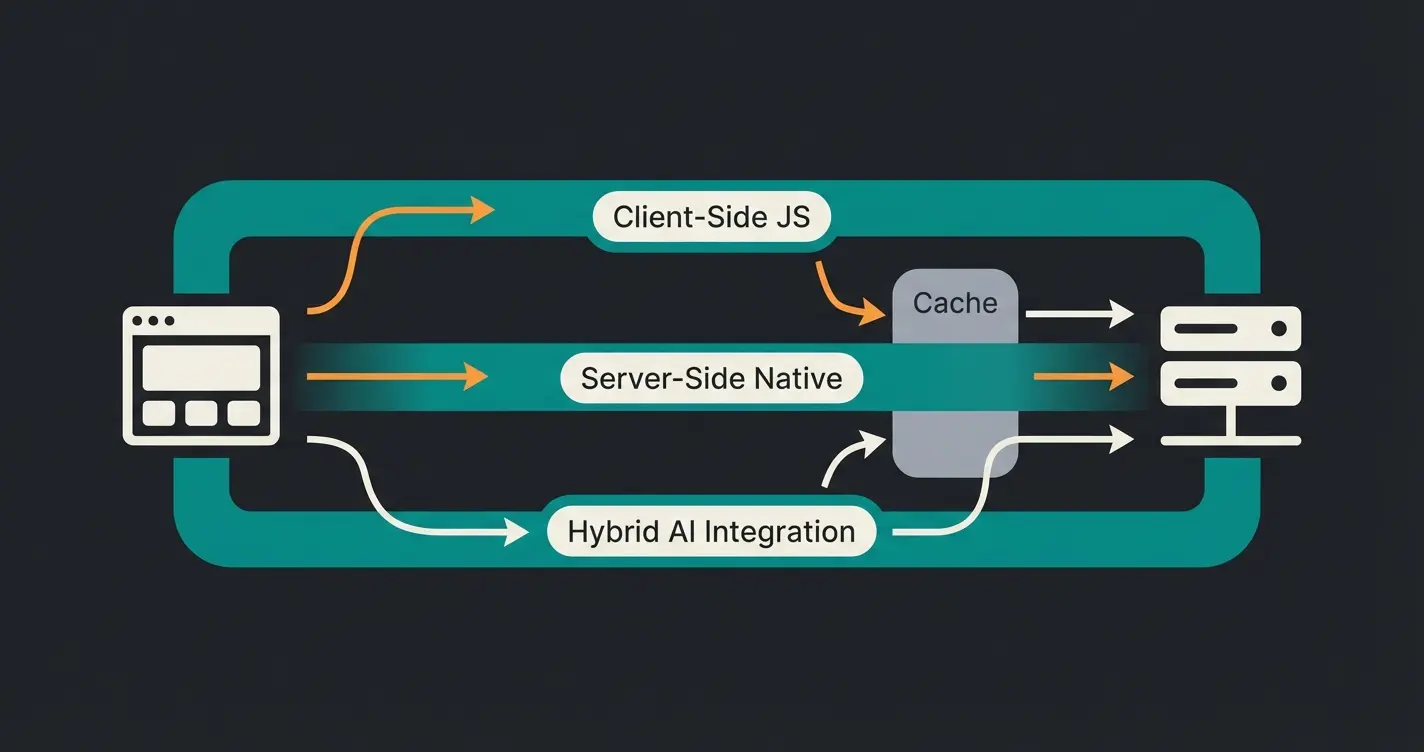
Based on current market analysis, three approaches can be identified for how merchants solve this problem:
Method A: Client-Side Testing (The Quick & Dirty Solution)
This involves tools like VWO, Optimizely Web, or (formerly) Google Optimize. A JavaScript snippet in the frontend manipulates the page after loading. As noted on Medium, these tools offer visual editors but come with significant trade-offs.
- Advantage: Quick setup, visual editor, no developer needed.
- Disadvantage: High risk of flickering, performance losses from external scripts, GDPR issues (data flow to the USA).
- Shopware Compatibility: Low, unless extensively configured to bypass the cache.
Method B: Server-Side / Native Testing (The Engineering Solution)
Here, the server decides before delivering HTML which variant to show. In Shopware, this can be done via the Rule Builder (rudimentary) or through code customizations (feature flags). Shopware's official documentation recommends techniques like dynamic component loading via Vue.js.
- Advantage: No flickering, best performance, full control over caching.
- Disadvantage: High development effort. Marketing teams cannot start tests without IT.
- Shopware Compatibility: High. Shopware officially recommends these approaches.
Understanding how AI transforms static rules can help you leverage Shopware's Rule Builder more effectively for sophisticated testing scenarios.
Method C: The Hybrid Solution (The Sweet Spot)
Modern approaches use server-side logic for variant assignment (to solve caching problems) but deliver content dynamically—for example, through AI-powered plugins or apps like Convertly that are deeply integrated into Shopware. According to Convertly, their solution handles cache invalidation automatically.
- Advantage: Combines performance with user-friendliness.
- Best Use Case: When you want to test sophisticated experiences like AI consultation without technical overhead.
Part 2: Strategic Gap Analysis – What Are We Testing?
Most guides online explain how to test. But hardly anyone tells you what you should test to achieve significant uplifts in 2025.
The Law of Diminishing Returns
If you change your checkout button from blue to red, you might see short-term fluctuation. But statistically significant uplifts of 20% or more are nearly impossible to achieve through pure UI cosmetics anymore. UX standards in e-commerce are now so high that most shops are "good enough."
The New Frontier: Static Filters vs. AI Consultation
This is where the greatest untapped potential for Shopware merchants lies. AI-driven product consultation represents a paradigm shift from passive filtering to active guidance.
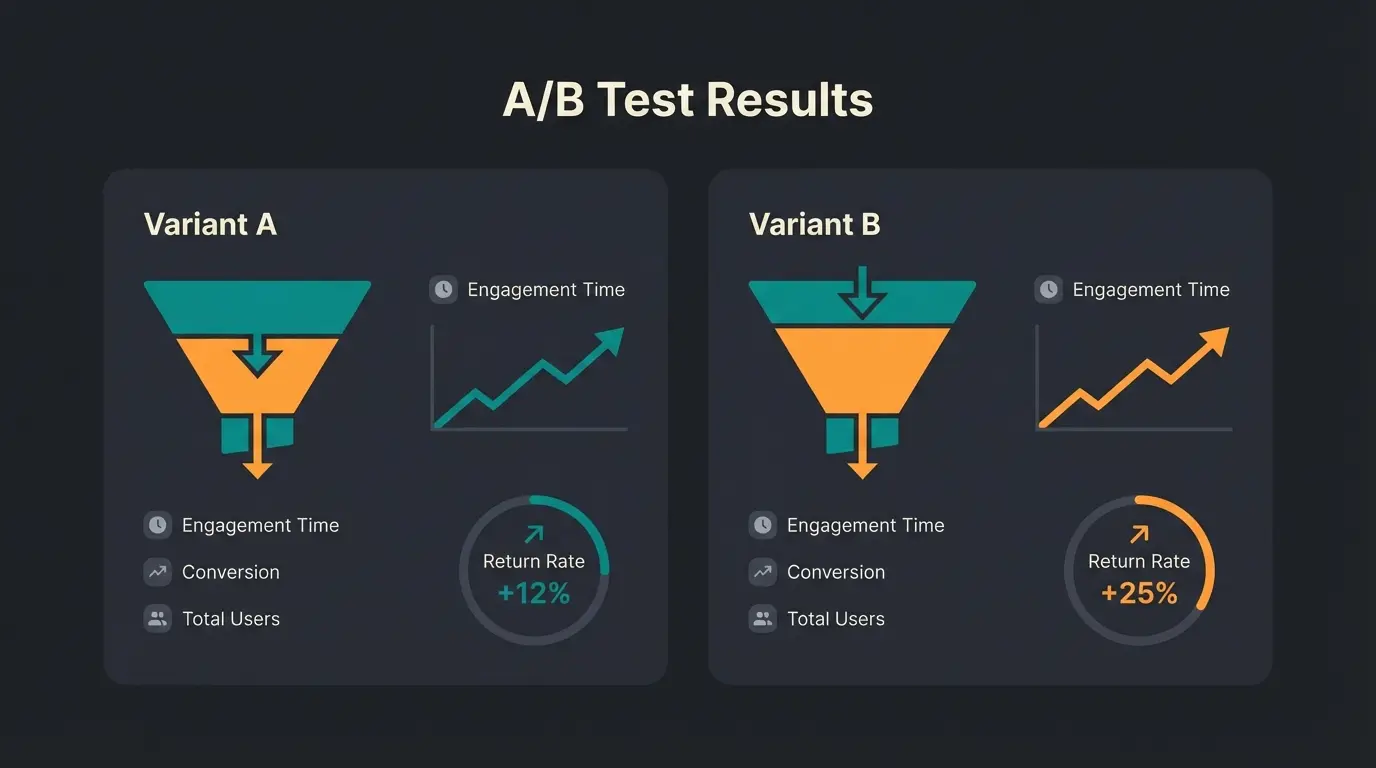
Status Quo (Variant A): The customer lands on a category page (e.g., "Running Shoes"). They see 200 products and a sidebar with technical filters (size, color, cushioning, drop).
- Problem: Decision Fatigue. The customer must be an expert to use the filters correctly.
- Result: High bounce rates and abandoned sessions as overwhelmed shoppers leave without purchasing.
Challenger (Variant B): The customer sees an AI-powered product advisor (Guided Selling). This is where AI-powered sales consultants shine.
- Approach: "I'll help you find the perfect shoe. Where do you usually run? (Trail/Road) Do you have knee problems?"
- Hypothesis: By reducing complexity and simulating a sales conversation, not only does the conversion rate increase, but also the average order value (AOV), while the return rate decreases.
Studies and benchmarks from industry reports show that Guided Selling can boost conversion rates by 20% to 70%. Threekit and Retainful have documented these impressive results across multiple e-commerce implementations.
Button colors, font sizes - minimal gains in mature shops
Checkout flow, page structure - moderate improvements
AI Consultation vs. Static Filters - transformational results
Part 3: The German Challenges – GDPR and Performance
A topic often ignored in US-centric guides is vital for the German market: The General Data Protection Regulation (GDPR/DSGVO) and German users' sensitivity to data privacy.
The Cookie Banner Dilemma
Classic A/B testing tools set cookies to track whether a user saw Variant A or B. This creates significant compliance challenges, as detailed by ClickValue in their analysis of post-Google Optimize alternatives.
The Problem: In Germany, you must obtain explicit consent for these tracking cookies (e.g., via Usercentrics or Cookiebot).
The Consequence: If 30-50% of users click "Reject All," these users are not included in your A/B test—or worse, they see Variant A but aren't tracked. This massively skews your results (Selection Bias). Testing only "yes-sayers" doesn't represent your average customer.
The Solution: Server-Side & Anonymous Testing
To obtain valid data in Germany, you must use solutions that meet specific criteria. Data-Mania provides excellent guidance on GDPR-compliant testing alternatives.
- No PII (Personally Identifiable Information) storage: Session IDs should be hashed and not persistently assigned to user profiles.
- First-Party Data usage: The logic should run on your server (Shopware), not on third-party servers in the USA.
- Consent Independence: Tests based purely on content delivery (without persistent tracking across sessions) can often be argued as "legitimate interest" (please consult your legal advisor).
The performance impact is well-documented. According to shyim.me, Shopware's reverse proxy configuration significantly affects how testing scripts interact with cached pages.
Stop guessing which button color converts better. Run the test that actually moves the needle—AI-powered product consultation vs. static filters.
Start Your Pilot TestPart 4: Practical Guide – Strategic Test Setup in Shopware 6
Let's get concrete. We're implementing a scenario that's strategically valuable, technically clean, and privacy-compliant.
The Scenario: We're testing the standard view against an AI purchase advisor on the "Road Bikes" category page.
Step 1: Define the Hypothesis
Step 2: Technical Implementation (The Cache-Proof Way)
Instead of using an external tool, we use Shopware's built-in capabilities or specialized plugins that work with the cache.
Option A: Using the Shopware Rule Builder (Native)
Shopware 6 allows you to deliver Shopping Experiences (CMS Pages) based on rules. This native approach integrates seamlessly with your existing setup.
- Create a Rule: Go to the Rule Builder. Create a rule called "Split Test Group B." Trick: Since Shopware has no native random generator in the Rule Builder, advanced agencies often use a small plugin or custom field on the customer/session that randomly assigns a "1" or "0" (modulo of User-ID or Session-ID).
- Duplicate Shopping Experiences: Layout A (Control): Standard Category Listing. Layout B (Challenger): Remove the listing "above the fold." Instead, prominently add your AI advisor element (e.g., embedded plugin or IFrame of a Guided Selling solution).
- Assignment: Assign both layouts to the category, with Layout B only applying when the "Split Test Group B" rule is met.
Option B: Using Specialized Shopware Apps
Tools like Convertly or Kameleoon integration are often the better choice for non-developers, as they automatically handle cache invalidation (Varnish Purge), manage user distribution (traffic split) in a GDPR-compliant manner, and work directly within Shopping Experiences. Gartner and WiserNotify provide comprehensive comparisons of these experimentation platforms.
For businesses looking to enhance their product discovery, implementing an AI product finder as the challenger variant can yield remarkable results in conversion optimization.
Step 3: Handling the HTTP Cache (Varnish)
If you choose Option A (DIY), you must ensure that Varnish doesn't deliver the same page to all users.
- Solution: Use cookies or session parameters that are considered as "Vary" headers in the Varnish configuration (VCL). This means: Varnish stores two versions of the page—one for users with cookie "Group A," one for "Group B."
- Note: This requires access to server configuration (often the agency's or host's responsibility).
Is your test client-side JavaScript or server-side logic?
Have you configured Vary headers in Varnish/Fastly for your test parameter?
Does your test rely on first-party session cookies or third-party tracking?
Clear cache and test as new user—do you see random variant assignment?
Step 4: Measuring the Right KPIs
Forget pure "Conversion Rate" (purchase). For a test of "Filters vs. Consultation," these metrics are more interesting:
- Engagement Time: Does the user spend time with the consultation?
- Micro-Conversion: "Product added to cart."
- Return Rate: (Long-term metric) Do consulted customers buy more suitable products? AI-powered consultation often significantly reduces returns.
Implementing AI-driven consultation allows you to track these nuanced metrics and understand the true impact on customer satisfaction and lifetime value.
Part 5: Why AI Consultation is the Game Changer
The analysis of search results revealed a gap: Nobody talks about AI as a variable in the test. Yet this is the strongest lever. The AI selling revolution is reshaping how we think about conversion optimization.
Static vs. Dynamic: A Psychological Comparison
A static filter is passive. It waits for input. An AI advisor is active. It asks questions. In an A/B test, you're comparing not two designs, but two psychological models:
- Model A (Search): "I know what I want, and I'm looking for it." (High cognitive load)
- Model B (Consultation): "I have a problem, solve it for me." (Low cognitive load)
This fundamental difference is why AI in customer service has transformed not just support interactions but the entire customer journey. When you reduce cognitive load, you remove barriers to purchase.
Data from Practice
Studies and benchmarks (e.g., from Zoovu or industry reports) show that Guided Selling can boost conversion rates by 20% to 70%. In Shopware, this can be realized through plugins that compete as "challengers" against the standard listing. Envive.ai has documented numerous case studies demonstrating these conversion improvements.
The integration possibilities extend beyond simple chatbots. Conversational Commerce PIM integration enables seamless product data synchronization, ensuring your AI advisor always has accurate information to share with customers.
Part 6: Comparison Table of Testing Methods
Part 6: Comparison Table of Testing Methods
To make your decision easier, here's a direct comparison of approaches for Shopware 6:
| Feature | External JS Tools (VWO, Optimizely) | Shopware Native (Rule Builder / Code) | AI-Native Integration / Hybrid |
|---|---|---|---|
| Setup Effort | Low (insert snippet) | High (development required) | Medium (plugin installation) |
| Performance Impact | Negative (JS load, CLS risk) | Neutral / Positive (server-side) | Neutral (async loading) |
| Caching Compatibility | Problematic (requires workarounds) | Excellent (Varnish-compatible) | Good (usually integrated) |
| GDPR Risk | High (US data transfer, cookies) | Low (first-party) | Low (provider-dependent) |
| Test Depth | Superficial (colors, text) | Deep (logic, prices, features) | Deep (user journey, consultation) |
| Cost Structure | Monthly license fees | One-time development costs | Plugin rental / license |
For those exploring advanced implementation options, AI Customer Service solutions can serve as the foundation for your AI consultation testing variant while providing value across multiple customer touchpoints.
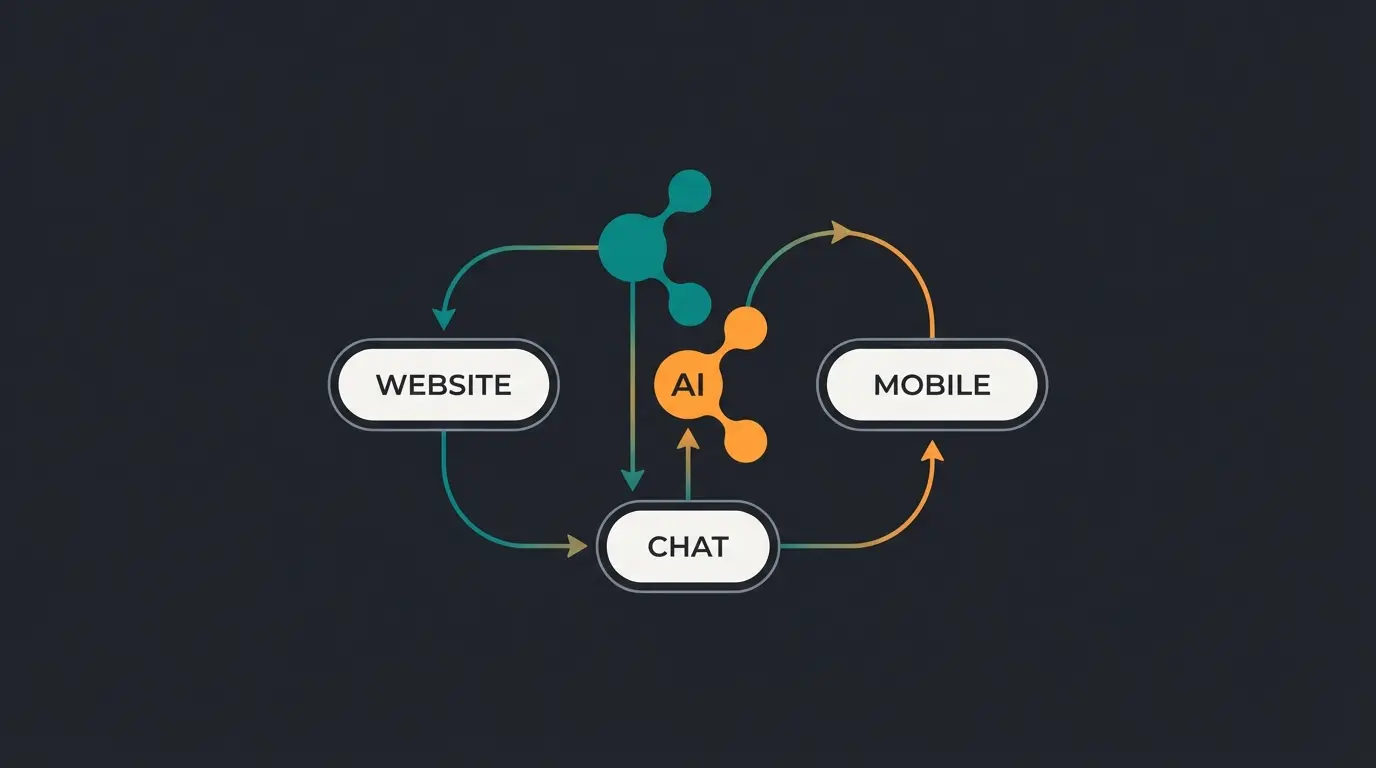
Beyond Shopware: Cross-Channel AI Testing
While this guide focuses on Shopware A/B testing, the principles extend across your entire e-commerce ecosystem. Consider testing AI consultation in multiple touchpoints for comprehensive optimization.
AI Chatbot E-Commerce implementations can be tested against traditional support channels, while AI Product Consultation providers offer various approaches worth comparing in controlled experiments.
Frequently Asked Questions About Shopware A/B Testing
Configure Vary headers in your Varnish VCL to account for your test parameter (cookie or session variable). This instructs Varnish to store separate cached versions for each test variant. Alternatively, use server-side testing solutions like Shopware's Rule Builder or integrated plugins like Convertly that handle cache invalidation automatically.
Yes, by using server-side testing that doesn't rely on persistent tracking cookies. Hash session IDs without linking them to user profiles, keep all logic on your Shopware server (first-party), and focus on content delivery tests rather than cross-session tracking. Consult your legal advisor to confirm this qualifies as 'legitimate interest' for your specific implementation.
For typical e-commerce conversion rates (2-5%), you need approximately 1,000-5,000 visitors per variant to detect a 20% relative improvement with 95% confidence. For smaller uplifts or lower baseline conversion rates, larger samples are required. Use an online sample size calculator and plan for at least 2-4 weeks of testing.
Traditional UI optimizations have reached diminishing returns in mature e-commerce. Most shops are already 'good enough' visually. Testing AI consultation vs. static filters addresses the fundamental user journey, reducing decision fatigue and simulating the in-store expert experience. This macro-optimization approach yields 20-70% conversion improvements compared to 2-5% from typical UI tweaks.
For native integration, use Shopware's Rule Builder combined with Shopping Experiences for variant delivery. For easier implementation, specialized tools like Convertly handle cache management automatically. For AI consultation specifically, look for Guided Selling plugins that integrate with Shopware's product data and support server-side variant assignment to avoid caching conflicts.
Conclusion: Courage to Fill the Gap
Shopware A/B testing in 2025 no longer means blindly installing tools and swapping colors. It requires understanding your shop's technical architecture (caching) and the legal framework (GDPR).
Above all, it requires strategic courage. The biggest gains aren't waiting in optimizing what exists, but in testing new approaches. The comparison "Standard Shop vs. AI-Powered Advisor" is the A/B test that could define your year.
Action Recommendations:
- Review your current caching setup (Varnish/Fastly) and understand how it affects testing
- Say goodbye to client-side tests for critical elements—they cause more problems than they solve
- Start a pilot: Use a Guided Selling solution and test it against your strongest category page
- Measure beyond simple conversion rate—track engagement time, micro-conversions, and return rates
The technology is here. The data supports it. Now it's up to you to start the test.
Stop optimizing button colors. Start testing AI consultation against your static filters and unlock 20-70% conversion improvements.
Launch Your AI Test Pilot
Kevin is CTO and co-founder of Qualimero. As an AI architect with over 15 years of experience as CTO and CPO in the tech industry, he designs the AI systems that automate tens of thousands of customer interactions daily for Qualimero's clients — reliably, securely, and at scale.