Shopware Cookie Consent: 2025 Guide to Compliance & Conversion
Master Shopware cookie consent in 2025. Learn GDPR compliance, Google Consent Mode v2, and how to optimize consent rates for AI tools and conversions.

Why Your Cookie Banner Determines Your Revenue
Imagine 50% of your potential customers entering your store, but you immediately blindfold them. They cannot see any products, receive no advice, and cannot find their way to checkout. This is exactly what happens daily in thousands of Shopware shops across Europe.
The topic of Shopware cookie consent is often dismissed as a tedious obligation—a necessary evil to avoid legal warnings. However, in 2025, the tables have turned. The cookie banner is no longer just a legal shield; it represents the first and most critical touchpoint in your customer journey.
According to ignite.video, current studies show that in Germany, rejection rates for privacy-compliant banners (with an equally prominent "Reject" button) now exceed 50%. This means: You are blind to half of your visitors. Your analytics data is incomplete, your retargeting lists are drying up, and—what many overlook—your modern on-site tools like AI-powered product consultation may not function at all until the user says "Yes."
In this comprehensive guide, you will learn not only how to make your Shopware shop legally compliant (GDPR/TTDSG), but how to strategically leverage the consent manager to close data gaps and properly integrate AI-powered sales tools for maximum conversion impact.
Average cookie rejection rate with compliant equal-weight buttons
Rejection rate before equal-prominence requirements
Percentage of visitors invisible to your analytics and AI tools
Legal Framework 2025: Essential Knowledge for Merchants
Before diving into technical configuration, we need to understand the playing field. The days when a simple "OK, understood" button was sufficient are long gone. The regulatory landscape has evolved significantly, and staying compliant requires a nuanced understanding of multiple overlapping regulations.
GDPR, TTDSG, and the "Reject All" Button
In Germany, the Telecommunications-Digital Services-Data Protection Act (TDDDG, formerly TTDSG) in conjunction with the GDPR regulates the use of cookies. The rule of thumb is simple: No data processing without explicit, informed consent (except for technically necessary services).
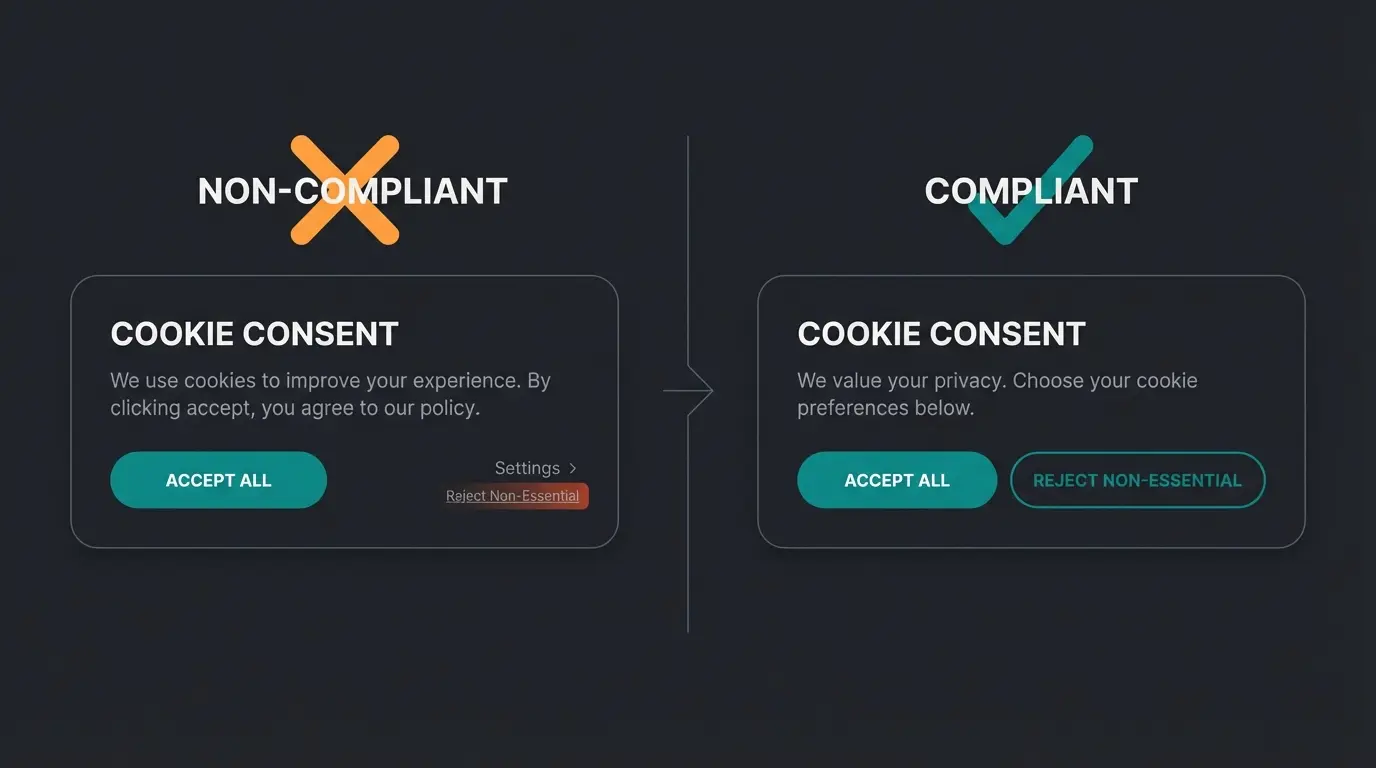
A crucial trend for 2024/2025 is banner design (nudging). Courts and data protection authorities increasingly require that the "Reject All" button must be placed just as prominently as the "Accept All" button. As documented by ignite.video, studies confirm this drastically increases rejection rates—from approximately 27% to over 50%. Those still relying on "dark patterns" (hidden rejection options) risk not only fines but also lose user trust permanently.
Google Consent Mode v2: The New Mandatory Requirement
Since March 2024, Google Consent Mode v2 has been mandatory for all merchants using Google Ads or Google Analytics and targeting audiences in the EEA. Understanding this requirement is essential for maintaining your advertising effectiveness.
- What it does: It transmits the consent status to Google. When a user declines, no cookies are set, but "pings" are sent that Google uses to model (extrapolate) conversions.
- The consequence: Without Consent Mode v2, your remarketing lists will no longer be populated and conversion tracking becomes inaccurate.
- Shopware status: According to GitHub documentation, Shopware 6.6 introduced native integration for Consent Mode v2. For older versions (6.5 and below), plugins or manual adjustments are necessary as noted by Shopware.
Future Outlook: The Consent Management Regulation (EinwV)
A look into the future: The German government is planning the EinwV (expected from April 2025) to support so-called PIMS (Personal Information Management Systems). According to cmshs-bloggt.de and niedersachsen.de, the idea is that users store their preferences once centrally in the browser or an app, and the shop reads these preferences. Currently, however, this is still future music and does not yet replace the classic banner in Shopware stores.
Strategic Comparison: Shopware Default vs External CMPs
Many shop operators ask themselves: "Is the free Shopware Cookie Manager sufficient, or do I need an expensive tool like Cookiebot or Usercentrics?" This is a crucial decision that affects both your compliance posture and your ability to leverage advanced tools like AI product consultation. Here is the objective comparison based on real-world implementations.
| Feature | Shopware Default | External CMPs (Cookiebot, Consentmanager, etc.) |
|---|---|---|
| Costs | Free (included in core) | Monthly fee (approx. $15-50+ depending on traffic) |
| Cookie Detection | Manual (you must enter cookies yourself) | Automatic (crawler scans the page monthly) |
| Legal Security | Basic protection (merchant liable for configuration) | High (audit logs, automatic updates for law changes) |
| Google Consent Mode v2 | Yes (from SW 6.6), otherwise via plugin | Yes, usually deeply integrated and easy to activate |
| Design & UX | Limited customization (Twig/CSS needed) | Highly customizable, A/B testing often included |
| Cross-Domain Consent | No (difficult to implement) | Yes (consent applies to multiple domains/subdomains) |
| Performance | Very good (no external script) | Medium (external script must load, can affect LCP) |
The comparison data draws from official Shopware documentation and independent reviews from SaaSworthy.
The Verdict: When to Use Which Solution
- Use Shopware Default if: You have a small to medium-sized shop, use few marketing tags (only GA4/Ads), and have developer resources to manually maintain new cookies.
- Use an external CMP if: You use many third-party tools, have no time for manual cookie maintenance, want to be on the safest legal side (audit trail), or manage multiple countries/domains.
This decision becomes even more critical when implementing advanced features. For shops leveraging AI-powered customer service or intelligent recommendation systems, proper consent management ensures these tools function for the maximum number of visitors.
Step-by-Step: Configuring the Shopware 6 Cookie Manager
If you decide on the integrated solution, correct configuration is crucial. An error here can result in tracking running without user consent—a serious compliance violation that could result in significant fines.
Step 1: Activation in the Admin Area
Navigate to: Settings > Shop > Basic Information > Privacy
Here you will find the "Cookie Notice" section. Configure the following settings:
- Show cookie notice: Enable this option.
- Cookie notice mode: Select "Allow" (Opt-in). This is mandatory for GDPR compliance. The "Notice only" mode is no longer permitted in the EU.
Step 2: Define Cookie Groups
Shopware distinguishes by default between "Technically necessary" and other groups (e.g., "Marketing", "Analytics"). According to Shopware's official documentation, proper categorization is essential.
- Ensure that only cookies essential for operation (shopping cart, login, CSRF) are in the "Technically necessary" group.
- Google Analytics, Facebook Pixel, or Hotjar belong in "Analytics" or "Marketing" categories without exception.
Step 3: Customize Texts (Avoid Nudging)
Under Settings > Text Snippets, you can search for "cookie". Customize the text to be friendly and transparent. Pro tip: Avoid legal jargon. Instead, write why cookies help the user (more on this in the AI chapter). This approach aligns with best practices for AI Customer Service implementations.
Step 4: Activate Google Consent Mode v2 (Shopware 6.6+)
If you are using Shopware 6.6, support is built into the core. According to Consentmanager, ensure your Google tags (via GTM or plugin) are configured to listen to Shopware's consent signals. Shopware now automatically sets the flags `ad_user_data` and `ad_personalization` based on user choice.
Navigate to Settings > Shop > Basic Information > Privacy and enable the cookie notice
Choose 'Allow' mode for GDPR-compliant explicit consent requirement
Ensure only essential cookies are in 'Technically necessary' group
Write user-friendly text explaining benefits rather than legal jargon
Configure Google tags to respond to Shopware consent signals
The "Data Blindness" Problem: Why Consent Rates Matter
Here lies the biggest mistake most shop operators make: They view the cookie banner only as a hurdle for tracking. In reality, it is the gatekeeper for your AI strategy and your ability to deliver personalized experiences that drive conversions.
The Scenario That Costs You Sales
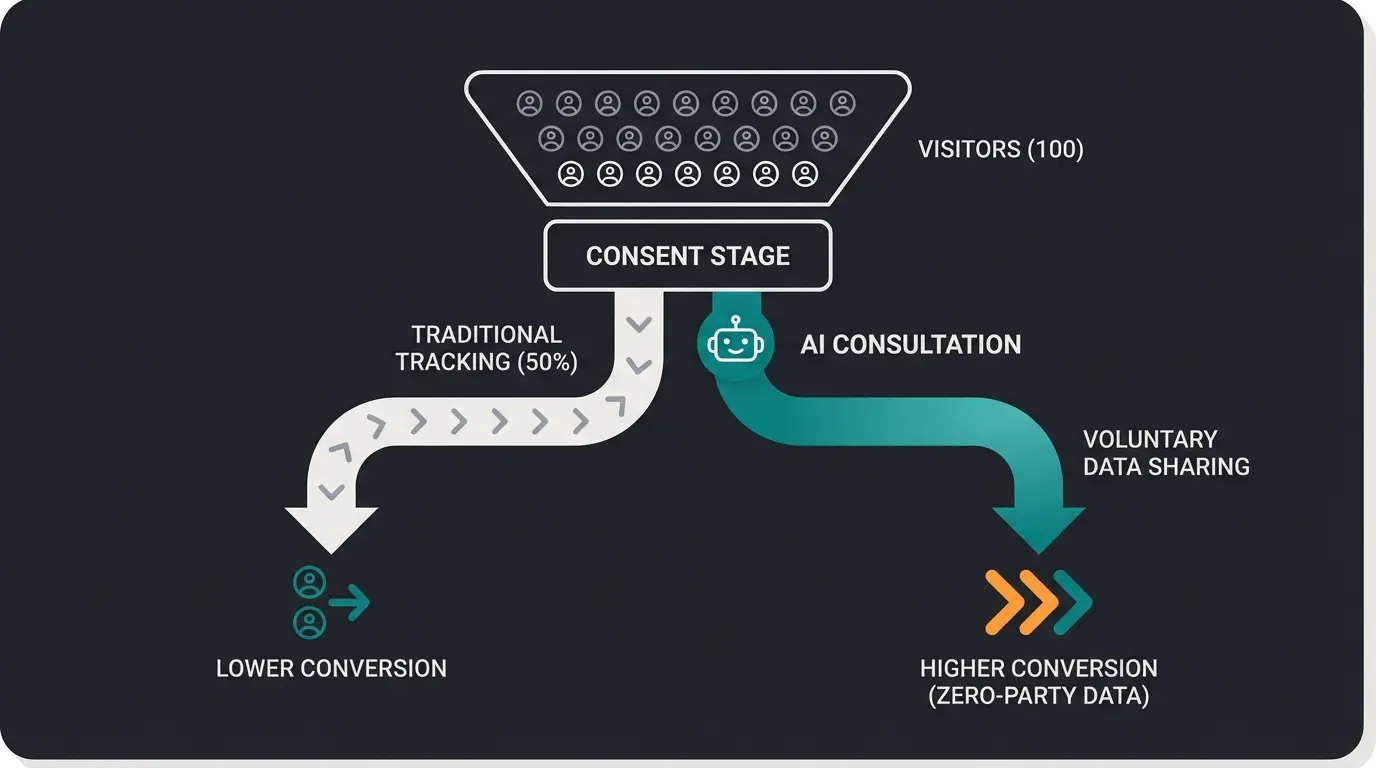
You invest in a modern AI product consultant (e.g., a chatbot that recommends shoes based on clicking behavior). If you simply classify this script as a "marketing cookie," 50% of users (those who click "Reject All") will never see the consultant. The result: Your expensive AI solution runs at only half capacity, and you lose potential conversions every single day.
The Solution: Functional vs. Tracking Cookies
You must differentiate between these two fundamentally different types of data collection:
- Tracking (Third-Party Data): Data that goes to Google/Meta. Users must be able to decline this.
- Functionality (Zero-Party Data): Data necessary for direct interaction in the shop (e.g., chat history, saved preferences in the session).
This distinction is crucial for implementing AI Chatbots customer service solutions effectively.
Strategy: Recategorize Your AI Tools
Do not categorize your AI consultant as "Marketing" by default. If the AI bot does not sell data to third parties but only improves the user experience, it belongs in the "Comfort" or "Functional" category. This is a legitimate classification that aligns with GDPR principles while maximizing your AI tool's reach.
This approach transforms consent from something adversarial into a genuine value proposition. When properly implemented alongside your Shopware AI guide, you create a seamless experience that benefits both compliance and conversion.
Technical Integration: Register External Scripts Correctly
Many merchants simply hard-code scripts in the theme (`base.html.twig`). This is fatal because the script then always loads—a GDPR violation that exposes you to legal risk. Here is how to register a custom script (e.g., your AI bot) correctly in the Shopware Cookie Manager so it only fires when permitted.
Method A: Via JavaScript (Recommended for Developers)
Shopware fires an event when the cookie configuration changes. We need to listen for this event. Create a JS file in your theme/plugin at `src/Resources/app/storefront/src/main.js`:
```javascript // Import the event import { COOKIE_CONFIGURATION_UPDATE } from 'src/plugin/cookie/cookie-configuration.plugin'; // Function to load your AI script function loadAiConsultant() { if (window.aiBotLoaded) return; // Prevents double loading const script = document.createElement('script'); script.src = 'https://your-ai-provider.com/bot.js'; script.async = true; document.body.appendChild(script); window.aiBotLoaded = true; console.log('AI Consultant loaded!'); } // Check on page start const cookieStorage = window.PluginManager.getPluginInstances('CookieStorage'); // 'ai-consultant' is the cookie key we will define next if (cookieStorage && cookieStorage.getItem('ai-consultant')) { loadAiConsultant(); } // Event listener for changes (when user consents later) document.$emitter.subscribe(COOKIE_CONFIGURATION_UPDATE, (event) => { const detail = event.detail; // Check if our cookie was activated if (detail['ai-consultant']) { loadAiConsultant(); } }); ```
This implementation follows the patterns documented in Shopware Developer Docs and community solutions on StackOverflow.
Method B: Register the Cookie in Backend
For the key `ai-consultant` to appear in the frontend at all, you must register it via PHP in your plugin. In your `services.xml`:
```xml <service id="YourPlugin\Framework\Cookie\CustomCookieProvider"> <argument type="service" id="Shopware\Storefront\Framework\Cookie\CookieProvider"/> <tag name="shopware.cookie_provider"/> </service> ```
In the PHP class:
```php class CustomCookieProvider implements CookieProviderInterface { private $originalService; public function __construct(CookieProviderInterface $service) { $this->originalService = $service; } public function getCookieGroups(): array { $groups = $this->originalService->getCookieGroups(); // Add to the "Comfort" group (usually index 10 or 20) $groups[] = [ 'snippet_name' => 'cookie.groupComfort', 'entries' => [ [ 'snippet_name' => 'cookie.aiConsultantName', 'cookie' => 'ai-consultant', // This key must match the JS 'value' => '1', 'expiration' => '30' ] ] ]; return $groups; } } ```
This technical approach ensures compliance while maximizing the effectiveness of tools like AI for pre-sales consultation and guided selling systems.
Stop losing 50% of your potential customers to misconfigured cookie consent. Our AI consultation solution integrates seamlessly with Shopware's consent logic, ensuring GDPR compliance while delivering personalized product recommendations to every visitor who opts in.
Get Started with AI ConsultationBest Plugins for Shopware Cookie Consent (2025 Edition)
If you shy away from manual integration, these are the top players on the market. Each offers distinct advantages depending on your specific needs and technical resources.
1. Consentmanager (Plugin)
- Advantages: Very deep integration into Shopware 5 & 6, natively supports Google Consent Mode v2, A/B testing for banner designs (important for conversion optimization!).
- Special feature: Offers automatic code blocking, which simplifies setup significantly.
- Price: From approx. €15/month (tiered by pageviews).
2. Cookiebot (via Usercentrics)
- Advantages: Extremely powerful scanner (finds almost everything), very well-known design (trust factor), geo-targeting (shows banner only where necessary). As noted by Exafol, the automated scanning capabilities are industry-leading.
- Disadvantages: Integration into Shopware often requires an additional plugin (e.g., from iCreative) to cleanly control the scripts.
- Price: Free for very small shops (<50 subpages), then from €12/month.
3. Cookie Consent Plus (Shopware Store)
- Advantages: One-time payment (no subscription!), full integration into Shopware admin, no external cloud dependencies (good for performance). According to research from petsymposium.org, the self-hosted approach offers significant privacy advantages.
- Disadvantages: Manual cookie maintenance required (no auto-scanner).
- Price: One-time approx. €69-99.
When selecting a cookie consent solution, consider how it will interact with your broader AI Selling strategy. The right choice supports both compliance and conversion optimization.

Consent as an Enabler: The Zero-Party Data Revolution
Here is the paradigm shift that separates forward-thinking merchants from those stuck in a compliance-only mindset: While third-party cookies are dying, consensual interaction is the future of e-commerce personalization. Your cookie consent banner is the first step in a trust relationship that leads to valuable product consultation.
The Zero-Party Data Advantage
Zero-party data is information that customers intentionally and proactively share with your brand. Unlike tracking cookies that observe behavior covertly, zero-party data comes from direct interaction—like chatting with an AI-powered product consultation tool.
Consider this scenario: A customer visits your shop looking for running shoes. With traditional tracking, you might observe which products they view. But with an AI consultant that asks "What's your running style? Road or trail? How many miles per week?"—you receive explicit, high-quality data that the customer wants you to have because it improves their experience.
Framing Consent as Value Exchange
Transform your cookie banner messaging from a legal obligation into a value proposition. Instead of emphasizing what data you collect, emphasize what the customer gains:
- "Enable personalized recommendations" instead of "Allow marketing cookies"
- "Get AI-powered shopping assistance" instead of "Accept functional cookies"
- "Save your preferences for faster checkout" instead of "Store session data"
This approach, combined with AI-powered product consultation, transforms consent from a barrier into an invitation for enhanced service.
Performance Considerations: Speed vs. Compliance
Many cookie plugins slow down Shopware shops significantly, impacting Core Web Vitals scores. This affects both SEO rankings and user experience. When evaluating solutions, consider these performance factors:
- External script loading: CMPs that load from external servers add latency and can block rendering
- JavaScript execution: Complex consent logic can delay Time to Interactive (TTI)
- Cookie scanning: Automated scanners may run resource-intensive operations
- LCP impact: Banner overlays can delay Largest Contentful Paint measurements
The Shopware default manager, while requiring manual maintenance, offers the best performance since it requires no external script loading. If you choose an external CMP, look for options with asynchronous loading and minimal DOM manipulation.
Conclusion & Action Checklist
Shopware cookie consent is far more than a legal checkbox. It is the switch that decides whether you receive data or stumble in the dark. Especially in the age of AI tools, a differentiated strategy is essential for survival and growth.
Your Action Steps for Today
- Check status quo: Do you have Google Consent Mode v2 active? (Test it in Google Tag Manager preview mode).
- Check banner design: Do you have an equal-weight "Reject" button? If not, you risk legal warnings. If yes, you need to work on the texts to increase acceptance rates.
- Liberate AI tools: Check if your chatbots or consulting tools are incorrectly blocked as "Marketing." Move these to "Functional" and explain the added value in the banner text.
- Measure performance: Use tools like PageSpeed Insights to see if your current cookie plugin is slowing down the shop (LCP value).
- Review categorization: Ensure your AI product consultation tools are properly categorized for maximum visibility.
The Final Tip
Do not view consent as something you must "wring" from the user. View it as an invitation. "May I help you find the perfect product?" works better than "May I track you?" This mindset shift is fundamental to succeeding in the privacy-first era while still delivering exceptional personalized experiences.
Yes, Shopware 6 includes a built-in cookie consent manager that allows you to categorize cookies, display compliant banners, and manage user preferences. Shopware 6.6 and later versions also include native support for Google Consent Mode v2. However, for advanced features like automatic cookie scanning and cross-domain consent, you may need external CMP plugins.
Yes, since March 2024, Google Consent Mode v2 is mandatory for all merchants using Google Ads or Google Analytics who target audiences in the European Economic Area (EEA). Without it, your remarketing lists will not be populated, and conversion tracking becomes inaccurate. Shopware 6.6+ supports this natively, while older versions require plugins.
Focus on value-based messaging rather than legal jargon. Rename cookie categories to emphasize benefits (e.g., 'AI Shopping Assistant' instead of 'Comfort cookies'). Ensure your AI consultation tools are categorized as 'Functional' rather than 'Marketing' when appropriate. A/B test your banner designs and texts to optimize acceptance rates while maintaining compliance.
Use the Shopware default if you have a small to medium shop, use few marketing tags, and have developer resources for manual cookie maintenance. Choose an external CMP if you use many third-party tools, need automatic cookie scanning, require audit trails for legal documentation, or manage multiple domains. External CMPs cost €12-50+/month but offer greater automation and legal security.
Register your AI script as a custom cookie in the Shopware Cookie Manager backend using PHP. Create JavaScript event listeners that load your AI script only after the user grants consent. Categorize AI consultation tools as 'Functional' or 'Comfort' rather than 'Marketing' if they don't share data with third parties. This ensures maximum visibility while maintaining GDPR compliance.
Stop losing half your visitors to data blindness. Implement AI-powered product consultation that works seamlessly with GDPR-compliant consent management. Our solution is designed for Shopware and respects your customers' privacy while delivering personalized recommendations that convert.
Start Your Free Trial Today
Lasse is CEO and co-founder of Qualimero. After completing his MBA at WHU and scaling a company to seven-figure revenue, he founded Qualimero to build AI-powered digital employees for e-commerce. His focus: helping businesses measurably improve customer interaction through intelligent automation.