Why "If-Then" Logic No Longer Cuts It
E-commerce in 2025 faces a paradox: technological possibilities are exploding, yet many online retailers use their most powerful tools merely to maintain the status quo. When thinking about Shopware workflow automation, most merchants immediately picture automatic invoice sending or status emails. That's efficient, certainly. But it's no longer a competitive differentiator.
In an era where the skilled labor shortage is putting massive pressure on sales and customer service in Germany and beyond, automation must deliver more than just administration. It must sell. According to Shopware, the platform's API-first approach enables exactly this kind of advanced integration.
The current landscape of Shopware automation is dominated by the Flow Builder. This tool is the heart of process control in Shopware 6. Yet while 90% of shops use it merely for logistics and accounting processes (post-purchase), the real gold lies in the pre-purchase phase: automated, intelligent customer consultation before the buy button is clicked.
This comprehensive guide takes you deep into the subject matter. We start with the technical foundations to ensure your groundwork is solid, then quickly move to advanced strategies that link classic rule logic with modern AI. Whether you're exploring AI-driven product consultation for the first time or looking to optimize existing workflows, this guide provides actionable insights for every experience level.
The Foundation: Understanding Flow Builder & Rule Builder
Before we build complex AI scenarios, we need to master the tools. Shopware 6 separates logic (When does something apply?) from execution (What should happen?). This understanding is crucial for any effective Shopware workflow automation implementation.
What Is the Shopware Flow Builder?
The [Shopware Flow Builder](/blog/shopware-flow-builder-ultimate-guide-automation-limits) is a no-code automation tool integrated directly into the Shopware 6 core. It enables merchants to define complex business processes without writing a single line of PHP code. It operates on a simple principle:
- Trigger (Event): An event in the shop (e.g., "Order placed", "Customer registered")
- Condition (Check): A verification whether certain criteria are met (defined by the Rule Builder)
- Action (Response): What should be done? (e.g., "Send email", "Set tag", "Fire webhook")
Rule Builder vs. Flow Builder: The Critical Difference
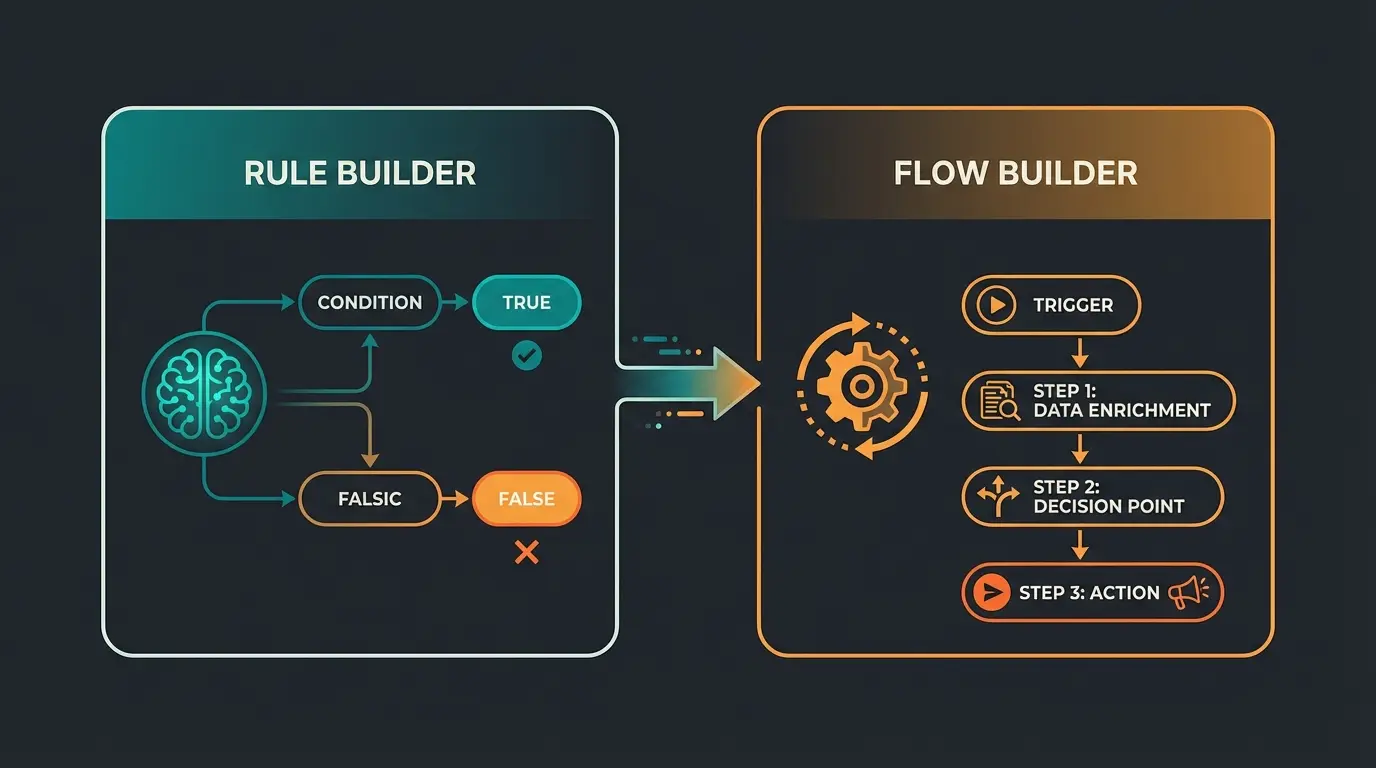
A common misunderstanding is mixing up these two tools. To build SEO-relevant structures and clean processes, we need to differentiate between the Shopware Rule Builder and the Flow Builder:
| Feature | Shopware Rule Builder | Shopware Flow Builder |
|---|---|---|
| Primary Purpose | Definition of conditions (logic) | Definition of processes (workflow) |
| Question Answered | "Is the customer from Switzerland?" | "If yes, send them customs information." |
| Output | True / False | Action / No Action |
| Example | Rule: "Cart value > €100" | Flow: "On order > €100 → Set 'VIP' tag" |
| Usage | Shipping methods, prices, content visibility | Emails, status changes, API calls |
In summary: The Rule Builder provides the "brain" for static logic, while the Flow Builder is the "muscle" that executes the work. As detailed by rhiem-intermedia.de, understanding this distinction is fundamental to effective automation design.
Status Quo: Classic Post-Purchase Automation
To understand the gap to AI automation, we must examine what currently counts as "standard." Most agencies and documentation focus on processes that occur after clicking "Buy." This represents Level 1 automation—necessary but no longer differentiating.
The "Big 3" Standard Workflows
These automations are hygiene factors. If you haven't implemented them yet, you should do so immediately as they form the baseline for any Shopware customer support operation:
1. Dynamic Order Confirmation
Instead of a static email, the customer receives different information based on their customer group (B2B vs. B2C). This segmentation improves relevance and customer satisfaction.
- Trigger: `checkout.order.placed`
- Condition: Rule "Is B2B Customer"
- Action: Send email template "Order Confirmation B2B" (with net prices and VAT ID reference)
2. Inventory Warning & Reordering
Prevents overselling and informs the purchasing department before stockouts occur, maintaining customer trust and operational efficiency.
- Trigger: `state_enter.product.stock.reached` (or similar via cron)
- Condition: Stock level < 5
- Action: Send internal email to "purchasing@shop.com"
3. Returns Management
Automated labels and communication for returns streamline the process and reduce customer service workload.
- Trigger: `state_enter.order_transaction.state.refunded`
- Action: Generate document "Credit Note" AND Send email to customer
Why "Level 1" Is No Longer Enough
These processes save time and reduce errors. But they have a fundamental limitation: they are reactive. They respond to a decision the customer has already made. They don't help guide the customer to that decision in the first place.
Furthermore, they're based on static logic. A Rule Builder can check: "Is Product X in the cart?" But it cannot understand: "Why did the customer choose Product X, and does it actually fit their needs?" This is where AI Customer Service technologies enter the picture, marking the beginning of a new era.
Of Shopware shops only automate processes after the purchase decision
Average cart abandonment rate due to lack of pre-purchase guidance
Modern customers expect round-the-clock consultation availability
The Gap: Where Static Rules Fail
Imagine you sell complex products, such as e-bikes or industrial machinery. A customer arrives on your site but is uncertain about which product fits their needs.
- Scenario A (Classic): The customer uses a filter for "Frame Size." But they don't know which frame size they need. They abandon the site.
- Scenario B (Rule Builder): You build complex rules. "If height > 180cm, show Category L." This is rigid and maintenance-intensive.
- Scenario C (Labor Shortage): The customer calls. No one answers because sales is overloaded.
The Problem: The Flow Builder is brilliant at moving data when a defined event occurs. But it's "dumb" when it comes to interpreting unstructured data (customer questions, uncertainties). Traditional Conversational AI approaches have tried to address this but often fell short of true understanding.
Here lies your opportunity for better rankings and more revenue: Pre-Sales Automation. This represents the next evolution in e-commerce customer experience.
Level 2: Intelligent Workflow Automation with AI
We now leave the path of standard documentation. The future of Shopware workflow automation lies in connecting generative AI (like GPT-4 or specialized models) with Shopware's process power. This is where AI powered sales consultants transform the customer journey.
The Concept: AI as "Trigger" and "Enricher"
Instead of AI just writing texts (as the Shopware AI Copilot already does according to atwix.com), we use it as a decision-maker within the workflow.
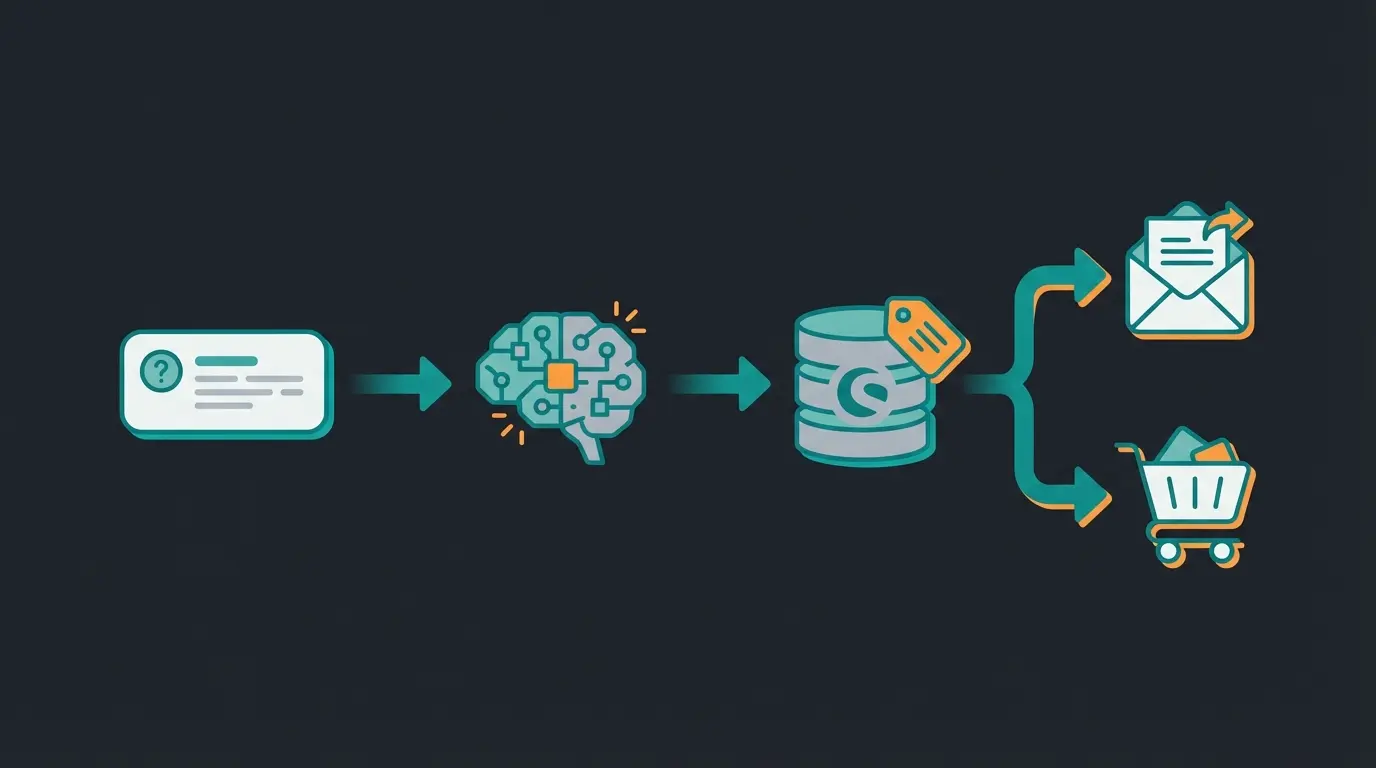
Customer interacts via chatbot, form, or browsing behavior
AI analyzes the intent (purpose) and context of the interaction
AI writes data back to Shopware (e.g., via tags or custom fields)
Shopware Flow Builder reacts to this new enriched data
Automated response tailored to customer needs
Why This Approach Is Revolutionary
Because it allows you to scale consultation. The AI takes on the role of the experienced salesperson who recognizes: "This customer isn't looking for a cheap entry-level model; they need professional equipment but are uncertain about compatibility." Through AI product consultation, every customer receives personalized guidance regardless of time or staff availability.
| Feature | Static Automation (Rule Builder) | AI-Powered Automation |
|---|---|---|
| Trigger Type | Hard fact (click, status change) | Soft factor (intent, sentiment, context) |
| Data Basis | Structured data (cart value, postal code) | Unstructured data (chat text, email content) |
| Flexibility | Low (must be defined beforehand) | High (AI adapts to new queries) |
| Goal | Efficiency (save time) | Effectiveness (increase revenue/conversion) |
| Example | "If customer from US, show FedEx" | "If customer seems frustrated, offer premium support" |
Stop losing customers to unanswered questions. Our AI-powered consultation solution integrates seamlessly with Shopware Flow Builder to guide customers to the right products 24/7.
Start Free TrialPractical Example: Automated Product Consultation
Let's make this concrete. We'll build a workflow that compensates for the skilled labor shortage in sales while delivering superior customer experiences through AI Selling capabilities.
Scenario: An online shop for high-quality tools. Goal: Customers who ask technical questions should be automatically qualified and guided to the right product.
Step 1: The Intelligent Entry Point (AI Bot)
A customer asks in the chat or a dynamic form: "I'm looking for a saw for hardwood that's also portable for use on construction sites." Traditional AI Chatbots might provide generic responses, but our approach goes further.
Step 2: Analysis & Tagging (External Service / Middleware)
An AI (connected via API) analyzes the text and extracts actionable intelligence:
- Identified Need: High performance (hardwood) + Mobility (battery/compact)
- AI Action: Calls the Shopware API and sets a tag on the customer (or session): `Interest: High-Performance-Mobile`
- Additional Enrichment: Fills a custom field `Last_Consultation_Topic` with "Saw Hardwood Mobile"
Step 3: The Shopware Flow (Automation)
Now the Flow Builder takes over, executing the precise actions that convert interest into sales:
- Trigger: `customer.tag.added` (Tag added)
- Condition: Tag is `Interest: High-Performance-Mobile`
- Action 1: Send email "Your Personal Product Recommendation" — Content dynamically includes products from the "Professional Cordless Saws" category that the AI pre-selected
- Action 2 (Optional): If potential cart value > $1,000, create task for sales team "Follow up personally"
The Result
The customer feels understood and advised. The process ran completely automatically. The Flow Builder wasn't triggered by a simple click but by an intelligent analysis. This is the power of combining Shopware API automation with AI intelligence.
Technical Implementation & Tech Stack
How do you implement this technically? Here we go into detail so this article provides value for developers and technical managers alike.
1. Webhooks: The Bridge to the Outside World
To connect AI, you need Webhooks. These enable real-time communication between your Shopware store and external services.
- Shopware Commercial (Evolve/Beyond): The "Call URL (Webhook)" action is natively included in the Flow Builder
- Community Edition / Rise: You need a plugin (e.g., "Flow Builder Webhook Action" or similar third-party tools) to fire webhooks from a flow, as noted by solution25.com
2. API Integration
The AI must communicate with Shopware. Shopware's "API-first" architecture is a huge advantage here, enabling seamless integration with external intelligence systems.
- Admin API: Use this to set tags or populate custom fields with AI-generated insights
- Sync API: When you need to update many records at once (e.g., product recommendations for 100 customers simultaneously)
3. "Copy-Paste" Workflow Recipe
Here's an abstract logic template you can use for your developer or agency to implement:
Data Privacy & Compliance: The European Factor
A topic often missing in US tutorials but essential for the DACH region and all EU markets: GDPR (DSGVO). Decision-makers in Germany are particularly risk-averse regarding AI and data processing.
When you integrate AI into your Shopware workflow automation, you process personal data. Here's what you must ensure:
- Transparency: The customer must know that an AI analyzes their inquiry (e.g., in the cookie banner or directly on the form)
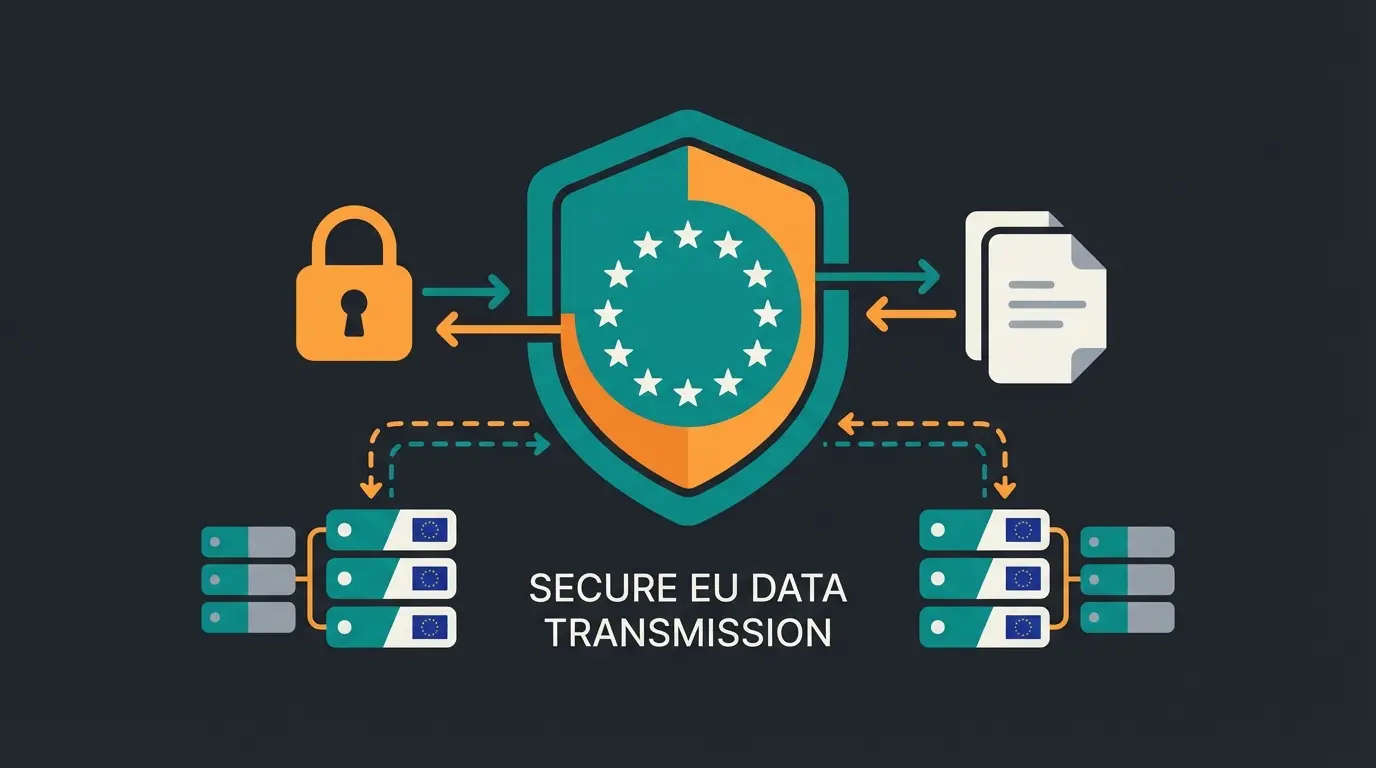
- Data Minimization: Only send the query to the AI ("I'm looking for a saw..."), not the customer's name or email address unless absolutely necessary and covered by a data processing agreement
- Server Location: Use AI models hosted in Europe (e.g., Azure OpenAI Europe Region or local open-source models) to minimize data transfers to third countries
This compliance-first approach not only protects your business legally but also builds customer trust—a crucial factor in the German market where data protection awareness is particularly high.
Closing the Pre-Purchase Gap: The Automated Journey
The fundamental shift in thinking required here cannot be overstated. Traditional e-commerce automation focuses almost exclusively on what happens after a customer decides to buy. But the real opportunity lies in influencing that decision itself.
Consider AI Employee Flora, a real-world implementation showing how AI consultation transforms customer interactions. The AI doesn't just answer questions—it understands context, identifies needs, and guides customers to optimal solutions.
Customer lands on site with questions or uncertainty
Intelligent chatbot analyzes intent and provides personalized guidance
AI enriches customer profile with behavioral and preference data
Flow Builder triggers targeted follow-ups based on AI insights
Customer converts with confidence in their choice
Standard automations handle invoicing, shipping, and support
This visualization demonstrates the caption that should guide your strategy: "Close the gap before the purchase." The left side of your automation strategy should focus on consultation and qualification, while the right side handles the traditional transactional processes.
Conclusion: Automation Must Sell, Not Just Manage
Shopware workflow automation has evolved. We're no longer in an era where an automatically sent invoice deserves applause. That's standard. The winners in e-commerce 2025 will be those who use the Flow Builder to create real, personalized customer experiences.
They close the gap between the anonymous online shop and personal consultation in the specialty store. They leverage AI not as a gimmick but as a strategic tool that understands customer needs, qualifies leads automatically, and triggers precisely timed interventions.
Your Checklist to Get Started
- Analyze your current flows: Are they only reactive (post-purchase)?
- Identify a pre-purchase friction point: Where do customers often abandon due to a consultation gap?
- Check your Shopware plan: Do you have access to webhooks (Evolve/Beyond) or do you need a plugin?
- Start small: A simple AI-powered tagging workflow often delivers more ROI than a complex large-scale project
- Measure and iterate: Track conversion improvements from AI-assisted interactions
Don't use technology just to cut costs. Use it as your best salesperson who works 24/7, never gets sick, and understands every customer wish. The combination of Shopware's robust automation infrastructure with modern AI capabilities represents the future of e-commerce—a future that's available today for merchants ready to embrace it.
FAQ: Common Questions About Shopware Automation
Yes, the Flow Builder is part of the Shopware 6 core and thus included in the free Community Edition. However, certain actions (like native webhooks) are often restricted to commercial plans (Rise, Evolve, Beyond) or require additional plugins.
Absolutely. That's the core promise. The interface is visual ("No-Code"). Only for complex connections to third-party systems (via API/Webhooks) is technical understanding or a partner helpful.
Shopware offers its own "AI Copilot" features included in commercial plans. For custom solutions (as described in this article), costs arise for API usage from AI providers (e.g., OpenAI) and potentially middleware (Make, Zapier). Pricing typically scales with usage volume.
The Shopware AI Copilot offers excellent assistance functions (writing texts, generating images, creating summaries). The approach described here goes further: it uses AI for decisions and process control (Agentic AI), which goes beyond the current standard features of the Copilot.
It can be, but requires careful implementation. Ensure transparency about AI usage, minimize personal data sent to AI services, use EU-hosted AI models where possible, and have proper data processing agreements in place. Consult with a data protection specialist for your specific use case.
Join forward-thinking merchants who are already using AI-powered consultation to increase conversions, reduce support load, and deliver exceptional customer experiences around the clock.
Get Started Today