Why Backend Automation Is Just the Beginning
Do you feel like your Shopware store runs technically well, but your sales team (or you personally) still spends too much time on manual tasks?
When you search for 'Shopware automation,' you typically find tutorials on automatically sending invoices or changing payment statuses. That's important—no question. But in 2025, that's no longer enough to stand out from the competition. While most merchants automate their administration, market leaders are beginning to automate their sales process.
In this comprehensive guide, I'll show you not only how to master the native tools of Shopware 6 (Flow Builder & Rule Builder), but also how to bridge the gap to Agentic Commerce—the new era of AI-powered product consultation. According to hellorep.ai, the market for AI-powered e-commerce is projected to grow at an annual rate (CAGR) of over 24% through 2032, making this transformation essential for forward-thinking merchants.
The Current State of E-Commerce Automation
The e-commerce landscape is changing rapidly. Yet when we examine the current use of automation in Shopware, the focus often remains heavily on the backend. Most shop operators use automation to save time (efficiency). However, the goal for 2025 must be to use automation to sell more (effectiveness).
- Classic automation: "When order comes in → Send invoice." (Saves 5 minutes of admin time).
- Modern automation: "When customer hesitates on product page → AI agent offers consultation → Converts visitor." (Generates revenue).
This article will guide you from classic process optimization toward revenue growth through intelligent agents. Understanding this shift is crucial for any merchant looking to implement effective Shopware AI strategies.
Projected CAGR through 2032
Potential uplift with AI chatbots
Current automation efforts miss frontend sales
Shopware Flow Builder & Rule Builder Explained
Before we dive into the AI world, we need to understand the foundation. Shopware 6 offers a powerful No-Code architecture with the Rule Builder and Flow Builder that forms the backbone of every Shopware automation strategy. According to rhiem-intermedia.de, mastering these tools is essential for any serious e-commerce operation.
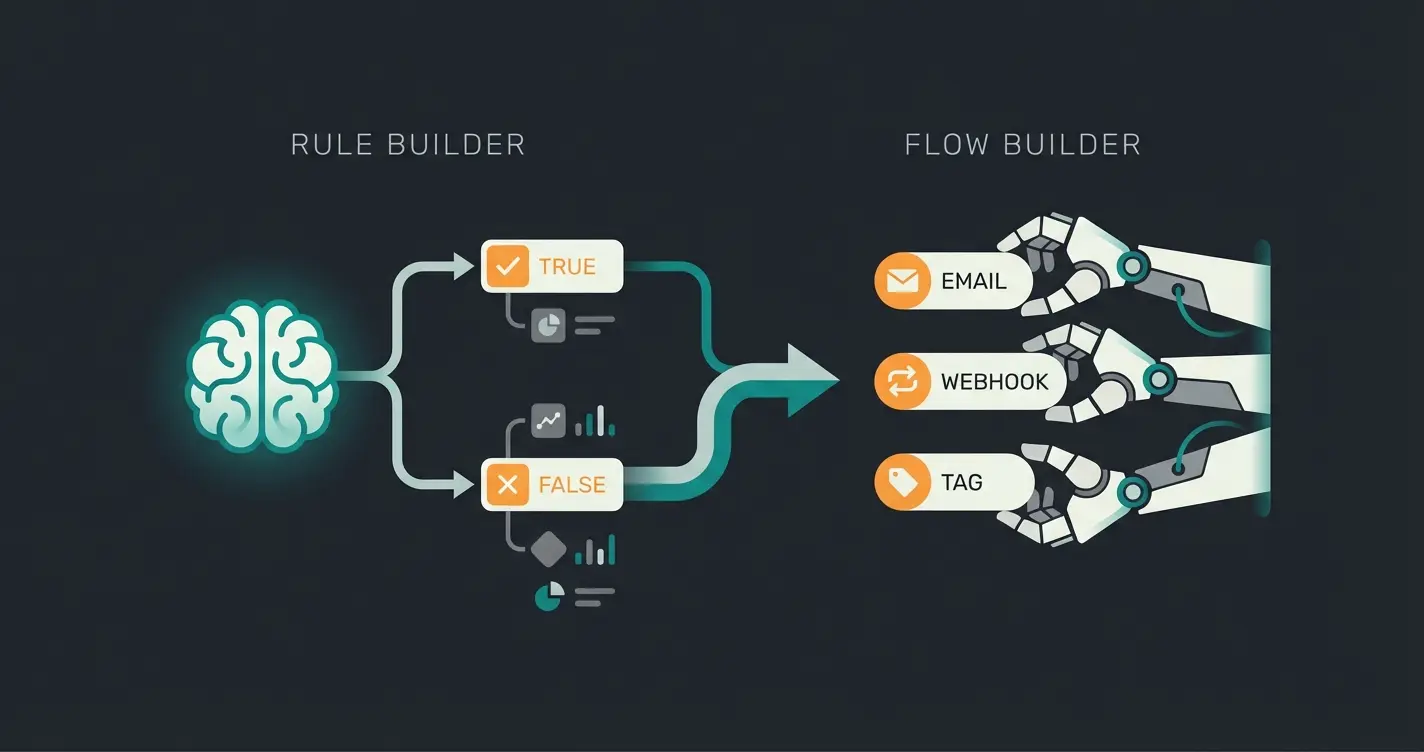
The Rule Builder: The Brain of Your Automation
The Rule Builder defines the conditions. It decides whether something should happen but doesn't execute any action itself. It creates 'statements' that are either true or false, as explained in the official Shopware documentation.
Examples of rules:
- "Customer is from Switzerland AND cart value > 200 CHF."
- "Customer hasn't ordered in 90 days."
- "Product belongs to the 'Sale' category."
The Flow Builder: The Hands That Execute
The Flow Builder executes the actions. It reacts to events (triggers) and uses the Rule Builder's rules to decide what should be done. According to brainstreamtechnolabs.com and solution25.com, this combination provides unprecedented flexibility for shop automation.
The structure of a Flow:
- Trigger (Event): A system event (e.g., `checkout.order.placed` or `state_machine.order.state_changed`).
- Condition: Connection with the Rule Builder (e.g., "Is this a VIP customer?").
- Action: What should happen? (e.g., send email, set tag, fire webhook).
| Feature | Rule Builder | Flow Builder |
|---|---|---|
| Main Function | Define logic & conditions | Execute processes & actions |
| Core Question | "Is the customer a VIP?" | "What do we do when they order?" |
| Output | True / False | Email, status change, webhook |
| Dependency | Can be used standalone (e.g., for shipping costs) | Often requires Rule Builder for complex flows |
The 3 Levels of Shopware Automation Maturity
To understand where your shop stands and where the potential lies, we divide automation into three maturity levels. Most shops are at Level 1 or 2, missing significant revenue opportunities.
Level 1: Administrative Automation (Backend)
This is purely about efficiency and error prevention. This is the standard that every Shopware store should have implemented.
- Tools: Flow Builder
- Use Cases: Invoice generation on order, status updates to customers ("Shipped"), internal notification to warehouse for express orders, customer tagging (e.g., "First-time buyer")
Level 2: Marketing Automation (Reactive)
Here, automation is used to create customer retention based on static rules. This level represents where most successful Shopware support automation efforts currently operate.
- Tools: Flow Builder + email marketing tools (or plugins)
- Use Cases: Birthday emails (Trigger: Date), abandoned cart emails (Trigger: Cart Abandoned), review requests 7 days after delivery
- Limitation: This level is reactive. It only responds once the customer has already performed an action (or non-action).
Level 3: Sales & Consultation Automation (Proactive & AI)
This is the "Blue Ocean" for shop operators. Here, the system acts like an experienced salesperson in a physical store. This represents the cutting edge of AI chatbots in e-commerce.
- Tools: Shopware AI Copilot, Agentic Commerce solutions, external AI integrations
- Use Cases: Real-time product consultation in chat ("Which running shoe fits my pronation type?"), dynamic product recommendations based on unstructured customer inputs, automated answering of complex support questions before purchase
Backend efficiency - invoices, shipping labels, status updates
Reactive engagement - birthday emails, abandoned cart recovery
Proactive conversion - real-time consultation, intelligent recommendations
The Missing Link: Frontend Consultation Automation
Why do many shops fail to scale their conversion rate despite perfect backend automation? Because the customer is left alone during the decision phase.
The Flow Builder is fantastic, but it's "mute." It can send an email, but it cannot understand why a customer is hesitating. This is where AI-powered product consultation comes into play—a crucial component of modern AI chatbot integration.
The Problem: The "Consultation Gap"
In a physical store, a salesperson approaches a customer who stands confused in front of the shelf. In an online shop, the customer stares at a static product page. If they have a question, they must search for a contact form (response time: 24 hours) or browse through an FAQ.
- Consequence: Cart abandonment.
- Statistic: AI chatbots can increase conversion rates by up to four times because they clarify questions immediately.
The Solution: Intelligent vs. Static Automation
Understanding the difference between static and intelligent automation is fundamental to implementing effective AI-driven product consultation in your store.
| Feature | Static Automation (Flow Builder) | Intelligent Automation (AI / Agentic) |
|---|---|---|
| Trigger | System event (order, status) | Customer question (natural language) |
| Flexibility | Rigid ("If A, then B") | Dynamic (understands context & nuances) |
| Goal | Reduce process costs | Increase revenue (conversion) |
| Setup | Manual configuration | Training on product data |
| Example | "Send PDF invoice" | "Explain the difference between Ski A and Ski B" |
Agentic Commerce: When AI Takes Over Sales
The term Agentic Commerce (or agent-based commerce) is the most important e-commerce trend for 2025 and beyond. Shopware itself is investing heavily in this area, as documented by identixweb.com and bigcommerce.com.
What Are AI Agents?
Unlike old chatbots that only spit out pre-made answers, AI agents are autonomous programs that can complete tasks. This represents a fundamental shift in how AI chatbots handle customer service.
- Shopware AI Copilot: Shopware already offers native AI features ("Copilot") that help in the admin area (e.g., writing product descriptions, generating images, classifying customers), as detailed by atwix.com.
- Frontend Agents: These interact directly with customers. They can search products, make comparisons, and add items to the cart.
Why "Dumb Bots" Have Had Their Day
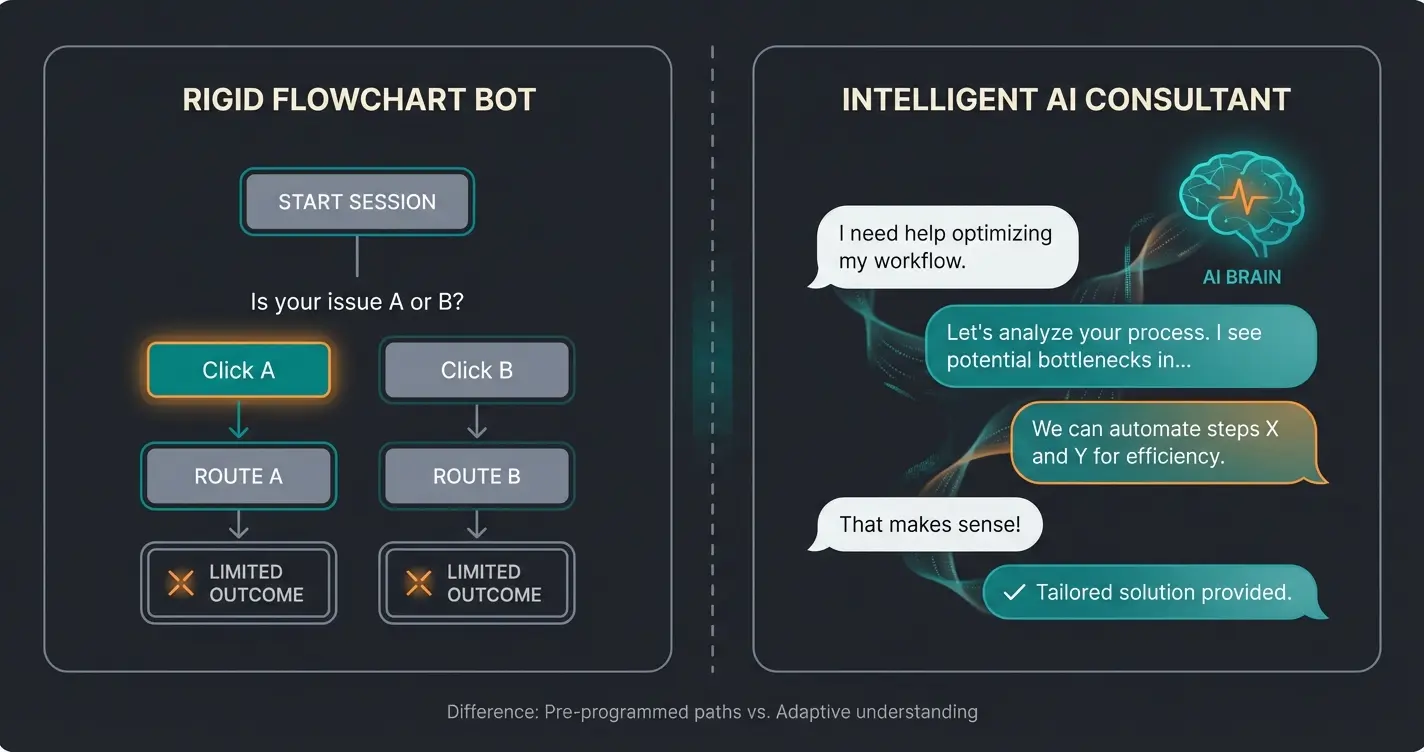
Many shops still use simple decision-tree bots ("Click 1 for shipping, 2 for returns"). These often frustrate customers more than they help. Modern AI solutions use Large Language Models (LLMs) to "read" the entire product catalog and advise like a human expert. This is the core principle behind effective Conversational AI implementation.
Example:
- Customer: "I'm looking for a gift for my wife. She plays tennis but has knee problems."
- Old Bot: "Please select a category: Sportswear / Equipment."
- AI Agent: "For tennis players with knee problems, cushioning is crucial. I recommend [Model X] because of its special gel sole or [Model Y] for more stability. Should I compare the details?"
Practical Scenario: Flow Builder and AI Working Together
The true magic happens when you combine the backend power of the Flow Builder with the frontend intelligence of AI. Here's a workflow that shows how both worlds work together, demonstrating optimal Shopware customer support implementation.
The Scenario: The Undecided B2B Customer
Step 1 - Frontend (AI Layer):
- A customer visits your shop and asks the AI consultant about a bulk order for office chairs.
- The AI advises on ergonomics and price tiers.
- The customer is interested but doesn't buy yet ("I need to discuss this internally").
- Action: The AI asks for the email address to send the quote.
Step 2 - Interface (Webhook):
- The AI solution sends the collected data (customer email, recommended products, interest level: High) via webhook to Shopware, as explained in the official Shopware webhook documentation.
Step 3 - Backend (Flow Builder):
- Trigger: Webhook received (or "Customer created").
- Rule Builder Check: "Is the interest level 'High'?"
- Action 1: The Flow Builder creates the customer as a "Lead" and tags them with "Interest: Office Chairs".
- Action 2: The Flow Builder sends a notification to the sales team's Slack channel: "Hot lead generated by AI!"
- Action 3 (Time-delayed): After 2 days, the Flow Builder automatically sends an email with a 5% discount code for the discussed chairs.
Result: A seamless transition from AI consultation to system-supported sales processing. This integration demonstrates how the AI Employee Flora approach can transform your customer journey.
Customer asks question → AI suggests Product A with personalized recommendations
Customer purchases → Flow Builder triggers invoice and shipping
Flow Builder waits 7 days → Sends review request automatically
Discover how AI-powered product consultation can transform your Shopware store from a passive catalog into an active sales machine. Join merchants already seeing 4x conversion improvements.
Start Your Free TrialStep-by-Step Implementation Guide
How do you start with this holistic Shopware automation approach? Here's your roadmap to success, incorporating AI Product Consultation best practices.
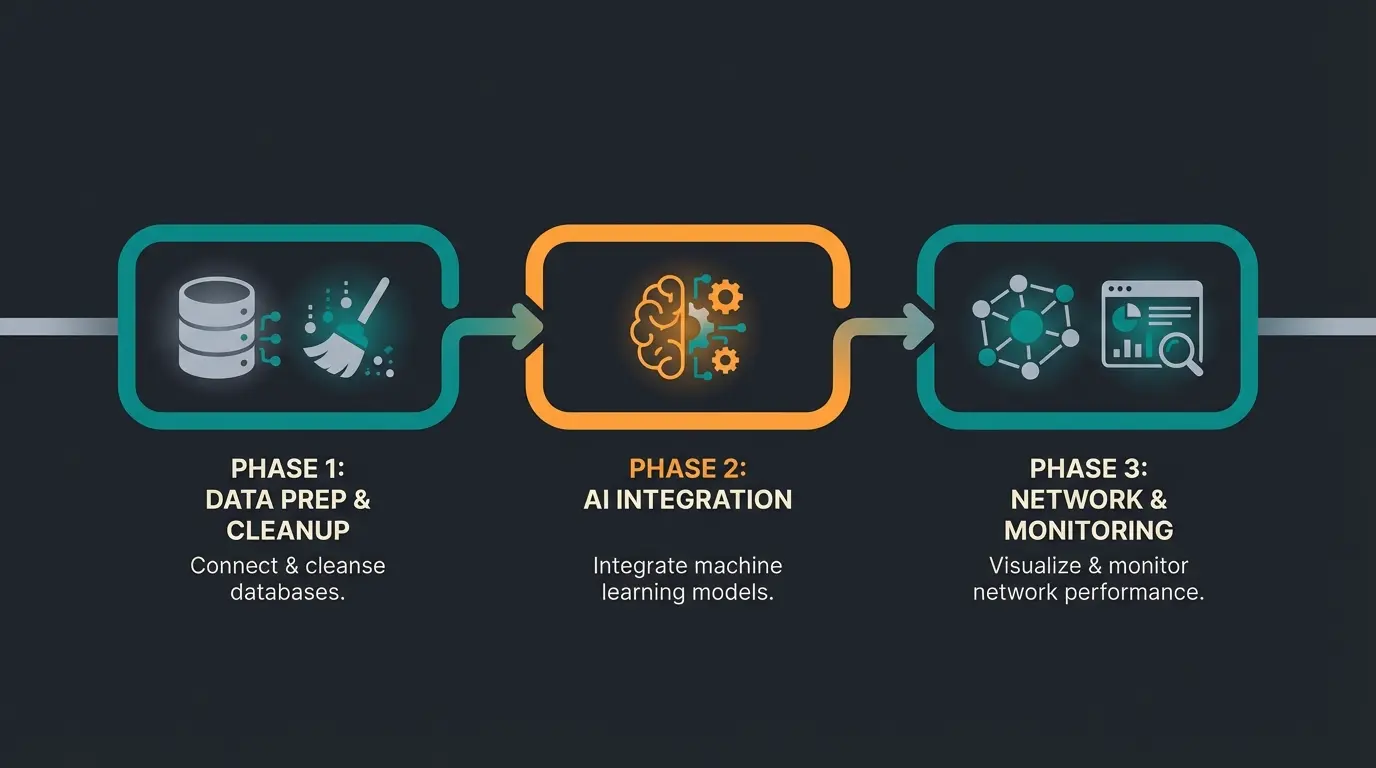
Phase 1: Do Your Homework (Backend)
Before you use AI, your processes must be solid.
- Data cleanup: Ensure clean product data. An AI can only advise well if the attributes (size, material, use) are maintained. Use the Shopware AI Copilot for product descriptions if needed.
- Use Rule Builder: Define your customer segments (VIPs, B2B, bargain hunters).
- Set up basic Flows: Automate all standard emails and status updates in the Flow Builder.
Phase 2: The AI Integration (Frontend)
- Choose a solution: Decide on an AI solution that integrates deeply with Shopware (via API). Make sure the AI has access to live inventory and prices.
- Training: "Feed" the AI with your FAQs, shipping conditions, and product descriptions.
- Placement: Integrate the chat widget prominently on product pages and in the checkout.
Phase 3: The Networking (Advanced)
- Configure webhooks: Use the webhook function in Flow Builder (available from Shopware Evolve/Beyond plans), as documented by Shopware pricing plans, to exchange events between shop and AI.
- Monitoring: Measure not just "time saved" but "conversion rate after chat".
Flow Builder vs. AI Consultant: Direct Comparison
To help you understand exactly where each tool excels, here's a detailed comparison that highlights why combining both approaches delivers the best results:
| Feature | Shopware Flow Builder | AI Product Consultant |
|---|---|---|
| Trigger Type | Static system event | User question (natural language) |
| Flexibility | Rigid rule-based logic | Dynamic contextual understanding |
| Primary Goal | Operational efficiency | Conversion optimization |
| Setup Process | Manual configuration | Training on product data |
| Customer Interaction | None (backend only) | Direct conversation |
| Learning Capability | None | Improves with usage |
| Best For | Order processing, notifications | Sales consultation, complex queries |
Frequently Asked Questions
The Rule Builder defines conditions (the logic of 'if X is true'), while the Flow Builder executes actions based on those conditions. Think of the Rule Builder as the brain that makes decisions, and the Flow Builder as the hands that carry out tasks. They work together: you create rules to define customer segments or conditions, then use flows to trigger specific actions when those conditions are met.
Yes, but with limitations using native tools. Shopware's Flow Builder is completely No-Code for backend automation. However, for intelligent frontend consultation that understands natural language and provides personalized recommendations, you'll need to integrate an AI solution. These modern AI tools also offer No-Code setup through training interfaces where you upload your product data and FAQs.
AI consultation addresses the 'consultation gap' where customers abandon purchases due to unanswered questions. Unlike static FAQs, AI consultants understand context, handle complex queries like 'I need a gift for my wife who plays tennis but has knee problems,' and provide instant, personalized recommendations. Studies show this immediate, relevant assistance can increase conversion rates by up to 4x.
Basic Flow Builder functionality is available in all Shopware 6 plans. However, advanced features like webhook actions (essential for AI integration) require the Evolve or Beyond plans. These higher tiers also include access to Shopware AI Copilot features for admin-side assistance with product descriptions and customer classification.
Track both efficiency metrics (time saved on manual tasks, support ticket reduction) and effectiveness metrics (conversion rate after chat interaction, average order value from AI-assisted purchases, customer satisfaction scores). The most successful implementations show ROI not just from cost savings, but primarily from increased revenue through better customer conversion.
The Future Belongs to Automated Shops
Shopware automation in 2025 means more than just "if-then" rules in the backend. It means creating an intelligent infrastructure that:
- Handles administrative processes invisibly and error-free (Flow Builder).
- Offers customer consultation that's scalable and available 24/7 (AI & Agentic Commerce).
The Flow Builder is your foundation for operational excellence. AI product consultation is your lever for exponential growth. Those who combine both close the gap between technical efficiency and human consultation needs.
Start today: Review your current flows and ask yourself with every manual customer contact: "Couldn't an AI agent solve this faster and immediately?"
Further Resources & Tools
- Shopware Documentation: Official Flow Builder Guides at docs.shopware.com
- Shopware AI: Overview of native Copilot Features at shopware.com/products/shopware-ai/
- Plugin Store: Search for "AI Chatbot" or "Consultant" for initial integrations
Stop leaving your customers alone during the buying decision. Implement AI-powered product consultation that converts browsers into buyers—automatically, 24/7.
Get Started Free
Lasse is CEO and co-founder of Qualimero. After completing his MBA at WHU and scaling a company to seven-figure revenue, he founded Qualimero to build AI-powered digital employees for e-commerce. His focus: helping businesses measurably improve customer interaction through intelligent automation.