What is Shopware SAP integration
Shopware SAP integration connects a Shopware 6 store with an SAP ERP system so that products, stock, prices, orders, customers, and invoices sync automatically in both directions. It removes manual data entry between the shop and the back office. Neither product ships a native connector, so the link runs through a plugin, middleware, or a custom build.
SAP integration is one branch of broader Shopware ERP integration. The difference is that SAP brings its own protocols and its own connector market. The payoff is measurable. "A properly configured Shopware SAP integration automates order processing from quote to fulfillment, reducing manual intervention by up to 80%," writes the Shopware agency Atwix in its October 2025 guide. In the projects we run, that number is the whole reason the integration exists.
SAP systems you can connect
Most Shopware merchants connect one of three SAP products: SAP Business One for smaller and mid-sized companies, SAP S/4HANA for mid-market and enterprise, and the older SAP ECC. Each exposes data differently, so the integration method and the available connectors change with the version you run.
| SAP version | Typical user | Main API / protocol | Connector availability |
|---|---|---|---|
| SAP Business One | SMEs and mid-sized firms | Service Layer (REST) | Broadest: store plugins plus iPaaS |
| SAP S/4HANA | Mid-market to enterprise | OData (REST) | Good: iPaaS plus custom builds |
| SAP ECC (R/3) | Legacy installations | RFC / IDoc (often via SOAP) | Limited: usually needs middleware |
| SAP Business ByDesign | Cloud mid-market | OData / SOAP | iPaaS plus custom builds |
If you are starting fresh on SAP Business One, the Service Layer is the only sensible choice. The older DI Server still works, but the REST-based Service Layer is faster for the real-time stock checks an online shop depends on. Weighing SAP against other enterprise systems? The Shopware Microsoft Dynamics integration covers the closest non-SAP alternative and follows a similar protocol split.
Integration methods compared
There are three ways to integrate Shopware with SAP: a native connector plugin from the Shopware Store, a middleware or iPaaS platform, or a custom API integration. Plugins are the cheapest and fastest, middleware is the most flexible, and a custom build gives you the most control over how data flows.
| Method | Upfront cost | Time to launch | Flexibility | Best for |
|---|---|---|---|---|
| Native plugin (e.g. Firebear, Versino) | Low, one-off licence | Days to weeks | Limited to plugin scope | SAP Business One, standard data flows |
| Middleware / iPaaS (e.g. Alumio, Junipeer, Codeless) | Medium, monthly fee | 15 min to a few weeks | High, links many systems | Multiple systems, changing requirements |
| Custom API build | High, dev project | Several weeks | Total | Unique processes, very large catalogs |
The trade-off is consistent. Where a native plugin locks you into one vendor's roadmap, middleware lets you connect SAP alongside other tools from a single hub. The same three-way split applies to any ERP, which is why the Lexware Shopware integration breaks down along the same lines.
What data syncs between Shopware and SAP
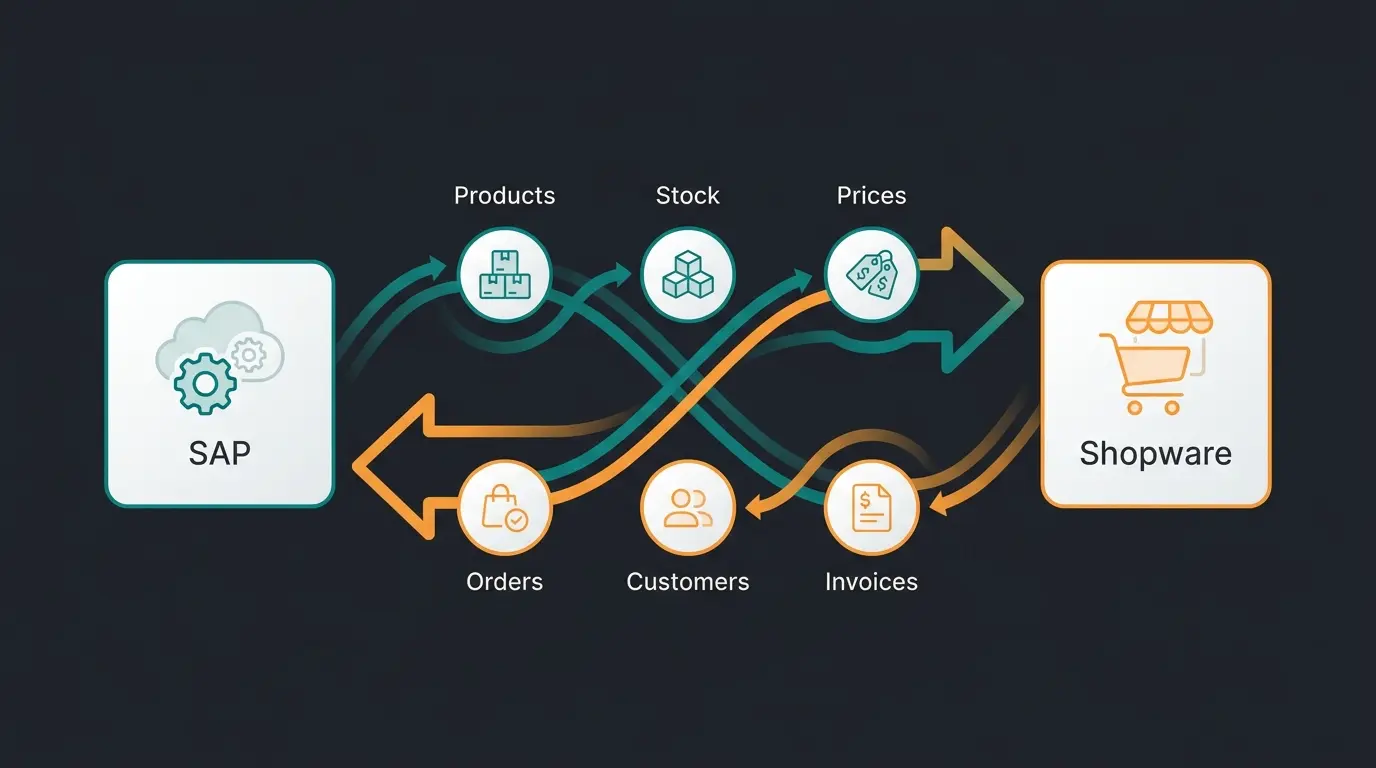
A Shopware SAP integration typically syncs six data objects: products and master data, stock levels, prices, orders, customers, and invoices. Each one flows in a defined direction. Master data and stock move from SAP to Shopware, orders move from Shopware to SAP, and customer records often sync both ways.
| Data object | Sync direction | Typical frequency |
|---|---|---|
| Products and master data | SAP to Shopware | On change or scheduled |
| Stock levels | SAP to Shopware | Near real-time |
| Prices, incl. customer-specific | SAP to Shopware | On change |
| Orders | Shopware to SAP | Real-time at checkout |
| Customers | Both directions | On change |
| Invoices | SAP to Shopware | On creation |
Junipeer, an iPaaS vendor, describes its connector as syncing "every article, stock level, customer, and order automatically between SAP and Shopware" in near real time (Junipeer, pricing last updated March 2026). Real-time stock sync is the part that pays off first, because it is what stops your shop from selling items SAP already booked out.
Step-by-step setup
Setting up a Shopware SAP integration follows six steps: map the data objects you need, choose an integration method, connect to SAP, set your field mappings, run a test sync, then switch to live with monitoring. Skipping the test sync is the most common cause of a failed go-live.
- SAP API access enabled (Service Layer for Business One, OData for S/4HANA)
- A clean product catalog with complete attributes
- Customer groups and pricing rules defined in SAP
- A staging environment for the test sync
- Map your data objects. Decide which of the six objects you actually need to sync, and in which direction.
- Choose an integration method. Plugin, middleware, or custom build, based on your SAP version and budget.
- Connect to SAP. Authenticate against the Service Layer or the OData endpoint.
- Configure field mappings. Match SAP fields to Shopware fields, including units, tax classes, and customer groups.
- Run a test sync in staging. Verify products, stock, and one full test order end to end.
- Go live with monitoring. Activate continuous sync and watch the logs closely for the first week.
This sequence works for any back-office system, not just SAP. Our general guide to connect Shopware to your ERP uses the same steps as a baseline and goes deeper on field mapping.
Costs and connector options
Shopware SAP integration costs range from a one-off plugin licence of roughly €299 to €2,999 up to recurring iPaaS subscriptions from about €499 per month, plus the implementation effort for field mapping and testing. A fully custom build is the most expensive, billed as a development project rather than a fixed licence.
| Option | Pricing model | Example price | Best for |
|---|---|---|---|
| Store plugin (SAP Business One) | One-off licence | €299 to €2,999 | B1 shops with standard flows |
| iPaaS / middleware | Monthly subscription | From €499 / month | Multi-system setups, fast start |
| Custom API build | Project plus maintenance | Quote-based | Complex, high-volume catalogs |
Listings in the Shopware Store ERP integrations section price the SAP Business One connector between €299 and €2,999 as of mid-2026. The cheapest plugin is a one-off cost, whereas an iPaaS platform like Junipeer runs from €499 per month, so the break-even depends on how long you plan to run the connection and how many systems you need to link.
Where an AI employee fits alongside SAP
While SAP runs the back office, an AI employee handles the customer-facing side. It answers product, order, and stock questions in real time using the same synced data, so customers get instant advice without adding load to your team. The connector moves the data. The AI employee puts it to work.
This is where AI product consultation sits on top of the integration: it reads your synced SAP catalog and recommends the right product, the way a sales rep would. See how Rasendoktor automated customer-facing advice with the AI employee Hektor, reaching a 100% automation rate on webchat inquiries, 40% lower support costs, and a 16x return on investment.
Rasendoktor, lawn-care e-commerce
All consultation inquiries handled
Across product-consultation deployments
Frequently asked questions
Yes. Neither product offers a native connector, so the integration runs through a Shopware Store plugin, an iPaaS platform, or a custom API build. Real-time sync of stock, orders, and prices is standard across all three methods.
SAP Business One (via the Service Layer), SAP S/4HANA (via OData), SAP ECC, and Business ByDesign all integrate. ECC usually needs middleware because it relies on older RFC or IDoc protocols rather than REST.
A store plugin for SAP Business One costs €299 to €2,999 as a one-off licence. iPaaS platforms like Junipeer start at €499 per month. Custom builds are quoted as development projects.
Yes. Stock and orders sync in near real time with most connectors, which prevents overselling. iPaaS tools like Junipeer push order data to SAP the moment a checkout completes.
A standard plugin or iPaaS connection can run within a few weeks. Atwix reports most full integrations finish in 8 to 12 weeks, while Junipeer's guided setup connects the two systems in about 15 minutes before field mapping.
A SAP integration keeps your back office accurate. An AI employee uses that same product, stock, and price data to advise customers in real time and lift basket value by up to 30%. See it run on your own catalog.
Book a demo
Kevin is CTO and co-founder of Qualimero. As an AI architect with over 15 years of experience as CTO and CPO in the tech industry, he designs the AI systems that automate tens of thousands of customer interactions daily for Qualimero's clients — reliably, securely, and at scale.