Lexware Shopware integration: plugins, methods, and practical guide 2026
Connect Lexware with Shopware 6: lexoffice vs. Lexware Warenwirtschaft, the best plugins, integration methods, and a step-by-step sync guide for merchants.

What is Lexware? A quick overview for Shopware merchants
Lexware is a product family by the Haufe Group, one of Germany's largest business software publishers. Founded in 1989 in Freiburg im Breisgau, Lexware has grown to serve over 500,000 customers, making it the market leader for SME business software in Germany. If you run a Shopware shop and work with a German accounting or inventory system, chances are Lexware is either already in your stack or on your shortlist.
Three product lines matter for the Shopware integration question, and each brings fundamentally different integration capabilities.
Lexware Office (formerly lexoffice) is the cloud accounting solution. Browser-based, designed for freelancers and small teams, it handles invoicing, bookkeeping, and basic financial management. Over 350,000 companies use it as of 2026, making it the leading online accounting tool in the German market.
Lexware Warenwirtschaft (Pro and Premium) is the desktop inventory management system. It runs locally on Windows and covers article management, order processing, warehouse operations, and purchasing. This is the product you need when physical inventory tracking, variant management, or multi-warehouse operations matter.
Lexware Financial Office bundles Warenwirtschaft, accounting, and payroll into one package. If you already use Financial Office, the inventory component is identical to the standalone Warenwirtschaft version and connects to Shopware in exactly the same way.
The real question is not whether Lexware connects to Shopware. It does. The question is: which product do you use, and what data needs to move? Invoices only? Or articles, stock levels, and orders too? The answer determines your integration path. For a broader overview of all ERP options, see the Shopware ERP integration guide.
lexoffice vs. Lexware Desktop: which one for Shopware?
Both products come from Haufe-Lexware, but they differ fundamentally in architecture, feature scope, and integration depth with Shopware. I have seen merchants pick the wrong one and regret it six months later, because migrating between them is not simple.
| Criterion | lexoffice (cloud) | Lexware Warenwirtschaft (desktop) |
|---|---|---|
| Operation | Browser/app, cloud-based | Windows installation, local |
| Pricing (2026) | From EUR 7.90/month to EUR 32.90/month (XL) | From EUR 44.90/month (Pro) to EUR 55.90/month (Premium) |
| Inventory management | Not included | Fully integrated, incl. multi-warehouse (Premium) |
| Article management | Simple products only | Variants, serial/batch numbers, BOMs |
| Shopware connection | Store plugins (accounting/invoicing) | sync4 middleware |
| Data sync scope | Invoices, customer data | Articles, stock, prices, orders, customers |
| API access | From XL plan (EUR 32.90/month) | Via sync4 interface |
| Best for | Freelancers, small shops (<100 products) | Merchants with inventory (100-5,000 products) |
One detail that catches people off guard: lexoffice and Lexware Desktop are not compatible systems. You cannot start with lexoffice and later upgrade to Warenwirtschaft without manually migrating your data. They are technically separate products despite sharing the Lexware name. The decision should come early.
For a broader look at Shopware accounting solutions beyond Lexware, we have a dedicated comparison.
Integration methods: how to connect Lexware with Shopware
Three established paths exist for connecting Lexware products to Shopware 6. Each serves a different use case, and none is universally the best choice. The right one depends on your Lexware product, your order volume, and how much automation you need.
Direct connection via a plugin from the Shopware Store. Works primarily with lexoffice for invoice and accounting data transfer. Setup takes minutes, no middleware required.
An intermediary software connects Lexware Desktop products with Shopware. sync4 is the established standard for Lexware Warenwirtschaft. Synesty and SyncSpider offer more flexibility for multi-channel scenarios.
Manual export from Lexware, import into Shopware. Only practical as a starting point or for very small product catalogs under 50 items. Not scalable, error-prone, and time-consuming.
Path 1 is the simplest route for lexoffice users: install the plugin, connect your lexoffice account, configure the settings. The entire setup can be done in under 30 minutes. The trade-off is that data transfer is limited to invoices and customer records. No product data, no stock levels.
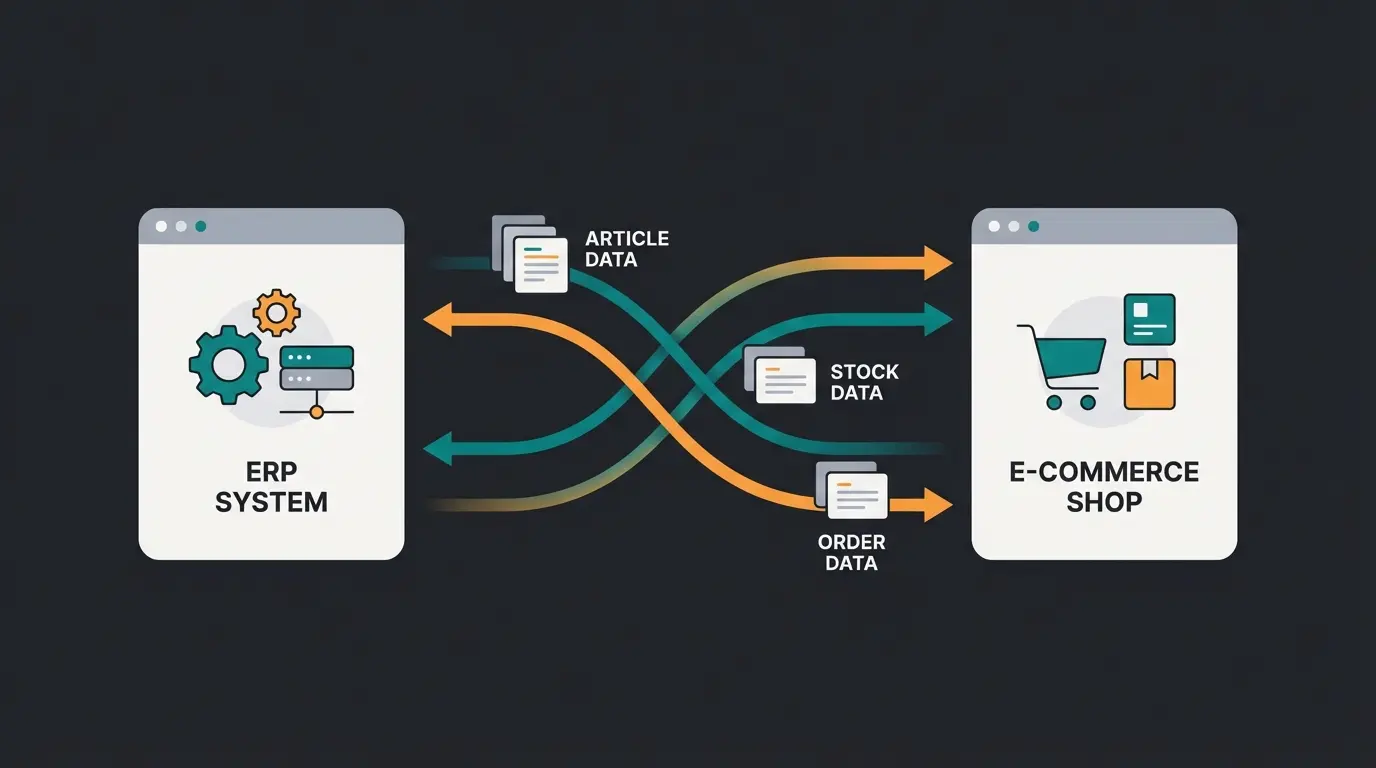
Path 2 is the standard for merchants running Lexware Warenwirtschaft. sync4 synchronizes article master data, prices, stock levels, and orders bidirectionally. Order import is GDPdU-compliant and audit-proof, and customers are created automatically in Lexware when new orders arrive. sync4 is available in three tiers: Starter, Plus, and Ultimate, each adding more automation capabilities.
Path 3 technically works but is not a long-term solution. With more than 50 products or regular orders, the manual effort becomes unsustainable. I have seen merchants spend hours per week on CSV exports that a middleware handles in seconds. Treat it as a transition phase only. For more detail on setting up a Shopware ERP overview, see the dedicated guide.
Best plugins for Lexware-Shopware integration
The Shopware Store lists several actively maintained plugins for the Lexware connection as of March 2026. Which one you need depends entirely on your Lexware product.
For lexoffice users
Lexware Office FiBu (by Shopsy): Transfers invoices including PDF attachments directly to lexoffice as soon as a voucher is created in Shopware. Supports PayPal transaction notes for automatic bank reconciliation in lexoffice. Actively maintained with the last update in March 2026.
Lexware Office Factura: Connects Shopware 6 with lexoffice for automated invoice creation, customer data management, and special tax case handling. Compatible with both Shopware Cloud and self-hosted instances, which makes it a safe choice if you might switch hosting models later.
lexoffice Connector: Uses the lexoffice Public API to transfer order and customer data in real time. This is the most capable option but requires the lexoffice XL plan at EUR 32.90/month for API access. Worth it if you need automated, hands-off data flow.
For Lexware Warenwirtschaft users
sync4 Interface for Lexware: The established middleware solution from sync4.de. Synchronizes articles (including descriptions, images, price lists, tiered pricing, EAN codes), stock levels, orders, and customer data. Built-in PIM system for additional attributes, manufacturer assignments, and variants. Available as a rental subscription with ongoing updates and support.
Store plugin, middleware (sync4), or CSV import
lexoffice S plan, the entry point for cloud accounting
sync4 order import is audit-proof and tax-compliant
Step-by-step: syncing orders and products
The most common setup I see with DACH-region Shopware merchants is Lexware Warenwirtschaft connected via sync4. Here is the typical workflow, step by step.
Transferring article master data
- Maintain article master data in Lexware Warenwirtschaft: article number, name, description, prices, EAN code, and images
- Mark the desired articles for Shopware export in sync4
- Add shop-specific attributes in the sync4 PIM: manufacturer assignments, variants, metadata, and additional product information
- Start the export. sync4 transfers all marked articles including price lists and tiered pricing to your Shopware shop
Importing orders
- An order comes in through the Shopware shop
- sync4 picks up the order and creates it as a sales order in Lexware
- Customer data is automatically matched. New customers are created in Lexware automatically
- Payment method and shipping method are transferred along with the order details
- The entire process is GDPdU-compliant and audit-proof, meeting German tax regulations
Automating stock reconciliation
Price and stock sync can be configured as a background service in sync4. When a stock level changes in Lexware, whether from a new delivery, a return, or a manual adjustment, the update is automatically pushed to Shopware. This prevents overselling and keeps your inventory management in Shopware accurate across systems.
For the invoicing side of the integration, specifically automated invoice creation and export, see our guide on Shopware invoicing.
Common problems and solutions
After working with Shopware merchants on ERP integrations across the DACH region, the same issues keep coming up. Here are the ones that waste the most time and how to fix them before they become production problems.
Missing article numbers: sync4 matches articles by article number. If the number is missing in either Lexware or Shopware, the sync fails silently without an error message. Solution: before the first sync, verify that every article has a unique article number on both sides. This one step prevents the majority of initial sync issues.
Tax rate mapping: Lexware and Shopware use different tax category systems. If the mapping is not configured correctly, invoice amounts will not match, and your bookkeeping will be off. Solution: map tax rates cleanly in the middleware once before going live. Double-check with a test order.
Data format conflicts: Lexware stores prices with a comma as decimal separator (German standard). Shopware may expect a period depending on locale configuration. This leads to wildly incorrect prices in the shop. Solution: check the number format settings in sync4 and enable conversion if needed.
Character encoding (umlauts): German product names with umlauts (ae, oe, ue, ss) can break during transfer if character encoding is not set consistently. Solution: ensure both systems use UTF-8 encoding, and test with a product that contains special characters before syncing the full catalog.
Timeout on large datasets: With more than 2,000 articles, the initial full sync can take longer than expected, sometimes several hours. Solution: run the first sync outside business hours and process in smaller batches of 200-500 articles at a time.
When Lexware reaches its limits
Lexware is a solid solution for small to mid-sized shops. But there is a ceiling, and recognizing it early saves you a painful migration later.
If you manage more than 5,000 articles, need real-time synchronization, operate multiple shops or marketplaces in parallel, or require a direct API connection without middleware, alternatives like JTL, Xentral, Pickware, or SAP become worth evaluating. A detailed Pickware vs JTL vs Xentral comparison covers the trade-offs, and for enterprise-scale operations, the Shopware SAP Integration guide walks through the full setup. You can also explore additional Shopware ERP integration options for a broader perspective.
That does not mean Lexware is a poor choice. For a merchant with 200 products, one warehouse, and stable order volume, Lexware Warenwirtschaft with sync4 is a reliable, cost-effective combination. The limitations are less about the product and more about scaling needs. For merchants outgrowing Lexware, JTL WaWi integration is often the natural next step up.
Conclusion: Lexware as a solid choice for small to medium shops
Connecting Lexware to Shopware is straightforward once you know which product you are using and what data needs to flow. For lexoffice users, Store plugins handle invoicing. For merchants with Lexware Warenwirtschaft, sync4 is the proven standard.
The key decision comes early: which Lexware product, and what scope of integration? Invoices only? Then lexoffice plus a plugin. Articles, stock, and orders? Then Warenwirtschaft plus sync4. Get this right, and the technical setup follows naturally.
And regardless of which ERP you run: more traffic and better product data mean nothing if visitors leave without buying. Qualimero's KI-Mitarbeiter turns your product knowledge into real-time customer advice, helping shoppers find what they need. Our clients see cart values increase by up to 35% and checkout rates rise by 60%.
Your ERP data is connected. Now add the advisory layer that turns visitors into buyers. A KI-Mitarbeiter from Qualimero uses your product data to advise customers in real time. Our clients increase cart value by up to 35%.
Book a free demo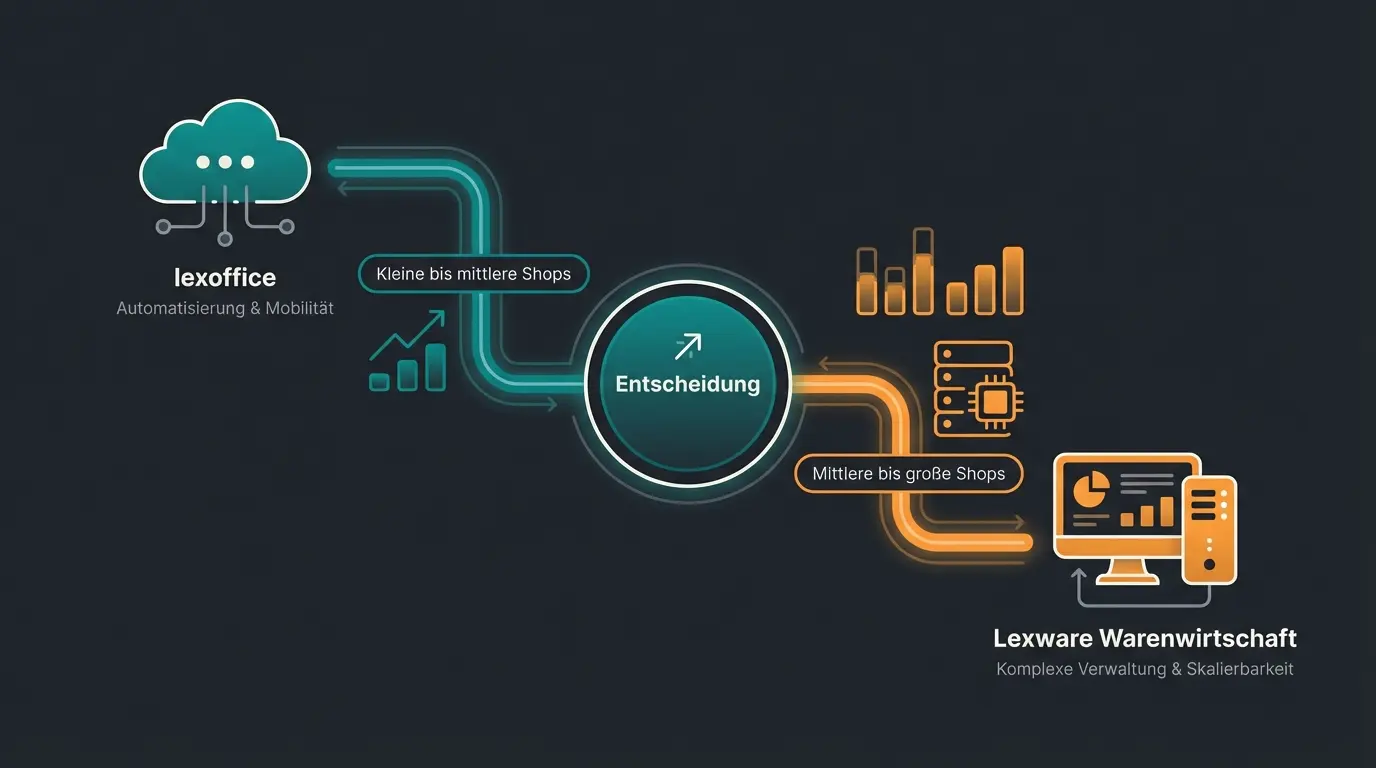
FAQ: Lexware and Shopware
Yes. The Shopware Store offers several actively maintained plugins as of March 2026 that connect lexoffice with Shopware 6. The integration primarily covers invoice creation, PDF transfer, and accounting data synchronization.
With the sync4 middleware, Shopware orders are automatically created as sales orders in Lexware Warenwirtschaft. The import is GDPdU-compliant and includes customer data, payment method, and shipping method.
Costs depend on the integration path. lexoffice plugins are often free or low-cost add-ons. sync4 for Lexware Warenwirtschaft is available as a rental subscription including updates and support. Add the Lexware license: from EUR 7.90/month (lexoffice) or EUR 44.90/month (Warenwirtschaft Pro).
Lexware does not offer real-time sync in the strict sense. sync4 enables automated background synchronization at configurable intervals. For true real-time connectivity, ERP systems like JTL or Xentral are the better choice.
A direct upgrade with data migration is not possible. lexoffice (cloud) and Lexware Desktop are technically separate systems. Master data must be transferred manually or via CSV export. This is why the decision should be made early, ideally before your first sync setup.

Lasse is CEO and co-founder of Qualimero. After completing his MBA at WHU and scaling a company to seven-figure revenue, he founded Qualimero to build AI-powered digital employees for e-commerce. His focus: helping businesses measurably improve customer interaction through intelligent automation.