Shopware ERP Integration 2026: 4 Connection Methods Compared
Compare 4 Shopware ERP integration methods: direct API, middleware, store plugin, and custom development. Real cost ranges, timelines, and a decision framework.

Why ERP integration is essential for Shopware stores
Open the back office of a mid-sized Shopware store processing 200+ orders per day and the bottleneck becomes obvious: stock levels do not match, invoices go out late, returns vanish somewhere between the shop and the warehouse. Manual data maintenance between Shopware and an ERP system costs 10-20 hours per week depending on catalog size. That is time your team could spend on growth.
According to Bitkom, 36% of German companies already use cloud-based ERP systems, yet many e-commerce merchants still run their shop and ERP as isolated silos. A proper Shopware ERP integration eliminates these problems by automatically syncing product data, stock levels, orders, and customer records.
What data flows between Shopware and ERP?
Before choosing an integration method, you need to understand which data flows actually need to be mapped. The scope determines the complexity, and the complexity determines the right method.
| Data type | Direction | Criticality |
|---|---|---|
| Product master data (name, description, variants, images) | ERP to Shopware | High |
| Stock levels and warehouse quantities | ERP to Shopware (real-time recommended) | Very high |
| Prices and tiered pricing | ERP to Shopware | High |
| Orders and order status | Shopware to ERP to Shopware | Very high |
| Customer data and addresses | Bidirectional | Medium |
| Invoices and credit notes | ERP to Shopware | High |
| Shipping information and tracking | ERP to Shopware | Medium |
| Categories and SEO data | Shopware-side or bidirectional | Low |
Stock synchronization and order import are the two most critical data flows. Delays here mean you sell products that are out of stock, or customers wait days for a shipping confirmation. These two processes determine whether an integration is perceived as "working." For a deeper look at Shopware Inventory Management and Shopware Accounting, the dedicated guides go into more detail.
A practical consideration: most merchants start by syncing only the highest-priority data flows (stock and orders), then expand to prices, customer data, and invoices in subsequent phases. This staged approach reduces risk and lets you validate the integration method before committing to the full scope.
4 ERP integration methods compared
There are four established ways to connect an ERP system to Shopware 6. None is universally better. The right choice depends on your ERP system, your catalog size, and your in-house technical capabilities.
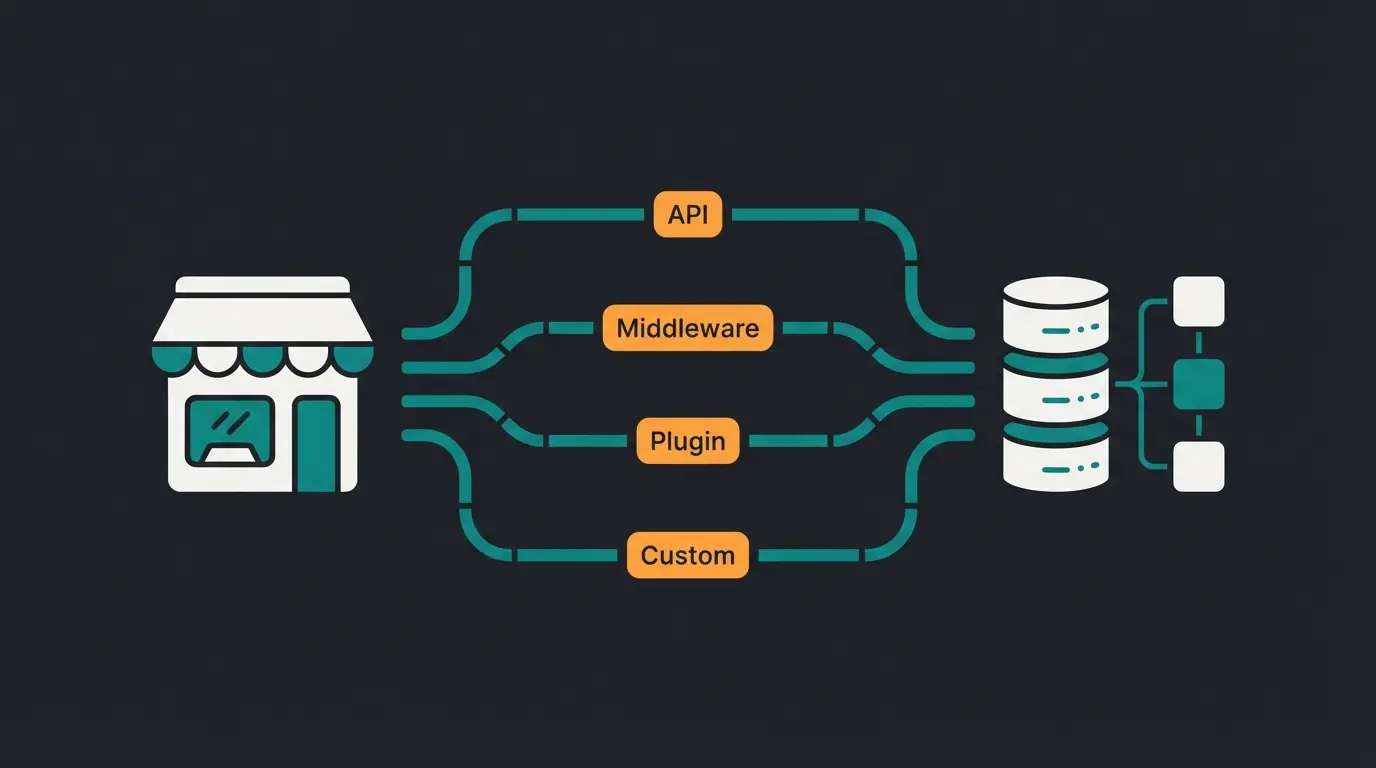
Method 1: Direct API integration
Shopware 6 provides a complete Admin API built on REST with OAuth 2.0 authentication. Every entity in the system can be read and written through this interface: products, orders, customers, categories, and media.
The Sync API allows bulk operations where hundreds of records are processed in a single request. This is essential for initial data imports and large catalog synchronizations.
Direct API integration requires that your ERP system also exposes an API or that you build a custom connector. Typical projects start at EUR 5,000-15,000 and take 4-8 weeks. The advantage: you control every data flow precisely. The trade-off: maintenance and updates are entirely your responsibility.
Method 2: Middleware solution
Middleware platforms like Synesty, Alumio, or MakeCommerce sit between Shopware and the ERP system. They offer visual editors for data mapping, pre-built connectors for common ERPs, and monitoring dashboards for running synchronizations. You define rules for which data flows where and when, without writing code yourself.
Costs typically run EUR 200-500 per month depending on data volume and the number of connectors. Setup takes 2-4 weeks. Middleware works particularly well for merchants operating multiple sales channels who need to connect not just Shopware but also marketplaces like Amazon or eBay. The limitation: very custom business processes can push the visual mapping to its boundaries.
Method 3: Store plugin (ERP connector)
The Shopware Extension Store offers ready-made connectors for the most common ERP systems. The Universal ERP Connector by Hatori, for example, connects Shopware bidirectionally with nearly any ERP system and synchronizes products, stock levels, prices, orders, and customer data.
One-time costs range from EUR 500-2,000 depending on the plugin and feature scope. Setup at 1-2 weeks is the fastest of all methods. Standard plugins typically cover 70-90% of common requirements. The remaining 10-30% usually involve custom business logic: special pricing rules, complex variant structures, or multi-step approval workflows.
Method 4: Custom development
For highly complex requirements, such as connecting to SAP S/4HANA with multi-tier warehouse management or integrating with industry-specific ERP systems, custom development is the only viable path. A development team builds a tailored connector designed precisely for your processes.
Costs start at EUR 10,000 and can go significantly higher for enterprise projects. Project timelines of 8-16 weeks are typical. In return, you get a solution that handles every business rule and evolves with your company. Important: budget for ongoing maintenance, because every Shopware or ERP update means the connector needs to be reviewed and potentially adjusted.
| Criterion | Direct API | Middleware | Store plugin | Custom |
|---|---|---|---|---|
| One-time cost | EUR 5,000-15,000 | EUR 500-2,000 setup | EUR 500-2,000 | From EUR 10,000 |
| Ongoing cost | Internal maintenance | EUR 200-500/month | Updates included | Maintenance contract |
| Setup time | 4-8 weeks | 2-4 weeks | 1-2 weeks | 8-16 weeks |
| Flexibility | Very high | Medium to high | Limited | Maximum |
| Technical expertise needed | Developer required | Configuration only | Minimal | Dev team required |
| Maintenance effort | High | Medium (provider) | Low | High |
| Scalability | High | High | Medium | High |
| Best for | Tech-savvy teams | Multi-channel merchants | Quick start, standard processes | Enterprise, custom processes |
Shopware Admin API: Technical foundations
The Shopware 6 Admin API is a REST-based interface with JSON payloads. Authentication runs via OAuth 2.0 with Client Credentials. Every entity in Shopware, whether product, order, or customer, is accessible through its own endpoint.
For ERP integrations, the Sync API is particularly relevant: it bundles multiple write operations (create, update, delete) into a single HTTP request. With the July 2025 release, Shopware introduced additional API endpoints that simplify external system integration, especially for ERP, CRM, and marketing automation tools.
Shopware also offers webhooks that automatically send a callback to your ERP when specific events occur: new order, status change, stock update. This enables real-time synchronization without constant polling.
Since version 6.4.6.0, rate limits apply to API access, especially on Shopware SaaS instances. Factor this into your architecture from day one.
Popular ERP systems for Shopware
Which ERP system connects best with Shopware depends on your company size and requirements. Here is an overview of the six most common options and their typical integration approach. If Pickware is on your shortlist, the Pickware overview explains what the system covers as an ERP before you weigh it against the alternatives.
| ERP system | Target audience | Integration method | Detail guide |
|---|---|---|---|
| Pickware | Shopware-native merchants | Native plugin, directly integrated into Shopware | Pickware guide |
| JTL WaWi | SMEs, multi-channel | Official JTL connector, free basic version | JTL guide |
| Xentral | Growing e-commerce businesses | API integration, 200+ connectors | Comparison guide |
| SAP Business One | Mid-market to enterprise | Middleware or custom development | SAP guide |
| Microsoft Dynamics | Mid-market with Microsoft ecosystem | Middleware (e.g. Alumio) or custom | Dynamics guide |
| Lexware | Small businesses, accounting focus | Plugin or middleware | Lexware guide |
For a detailed comparison of the three most popular systems, see the Pickware vs JTL vs Xentral comparison. For a broader overview, the Shopware ERP overview covers selection criteria and cost considerations. For Lexware users, the Lexware Shopware Integration guide covers the connection in detail.
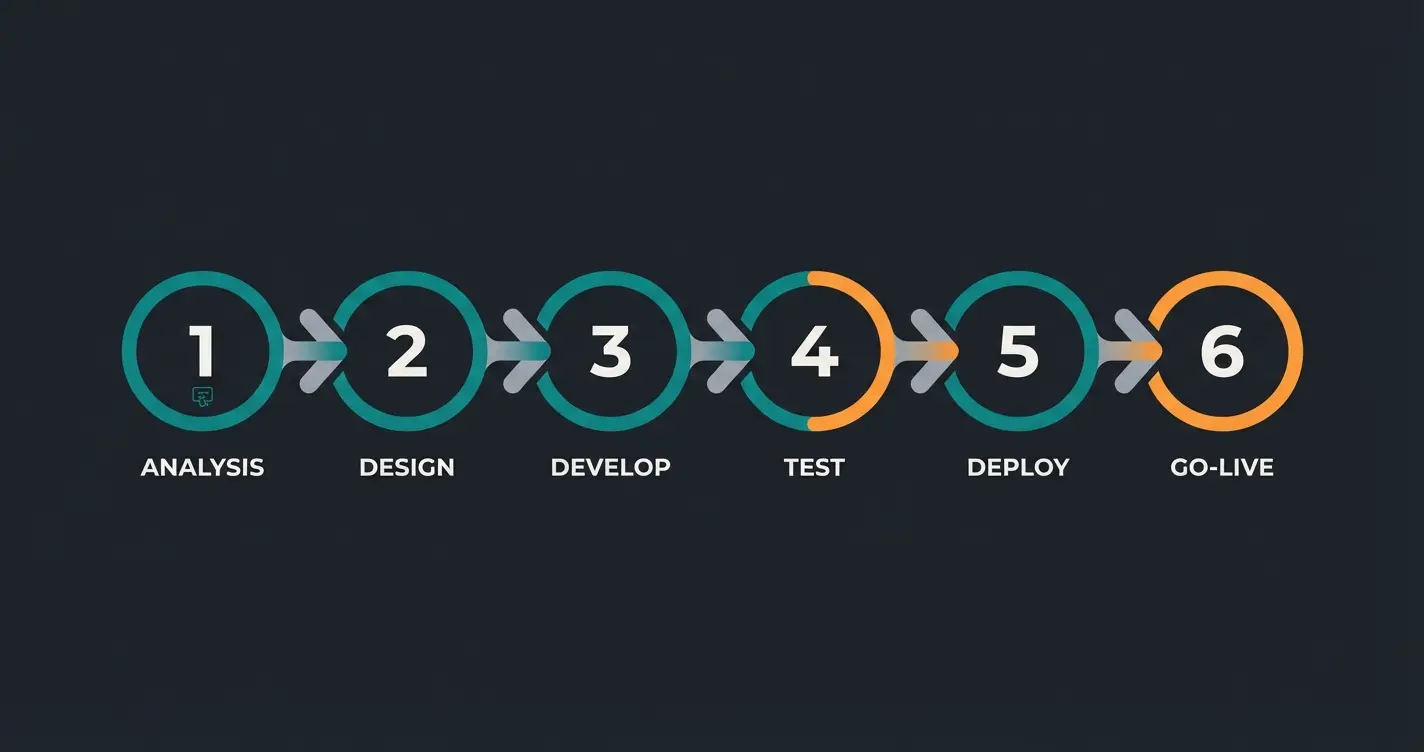
ERP integration project workflow
Which data needs to be synchronized? In which direction? At what frequency? Define use cases, not features.
Based on requirements: does a plugin suffice, do you need middleware, or is custom development necessary?
Align product numbers, category structures, and customer fields between both systems. Clean up legacy data before synchronization.
Install the plugin, configure middleware, or develop the API connector. Define mapping rules and set up error handling.
Test with a subset first, then with the complete dataset. Critical scenarios: stock changes during concurrent orders, returns, partial shipments.
Staged rollout recommended. Set up monitoring for synchronization errors. Monitor closely for the first two weeks.
A common mistake: treating go-live as the end of the project. In practice, many edge cases only surface in production, for example when a customer modifies an order while it is already being processed in the ERP. Plan at least four weeks of post-launch support.
One honest note: not every Shopware store needs an ERP integration right away. If you process fewer than 20 orders per day with a catalog under 200 products, manual workflows may still be manageable. The investment only pays off when manual data maintenance visibly slows your growth or causes errors that cost you customers.
Common ERP integration mistakes to avoid
After dozens of ERP integration projects, the same pitfalls keep appearing. None of them are technically unsolvable, but each one costs time and money when it only surfaces in production.
- Skipping data cleanup before migration. When product numbers are duplicated, customer records are outdated, or categories do not align, every integration fails regardless of method.
- Coupling too tightly. When Shopware and ERP are so tightly intertwined that an update on one side blocks the other, you have a maintenance problem. Decoupled architectures with queue-based communication are more robust.
- No monitoring. Synchronization errors happen. Without automatic alerts, you only notice when a customer complains. Every integration needs a dashboard showing failed syncs.
- Underestimating performance. A shop with 50,000 products and hourly stock synchronization generates significant API traffic. Test performance under realistic conditions, not just with 100 test products.
- Ignoring returns and edge cases. Standard synchronization covers the happy path. But what happens with partial returns, cancellations after shipping, or manual stock corrections? These edge cases must be defined before go-live.
I have seen a garden supply merchant lose three days of orders because their stock sync failed silently over a weekend. No alerts, no dashboard, no fallback. By Monday morning, 47 orders contained products that were already sold out. The integration itself was technically fine, the monitoring was not.
Costs of a Shopware ERP integration
Total costs break down into one-time expenses (setup, configuration, development) and ongoing costs (licenses, hosting, maintenance). Here is a realistic overview as of early 2026.
One-time. Updates usually included. Lowest entry point.
Ongoing costs. Setup additionally EUR 500-2,000.
One-time. Plus internal maintenance costs.
Enterprise projects can reach EUR 30,000+. Maintenance contract separate.
Do not forget: ERP license costs come on top. JTL WaWi starts free (basic version, limited to 500 products), Xentral begins at around EUR 199/month, and SAP Business One runs into several thousand euros annually. The Shopware ERP overview and the Shopware Accounting guide go deeper into total cost of ownership.
Conclusion: Choosing the right integration method
The right method comes down to three questions: How complex are your business processes? How large is your catalog? And how much technical expertise do you have in-house?
For a Shopware merchant with standard processes and under 5,000 products, a store plugin is enough. Once multi-channel or complex pricing logic enters the picture, middleware pays off. And for enterprise requirements with SAP or Dynamics, custom development is usually the only path forward.
Regardless of which method you choose: invest enough time in requirements analysis and data cleanup. The technology is rarely the problem. Data quality almost always is. For the full picture on ERP options, the Shopware ERP Integration Guide covers the broader ecosystem.
At Qualimero, we have observed that merchants who solve their ERP integration challenge often face the next bottleneck immediately: customer advisory at scale. With accurate stock data and fast fulfillment in place, the limiting factor becomes how well you convert visitors into buyers. Our clients report a 7x increase in conversion when an AI employee handles product advisory in real-time alongside their optimized backend.
A clean ERP integration ensures accurate stock levels and fast delivery times. But the next lever is customer advisory: a Qualimero AI employee advises your customers in real-time, identifies purchase intent, and increases average cart value by up to 35%.
Book a free demoFAQ: Shopware ERP integration
Between 1 and 16 weeks depending on the method. A store plugin is set up in 1-2 weeks. Middleware solutions need 2-4 weeks. Direct API integrations and custom development take 4-16 weeks, depending on the complexity of your business processes.
For stock levels and order status, real-time synchronization is recommended to avoid overselling. Product master data, prices, and categories can usually be updated via daily or hourly batch sync. Real-time for everything significantly increases costs and complexity.
Yes, if you use middleware. The middleware remains in place and you only swap out the ERP connector. With direct API or custom development, an ERP switch is more involved because the connector was built specifically for that system.
Pickware is the easiest as a native Shopware plugin. JTL WaWi has a well-documented official connector. Xentral offers a modern API with pre-built Shopware connectors. See the ERP comparison guide for a detailed breakdown.
First-year total costs range from EUR 500 (simple plugin) to EUR 30,000+ (enterprise custom development), plus ERP license costs. For a typical mid-market shop with a middleware solution, budget EUR 5,000-10,000 in the first year including setup and ongoing costs.
Middleware makes sense when you operate multiple sales channels or need to connect more than just Shopware to your ERP. The monthly cost pays for managed infrastructure, monitoring, and pre-built connectors that reduce development time. For a single-channel Shopware store with standard requirements, a plugin is usually more cost-effective.
An ERP integration optimizes your operations. An AI employee optimizes your conversion. Our clients increase checkout rates by up to 60%. Try it yourself.
Try 14 days free
Lasse is CEO and co-founder of Qualimero. After completing his MBA at WHU and scaling a company to seven-figure revenue, he founded Qualimero to build AI-powered digital employees for e-commerce. His focus: helping businesses measurably improve customer interaction through intelligent automation.