Why your ERP integration strategy needs a 2026 rethink
Shopware ERP integration in 2026 requires a unified data layer connecting ERP, CRM, and AI systems through real-time APIs. The global ERP market reaches $83.19 billion in 2026, and 67% of organizations report successful ERP implementations when they plan for AI-ready data structures from the start. Merchants still running batch CSV imports are building on a foundation that cannot support AI commerce.
Shopware's Agentic Commerce Alliance, launched in 2025 and expanded with 17 new members in January 2026, sets open standards for agent-driven commerce. Members like PayPal, Klaviyo, and ChannelEngine are building protocols that let AI agents discover, compare, and purchase products across e-commerce platforms. For merchants, the practical consequence: your product data must be structured, attributed, and API-accessible in formats that autonomous agents can parse.
As Shopware states in the Alliance's founding announcement: "The future of commerce will be shaped by AI agents acting on behalf of merchants and consumers alike. Open standards are essential to ensure that this future remains accessible to businesses of all sizes." This directly impacts ERP strategy. Agents need structured, API-accessible product and inventory data to function.
As of Q2 2026, more than 80% of SMEs with annual revenue under $50 million rely on ERP systems, up from 53% in 2019. 78.6% of new ERP implementations choose cloud deployment, reflecting a clear shift away from on-premise installations. According to Forrester, organizations with mature CRM strategies achieve 29% higher sales win rates and 25-30% ROI uplift, connecting the ERP-CRM data layer directly to revenue.
For Shopware merchants specifically, Q2 2026 brings a decision point. Shopware 6's mature API ecosystem, combined with the growing availability of AI employee tools, means that merchants who modernize their ERP integration now gain a structural advantage over competitors still operating with legacy sync patterns.
The basics: why clean ERP integration is non-negotiable
Clean ERP integration eliminates manual data entry, prevents overselling, and gives every department a single, reliable dataset to work from. Without it, scaling beyond a single sales channel becomes a coordination nightmare that consumes staff hours and erodes customer trust.
Operational efficiency and error prevention
Manual data transfer between Shopware and an ERP introduces errors at every handoff. A mistyped SKU, a delayed stock update, or a lost order confirmation compounds into refunds, negative reviews, and wasted warehouse labor. ERP integration automates these data flows and removes human error from the equation.
Research from NetSuite shows that ERP adoption reduces operational costs by 23% and administrative costs by 22%. For a Shopware merchant processing 500 orders per day, that reduction translates directly into fewer support tickets, fewer returns caused by shipping errors, and less time spent reconciling spreadsheets. Proper Shopware inventory management depends on this automated data flow.
Businesses that successfully integrate their ERP with their e-commerce platform report a 25 to 40% reduction in stockouts and an 80 to 95% near-elimination of order re-keying errors. These improvements compound over time. Fewer stockouts mean fewer lost sales. Fewer data entry errors mean fewer returns, fewer customer complaints, and lower support costs per order.
Compared to manually exporting orders via CSV and importing them into accounting software, a real-time API integration reduces processing latency from hours to seconds. Compared to batch synchronization, event-driven sync prevents the stock discrepancies that cause overselling during peak traffic.
Single source of truth
When product data lives in both Shopware and your ERP without a clear master, conflicts are inevitable. Price changes applied in one system but not the other create customer-facing errors. A single source of truth, typically the ERP for product master data and Shopware for storefront presentation, eliminates these conflicts.
46% of organizations report improved key business processes after ERP implementation, and the single source of truth is the primary reason. This principle extends to customer records: when a customer updates their address in Shopware, the change must propagate to your ERP, your shipping provider, and your CRM without manual intervention.
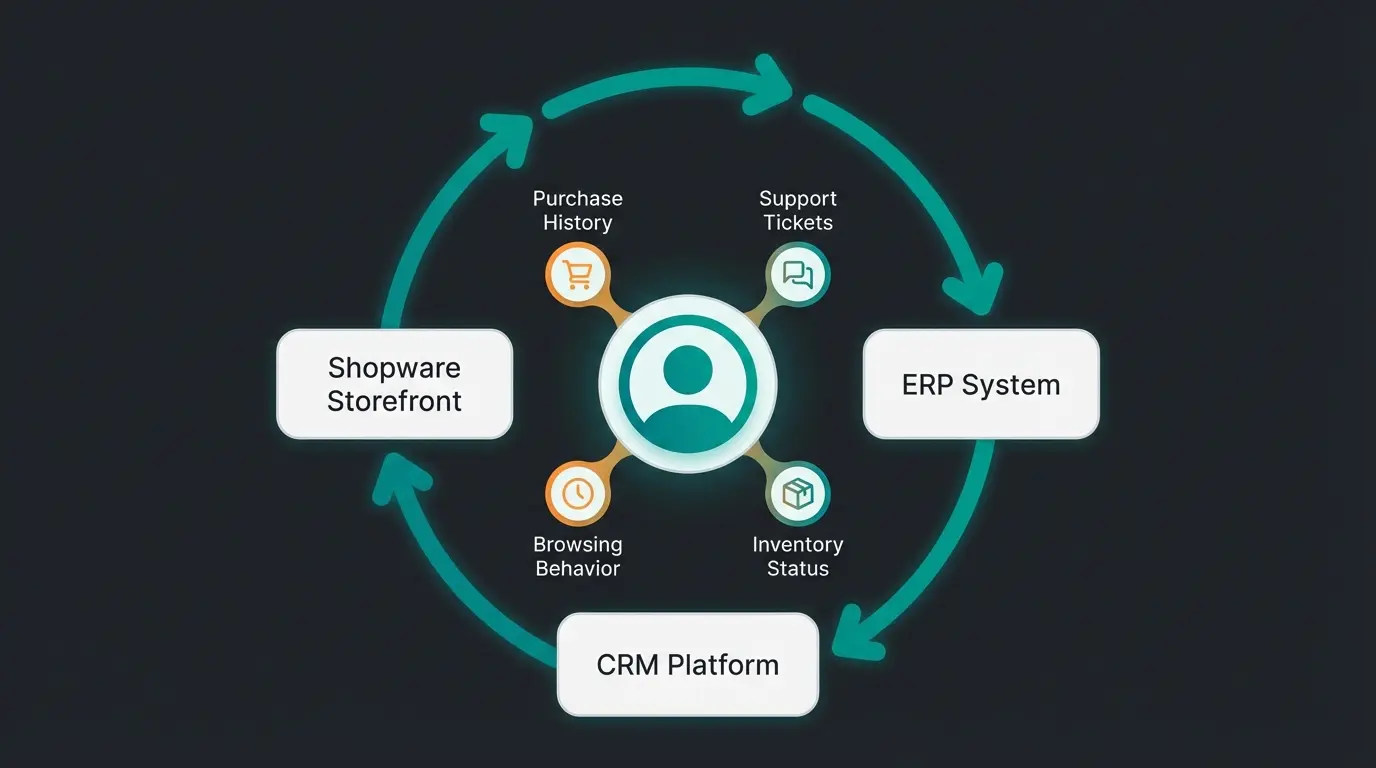
Customer lifecycle management illustrates why SSOT matters for AI readiness. When your CRM records a customer's support history, your ERP tracks their order patterns, and Shopware logs their browsing behavior, an AI employee can synthesize all three into a coherent customer profile. Without SSOT, these data points live in silos, and the AI employee sees only a fragment of the customer relationship.
Scalability across channels
A Shopware merchant selling only through their own storefront can sometimes manage without deep ERP integration. The moment you add Amazon, eBay, a B2B portal, or a physical retail location, manual processes collapse. Each channel generates its own orders, returns, and inventory movements, and only a centralized ERP can reconcile them.
As Atwix notes in their integration research: "An integration handling today's 200 daily orders must support the 800 orders you anticipate in 18 months." Building for current volume is building for failure. Your integration architecture must account for channel expansion, seasonal peaks, and the data volume increases that come with AI-driven personalization.
Top Shopware 6 ERP systems compared (2026 edition)
Five ERP platforms dominate the Shopware 6 ecosystem in 2026, each targeting a different merchant profile. Pickware suits native Shopware shops that want zero-friction setup. JTL-Wawi serves high-volume multi-channel sellers. Xentral targets cloud-first DTC brands. SAP and Microsoft serve enterprise operations, while WeClapp offers a lean cloud alternative.
Pickware: the native solution
Pickware is built directly into the Shopware ecosystem. It installs as a plugin, shares the same database, and requires no middleware or external API configuration. For merchants whose operations center on a single Shopware storefront, this eliminates integration complexity entirely.
Pickware covers warehouse management, shipping label generation, and POS functionality. Its strength is simplicity: stock levels update instantly because Pickware reads and writes to the same Shopware database. The limitation is equally clear. Pickware does not scale gracefully to multi-channel operations, and its reporting capabilities fall short of standalone ERP systems.
Compared to JTL-Wawi, Pickware offers faster setup but less depth. Compared to Xentral, it lacks cloud-native multi-location features. For a Shopware-only merchant processing under 300 orders daily, Pickware remains the pragmatic choice in 2026. See our detailed Pickware integration guide for setup instructions.
JTL-Wawi: the e-commerce workhorse
JTL-Wawi is the most widely adopted ERP for mid-market German e-commerce merchants, processing over 300 million orders annually across its user base. The Shopware 6 integration uses JTL-Connector, an open-source middleware layer that maps JTL-Wawi's data model to Shopware 6's Admin API. Setup requires installing the JTL-Connector plugin in Shopware, configuring endpoint URLs in JTL-Wawi, and running an initial full sync. Catalogs with more than 10,000 SKUs need several hours for this first sync.
JTL transitioned to a SaaS pricing model in 2024. JTL-Wawi itself remains free in its base version. The connector licensing bills per order processed, with rates typically ranging from EUR 0.14 to EUR 0.29 per order depending on volume tier. For a merchant processing 1,000 orders per month, that translates to roughly EUR 140-290/month for connector fees alone. At 5,000 orders, costs climb to EUR 700-1,450/month before negotiating custom tiers. A JTL service partner needs 1 to 3 man-days for initial setup, adding EUR 800-2,400 in consulting fees.
One cost factor that catches merchants off guard: JTL-Wawi requires a Windows server. Cloud-hosted Windows VPS runs EUR 50-100/month. On-premise, you need a dedicated machine with SQL Server. Factor this into your total cost calculation.
Multi-channel synchronization is where JTL-Wawi earns its reputation. The system connects natively to Amazon, eBay, and other marketplaces through JTL-eazyAuction, while managing Shopware as the primary storefront via JTL-Connector. Inventory is allocated across channels from a single pool, and orders from all sources funnel into one fulfillment workflow. JTL-WMS supports barcode scanning, pick-pack-ship workflows, and multi-warehouse stock allocation.
Data mapping between JTL-Wawi and Shopware 6 is the most common source of implementation friction. Shopware 6's property system and custom fields do not map one-to-one to JTL-Wawi's attribute structure. Variant products, cross-selling relationships, and CMS content require careful mapping rules. The connector supports custom field mapping since version 3.x, but complex product structures, configurable products, bundles, still require manual mapping rules or middleware-assisted transformation.
Xentral: the cloud-native ERP
Xentral positions itself as the ERP for digital-first brands that need agility over legacy feature depth. Its Shopware 6 integration uses a native connector that syncs products, orders, stock, and customer data via REST API. Setup is faster than JTL-Wawi because both systems are API-first, reducing the data mapping friction.
The platform covers procurement, production planning, warehouse management, and financial accounting in a single cloud interface. Compared to JTL-Wawi, Xentral is easier to deploy and maintain, but its marketplace integrations are less mature. Compared to Pickware, it offers far more depth in operations management. Xentral fits DTC brands processing 200 to 2,000 orders daily that want a modern cloud ERP without SAP-level complexity.
Xentral's API-first architecture makes it particularly well-suited for AI-layer integration. Data enrichment workflows using tools like n8n or Make can transform Xentral's product data during sync, automatically generating structured attributes from raw specifications. This is a significant advantage over desktop-based ERPs where data enrichment requires manual processes or custom scripting.
Enterprise and middleware: SAP, Microsoft, WeClapp
Enterprise merchants running SAP Business One, SAP S/4HANA, or Microsoft Dynamics 365 typically connect to Shopware through middleware platforms like Alumio, Pimcore, or custom-built integration layers. These setups cost more and take longer to implement, but they handle the data complexity of enterprise operations: multi-currency, multi-language, multi-warehouse, and multi-legal-entity scenarios. Our SAP integration and Microsoft Dynamics integration guides cover these setups in detail.
WeClapp offers a lighter-weight cloud ERP that competes with Xentral for the mid-market. Its Shopware integration covers the core data flows, though it lacks the ecosystem depth of JTL-Wawi or the enterprise capabilities of SAP. For the broader Shopware ERP landscape and how to evaluate these options against your specific requirements, see our dedicated comparison.
According to Atwix, pre-built connectors typically cost $5,000 to $25,000 with a 2 to 6 week implementation timeline, while custom integrations range from $25,000 to $150,000 and take 3 to 6 months. Choosing the right tier depends on your data complexity and channel count.
| ERP system | Deployment | Best for | Shopware connector | Multi-channel | CRM capabilities | Monthly cost | Setup timeline |
|---|---|---|---|---|---|---|---|
| Pickware | Shopware plugin | Single-channel, < 300 orders/day | Native (built-in) | Limited | None (Shopware customer data only) | From EUR 99/mo per shop | 1-2 days |
| JTL-Wawi | Desktop + cloud billing | Multi-channel, 500-5,000 orders/mo | JTL-Connector (open-source) | Strong (Amazon, eBay, more) | Basic (customer groups, tags) | Free base + EUR 0.14-0.29/order | 1-3 days + 2-4 weeks testing |
| Xentral | Cloud SaaS | DTC brands, 200-2,000 orders/day | Native REST API | Growing | Basic CRM module included | From EUR 349/mo + EUR 1,990 onboarding | 2-4 weeks |
| SAP Business One | On-premise / Cloud | Enterprise, multi-entity | Middleware (Alumio, custom) | Via middleware | Full CRM or SAP CX suite | From EUR 38/user/mo (cloud) | 3-6 months |
| Microsoft Dynamics 365 | Cloud | Enterprise, Microsoft stack | Middleware (custom) | Via middleware | Full CRM suite | From EUR 65/user/mo | 3-6 months |
| WeClapp | Cloud | SMB, lean operations | Native connector | Moderate | Integrated CRM module | From EUR 59/user/mo | 2-4 weeks |
Shopware ERP integration costs: what to budget in 2026
Shopware ERP integration costs range from EUR 99/month for a native Pickware setup to over EUR 150,000 for a custom SAP enterprise integration. Most mid-market merchants land between EUR 300 and EUR 1,500/month in total operating costs. The decisive factors are order volume, number of connected systems, and whether you use pre-built connectors or custom API work.
The cost landscape shifted since JTL and Xentral moved to order-based SaaS pricing. A merchant processing 2,000 orders per month on JTL-Wawi pays roughly EUR 280-580/month in connector fees plus EUR 50-100/month for the required Windows server. The same merchant on Xentral pays EUR 349-599/month as a flat subscription. On Pickware, it is EUR 99/month for ERP and EUR 199/month per WMS device license. The right comparison is total cost of ownership over 12 months, not monthly sticker price.
Enterprise setups carry a different cost profile. SAP Business One costs $20,000 to $50,000 in the first year for 5 to 15 users, covering licensing, consulting, and data migration. Microsoft Dynamics 365 starts at EUR 65/user/month, but middleware development for the Shopware connection adds EUR 15,000-50,000 in project costs.
Hidden costs trip up most integration projects. Xentral charges a mandatory EUR 1,990 onboarding fee on top of the monthly subscription, and exceeding order limits costs EUR 0.20-0.25 per additional order. JTL's ecosystem demands a Windows server and often a service partner for initial configuration. Middleware platforms like Alumio or Make add EUR 50-500/month depending on workflow volume. Budget for these from the start.
| Scenario | ERP system | Monthly operating cost | First-year total (incl. setup) | When it makes sense |
|---|---|---|---|---|
| Single-channel, < 300 orders/day | Pickware | EUR 99-298/mo | EUR 1,200-3,600 | Shopware-only, simple warehouse |
| Multi-channel, 1,000-5,000 orders/mo | JTL-Wawi | EUR 200-1,550/mo | EUR 3,200-20,000 | Amazon + eBay + Shopware |
| DTC brand, 200-2,000 orders/day | Xentral | EUR 349-849/mo | EUR 6,200-12,200 | Cloud-first, fast scaling |
| Enterprise, 5-15 users | SAP Business One | EUR 190-1,365/mo | EUR 20,000-50,000 | Multi-entity, multi-currency |
Shopware CRM integration: managing customer relationships through your ERP
Shopware CRM integration connects customer behavior data from your storefront through your ERP to dedicated CRM tools like HubSpot, Salesforce, or Klaviyo, creating a unified customer profile that powers personalized marketing and AI-driven service. 91% of companies with 10+ employees now use CRM software, and the CRM market reaches $126.17 billion in 2026. Treating CRM and ERP as separate projects means losing the compounding benefits of unified customer intelligence.
HubSpot connects to Shopware via middleware platforms like Make or Zapier, syncing customer records, order events, and lifecycle stages. Salesforce integrations typically use custom API connectors or iPaaS platforms like Alumio to handle more complex data mapping. Klaviyo, popular among DTC brands, pulls order and product data from Shopware to power segmented email and SMS campaigns. In each case, the ERP sits at the center, ensuring that inventory availability, order status, and fulfillment data feed back into the CRM for accurate customer communication.
The practical implementation of Shopware customer management through CRM-ERP integration typically follows a three-tier architecture. The ERP handles transactional data: orders, invoices, shipping, inventory. The CRM manages relationship data: lead scores, communication preferences, support history, campaign engagement. Shopware serves as the customer-facing layer, consuming data from both systems to personalize the storefront experience. Getting this architecture right requires clear data ownership rules for each field and conflict resolution logic for when systems disagree.
The return on this investment is substantial. According to Nucleus Research, CRM systems deliver an average of $8.71 for every $1 spent over a three-year period, based on data from 3,000+ deployments. CRM increases customer retention by 27%. As Nucleus Research analyst Rebecca Wettemann notes: "CRM returns compound when customer data flows bidirectionally between ERP and storefront systems, because every team works from the same customer profile."
How CRM data powers AI customer service
Structured customer data from your CRM-ERP integration is what separates a generic FAQ responder from an AI employee that resolves customer issues with context. When an AI employee has access to a customer's order history, return patterns, product preferences, and open support tickets, it provides specific, actionable answers rather than templated responses.
81% of organizations are predicted to use AI-powered CRM by 2025, a threshold likely already crossed as of Q2 2026. This is not a future trend. It is the current baseline. Merchants without AI-ready customer data structures are falling behind competitors who use unified data to power AI product consultation and AI customer service.
Rasendoktor, an online specialist for professional lawn care, achieved a 16x ROI and 100% automation rate with an AI employee from Qualimero. That result was possible because their product data, inventory levels, and customer interaction history were structured and accessible. Without clean ERP and CRM integration, the AI employee would have lacked the context needed to recommend the right lawn care product for a specific soil type, garden size, and regional climate.
Gartenfreunde saw a 7x higher conversion rate after implementing AI-powered product consultation. The common thread: structured data from integrated systems gave the AI employee enough context to be genuinely useful, not just conversational.
ERP data as fuel for AI-powered commerce
ERP data powers AI commerce when product attributes, inventory levels, and customer records are structured in machine-readable formats that AI employees can query in real-time. Unstructured ERP data, free-text product descriptions, flat inventory counts, broad customer segments, is the single biggest obstacle to deploying effective AI employees. Merchants who fix this see results: Rasendoktor achieved a 16x ROI, Gartenfreunde a 7x higher conversion rate.
Consider a common scenario: a customer asks your AI employee "Which soil type works best for my clay-heavy garden in northern Germany?" Without structured product attributes mapping soil compatibility, climate zones, and application methods to specific products, the AI employee has nothing to work with. The data exists in your ERP, often buried in supplier specification sheets or product descriptions. The integration challenge is extracting it into structured, queryable fields.
An AI employee tasked with recommending a compatible power supply for a customer's server needs structured access to wattage ratings, form factor specifications, efficiency certifications, and real-time stock availability. If your Shopware ERP integration only syncs product names and prices, the AI employee cannot perform this task. Deep data integration means syncing structured product attributes, relational data (accessories, compatibility matrices), and granular inventory data (warehouse location, restock dates) in formats that AI systems can query.
The business impact of getting this right is measurable. ERP integration reduces stockouts by 25 to 40%, and cloud ERP delivers 91% inventory optimization. When AI employees access this optimized data in real-time, they stop recommending out-of-stock products and start guiding customers toward available alternatives. Qualimero's AI employees consistently deliver +35% higher cart value and +60% checkout rate increases for merchants whose ERP provides structured product data. The difference is not the AI model. It is the data feeding it.
Integration methods: connecting systems the smart way
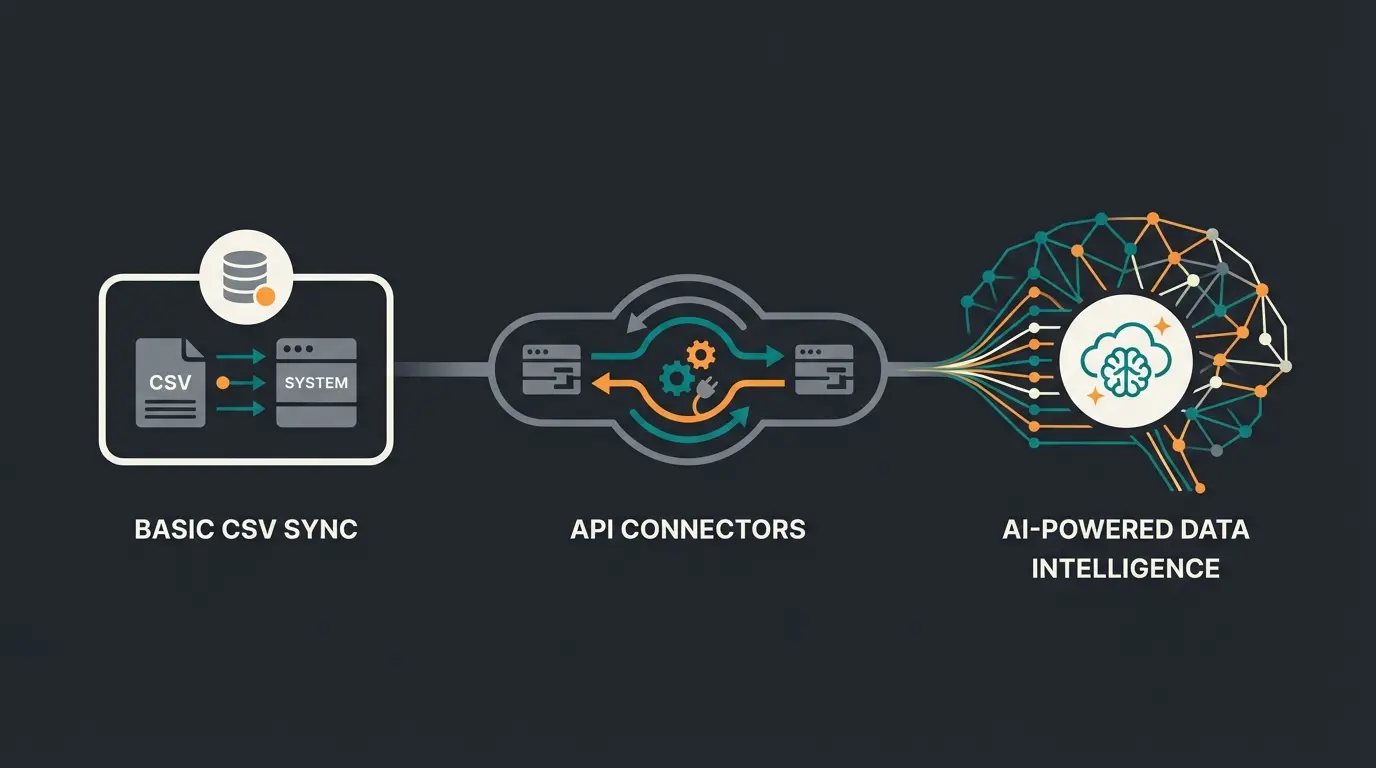
Shopware 6 supports three integration methods: pre-built connectors (EUR 5,000-25,000, 2-6 weeks), middleware/iPaaS platforms (EUR 10,000-50,000, 6-12 weeks), and custom API integrations (EUR 25,000-150,000, 3-6 months). The right choice depends on your ERP, data complexity, and how many systems need to communicate. A detailed comparison is covered in our ERP connection methods compared guide.
Standard connectors
Pre-built connectors, like JTL-Connector for JTL-Wawi or Pickware's native plugin, offer the fastest path to integration. They handle the most common data flows: products, orders, stock levels, and customer records. Setup typically takes 2 to 6 weeks, and costs range from $5,000 to $25,000 depending on catalog size and customization needs.
The tradeoff is flexibility. Standard connectors impose their own data mapping logic, which may not match your specific product structure or workflow requirements. Compared to middleware solutions, connectors are cheaper and faster to deploy. Compared to custom API work, they are less adaptable but far more maintainable.
Middleware and iPaaS platforms
Middleware platforms like Alumio, Celigo, or Make sit between Shopware and your ERP, translating data formats and orchestrating sync workflows. They are the right choice when you need to connect more than two systems, or when your data mapping requirements exceed what a standard connector supports.
For accounting-specific integrations, platforms like these also bridge Shopware to tools like Lexware. Our Lexware Shopware integration guide covers this use case in detail, and the broader topic of financial data flows is addressed in the Shopware accounting overview. For invoice-specific workflows, see our Shopware invoices guide. Middleware adds a monthly platform cost but reduces long-term maintenance compared to custom code.
The strategic advantage of middleware goes beyond simple data routing. Modern iPaaS platforms support data enrichment during transfer: an n8n workflow can intercept a new product from your ERP, send its specifications to an AI model for structured attribute generation, and push the enriched data to Shopware. This transforms the integration layer from a passive pipe into an active data intelligence layer.
Custom API integrations
Custom integrations use Shopware 6's Admin API and Storefront API directly, building bespoke data flows tailored to your exact requirements. This approach costs $25,000 to $150,000 and takes 3 to 6 months, but it delivers maximum flexibility. Merchants with unique product configurators, complex B2B pricing rules, or multi-ERP architectures often have no alternative.
The risk with custom work is maintenance. Every Shopware update and every ERP version change can break custom integrations. Budget for ongoing developer time, not just the initial build. Compared to middleware, custom integrations offer more control but require more expertise to operate.
Single ERP, standard workflows, budget under $25K. Timeline: 2-6 weeks.
Multiple systems, custom data mapping, CRM + ERP + storefront. Timeline: 6-12 weeks.
Complex B2B logic, multi-ERP, unique configurators. Timeline: 3-6 months, $25K-$150K.
Checklist: is your data structure AI-ready?
Before deploying an AI employee on top of your Shopware ERP integration, your data structure must meet specific requirements. The following checklist identifies the gaps that most commonly prevent AI systems from delivering useful customer interactions.
- Structured product attributes: every product has machine-readable specifications (dimensions, materials, compatibility) in dedicated custom fields, not buried in free-text descriptions.
- Custom fields for AI context: Shopware custom fields contain data points that help differentiate products: target audience, skill level, seasonal relevance, complementary product IDs.
- Real-time inventory: stock levels update within 60 seconds of a warehouse change, including per-warehouse availability and expected restock dates.
- Clean customer segmentation: customer records include purchase history, return rate, average order value, preferred categories in structured fields.
- Consistent product taxonomy: categories follow a standardized hierarchy that an AI system can navigate programmatically.
- Order status granularity: states go beyond 'processing' and 'shipped' to include picking, packing, carrier handoff, and delivery timestamps.
- Data hygiene automation: duplicate detection, field validation rules, and scheduled quality audits run automatically.
If your current setup fails more than two items on this list, prioritize data structure improvements before investing in AI employee deployment. The AI is only as useful as the data it can access.
Practical implementation tips
Successful Shopware ERP integration projects follow a predictable pattern. The merchants who avoid costly rework share a set of practices that are more about discipline than technical sophistication.
Start with data mapping documentation before writing any code or configuring any connector. Map every field in your ERP to its Shopware equivalent, identify conflicts (different field types, different validation rules, different update frequencies), and define which system is the master for each data entity. This document becomes the single reference for your entire integration project.
Run a parallel operation period of at least two weeks. Keep your old process running alongside the new integration and compare outputs daily. Discrepancies found during parallel operation cost a fraction of what they cost after go-live. Pay special attention to edge cases: partial shipments, split orders, backorders, and returns.
Automate regression testing for critical data flows. Build automated checks that verify: are product prices consistent between ERP and Shopware? Do stock levels match within acceptable tolerance? Are new orders appearing in the ERP within 60 seconds? These checks should run on a schedule and alert your team when any threshold is breached.
Implement monitoring from day one, not after the first failure. Track sync latency, error rates, queue depths, and data freshness. Set alerts for sync failures that trigger within minutes, not hours. A broken integration that runs undetected overnight can create hundreds of incorrect orders.
Plan for peak load from the start. Your integration must handle Black Friday volumes, not just average Tuesday volumes. Load test your sync pipeline at 3x to 5x normal order volume. Identify the bottleneck, whether that is API rate limits, database write speed, or middleware throughput, and ensure you have a scaling plan before your first major traffic event.
Plan for the AI layer from the start, even if you are not deploying an AI employee immediately. Structure your custom fields, product attributes, and customer data with machine readability in mind. Retrofitting structured data onto an existing integration is significantly more expensive than building it in from the beginning.
Use n8n or Make for data enrichment during sync. Instead of waiting for your ERP vendor to build AI features, add an enrichment step to your integration workflow. When a new product enters your ERP, route it through an AI model that generates structured attributes from the product description. Push these enriched attributes to Shopware alongside the raw ERP data. This approach works with any ERP and any integration method, and it builds the AI-ready data layer incrementally.
Frequently asked questions
Shopware ERP integration is the automated synchronization of data between your Shopware 6 storefront and an Enterprise Resource Planning system. It connects orders, inventory, product data, customer records, and financial transactions so both systems share accurate, up-to-date information without manual data entry.
The best ERP depends on your business scale and channel strategy. Pickware is ideal for single-channel Shopware-only merchants. JTL-Wawi suits multi-channel mid-market sellers. Xentral fits cloud-first DTC brands, and SAP or Microsoft Dynamics serves enterprise operations with multi-entity requirements.
Pre-built connectors typically cost $5,000 to $25,000 with a 2 to 6 week timeline. Custom API integrations range from $25,000 to $150,000 and take 3 to 6 months. Ongoing maintenance, middleware licensing, and ERP subscription fees add recurring costs that vary by platform and order volume.
Yes, and in 2026 this is standard practice. HubSpot, Salesforce, and Klaviyo each offer integration paths to Shopware via middleware or direct API connectors. The most effective setups route CRM data through the ERP to maintain a single source of truth for customer records.
AI employees need structured, real-time data to provide useful customer interactions. ERP integration supplies product specifications, inventory availability, order status, and customer history in machine-readable formats. Rasendoktor achieved a 16x ROI by connecting structured ERP data to an AI employee.
Pickware is a native Shopware plugin sharing the same database, offering instant sync for single-channel shops. JTL-Wawi is a standalone ERP with connector-based integration that excels at multi-channel operations, advanced warehouse management via JTL-WMS, and high-volume order processing across marketplaces.
Connector-based integrations take 2 to 6 weeks. Middleware setups with multiple systems require 6 to 12 weeks. Enterprise custom integrations involving SAP or Microsoft Dynamics can take 3 to 6 months including testing and parallel operation periods.
Monthly costs depend on your ERP and order volume. Pickware starts at EUR 99/month. JTL-Wawi charges EUR 0.14-0.29 per order (roughly EUR 140-1,450/month for 1,000-5,000 orders) plus EUR 50-100/month for a Windows server. Xentral ranges from EUR 349 to EUR 849/month. Add EUR 50-500/month for middleware if connecting multiple systems.
Pickware is the most cost-effective choice for small single-channel Shopware shops at EUR 99/month with zero setup complexity. For shops planning marketplace channels within 12 months, JTL-Wawi's free base version with per-order connector pricing keeps costs proportional to actual growth.
Your Shopware ERP integration already holds the product knowledge, inventory data, and customer history that an AI employee needs to convert visitors into buyers. Qualimero's AI employees plug directly into your existing data infrastructure: Rasendoktor achieved a 16x ROI without a system overhaul. Start a free pilot and see what your data can do.
Start your free AI employee pilot
Kevin is CTO and co-founder of Qualimero. As an AI architect with over 15 years of experience as CTO and CPO in the tech industry, he designs the AI systems that automate tens of thousands of customer interactions daily for Qualimero's clients — reliably, securely, and at scale.