Introduction: Why a Link Alone No Longer Cuts It
Imagine walking into a store, and nobody's there. Or worse: a salesperson runs up to you, stares at you, and says nothing. This exact scenario plays out thousands of times daily in the digital space when companies use WhatsApp Click to Chat without having a strategy for the "what happens next?"
In Germany, WhatsApp has become indispensable. With roughly 60 million daily users according to Lime Technologies, the messenger has achieved market penetration that email marketing can only dream of. We're talking open rates of 98% for WhatsApp versus 20% for email, as reported by Cooby and Exotel. The click to chat WhatsApp function is the key to opening this door. It removes the biggest hurdle in mobile marketing: the tedious process of typing and saving phone numbers.
But here's the catch: Most tutorials and tools out there only show you how to open the door (create the link). They don't show you how to invite the visitor in, consult with them, and actually sell them something. If you want to transform it into an AI-powered sales channel, you need to think beyond the basic link.
In this comprehensive guide, you'll learn not just the technical basics—how to create a WhatsApp chat start link—but also the strategic masterclass: How to turn a simple click into a full-fledged product consultation using pre-filled messages and Artificial Intelligence (AI).
WhatsApp penetration in Germany exceeds 80% of the population
WhatsApp messages vs. 20% for traditional email marketing
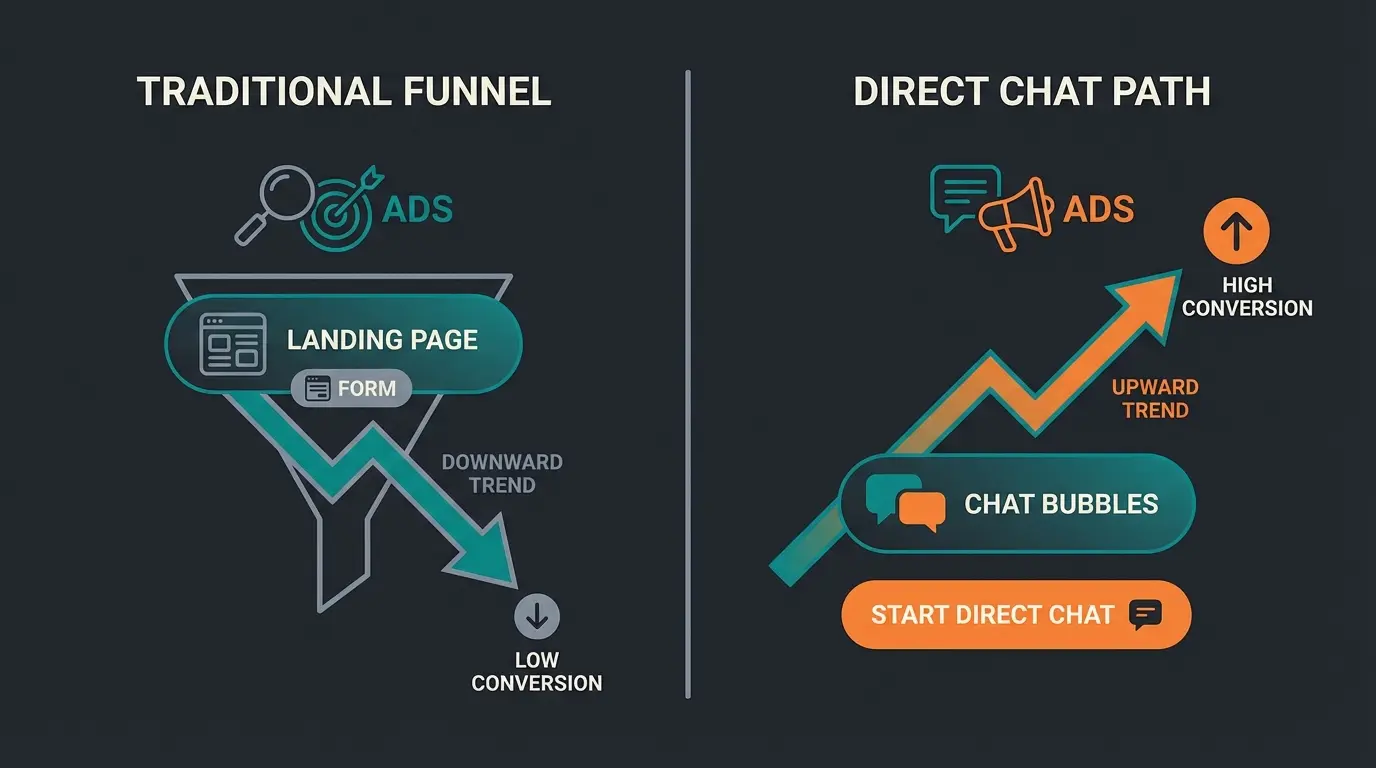
Click-to-WhatsApp campaigns vs. traditional website funnels
The Basics: How to Create a WhatsApp Link Manually
Before we dive into automation, we need to lay the foundation. Creating a click to chat URL WhatsApp link is technically simple, but prone to careless errors that can break the entire experience.
The Golden Formula
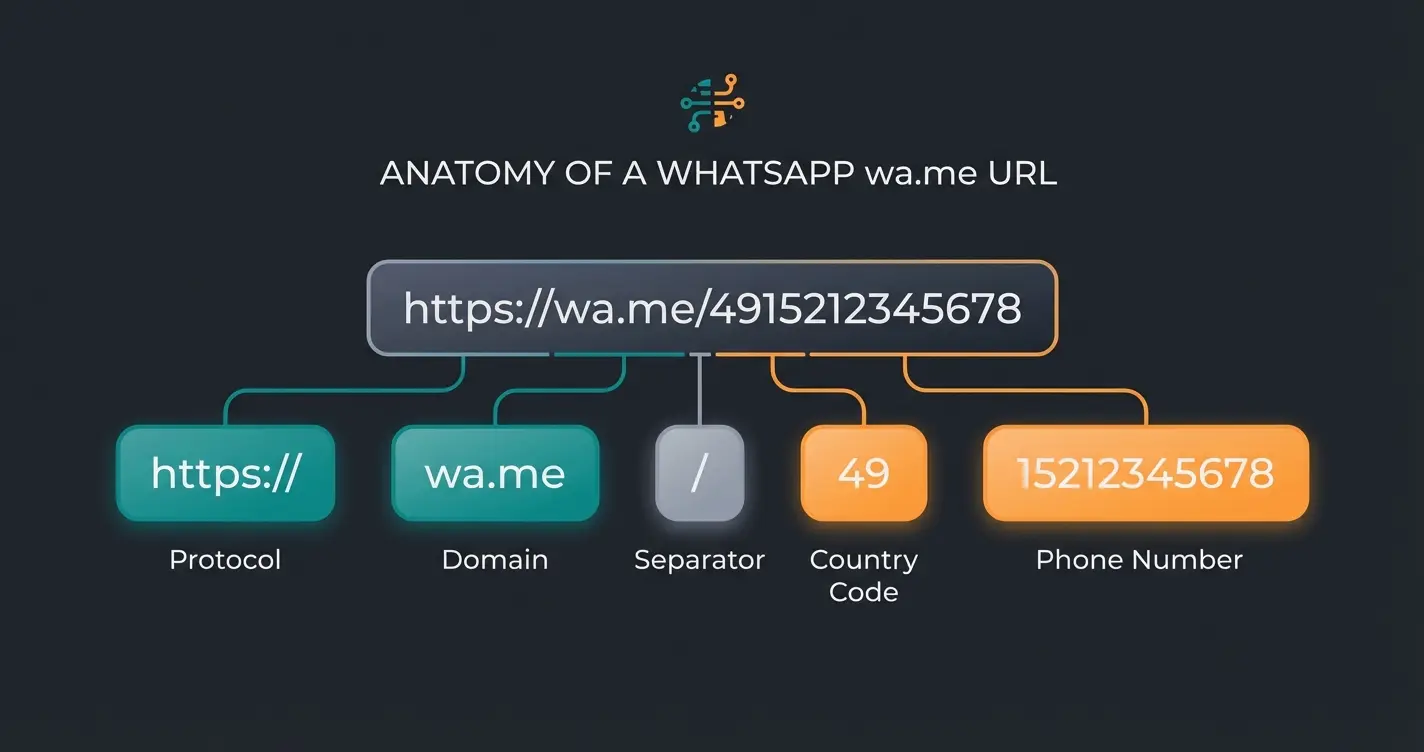
The official and most reliable method from Meta (WhatsApp) uses the short domain `wa.me`. The basic formula is:
`https://wa.me/<InternationalNumber>`
The Most Common Mistake: Number Formatting
In Germany, we're accustomed to writing phone numbers with a leading zero (0171...) or with the plus symbol (+49...). Both of these cause Click to Chat links to malfunction completely.
The rules for a working number:
- Use the international dialing code (for Germany: 49, for US: 1, for UK: 44)
- Remove all `+` symbols
- Remove all leading zeros (including the area code zero)
- Remove all parentheses `()`, hyphens `-`, or spaces
Example: Your number is: `0151 123 456 78`. International format: `+49 151 123 456 78`
| Format | Link (Correct/Wrong) | Result |
|---|---|---|
| Correct | `https://wa.me/4915112345678` | ✅ Chat opens immediately |
| Wrong | `https://wa.me/+4915112345678` | ❌ Error (due to `+`) |
| Wrong | `https://wa.me/015112345678` | ❌ Error (no country code) |
| Wrong | `https://wa.me/49(0)15112345678` | ❌ Error (due to parentheses/zero) |
Advanced: Adding Pre-Filled Messages (The Secret Weapon)
An empty chat is intimidating. The user has clicked, WhatsApp opens, and now the cursor just blinks. What should they write? "Hello"? "Price?" This friction point kills conversions before they even start.
This is where the magic of pre-filled messages comes into play. You can manipulate the link so that a message already appears in the user's text field, which they only need to send. Understanding this technique is essential for any AI strategy for instant sales.
The Technical Implementation
To add text, we extend the URL with the parameter `?text=`. The formula becomes:
`https://wa.me/<Number>?text=<URL-encoded-text>`
URL Encoding: Why Spaces Become %20
Browsers cannot process spaces in the address bar. Therefore, special characters must be "encoded." The most important character is the space, which is replaced by `%20`, as explained by DotDigital and FVDM.
Example: Desired text: "Hello, I need help." Encoded text: `Hello,%20I%20need%20help.`
The complete link: `https://wa.me/4915112345678?text=Hello,%20I%20need%20help.`
Essential URL Codes for Your Links
To make your messages look professional and well-formatted, you should know these codes:
- Space: `%20`
- Line break (Enter): `%0A` (Very important for lists!)
- Question mark (?): `%3F`
- Ampersand (&): `%26`
Example for a structured message: "Hello, I'm interested in Product X."
Link ending: `?text=Hello,%0AI'm%20interested%20in%20Product%20X.`
When you combine these techniques with smart link strategies, you can create highly targeted entry points for different customer segments and product categories.
3 Common Mistakes That Cost Businesses Revenue
Even when the link works technically, many businesses fail in practical implementation. Here are the three biggest pitfalls when using WhatsApp click to chat that destroy conversion rates:
1. The Silent Wall
You link to a number that sits on a physical phone in the office. The customer clicks at 7:00 PM, writes a message—and gets no response until 9:00 AM the next morning.
The result: The customer has long since moved on to your competition. In the age of instant messaging, users expect an instant reaction. This is precisely where an AI chatbot for E-Commerce becomes essential.
The solution: Deploy auto-responders or, better yet, an AI that responds 24/7 with intelligent, contextual answers.
2. Generic Entry Points
Many companies use the same link (`?text=Hello`) for everything: support, sales, complaints, general inquiries.
The problem: Your team (or your bot) doesn't know why the customer is writing. You waste time with the question "How can I help?" instead of selling directly.
The solution: Context-based links (see next section) that immediately signal customer intent.
3. Missing GDPR Compliance
This is a huge topic in Germany, Austria, and Switzerland. Anyone who uses WhatsApp click to chat and handles inquiries through the normal WhatsApp Business App on a phone often unknowingly synchronizes the address book with US servers, as documented by Superchat, Hello Charles, and Sofortdatenschutz.
The risk: Warnings and fines under GDPR regulations.
The solution: Use the WhatsApp Business API through a certified Solution Provider. This is where a proper WhatsApp Business API chatbot becomes invaluable for compliant operations.
Why Click to Chat Needs AI Product Consultation
Here's where the wheat separates from the chaff. Most competitors see the click as the goal. We see the click as the starting signal for an automated sales consultation. This is your unique selling proposition (USP) in the market.
The Concept of Contextual Click-to-Chat
Instead of a general "Contact" button, you create specific links for different products or campaigns. Since your AI can read the pre-filled text, it knows immediately what the conversation is about, enabling true AI product consultation.
Scenario: An Online Shop for Sports Equipment
- Link A (on the running shoes page): `?text=I'm interested in running shoes but unsure about sizing.` AI Response: Immediately starts the "Size Advisor Flow," asks about current shoe size and preferred brand.
- Link B (on the ski equipment page): `?text=I'm looking for a ski set for beginners.` AI Response: Starts the "Winter Sports Advisor," asks about height and skill level.
Comparison: Standard Bot vs. AI Consultant
The difference between traditional automation and intelligent AI Product Consultation is dramatic:
| Feature | Standard FAQ Bot (The Competition) | Your AI Consultant |
|---|---|---|
| Response to Link | "Hello, choose from menu: 1. Support, 2. Sales" | "Hi! I see you're looking for running shoes. Do you run more on road or trail?" |
| Understanding | Only reacts to keywords ("shoe") | Understands context and intent ("beginner looking for set") |
| Goal | Create ticket / Forward to human | Conduct consultation & close sale |
| Availability | 24/7 (but unintelligent) | 24/7 (intelligent & sales-oriented) |
Through this method, the WhatsApp chat start link becomes a powerful funnel entry point. The user doesn't have to explain their problem first—the link has already done it for them. This approach turns standard AI chatbot for E-Commerce capabilities into genuine competitive advantages.
Stop losing leads to silent chats. Deploy AI-powered consultation that responds instantly, understands context, and converts visitors into customers 24/7.
Start Your Free TrialVisualization: The AI Handover Flow
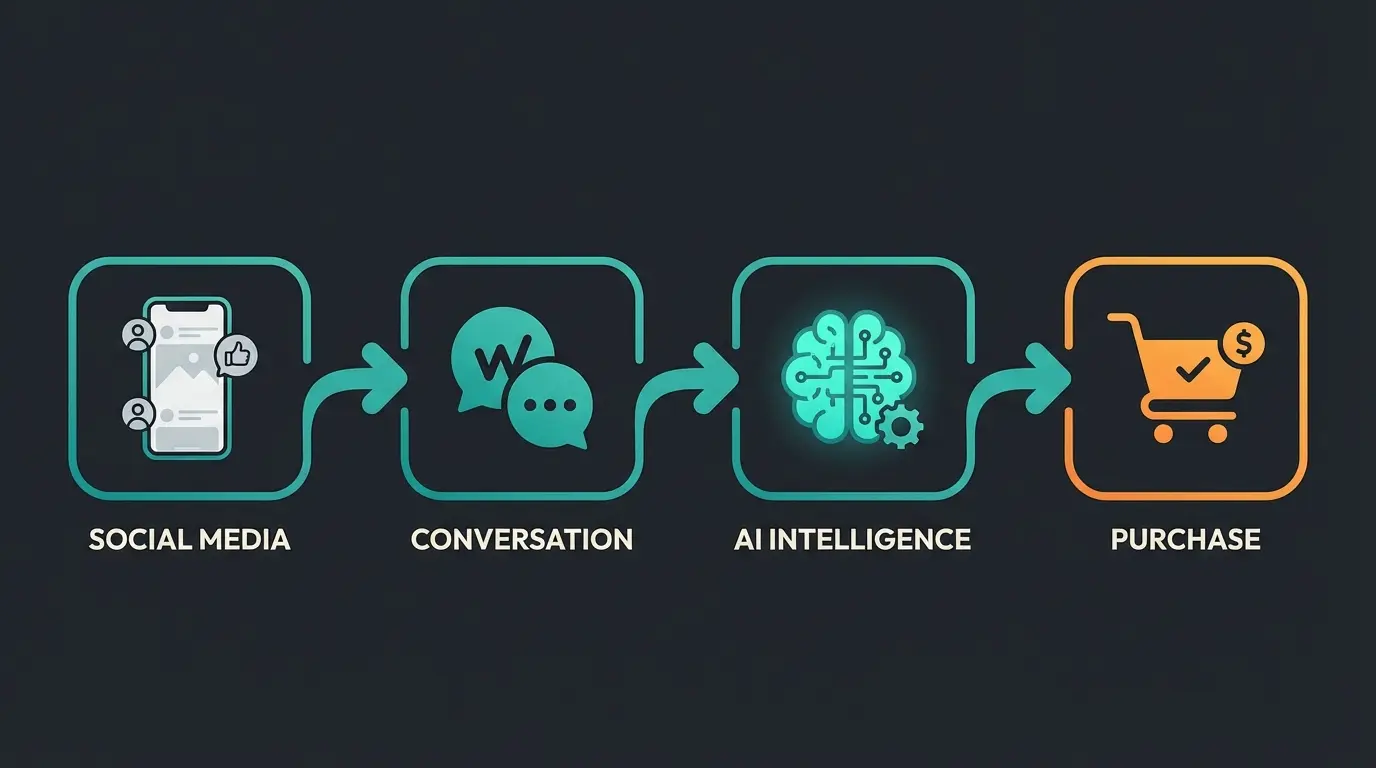
To understand how powerful this integration really is, let's examine the complete customer journey from click to conversion.
Customer sees Instagram story about "Summer Skincare"
Customer swipes up. Link contains `?text=Summer skincare consultation`
Message is pre-typed. Customer presses "Send"
Your AI recognizes the keyword "summer skincare" in the source text
AI responds: "Hey! UV protection is crucial for summer. Do you have dry or combination skin?"
After 3-4 questions, AI suggests the perfect product and sends checkout link directly in chat
This process eliminates the "friction" on websites where customers have to click through filters and categories. The AI product finder capabilities built into modern solutions make this seamless experience possible.
Legal & Trust: Using WhatsApp Links in Germany (GDPR)
If you operate in Germany, Austria, or Switzerland, you cannot avoid the topic of data privacy. The top search results often ignore this because they're internationally oriented, but for European businesses, this is non-negotiable.
The Problem with the Standard App
Using the private WhatsApp app or the normal "WhatsApp Business App" on a smartphone is highly problematic from a data protection perspective for businesses. These apps access the phone's address book and upload contact data (even from non-WhatsApp users) to Meta servers in the USA, according to Superchat, Sofortdatenschutz, and Hellomateo. There is no Data Processing Agreement (DPA) for the apps, according to Superchat.
The Solution: WhatsApp Business API
To scale Click to Chat in a legally compliant way, you need the WhatsApp Business API (Platform), as explained by Heydata:
- No access to contacts: The API has no address book and no access to your phone. It only processes messages that come in.
- Server location: Many German providers (Business Solution Providers) host the interface on German servers.
- Deletion concepts: You can automate GDPR-compliant deletion routines.
Marketing Turbo: Click-to-WhatsApp Ads
A trend that will grow massively in 2025 is the combination of Click to Chat with paid advertising on Facebook and Instagram (Meta Ads), as reported by Superchat, ChatOnDesk, and IntexMedia.
Instead of sending traffic to a landing page (where 90% bounce), "Click-to-WhatsApp Ads" direct the user straight into the chat.
Why This Works So Well
- Lower barrier: A chat feels more non-committal than filling out a form.
- Lead qualification through AI: Instead of an expensive form, your AI qualifies the lead in the chat using AI sales consultation techniques.
- Retargeting: Since you now have the phone number (and a 24-hour window for responses), you can reach the lead much more directly than through email retargeting.
The statistics speak for themselves: Companies often see a 3x higher conversion rate with Click-to-WhatsApp campaigns compared to traditional website funnels, according to IntexMedia. The power of AI expert consultants makes these conversions even more valuable by qualifying leads in real-time.
Standard Link vs. Smart Link Comparison
Understanding the fundamental difference between basic WhatsApp links and AI-enhanced smart links is crucial for maximizing your conversion potential:
| Aspect | Standard Manual Link | Smart Link with AI |
|---|---|---|
| Initial Response | Chat opens, user waits for human response | Chat opens, instant AI reply with context |
| User Experience | Generic greeting, must explain needs | Personalized greeting based on pre-filled text |
| Response Time | Business hours only, minutes to hours | 24/7 availability, milliseconds |
| Product Recognition | None - human must identify needs | Automatic intent detection and product matching |
| Selling Approach | Reactive - answer questions | Proactive - guided selling with recommendations |
| Data Capture | Manual CRM entry | Automatic lead qualification and logging |
| Scalability | Limited by staff availability | Unlimited concurrent conversations |
FAQ: Common Questions About WhatsApp Links
Here we answer the questions that users often type into Google (`WhatsApp chat start link`, `click to chat URL WhatsApp`) to close the content gaps of the competition.
Most online generators do nothing more than format your number into the `wa.me` format. However, it's safer (and more professional) to build the link yourself as described above. This prevents third-party providers from tracking your number or collecting data about your business communications.
Yes! You can place the `wa.me` link in your bio (profile). For Instagram, use the "Link" area in your profile. For TikTok, you often need a Business account to set clickable links in your bio. Pro tip: Use a link shortener (like bit.ly) or a link-in-bio page to hide the long WhatsApp link with pre-filled text.
If the user clicks on desktop and hasn't set up WhatsApp Web, or if the app is missing on their phone, the link redirects to an official WhatsApp landing page that prompts them to download the app. So the user isn't completely lost—they're guided toward installation.
Not directly in WhatsApp, but through workarounds: 1) Pre-filled text: Use different texts for different sources (e.g., `?text=Inquiry%20Instagram` vs. `?text=Inquiry%20Website`). Your AI can read this. 2) Link shorteners: Use tools like Bitly to see how often the link was clicked. 3) UTM parameters: If you route through an intermediate page that then opens WhatsApp, you can use classic Google Analytics UTM parameters.
Create product-specific pre-filled messages that trigger different AI consultation flows. For example: `?text=I need help choosing a winter jacket` for outerwear pages, and `?text=I'm looking for beginner running shoes` for footwear sections. Your AI reads these and immediately starts the relevant consultation path.
Conclusion: The Link Is Just the Beginning
WhatsApp Click to Chat is one of the most powerful tools in modern conversational marketing. It tears down the wall between you and your customers. But beware: When you tear down the wall, you must be ready to receive the visitor properly.
A bare link without strategy leads to overwhelmed support teams and disappointed customers. The combination of a cleanly formatted link, an intelligent entry text, and AI-powered consultation transforms a simple messenger chat into a 24/7 sales channel.
Your Checklist for Getting Started
- Create your `wa.me` link with international dialing code (without `+` and leading `0`)
- Define pre-filled texts (`?text=`) for your most important products and campaigns
- Ensure you're using the WhatsApp Business API (for GDPR compliance)
- Connect the channel with an AI solution that understands the link's context and provides immediate consultation
Start today—your customers are already waiting in the chat. The difference between a link that sits there and one that converts comes down to what happens in those crucial first seconds after the click.
Deploy AI-powered WhatsApp consultation that responds instantly, qualifies leads automatically, and sells 24/7. Join leading e-commerce brands already using intelligent Click to Chat.
Get Started Free
Lasse is CEO and co-founder of Qualimero. After completing his MBA at WHU and scaling a company to seven-figure revenue, he founded Qualimero to build AI-powered digital employees for e-commerce. His focus: helping businesses measurably improve customer interaction through intelligent automation.