Introduction: Why a Simple Link Changes Your Business
In Germany alone, over 60 million people use WhatsApp daily, according to Superchat and Lime Technologies. It's the undisputed number one communication channel. But for businesses, there's a massive barrier: friction.
When a potential customer sees your phone number on a website or flyer, they have to: copy or memorize the number, open their address book, create a new contact, open WhatsApp, search for the contact, and finally type a message. Each of these steps costs you conversions. A whatsapp link generator eliminates all these steps. With a single click on a whatsapp url link, the chat opens directly—even with a predefined message.
But in this article, we go one step further. We'll show you not only how to create a WhatsApp link, but how to transform it into an automated sales machine that complies with German data protection standards and qualifies leads 24/7 through AI integration.
The Tool: Your Free WhatsApp Link Generator
Create your custom link here. Add your phone number and an optional starter message to begin the chat with immediate context. This whatsapp link tool handles all the technical formatting for you automatically.
(Note for developers/webmasters: The interactive frontend module for the generator should be embedded here. It should include the following fields: Country code (dropdown), Phone number (input), Pre-filled message (textarea), Button "Generate Link" & "Create QR Code".)
How to Create a WhatsApp Link (Step-by-Step Guide)
There are two ways to create a whatsapp me link: the automatic way using a tool (see above) or the manual way for technically-minded users who want to understand how the URL is structured. Understanding both methods helps you troubleshoot issues and customize links for specific campaigns.
Option 1: The Automatic Way (Recommended)
Using a whatsapp link tool is the safest way to avoid formatting errors. Here's how it works:
- Select your country code (e.g., +1 for USA, +49 for Germany, +44 for UK)
- Enter your mobile number WITHOUT the leading zero
- Write a message that you want the customer to send
- Click "Generate" to create your instant link
Option 2: The Manual Way (wa.me Syntax)
WhatsApp uses an official API interface called the "Click to Chat" function. If you want to build the link manually, you must follow strict syntax rules as documented on WhatsApp's official FAQ and their developer documentation.
The Basic Formula: `https://wa.me/<number>`
The Rules to Follow:
- International prefix: Always use the international format. For the US it's 1, for Germany it's 49, for the UK it's 44
- No special characters: Leave out the +, parentheses (), hyphens -, or spaces
- No leading zero: The 0 from the area or mobile prefix is omitted
WhatsApp Link Format Examples
| Input (Wrong) | Input (Correct) | Resulting Link |
|---|---|---|
| 0151-1234567 | 491511234567 | https://wa.me/491511234567 |
| +49 151 1234567 | 491511234567 | https://wa.me/491511234567 |
| 00491511234567 | 491511234567 | https://wa.me/491511234567 |
| (555) 123-4567 | 15551234567 | https://wa.me/15551234567 |
Anatomy of a Link with Pre-filled Text
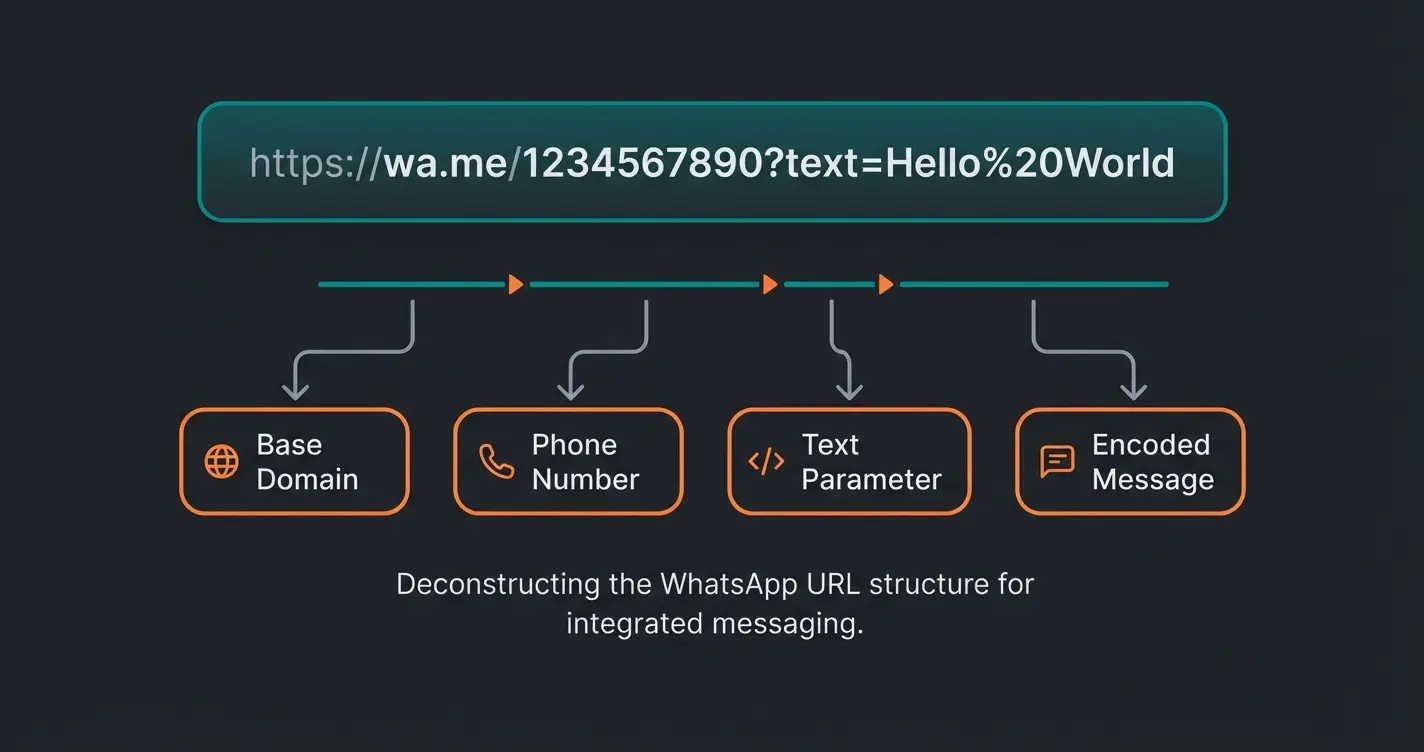
If you want to predefine a message, things get technically more demanding because URLs cannot contain spaces. These must be "URL-encoded" (usually with %20).
Formula: `https://wa.me/15551234567?text=I%20have%20a%20question`
- `https://wa.me/` = The base domain
- `15551234567` = The clean phone number
- `?text=` = The command (parameter) for the text
- `I%20have...` = The encoded text where spaces become %20
Why "Just a Link" Isn't Enough: The AI Consultation Approach
Most businesses make a critical mistake: they create a link, post it on Instagram, and wait. But what happens when the customer clicks? This is where the gap between basic whatsapp link generators and intelligent sales solutions becomes apparent.
The "Speed to Lead" Problem
Imagine a customer clicks on your link on Saturday evening at 9:00 PM. They write: "I'm interested in your premium package." If you don't respond until Monday morning, the lead is often already lost.
The data speaks a clear language: According to Greetnow and Rework, companies that contact leads within 5 minutes have a 21 times higher probability of qualifying that lead than those who respond after 30 minutes. Research from Salesso shows that after just 10 minutes, the probability of qualification drops by four times. Yet according to Verse.ai and GetCensus, the average response time in B2B is often over 42 hours.
Leads contacted within 5 minutes vs. 30+ minutes
After just 10 minutes of wait time
Typical response time that loses most leads
In Germany alone, making it the #1 channel
The Solution: Smart Links with AI Integration
This is where a simple whatsapp link generator differentiates from a real sales solution. Instead of letting the link lead into an empty chat room, you connect it with an AI customer service consultant that responds immediately.
The New Workflow:
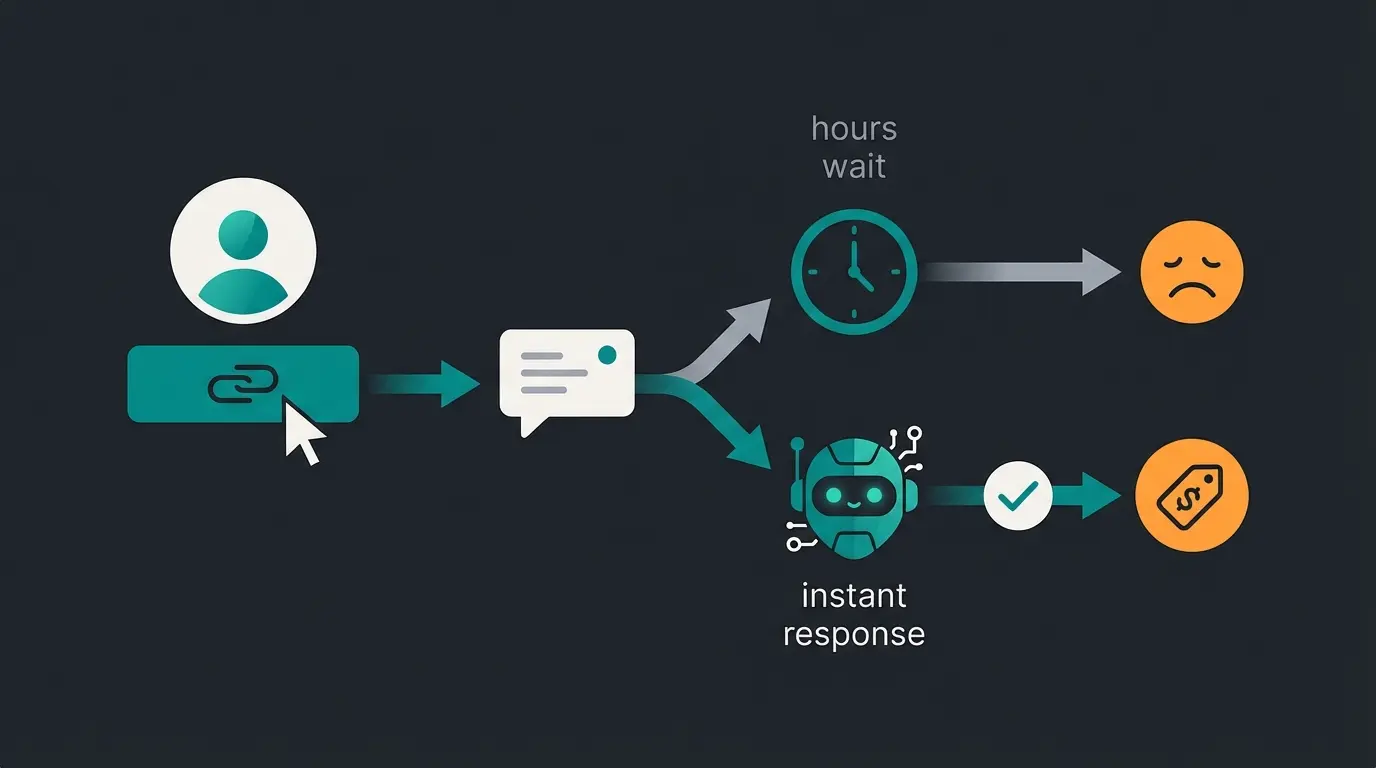
- Click: Customer clicks on the link (e.g., in your Instagram bio)
- Trigger: The predefined message ("I want to know more about Product A") is sent
- Instant Response: Your AI responds within seconds (not hours)
- Qualification: The AI asks follow-up questions ("How many employees are you looking for a solution for?"), qualifies the lead, and only then hands over to a human employee or directly books an appointment
Stop losing leads to slow response times. Connect your WhatsApp link generator with AI-powered instant responses and qualify leads 24/7.
Start Free Trial3 Strategies for High-Converting WhatsApp Links
Use the flexibility of whatsapp url link creation to capture the user's context. A generic link for all channels is wasted potential. Here are three proven strategies that top-performing businesses use to maximize their WhatsApp link conversions.
1. The Product-Specific Link Strategy
Don't direct users from a specific product page to your general number. Create a separate link for each product with customized text. This approach works exceptionally well when combined with WhatsApp Business features that allow for organized conversation management.
- Link for sneaker page: `?text=I%20have%20a%20question%20about%20sneaker%20sizing`
- Link for returns page: `?text=I%20want%20to%20register%20a%20return`
- Link for premium products: `?text=I%20am%20interested%20in%20the%20premium%20package`
Advantage: Your support team (or your AI) knows immediately what it's about, without the customer having to explain the problem first. This drastically reduces the "Time to Resolution" and improves customer satisfaction.
2. The Support vs. Sales Split Strategy
Separate inquiries in advance. Use two different buttons on your contact page to route customers to the right team or WhatsApp AI chatbot:
- Button A ("Sales"): Leads to a link with the text "Consultation requested"
- Button B ("Support"): Leads to a link with the text "Help needed"
This allows you to automatically route inquiries in the backend (e.g., via the WhatsApp Business API chatbot) to the right teams or AI agents, ensuring faster and more relevant responses.
3. The QR Code at Point of Sale (POS) Strategy
Connect the physical with the digital world. A whatsapp link tool often generates QR codes as well. Print these on various touchpoints to create seamless omnichannel experiences:
- Product packaging: "Scan for video instructions"
- Store windows: "Scan to check availability"
- Business cards: "Scan to save contact and start chat"
- In-store displays: "Scan to speak with a product expert"
This strategy is particularly effective for businesses looking to bridge offline and online customer interactions, as highlighted in successful WhatsApp marketing examples across various industries.
User sees your WhatsApp link on website, social media, or QR code and clicks
The context-aware message automatically populates the chat
Traditional approach: customer waits hours for a response, often losing interest
With AI integration: immediate personalized response, qualification, and routing
Qualified lead gets connected to the right solution or books an appointment
German Business Checklist: Is Your WhatsApp Link Legal?
Anyone using WhatsApp commercially in Germany operates within a strict legal framework. Many international tools ignore this. Here's what you need to pay attention to in order to avoid warnings and fines. This section is crucial for businesses targeting the German market, though the principles apply broadly to GDPR-compliant regions.
1. The GDPR Trap (Address Book Sync)
The biggest risk lies not in the link itself, but in the app that opens the link. According to Lime Technologies, Hello Charles, and Chatarmin:
- The Problem: The standard "WhatsApp Business App" accesses the smartphone's address book and uploads all contacts to US servers (Meta). This often happens without the contacts' consent, which constitutes a violation of GDPR.
- The Solution: Use the WhatsApp Business API (Platform) for professional marketing. This does not synchronize address books and enables GDPR-compliant processing through certified partners, as confirmed by Superchat.
Understanding the difference between the app and the API is essential for proper WhatsApp Business setup in regulated markets.
2. The Legal Imprint Requirement (§ 5 DDG)
A WhatsApp Business profile is legally considered a "telemedia service" in Germany. According to Hellomateo, Anwalt.de, and Datenschutzkanzlei, this means you must also provide an easily accessible legal imprint within WhatsApp.
Implementation: Since WhatsApp doesn't have a specific field for legal notices, you must include a clear link labeled "Imprint" or "Legal Notice" in the business description ("Info") that leads directly to your website's legal page.
3. Consent (Opt-In) Requirements
Just because someone writes to you through a link doesn't automatically give you permission to send them advertising, as noted by Brevo:
- First Contact: If the customer initiates the chat through the link ("Pull Principle"), they can expect a response to their specific question.
- Newsletter/Marketing: For further advertising, you need an explicit opt-in (consent), which is ideally requested and documented in the chat itself.
For businesses setting up compliant WhatsApp marketing, having a proper WhatsApp Business Account with documented consent processes is essential.
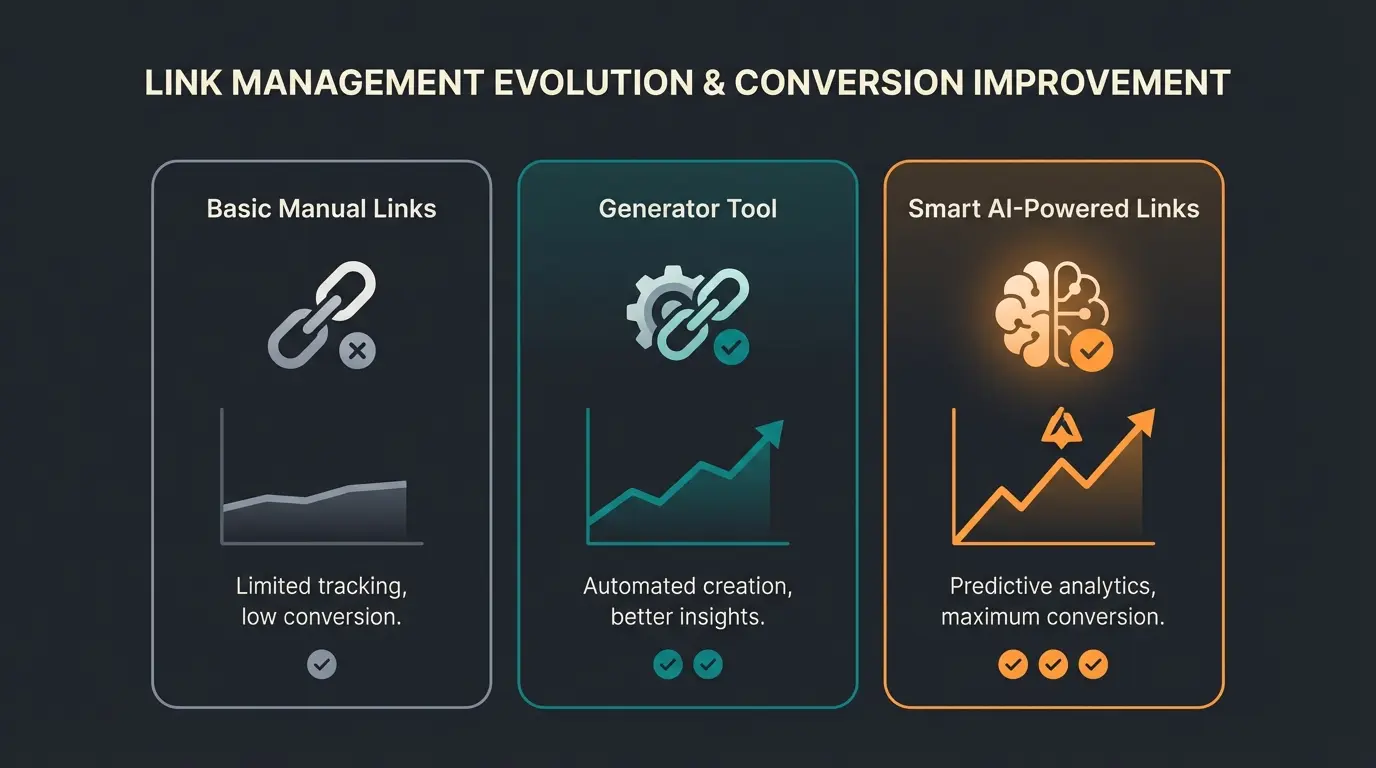
Comparison: Manual vs. Generator vs. Smart Link
Which method is right for your business? This comparison helps you choose the approach that matches your resources and goals. Consider these factors when selecting your whatsapp link generator strategy:
| Feature | Manual (wa.me) | Standard Generator | Smart Link (with AI Solution) |
|---|---|---|---|
| Setup Complexity | Complex (syntax errors possible) | Easy (form-based) | Easy + Strategic |
| Cost | Free | Free | Variable (software costs) |
| Pre-filled Message | Yes (must be encoded manually) | Yes (simple input) | Yes + Context Recognition |
| Response Time | Hours (human) | Hours (human) | Instant (AI agent) |
| Data Protection (EU/DE) | Depends on end device | Depends on end device | High (API-based) |
| Conversion Focus | Low | Medium | High |
| Scalability | Limited | Limited | Unlimited |
| Analytics | None | Basic (via URL shortener) | Comprehensive |
For businesses serious about leveraging WhatsApp for sales, combining a whatsapp link generator with a WhatsApp marketing tool provides the complete solution for modern customer engagement.
Advanced Implementation: AI-Powered WhatsApp Automation
The most successful businesses in 2025 aren't just creating links—they're building intelligent conversation systems. Here's how the complete ecosystem works when you combine your whatsapp link generator with modern AI capabilities.
The Smart Link Architecture
Modern WhatsApp chatbots in 2025 go far beyond simple auto-responders. They understand context, qualify leads, and provide personalized product recommendations. When integrated with your whatsapp me link strategy, they create a seamless experience that feels human while operating at scale.
The key components of an effective smart link system include:
- Context-aware triggers: Links that pass product information, page origin, and user intent to the AI
- Natural language processing: Understanding customer queries in their own words, not just keyword matching
- Integration with your product catalog: Real-time inventory checks, pricing, and availability information
- CRM synchronization: Automatic lead capture and qualification scoring
- Handoff protocols: Seamless transition to human agents when needed
For businesses looking to implement this level of sophistication, AI Chatbots customer service solutions provide the foundation for building these intelligent systems.
Frequently Asked Questions (FAQ)
Instagram allows only one clickable link in the bio (or up to 5 through the native function). According to Taplink and SocialWP, create your link with our generator, go to your Instagram profile -> "Edit Profile," and add the link under "Links" -> "External Link." Pro tip: For professional accounts, use the "WhatsApp Action Button" in the contact options to keep your bio link free for your website.
Yes, absolutely. The wa.me link is universal. It doesn't matter whether the recipient (you) uses the private app, the Business app, or the API. The link simply opens the app on the user's device and searches for your number. This makes it perfect for any business setup.
A pure WhatsApp link offers no tracking. To measure clicks, you should run the generated link through a URL shortener (like bit.ly) or use UTM parameters when using the link in advertisements. Professional WhatsApp marketing tools often offer integrated analytics that track not just clicks but also conversation outcomes.
Yes, creating the link is free. The underlying technology is an open standard from WhatsApp. Costs only arise when you use professional software to manage incoming chats, implement AI automation, or need advanced analytics and CRM integration.
If the user clicks on desktop, they will be prompted to open WhatsApp Web or download the desktop app. On smartphones, they will be directed to the App Store if the app is missing. The link gracefully handles both scenarios without breaking.
Conclusion: The Link Is Just the Beginning
A whatsapp link generator is a powerful tool to break down the barrier between you and your customers. It makes contact as easy as a single click. But in a market where speed determines the purchase, accessibility alone is not enough.
If you generate 50 inquiries through your new link but don't respond for 4 hours, you've disappointed 50 potential customers. The data is clear: those first five minutes are critical, and every minute of delay dramatically reduces your conversion rates.
The success formula for 2025 is:
Start now by creating your first link above, but remember: the click is only the invitation to dance—your response is the music. The businesses that understand this distinction and invest in the complete ecosystem will dominate their markets.
Whether you're just getting started with basic links or ready to implement full AI automation, the key is to begin. Create your first link, test different pre-filled messages, analyze what works, and continuously optimize. The whatsapp url link you create today could become the foundation of your most powerful sales channel tomorrow.
Don't let leads slip away while waiting for a response. Combine your WhatsApp link generator with AI-powered instant engagement and watch your conversions soar.
Get Started Free
Lasse is CEO and co-founder of Qualimero. After completing his MBA at WHU and scaling a company to seven-figure revenue, he founded Qualimero to build AI-powered digital employees for e-commerce. His focus: helping businesses measurably improve customer interaction through intelligent automation.