Introduction: Why "Sending" Is No Longer Enough
If you're asking yourself: "What is a WhatsApp channel?", you're probably looking for new ways to reach your customers where they spend most of their time. The answer seems simple: it's a newsletter feature built directly into the world's most popular messaging app. But this definition only scratches the surface—and it leaves the biggest revenue potential untapped.
We're now in 2026. Email open rates have stagnated, and social media algorithms are drastically cutting organic reach. In this environment, WhatsApp channels have established themselves as a powerful instrument. But most businesses are using them wrong. They treat the channel like a bulletin board: push information out, hope for attention, done.
In this comprehensive guide, we'll not only explain the technical basics (WhatsApp channel explained), but we'll show you the strategy your competition is overlooking. We connect the enormous reach of channels with the intelligent automation of an AI sales consultant. Learn how to transform a one-sided monologue into a revenue-generating dialogue.
What Exactly Is a WhatsApp Channel? (The Basics)
To understand the strategic depth, we first need to clarify the fundamentals of the WhatsApp channel function.
Definition and Location
A WhatsApp channel is a feature that allows administrators to send messages, images, videos, stickers, and polls to an unlimited number of subscribers. It's a classic one-to-many communication tool (one sender to many recipients).
Unlike group chats or broadcast lists, you won't find channels in your normal chat list. They have their own home in the "Updates" tab (formerly "Status"). This is a deliberate design decision by Meta to separate private communication from business or informational updates. As noted by Medium and Kommunicate, this separation helps users manage their messaging experience more effectively.
Core Features (As of 2025/2026)
WhatsApp has massively expanded the features since launch. Here's the current state of the technology:
- Unlimited Reach: Unlike groups (limited) or broadcast lists (requiring users to have saved your number), anyone can follow a channel.
- Anonymity & Privacy: As an administrator, you cannot see the phone numbers of your followers (unless they're already saved as contacts). Conversely, followers don't see your private number, only the channel profile. According to Hindustan Times and official WhatsApp documentation, this significantly lowers the barrier for subscribing.
- Reactions, Not Replies: Followers cannot respond with text. They can only react to posts with emojis or participate in polls. This prevents spam but also eliminates direct dialogue within the channel itself, as Chatarmin explains.
- 30-Day History: New subscribers see the history from the last 30 days. Content is therefore more short-lived than on a website but longer-lasting than an Instagram Story, according to Sinch.
- Directory & Search: Users can find channels through a searchable directory, filtered by country and popularity. This is a massive advantage for organic discovery.
Why Is This Better Than an Email Newsletter?
The decisive factor is attention.
- Email: Open rates of 20-25% are considered good. Emails often land in spam or the "Promotions" folder.
- WhatsApp Channel: The push notification (if enabled) appears on the lock screen of the device users pick up 80 times a day. Even without push, the red dot in the "Updates" tab is a strong psychological trigger.
WhatsApp Channel vs. Group vs. Broadcast (Comparison)
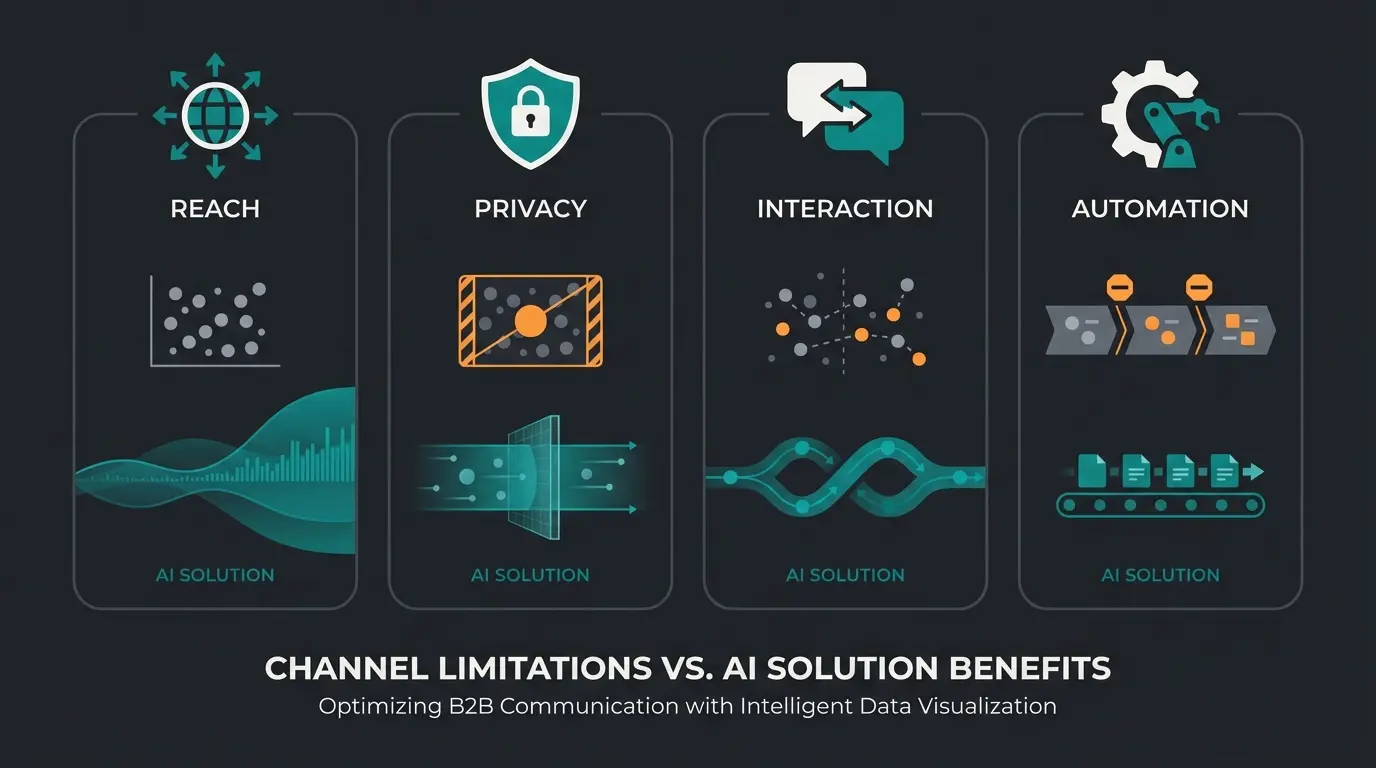
Many businesses confuse the channel WhatsApp function with existing tools. Here's the definitive comparison that shows why channels are necessary for acquisition and AI solutions are essential for conversion. Understanding these differences is crucial for your WhatsApp marketing strategy.
| Feature | WhatsApp Channel | WhatsApp Group | Broadcast List | AI Consultant (Business API) |
|---|---|---|---|---|
| Communication Direction | One to Many (1:n) | Many to Many (n:n) | One to Many (1:n) | One to One (1:1) |
| Reach | Unlimited | Max. 1,024 people | Max. 256 per list | Unlimited |
| Visibility | Public (Searchable) | Private (Invite) | Private | Private (User-triggered) |
| User Privacy | High (Number invisible) | Low (Everyone sees numbers) | High | High (GDPR-compliant via API) |
| Interaction | Emojis/Polls only | Chat (chaos risk) | Reply goes to 1:1 chat | Deep dialogue & consultation |
| Automation | Limited (Posting API) | None | None | Full (AI & Flows) |
| Cost | Free | Free | Free | Paid (per conversation) |
| Goal | Discovery & News | Community & Discussion | Existing customer info | Sales & Support |
The key takeaway from this table: The channel is unbeatable for reach and privacy. But it's weak on interaction and closing sales. The "AI Consultant" column (far right) is the missing puzzle piece that we'll integrate later. As Interakt and Lime Technologies confirm, combining broadcast tools with conversational AI creates the most effective sales funnel.
Tutorial: How to Create a WhatsApp Channel
Before we implement the AI strategy, you need to lay the foundation. Creating a channel is simple, but optimization for conversion is often forgotten. For a complete understanding, you should also explore WhatsApp Business explained.
Step-by-Step Guide (Android & iOS)
- Open WhatsApp: Ideally use the WhatsApp Business App to separate business and private communication, although it also works with the personal app. For detailed setup instructions, check our WhatsApp Business setup guide.
- Go to "Updates": Tap the tab at the bottom (iOS) or top (Android) where you also see status updates.
- Add Channel: Look for the plus symbol (+) next to the "Channels" heading.
- Select "Create Channel": Confirm the notices (your channel is public, you are anonymous as admin).
- Name & Description: Choose your brand name or a clear topic (e.g., "Outdoor Pros" instead of "Müller GmbH"). For your image, use a logo or trustworthy face.
- Finish: Tap "Create Channel."
Use the Business App to separate personal and professional messaging
Find the tab at bottom (iOS) or top (Android) of your screen
Look for the + symbol next to the Channels heading
Confirm public visibility and admin anonymity
Add strategic name, description, and profile image
Pro Tip: The Description as Conversion Lever
Most people write here: "Here we post news." That's a mistake. Use the description to mentally prepare the user for the next step.
- Poor: "Official channel of Müller Shoe Factory."
- Optimized: "Exclusive deals & expert tips for hikers. 👇 Looking for the perfect shoe? Click the link in our posts for your free AI gait analysis."
This way, you frame the channel not as a news feed, but as an entry point to consultation. As ChatWerk emphasizes, the channel description is prime real estate for conversion optimization. Once you've set up your channel, you may want to verify your WhatsApp channel to build additional trust with your audience.
The Strategy Gap: Why Just "News" Isn't Enough
When you analyze the top search results for "what is a WhatsApp channel," you'll find that almost all of them stop at the topic of "sending messages."
The "Dead-End" Problem
Imagine you post an image of a new product in your channel. 5,000 people see it. 200 react with a "heart" emoji. And now what?
- You don't know who the 200 interested parties are (privacy).
- You can't message them ("Hey, want to buy?").
- The user must leave the channel, go to the browser, search for your shop, find the product...
At each of these steps, you lose 50% of interested prospects. The channel is a one-way street. It generates attention, but it doesn't "harvest" it.
The API Reality in 2026
Many sources claim channels have no API. That's no longer entirely correct. There are now ways to automate posts via API (e.g., through cloud APIs from third-party providers like Whapi.Cloud). But: This API only allows sending. It doesn't allow interaction.
The true power lies not in automating the channel, but in connecting the channel to the WhatsApp Business API (WABA). This is where solutions like automated sales consultation become essential for converting channel interest into actual revenue.
The Game Changer: WhatsApp Channels + AI Product Consultant
Here we leave the path of standard guides and enter the field of high-performance strategy.
We use the channel as a "Discovery Layer" and the WhatsApp Business API as a "Conversion Layer." The connecting element is your AI. This approach represents the cutting edge of AI consultation strategies.
The Workflow: From Emoji to Euro
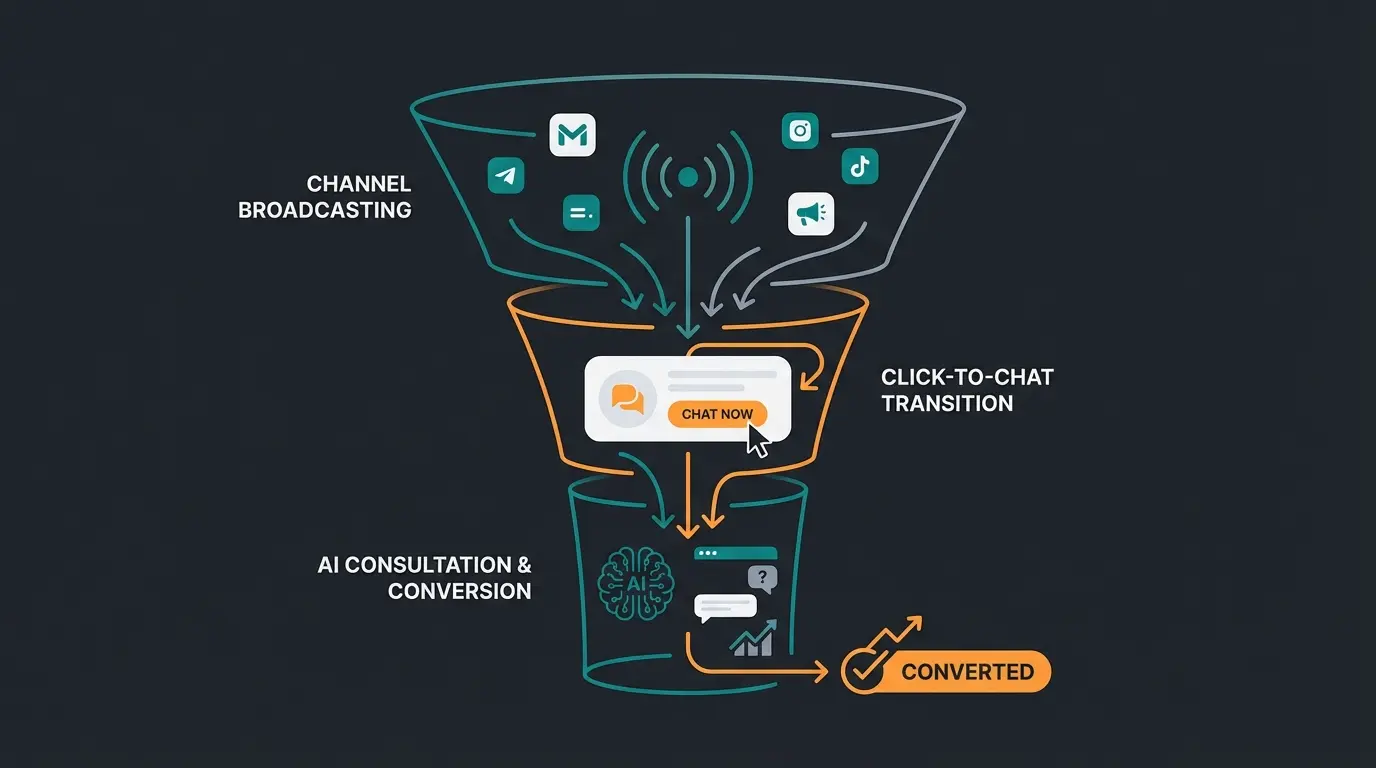
Here's the exact process for bypassing the channel's limitations:
1. The "Hook" in the Channel (One-to-Many)
You don't just post "Buy these shoes" in the channel. You post a problem or a teaser.
- Post: "Did you know that 60% of all runners wear the wrong cushioning? This leads to knee pain. 🏃♂️"
- Call-to-Action (CTA): "Which shoe fits your running style? Take the 30-second check with our virtual advisor: [wa.me link here]"
2. The "Click-to-Chat" (The Transition)
The user clicks the link (wa.me/...). This link immediately opens a private 1:1 chat with your WhatsApp Business Account.
Technical detail: The link contains a pre-formulated message, e.g., `?text=I%20want%20the%20gait%20analysis`.
3. The AI Takes Over (One-to-One)
As soon as the user sends this message, your WhatsApp Business API (not the normal app!) kicks in. An AI agent (based on LLMs like GPT-4o or Claude 3.5, trained on your product data) takes over the conversation. This is where WhatsApp AI product consultation truly shines.
- AI: "Hello! I'm happy to help you find the perfect shoe. Do you run more on asphalt or in the forest?"
- User: "Mostly forest, sometimes muddy."
- AI: "Understood. For muddy forest terrain, you need grip. Do you prefer waterproof shoes (Gore-Tex) or maximum breathability?"
4. The Close
The AI filters your product catalog in real-time and presents one perfect product directly in the chat—including a "Buy" button or link to the shopping cart.
Why This Model Wins
- Qualification: The channel filters general interest. Only those who click have genuine interest.
- Data Ownership: Once the user starts the 1:1 chat, you have (GDPR-compliant) their number and can contact them again later (retargeting within 24-hour service windows or via template messages). EngageLab confirms this data collection approach complies with regulations.
- Instant Gratification: The user doesn't have to search on a website. The AI serves the solution on a silver platter.
- Scalability: Your AI can conduct 1,000 consultations simultaneously while you've only posted once in the channel.
For more real-world applications of this approach, explore our AI consultation examples.
Visualization: The WhatsApp Sales Funnel
To make this concept tangible, imagine a funnel:
Broadcasting, news, edutainment. Metrics: views, emoji reactions. Cost: €0. Content: 'The 3 biggest hiking mistakes.'
The strategic click-to-chat link that transitions users from broadcast to conversation
Consultation, needs analysis, objection handling. Metrics: started conversations, retention. Cost: low API fees
AI-driven product matching based on conversation insights
Checkout, payment. Metrics: conversion rate, revenue. Content: 'Here's your model Alpine Pro. Order now.'
This funnel approach transforms one-sided channel broadcasts into revenue-generating conversations. Consider implementing a WhatsApp newsletter tool to streamline your top-of-funnel content distribution.
Stop broadcasting into the void. Connect your WhatsApp channel with AI-powered product consultation and turn followers into buyers—automatically, 24/7.
Start Your Free AI Consultation DemoBusiness Advantages and Disadvantages
Is a WhatsApp channel sensible for every business? Here's an honest assessment that also considers the costs of the API solution.
Advantages
- Unfiltered Visibility: No algorithm decides whether your fans see the post (unlike Facebook/Instagram). Anyone who subscribed sees the red dot.
- Trust: WhatsApp is a "private space" environment. Advertising feels more personal here.
- Free Reach: Building and operating the channel costs nothing.
- Market Research: Polls in the channel are a brilliant tool for discovering which products you should feed into the AI chat.
Disadvantages & Challenges
- No Organic Virality: A channel post rarely goes "viral" like a TikTok. You must bring your existing audience (newsletter, website, social media) to the channel.
- Manual Maintenance (without tools): Without third-party tools, channel posts often need to be created manually.
- Cost for "Intelligence": While the channel is free, the WhatsApp Business API (for AI chat) costs money. Meta charges per conversation (e.g., marketing or service category). According to Gallabox and Authkey, these costs must be calculated against Customer Lifetime Value (CLV).
- Content Fatigue: If you post irrelevant things too often, users mute or unsubscribe from the channel. The "mute rate" is a critical indicator.
If you're looking to generate revenue from your channel, our guide on how to monetize your WhatsApp channel provides detailed strategies for various business models.
Massive addressable market as of 2025
Average smartphone pickups per user daily
Typical email marketing benchmark
Push notifications reach lock screens instantly
Legal: Are WhatsApp Channels GDPR Compliant?
This is the most important question for the German (DACH) market. For comprehensive guidance on compliance, refer to our GDPR compliant AI consultation guide.
Short answer: Yes, channels are more privacy-friendly than groups, but caution is advised.
Why Channels Are Safer Than Groups
In a WhatsApp group, every participant sees the phone number of every other participant. That's a GDPR nightmare. In a channel, subscriber phone numbers are hidden by default—both from other subscribers and from the admin (you). You only see profile names and possibly pictures, as confirmed by WhatsApp's official privacy documentation.
The Critical Point: Metadata & US Servers
WhatsApp (Meta) processes metadata on US servers.
- Channel Usage: Since you don't see or process personal data (numbers) of followers, the risk is lower.
- The AI Chat (API): Once the user switches to the 1:1 chat, you process personal data (phone number, chat content). For this, you need: a DPA (Data Processing Agreement) with your WhatsApp BSP (Business Solution Provider), a clean privacy policy, and a "double opt-in" or clear consent for chat initiation.
For a complete understanding of WhatsApp for business purposes, including compliance considerations, check out our guide on AI for sales consulting.
Creating Your WhatsApp Business Channel Strategy
Now that you understand the fundamentals, let's discuss how to build a comprehensive channel strategy. Creating a WhatsApp Business Channel requires more than just technical setup—it demands strategic planning.
Content Strategy for Maximum Engagement
Your channel content should follow the 80/20 rule: 80% value-driven content (tips, insights, entertainment) and 20% promotional content with clear CTAs driving users to your AI consultant.
- Educational Posts: Share industry tips, how-to guides, and expert insights that establish your authority
- Behind-the-Scenes Content: Give followers exclusive access to your brand story and team
- Product Teasers: Create curiosity with sneak peeks that lead to AI consultation CTAs
- Interactive Polls: Use the polling feature to understand audience preferences and segment your future messaging
- User-Generated Content: Share customer success stories and testimonials
Posting Frequency Best Practices
Finding the right posting cadence is crucial for maintaining engagement without triggering mutes. According to industry benchmarks:
- Minimum: 2-3 posts per week to stay top-of-mind
- Maximum: 1-2 posts per day (more risks content fatigue)
- Optimal timing: Test different times based on your audience's activity patterns
- Consistency: Establish a regular schedule your followers can anticipate
FAQ: Frequently Asked Questions
No, creating and operating a channel is free for businesses and individuals. Costs only arise when you use the WhatsApp Business API for automated 1:1 responses or mass newsletter marketing templates.
Out of the box, the WhatsApp app doesn't offer a scheduling function. However, through third-party tools and special cloud APIs (like Whapi.Cloud or Evolution API as mentioned on GitHub), it's possible to automatically push RSS feeds or CMS content to the channel.
No, not with text. They can only react with emojis or participate in polls. To receive text responses, you must—as described in our strategy—post a link to a private chat.
The green checkmark (verification) is hard to obtain and usually reserved for major brands or public figures. Meta reviews media presence and notoriety for this. However, the checkmark is not necessary for the AI strategy to function. Learn more in our verification guide.
With a broadcast list, the recipient must have saved your number, otherwise the message won't arrive. With channels, that's not necessary—anyone can subscribe. This makes channels much more scalable for new customers, as RocketPush and VFirst confirm.
Conclusion: The Channel Is the Beginning, AI Is the Goal
To the question "What is a WhatsApp channel?" there are two answers.
The first answer is technical: It's a modern broadcast tool for updates with high reach and good privacy protection.
The second answer is strategic: It's the most cost-effective "top-of-funnel" channel in 2026.
Businesses that use channels only as "Newsletter 2.0" are leaving potential on the table. The real magic happens when you use the channel to spark interest and an AI-powered consultation to convert that interest into revenue.
Start Today:
- Create your channel (takes 5 minutes).
- Write a description that invites dialogue.
- Connect your WhatsApp Business API with an AI solution to process inquiries from the channel around the clock.
Note: This article is based on the technological state of 2025/2026. WhatsApp features evolve quickly. Regularly check official Meta updates.
Your WhatsApp channel is just the beginning. Connect it with Qualimero's AI Product Consultant to automatically convert channel interest into sales conversations—24/7, in any language.
Get Started Free Today
Lasse is CEO and co-founder of Qualimero. After completing his MBA at WHU and scaling a company to seven-figure revenue, he founded Qualimero to build AI-powered digital employees for e-commerce. His focus: helping businesses measurably improve customer interaction through intelligent automation.