Introduction: Why Standard Setup Falls Short in 2025
When you search for 'WhatsApp Business setup,' you likely understand what is WhatsApp Business and have a clear goal: being accessible where your customers already spend their time. In Germany alone, over 60 million people use WhatsApp daily, according to Superchat. The open rates are phenomenal at 98%, as reported by Chatarmin and Exotel. However, simply installing the app is only half the battle in 2025.
Most online guides show you how to upload a profile picture and enter your business hours. That's 'Level 1.' But while you're still configuring 'We are away' messages, your competitors are already moving to 'Level 3': intelligent product consultation powered by AI.
The market is shifting dramatically. Customers no longer just want to know when you're open (support)—they want to know which product fits their needs (sales). According to research from Gallabox, approximately 17% of users want complex product information directly in chat, and nearly 75% are willing to purchase directly through messenger applications.
This article is not your ordinary installation guide. We'll walk you through the technical setup process (so you have a solid foundation), but then we'll show you how to transform the channel from a passive inbox into an active sales assistant. We bridge the gap between 'create account' and 'generate revenue.' Whether you're implementing AI product consultation or building a comprehensive communication strategy, this guide covers everything you need.
Decision Guide: App or API? (The Strategic Crossroads)
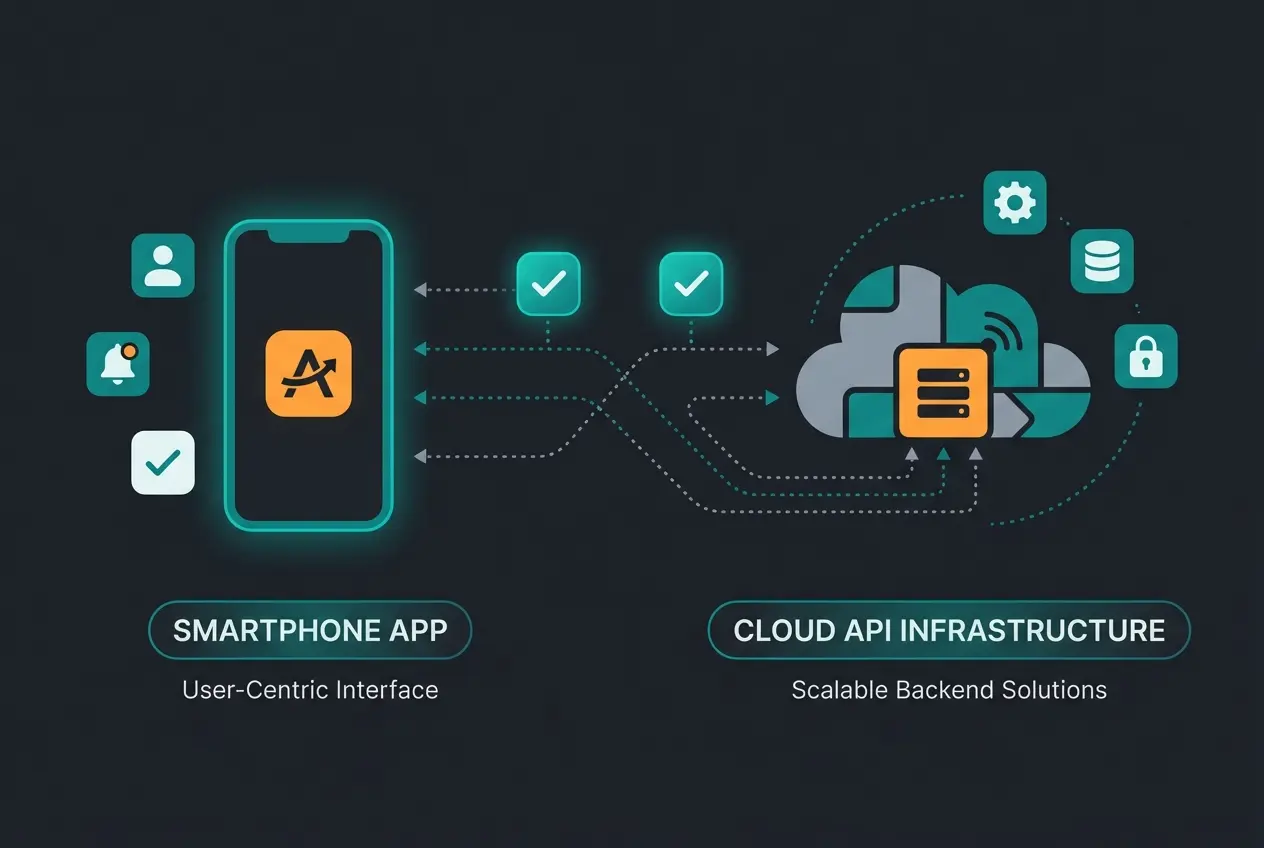
Before you pick up your smartphone, you need to make a fundamental decision. WhatsApp offers two completely different products that are often confused. Choosing the wrong one can cost you expensive migrations later—or even legal warnings.
The WhatsApp Business App (The Entry-Level Solution)
This is the free app you find in the App Store or Play Store. It's designed for small business owners (bakeries, hairdressers, individual consultants).
- Advantage: Free, immediately ready to use
- Disadvantage: GDPR-critical (accesses phone book), no real automation, limited to a few devices (see also WhatsApp Business web for browser access) according to Cuedesk and Bol7
The WhatsApp Business API (The Professional Solution)
This is not an app but an interface that connects to software platforms (like our solution, Userlike, Superchat, etc.). If you're looking to implement Shopware AI chatbots, the API is your foundation.
- Advantage: 100% GDPR-compliant, unlimited users, AI integration possible, newsletter sending without the 256-contact limit as noted by Botcake
- Disadvantage: Paid (software fees + Meta fees)
Comparison Table: What Do You Really Need?
| Feature | WhatsApp Business App | WhatsApp Business API (Platform) |
|---|---|---|
| Target Audience | Sole proprietors & local small businesses | SMEs, E-Commerce, Sales teams |
| Setup | Download from App Store | Through Business Solution Provider (BSP) |
| Costs | Free | Software subscription + conversation costs |
| GDPR / Data Privacy | Critical (accesses all contacts) | Secure (no access to private contacts) |
| Devices / Users | Max. 1 smartphone + 4 linked devices | Unlimited users & devices |
| Automation | Static (away notice, quick replies) | Intelligent (AI agents, chatbots, ERP connection) |
| Newsletter (Broadcast) | Max. 256 recipients (must have saved number) | Unlimited (opt-in required) |
In the following 'Step-by-Step' section, we focus on setting up the App since this matches the most common search intent. In the 'From Chat to Revenue' section, we then show how you (typically through the API) unleash AI power for AI chatbots in customer service.
Step-by-Step: WhatsApp Business App Setup
You've decided to start with the app? Here's the most efficient path to your goal, including a landline trick that many overlook when they want to complete the WhatsApp Business account create process.
Step 1: Download and Preparation
Download the WhatsApp Business App (not the private messenger!) from Google Play Store or Apple App Store.
Step 2: Phone Number Verification (Landline Trick)
This is the most critical step when you sign up for WhatsApp Business. Many businesses don't know they can use their landline number to appear more professional and free up their personal mobile phone.
How to verify a landline number according to HelloMateo, Hypersender, and Trengo:
- Select your country in the setup dialog (+1 for US, +44 for UK, +49 for Germany)
- Enter your landline number without the leading '0' of the area code
- WhatsApp will try to send an SMS. This will fail. Wait for the timer (usually 60 seconds)
- Now select the option 'Call Me'
- Your landline phone will ring. A computer voice will dictate a 6-digit code
- Enter this code in the app. Done!
Step 3: The Business Profile (Your Digital Storefront)
An empty profile creates no trust. Fill in the following data carefully, as this information can later be read by AI systems if you upgrade your WhatsApp Business setup:
- Profile Picture: Use your logo, not personal photos
- Category: Choose the most appropriate industry (e.g., 'Clothing Store' or 'Financial Services')
- Description: A brief pitch. Who are you and what do you offer?
- Business Hours: Essential for managing customer expectations
- Address & Email: Creates legal security and trust
Step 4: Welcome and Away Messages
In the app under Business Tools you'll find these basic functions.
Welcome Message: Sent when a customer writes to you for the first time (or after 14 days of inactivity).
- Bad: 'Hello.'
- Better: 'Hello! Welcome to [Company Name]. How can we help you?'
- Pro Tip (Preparation for Sales): 'Hello! Are you looking for support or product consultation?'
Away Message: Automatic response outside business hours.
GDPR-Compliant WhatsApp Use (The Most Critical Step)
Before we get to the exciting part (revenue & AI), we need to address the 'elephant in the room': The General Data Protection Regulation (GDPR). This is the biggest hurdle for business WhatsApp use, especially in the EU.
The Problem: Contact Synchronization
The standard WhatsApp Business App requires access to your phone book. It uploads all contacts to Meta's US servers—including those of people who don't even use WhatsApp. Without the consent of these individuals, this violates GDPR according to E-Recht24 and Sofortdatenschutz.
The Solutions
Use a dedicated business phone where only business contacts who use WhatsApp or have consented are stored. No private contacts.
Use MDM software that strictly separates business and private contacts on the phone.
When using the WhatsApp Business API through a provider, there is no synchronization with the phone's contact book. Data resides on GDPR-compliant provider servers.
According to HelloMateo and Hello-Charles, the API solution is the safest path for businesses concerned about data privacy compliance.
From Chat to Revenue: Optimizing Your Account for Sales
Here's where the wheat separates from the chaff. Most businesses set up WhatsApp and then passively wait for questions like 'Where's my package?' That's pure cost generation (support). We want to use WhatsApp as a profit center (sales). To do this, we need to transform the channel from a 'dumb inbox' into an 'intelligent consultant.'
The Problem with Standard Automation
Classic chatbots ('Press 1 for business hours') frustrate customers. They're rigid and understand no context. When a customer asks: 'I'm looking for running shoes for wide feet that are waterproof,' simple bots fail completely. This is where AI chatbot solutions for E-Commerce make all the difference.
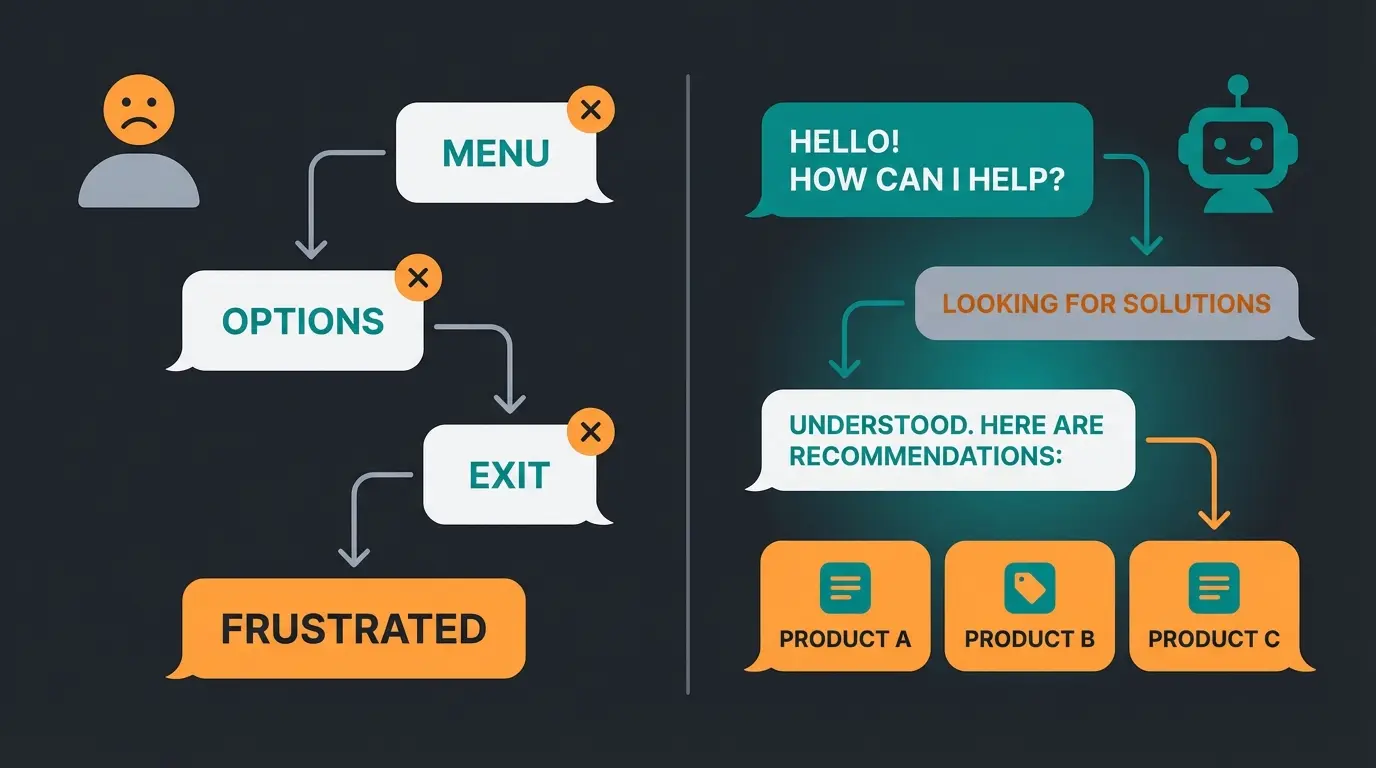
The Solution: AI Product Consultation
Imagine your WhatsApp channel functioning like the best salesperson in your retail store. They know the catalog, understand nuances, and can make recommendations. This is the power of Conversational AI applied to messaging.
1. The Catalog as Data Foundation
For an AI (or even a human) to provide good advice, the WhatsApp catalog (or the feed connected to the API) must be optimized. According to Yellow.ai and Cartcoders, proper catalog structure is essential:
- Images: Use high-resolution images. AI models can now 'see' images and recognize details
- Descriptions: Don't just write 'Blue T-shirt.' Write: 'Breathable running shirt made of polyester, ideal for marathons, slim fit.' These attributes help the AI match products to specific queries ('Looking for something for jogging')
- Metadata: Maintain GTINs and MPNs so the AI can uniquely identify products
2. The Consultation Welcome Message
Change your welcome message. Instead of waiting passively, invite consultation:
- Old: 'Thanks for your message. We'll get back to you.'
- New (Sales Focus): 'Hello! I'm the virtual assistant from [Brand]. Are you looking for something specific or do you need inspiration? Tell me what you need the product for!'
3. Create Proactive Entry Points
Nobody will message you if they don't know you're there. Consider implementing AI consulting in e-commerce touchpoints:
- QR Codes on Products: 'Not sure how to use this? Scan for instant video consultation on WhatsApp.'
- Website Widget: Instead of an email form ('We'll respond in 24h'), use a WhatsApp button with the text: 'Start Product Consultation Now.'
Stop treating WhatsApp as just another support inbox. See how AI-powered product consultation can turn every customer conversation into a revenue opportunity.
Request Your Free DemoThe WhatsApp Maturity Model: From Basic to Intelligent
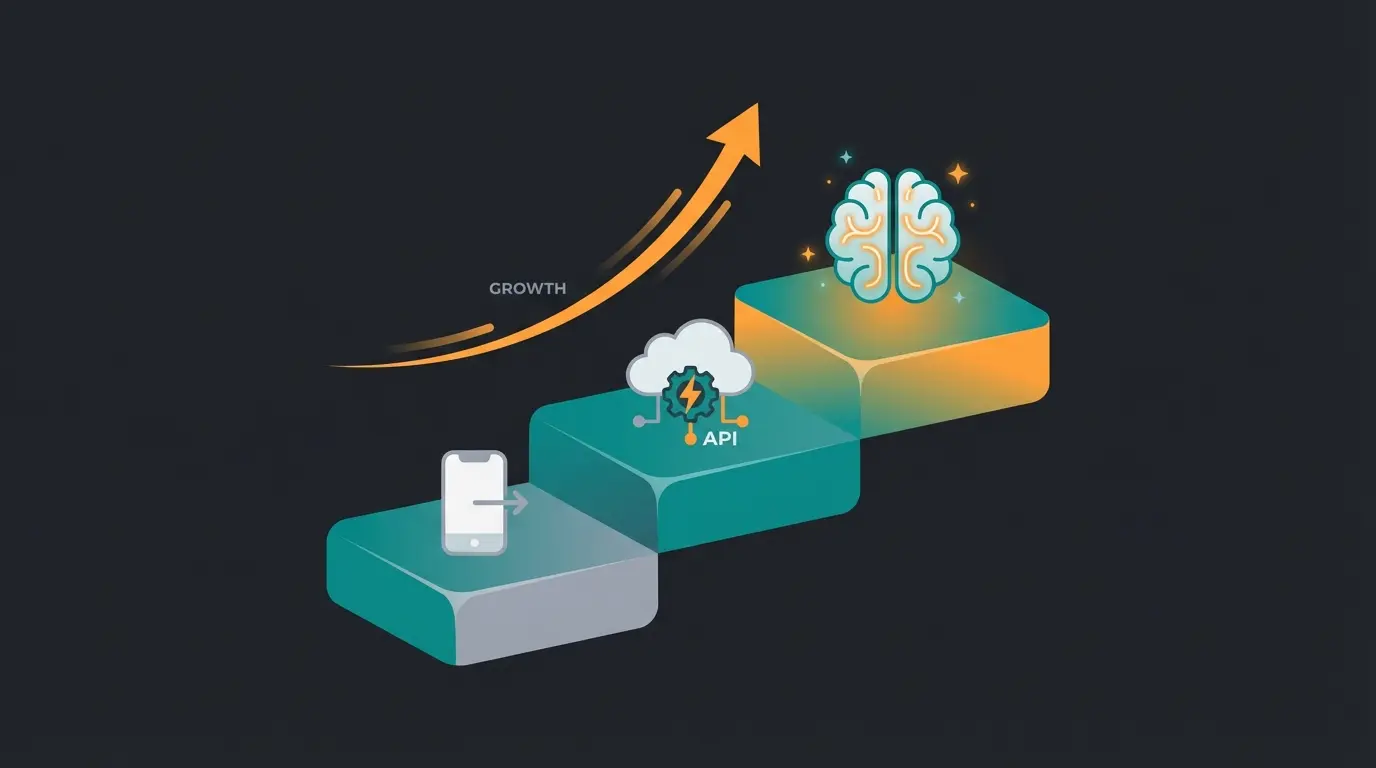
To understand where your business currently stands and where it could be, consider this maturity model that differentiates basic setup from advanced AI-powered consultation capabilities.
WhatsApp Business App on a phone. Manual responses, business hours display. Problem: Doesn't scale, employees unavailable evenings, customers wait.
API with simple software. Button menus ('Press 1 for shipping status'), FAQ templates. Problem: Feels like a hotline queue. Customers abandon if their issue doesn't fit a button.
API with AI integration & product data feed. Free-text understanding. Customer: 'Do you have something suitable for a summer wedding, not too expensive?' AI: 'For a summer wedding, I recommend light fabrics like linen or viscose. Here are three dresses under $100 that would be perfect...'
The goal is to reach Level 3 where customers feel advised, not managed. The conversion rate increases dramatically. This is where you can automate Shopware support while maintaining personalized service quality.
Static Bot vs. AI Consultant: Visual Comparison
The difference between standard automation and intelligent consultation becomes crystal clear when you compare actual conversation flows:
| Scenario | Static Bot Response | AI Consultant Response |
|---|---|---|
| Customer asks: 'Which shoes for hiking?' | 'Here is our shoe category link.' (Dead end) | 'Do you need waterproof or breathable?' → 'Waterproof' → 'I recommend the MountainX Pro based on your needs.' |
| Customer asks: 'Something for a summer wedding' | 'Please select: 1) Dresses 2) Suits 3) Accessories' | 'For a summer wedding, I recommend light fabrics. What's your budget range and preferred style?' |
| Customer asks: 'What fits wide feet?' | 'Our sizing guide: [link]' | 'For wider feet, I suggest models from our Comfort line. The CloudWalk series runs particularly wide. What's your typical size?' |
This intelligent approach is exactly what AI eliminates waiting times in modern customer service—proactive, contextual, and conversion-focused.
AI-Readiness Checklist for Your WhatsApp Channel
Want to automate your channel and prepare it for AI agents? Check these points. If you can tick these boxes, you're miles ahead of most competitors. This preparation is essential whether you're using Shopware Flow Builder or advanced AI solutions.
- ☐ Catalog Structure: Are products logically categorized? Do you have attributes like size, color, material in the text?
- ☐ Policy Data: Do you have return policies and shipping costs available as text? (The AI needs this info to autonomously answer questions like 'Can I return this?')
- ☐ Tone of Voice: Have you defined how your company speaks? (Casual/informal or Professional/formal). A good AI can be trained on this.
- ☐ Escalation Path: Is it clear when the AI should hand off to a human? (e.g., for complaints)
2025 Cost Update: What You Need to Know
WhatsApp's pricing structure is changing massively right now. This is crucial for your budget planning.
1. Service Conversations Are Now Free
Since November 1, 2024, all 'Service Conversations' (conversations initiated by the customer to get help) are free according to iSlash, WCAPI, and Facebook.
2. New Model Starting April/July 2025
Starting April 2025 (for some markets/partners from July), Meta is switching to a 'Per-Message' pricing model for templates according to 8x8.
Now free when customer-initiated (since Nov 2024)
New pricing model starting April/July 2025
Customers willing to buy via messenger
WhatsApp message open rates vs email
Strategy Implication: This makes 'spray and pray' marketing more expensive and precise, AI-driven targeting more important. Use the free service windows to advise customers so well that you need fewer paid re-engagement messages. This is where AI-driven consultation tracking becomes invaluable.
Complete Feature Comparison: App vs API vs AI-Enhanced
While most guides only compare App vs API, the real differentiation comes with a third column—AI-enhanced API solutions:
| Capability | WhatsApp App | Standard API | AI-Enhanced API |
|---|---|---|---|
| Setup Time | 10 minutes | 1-2 days | 1-2 days + training |
| GDPR Compliance | Critical risk | Compliant | Compliant |
| Monthly Cost | Free | $50-200+/month | $100-400+/month |
| Ability to Consult | None (manual only) | Limited (templates) | Full contextual advice |
| Ability to Upsell | None | Basic sequences | Intelligent recommendations |
| 24/7 Availability | No | Partial (templates) | Yes (AI handles) |
| Learning Capability | None | None | Improves over time |
Success stories demonstrate the power of AI-enhanced solutions. See how businesses have scaled with AI employee solutions to handle increased customer demand without proportionally increasing staff.
Implementation Timeline: Your Path to AI Consultation
Understanding the journey from basic setup to intelligent consultation helps set realistic expectations:
Set up WhatsApp Business (App or API), verify number, complete business profile, configure basic welcome messages.
Structure product catalog with detailed descriptions, compile policy documents, define tone of voice and escalation rules.
Connect product feed to AI system, train AI on your specific inventory and policies, test conversation flows.
Monitor conversations, refine AI responses based on customer interactions, expand capabilities based on common queries.
The AI employee Flora case study demonstrates how proper implementation transforms customer interactions from transactional to consultative.
Conclusion: Your Next Steps
Setting up WhatsApp Business is technically not rocket science—in 10 minutes, the app is on your phone. But the real challenge lies not in installation, but in activation as a sales channel.
While most businesses only see WhatsApp as another inbox for complaints, you now have the plan to use it as an active sales space. The 2025 pricing changes (free service chats) play right into your hands: extensive consultation no longer costs you Meta fees.
The evolution from basic messaging to consultative AI implementation represents one of the biggest opportunities in customer communication today.
Your Action Plan
- Start: Download the app for initial tests or contact a BSP for the API
- Secure: Clarify the GDPR topic (no access to private contacts!)
- Optimize: Revamp your catalog. Make it 'readable' for humans and machines
- Automate: Don't settle for dumb chatbots—implement intelligent AI consultation
FAQ: Common Setup Questions
The App is free. The API incurs costs through the software provider and usage-based fees from Meta (though service conversations have been free since November 2024).
Yes, absolutely. When verifying, select 'Call Me' to receive the code via voice announcement on your landline phone.
You can transfer your number, but your chat histories from the app are typically lost since you're technically moving to a different platform. Plan the switch early.
With modern solutions (like ours), no. You connect your product catalog (e.g., from Shopify or Excel), define the AI's 'personality,' and the system handles the rest.
Through 'grounding.' The AI is strictly instructed to only use information from your uploaded catalog and guidelines. If it doesn't know something, it hands off to a human employee.
Don't just set up a dumb inbox. Set up a smart sales consultant that works 24/7, never takes breaks, and converts conversations into customers.
Start Your Free Trial Now
Lasse is CEO and co-founder of Qualimero. After completing his MBA at WHU and scaling a company to seven-figure revenue, he founded Qualimero to build AI-powered digital employees for e-commerce. His focus: helping businesses measurably improve customer interaction through intelligent automation.