Why Your Magento Shop Design No Longer Works in 2026
When you think about Magento webdesign, what comes to mind first? Probably colors, fonts, the logo in the top left corner, and a large hero image. But in 2026, that's no longer enough. The e-commerce landscape has changed dramatically. While the average e-commerce conversion rate continues to stagnate at a disappointing 1.5% to 2.5% according to Oberlo and Popupsmart, it's no longer sufficient to simply present products beautifully.
The traditional model of online shopping—searching, filtering, scrolling—has reached its limits. Customers suffer from "Analysis Paralysis," the inability to choose from an overwhelming number of options. The static shop as we know it is dying. If you're comparing platforms, our comprehensive Shopware vs Magento analysis provides valuable insights into each platform's strengths.
The future of Magento webdesign lies not in presenting but in consulting. It's about transitioning from a passive catalog to active Digital Consultation. In this comprehensive guide, you'll learn how to transform your Magento frontend from a mere display window into an intelligent sales consultant that uses AI-powered dialogues to maximize customer engagement and revenue. We'll explore the technical foundations of modern Magento layouts, the revolution brought by Hyvä, and the mandatory legal adjustments for the German market starting in 2025.
The Foundation: Modern Layouts and Technical Basics
Before we dive into futuristic AI interfaces, we need to understand the foundation. You don't build a house on sand, and a high-converting shop doesn't emerge from outdated code. Understanding the architecture behind Magento shop design is essential for any serious optimization effort.
Understanding Magento Layout: XML, Blocks, and Containers
For shop owners and designers, understanding the architecture behind Magento gestaltung is essential. Magento 2 strictly separates logic (PHP), structure (XML), and presentation (PHTML/CSS). This separation of concerns enables precise control over every aspect of your storefront.
- Layout XML: This is the blueprint of your page. XML files define which element appears where on the page. According to StackExchange, mastering XML layouts is fundamental to Magento customization.
- Containers: Think of containers as the frame structure (e.g., header, footer, main content). They have no content of their own but hold blocks together and give them structure (often as `div` in HTML). As explained by Webkul, containers provide the structural foundation.
- Blocks: This is where the content lives. A block is a functional element, like the cart button, product list, or a banner. Blocks use PHTML templates to generate HTML. BSSCommerce provides excellent documentation on block implementation.
The Theme Revolution: Hyvä vs. Luma vs. Headless
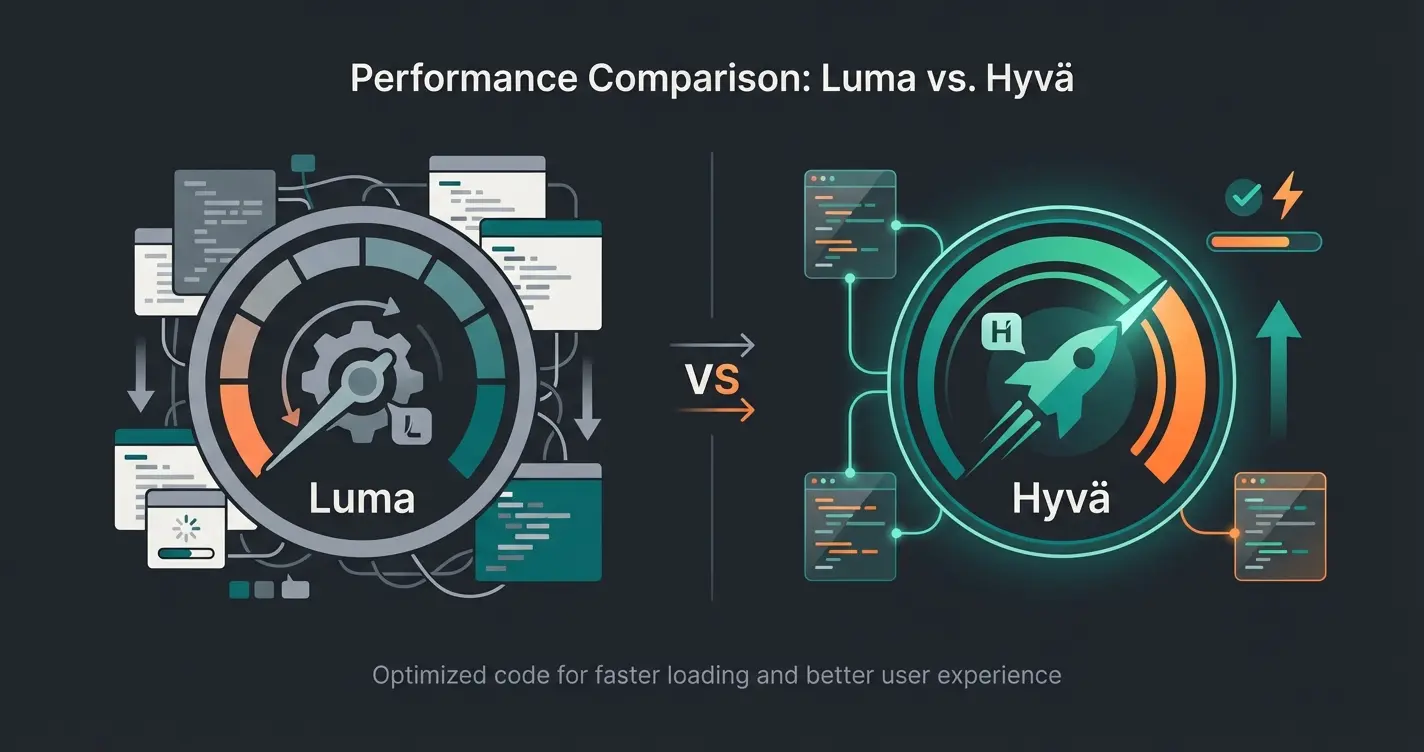
The most important decision in 2026 is choosing the frontend stack. For years, the "Luma" theme was the standard. Today, it's a bottleneck that holds back your Magento shop design performance.
The Problem with Luma
Luma is based on outdated technologies like RequireJS, KnockoutJS, and jQuery. These libraries load hundreds of JavaScript files before the user can even interact. The result: Poor Core Web Vitals (CWV), especially for Interaction to Next Paint (INP) and Largest Contentful Paint (LCP). According to Hyvä.io, these performance issues significantly impact conversion rates. Research from Aureate Labs confirms the technical limitations of the legacy stack.
The Solution: Hyvä Theme
Hyvä has revolutionized Magento shop design by completely rewriting the entire frontend code. It uses only two lightweight frameworks: Alpine.js (for interactivity) and Tailwind CSS (for styling). The performance gains are remarkable—Hyvä shops often achieve 90-100 points in Google PageSpeed Insights Score, both mobile and desktop. According to Elightwalk and WebMeridian, this dramatically reduces complexity, cutting development times and costs. DesignRush lists Hyvä among the top Magento performance solutions.
Headless and PWA (Progressive Web Apps)
For very complex, app-like experiences, a headless approach (e.g., with PWA Studio or Vue Storefront) is an option. In this case, the frontend is completely decoupled from the Magento backend. The advantage is maximum design flexibility. The disadvantage is high complexity and costs. As BSSCommerce and MageTop note, for 90% of merchants, Hyvä is the more efficient solution since it delivers performance without the complexity of a separate React/Vue app. For deeper insights into AI-enhanced design capabilities, explore our Magento AI design guide.
Mobile-First Is No Longer Just a Buzzword
According to SimilarWeb, in Germany, over 67% of traffic is expected to come from mobile devices in 2025. A Magento webdesign that starts on desktop and then "scales down" ignores the majority of your customers.
Hyvä-based shops consistently achieve top Google PageSpeed scores
Expected mobile traffic share in German e-commerce by 2025
Potential conversion rate increase with guided selling interfaces
Interaction to Next Paint threshold for optimal user experience
The Missing Link: Designing for Product Consultation
Here lies your greatest opportunity for differentiation in Magento gestaltung. Most agencies sell you a "redesign" that only changes colors and fonts. But a prettier filter is still just a filter. To truly transform your customer experience, you need to think beyond traditional e-commerce patterns.
The Problem: The Filter Hell
Imagine walking into a wine shop. The salesperson says nothing but hands you a list of 500 wines and says: "Filter by grape variety, vintage, and acidity." That's the reality in most Magento shops. Customers often don't know what they technically need (e.g., "Intel i7 processor"), but rather what they want to do (e.g., "edit videos"). This fundamental disconnect is why AI product consultation has become essential for modern e-commerce.
How AI Changes Webdesign: From Search and Filter to Ask and Answer
Magento webdesign in 2026 must create space for dialogue. AI tools and "Product Finder" extensions enable Guided Selling that simulates in-store consultation. According to Aiden.cx, these solutions can dramatically improve the customer journey.
UI Patterns for AI Integration
How do you visually integrate an AI consultant without it looking like an annoying chatbot from the 2000s? Understanding modern AI-powered product consultation approaches is crucial.
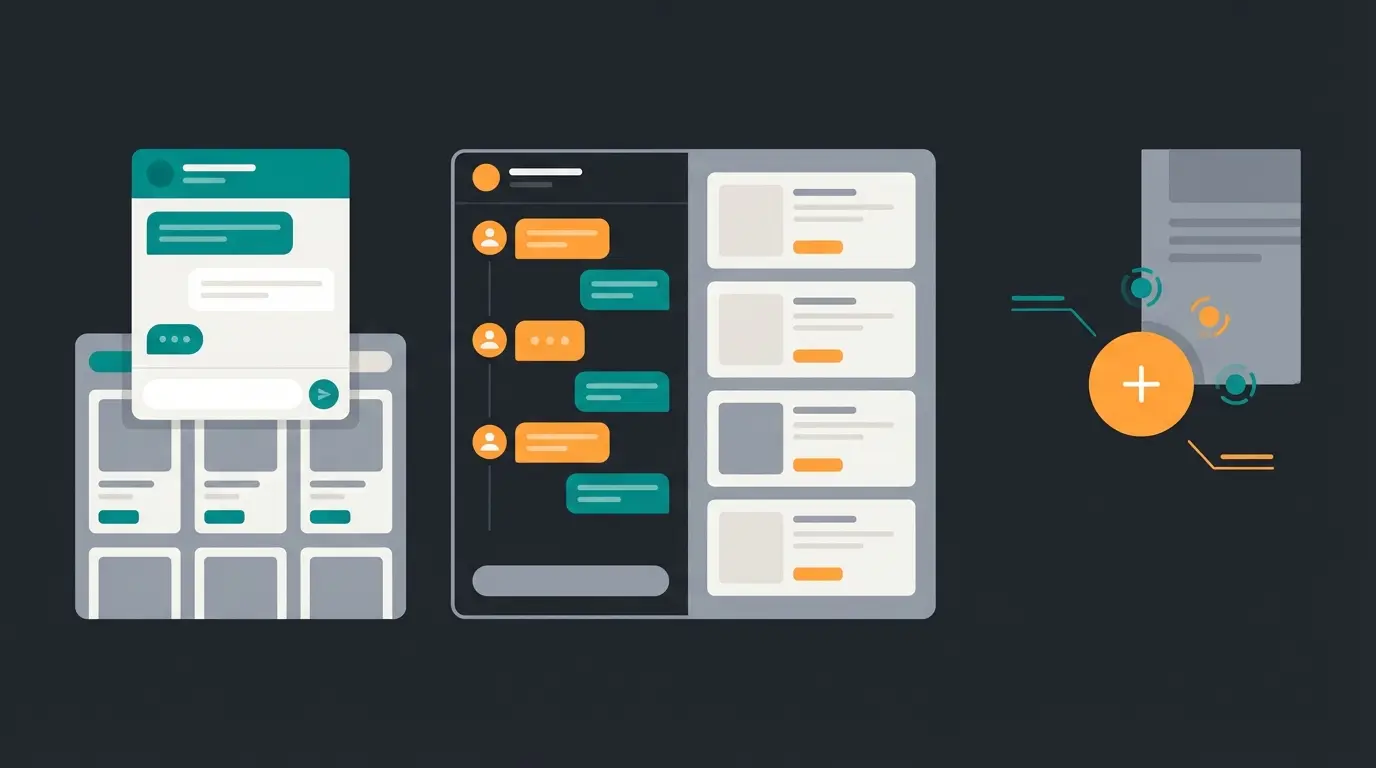
The Embedded Consultant: Instead of a sidebar with filters, dedicate the most prominent space on the category page (above the products) to a question: "What do you want to use this product for?" Use large, clickable tiles with icons instead of small checkboxes. The advantage is that the user is immediately picked up and guided.
The Split-Screen Advisor: On desktop, you can split the screen. On the left, the AI conversation ("I'm looking for a gift for my wife, she likes red wine"), on the right, the product list updates in real-time based on the conversation. This dynamic layout is based on AJAX reloads (Hyvä is ideal for this due to Alpine.js).
The Floating Action Button (FAB) 2.0: A static chat button at the bottom right is often ignored. Modern Magento shop design uses context-sensitive triggers. Example: When a user spends 30 seconds on a product detail page scrolling up and down (a signal of uncertainty), a gentle overlay appears: "Not sure if the size fits? Let's measure together." For implementation guidance, consult our digital consultant guide.
Guided Selling vs. Classic Filters: A Direct Comparison
| Feature | Classic Magento Layered Navigation | AI-Driven Guided Selling Design |
|---|---|---|
| User Action | Must select technical attributes (e.g., "Lumens") | Answers usage questions (e.g., "How bright should it be?") |
| Mobile UX | Long lists, small checkboxes, lots of scrolling | Large touch targets, swipe gestures, quiz format |
| Psychology | Requires technical knowledge, creates stress (Choice Overload) | Builds trust, feels like service |
| Conversion Rate | Average (users often abandon) | High (up to 2.5x higher conversion rate) |
| Personalization | Limited to pre-defined filter combinations | Dynamic recommendations based on conversation context |
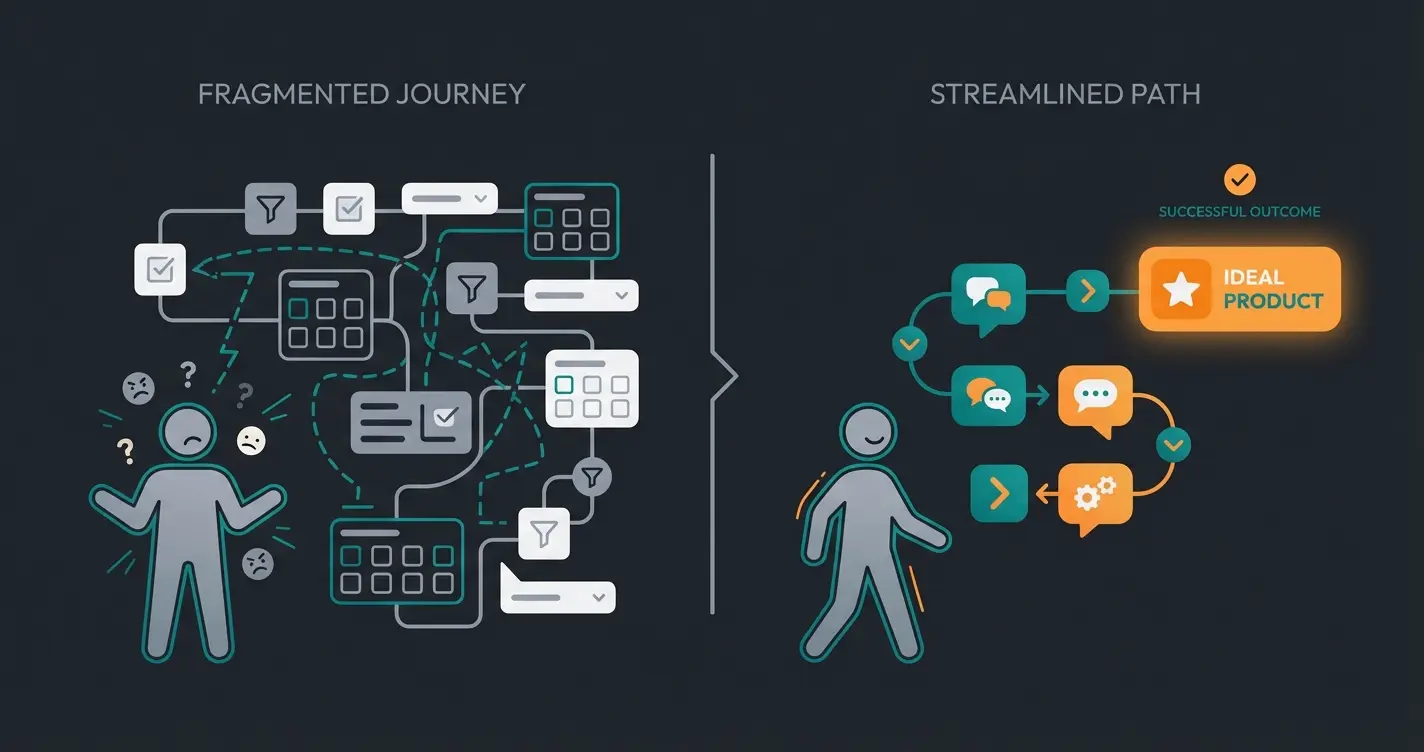
Homepage → Menu → Subcategory → Filter (Color) → Filter (Size) → Scroll → Click Product → Back → Click Product → Eventually Purchase or Abandon
Homepage → AI Prompt 'What are you looking for?' → Conversation → Personalized Recommendation → Confident Purchase
AI-guided paths reduce time-to-product by 60% and increase purchase confidence significantly
Stop losing customers to filter fatigue. Our AI consultation solution guides visitors to the perfect product through natural conversation—just like your best in-store salesperson, but available 24/7.
Start Your Free TrialUX for the German Market: Trust and Legal Compliance
Germany is a special market. Data protection and security are top priorities. A Magento webdesign that ignores these aspects will fail—or face legal action. Understanding these requirements is essential for any AI consulting e-commerce implementation.
Legal Design Obligations for 2025 and 2026
The Accessibility Strengthening Act (BFSG)
Starting June 28, 2025, online shops in Germany must be accessible. This is no longer optional—it's the law. According to DKD and Haerting, this has significant design implications.
- Contrasts: Text must have a contrast ratio of at least 4.5:1 to the background. The popular "light gray on white" is prohibited.
- Focus Indicators: When navigating with the keyboard (Tab key), the active element must be clearly outlined.
- Scalability: The layout must not break when text is enlarged to 200%.
- Alternative Texts: Images must be maintained in the backend (Magento Admin) with alt texts that describe the image.
The Reject All Obligation for Cookies
Following rulings from the VG Hannover and guidelines from data protection conferences documented by Nexcelent, Niedersachsen.de, and Dr. Bahr, the cookie banner must offer two equivalent buttons on the first level: "Accept All" and "Reject All."
The Button Solution for Checkout
The buy button must be clearly labeled, e.g., with "Order with Payment Obligation." Labels like "Sign Up" or "Continue" are not permitted in checkout and lead to invalid contracts, as explained by e-recht24 and CR-Online. The button placement must be directly below the essential contract information (product, price, delivery time). No distracting elements in between!
Trust Signals: Designing for Customer Confidence
In Germany, the imprint (Impressum) is sacred. According to e-recht24's guidelines, it must be reachable from every page with a maximum of two clicks. Classical placement is in the footer. Experiments hiding it in the "burger menu" often lead to distrust.
For Trusted Shops / Trustami integration, don't just place badges in the footer. Smart placement means positioning the seal next to the "Add to Cart" button (Micro-Reassurance) and in the checkout process. Regarding data privacy, ensure that widgets only load when consent has been granted, or use static badges without tracking. When implementing these elements, consider your AI consultation readiness to ensure seamless integration.
Case Study: The Static Shop vs. The AI-Powered Shop
Let's compare two scenarios to illustrate the impact of modern Magento webdesign and how AI-powered sales consultants transform the customer experience.
Scenario A: The Classic Luma Shop (Status Quo)
- User: Lisa is looking for running shoes.
- Homepage: Large slider (loads slowly), with "Bestsellers" below.
- Navigation: Click on "Women" → "Shoes" → "Sports".
- Category Page: 400 products. Lisa opens the filter.
- Filter: She sees "Cushioning: Neutral / Pronation". Lisa doesn't know what that means. She selects "Color: Blue".
- Result: 50 blue shoes. She clicks on three, reads descriptions, is unsure, leaves the shop.
- Time: 4 minutes. Revenue: €0.
Scenario B: The Hyvä Shop with Guided Selling (The Future)
- User: Lisa is looking for running shoes.
- Homepage: Loads in 0.8 seconds (Hyvä). Instead of a slider, she sees a question: "What's your goal today?"
- Interaction: She clicks on "Running".
- Guided Selling UI: An overlay opens (no reload). Question 1: "Where do you usually run?" (Images: Forest / Street / Treadmill). Lisa selects "Street". Question 2: "Do you have knee problems?" Lisa selects "Yes, sometimes."
- Result: The AI filters technical attributes in the background (Cushioning = High, Surface = Asphalt).
- Presentation: "We found 3 perfect shoes for your knees on asphalt."
- Outcome: Lisa feels understood and makes a purchase.
- Time: 2 minutes. Revenue: €149.
This transformation is exactly what AI product advice delivers for modern e-commerce stores.
Step-by-Step: Integrating AI Into Your Magento Design
How do you implement this technically? Here's a roadmap for your Magento gestaltung project that will help you transform your shop into an AI-powered consultation hub.
Step 1: Clean Up the Technical Foundation
Switch to Hyvä. It makes no sense to build an AI engine into a slow Luma shop. The interface response time must be under 100ms (INP - Interaction to Next Paint) for the "consultation" to feel fluid. According to Enfuse Solutions, this performance threshold is critical for user engagement.
Step 2: Prepare the Data Structure
AI needs data. Maintain your product attributes in Magento cleanly. Create attributes for "Use Case" (e.g., "Outdoor," "Office," "Gaming"), not just technical data. Use AI extensions (e.g., from Amasty or MageComp) to automatically generate and enrich product descriptions and metadata. Resources from Devrims and Meetanshi provide excellent documentation on these integrations.
Step 3: Choose the Frontend Module
Use specialized Guided Selling extensions (like Aiden or Product Guide modules) that integrate into Magento. For design customization, adapt the CSS (Tailwind in Hyvä) to your CI. The consultant must not look like a foreign element. For comprehensive implementation guidance, explore our AI-powered product consultation resource.
Step 4: Testing and Optimization
Launch A/B tests. Version A: Standard category. Version B: Category with a prominent "Start Product Advisor" button. Measure not only revenue but also "Time to Product" (How long does the customer take to find the right product?). When evaluating platforms for your Shopware AI consultation, consider how each handles testing workflows.
Migrate to Hyvä theme, optimize Core Web Vitals, ensure INP under 100ms
Clean product attributes, create use-case categories, implement AI metadata generation
Install guided selling module, customize UI to match brand CI, configure conversation flows
Run A/B tests, measure Time-to-Product metrics, iterate based on conversion data
High-Converting Product Page Anatomy for 2026
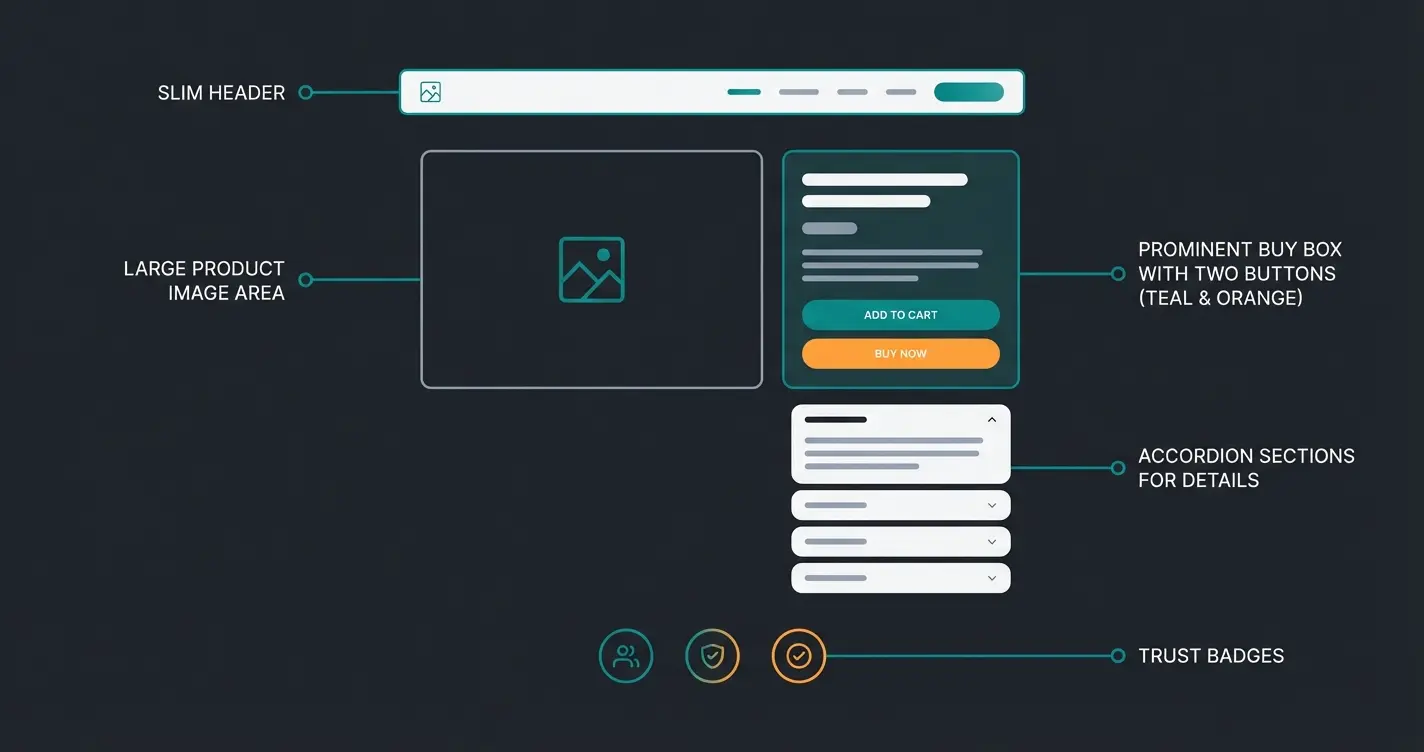
Understanding the structure of an optimized product page is essential for modern Magento layout implementation. Here's the blueprint for a high-converting product detail page:
- Header: Slim, sticky, with AI-powered search bar
- Hero Area: Product image + Trust Badge (Trusted Shops) directly next to the price
- Buy Box: "Add to Cart" button (contrast color) + "Does this suit me?" button (starts AI dialogue)
- Content: No walls of text. Accordions for technical details
- Footer: Links to imprint, privacy policy, accessibility statement
Relaunch Checklist for Your Magento Shop
- Is the theme Hyvä-based or headless?
- Are Core Web Vitals (LCP < 2.5s, INP < 200ms) in the green zone?
- Is the cookie banner legally compliant (two equivalent buttons)?
- Does the design meet BFSG requirements (contrasts, keyboard navigation)?
- Is there a "Guided Selling" entry point on the homepage?
- Is the imprint reachable with max. 2 clicks?
- Have you implemented AI-powered product consultation?
Conclusion: Great Design Looks Good—Great Design Sells
Magento webdesign in 2026 is far more than selecting a theme on ThemeForest. It's the fusion of extreme technical performance (Hyvä), legal security (BFSG/Cookies), and psychological sales guidance (AI & Guided Selling).
The era of static storefronts is over. Customers today expect the same consultation expertise online as in a specialty store—only faster and more convenient. Those who switch their design to "Digital Consultation" now secure the decisive competitive advantage in a saturated market.
Are you ready to transform your Magento shop from a passive catalog into an active top seller? Start with performance, but complete the project with intelligence. The combination of speed and smart guidance is what separates the market leaders from everyone else.
Frequently Asked Questions About Magento Webdesign
Hyvä is currently the best choice for most Magento shops. It uses Alpine.js and Tailwind CSS to deliver exceptional Core Web Vitals scores (90-100 on PageSpeed), while drastically reducing development complexity compared to the legacy Luma theme. For very complex, app-like experiences requiring maximum design flexibility, a headless approach with PWA Studio or Vue Storefront is an alternative, though with significantly higher implementation costs.
For German compliance, ensure your cookie banner offers two equally prominent buttons (Accept All and Reject All) on the first level. Your imprint must be accessible within two clicks from any page. Starting June 28, 2025, the BFSG requires accessibility features including minimum 4.5:1 contrast ratios, visible focus indicators for keyboard navigation, and proper alt texts for all images. The checkout button must clearly state 'Order with Payment Obligation' to create valid contracts.
Guided Selling replaces traditional filter-based navigation with AI-powered conversational interfaces that ask customers about their needs rather than requiring technical knowledge. Instead of selecting 'Cushioning: Pronation,' customers answer questions like 'Do you have knee problems?' This approach can increase conversion rates by up to 2.5x by reducing decision fatigue and providing personalized recommendations.
Implementation typically follows four phases: Technical foundation (Hyvä migration) takes 4-8 weeks, data preparation requires 2-4 weeks, frontend integration needs 3-6 weeks, and testing/optimization is ongoing. Total timeline is usually 3-6 months depending on shop complexity and existing technical debt.
Core Web Vitals are Google's metrics for user experience: LCP (Largest Contentful Paint) should be under 2.5 seconds, INP (Interaction to Next Paint) under 200ms, and CLS (Cumulative Layout Shift) under 0.1. These directly impact search rankings and user engagement. Luma-based shops often fail these metrics due to heavy JavaScript, while Hyvä-based shops consistently achieve green scores across all metrics.
Join hundreds of merchants who've upgraded from static catalogs to AI-powered sales consultants. Our solution integrates seamlessly with Hyvä and provides the guided selling experience your customers expect in 2026.
Get Started Today
Lasse is CEO and co-founder of Qualimero. After completing his MBA at WHU and scaling a company to seven-figure revenue, he founded Qualimero to build AI-powered digital employees for e-commerce. His focus: helping businesses measurably improve customer interaction through intelligent automation.