Introduction: The Missing Puzzle Piece in Shopware 6
Anyone migrating from Shopware 5 to Shopware 6 or starting fresh in e-commerce often faces a surprising hurdle: Where is the 'Create Quote' button? While Shopware 6 is considered one of the most flexible and modern e-commerce systems on the market, the standard version (Community Edition and Rise Plan) lacks a native function to generate a formal, individual PDF quote from a shopping cart. According to Shopware's official documentation, this functionality is reserved for higher-tier plans.
For pure B2C shops selling t-shirts or coffee mugs, this isn't a problem. But for B2B merchants, providers of complex technical goods, or shops with high cart values, the quote is the most important step before purchase completion. Customers in this segment don't simply click 'Buy'—they need budget approvals, negotiate volume discounts, or require a formal price confirmation for their purchasing department.
When this function is missing, merchants often improvise with Word templates or manual emails. The result: error-proneness, time loss, and—worst of all—cart abandonment because the customer doesn't want to wait. This is where AI-powered product consultation can make a significant difference by providing immediate assistance.
This guide is the most comprehensive resource on the topic of 'Shopware create quote'. We illuminate not only which technical buttons you need to press but also analyze the strategic significance of the quote process for your revenue in 2025.
We compare the three paths to your goal: The Enterprise Way using native Shopware B2B Suite functions, The Standard Way through plugin usage, and The Innovative Way with AI-powered quote automation—and why this can double your conversion rate.
Option 1: Native Functions (Shopware B2B Components)
Many merchants desperately search the backend for the quote function, assuming an 'Enterprise-Grade' system should have this by default. The answer is: Yes, Shopware can do this—but it's a matter of licensing.
Who Is This Option For?
This option is exclusively available to users of the Shopware Evolve and Shopware Beyond plans. Users of the Community Edition or Rise Plan have no access to these native features. As detailed in Shopware's B2B documentation, the B2B Components are a premium feature set.
The Quote Management of the B2B Suite
Shopware groups these functions under the so-called 'B2B Components'. A central component of this is Quote Management. The process is deeply integrated into the Shopware architecture and offers a seamless workflow between merchant and business customer. Understanding how Shopware AI features complement these native capabilities is essential for modern B2B operations.
Logged-in B2B customer fills cart, selects 'Request Quote' instead of checkout, can add desired price or comments
Request appears in Shopware Admin's special overview, sales rep can view the cart contents
Merchant adjusts prices (absolute or percentage), adds/removes items, adds comments to the quote
Quote is sent back to customer who sees it in 'My Account' area, can accept or counter-offer
Once agreement is reached, customer converts quote to binding order with one click
According to Shopware's quote management guide, this entire process happens within the Shopware ecosystem, maintaining data consistency and audit trails.
Pros and Cons of the Native Solution
| Advantages | Disadvantages |
|---|---|
| Seamless Integration: No third-party plugins needed, updates are safe | High Costs: Only included in expensive Evolve/Beyond plans |
| B2B Focus: Perfectly tailored to company structures (roles & permissions) | Overkill: Often too powerful and complex for smaller shops |
| Flow Builder Support: Full integration into automations (e.g., Slack notification on new request) | Little Flexibility: The process is rigidly predetermined and hard to customize without development |
Option 2: Using Plugins (The Standard Way)
For an estimated 80% of Shopware merchants (Community Edition and Rise), the path through the Shopware Store is the reality. Since the core doesn't offer this function, a lively ecosystem of extensions has developed.
Market Leaders and Solutions
Searching for 'create quote' in the store delivers various results. Particularly noteworthy are solutions like the plugin 'Individuelles Angebot' by PremSoft or similar extensions from agencies like Pickware (in the ERP context). The PremSoft documentation provides detailed setup instructions.

Deep-Dive: How the 'Individual Quote' Plugin Works
This plugin has become the quasi-industry standard for small to medium shops. It simulates the functionality of the large B2B Suite for a fraction of the price. According to the Shopware Store listing, the setup process is straightforward.
- Cart Takeover: The customer places items in the shopping cart
- Button Logic: Above a defined cart value (e.g., €500), a 'Request Quote' button appears next to the 'Checkout' button
- Request: The customer clicks, a modal opens for remarks, and the request is submitted
- Backend Processing: In the admin menu, a new 'Quotes' section appears where the merchant can view positions and enter individual prices (e.g., 'Special price for Project Miller')
- PDF Generation: A PDF is generated and sent to the customer via email
- Order Completion: The customer clicks a link in the PDF or email, lands back in the shop with reduced prices, and completes the purchase
The plugin compatibility information confirms support for Shopware 6.4 and above.
The Limitations of Plugin Solutions
Although these plugins technically work, they bring strategic disadvantages that are often overlooked. Understanding these limitations helps explain why AI-driven selling solutions are gaining traction.
- Reactivity: They wait for the customer to take action. Many customers abandon before even asking if the price seems too high.
- Manual Effort: Each request requires an employee to log in, calculate, and create a PDF. With 50 requests a day, that's a full-time job.
- Media Breaks: Often the PDF is sent via email, the customer then calls, the price is changed on the phone... data consistency suffers.
- Compatibility Risks: With every Shopware update (e.g., to version 6.7), you must wait until the plugin manufacturer catches up.
Why 'Request Quote' Buttons Cost You Revenue
Here we leave the technical level and look at sales psychology. Most merchants view the topic of 'creating quotes' as a purely administrative act. This is a mistake.
The Problem of the 'Black Box'
When a customer clicks 'Request Quote,' they enter uncertainty: When will I get a response? Is the price good? Is the wait worth it? In the time your sales team processes the request (on average 4 to 24 hours), the customer has long since visited the competition. If that competitor displays prices transparently or has a faster process, the customer is gone.
Time customers wait for manual quote processing
B2B buyers who leave when immediate pricing isn't available
Average number of alternatives checked while waiting for quotes
The Consultation Gap
Current top search results and plugins treat quotes as the endpoint of a search: The customer knows what they want and just wants to negotiate the price. In reality, B2B customers often need consultation before they request a quote. Questions like 'Does Component A fit Machine B?' or 'Do I need the accessory set?' go unanswered.
A simple 'Request Quote' button doesn't solve this problem. It only shifts the consultation into a slow email ping-pong process. This is precisely where AI-powered chatbot solutions excel—they can provide instant guidance before the formal quote stage.
The Future: AI-Powered Quote Consultation
Here lies your opportunity to stand out from the competition. Instead of just managing the quote process (as with plugins), you can automate and enhance it. Modern AI e-commerce solutions are transforming how B2B transactions happen.
What Is AI-Powered Quote Consultation?
Imagine combining a chatbot (based on LLMs like GPT-4) with your Shopware system. Instead of the customer silently adding items to the cart and then filling out a form, they interact with an AI Sales Consultant. This approach represents a fundamental shift from reactive administration to proactive selling.

The New Workflow: Proactive Instead of Reactive
The transformation from traditional quoting to AI-powered consultation represents a paradigm shift. Think of it as the difference between a vending machine and a personal shopping assistant. KI-Mitarbeiter (AI Agents) are becoming essential tools for modern e-commerce operations.
Customer arrives on site, AI asks: 'Are you looking for a solution for an open-plan office or home office?'
AI suggests matching products with real-time cross-selling recommendations
AI recognizes: 'This is a large order for 50 desks' and adjusts approach accordingly
Instead of 'We'll get back to you,' AI generates preliminary quote based on pre-defined rules
AI writes complete data via API directly as 'Prepared Quote' into Shopware backend or CRM
This approach leverages AI in customer service principles while focusing specifically on revenue generation. The AI doesn't just answer questions—it actively guides customers toward purchase decisions.
AI Solution vs. Standard Plugins: The Comparison
| Feature | Standard Plugin | AI Solution |
|---|---|---|
| Speed | 4-24 hours (manual) | Seconds (real-time) |
| Personnel Effort | High (review every quote) | Low (only review exceptions) |
| Consultation | None (just a form) | Interactive (product advice) |
| Conversion Rate | Medium (risk of abandonment) | High (immediate reward) |
| Data Quality | Customer often makes typos | AI validates inputs instantly |
| Availability | Business hours only | 24/7 consultation |
The advantages become even more pronounced when you consider how AI sales agents can handle complex product configurations that would typically require specialized staff.
Stop losing customers to slow, manual quote processes. Our AI-powered solution generates instant, personalized quotes while providing expert product consultation 24/7.
Start Your Free TrialStep-by-Step: Optimizing Your Quote Process
Whether you choose plugin, B2B Suite, or AI—the foundation must be solid. Here's the universal guide to setup, applicable regardless of which solution path you take.
Step 1: Check Technical Prerequisites
Ensure you're running at least Shopware 6.4, preferably 6.6. Many quote plugins require current versions for full compatibility. According to the Shopware compatibility guide, running the latest stable version is always recommended.
Go to Settings > Flow Builder. You need to create a dedicated email template for 'Quote Sent.' Standard emails like 'Order Confirmation' don't match the wording needed for quotes.
Step 2: Customize Document Templates (GoBD Compliance!)
A quote is a legal document in Germany. Go to Settings > Documents, duplicate the 'Invoice' template, and rename it to 'Quote.' Change the title in the document from 'Invoice No.' to 'Quote No.' The Shopware document settings and YouTube tutorials provide detailed guidance.
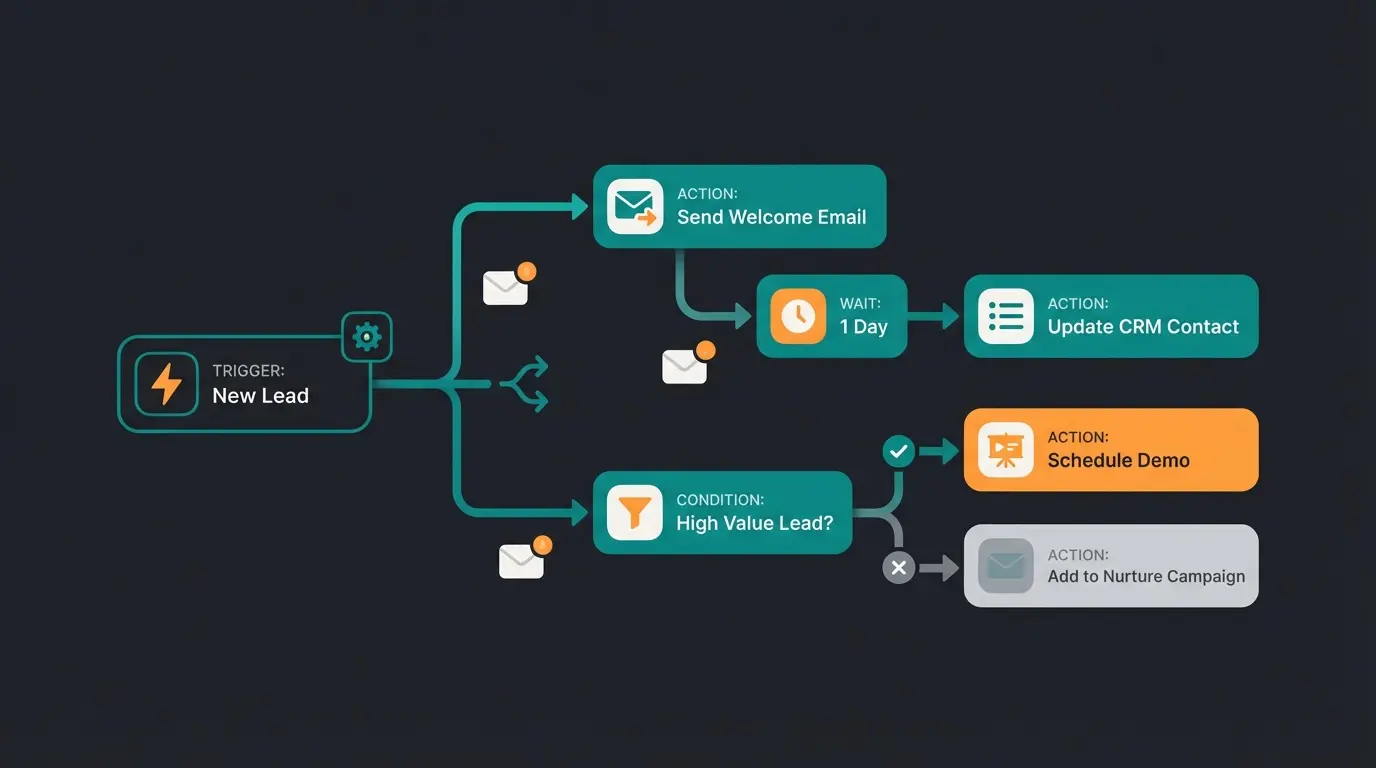
Step 3: Utilize the Flow Builder
The Flow Builder is the heart of automation in Shopware 6. According to Rhiem Intermedia's guide and Shopware's official Flow Builder documentation, you should configure the following:
- Trigger: Select 'Checkout / Quote Requested' (the event name may vary depending on plugin)
- Actions: Send email to sales team ('New Lead!'), send confirmation to customer, optionally set status to 'In Progress'
- Conditions: Add conditions based on cart value, customer group, or product categories
Step 4: Integration of Your Chosen Solution
For Plugins: Install, activate, and assign to your sales channel. Be sure to test the 'Off-Canvas Cart'—merchants often forget to enable the button there as well. The plugin installation guide covers all configuration options.
For AI Solutions: These typically work through the Shopware API (Admin API). The AI needs read access to products and write access to cart/orders. AI virtual sales solutions often provide pre-built Shopware integrations.
Legal Compliance: Avoiding Pitfalls (GoBD & BGB)
In Germany, the topic of quotes is strictly regulated. 'Creating a quote' is more than just printing a PDF. Understanding these requirements is essential for any merchant operating in the German market.
1. Binding vs. Non-Binding Quotes
According to § 145 BGB (German Civil Code), an offer (quote) is fundamentally binding. If you send a customer a PDF with a price and they say 'Yes,' you have a contract. The Allrecht legal guide provides detailed explanations of these regulations.
- Tip: Use disclaimer clauses like 'Quote non-binding' or 'While supplies last' if you want to protect yourself
- In the Plugin: Ensure this text block is permanently anchored in the PDF template
- Validity Period: Always specify how long the quote remains valid
According to Teamleader's business guide and RA-Kotz legal analysis, proper quote formulation is critical for legal protection.
2. GoBD and Immutability
As soon as a quote becomes tax-relevant (e.g., when it becomes the basis for an invoice), GoBD regulations apply. The document may not be altered after the fact. Shopware stores generated documents in the file system—do not delete these manually!
Plugins like Pickware ERP help here by creating a complete history (audit trail). The Pickware compliance documentation and Google's GoBD resources provide comprehensive guidance.
3. Validity Period
Define an expiration date technically. In the 'Individual Quote' plugin, you can set an expiration date (e.g., 14 days). After expiration, the link in the customer account should be deactivated so no one claims prices from 2023. This is also important for Conversational AI implementations that generate quotes automatically.
Comparison Table: Which Solution Fits Your Business?
To make your decision easier, we've directly compared the three approaches across key criteria that matter most for B2B operations.
| Feature | Native B2B Suite | Plugin (e.g., PremSoft) | AI Automation |
|---|---|---|---|
| Target Audience | Enterprise / Corporations | SMB / Mid-Market | Innovation Leaders |
| Costs | High (part of plan) | Low (ca. €20-30/month) | Medium (software + setup) |
| Setup Time | Weeks (configuration) | Minutes (installation) | Days (integration) |
| Customization | Medium (rigid in core) | High (many settings) | Very High (adaptive learning) |
| Process Type | Manual / Administrative | Manual / Administrative | Automatic / Selling |
| User Experience | Sober / Functional | Standard Shopware | Conversational / Modern |
| 24/7 Availability | No (staff dependent) | No (staff dependent) | Yes (always on) |
| Pre-Sales Consultation | Limited | None | Full AI guidance |
For merchants exploring AI options, digital sales assistants offer a middle ground between full automation and traditional approaches.
Implementation Checklist for Success
Use this actionable checklist to ensure your quote process implementation covers all essential elements:
- ☐ Assess Demand: How many quote requests do you receive per week? (>10 justifies automation investment)
- ☐ Choose Solution: Does a plugin suffice, or do you need the B2B Suite or AI solution?
- ☐ Legal Texts: 'Non-binding' clause inserted into PDF template?
- ☐ Flow Builder: Email notification to sales configured?
- ☐ Document Numbering: Separate number range for quotes established?
- ☐ Expiration Dates: Automatic validity period configured?
- ☐ Testing: Complete process played through as customer (Desktop & Mobile)?
- ☐ Off-Canvas Cart: Quote button visible in mini-cart?
- ☐ GoBD Compliance: Document storage and audit trail verified?

Frequently Asked Questions
No, Shopware 6 Community Edition and Rise Plan do not include native quote functionality. This feature is only available in the Evolve and Beyond plans through the B2B Components. For Community/Rise users, plugins or third-party AI solutions are required to add quote capabilities.
Most quote plugins for Shopware cost between €20-30 per month. Popular options like 'Individuelles Angebot' by PremSoft offer affordable entry points for small to medium businesses. However, remember to factor in the ongoing manual labor costs of processing each quote request.
GoBD (Grundsätze zur ordnungsmäßigen Führung und Aufbewahrung von Büchern) are German regulations for proper bookkeeping. When quotes become tax-relevant (e.g., as basis for invoices), they must be stored immutably with complete audit trails. Non-compliance can result in legal issues and tax penalties.
AI-powered quote solutions offer three major advantages: speed (instant quotes vs. 4-24 hour wait times), consultation (interactive product guidance vs. static forms), and 24/7 availability. AI can pre-qualify leads, recommend products, and generate personalized quotes automatically, reducing manual workload while improving conversion rates.
Under German law (§ 145 BGB), quotes are generally binding—if a customer accepts, you have a contract. To protect yourself, include disclaimers like 'Angebot freibleibend' (quote non-binding) or 'Solange der Vorrat reicht' (while supplies last). Always specify a validity period to prevent outdated quotes from being accepted.
Conclusion: From Administration to Active Selling
The topic of 'Shopware create quote' is no longer just a technical matter in 2025—it's a lever for more revenue. Those who make their customers wait, lose them. The competition is just one click away, and modern B2B buyers expect immediate responses.
Your Path Forward: Start with solid plugins like the one from PremSoft to offer the function at all. Then professionalize by paying meticulous attention to GoBD-compliant documents and clean email templates via Flow Builder. Finally, when your sales team is overwhelmed, consider AI solutions that take over pre-qualification and quote generation.
The pure technology is only the first step. The integration of intelligent consultation into the quote process is the key to higher cart values and more satisfied B2B customers. Evaluate your options today—the competition isn't sleeping, and every day with a slow, manual quote process is a day of lost revenue.
Transform quote generation from a bottleneck into a competitive advantage. Our AI solution provides instant, personalized quotes with expert product consultation—24/7, without adding headcount.
Get Started Free
Lasse is CEO and co-founder of Qualimero. After completing his MBA at WHU and scaling a company to seven-figure revenue, he founded Qualimero to build AI-powered digital employees for e-commerce. His focus: helping businesses measurably improve customer interaction through intelligent automation.