What is a Shopware store? Store vs. marketplace
A Shopware store is an online shop built on Shopware, the open-source ecommerce platform from Germany powering over 100,000 brands worldwide. It is not the Shopware Store marketplace at store.shopware.com, where merchants browse plugins and extensions. Your Shopware store is your own branded storefront, running on your domain, with your products and your design.
That distinction trips up Google too. Search "shopware store" and position 1 is the extension marketplace. Position 2 is Shop-Ware, an unrelated auto repair software company. Only from position 7 onward do results cover actually building an online shop on Shopware. This guide addresses that second meaning.
Shopware was founded in 2000 by Stefan and Sebastian Hamann in Schoppingen, Germany. The platform holds 12% of the top 1,000 German online stores, confirmed as the market leader among ecommerce platforms in Germany for 2025. The current version, Shopware 6, runs on Symfony and Vue.js. In June 2025, Shopware introduced "Agentic Commerce," its framework for AI-driven sales automation built into the platform.
Mid-market retailers between EUR 500,000 and EUR 50 million in annual revenue are Shopware's sweet spot. They need more than a template shop (Shopify's strength) but cannot justify the six-figure budgets that Adobe Commerce or SAP Commerce demand. Shopware fills that gap with enterprise-grade features at SME-accessible pricing, backed by a development community that understands European compliance requirements like DSGVO and the EU's digital product passport regulations.
Why choose Shopware for your online store
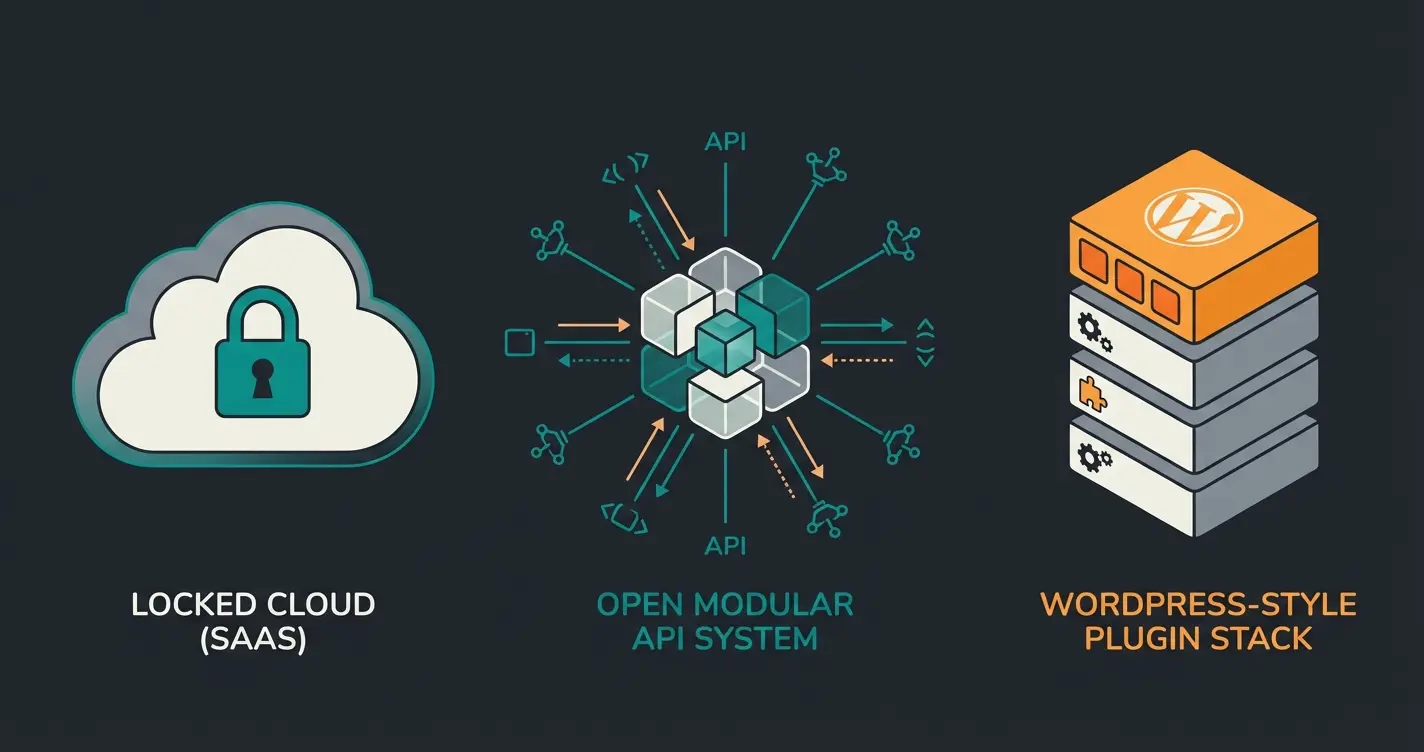
Shopware fills a specific gap in the ecommerce platform landscape: more customizable than Shopify, more scalable than WooCommerce, less complex and cheaper than Adobe Commerce (formerly Magento). Its core strengths are the API-first architecture, the built-in Shopping Experiences CMS, open-source code access, and a mature DACH ecosystem with local payment and shipping integrations ready out of the box.
The API-first design means every storefront function is accessible via REST or Admin API. Run your Shopware store headless, connect it to mobile apps, or integrate ERP systems without custom middleware. Shopify offers comparable API access but restricts you to its hosting infrastructure with no self-hosted option. WooCommerce provides a REST API too, but it was retrofitted onto WordPress. Performance drops noticeably above 5,000 products without managed hosting.
Shopping Experiences is Shopware's drag-and-drop CMS for product pages, landing pages, and category layouts. You place content blocks, product listings, image galleries, and text modules in a visual editor without code. Shopify's Online Store editor covers similar ground, but Shopware gives more granular layout control, including conditional content blocks that display different information based on customer group or device type.
Flow Builder automates operational logic: trigger an email when inventory drops below a threshold, tag VIP customers after their fifth purchase, notify your warehouse when a high-value order comes in. Rule Builder handles dynamic pricing and conditional display rules. Comparable automation on Shopify requires the Advanced plan at USD 399/month or paid third-party apps.
And Shopware is open source. The Community Edition is free to inspect, fork, extend, and host anywhere. Shopify is closed-source SaaS. WooCommerce is open source too, but it runs as a WordPress plugin rather than a standalone ecommerce system built for commerce from the ground up. According to Statista, global ecommerce revenue surpassed USD 4.1 trillion in 2025. For DACH merchants selling internationally, Shopware's native multi-language and multi-currency support from the Rise edition makes geographic expansion a configuration task, not a rebuild.
Shopware editions and pricing
Shopware offers a free Community Edition and three commercial tiers: Rise from EUR 600/month, Evolve from EUR 2,400/month, and Beyond from EUR 6,500/month. All commercial pricing scales with your gross merchandise volume (GMV), so a store generating EUR 5 million annually pays more than one doing EUR 500,000 on the same edition. The official Shopware pricing page lists current base rates.
| Feature | Community | Rise | Evolve | Beyond |
|---|---|---|---|---|
| Price | Free (under EUR 1M GMV) | From EUR 600/mo | From EUR 2,400/mo | From EUR 6,500/mo |
| Shopping Experiences CMS | Basic | Full | Full + Premium blocks | Full + Premium blocks |
| Flow Builder | Basic triggers | Full automation | Full automation | Full + custom triggers |
| B2B Suite | Not included | Basic (quotes, roles) | Full B2B | Full B2B + custom |
| Multi-language/currency | Via community plugins | Native | Native | Native |
| AI Copilot | Not included | Not included | Included | Included |
| Dynamic pricing rules | Limited | Yes | Yes | Advanced |
| Support tier | Community forums | Standard | Priority | Dedicated account manager |
| Hosting options | Self-hosted only | Cloud or self-hosted | Cloud or self-hosted | Cloud or self-hosted |
Shopify's comparison page argues: "Shopify gives brands a comprehensive and continuously evolved feature set, whereas Shopware requires additional plugins and developers to access many functionalities." Partially true. Shopware's out-of-the-box feature set on Community and Rise is narrower than Shopify's. The trade-off: when you need something Shopify does not offer, you are stuck within its walled garden. With Shopware, you build it yourself or source it from the 4,000+ plugin marketplace.
Setting up your Shopware store step by step
Setting up a Shopware store takes six steps: choose your edition and hosting model, install the platform, select and customize your theme, build your product catalog, configure payment and shipping, then test and launch. Most stores go live within 2-4 weeks. Complex B2B setups with ERP integration extend that to 6-8 weeks.
Cloud (managed by Shopware, one-click setup) or self-hosted (your server, PHP 8.2+, MySQL 8.0+). Cloud eliminates infrastructure overhead. Self-hosted gives full database access and custom server tuning.
Cloud: instant provisioning. Self-hosted: install via Composer or the web installer. Configure store name, default currency, tax rules, and email templates.
Pick a theme from the Shopware Store marketplace (200+ commercial options) or build custom. Use Shopping Experiences CMS for layouts, colors, logos, and category-specific designs.
Create categories, define properties (size, color, material), configure variants and cross-selling. Import via CSV for catalogs above 100 products.
Connect Mollie, PayPal, Stripe, or Klarna for payments. Set up DHL, DPD, or UPS for shipping with rules by weight, price, or destination.
Run test orders across all payment methods. Verify email notifications, inventory updates, and shipping label generation. Go live, then track conversion rate and page speed daily for the first two weeks.
The hosting decision shapes your ongoing operational load. Shopware Cloud handles updates, backups, and server management. Self-hosted gives you raw database access, custom server tuning, and no recurring platform fee beyond the license. For stores under EUR 2 million annual revenue, cloud hosting is typically the simpler path. Above that threshold, self-hosted with managed infrastructure (Hetzner, AWS, or similar) provides better flexibility and more favorable cost-per-transaction ratios.
Theme selection directly influences conversion. Shopware's default Storefront theme is responsive and functional but generic. The marketplace offers 200+ commercial alternatives, and you can build entirely custom themes using Shopware's Bootstrap-based template system. For a detailed comparison of free versus premium options, including performance benchmarks, check the Shopware themes guide.
Product data quality determines how well your store's search and any AI tools perform later. We have tested this across multiple Shopware deployments. Stores with complete product attributes (name, description, EAN, manufacturer, weight, dimensions, and niche-specific custom properties) achieve 40-60% better internal search relevance than those with only name and price filled in. Sparse data is a silent conversion killer.
Payment configuration deserves more attention than most setup guides suggest. Mollie is the default recommendation for DACH stores because it bundles credit cards, SEPA direct debit, Klarna, PayPal, and iDEAL in a single integration. Stripe is the alternative if you sell primarily outside the DACH region. The critical step most merchants skip: testing every payment method with real transactions before launch. A Klarna integration that works in the staging environment but fails on live orders due to a misconfigured API key has cost stores we work with days of lost revenue.
Shipping rules are where Shopware's Rule Builder earns its keep. You can define rules by order weight, cart value, destination country, and customer group. Free shipping above EUR 50? One rule. Different carriers for domestic versus international? Two rules. Surcharges for oversized items? Three rules. The setup takes an afternoon. Getting it wrong costs more.
AI-powered product consultation for Shopware
AI product consultation turns a Shopware store from a passive catalog into a guided shopping experience. Qualimero customers report up to 16x ROI and 7x higher conversion rates by deploying AI employees that understand every product in the catalog, recognize returning customers, and deliver personalized recommendations across chat, WhatsApp, and email.
The average ecommerce conversion rate sits at 2.5-3%, according to 2026 industry benchmarks. That means 97 out of 100 visitors leave without purchasing. Baymard Institute's analysis of 50 studies pegs the average cart abandonment rate at 70.22% as of 2026. A significant portion of those abandonments happen because shoppers cannot find the right product or have unanswered questions. No amount of checkout optimization fixes a customer who never found what they needed.
Shopware Co-CEO Sebastian Hamann frames the opportunity: "The future of digital commerce begins where AI meets real merchant needs." An AI employee connects to Shopware's REST API, pulls live product data (stock levels, pricing, attributes), and uses that information to guide customers through complex purchase decisions in real time. Not a scripted FAQ popup. A system that knows your catalog and adapts every conversation to the individual customer.

Rasendoktor, an online retailer for professional lawn care products, handles 2,000-3,000 consultation-intensive inquiries per season. Their AI employee Hektor achieved 16x ROI, 100% automation of webchat inquiries, and 40% reduction in support costs. Hektor delivers product recommendations around the clock, factors in regional soil conditions, and responds in under 5 seconds. The full implementation is documented in the Rasendoktor case study.
Signed, an online retailer for custom decorative signs, deployed AI employee Alex on Instagram and TikTok. The numbers: 18x ROI, 70% automation of customer inquiries on social channels, and a 30% increase in upselling. Alex transformed social media interactions into targeted purchase opportunities, something no standard Shopware plugin can do. See the Signed success story for the integration timeline.
Signed: custom signs via Instagram and TikTok
Gartenfreunde: garden and wellness products
Average across Qualimero ecommerce deployments
When does AI consultation make sense? Three conditions need to be true. First, your products require explanation: technical specifications, compatibility questions, usage guidance. A t-shirt shop does not need AI consultation. A garden supply store with 400 plant protection products does. Second, your catalog exceeds 200 products, the point where customers stop browsing and start searching, often badly. Third, you are losing sales to unanswered questions. If your analytics show high exit rates on product pages or a support backlog of pre-purchase inquiries, the ROI case writes itself.
For stores that meet those criteria, AI-powered product consultation bridges the gap between a self-service catalog and a staffed showroom. The integration with Shopware's REST API means the AI employee always works with your live product data, not a static export.
Extending your Shopware store
Shopware's plugin ecosystem offers 4,000+ extensions covering payment, shipping, marketing, analytics, and automation. Each is installable from the Shopware admin panel or via Composer for self-hosted setups. Finding plugins is not the challenge. Finding the right ones is.
We evaluate Shopware plugins across four criteria: update frequency (monthly or better), compatibility with the current Shopware version (6.6+ as of 2026), support responsiveness (under 48 hours for critical issues), and review quality (not just star ratings, but actual review content). A plugin rated 4.8 stars with no update in eight months is a liability, not an asset.
Essential plugin categories for production stores: payment gateways (Mollie handles 90% of DACH use cases), shipping integration (DHL, DPD), SEO management (meta tags, structured data, sitemap control), analytics (GA4 event tracking), and AI/automation. For a side-by-side evaluation of the top options in each category, see the Shopware 6 plugins comparison.
When no existing plugin fits, custom development is the path forward. Shopware 6 plugins are Symfony bundles, which means any PHP developer with Symfony experience can build them. The Shopware Developer Documentation covers the plugin system, admin extensions, and storefront customizations in detail. For the economics of building versus buying, the Shopware plugin development guide walks through the trade-offs.
Measuring success and ROI
Track your Shopware store's health through four core KPIs: conversion rate, average order value, cart abandonment rate, and customer lifetime value. Integrate Google Analytics 4 for traffic and behavior data. Use Shopware's built-in analytics for sales reporting. Together, they reveal exactly where customers drop off and where targeted interventions lift revenue.
| KPI | Industry benchmark | With AI consultation |
|---|---|---|
| Conversion rate | 2.5-3% (Smart Insights, 2026) | Up to 7x higher (Qualimero client data) |
| Cart abandonment | 70.22% (Baymard Institute) | Reduced through guided product selection |
| Average order value | Varies by vertical | +35% with AI product recommendations |
| Support cost per inquiry | EUR 5-15 per ticket | Under EUR 0.15 per AI-handled chat |
Shopware's admin dashboard covers order volume, revenue, and top products out of the box. For deeper traffic analysis, channel attribution, and user behavior flows, the Shopware Google Analytics integration connects your store to GA4 with granular event tracking for add-to-cart, checkout progression, and completed purchases.
The Signed success story demonstrates what measurable AI impact looks like: deploying an AI employee on social channels yielded 18x ROI, tracked through channel-specific conversion attribution in GA4. Without proper analytics infrastructure in place first, you cannot quantify the lift. Set up tracking before deploying AI, not after.
FAQ: Shopware store
The Community Edition is free for stores generating under EUR 1 million in annual GMV. Above that threshold, or when you need B2B features, premium CMS blocks, or official support, commercial editions start at EUR 600/month (Shopware pricing).
A standard B2C store with under 500 products launches in about 2 weeks. Customized stores with complex catalogs or B2B requirements take 4-8 weeks. Cloud hosting reduces the infrastructure portion to minutes.
No. Shopify is a closed-source, hosted SaaS platform optimized for speed and simplicity. Shopware is open source, offers both self-hosted and cloud options, and provides deeper customization. Shopware leads in the DACH market; Shopify dominates globally.
Yes. Shopware provides migration assistants covering products, customers, orders, and categories. Typical migration takes 1-3 weeks depending on catalog size, custom fields, and plugin dependencies.
From the Rise edition onward, with basic B2B features like customer-specific pricing and quote management. Full B2B capability (role-based access, custom approval workflows, tiered pricing) requires Evolve or Beyond.
Through an API integration connecting to Shopware's REST API. The AI employee pulls live product data, attributes, and stock levels to provide real-time recommendations via chat, WhatsApp, or email. Base integration takes 2-3 days, plus roughly a week for testing.
More traffic alone does not convert. A Qualimero AI employee advises your customers around the clock, recommends the right products, and increases your conversion rate. Our customers report up to 16x ROI and 7x higher conversions.
Book a free demo
Kevin is CTO and co-founder of Qualimero. As an AI architect with over 15 years of experience as CTO and CPO in the tech industry, he designs the AI systems that automate tens of thousands of customer interactions daily for Qualimero's clients — reliably, securely, and at scale.