Why Simple Forms in Chat Are No Longer Enough
In the world of digital marketing and customer support, the Intercom Messenger has long become the standard for direct customer communication. However, a simple chat often isn't sufficient to collect structured data. This is where the Typeform Intercom integration comes into play. It promises the best of both worlds: the conversational experience of Intercom combined with Typeform's design-focused data collection capabilities.
At first glance, this appears to be the perfect solution. You install the app, embed your form, and start collecting leads. But when we look beneath the surface—especially through the lens of European data privacy requirements and complex B2B needs—cracks begin to appear in the foundation. Understanding how AI chatbots are transforming customer interactions helps contextualize why traditional form-based approaches are becoming outdated.
This article isn't your typical how-to guide. While we'll walk you through the technical setup step by step, we'll dive deep into areas that other guides completely ignore: the GDPR pitfalls when transferring data between US and EU servers, and why static forms in 2026 are often a dead end for genuine customer consultation. We'll show you how to master the integration and when it's time to switch to an AI-powered alternative.
Step-by-Step: Setting Up the Integration
Before we delve into the strategic and legal intricacies, the technical foundations must be in place. Setting up the Intercom Typeform connection is fortunately straightforward, but requires precision to avoid data loss.
Prerequisites for Installation
- An active Intercom account with access to the App Store
- A Typeform account (Free plan works for testing, but Logic Jumps and Hidden Fields require higher-tier plans)
- Admin rights in both tools to complete the authentication process
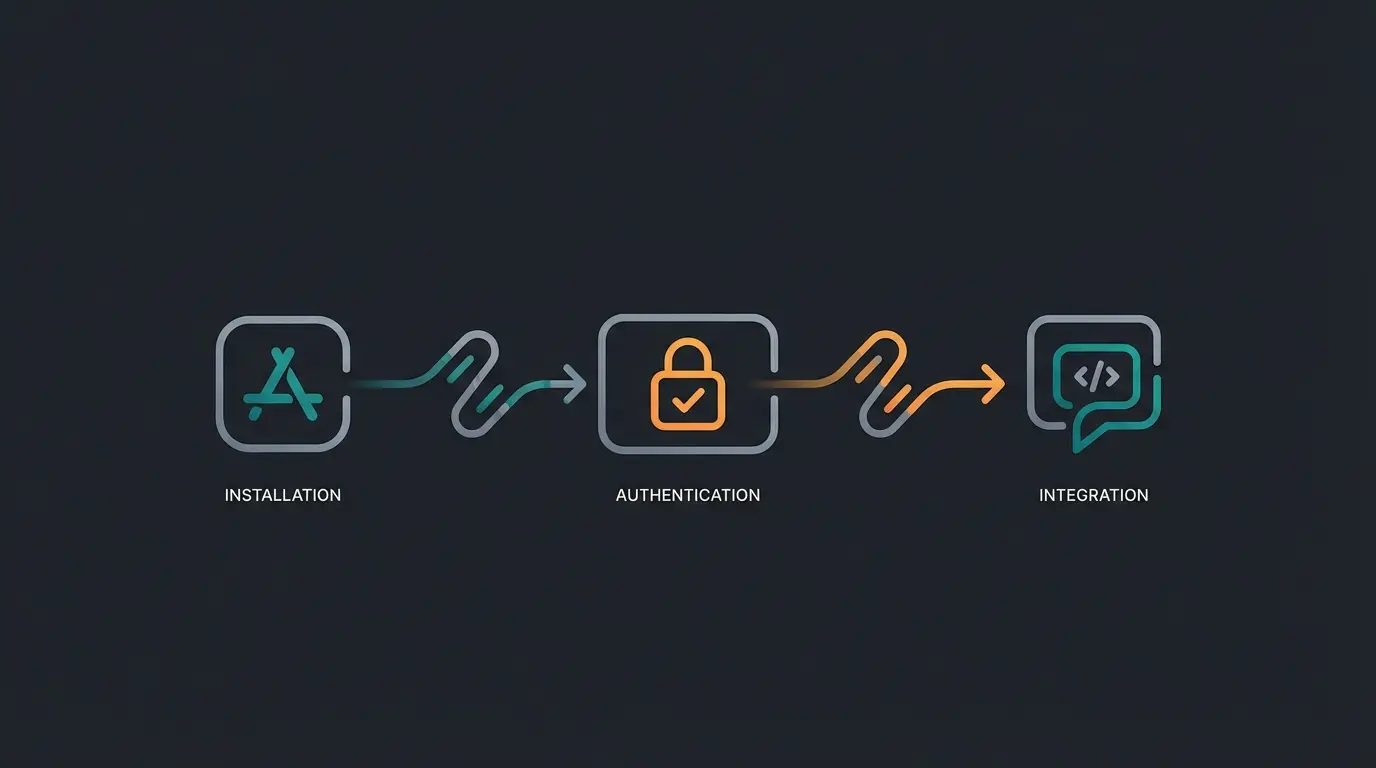
Step 1: Installation from the Intercom App Store
The safest route leads directly through Intercom's marketplace. Navigate to the App Store icon in the bottom left of your Intercom dashboard. Search for "Typeform" and click "Install now". According to Typeform, this process takes less than a minute to complete. The Intercom Help Center provides detailed documentation for troubleshooting installation issues.
Step 2: Authentication and Account Linking
After installation, you'll be prompted to connect your accounts. A pop-up window will open requesting access to your Typeform account. Confirm the access by clicking "Accept." Important: Make sure you're logged into the correct Typeform workspace if you manage multiple workspaces. As noted by Storylane, verifying your workspace selection prevents common configuration errors down the line.
Step 3: Embedding the Form in Messenger
Now comes the exciting part: getting the form to your users. You have two main approaches here:
- Manual sending in chat: During a live conversation, agents can select a Typeform via the "App" icon in the composer and post it directly into the chat.
- Automation via bots: You can define the Typeform as part of a "Custom Bot" or workflow. Navigate to "Operator" or "Workflows" in Intercom, select "Send an app" as the action, and choose your specific Typeform.
The user now sees a button or preview ("Fill out the form") that opens the form directly in the Messenger overlay—without any media disruption. This seamless experience aligns with modern conversational AI principles that prioritize user experience continuity.
The European Perspective: GDPR, Server Locations & Risks
This is where things become critical for businesses in the DACH region (Germany, Austria, Switzerland). Most English-language tutorials completely ignore this point, but for a European data protection officer, the Typeform Intercom integration represents a potential minefield.
The Data Journey Problem (Data Flow Analysis)
Imagine a customer from Munich chatting with your support team. Here's what happens to their data:
- Intercom: The data resides (depending on your plan) either in the USA or in Ireland (AWS Dublin).
- Typeform: As soon as the customer opens the form, data is sent to Typeform. According to Typeform's documentation, Typeform hosts its main servers in Virginia, USA (AWS us-east-1).
- Return path: After submission, the data flows back to Intercom.
Fact Check: Where Does Your Data Actually Reside?
Typeform: By default, all data resides in the USA. EU hosting (Germany/backup) is exclusively available to customers on the "Enterprise" plan. If you're using the Basic, Plus, or Business plan, your customers' personal data leaves the EU. This is confirmed by Typeform's GDPR documentation.
Intercom: Intercom offers "Regional Data Hosting" in the EU. However, this only applies to new customers on Advanced/Expert plans. Existing workspaces cannot simply be migrated; you would need to create a completely new workspace and manually export/import data, which often amounts to losing your conversation history. According to eesel.ai, this limitation affects many businesses attempting to achieve compliance after initial setup.
Customer initiates chat through Intercom Messenger on your website
Data stored in EU (Ireland) or US depending on your plan tier
Form data sent to Virginia, USA servers—critical GDPR risk point
Responses returned to Intercom database for lead management
GDPR Compliance Checklist for the Integration
If you want to use the integration, you must check off the following points to avoid legal issues:
- Data Processing Agreements (DPAs): You need a signed Data Processing Agreement with both Intercom and Typeform. Both providers offer these and use Standard Contractual Clauses (SCCs) for transfers to third countries. The Intercom DPA documentation outlines their compliance framework.
- Consent Management (Opt-in): Since Typeform is a third-party provider that is technically not "necessary" for website operation, you strictly speaking need explicit consent (opt-in) before the form loads. As recommended by LegalWeb, implement a pre-question in the chat: "May we load a form to collect your data? (Privacy notice)". Only when clicking "Yes" should the bot display the Typeform.
- Transparency in Privacy Policy: Your privacy policy must explicitly mention that data in the chat is passed to Typeform (USA). According to Simple Analytics, this transparency requirement is often overlooked but remains legally critical.
Where the Integration Reaches Its Limits
You've set up the integration and secured it legally. But now you encounter operational problems. The Typeform Intercom integration is excellent for simple tasks (NPS surveys, simple contact forms), but it often fails with complex use cases.
The "Interrogation" Effect
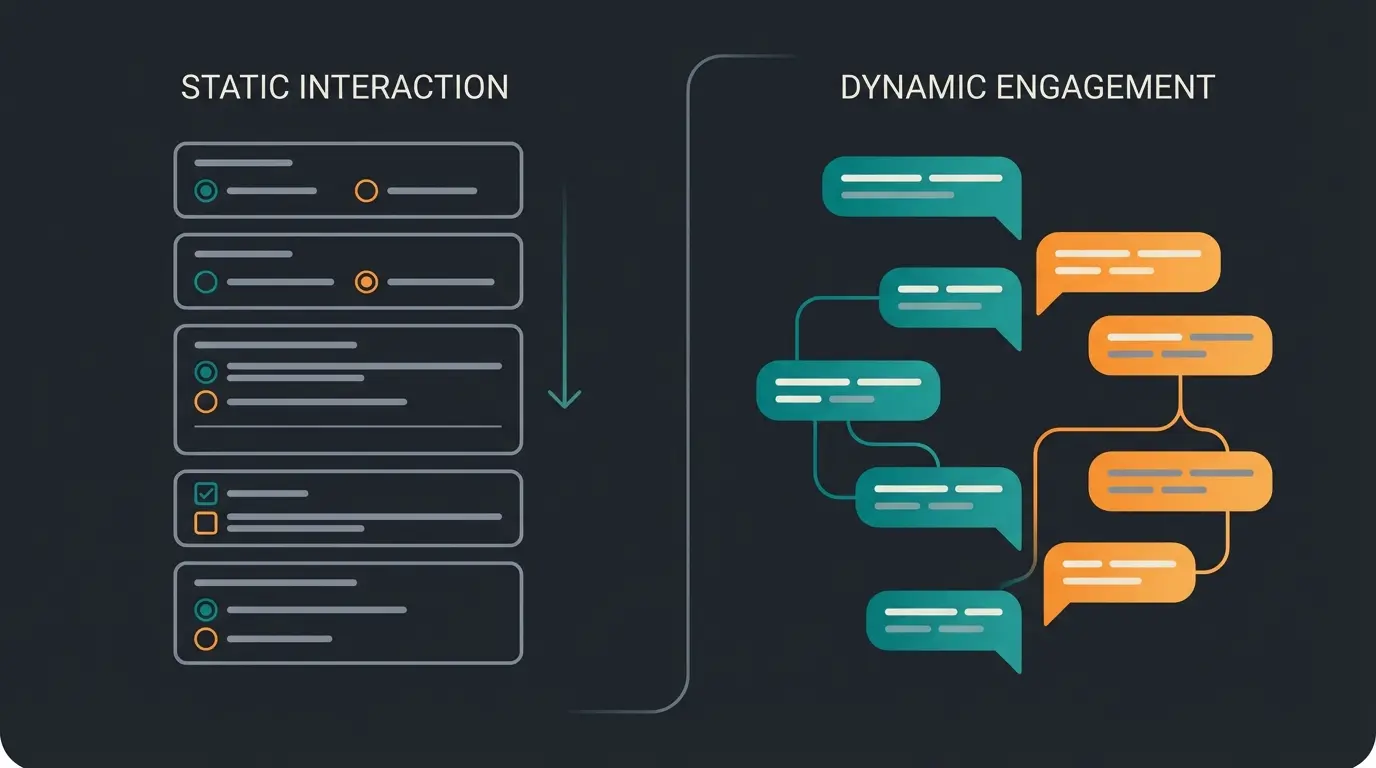
A Typeform is linear. Question 1, Question 2, Question 3. For the user in chat, it often feels like an interrogation. In an era where users are accustomed to ChatGPT and fluid dialogues, a rigid form in the chat window often feels like a foreign element. It interrupts the natural flow of conversation and creates a jarring experience that can damage user trust and engagement.
Missing "Update" Functionality
A major technical shortcoming: The integration often cannot cleanly update existing Intercom contacts. If a user enters a new phone number in the Typeform, it won't automatically overwrite the "Phone" field in the Intercom user profile. Instead, it often only lands as a note in the chat history or requires complex workarounds via Zapier or Make. According to Typeform's integration FAQ, this limitation creates data silos that undermine the integration's value proposition. Uploadcare documents similar challenges with form-to-CRM data synchronization.
No Real Consultation Capability (Static vs. Dynamic)
The biggest problem is the lack of intelligence. Consider this scenario: A customer asks about a software solution for 50 employees. Typeform stores "50 employees" and says "Thank you." Customer expectation: "With 50 employees, I recommend Plan B, but keep in mind that..."
Typeform can collect data, but it cannot advise. Logic Jumps (If answer A, then jump to question C) are tedious to maintain and never cover all the nuances of real consultation. This limitation becomes particularly evident in industries where AI product consultation provides significant competitive advantages.
Discover how AI-powered product consultation delivers personalized recommendations that static forms simply cannot match. Transform your customer conversations today.
Start Free AI ConsultationThe Solution: Moving from Forms to AI Product Consultation
If your goal isn't just collecting email addresses but generating qualified leads or selling complex products, the combination of Typeform and Intercom today is often only "Generation 1.0." The future—and the solution to the problems mentioned above—lies in AI Product Consultation. Companies implementing AI customer service solutions are seeing dramatic improvements in lead quality and conversion rates.
What's the Fundamental Difference?
Imagine replacing the static Typeform with a specialized AI agent that operates directly in the Intercom chat (or replaces it entirely). The difference becomes immediately apparent in real conversations:
Typeform (Static Approach)
- Bot: "What is your budget?"
- User: "€5,000"
- Bot: "Thank you. Next question: When do you want to start?"
- Result: A data record in a table.
AI Consultant (Dynamic Approach)
- AI: "What is your budget?"
- User: "Well, around €5,000, but it depends."
- AI: "I understand. €5,000 is a good starting point for our 'Growth' package. However, if you also need Feature X, we'd be looking at around €6,000. Would you like me to briefly explain the difference?"
- Result: A consulted customer who has built trust and is ready to buy.
This transformation from data collection to genuine consultation represents the core value proposition of modern AI chatbot integration strategies. The AI employee Flora demonstrates how this works in practice, delivering personalized product recommendations that dramatically outperform static form approaches.
Use Case: Complex B2B Sales and Support
Especially in B2B sectors (SaaS, insurance, industrial), requirements cannot be squeezed into multiple-choice questions. An AI model can understand unstructured inputs ("I need something affordable that can also do X") and respond intelligently. The Rasendoktor AI consultation success story showcases how this approach transforms customer interactions in specialized industries.
Companies implementing Shopware chatbots are discovering that AI-powered consultation significantly outperforms traditional form-based lead capture, particularly for products requiring explanation or customization. The ability to handle edge cases and complex requirements naturally—without programming every possible scenario—represents a fundamental shift in customer engagement capability.
AI consultation delivers personalized recommendations that convert better than static forms
Dynamic dialogue filters and qualifies prospects more effectively
AI handles complex questions that would otherwise escalate to human agents
Customers prefer conversational AI over interrogation-style forms
Comparison Table: Typeform vs. Intercom Bots vs. AI Solution
To help you make the right decision, we've compared the three most common options. This comparison reflects the evolution from basic form integration to intelligent Intercom AI product consultant solutions.
| Feature | Typeform Integration | Intercom Native Custom Bots | AI Product Consultant (Gen 2.0) |
|---|---|---|---|
| Setup | Fast (Plug & Play) | Medium (Builder System) | Medium (Training on Knowledge Base) |
| User Experience | Visually strong but linear | Chat-based but often click-heavy | Natural dialogue (free text) |
| Consultation Depth | None (Data collection only) | Low (Only pre-programmed paths) | High (Analyzes & Recommends) |
| Data Privacy (EU) | Critical (US servers by default) | Good (If EU hosting booked) | Provider dependent (Often more flexible) |
| Maintenance | Complex for changes (Logic Jumps) | Complex (Adjusting flowcharts) | Low (Learns from documents) |
| Best Use Case | NPS, Feedback, Event Registration | Simple Lead Qualification | Complex Sales, Support, Consultation |
Decision Matrix: Do You Need Typeform or AI?
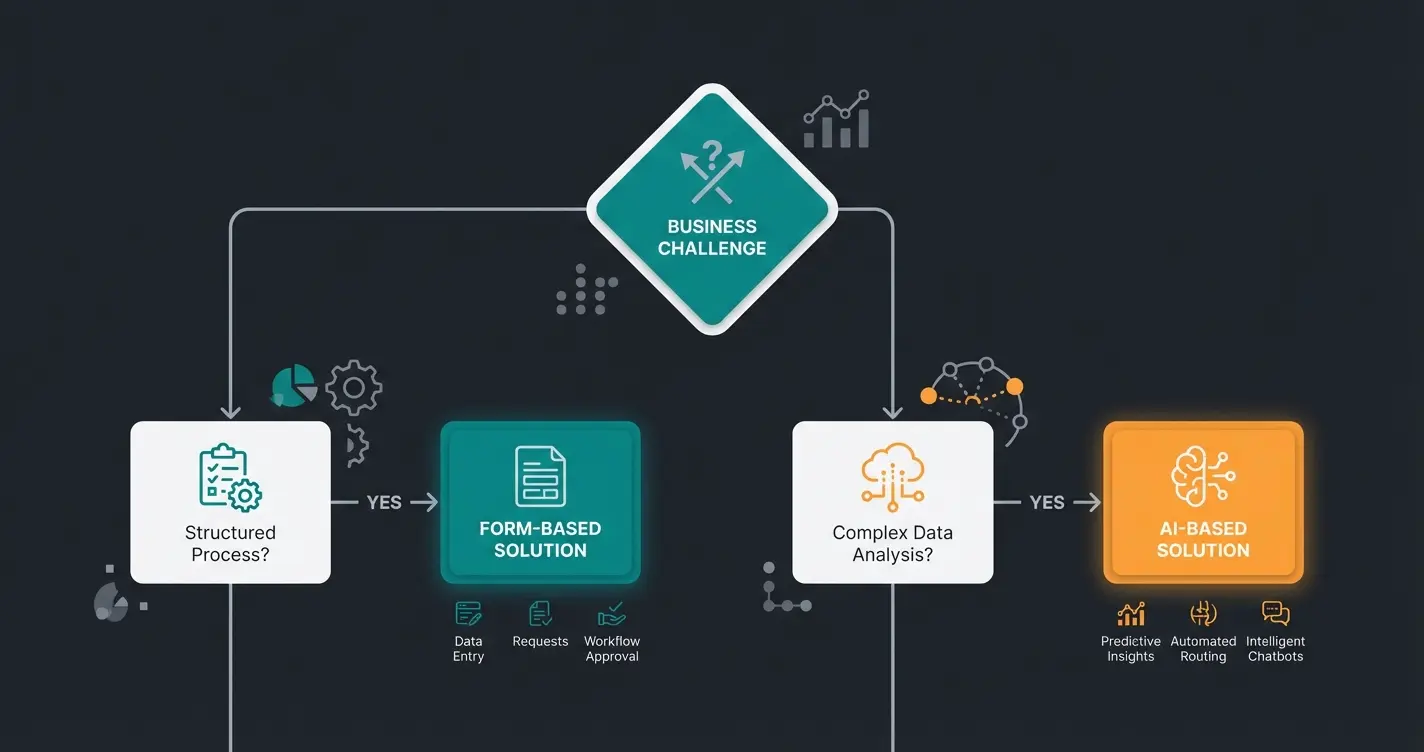
Use this simple decision framework to determine the right approach for your business:
Choose Typeform Integration If:
- You're collecting simple feedback (NPS scores, satisfaction surveys)
- Your questions have definitive multiple-choice answers
- You don't need to provide personalized advice based on responses
- GDPR compliance is manageable (Enterprise plan or proper consent flows)
- Data collection volume is low enough that manual review is feasible
Choose AI Consultation If:
- Your product requires explanation or customization
- Customers ask follow-up questions about recommendations
- You need to handle edge cases and unique requirements
- Lead qualification requires understanding context and nuance
- You want to scale consultation without scaling headcount
Frequently Asked Questions
Technically yes, but only with proper precautions. You need signed DPAs with both providers, explicit user consent before loading the form, and clear disclosure in your privacy policy. For complete peace of mind, consider Typeform's Enterprise plan which offers EU data hosting, though this significantly increases costs.
Intercom's native bots follow pre-programmed decision trees—they can only respond to scenarios you've explicitly configured. AI product consultants understand natural language, analyze context, and provide personalized recommendations even for questions you haven't anticipated. They learn from your product documentation rather than requiring manual flow building.
Typeform integration takes about 15-30 minutes for basic setup. AI consultation solutions typically require 2-4 hours for initial configuration, including training on your product knowledge base. However, AI solutions require significantly less ongoing maintenance since they don't need manual logic jump updates when products change.
Yes, most AI consultation platforms can import historical form responses and chat transcripts to inform their initial training. The transition doesn't require a hard cutover—many businesses run both systems in parallel during migration, gradually shifting traffic to AI consultation as they validate performance.
Initial costs are often higher, but total cost of ownership typically favors AI consultation for businesses with complex products. Consider the hidden costs of Typeform: time spent maintaining logic jumps, manual lead qualification, and lost conversions from customers who abandon linear forms. AI consultation often pays for itself through improved conversion rates within 3-6 months.
Conclusion: When to Use What
The Typeform Intercom integration still has its place. It's the tool of choice when you want to conduct visually appealing surveys (like NPS or feedback), have a defined, short list of questions that don't require consultation, and can ensure the GDPR issue (US servers) is resolved through Enterprise plans or proper consent mechanisms.
However, if your goal is to qualify leads, explain complex products, or offer genuine consultation in chat, then a static form becomes a brake on your conversion rate. In this case, you should take the leap and explore solutions that go beyond mere data collection to bring real intelligence into customer conversations.
Actionable Recommendations
- For Starters: Install the Typeform app in Intercom for simple feedback collection. Monitor GDPR compliance carefully.
- For Professionals: Audit your GDPR compliance thoroughly (server locations, DPAs, consent flows). Consider whether your current approach truly serves complex customer needs.
- For Visionaries: Test an AI consultant approach to transform visitors not just into data records, but into genuine customers who feel understood and advised.
The evolution from static forms to intelligent consultation represents more than a technology upgrade—it's a fundamental shift in how businesses engage with customers. Those who make this transition early will gain significant competitive advantages in customer experience and conversion optimization.
Stop interrogating your customers with static forms. Start genuinely consulting them with AI-powered product recommendations that understand context, answer questions, and drive conversions.
Get Started with AI Consultation