Why the Intercom Zapier Integration Is a Double-Edged Sword
In the modern operations and support landscape, Intercom serves as the heartbeat of customer communication. Yet Intercom alone often remains an island. This is where the Intercom Zapier integration enters the picture—frequently called the "duct tape of the internet" according to eesel.ai. It promises to seamlessly connect Intercom with your CRM, project management tools, and spreadsheets.
For operations managers and support leads, this initially sounds perfect: automate processes, eliminate manual data entry, and save time. And indeed, when you simply want to move an email address from point A to point B, Zapier is brilliant. The platform has become essential for teams looking to streamline their Zapier sales automation workflows.
But there's a problem that hardly anyone discusses openly.
When you try to use Zapier not just for administrative tasks but for genuine customer interactions or product consultation, you risk damaging the customer experience. Why? Because customers in 2025 expect real-time responses—not a 15-minute "polling pause" while Zapier processes data in the background. Additionally, data privacy (GDPR) when transferring customer data through US servers remains a constant headache for legal departments at European companies.
This article isn't your ordinary "how-to" guide. We will:
- Show you exactly how to set up the Zapier Intercom connection in 3 steps (covering the basics)
- Present the best workflows for administrative tasks
- Ruthlessly analyze where the limitations lie (costs, latency, "dumb pipes")
- Demonstrate why a dedicated AI solution is the logical next step for product consultation and complex support
Part 1: Setup – Connecting Intercom with Zapier (Step-by-Step)
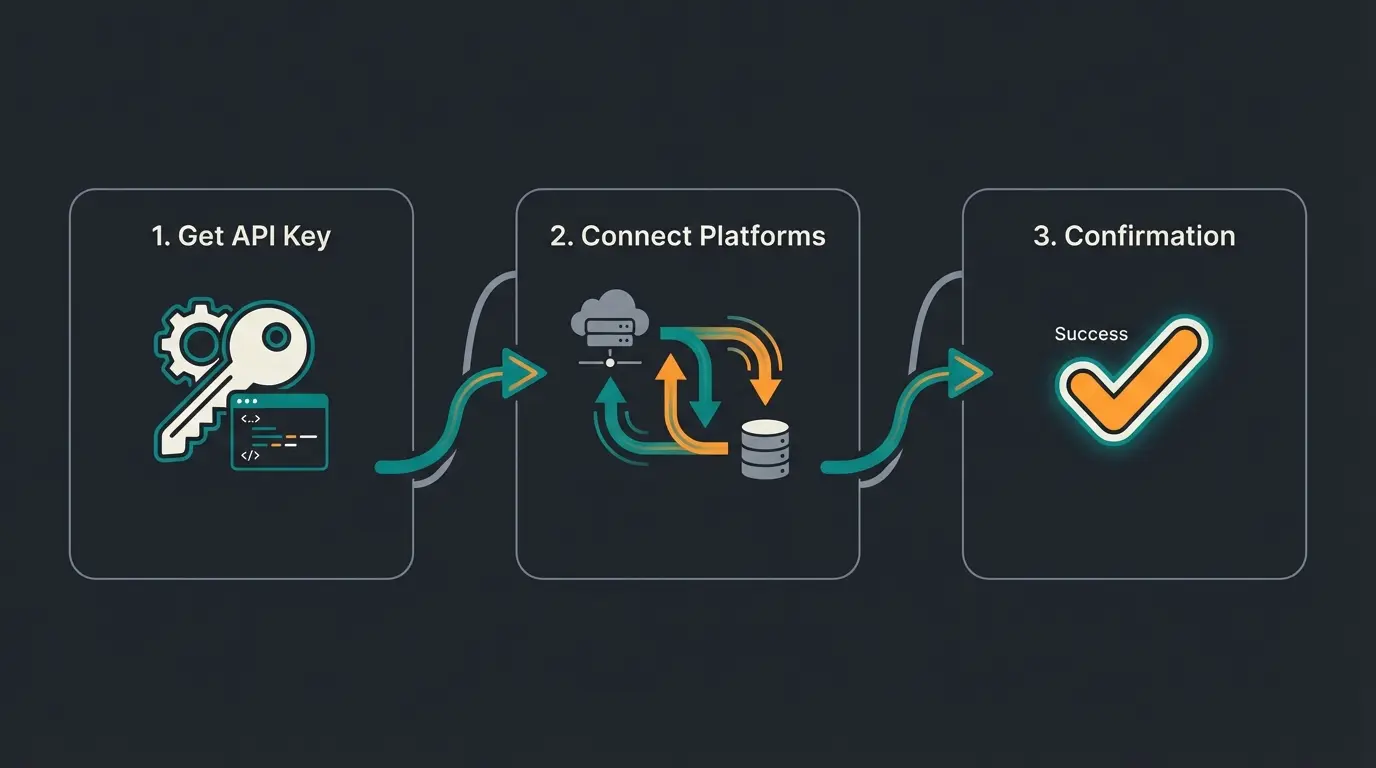
Before we question the strategy, we need to master the fundamentals. Setting up the Intercom Zapier integration is technically straightforward but requires careful attention to permissions. Understanding the Intercom API guide can help you navigate the technical requirements more effectively.
Step 1: Preparation and API Access
To connect Zapier with Intercom, you need an active account with both services.
- Intercom: You need access to the Developer Hub or at least admin rights to approve integrations.
- Zapier: A free account works for getting started, but has limitations (more on that later).
Step 2: Establishing the Connection
Follow these steps to establish your connection according to Intercom's documentation:
- Log into your Zapier dashboard and click on "My Apps"
- Search for "Intercom" and click "Connect"
- A pop-up window opens. Zapier will ask you to log into Intercom and authorize access
- Important for EU users: Pay attention to whether you're prompted to select the correct Intercom region (US, EU, or Australia). If your Intercom workspace is hosted on EU servers (`app.eu.intercom.com`), you must account for this during authentication so API calls are routed correctly
Step 3: The First Test Zap
Create a simple workflow to verify the connection:
- Trigger: "New User in Intercom"
- Action: "Email by Zapier" (Send yourself an email)
- Click "Test Trigger". If Zapier finds a current user from your Intercom database, the connection is established
Part 2: Top 5 Classic Use Cases (Where Zapier Excels)
As long as the goal involves moving structured data from one place to another, Zapier Intercom is a powerful tool. Here are the five most common use cases that make sense for operations teams:
1. Pushing Leads to CRM (HubSpot / Salesforce)
This is the classic workflow that integrates well with your Intercom Salesforce integration. A visitor starts a chat in Intercom and leaves their email address.
- Trigger: `New Lead` or `New User` in Intercom
- Action: `Create or Update Contact` in HubSpot/Salesforce
- Advantage: No more copy-paste by the sales team
- Disadvantage: Duplicate checking must be properly configured
2. Team Notifications in Slack
Important customers shouldn't have to wait. This pairs perfectly with your Intercom Slack integration setup.
- Trigger: `New Conversation` in Intercom
- Filter: Only when user tag contains "VIP" or "Enterprise"
- Action: `Send Channel Message` in Slack
- Benefit: Key account management can react immediately without constantly being logged into Intercom, as noted by Zapier's integration guide
3. Feedback Logging in Google Sheets
For product managers, qualitative feedback is worth its weight in gold.
- Trigger: `Tag Added to Conversation` (e.g., tag "Feature-Request")
- Action: `Create Spreadsheet Row` in Google Sheets
- Benefit: You get a clean table of all feature requests for the next product meeting according to Zapier's documentation
4. Converting Offline Messages to Tickets (Jira / Trello)
When support isn't staffed on weekends.
- Trigger: `New Conversation` (during "Out of Office" hours)
- Action: `Create Issue` in Jira or `Create Card` in Trello
- Benefit: Nothing falls through the cracks when the team returns on Monday
5. Typeform to Intercom
It also works in reverse: qualify users through a form beforehand.
- Trigger: `New Entry` in Typeform
- Action: `Create/Update User` in Intercom
- Benefit: When the user later opens the chat, the agent already has all context data from the form available
Part 3: The "Zapier Trap" – Why Automation Doesn't Equal Consultation
Up to this point, everything sounds fantastic. But the customer communication landscape has changed dramatically. Customers don't just want to be "managed"—they want to be consulted. And this is precisely where the classic Intercom Zapier integration fails. For advanced support capabilities, exploring Intercom support bot solutions becomes essential.
When you try to use Zapier to substantively answer customer questions or provide complex product recommendations, you run into three massive problems.
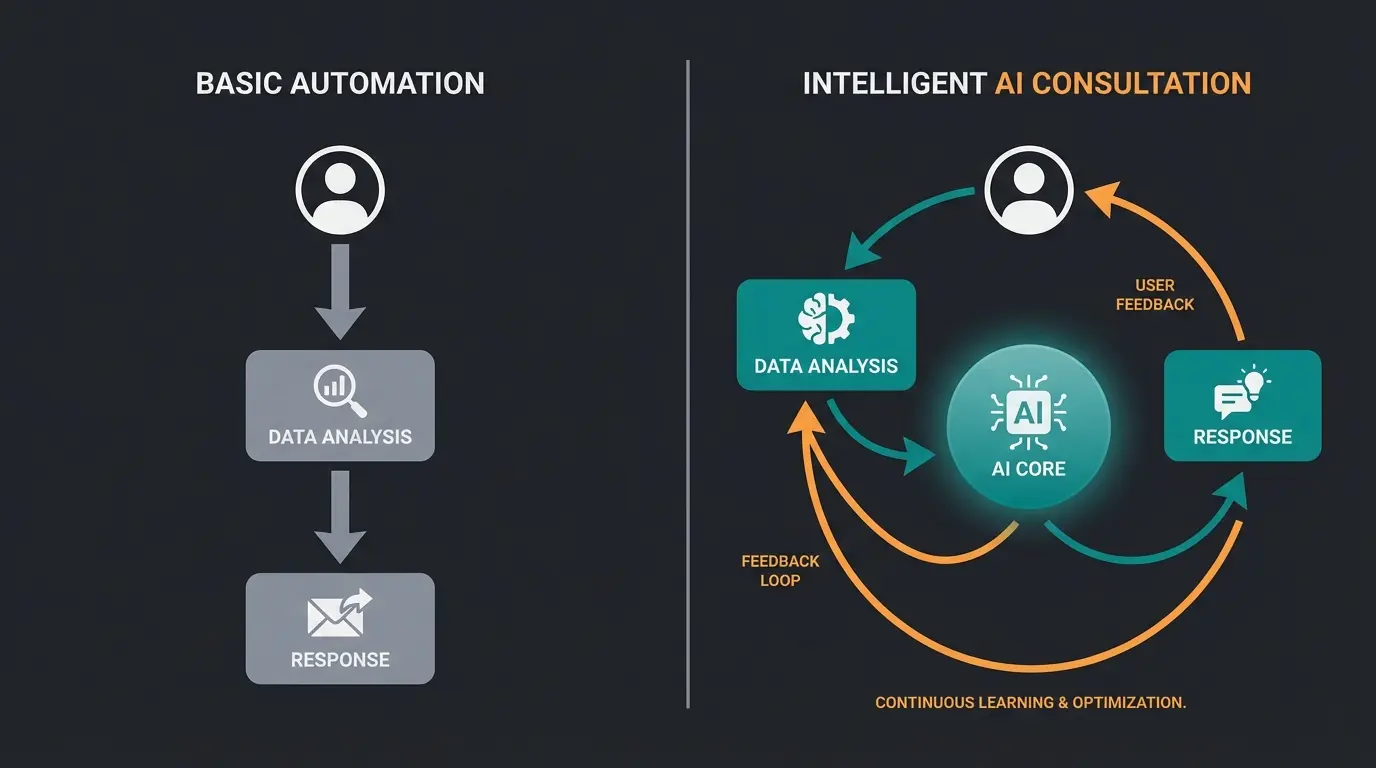
1. The "Dumb Pipes" Problem
Zapier excels at transporting data. It's a logistics company, not a consultant.
- Reality: Zapier sees: "New text from customer." It doesn't understand: "Customer is frustrated because the package is missing" vs. "Customer is happy and wants to upgrade."
- Consequence: You can only build rigid rules ("If message contains word 'price', send price list"). This feels robotic and often misses the customer's intent. True product consultation requires contextual understanding that Zapier simply lacks.
2. The Latency Trap (The Polling Delay)
This is the most technically critical point for live chats.
How Zapier works: Most triggers are based on "polling." This means Zapier periodically checks with Intercom and asks: "Anything new?"
According to luhhu.com and clickleo.com, the delays are significant:
- Free / Starter Plan: Every 15 minutes
- Professional Plan: Every 2 minutes
The scenario: A customer asks about a product in the chat. Zapier notices the question 14 minutes later and then triggers a response.
Result: The customer is long gone. In e-commerce or SaaS support, 15 minutes of waiting time in a "live chat" is completely unacceptable. As Zapier's own documentation confirms, instant triggers require premium plans.
User asks product question in Intercom chat
15-minute wait on basic plans (customer may leave)
Zapier finally detects the new message
Automated response arrives too late
3. The Cost Explosion (Task Volume)
Many companies underestimate the costs of deep integration, as detailed by Zapier's pricing page. Zapier charges by "tasks."
Calculation: A single intelligent workflow often consists of multiple steps:
- Trigger (customer writes)
- Filter (Is this a VIP?)
- Formatter (clean up text)
- Search (find customer in CRM)
- Action (send response)
The result: A single conversation can consume 4-5 tasks. With 1,000 conversations per month, that's 5,000 tasks.
Costs: While the Starter plan appears affordable, at high volume you quickly land in the "Team" or "Company" plan, which can cost hundreds of dollars per month according to concepttodone.com, lindy.ai, and activepieces.com.
A single complex workflow consumes multiple tasks
On Free/Starter plans, unacceptable for live chat
Moving from Starter to Team plan as volume grows
Part 4: The European Context – GDPR and Server Locations
For companies in the EU region, the Intercom Zapier integration is not just a technical question but also a legal one. Understanding AI consulting in e-commerce regulations becomes crucial for compliance.
The "Data Hop" Problem
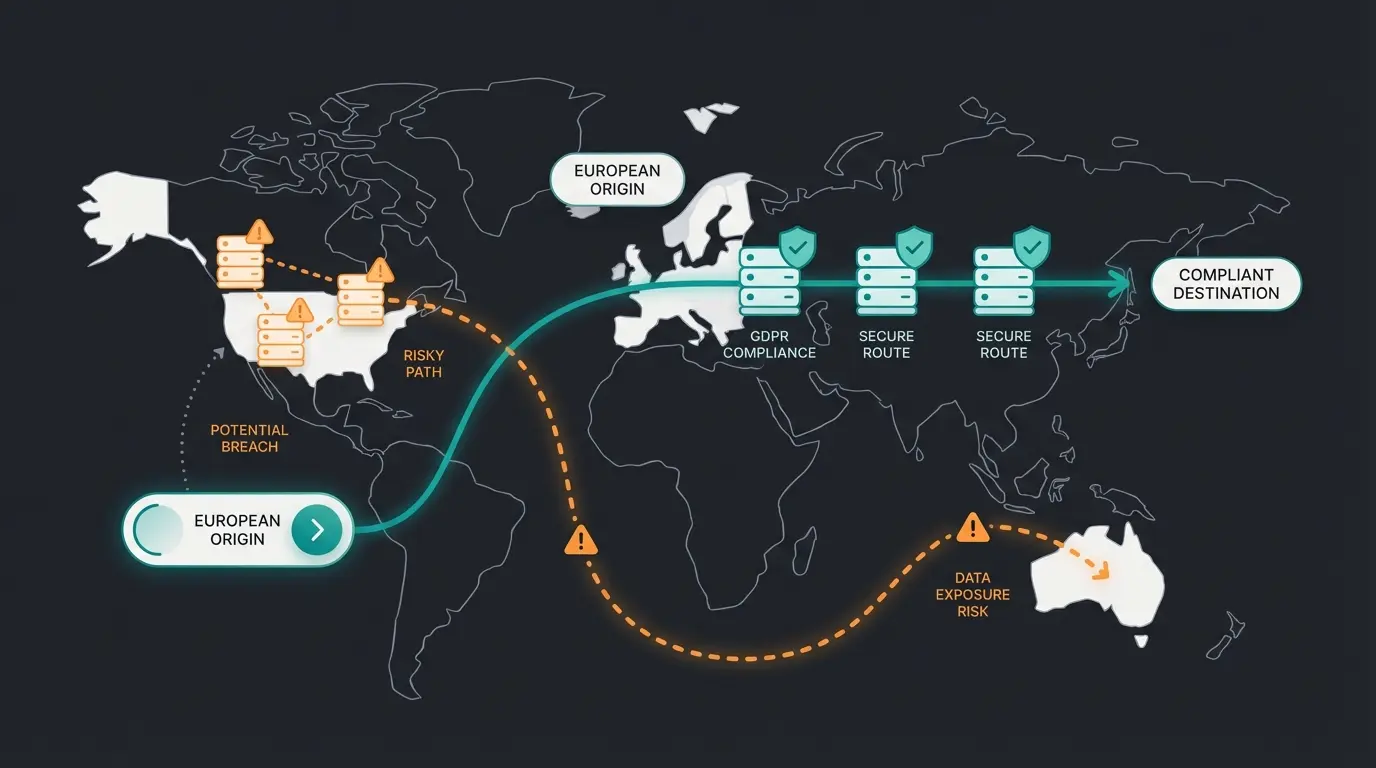
When you connect Intercom (EU servers) with Zapier, data often leaves the secure legal jurisdiction.
- Intercom: Offers EU hosting (`app.eu.intercom.com`). Your data is securely stored in Ireland according to eesel.ai's analysis.
- Zapier: Hosts data primarily on AWS servers in the USA as confirmed by saas.do and Zapier's privacy documentation.
- Destination App: When you then push data back to a European tool, the data has still crossed the Atlantic once.
While Zapier is part of the Data Privacy Framework (DPF) according to dataprivacyframework.gov, many European data protection officers still view the transfer of personal customer data (PII) to the USA critically (keyword: Schrems II aftermath).
Part 5: The Better Way – AI Product Consultation Instead of Linear Automation
When your goal isn't just "moving data" but "helping customers," you need to make the leap from automation (Zapier) to intelligence (AI). Implementing AI customer service solutions represents this evolution.
This is where modern AI solutions (such as specialized agents) come into play. They're not "dumb pipes" but "intelligent consultants." When comparing options, it's worth exploring Intercom Fin alternatives to understand the full landscape.
How AI Solves the "Zapier Problem"
1. Context Instead of Keywords
An AI agent analyzes the entire thread and your knowledge base. This approach aligns with modern AI product consultation best practices.
- Zapier: Reacts to the keyword "invoice"
- AI: Reads: "I haven't received my invoice even though payment was debited." -> The AI understands it's about a missing invoice, checks the status, and responds empathetically instead of just sending a link to the FAQs
2. Real-Time Instead of Polling
AI integrations that live directly within Intercom (native integrations) have no polling delay. They "read along" as the customer types and can respond immediately (or with a human-like delay). The 15-minute gap disappears entirely.
3. Knowledge Integration (Knowledge Base)
Zapier cannot read documents. An AI solution indexes your entire documentation:
- Confluence
- Notion
- Google Docs
- Intercom Help Center
When a customer asks a question, the AI "knows" the answer because it has "read" your documents. Zapier can only copy data but cannot apply knowledge, as noted by eesel.ai. This makes a significant difference for AI chatbot integration capabilities.
4. GDPR Compliance Through EU Hosting
Specialized European AI providers or those focused on compliance often offer guaranteed EU Data Residency according to eesel.ai's compliance page, Intercom's help documentation, and additional compliance sources.
- Data is processed in Frankfurt or Dublin
- No transfer to the USA
- This is a massive selling point for the data protection officer
Stop losing customers to 15-minute response delays. Our AI product consultant provides instant, context-aware responses while keeping your data GDPR compliant.
Start Your Free TrialPart 6: Comparison – Zapier vs. AI Consultant
To help you decide, here's a direct comparison. When should you stick with the classic Intercom Zapier integration, and when does switching make sense? For a broader perspective on customer support tools, check our Intercom comparison guide.
| Criteria | Zapier + Intercom | AI Consultant Solution |
|---|---|---|
| Primary Purpose | Move data (Admin & Ops) | Answer customer questions (Support & Sales) |
| Response Time | 1-15 minutes (polling delay) | Instant / Real-time |
| Intelligence | "If this, then that" (Linear) | Understands context, sentiment & nuances |
| Knowledge Base | None (cannot read docs) | Indexes Confluence, Notion, PDFs, etc. |
| Setup | Medium (requires logic understanding) | Easy (One-click connect & indexing) |
| Cost at Scale | High (pay-per-task) | Often flat rate or per conversation (more predictable) |
| Data Privacy (EU) | Servers mostly USA (data transfer required) | Often EU hosting option available |
The Verdict
- Stick with Zapier if: You want to optimize internal processes (e.g., "Send every new lead to a Google spreadsheet"). Zapier is unbeatable here.
- Switch to AI if: You want to automate customer inquiries (e.g., "Which product suits me?" or "How do I reset Feature X?"). Zapier is too slow and too "dumb" for this purpose.
Conclusion: The Right Tool Choice Makes All the Difference
The Intercom Zapier integration is a fantastic tool for your company's engine room. It keeps your databases synchronized and informs your team. But it doesn't belong on the front lines of customer communication.
Attempting to build a "support bot" with Zapier often leads to frustrated customers (due to wait times and wrong answers) and high bills (due to exploding task volumes). For more sophisticated solutions, consider implementing a proper Chatbot integration solution.
When you're ready to transform your Intercom chat from a mere inbox into a proactive product advisor, the path through a dedicated AI solution is the logical step. You'll not only get happier customers through real-time responses but also sleep better knowing your data (with the right provider) doesn't leave EU jurisdiction.
Next Steps
- Audit your current Zapier workflows: Which serve only data transfer (keep) and which attempt to answer customers (replace)?
- Test an AI solution that can use your existing knowledge base (Notion/Confluence)
- Review the GDPR settings of your integrations to avoid unpleasant surprises
FAQ: Intercom Zapier Integration Questions
Basic setup takes 10-15 minutes. You'll need admin access to both platforms, and the process involves authorizing Zapier to access your Intercom workspace. However, building effective workflows with proper filters and multi-step actions can take several hours to configure and test properly.
The three biggest limitations are: 1) Polling delays of 1-15 minutes depending on your plan, making it unsuitable for real-time chat; 2) Linear "if-then" logic that can't understand context or sentiment; and 3) Escalating costs as each workflow step counts as a task, potentially consuming 4-5 tasks per conversation.
While both platforms offer GDPR compliance features, data transferred through Zapier typically routes through US servers. Even with Intercom's EU hosting option, the integration creates a "data hop" to US infrastructure. For strict GDPR compliance, consider AI solutions with guaranteed EU data residency that eliminate this intermediate transfer.
Use Zapier for backend administrative tasks: syncing leads to CRMs, logging data in spreadsheets, sending team notifications, and creating tickets. Switch to AI for any customer-facing automation where response time, context understanding, and conversation quality matter—particularly product consultation, complex support queries, and sales inquiries.
Zapier's free plan includes 100 tasks/month with 15-minute polling intervals. For active businesses, you'll likely need the Team plan ($299+/month) for faster polling and more tasks. With each conversation potentially consuming 4-5 tasks, 1,000 monthly conversations could cost $200-500+ depending on workflow complexity.
Discover how AI-powered product consultation delivers instant, intelligent responses without GDPR concerns. Transform your Intercom from a simple inbox to a revenue-generating advisor.
Get Started FreeDisclaimer: This article is for informational purposes and does not constitute legal advice, particularly regarding GDPR. Please consult your data protection officer for binding statements.