Key Points: What You Need to Know First
Strategic Shift: Simply synchronizing inventory is no longer enough in 2025. Successful merchants use AI not only to transfer product data but to optimize it for the marketplace and answer customer inquiries automatically. This represents a fundamental change in how we approach Shopware multi channel strategy and marketplace integration.
Legal Requirements: The German market demands specific adaptations for your WooCommerce eBay integration. Topics like the Base Price Ordinance (PAngV) and the Platform Tax Transparency Act (PStTG) are critical stumbling blocks that standard plugins often inadequately explain. According to anwalt.de, compliance failures can result in significant fines.
Technology Update: eBay has introduced new APIs in 2025 (such as the Inventory Mapping API), which favor AI-powered listings. As reported by eBay's developer documentation, anyone still working manually here loses visibility in search results.
Solution Path: This article guides you from the technical foundation ('The Plumbing') through legal protection ('The German Hurdle') to an intelligent sales strategy ('The AI Consultant'). Whether you're evaluating WooCommerce vs Shopify or already committed to WooCommerce, this guide provides actionable insights.
Why Synchronization Alone Is No Longer Enough
For most online merchants, connecting WooCommerce and eBay is a purely logistical necessity. You don't want to manually reconcile inventory when an item sells in your shop, and you don't want to manually transfer orders to your warehouse management system. That's understandable, but in 2025, this perspective is dangerously short-sighted.
E-commerce has evolved. While standard plugins (the 'plumbers' of the internet) reliably shovel data from A to B, they often ignore the most important factor: The customer and the algorithm.
In Germany, there's an additional layer of complexity: Legal certainty. One wrong checkbox in your WooCommerce eBay connector, and the base price is missing—a feast for warning associations. One forgotten field in the backend, and the data for the tax office (PStTG) doesn't match the eBay reports. According to gtkp.de, these compliance issues have led to numerous legal disputes.
This guide is not a simple 'installation tutorial.' It's a strategic roadmap for merchants who use WooCommerce as their hub but want to unlock eBay as a full-fledged, intelligent sales channel. We're moving away from pure 'Multichannel Listing' toward 'Multichannel Intelligence.' This approach aligns with modern AI consulting e-commerce strategies.
Time-consuming manual data transfer, high error rate, delayed inventory updates
Automated stock and price sync, but static content and no intelligent optimization
Dynamic listing optimization, automated customer consultation, predictive inventory management
The Technical Foundation: How Modern Connectors Work
Before we turn to intelligent strategies, we need to understand the foundation. A solid WooCommerce eBay integration is based on three indispensable pillars. If any of these pillars wobbles, you risk overselling or margin losses.
1. Inventory Synchronization (Inventory Sync)
This is the absolute minimum. When you sell the last item in your WooCommerce shop, the eBay listing must be ended or paused within minutes (or seconds). According to linnworks.com, real-time synchronization is essential for high-volume sellers.
- Challenge: Many cheap plugins only synchronize every 15-30 minutes (cron-job based). During high-traffic events (Black Friday), this leads to 'overselling.'
- Best Practice: Use solutions that support real-time updates or very frequent intervals (every minute).
2. Price Synchronization & Margin Control
You shouldn't charge the same price on eBay as in your shop. eBay charges selling fees (typically around 11% + fixed), and shipping costs often need to be factored in.
- The 'Dumb Pipe' Method: Simply mirror the WooCommerce price 1:1. This destroys your margin.
- The Smart Method: Use price rules (e.g., `Woo price + 15%` or `Woo price + €2`). Professional WooCommerce eBay connectors allow different pricing strategies per category.
3. Order Import & Status Synchronization
Orders generated on eBay must be created in WooCommerce as 'orders' so your accounting and shipping processes (e.g., DHL label creation) run centrally.
Mini-Tutorial: The API Connection (M2M Keys)
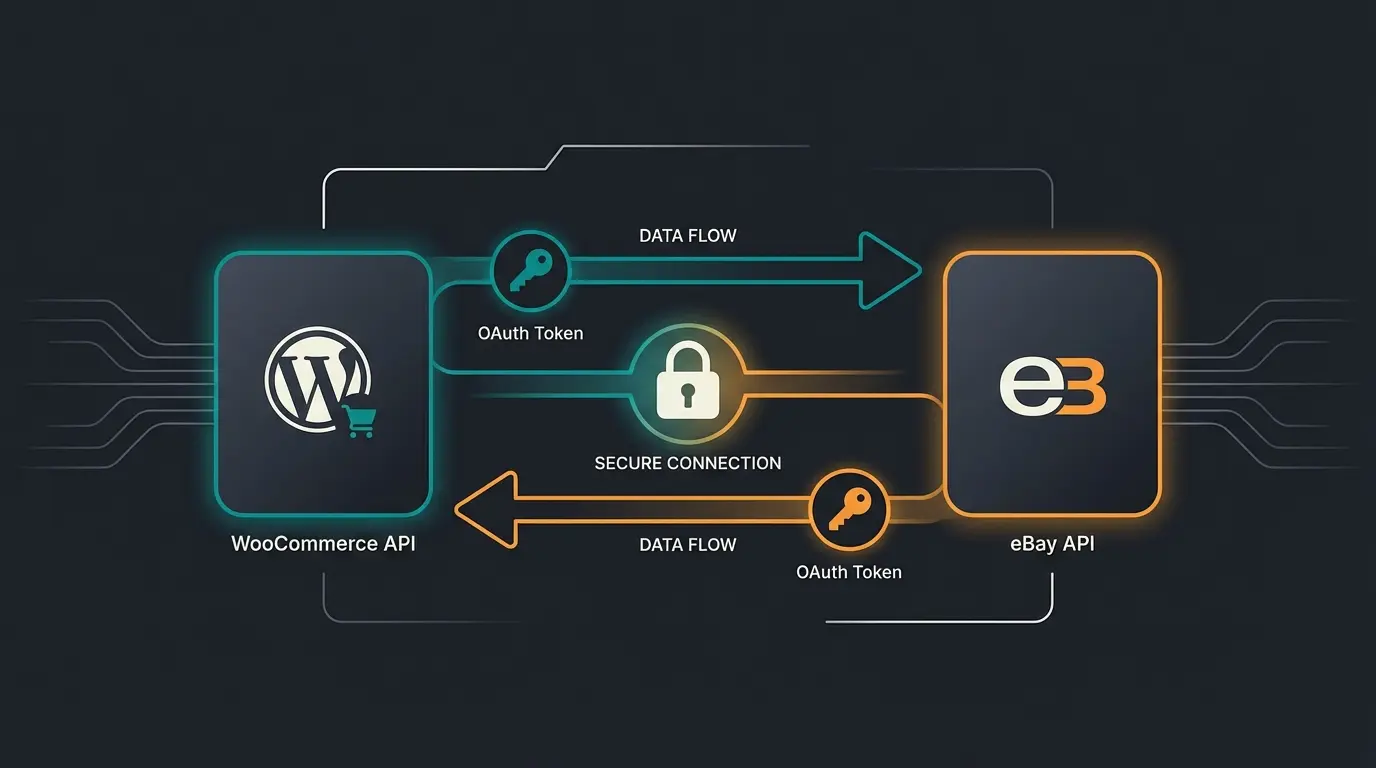
Whether you use Magnalister, WP-Lister, or a custom solution, the connection today almost always runs through the modern eBay REST API. According to eBay's official documentation, the authentication process has been streamlined.
- Developer Account: Plugins usually direct you straight to eBay Login (OAuth).
- Token Validity: Previously, tokens often expired after 18 months. Modern integrations use 'Refresh Tokens' that renew automatically. If your connection suddenly breaks, an outdated token is often the culprit.
- Environment: Make sure you select 'Production' (Live) in the plugin, not 'Sandbox' (Test environment), unless you're a developer.
The German Hurdle: Legal Compliance & Tax Pitfalls
This is where most international plugins fail. A US plugin developer doesn't understand why a missing base price in Germany can cost €1,000. Here are the critical points for the German market—essential knowledge for anyone considering their Shopware Amazon integration or any marketplace expansion.
1. The Base Price Problem (PAngV)
Anyone selling coffee, oil, cleaners, or other goods by weight or volume must display the base price (price per 100g/1kg/1l) on eBay.
The Problem: In WooCommerce, you often use plugins like Germanized or German Market to store base prices (`pa_base_price`). Standard connectors like the simple WP-Lister (Free Version) often don't automatically recognize these special German fields.
The Solution: You must ensure the plugin passes the `UnitQuantity` and `UnitType` fields to the eBay API. As detailed in eBay's listing guidelines, proper field mapping is essential.
2. PStTG (Platform Tax Transparency Act)
Since 2023 (with reports from 2024/2025), eBay is legally required to report your revenues to the Federal Central Tax Office (BZSt). According to kleinanzeigen.de, this applies to various online platforms.
- The Threshold: As soon as you make 30 sales OR achieve €2,000 revenue in the calendar year, it gets reported.
- The Danger: If you cancel orders in WooCommerce but this cancellation doesn't transfer cleanly to eBay (or eBay doesn't refund the fees), a discrepancy arises. The tax office sees the eBay report (higher revenue) and your tax return (lower revenue).
- Strategy: Use a WooCommerce eBay interface that cleanly synchronizes cancellations and returns ('Order Status Sync') so that the data stocks remain identical.
3. Legal Texts: Terms & Conditions and Right of Withdrawal
A fatal mistake is simply copying the terms and conditions from your online shop into the eBay description field.
- Withdrawal Period: On eBay, many merchants offer 1 month withdrawal (to obtain Plus status), while in the shop often only 14 days. If you copy the text, you contradict yourself -> Warning risk.
- Imprint: eBay has specific fields for the imprint ('Seller's Legal Information'). These must be maintained in the eBay account settings, not in the item description.
- Tip: Use interfaces from IT-Recht Kanzlei or Händlerbund, which can often push legal texts directly via API to eBay, independent of the WooCommerce connector.
| Area | Check Item | Priority |
|---|---|---|
| Legal | Imprint stored in eBay account settings (not just text)? | Critical |
| Legal | Withdrawal notice differs correctly (1 month vs 14 days)? | Critical |
| Legal | Base price (e.g., €/100g) displayed directly under the price? | Critical |
| Tax | VAT rates (OSS procedure) match? | High |
| Tax | Cancellations correctly recorded (PStTG reporting)? | High |
| Sync | Inventory synced in real-time (< 15 min)? | High |
| Quality | All eBay mandatory characteristics (Item Specifics) filled? | Medium |
| Strategy | Using different prices for eBay (securing margin)? | Medium |
The Quality Problem: Why Syncing Isn't Selling
If you've completed points II and III, your products are on eBay. But are they actually selling?
Most merchants use their WooCommerce product description 1:1 for eBay. From an SEO perspective, this is often a mistake. Understanding these differences is crucial, similar to how AI sales agents approach different channels.
- Google vs. eBay Cassini: In your shop, you write for Google (long texts, storytelling). On eBay, the 'Cassini' algorithm counts (hard facts, 'Item Specifics', attributes).
- The 'Consultation Gap': The biggest untapped potential lies in communication. A customer on eBay often doesn't read the entire description. They have a question: 'Does this part fit model XY too?' or 'Is the material weatherproof?'
Standard connectors are 'mute.' They upload the product and then remain silent. Here, a gap emerges between mere listing (logistics) and consulting (sales). This is where an AI product consultant can make all the difference.
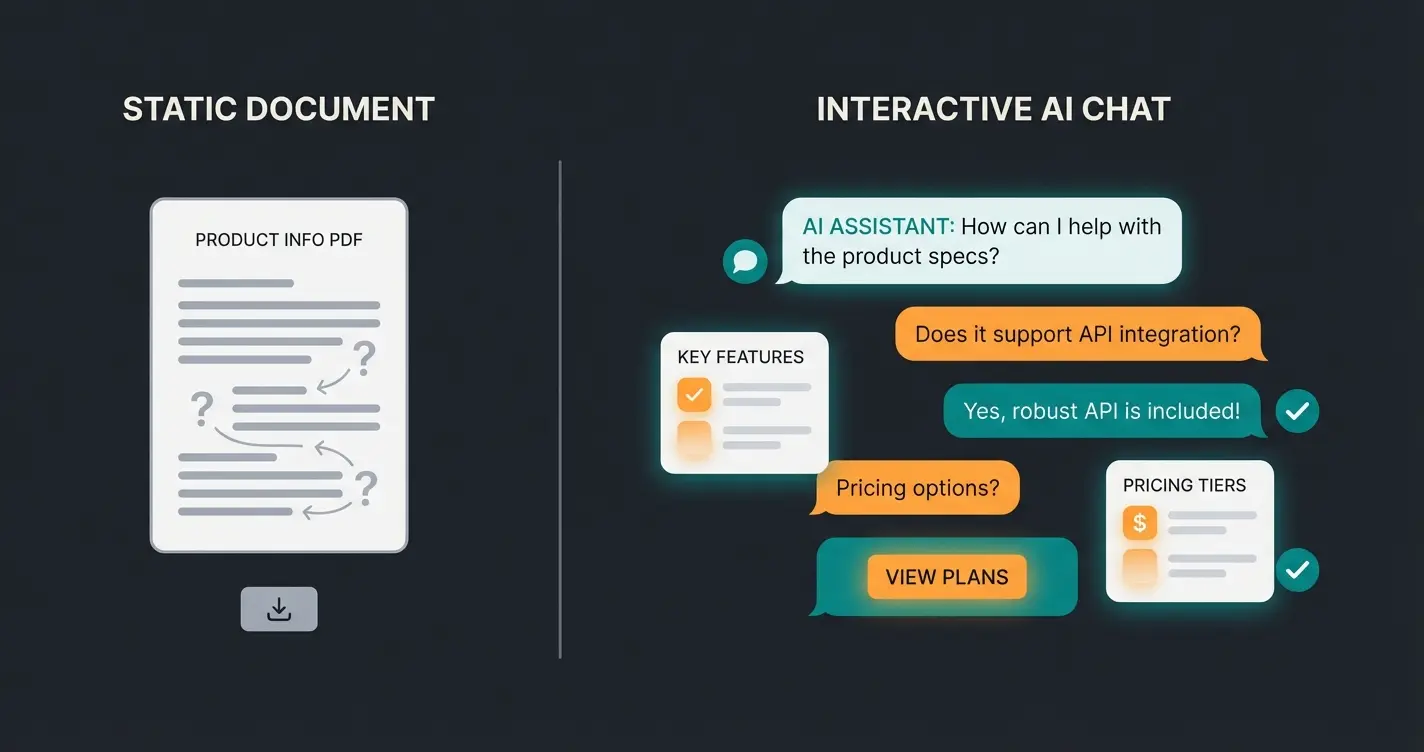
Stop just listing products—start intelligently consulting customers. Our AI-powered solution answers buyer questions automatically using your WooCommerce data.
Get Started FreeThe Solution: AI-Driven Product Consultation
2025 marks the transition from static interfaces to intelligent assistants. eBay itself has recognized this and introduced the Inventory Mapping API, which uses AI to better understand product data. As detailed in eBay's API documentation, this represents a major shift in how listings are processed. As a WooCommerce merchant, you should adapt this trend—similar to how businesses approach AI product consultation.
1. The Smart Assistant Instead of Dumb Pipe
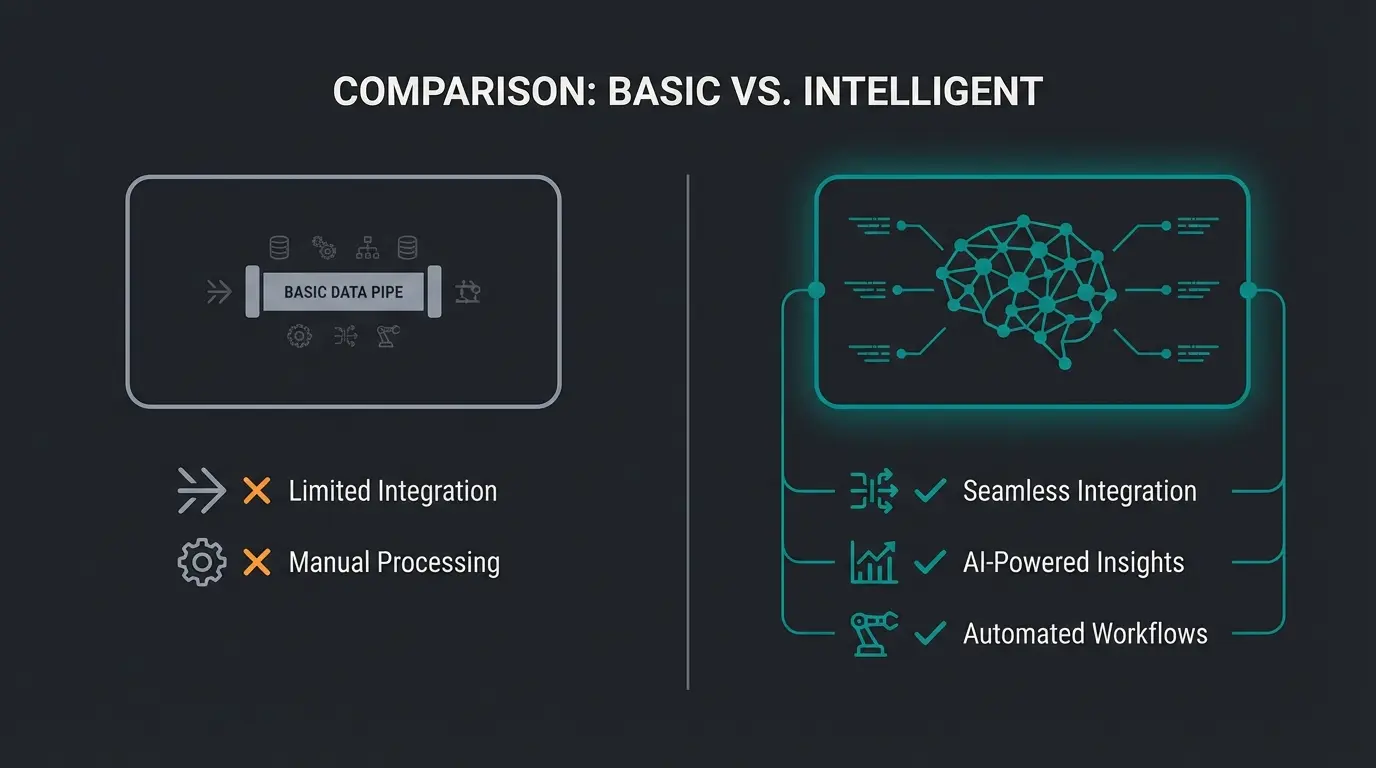
Think of your WooCommerce eBay integration no longer as a pipeline, but as an employee.
Data Enrichment: An AI can analyze your WooCommerce description and automatically supplement missing eBay attributes ('Item Specifics'). If the text says 'summery linen shirt,' the attribute `Material: Linen` and `Season: Summer` should be automatically set for eBay. This massively increases visibility, as eBay users search via filters.
2. Consultation vs. Description
Here lies your competitive advantage. Instead of just sending data, use AI (e.g., integrated into modern helpdesk tools or advanced connectors) to utilize WooCommerce data for answers. This approach mirrors the success seen in AI product consultation case studies.
3. Agentic AI: The Future of Automation
eBay already speaks of 'Agentic AI,' meaning AI agents that act proactively. This is demonstrated in YouTube presentations from eBay's developer conferences. This aligns with how AI chatbots transform customer interactions across all channels.
- Price Adjustment: The AI recognizes that a competitor on eBay has lowered their price, checks your margin in WooCommerce (based on purchase prices), and suggests an adjustment.
- Listing Optimization: The AI notices that a title on eBay generates no clicks and rewrites it based on successful keywords, without you having to change the master data in WooCommerce.
AI-optimized titles generate significantly more clicks than manual listings
Automated AI responses vs manual customer service
Complete Item Specifics through AI auto-tagging improve conversion
Reduction in manual listing optimization work
Comparison: Standard Plugins vs. Next-Gen Solutions
Which tool fits your strategy? Here's a comparison of market leaders and the new generation. This comparison is essential for making informed decisions, similar to evaluating AI product consultation options.
| Feature | Magnalister | WP-Lister Pro | Next-Gen AI Integration |
|---|---|---|---|
| Type | Cloud Connector (SaaS) | WordPress Plugin | Hybrid AI Solution |
| Cost | From ~€49/month (ongoing) | ~$149/year (one-time/annual) | Variable (often SaaS) |
| Inventory Sync | ✅ Yes (Reliable) | ✅ Yes (Real-time possible) | ✅ Yes |
| Order Import | ✅ Yes | ✅ Yes | ✅ Yes |
| Legal Text Sync | ⚠️ Limited (manual assignment) | ⚠️ Manual via Templates | ✅ Context-Aware |
| Base Price Mapping | ✅ Yes (config required) | ⚠️ Often complex (shortcodes) | ✅ Automatically detected |
| Product Consultation | ❌ No (Static) | ❌ No (Static) | ✅ AI Chat / Q&A |
| Data Enrichment | ❌ Manual (Matching) | ❌ Manual | ✅ Auto-Tagging via AI |
| Target Audience | Mid-market needing support | DIY pros & agencies | Growth-oriented merchants |
Our Assessment
Magnalister is the market leader in Germany. Solid, more expensive, but with good support for German issues. According to magnalister.com, they support over 15 marketplaces.
WP-Lister is powerful but requires more technical understanding. The 'Pro' version is mandatory for variant articles. As noted by wpshop.net, it's particularly popular among WordPress developers.
AI Solutions are still new, but tools building on the eBay Inventory Mapping API will dominate the market in 2025, as they qualitatively improve listings, not just copy them. This aligns with how AI sales consultant tools are reshaping the industry.
Step-by-Step: How to Get Started Right
If you want to start today, follow this process to avoid technical and legal errors.
Step 1: Preparation in WooCommerce
- Check SKUs: Every item and every variant must have a unique article number (SKU). No SKU, no sync.
- Clean up attributes: Make sure color, size, and material are created as real WooCommerce attributes, not just in free text.
Step 2: The Connection (Setup)
- Install the plugin of your choice (e.g., Magnalister or WP-Lister).
- Connect the eBay account (OAuth Login).
- Important: Select the correct eBay marketplace (ebay.de for Germany, ebay.com for US).
Step 3: The German Mapping
- Go to the category settings of the connector.
- Map your WooCommerce categories to the eBay categories.
- Base Price Check: Search in the settings for 'Item Specifics' or 'Characteristics'. Link `Unit Quantity` with your Woo field for quantity (e.g., `_unit_amount`) and `Unit Type` with the unit (e.g., `_unit_product`).
Step 4: Template & Design
Don't use wild HTML templates anymore. eBay prefers 'Mobile Responsive' designs.
- Avoid 'Active Content' (JavaScript is forbidden on eBay).
- Keep the template clean: Logo, short description, properties.
Step 5: The Test Upload
Upload one item. Check immediately on eBay:
- Is the base price displayed?
- Is the VAT correct?
- Are the shipping conditions correct (withdrawal notice)?
Conclusion: From Logistics to Intelligence
Connecting WooCommerce and eBay in 2025 is no longer a pure IT task, but a management task. Those who only shovel data lose to merchants who optimize their listings using AI and are legally sound.
The key differentiator isn't the plugin you choose—it's the strategy behind it. Standard connectors handle the plumbing, but intelligent solutions handle the sales. As you've seen throughout this guide, the shift from 'Multichannel Listing' to 'Multichannel Intelligence' requires three pillars:
- Technical Foundation: Reliable real-time synchronization of inventory, prices, and orders
- Legal Compliance: Proper handling of German-specific requirements (base prices, PStTG, legal texts)
- AI Enhancement: Automated data enrichment, listing optimization, and customer consultation
Use the checklist above to verify your status quo. Whether you use an established tool like Magnalister or opt for new AI-powered solutions depends on your budget. The important thing is: Data sovereignty should always remain in your WooCommerce shop.
Frequently Asked Questions
For the German market, Magnalister is often the first choice due to good coverage of German legal requirements (base prices, VAT). WP-Lister Pro is a more cost-effective, powerful alternative for technically savvy users. However, for 2025 and beyond, AI-enhanced solutions that build on eBay's Inventory Mapping API offer the most growth potential.
Since the PStTG (Platform Tax Transparency Act), eBay automatically reports your revenues to the BZSt when you make more than 30 sales or €2,000 revenue per year. You must ensure that your accounting exactly matches this data. Any discrepancies between your WooCommerce records and eBay's reports can trigger an audit.
You must pass the fields `UnitQuantity` (quantity, e.g., 0.5) and `UnitType` (unit, e.g., kg) via API to eBay. In plugins like WP-Lister or Magnalister, these fields often need to be manually assigned to the corresponding WooCommerce attributes (e.g., from Germanized). Without this mapping, your listings violate German price ordinance (PAngV).
Yes, eBay has offered the 'Inventory Mapping API' since 2025, which uses AI. Additionally, there are third-party tools that analyze WooCommerce product descriptions using AI and automatically fill in the 'Item Specifics' (characteristics) important for eBay to increase visibility. These AI tools can also auto-generate optimized titles and answer customer questions automatically.
Standard connectors are 'dumb pipes'—they reliably move data from WooCommerce to eBay but don't optimize it. AI-enhanced integrations act as 'smart assistants' that analyze your product data, automatically enrich missing attributes, optimize listings for eBay's algorithm, and can even answer customer questions using your WooCommerce product information.
Stop treating eBay as just another listing channel. Start leveraging AI to optimize listings, automate customer consultation, and maximize your marketplace revenue.
Start Your Free Trial