The Evolution of Shopware Plugin Development in 2025
Shopware plugin development has undergone a dramatic transformation in recent years. Anyone thinking about extensions for Shopware 6 today can no longer focus solely on PHP classes, Twig templates, and database migrations. We're in 2025—an era where e-commerce no longer just means "product availability" but intelligent, digital consultation.
In the past, the goal of a plugin was often simple: create an interface to the ERP, add a field in the checkout, or install a slider in the frontend. Today, we face a new challenge. Shop operators and customers expect intelligence. They expect a shop not just to list products but to advise them—similar to a good salesperson in a physical store. This shift fundamentally changes how developers approach Shopware AI power and integration.
In this comprehensive guide, we'll examine Shopware plugin development from a modern perspective. We'll look at the technical foundations of Shopware 6.6 and 6.7, analyze the "make or buy" decision considering current agency hourly rates, and demonstrate why the future of plugin development lies in hybrid AI architectures.
Technical Foundations: How Shopware 6 Plugins Work
To understand the strategic decisions involved, we must first look under the hood. Even though AI and cloud apps dominate the market, understanding the core architecture remains essential for any Shopware plugin development project.
Architecture: Plugin System vs. App System
Since Shopware 6.4, and reinforced with updates to 6.6, there are two dominant paths for building extensions. Choosing between these two is the first step in every development project. According to webiprog.de, understanding these fundamental differences is critical for long-term maintainability.
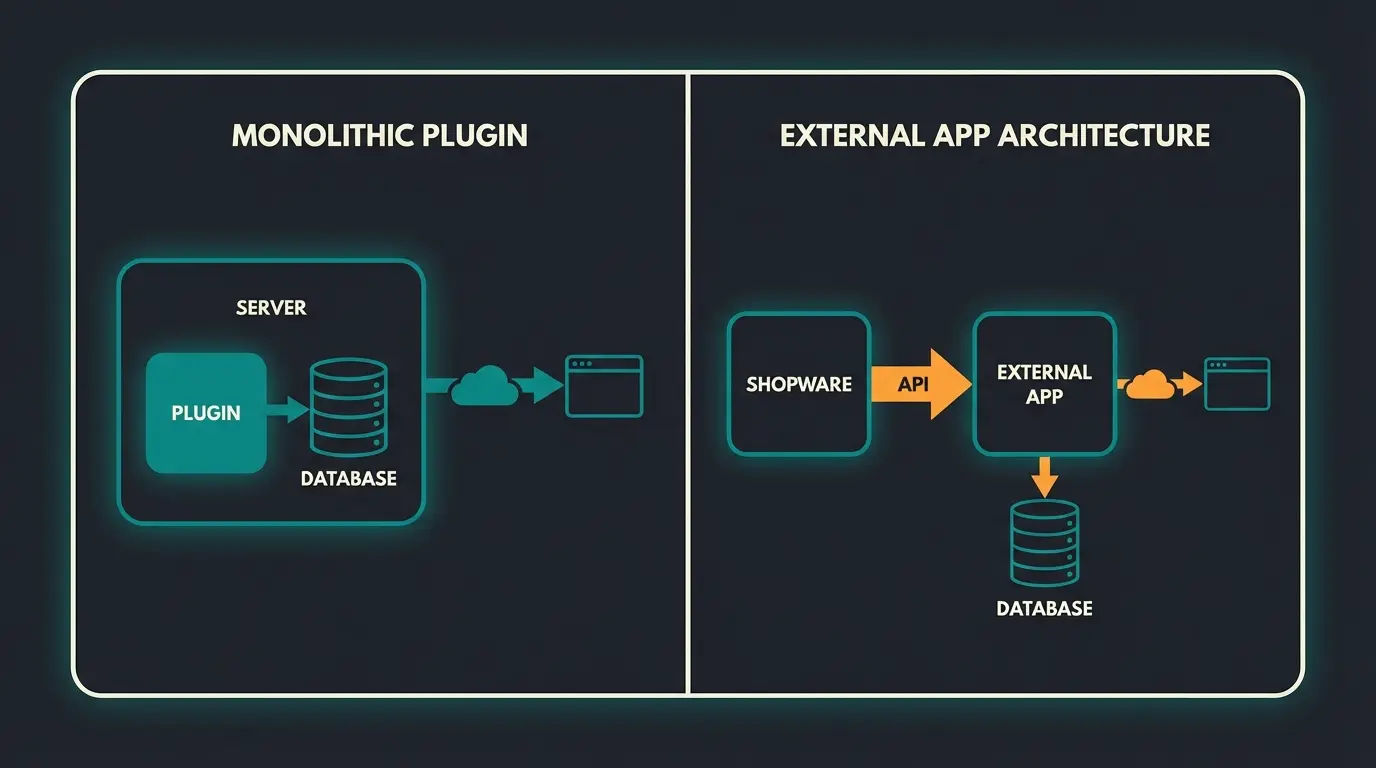
The Classic Plugin System: This approach is built deeply on the Symfony Fullstack Framework. The code resides directly on the shop's server in the `custom/plugins` directory. The advantage is full access to the Core, the database (DAL), and services—maximum customizability. However, the downside is that updates (e.g., major releases to 6.6 or 6.7) can lead to "breaking changes." When Shopware modifies a class, your plugin breaks. This system is best suited for deep backend logic and complex checkout customizations.
The App System (The Future?): With this approach, the app runs on an external server and communicates with Shopware via API. Only a manifest file exists in the shop itself. The advantage is that it's "cloud-ready"—shop core updates rarely break the app because the API remains stable, resulting in less maintenance overhead for the shop operator. As noted by bitbag.io, this architecture aligns with modern cloud-first development practices. The limitation is restricted access—you cannot simply override every PHP class in the Core.
Tech Stack Update: What Developers Need for Shopware 6.6+
With the release of Shopware 6.6 in 2024 and subsequent updates, the requirements for Shopware plugin development have become stricter. Outdated code is no longer tolerated. Understanding these changes is essential, especially when exploring AI capabilities within the platform.
- PHP 8.2+: This is now the absolute standard. Typing has become stricter, which improves code quality but makes old plugins incompatible. Shopware's official documentation emphasizes this requirement.
- Vue.js 3: The admin panel has been completely migrated to Vue.js 3. Anyone still writing plugins with Vue 2 syntax will find their administration interface no longer works. This was one of the biggest "breaking changes" in recent years.
- Webpack 5 & Node 20: Build tools have been updated. Plugins must now be compatible with Node 20 to compile assets for the Storefront or Administration. deepware.de provides detailed guidance on these build requirements.
- Removal of Feature Flags: Many functions that were previously experimental (e.g., Async JavaScript Loading) are now standard. Your plugin must handle the fact that JS in the frontend loads asynchronously.
The Make or Buy Decision: Costs and Risks in 2025
Before a single line of code is written, the economic question arises: Is custom development worthwhile? The answer in 2025 is more complex than ever, as hourly rates for qualified Shopware plugin development have increased and maintenance costs are often underestimated.
What Does Custom Development Really Cost?
Based on current market analyses for Germany, hourly rates for reputable Shopware agencies and certified freelancers range between €100 and €160 net. According to shopwareagentur.info, budget providers (under €80) often deliver code that fails the strict quality guidelines of the Shopware Community Store or breaks during updates.
Here's a realistic calculation for a medium-complexity plugin (e.g., a custom product advisor), which directly impacts your ability to implement AI-powered product advice:
| Cost Factor | Custom Dev / Agency | Standard Store Plugin | Specialized SaaS Solution |
|---|---|---|---|
| Initial Costs (Setup) | €5,000 - €15,000 (approx. 40-100 hrs) | €50 - €500 (one-time) | Low (setup fee or self-service) |
| Time-to-Market | 2 - 4 months (concept, dev, QA) | Immediate | 1 - 5 days |
| Maintenance (Updates) | High (every Shopware update requires review) | Medium (depends on vendor) | Minimal (SaaS provider handles it) |
| Risk | High (bug fixing at your expense) | Medium (feature backlog at vendor) | Low (ongoing optimization included) |
| Flexibility | 100% Individual | Rigid (configuration only) | High (via API connection) |
The TCO Trap: Total Cost of Ownership
Many merchants only see the initial costs. But Shopware plugin development doesn't end with launch. Consider these ongoing factors that affect your AI readiness:
- Shopware Updates: Shopware regularly releases minor updates. A custom plugin often needs adjustments (e.g., adaptation to Vue.js 3 in the Admin).
- Compatibility: Conflicts with other plugins are the most common cause of shop outages.
- Security Vulnerabilities: Those who write custom code are responsible for their own security patches.
Standard agency rate for certified Shopware developers in Germany
Typical range for medium-complexity custom plugins
Expected yearly cost as percentage of initial development
Strategic Conclusion: Build (Custom Development): Only makes sense for absolute core processes that define your USP and for which no market solution exists. Buy (Store Plugin): For standard functions (SEO, payment, shipping). Connect (SaaS/Hybrid): For complex logic like AI, search, or Guided Selling. Here, custom development is often a bottomless pit.
Focus: Developing Plugins for Product Consultation
Let's get concrete. One area where standard plugins often fail and pure custom development becomes too expensive is digital product consultation (Guided Selling). This is where AI product consultation becomes essential for modern e-commerce.
Why Standard Filters Are No Longer Enough
The classic Shopware search and faceted filters (color, size, price) are technically solid but emotionally dead. A customer searching for an e-bike often doesn't know whether they need a "500Wh battery" or "750Wh battery." But they do know they want to "take long tours in the Alps."
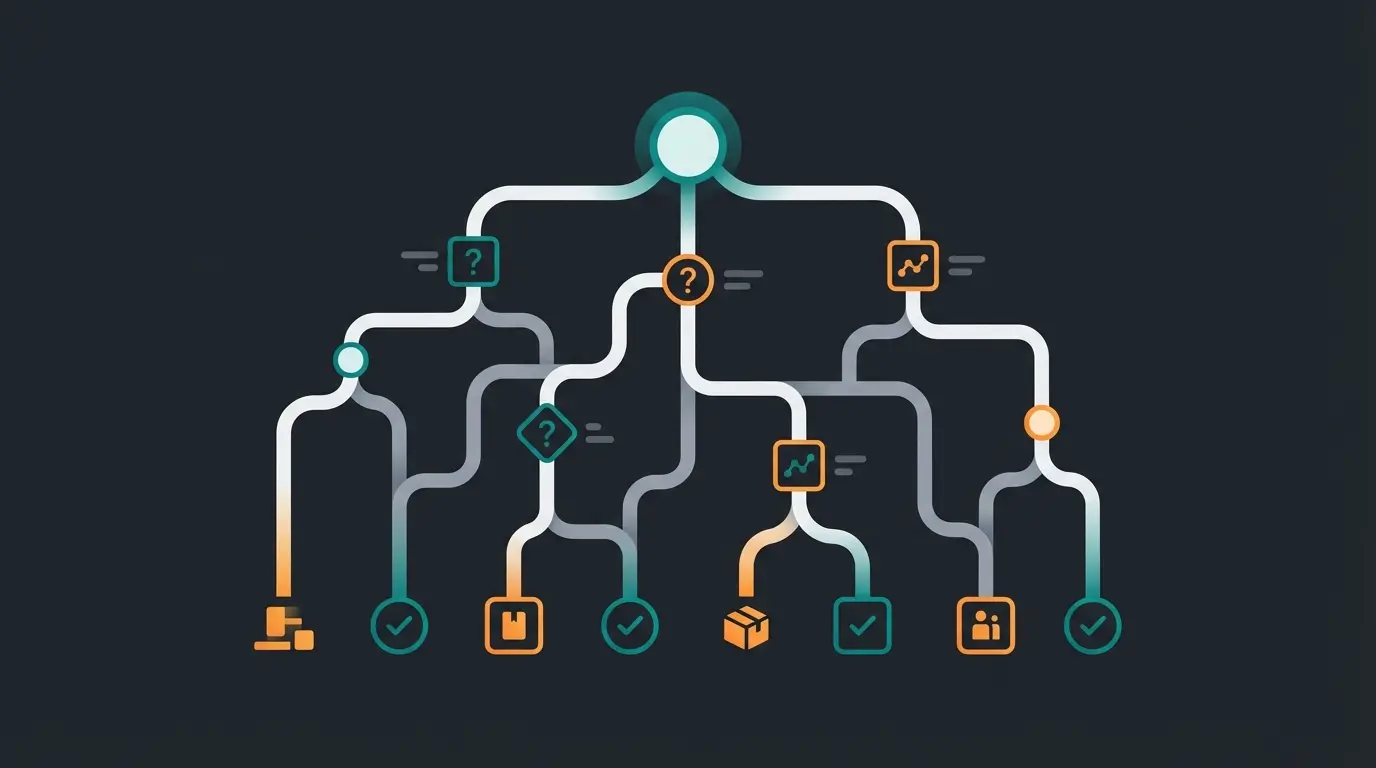
This is where Guided Selling comes into play. A Guided Selling plugin must: Ask questions ("Where do you usually ride?"), logically connect answers, suggest suitable products and explain why they fit. This approach transforms how AI e-commerce transforms customer interactions.
The Technical Challenge
If you try to develop this as a classic Shopware plugin, you'll quickly hit limitations:
- Data Structure: You must map complex decision trees in the database. Shopware's `Rule Builder` logic often isn't sufficient because it's designed for shopping carts, not consultation conversations.
- Performance: If every customer answer triggers a complex database query in the frontend, load times suffer (Core Web Vitals).
- Maintenance: Hardcoded question trees in PHP or Twig are not maintainable for marketing teams.
This is the point where modern Shopware plugin development leaves the path of the "monolith" and becomes "architecture." Implementing AI-powered sales assistant functionality requires thinking beyond traditional plugin boundaries.
AI in Shopware Development: Why DIY Coding Is Risky
The hype around Artificial Intelligence (AI) tempts many agencies and developers to quickly build an "AI plugin." Take the OpenAI API, build a controller in Shopware, and the advisor is ready. But beware: this is a trap. Understanding AI consulting in e-commerce reveals the hidden complexities.
The Hidden Complexities of AI Integration
Context Windows and Token Limits: A shop with 10,000 products cannot simply send all product data to ChatGPT. That exceeds any token limit and budget. You need a RAG architecture (Retrieval-Augmented Generation). This means: You need a vector database (alongside MySQL) that enables semantic search before data goes to the AI. Implementing this on standard Shopware hosting is extremely complex.
Hallucinations: A generic AI could invent products or promise features your item doesn't have. A plugin must implement "guardrails" (safety mechanisms) to restrict the AI to your catalog. This is critical for maintaining trust in your AI-powered sales consultants.
Latency (Speed): PHP (Shopware's language) isn't ideal for long-running AI processes. If a customer waits 10 seconds for a response, they bounce. Modern AI apps use Node.js or Python microservices for this task.
Data Privacy (GDPR/DSGVO): Sending customer data directly to US servers is legally sensitive. As noted by itdelight.io and communicode.com, Shopware itself offers the "AI Copilot" with features, but these focus heavily on the backend (text creation, summaries) or simple export helpers. For interactive customer consultation in the frontend, specialized tools that work GDPR-compliant and performantly are often missing.
Shopware AI Copilot vs. Custom AI Solutions
Shopware has stepped forward with the AI Copilot (available from version 6.6 in the Rise/Evolve plans). Features like "Image Keyword Assistant," "Review Summaries," or "Custom Checkout Messages" are great, as detailed on Shopware's official site and exwe.de. However, these tools are productivity helpers for the merchant, not sales advisors for the customer.
Anyone who wants a true "Digital Salesperson" must go beyond the standard Copilot. This is where specialized Shopware AI features become essential.
Stop struggling with complex AI integrations. Get an intelligent sales consultant that works with Shopware out of the box—GDPR-compliant, fast, and constantly improving.
Start Your Free TrialThe Solution: Hybrid Architecture Instead of Monolith
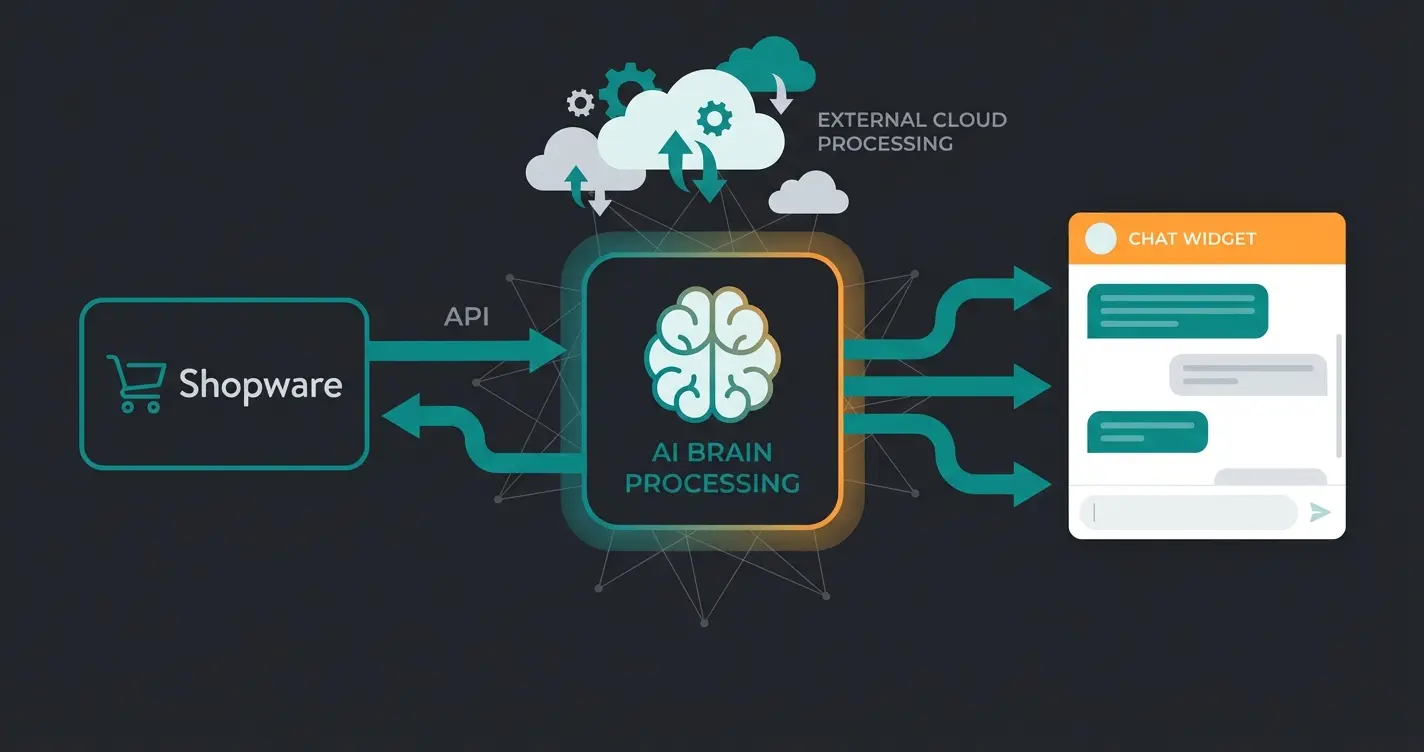
Instead of trying to squeeze complex AI into Shopware, we should use Shopware for what it excels at: being an excellent transaction system and data source. This approach aligns with modern AI sales agents architecture patterns.
Modern Shopware plugin development for Guided Selling looks like this:
Holds products, prices, and availability as the core transactional system
Lightweight plugin sending product data via API or feed to the AI engine
External processing layer with vector databases, LLMs, and decision trees
Lightweight JavaScript component integrated into Shopware frontend for customer interaction
Advantages of This Architecture
- No Performance Load on the Shop: The computing power for AI comes from the cloud, not the Shopware server.
- Independence from Updates: When Shopware updates to version 6.8, only the lightweight connector plugin needs to be checked, not the entire AI logic.
- Faster Integration: Instead of developing for months, you just connect.
This hybrid approach enables sophisticated Shopware 6 chatbots without the technical overhead of building everything from scratch.
Step-by-Step: Integrating an AI Consultant into Shopware
Instead of a "Hello World" tutorial, let's show the workflow for integrating such a modern solution. This is the path top shops are taking today, leveraging AI product consultation capabilities.
Step 1: Create the Data Foundation (In Shopware Admin)
Before AI can work, it needs clean data. Use Dynamic Product Groups in Shopware to define which products should even be advised on (e.g., "Only available e-bikes"). Maintain properties (Properties) cleanly. The AI can only work with what's in the system.
Step 2: Install the Connector Plugin
Instead of writing your own API clients, use ready-made connectors. Installation via `bin/console plugin:install` or the Plugin Manager. Configuration: Store the AI engine's API key. Mapping: Which Shopware properties (e.g., "technical_data_weight") should be used for consultation?
Step 3: Define Consultation Logic (No-Code)
Here we leave the IDE (PHPStorm) and go to the AI solution's dashboard. Prompting instead of Coding: Instead of programming `if ($answer == 'mountain') { ... }`, you define in natural language: "When the customer asks about terrain capability, prioritize mountain bikes with full suspension." Or you use a visual editor to sketch the conversation flow.
Step 4: Frontend Integration
The plugin automatically injects a JavaScript snippet into the Twig template (`base.html.twig`). The advisor's design (chat window, quiz mode) can be customized via CSS to match the shop theme without touching the core template.
Cost and Time Comparison: DIY vs. Smart Integration
Let's compare the scenarios for an AI-powered product advisor concretely.
Scenario: An online shop for sports nutrition wants to build a "Supplement Finder" that recommends the perfect protein powder to customers based on training goals, allergies, and taste preferences.
| Criterion | Option A: Agency Development (Custom) | Option B: Hybrid AI Solution (SaaS) |
|---|---|---|
| Development Time | 3 - 6 months (concept, design, backend, frontend, testing) | 2 - 5 days (installation, data sync, configuration) |
| Setup Costs | €20,000 - €45,000 (at €125/hr) | €500 - €2,000 (onboarding) |
| Ongoing Costs | Maintenance contract (approx. €300/month) + hosting upgrade | Monthly license fee (scales with usage) |
| AI Quality | Static or simple API connection (high hallucination risk) | State-of-the-art (RAG, vector search, continuous updates) |
| ROI (Return on Investment) | Slow (break-even often only after 2 years) | Fast (often in the first month through conversion uplift) |
Conclusion: The Future is API-First Development
Shopware plugin development isn't dead, but it has changed. The "lone wolf" developer who builds complex monoliths in isolation is being replaced by architects who intelligently connect best-of-breed systems.
For 2025 and beyond, the following principles apply:
- Standardize where possible: Use the Shopware Core and standard plugins for basic functions.
- Outsource where necessary: Complex logic like AI, search, and personalization belongs in specialized services, not in the shop's PHP code.
- Focus on the customer: Don't invest your development budget in backend tinkering, but in frontend experience and Guided Selling.
Ready to start today? If you're a developer, deepen your knowledge of Vue.js 3 and the Shopware App System API. If you're a merchant wanting more revenue through better consultation immediately, don't waste time on months-long development projects.
Costs vary greatly depending on complexity. Simple function extensions start at approximately €2,000 - €5,000. Complex interfaces or configurators can quickly cost €15,000 to €50,000. Hourly rates for reputable agencies in 2025 are between €100 and €160.
In most cases: No. The technical complexity (logic trees, UX design, performance) is high. Specialized SaaS solutions for Guided Selling are usually cheaper, faster to deploy, and deliver better results through AI integration than static custom developments.
There are two paths: Use the integrated "Shopware AI Copilot" features for backend processes (texts, summaries). For frontend features (customer consultation), connecting external AI services via apps or plugins is recommended to avoid performance issues and high token costs.
Plugins are installed directly on the server and can deeply intervene in the system but are vulnerable during updates. Apps run on external servers and communicate with Shopware via API. Apps are more future-proof ("Cloud Compatible") and easier to maintain but sometimes have more limited access to the Core.
Developers must use PHP 8.2+, Vue.js 3 for admin components, Webpack 5 with Node 20 for asset compilation, and handle asynchronous JavaScript loading in the frontend. Feature flags from earlier versions are now removed, requiring updated plugin architecture.
Join leading e-commerce brands using intelligent product consultation to boost conversions. No complex development required—just connect and sell smarter.
Get Started Free