Introduction: Why Logistics Alone Is No Longer Enough
Anyone who wants to succeed in modern e-commerce is fighting a war on two fronts. On one side stands logistics: packages must reach customers quickly, error-free, and cost-efficiently. Here, JTL-Wawi is the undisputed market leader in the German-speaking region. On the other side stands the customer experience: the shop must inspire, sell, and tell stories. This is where Shopware 6 shines.
The connection of these two worlds—Shopware JTL Wawi—is considered the "best-of-breed" solution for ambitious merchants. However, reality often looks different: frustrating "Status 500" errors, unsynchronized inventory levels, and exploding costs due to new licensing models cloud the picture. When comparing platforms, understanding the Shopware vs JTL differences becomes crucial for making the right choice.
Even more important is what most merchants overlook: The integration of JTL and Shopware is no longer just a question of logistics, but the foundation of your AI strategy. According to JTL-Software, the connector has evolved into a full SaaS solution that fundamentally changes how merchants approach their data infrastructure.
In this comprehensive guide, we go deeper than the usual installation instructions. We illuminate the strategic importance of clean data, compare the alternatives without mercy, clarify the new cost situation for 2024/2025, and show you how to use your Wawi data not just to ship packages, but to provide fully automated AI product consultation.
The System Question: JTL-Wawi vs. Pickware vs. Shopware Core
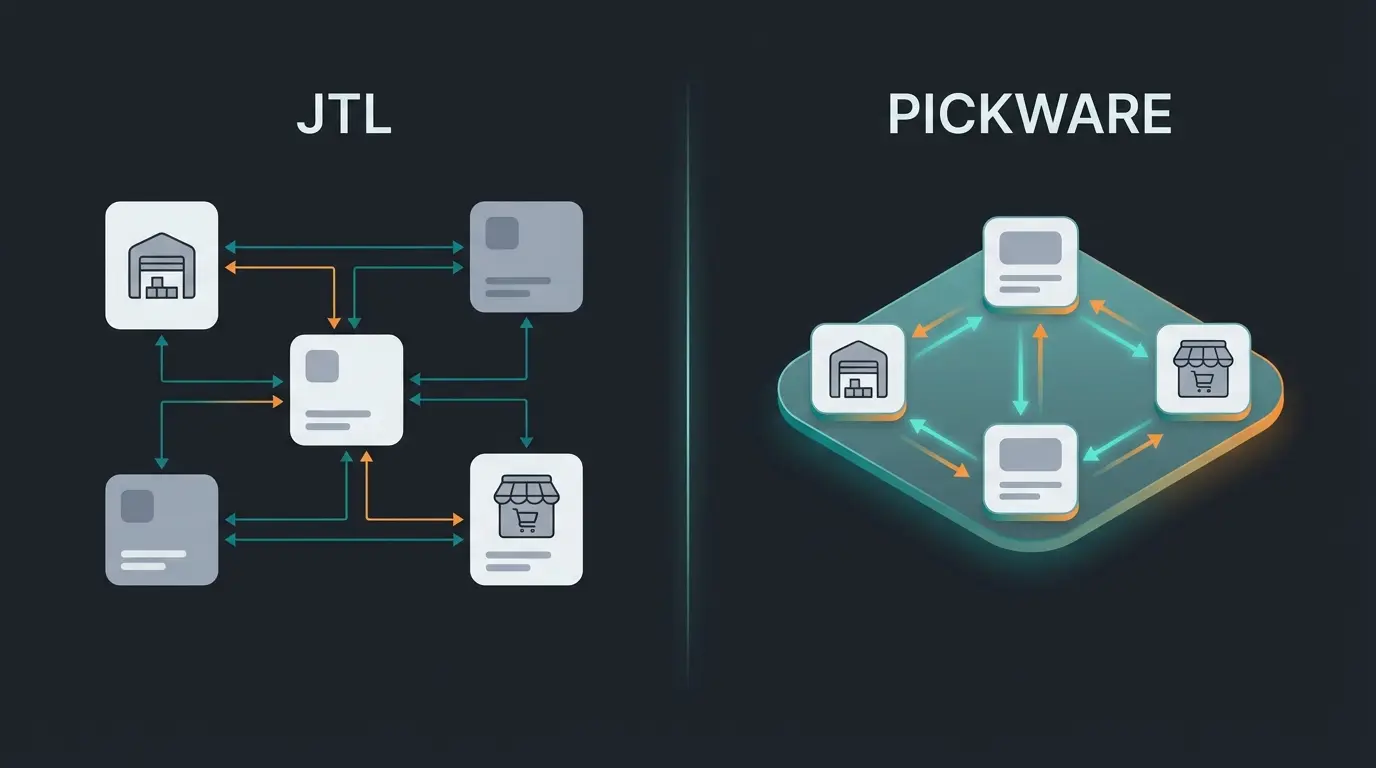
Before we discuss technical details, we must clarify the strategic question: Do you even need an external merchandise management system like JTL? Analysis of search results shows that many merchants waver between JTL and Pickware. Here is the decision guide for 2025.
JTL-Wawi: The Multi-Channel Powerhouse
JTL is a classic ERP solution (Enterprise Resource Planning). It runs separately from the shop (usually on a Windows server) and "speaks" to Shopware via a connector. This architecture enables powerful Shopware automation 2025 workflows that span multiple platforms.
- Strengths: Extremely powerful in multi-channel shipping. If you sell not only on Shopware but also on Amazon, eBay, Kaufland, and Otto, JTL is almost without alternative. The Wawi centralizes all inventory.
- Weaknesses: The separation of systems leads to complexity. Data must be synchronized (latency). The learning curve is steep.
- Ideal for: Merchants with high shipping volume (>50 packages/day), multi-channel strategy, and complex warehousing (chaotic warehouse, WMS).
Pickware: The Native Shopware Solution
Pickware is not an external program but a plugin directly in Shopware. There is no interface since ERP and shop use the same database. According to Dreikon, this approach offers distinct advantages for certain business models.
- Strengths: "Single Source of Truth" in real-time. No synchronization errors. Perfectly integrated into the Shopware backend.
- Weaknesses: Fewer functions for complex logistics or production. Multi-channel connection (marketplaces) is possible but often less deep than with JTL.
- Ideal for: D2C brands (Direct-to-Consumer) that focus 100% on their Shopware shop and prefer lean processes.
Comparison Table: JTL vs. Pickware
| Feature | JTL-Wawi | Pickware ERP |
|---|---|---|
| Architecture | External system (On-Premise/Cloud) | Integrated in Shopware (Plugin) |
| Data Authority | JTL is leading (Master) | Shopware is leading |
| Multi-Channel | Excellent (eazyAuction native) | Good (via additional plugins) |
| Complexity | High (IT knowledge required) | Low (Shopware knowledge sufficient) |
| AI-Readiness | High (Very deep attribute structure possible) | Medium (Limited to Shopware fields) |
| Costs | Base free + SaaS fees | Monthly rental fees |
The 2025 Cost Trap: Is JTL Still Free?
A common misconception in forums and older blog articles is that the connection is "free." This has changed drastically with JTL's license changes (July/September 2024). Here is the current state of affairs so you can correctly plan your budget—critical information when evaluating Shopware B2B pricing and total cost of ownership.
The End of the Free Connector Era
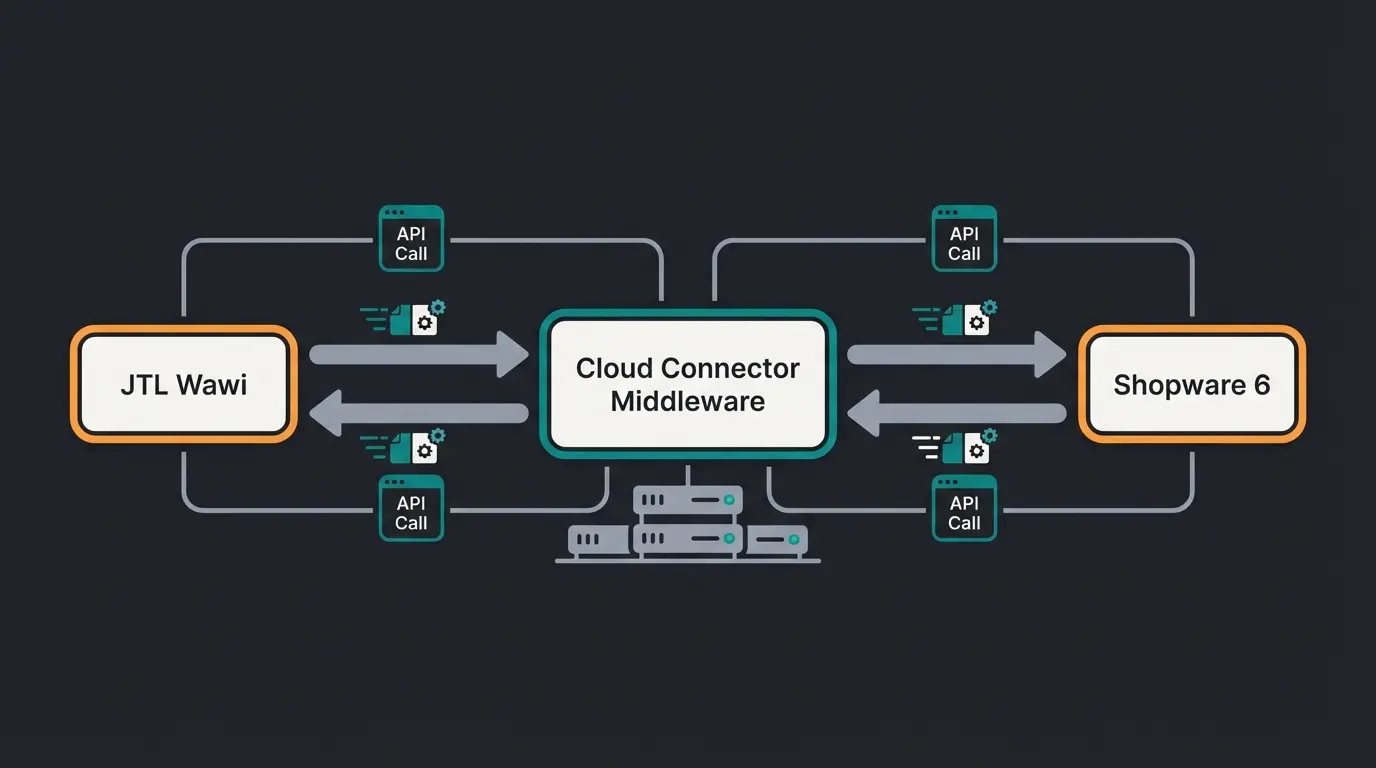
Previously, the connector was a plugin that you installed once. Today, the JTL Connector for Shopware 6 is a SaaS solution (Software as a Service). This means the connector runs on JTL servers and acts as middleware. According to JTL-Software's official documentation, this fundamental shift requires merchants to reconsider their integration strategy.
The New Order Packages Model
While JTL-Wawi in the "Start" edition can still be free for one user, you now pay for transactions. According to Recent Digital, the pricing structure has become significantly more complex.
Often included in Start package or low-cost tier
Prices increase with transaction volume
Charged when exceeding package limits
Hidden Integration Costs to Consider
Beyond the obvious license fees, you must factor in the following items when planning your budget. This is particularly important if you're considering Shopware alternatives 2025 and need accurate cost comparisons:
- Hosting: JTL-Wawi requires a Windows server (if not operated locally). Costs: approximately €50-100/month.
- Setup: A JTL service partner needs between 1 and 3 man-days for a clean initial setup (mapping tax rates, shipping methods, customer groups).
- Maintenance: Shopware updates often require the connector to be adapted. Plan budget for ongoing adjustments.
- Data Quality Audits: Cleaning up messy data before integration can require significant consulting time.
Deep Dive: How the JTL Connector Works (And Why It Fails)
To fix problems, you must understand how data flows. The connector is not a one-way street, but it has a clear hierarchy. Understanding this architecture is essential for effective Shopware API automation.
The Data Flow: Understanding the Golden Source
JTL-Wawi is almost always the leading system (Master). This hierarchy determines how data conflicts are resolved:
Products, prices, attributes, and inventory are maintained in JTL-Wawi as the single source of truth
The SaaS connector transforms JTL data into Shopware 6 API calls
Products appear in your shop with all synced attributes and properties
Your AI assistant uses structured product data to advise customers intelligently
Order flows back through the connector into JTL for fulfillment
Push (Wawi → Shop): Article data, prices, inventory, images, categories, and attributes are pushed from JTL to the shop. Important: If you change an article in the Shopware backend, this change will be overwritten on the next sync! Always change master data in JTL.
Pull (Shop → Wawi): Orders and customer data are fetched from the shop and imported into JTL.
The Technical Architecture Explained
The SaaS connector functions as a translator between the two systems, as detailed by JTL's technical documentation:
- JTL-Wawi sends XML/JSON data to the connector server (JTL Cloud)
- The Connector Server transforms this data into Shopware 6 API calls
- Shopware 6 receives the calls and updates the database
Step-by-Step Installation Guide (Modernized for 2025)
Forget the old guides for Shopware 5. Here is the process for the SaaS variant in Shopware 6, optimized for merchants who value efficiency. This process works well for both B2C and Shopware B2B guide implementations.
Phase 1: Preparation
- Backup: Create a complete backup of your Shopware database. A faulty initial sync can "destroy" your shop.
- Data Cleanup: Delete test articles in Shopware. The connector doesn't like "corpses" in the database.
- Documentation: Record your current tax rates, shipping methods, and customer groups for mapping.
Phase 2: Licensing in the JTL Customer Center
- Log into the JTL Customer Center.
- Navigate to Products > Shop Connectors.
- Book the Shopware 6 Connector (SaaS).
- You will receive an Auth Token and a Connector URL. Save these securely.
Phase 3: Setup in Shopware 6
- Install the plugin "JTL-Connector" via the Shopware Community Store (free to download, license runs via JTL).
- Activate the plugin.
- In the plugin settings, enter the Auth Token you generated in the JTL Customer Center.
Phase 4: Connection in JTL-Wawi
- Open JTL-Wawi > Platforms > Sales Channels.
- Click Create and select Shopware 6.
- Enter the Connector URL and the Password (Token).
- Click Test Connection. If it lights up green: Congratulations!
Phase 5: The Initial Sync (The Critical Phase)
During the first sync, you must decide which scenario applies to your situation:
- Empty Wawi, full Shop: JTL pulls all articles from Shopware (Import).
- Full Wawi, empty Shop: JTL pushes all articles to the shop (Recommended).
- Mixed scenario: Do NOT mix these scenarios without professional help. Duplicates are pre-programmed.
Troubleshooting Hub: Common Errors and Solutions
Search results show that forums are full of specific error messages. Here we consolidate solutions for the most common "showstoppers." These fixes are essential knowledge for anyone managing Shopware 6 Chatbots or other AI integrations that depend on clean data sync.
Error: Status 500 During Sync
The classic. The sync starts but breaks off after some time with a Server Error 500. According to Shopware's community forums, this is typically a server configuration issue.
- Cause: Usually a timeout (PHP `max_execution_time`) or a memory limit problem on the web server. The connector tries to send too many images or articles at once.
- Solution A (JTL side): Reduce the packet size in the connector settings in Wawi (e.g., from 50 to 10 articles per packet).
- Solution B (Server side): Increase the `memory_limit` in `php.ini` to at least 512MB, better 1GB.
- Solution C (Expert level): Check the `LOCK_DSN` variable. Sometimes session files collide in the host's `tmp` folder. A custom path can help.
Error: Images Not Syncing or Incorrectly Scaled
Symptom: Articles arrive but without images, or thumbnails are missing. As Shopware's media documentation explains, Shopware 6 generates thumbnails asynchronously.
- Cause: Shopware 6 generates thumbnails asynchronously. When JTL sends the image, Shopware is still calculating or breaks off. Also, "orphaned" entries in the Shopware database can block the process.
- Solution: Check image sizes in JTL. Images >4MB or >2500px often cause problems. Clear the Shopware cache and run the command `bin/console media:generate-thumbnails` on the server. In extreme cases: Delete the image in JTL, do a sync, add it again.
Error: Tax Rate Not Found
Cause: The tax classes in JTL (e.g., "Normal tax rate 19%") are named differently than in Shopware ("Standard rate"). This mapping must be precise for orders to process correctly.
Solution: The mapping in the connector settings in JTL-Wawi must be exact. Check every tax rate and every delivery country. Document your mappings for future reference.
Error: Attributes and Characteristics Not Displayed
Cause: In Shopware 6, properties often need to be assigned to a "set" first to be visible in the frontend. This is crucial for Shopware SEO product pages that rely on structured product data.
Solution: Use functional attributes in JTL. Attributes like `storefront_presentation_property_groups` control how properties are displayed in Shopware. According to JTL's attribute documentation, these special attributes enable precise frontend control.
Our AI-powered product consultation platform is built to handle complex data structures seamlessly. See how clean data transforms your customer experience.
Explore AI ConsultationThe Data-First Potential: From Logistics to AI Consultation
Here lies your chance to stand out from the competition. Most merchants use the connection Shopware JTL Wawi only to sync inventory. That is waste of potential. The same data infrastructure that powers your logistics can power intelligent AI E-Commerce experiences.
The Problem: Dumb Data That Can't Sell
A typical JTL article looks like this:
- Name: "Hiking Boot X200"
- Description: "Great shoe made of leather, waterproof."
- Price: €99
For logistics, that's enough. For an AI-powered product consultation (e.g., a chatbot in Shopware), it's worthless. The AI doesn't know in a structured way that the material is "leather" or that the property "waterproof" exists. It has to guess (text parsing), leading to inconsistent and unreliable customer advice.
The Solution: JTL as Golden Source for AI
You must use JTL-Wawi to make your data AI-ready. This transforms your warehouse management system into a strategic asset for customer experience, enabling sophisticated Shopware B2B customer portal experiences.
1. Attributes Instead of Free Text
Use the characteristics and custom fields in JTL extensively:
- Instead of writing "waterproof" in the text, create a characteristic `Technology` with the value `Waterproof`.
- Instead of writing "for wide feet" in the text, use an attribute `Fit` = `Wide`.
- Add technical specifications as structured fields: `Sole_Material`, `Upper_Material`, `Weight_Grams`.
2. The Sync Advantage for AI Applications
The JTL connector synchronizes these characteristics as Shopware Properties. This is where the magic happens for AI consultation:
- Result: Structured data arrives in Shopware.
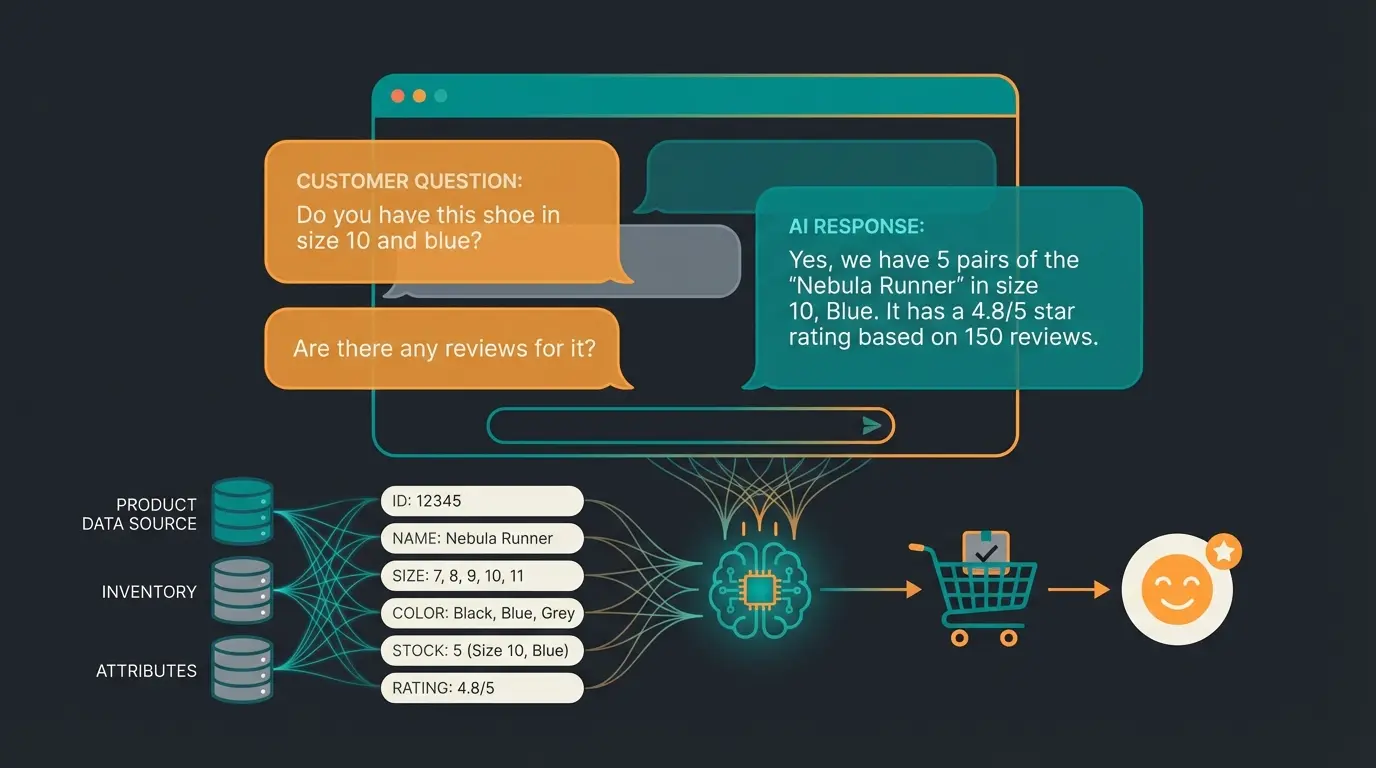
- The AI Use Case: You can now connect an AI agent (e.g., via OpenAI API or plugins) to your Shopware shop. When a customer asks: "I'm looking for a shoe for wide feet that holds up in the rain", the AI doesn't have to hallucinate. It filters the database by: `Fit` == `Wide` AND `Technology` == `Waterproof`
3. Functional Attributes for Logic Control
JTL offers special functional attributes for Shopware 6. Use these to control logic across your entire system:
- `shipping_free`: Controls free shipping eligibility.
- ` active`: Turns articles on/off.
- Strategy: Use JTL workflows to set these attributes automatically (e.g., "If inventory > 10 and margin > 20%, set attribute `Highlight` to `true`").
The Middleware Concept for Modern E-Commerce
Think of JTL not as a final destination, but as middleware in your data pipeline. This perspective changes how you approach Shopware vs OXID decisions and platform architecture:
CSV files flow through JTL Ameise into JTL Wawi
Add AI-relevant attributes: size, material, usage class, compatibility
Validate data completeness and consistency
JTL Connector pushes enriched data to your storefront
Your AI Sales Bot uses structured data to advise customers like a human expert
Those who keep their data clean in JTL ("Data Hygiene") automatically build the foundation for the next generation of e-commerce. The investment in structured data pays dividends across every customer touchpoint.
Conclusion and Go-Live Checklist
The connection of Shopware 6 and JTL-Wawi is powerful, but not a self-runner. The days when you could "just install the connector" are over—especially due to the SaaS transition and new cost models.
Summary for Decision Makers
- Check costs: Calculate the order packages through. For small shops with many cheap orders, the new pricing structure can be painful.
- Understand the technology: The SaaS connector requires clean timeouts and PHP settings. Status 500 is usually a server configuration problem, not a software bug.
- Change your strategy: Don't use JTL just as inventory management. Maintain attributes as granularly as possible. That's your capital for upcoming AI features.
Your Go-Live Checklist
- ☐ Backup: Shopware database & filesystem secured?
- ☐ JTL Version: Is the Wawi current (at least 1.6+ for stable SW6 connection)?
- ☐ Connector License: Booked in the customer center and token generated?
- ☐ Tax Mapping: All tax rates correctly assigned in Wawi?
- ☐ Shipping Methods: JTL shipping methods mapped to Shopware shipping methods?
- ☐ Data Audit: Is your article data structured (characteristics) or just text deserts?
- ☐ AI Readiness: Have you identified which attributes power your consultation tools?
Frequently Asked Questions
No, not anymore. Since 2024, the JTL Connector operates as a SaaS solution with order-based pricing. While the base Wawi may be free for one user, you pay for transaction packages. Small shops (under 500 orders/month) may find affordable options around €19-39, but high-volume merchants can expect €119+ monthly.
It depends on your business model. Choose JTL if you sell on multiple channels (Amazon, eBay, Otto) and need complex warehouse management. Choose Pickware if you're a D2C brand focused exclusively on your Shopware shop and want simpler, real-time integrated operations. JTL offers deeper attribute structures for AI readiness.
Status 500 errors are almost always server configuration issues, not software bugs. Check your PHP memory_limit (should be at least 512MB), increase max_execution_time, and reduce the connector's packet size in JTL settings. Large image files and too many articles per sync batch commonly trigger these timeouts.
The key is structured data. Instead of writing product features in description text, use JTL's characteristics and custom fields. Create attributes like Material, Technology, Fit, and Usage Class. When synced to Shopware, AI systems can filter and query this structured data to provide accurate, personalized product recommendations.
Your changes will be overwritten! JTL-Wawi is the master system. Any modifications made directly in Shopware's backend will be replaced during the next sync. Always make changes to product data, prices, and inventory in JTL-Wawi to ensure data consistency.
Is Your Wawi Ready for the Future?
Many merchants fail not because of technology, but because of data quality. An audit of your JTL data structure is often the first step to more revenue—and fewer headaches during sync. The difference between a frustrating integration and a competitive advantage lies in how thoughtfully you structure your product information.
The merchants who will win in the next five years aren't just those who ship packages efficiently. They're the ones who transform their logistical data infrastructure into an intelligent sales engine. Your JTL-Wawi isn't just a warehouse management system—it's the foundation of your AI-powered future.
Disclaimer: Prices and technical details are based on the status as of late 2024/early 2025. JTL and Shopware are constantly developing their software. Always check the official changelogs before installation.
Discover how AI-powered product consultation can turn your carefully structured JTL data into personalized customer experiences that convert. Start your free trial today.
Start Free AI Consultation Trial