
What Shopware Frontends actually is
Shopware Frontends is Shopware's official toolkit for building a custom storefront that runs separately from the Shopware backend and talks to it through the Store API. It ships as a set of JavaScript packages plus Vue.js components, with a reference template built on Nuxt. It replaces the Twig storefront, not the Shopware backend.
The full name is Shopware Composable Frontends. Both terms refer to the same project. The official Shopware Frontends documentation describes it as a toolkit for platform-agnostic custom storefronts, and that phrasing is precise: it is a collection of packages, not a finished shop.
Four core packages do the heavy lifting. The API client wraps the Store API and handles authentication state. The composables package provides Vue 3 functions like `useCart` and `useProduct`. CMS base implements Shopware's default Shopping Experiences sections, blocks and elements in Tailwind. Helpers cover price formatting, translation handling and URL handling.
On top of those sit the project templates. As of Q3 2026 the Vue Starter Template in the Shopware Frontends repository is built on Nuxt 4, while parts of the documentation still reference Nuxt 3. The repository carries 2,246 commits and an MIT licence. Worth checking which version a prospective agency has actually shipped against.
It works against both self-hosted Shopware 6 and Shopware Cloud, because the Store API is available in both. That is a genuine architectural advantage: no server access, no plugin installs, no theme build step required on the frontend side. If you are still deciding whether to decouple at all, that question is broader than this toolkit, and we cover it separately in our analysis of whether headless commerce is right for your shop. For the wider platform picture, see our complete Shopware guide.
Shopware Frontends vs. PWA vs. classic Twig storefront
Shopware Frontends replaced Shopware PWA, which the Vue Storefront repository now marks as no longer maintained. For most merchants the real choice is not Frontends versus PWA. It is Frontends versus the classic Twig storefront that ships with Shopware 6, and Twig is still the right answer for the majority of shops.
The PWA question comes up constantly, so let us close it. The vuestorefront/shopware-pwa repository opens with a warning that the project is not maintained anymore and points readers to Composable Frontends. The old `@shopware-pwa/` npm packages are deprecated in favour of `@shopware/` equivalents. Shopware has not published a formal end-of-life date, so treat the repository notice as the authoritative signal rather than expecting an announcement.
Do not start a new project on PWA. That one is not a judgement call.
| Criterion | Classic Twig storefront | Shopware Frontends | Shopware PWA | Custom Nuxt / Vue Storefront on Store API |
|---|---|---|---|---|
| Status in 2026 | Actively developed, ships with Shopware 6 | Actively developed, official line | Not maintained | Your own responsibility |
| Build effort | Low. Theme and configure | High. Custom application from a starter template | High, on an unmaintained base | Highest. No Shopware-provided components |
| Storefront plugin ecosystem | Full access | Not available for Twig-rendering plugins | Not available | Not available |
| Shopping Experiences (CMS) | Native | Supported via the CMS base package for default sections and blocks | Partial | Build it yourself |
| Team skills needed | PHP, Twig, SCSS | Vue 3, Nuxt, TypeScript, plus PHP for the backend | Vue 2 era stack | Vue or React, plus deep Store API knowledge |
| Upgrade path | Tied to Shopware releases and theme compatibility | Decoupled from internal APIs, tied to your own dependency churn | None | Entirely yours |
| Performance ceiling | Good with caching discipline | High, if the build is disciplined | High in theory | High |
| Vendor lock-in | Shopware theming system | Low. Store API only, MIT licence | Low | Lowest, and the most work |

The stability argument is the one Shopware itself leads with. Its Frontends repository states: "Shopware Frontends doesn't rely on Shopware's volatile internal APIs (such as twig blocks, DAL or Events), hence not being subject to breaking changes in those APIs, as opposed to Twig Storefront themes." That claim held up through the last major release. Shopware shipped 6.7 on 14 May 2025, removing the Vue 2 compatibility layer from the admin, with 6.7.5.0 following in December 2025 and 6.8 planned for 2027. A heavily customised Twig theme feels each of those. A Frontends storefront talking only to the Store API mostly does not, which is the single strongest technical case for the toolkit. Our Shopware 6.7 update guide covers what that release changed on the backend side.
What Shopware Frontends costs to build and run
A production Shopware Frontends storefront costs significantly more to build than a themed Twig storefront, because you are commissioning a custom application rather than styling an existing one. Budget for frontend development, a separate Node hosting layer, and ongoing maintenance of a codebase that no longer receives storefront updates from Shopware.
No page on the first results page for this query publishes a cost figure. So here is ours, with the assumptions stated openly rather than dressed up as survey data. The rate basis comes from our own Shopware developer rates research: freelancers charge 60 to 120 EUR per hour in the DACH region, specialised agencies 100 to 180 EUR per hour. The hour estimates below are ours, drawn from what a full storefront actually contains: category and filter pages, product detail, cart, checkout, customer account, CMS page rendering, search, and the inevitable long tail of legal and transactional pages.
| Cost block | Band (EUR) | Basis and assumptions |
|---|---|---|
| One-off build, agency | 40,000 to 120,000 | 400 to 800 hours at 100 to 180 EUR per hour. Covers the full storefront surface, not a proof of concept |
| One-off build, freelance or in-house | 24,000 to 96,000 | Same hour range at 60 to 120 EUR per hour. Assumes an existing Vue team and someone who already knows Shopware |
| Rebuilding storefront plugin functionality | 2,000 to 8,000 per plugin | Each Twig-rendering plugin you depend on becomes a Vue component. Reviews, badges, consent, payment UI |
| Frontend hosting, per year | 500 to 6,000 | Node or edge platform on top of your existing Shopware hosting. Vercel Pro starts at 20 USD per seat per month with a 20 USD usage credit, then bills on execution |
| Maintenance, per year | 8,000 to 25,000 | 60 to 150 hours for framework and dependency upgrades. The Nuxt 3 to Nuxt 4 move in the starter template is a concrete example of this work |
Two points about that table. The frontend hosting line sits on top of your Shopware backend hosting, it does not replace it. You are running two platforms now. Check Shopware hosting requirements for the backend side, compare options in our roundup of the best Shopware hosting providers, and note that Shopware Cloud pairs cleanly with Frontends because the Store API is all you need.
The maintenance line is the one merchants underestimate. A Twig theme can sit untouched for a year and still work. A Nuxt application with 40 npm dependencies cannot.
Performance: what headless actually delivers
A well-built Frontends storefront can hit meaningfully better Core Web Vitals than a plugin-heavy Twig storefront, mainly by removing server-side theme rendering and third-party plugin JavaScript from the critical path. But the gain comes from the discipline of a clean build, not from headless architecture by itself. A badly built Nuxt storefront is slower than a well-tuned Twig one.
Set the target first. Google's Core Web Vitals thresholds are specific, and they are measured at the 75th percentile of page loads, split by mobile and desktop.
| Metric | Measures | Good threshold |
|---|---|---|
| LCP (Largest Contentful Paint) | Loading | Within 2.5 seconds |
| INP (Interaction to Next Paint) | Interactivity | 200 milliseconds or less |
| CLS (Cumulative Layout Shift) | Visual stability | 0.1 or less |
Where the speed actually comes from: client-side routing after the first page load, edge caching of rendered output, granular control over what JavaScript ships, and the absence of a plugin pile-up injecting scripts you never asked for. Where it does not come from: the word headless. Every Store API round trip is still a network call, and server-side rendering still costs compute.
Kiwee, the agency ranking on this query with hands-on Frontends work, titled one of its sections "Performance gains aren't a given" and flagged a concrete gap: as of Shopware 6.6 the Store API had no ETag header, so a client cannot check whether a cached resource is still valid without re-fetching the full payload. That is a real ceiling on caching strategy, and no vendor page mentions it.
Here is the opinion, and reasonable people disagree with me on it. Most headless migrations that report a large speed win would have captured the majority of that win by deleting unused plugins, fixing image delivery and tightening caching on the existing Twig theme. Our guide to Shopware performance optimization covers that cheaper path. Try it before you commission a rebuild, because if it works you have saved six figures.
The trade-offs nobody puts in the docs
The three things that derail Shopware Frontends projects are plugin compatibility, Shopping Experiences coverage, and team capability. Storefront plugins from the Shopware Store render Twig templates and simply do not work in a Frontends storefront. Every one you rely on has to be rebuilt as a Vue component or dropped.
Serge Korzh, Full Stack Developer at Kiwee, put the general problem more bluntly than any vendor page will: "Shopware Frontends doesn't try to achieve this 'just works' whatsoever, at least, not on the level of the whole store. You have to start basically from a blank Nuxt 3 application and build your way up to a fully fledged eCommerce storefront yourself." Kiwee also notes that Shopware's own demo store template is explicitly not production-ready. Treat it as an example, not a default theme.
- The plugin ecosystem does not come with you. The Shopware Store lists 3,465 extensions as of Q3 2026. Backend-only extensions such as ERP connectors and payment processing keep working, because they operate below the storefront. Anything that renders UI does not: review widgets, trust badges, cookie consent banners, payment method UI, tracking integrations, wishlist and comparison features. Audit which ones you actually depend on before anything else.
- Shopping Experiences need frontend counterparts. The CMS base package covers Shopware's default sections, blocks and elements. Custom blocks built by your agency, or shipped by a plugin, do not exist in your Nuxt app until someone builds them. Until then your marketing team can still drag and drop in the admin, but the result renders as nothing.
- SEO ownership moves to your team. Meta tags, canonicals, structured data, XML sitemaps, hreflang, pagination handling and redirect management are all handled for you by the default storefront. In a Frontends build they are line items in the project scope. Leave them out and you will discover the omission through a ranking drop, roughly six weeks after launch.
- The hiring pool narrows. You need Vue 3, Nuxt and TypeScript on the frontend, and you still need PHP and Symfony depth on the backend for the Shopware side. That is two skill sets rather than one. Our guide to hiring a Shopware programmer covers what to test for, and the backend server requirements stay the same regardless of frontend choice.
None of this makes Frontends a bad toolkit. It makes it a commitment. The projects that go wrong are the ones where nobody priced the fourth item on that list.
When Shopware Frontends pays off, and when it doesn't
Shopware Frontends pays off when the storefront itself is a competitive differentiator: consultation-heavy catalogues, multi-touchpoint commerce, or interfaces that standard themes cannot express. It does not pay off for a standard catalogue shop where a themed Twig storefront plus targeted performance work reaches the same commercial outcome for a fraction of the budget.
Score yourself honestly against the six criteria below. The scoring is deliberately harsh on budget and plugin dependency, because those two are where projects stall after the money is committed.
| Criterion | 2 points | 1 point | 0 points |
|---|---|---|---|
| Storefront as differentiator | Customers choose you partly for the buying experience | Storefront is above category average | Standard catalogue shop |
| Frontend touchpoints beyond the web shop | Three or more: app, kiosk, portal, marketplace | Two | One |
| In-house Vue and Nuxt capability | A team already shipping Vue in production | One developer, currently learning | None |
| Catalogue consultation complexity | Configurable or compatibility-driven products | Some technical products | Simple, self-explanatory SKUs |
| Budget available for the build | Over 80,000 EUR | 40,000 to 80,000 EUR | Under 40,000 EUR |
| Storefront plugins you depend on | Zero to two | Three to five | More than five |
That middle band deserves emphasis, because it is where most mid-market merchants actually land. You do not have to choose between a full rebuild and doing nothing. Frontends packages can run as a plain Vue app inside a standard Shopware storefront, which lets you rebuild the one screen that matters and leave the other forty alone. If a full replatform is genuinely on the table, our Shopware relaunch checklist covers the sequencing.
Building AI product consultation on a composable frontend
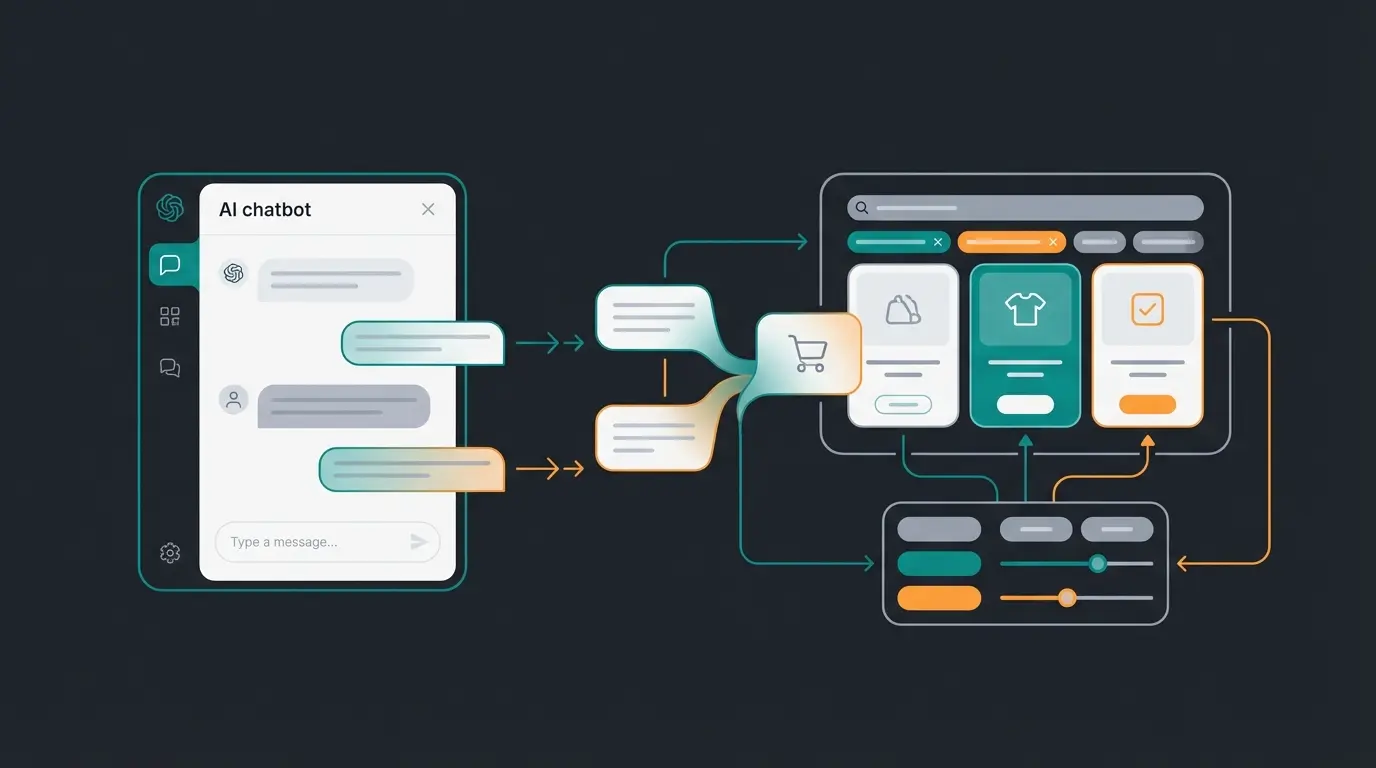
A composable frontend removes the main technical obstacle to AI product consultation: the consultation interface no longer has to fit inside a theme template. The AI employee becomes a first-class component with access to the same Store API data as the rest of the storefront, so it can read cart state, catalogue attributes and customer context directly.
The architectural difference is concrete. A widget bolted onto a Twig theme typically runs in an iframe or an isolated script, maintains its own copy of product data, and cannot change what the page displays. A component inside a Nuxt application shares routing, session and reactive state with the rest of the shop. When it narrows a selection to three products, the product grid behind it updates, because both read the same store. The Shopware Store API is the single data source for both.
Numbers from a live implementation. Pooldoktor's AI product advisor Franz went live in January 2026 and handles over 1,100 conversations per month, roughly half of them genuine product consultation on water chemistry, pump sizing and filtration. Measured against a control group, revenue per user is 18.75% higher. Average response time is 13 seconds, customer satisfaction sits at 7.6 out of 10, and the implementation returned 33 times its cost.
Now the honest part, and it cuts against the argument I just made. Pooldoktor's fourth requirement was explicitly go-live within weeks without rebuilding the storefront. AI product consultation does not require a composable frontend. It is easier on one, not gated by one. If better product guidance is the actual goal behind a replatform proposal, test the guidance first. It is a fraction of the cost and it will tell you whether the storefront was ever the bottleneck.
Implementation roadmap: from decision to launch
A realistic Shopware Frontends rollout runs in five stages: catalogue and plugin audit, partner or team selection, CMS and content strategy, staged frontend build with the backend untouched, then cutover with redirects and monitoring. The backend stays live throughout, which is what makes a phased migration possible.
List every storefront-rendering plugin and price its replacement. Gate: if rebuild cost exceeds the build budget, the project stops here. This gate kills more projects than any other, and that is a feature.
Ask for a live Frontends storefront in production, not a proof of concept. Gate: no verifiable production reference, no contract. See our notes on Shopware installation and Shopware Docker setup for the environment work involved.
Decide which Shopping Experiences blocks marketing needs on day one and which can wait. Gate: marketing signs off on the block list before the build starts, not after.
Build against the live backend on a separate domain. Checkout and payment get the most testing time. Checkpoint: GDPR and hosting region, including where the Node layer runs and how consent gating is wired. Confirm your Shopware backup strategy covers both platforms.
301 redirects for every changed URL, sitemap resubmission, and daily Search Console checks for the first two weeks. Gate: rollback stays available until organic traffic and conversion both hold for 14 days.
Elapsed time for a mid-sized migration is typically four to eight months from decision to cutover, based on the 400 to 800 build hours above running alongside audit, design and testing rather than in sequence. Teams that compress it below three months usually did so by cutting the plugin audit. That bill arrives later. If you would rather not run two hosting platforms yourself, managed Shopware hosting providers increasingly cover the Node layer alongside the PHP backend.
Frequently asked questions
Effectively yes. The vuestorefront/shopware-pwa repository opens with a notice that the project is not maintained anymore and directs readers to Shopware Composable Frontends. The old `@shopware-pwa/` npm packages are deprecated in favour of `@shopware/` equivalents. Shopware has published no formal end-of-life date, so use the repository notice as your signal.
Nothing. They are two names for the same project. Composable Frontends is the full product name used on shopware.com, while Shopware Frontends is the short form used in the documentation and the GitHub repository. The npm packages are published under the `@shopware/` scope.
Yes. Frontends is designed to work with the HTTP APIs available in Shopware Cloud, requiring no themes, plugins or server access. It works equally well against self-hosted Shopware 6, because both expose the same Store API. That makes it one of the few ways to build a fully custom storefront on Cloud.
Partly. The CMS base package implements Shopware's default sections, blocks and elements in Tailwind, so standard pages built in the admin render correctly. Custom CMS blocks, whether built by your agency or supplied by a plugin, need a matching Vue component in your frontend before they display anything.
Storefront plugins that render Twig templates do not work, because there is no Twig rendering in a Frontends storefront. Backend-only extensions such as ERP connectors and payment processing continue to function normally. Of the 3,465 extensions in the Shopware Store, audit specifically the ones that produce visible storefront output.
Budget 40,000 to 120,000 EUR for an agency-built production storefront, based on 400 to 800 hours at DACH agency rates of 100 to 180 EUR per hour. Add 500 to 6,000 EUR per year for Node hosting on top of your Shopware backend hosting, plus 8,000 to 25,000 EUR annually for maintenance.
Four to eight months from decision to cutover for a mid-sized catalogue, with audit, design, build and testing overlapping rather than running in sequence. Projects compressed below three months almost always skipped the plugin audit, which surfaces as unbudgeted rebuild work shortly before launch.
Composables are reusable Vue 3 functions that wrap shop logic and Store API calls. `useCart` exposes reactive properties such as cart items and total price alongside functions like adding a product or applying a promotion code. They ship in the `@shopware/composables` package and remove most direct API handling.
A composable frontend makes AI product consultation easier to build. It does not make it possible. If the goal is helping customers pick the right product, an AI employee reaches that outcome on your current Shopware storefront in weeks rather than months. Pooldoktor measured 18.75% higher revenue per user against a control group and a 33x return.
Book a demo
Kevin is CTO and co-founder of Qualimero. As an AI architect with over 15 years of experience as CTO and CPO in the tech industry, he designs the AI systems that automate tens of thousands of customer interactions daily for Qualimero's clients — reliably, securely, and at scale.