The End of the Digital Monologue
E-commerce is facing a paradigm shift. For years, "storytelling" was considered the holy grail of online marketing. Merchants invested heavily in Shopware Shopping Experiences (known in Germany as Erlebniswelten) to create emotional visual worlds, videos, and inspiring texts. The goal: to emotionally engage the customer and create memorable brand experiences.
But there's a problem that rarely gets discussed in agency briefings: Storytelling is often a monologue. You send messages to customers, but you don't listen. A customer landing on a beautifully designed landing page for "running shoes" might see an inspiring video of a marathon runner. But if this customer actually wants to know whether the shoe is suitable for wide feet, the video doesn't help. They have to search, filter, or—worst case—leave the shop entirely.
This is the massive content gap in the current Shopware ecosystem. While the competition is still discussing how to drag and drop blocks, we're opening a new chapter today: The transformation of Shopware Shopping Experiences from static presentations to intelligent, consultative dialogue systems. According to Shopware, this evolution represents the next frontier in e-commerce customer engagement.
In this article, you'll learn not only how to technically master Shopware Shopping Experiences, but how to supercharge them with artificial intelligence (AI) so that your shop doesn't just "show" but "advises." We'll also look at the upcoming Shopware 6.7 release and the mandatory accessibility adjustments that will dictate your 2025 content strategy. Understanding AI readiness is crucial for staying competitive in this evolving landscape.
How Shopware Shopping Experiences Work
Before we break the rules, we must master them. For SEO beginners and shop managers, a solid understanding of the architecture of Shopware Shopping Experiences is essential. Unlike the rigid "Shopping Worlds" (Einkaufswelten) from Shopware 5, the CMS in Shopware 6 offers flexible, block-based logic that enables truly dynamic content creation.
The Architecture of Shopping Experiences
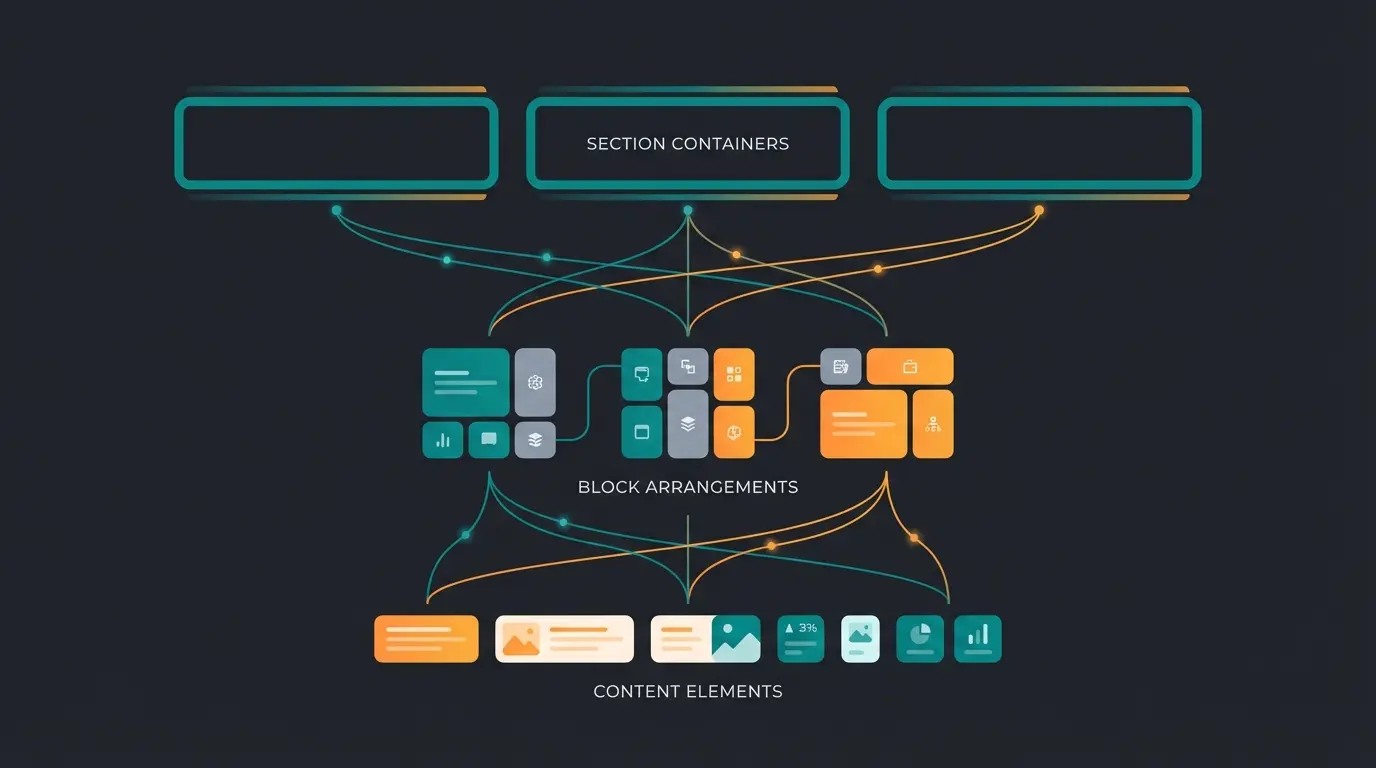
The system is based on a clear hierarchy that enables content to be displayed responsively and dynamically. As documented by Shopware and ThemeWare, this modular approach gives merchants unprecedented control over their storefront presentation.
Layout Types
Shopware distinguishes strictly by purpose, and understanding these distinctions is crucial for effective implementation:
- Shop Pages: For service content such as terms and conditions, contact forms, or "About Us" pages. These are essential for building trust and providing necessary legal information.
- Landing Pages: Marketing-focused pages for campaigns that often function independently of the category structure. These are perfect for seasonal promotions and special offers.
- Category Pages: These layouts integrate product listings. SEO success is often determined here, as text and products are mixed. This is where AI powered consultation can make the biggest impact.
- Product Pages: Layouts for the Product Detail Page (PDP). This is a powerful feature for showcasing high-end products individually and creating compelling product stories.
The Building Blocks
Understanding the three-tier building block system is essential for creating effective Shopping Experiences:
- Sections: The horizontal layer. Here you decide whether the area takes up full width or has a sidebar. Sections provide the structural foundation for your layout.
- Blocks: Predefined arrangements of elements (e.g., "image left, text right"). Shopware provides categories like text, images, commerce (product sliders), and video for maximum flexibility.
- Elements: The actual content (the image, text block, product). Elements are "dumb" – they don't know where they are; they only display what you tell them to display.
The Standard Workflow
The typical workflow for a merchant today looks like this:
Navigate to Content > Shopping Experiences in the Shopware admin panel
Choose between Shop Page, Landing Page, Category Page, or Product Page
Add standard blocks like banners, text, and product grids from the sidebar
Connect the layout to a category or specific page in your shop
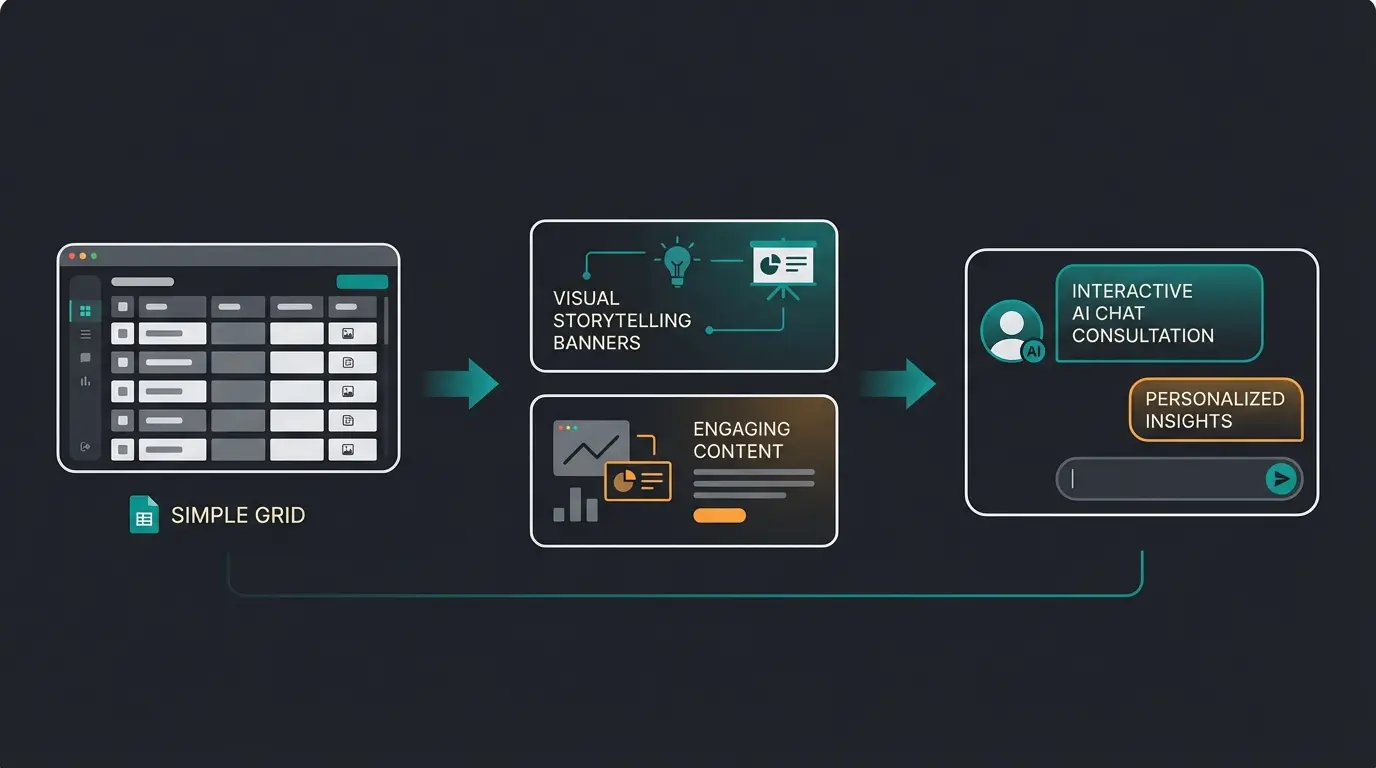
The problem with this approach: This workflow creates static pages. Every visitor sees the same thing (apart from customer group rules). It's a "one-size-fits-all" approach that seems outdated in the age of hyper-personalization and AI. This is precisely where AI product consultation becomes a game-changer.
The Strategic Gap: Why "Beautiful" Is No Longer Enough
Analysis of the top search results for Shopware Shopping Experiences shows that almost all tutorials explain how to build a page, but not why it often doesn't convert. This represents a significant opportunity for merchants willing to think beyond aesthetics.
The Storefront Paradox
Imagine walking into a physical store. The shop is beautifully decorated (great experience world). But there's no salesperson. You see a shelf with 50 different cameras. Which one suits you? Without consultation, you leave the store and Google test reviews. This exact scenario plays out in 90% of all Shopware shops.
- Symptom: High bounce rates on category and landing pages despite beautiful designs
- Cause: The Shopping Experience offers inspiration but no orientation or guidance
- The missed opportunity: German buyers expect high-quality consultation, not just pretty pictures
The Limitations of Standard CMS Elements
The standard elements in Shopware (text, image, video) are passive by nature. While they serve their purpose for basic content display, they fundamentally lack the ability to engage in meaningful dialogue with visitors.
- A text block can be read, but it cannot answer questions or adapt to individual needs
- A product slider shows bestsellers, but not necessarily what the customer needs right now
- A form can collect data, but cannot lead a conversation or provide guidance
This is where we need to start. We must transform Shopware Shopping Experiences from a presentation surface into an interaction surface. The implementation of Shopware 6 chatbots represents one of the most effective ways to bridge this gap.
The New Era: AI-Powered Shopping Experiences
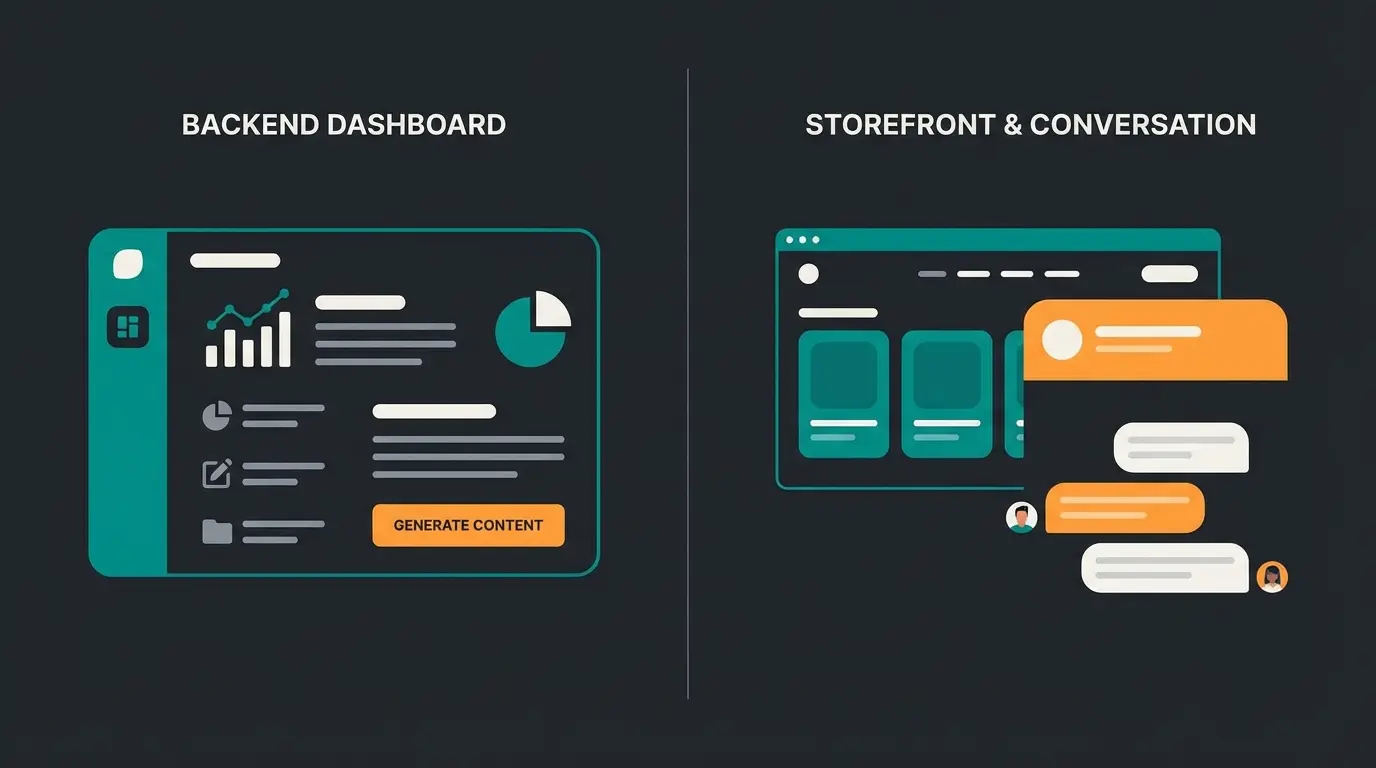
Shopware has already taken massive steps toward artificial intelligence with the AI Copilot. However, it's important to distinguish between backend efficiency and frontend experience. Both serve different purposes and address different challenges in the e-commerce ecosystem.
Backend AI vs. Frontend AI
Most current discussions and features revolve around the backend, as documented by Shopware and various YouTube tutorials:
- AI Copilot | Content: Generates texts for your Shopping Experiences. This saves time but doesn't change the static nature of the page for the customer.
- AI Copilot | Image Keywords: Helps with SEO through automatic image tags, improving discoverability.
- AI Copilot | Export Assistant: Helps with data management and streamlines administrative tasks.
Our opportunity (Frontend AI): The true revolution lies in bringing AI onto the stage – directly into the Shopping Experience, visible to the customer. We're talking about Guided Selling and Conversational Commerce, embedded in the CMS structure. As explored on Qualimero, this approach transforms passive browsing into active consultation.
The Concept of the Intelligent Section
Instead of filling a landing page only with banners, we integrate an "Intelligent Section." Technically, this is often a Custom CMS Block (more on that later) that contains AI logic. This transforms the shopping experience from a digital brochure into an interactive consultation platform.
| Feature | Standard Shopware Experience | AI-Enhanced Experience |
|---|---|---|
| User Interaction | Passive (scrolling, clicking) | Active (questions, answers, filtering) |
| Data Flow | One-way (shop → customer) | Dialogue (shop ↔ customer) |
| Personalization | Customer groups (segment-based) | Real-time intent (behavior-based) |
| Goal | Information & inspiration | Consultation & conversion |
| Example | Banner: "New Running Shoes" | Chatbot: "Running on asphalt or trails?" |
Use Case: The Digital Consultant in the CMS
Imagine you're selling bicycles. Understanding how AI consultation transforms customer interactions is key to implementing this effectively.
The old way: A category page with a large header image "Mountain Bikes" and below it a grid with 200 bikes. The customer is overwhelmed and must navigate alone through countless options.
The new way: Between the header and product grid, you drag in a new block: "The AI Bike Finder."
- The customer is asked: "Where do you usually ride?" (forest, city, mountains)
- "How often do you ride?" (daily commute, weekend adventures, occasional leisure)
- Based on the answers, the Shopping Experience reloads the product grid below the advisor – dynamically filtered by the AI to show only relevant options
This isn't a future dream. By using Dynamic Product Groups in combination with interactive plugins (like Guided Selling or Product Advisor Apps), this can already be implemented in Shopware 6 today. Solutions like AI product consultants make this accessible even to merchants without deep technical expertise.
Stop showing products passively. Start actively consulting your customers with intelligent AI-powered product recommendations that understand their needs.
Start Your AI TransformationCreating a High-Converting Shopping Experience
How do you implement this strategy technically and conceptually? Here's the roadmap for a modern Shopware approach that goes beyond standard tutorials and delivers real conversion results.
Step 1: Design for Emotions (The Foundation)
Use the visual strengths of Shopware 6 to create an emotional foundation. This remains important even as we add intelligence layers on top.
- Use full-width sections for emotional entry points that capture attention immediately
- Use the Layout Editor to make responsive adjustments (Mobile First!)
- Pro tip: Pay attention to loading times. Large images in Shopping Experiences are often performance killers. Use WebP and Lazy Loading (standard in newer Shopware versions)
The visual foundation matters because it creates the emotional context for the AI consultation that follows. AI powered sales works best when combined with compelling visual design.
Step 2: Accessibility as a Requirement (Shopware 6.7 & EAA)
This is the most important current aspect that you cannot ignore. From June 28, 2025, the European Accessibility Act (EAA) applies. Online shops must be accessible, as detailed by Shopware, EcomWise, and Trusted Shops.
Shopware 6.7 (release planned for May 2025) brings massive updates for accessibility in the storefront. If you're building Shopping Experiences, you need to pay attention now:
- Contrasts: Text on images must be readable (WCAG 2.1 AA Standard). Shopware 6.7 will provide warnings or improvements in the standard theme.
- Screen reader compatibility: Every image in your Shopping Experience must have alt text. The AI Copilot can help generate these keywords as noted by Folio3.
- Keyboard navigation: Interactive elements (like sliders or our planned AI consultant) must be operable without a mouse.
Step 3: Integrating Intelligence (Custom Blocks)
Here we leave the standard path. To achieve real interactivity, you have two options that can fundamentally transform your shopping experience:
Option A: Using Apps and Plugins
There are already solutions in the Shopware Store like "Product Recommendation Quiz" or "AI Product Advisor." These can often be dragged directly into the Shopping Experiences as a CMS element, making implementation straightforward.
- Advantage: No code necessary, quick implementation
- Disadvantage: Monthly costs, dependency on the plugin manufacturer
Option B: Developing Custom CMS Blocks (For Agencies/Developers)
For a tailored solution, you can develop your own CMS blocks as documented by Shopware and Emizentech:
- Structure: A block consists of a Vue.js component (administration) and a Twig template (storefront)
- Logic: You can create a block that connects to an external AI API (like OpenAI) for intelligent responses
- Integration: After registering the block, it appears normally in the sidebar of Shopping Experiences under "Custom" or a custom category and can be placed by the merchant via drag-and-drop
Understanding AI driven product consultation fundamentals will help you design more effective custom blocks.
Step 4: The Data Feedback Loop
An AI-powered Shopping Experience sends data back, creating a continuous improvement cycle:
- If 80% of users in the "advisor block" indicate they're looking for "vegan materials," but your static banners advertise "genuine leather," you have a match problem
- Use this data to adjust the static parts of your Shopping Experience (images, texts) accordingly
- Over time, the layout becomes increasingly relevant and conversion-optimized
Average improvement when adding guided selling to category pages
Decrease in exits when visitors engage with AI consultation
More products viewed per session with AI recommendations
Average order value increase through personalized guidance
Digital Sales Rooms vs. Shopping Experiences
There's often confusion between Shopping Experiences and Digital Sales Rooms (DSR). It's important to distinguish between these for your readers, as both offer "experiences" but have different goals. Understanding this distinction helps you choose the right approach for different customer segments.
| Feature | Shopping Experiences (CMS) | Digital Sales Rooms (DSR) |
|---|---|---|
| Target Audience | All visitors (B2C/B2B) | Selected customers (B2B/VIP) |
| Mode | Self-service (customer clicks alone) | Guided (salesperson leads through the shop) |
| Technology | Part of the core (storefront) | Separate instance / extension |
| Features | Static pages + widgets | Video calls, co-browsing, live presentation |
The strategy: Use DSR for high-ticket B2B sales (e.g., machinery spare parts) where a real person must provide consultation. Use AI-powered Shopping Experiences for the scalable B2C market, where an AI bot takes on the salesperson's role. Interestingly, DSR is technically based on Shopping Experience layouts – so you can leverage synergies, as explained by Bay20 and Shopware.
This dual approach recognizes that AI consultation closes the gap between self-service and full human support, providing a middle ground that scales effectively.
Practical Tips for SEO and Content Optimization
Since the primary keyword is "Shopware Shopping Experiences," here are some tips on how to optimize the article and the pages you create for Google. These technical considerations are often overlooked but crucial for visibility.
- Text-to-code ratio: Shopping Experiences tempt you to use only images. Google needs text. Use the text block or text-on-image (with CSS, not as graphics!) so the crawler finds content.
- H-tag structure: Pay attention in the Layout Editor not to use multiple H1 tags on a page. Shopping Experiences allow free choice of heading tags – discipline is required here.
- Lazy loading: Shopware 6 does this largely automatically, but check with custom blocks whether images are loaded efficiently.
- Meta data: Don't forget that the layout itself doesn't have meta data, but rather the category or page it's assigned to. Maintain these under Catalogs > Categories > SEO as noted by Shop-Studio and Bay20.
Implementing these SEO best practices alongside AI sales assistants creates a powerful combination of discoverability and conversion optimization.
The Future Is Dialogue-Oriented
Shopware Shopping Experiences are a powerful tool, but in their standard form often a blunt sword. In a market dominated by Amazon and Temu, mid-sized retailers cannot win on price or logistics alone. They win through consultation expertise – the ability to understand and address individual customer needs.
By upgrading your Shopping Experiences from static "picture books" to interactive "consultation rooms," you harness the true power of Shopware 6. The AI consultation bridge between traditional e-commerce and personalized shopping experiences represents the future of online retail.
- Prepare for Shopware 6.7 (accessibility requirements are non-negotiable)
- Integrate AI elements into the frontend area for active customer engagement
- Think in dialogues, not layouts – every page should be a conversation opportunity
Frequently Asked Questions
Shopping Experiences (Erlebniswelten) is the modern CMS system in Shopware 6, replacing the older Shopping Worlds (Einkaufswelten) from Shopware 5. The new system offers flexible, block-based architecture with four distinct layout types (Shop Pages, Landing Pages, Category Pages, and Product Pages), enabling more responsive and dynamic content creation than the rigid structure of its predecessor.
To comply with the European Accessibility Act by June 2025, ensure all images have descriptive alt text, maintain WCAG 2.1 AA contrast standards for text on images, enable keyboard navigation for all interactive elements, and use proper heading hierarchy. Shopware 6.7 will include built-in accessibility features and warnings to help merchants achieve compliance.
Yes, you can integrate AI consultation through two main approaches: using ready-made plugins from the Shopware Store (like Product Recommendation Quiz or AI Product Advisor) that function as CMS elements, or developing custom CMS blocks that connect to external AI APIs. Both methods allow drag-and-drop placement within your existing layouts.
Shopware provides standard blocks in categories including Text, Images, Commerce (product sliders, listings), Video, and Forms. Additionally, you can create custom blocks for specialized functionality like AI consultants or interactive quizzes. Each block contains elements that display your actual content within the layout structure.
AI-enhanced experiences transform passive browsing into active consultation by asking visitors about their needs and preferences, then dynamically filtering products accordingly. This approach reduces decision paralysis, decreases bounce rates, increases product discovery, and typically improves conversion rates by 30-40% compared to static layouts.
Stop building digital brochures. Start creating intelligent consultation experiences that understand your customers and guide them to the perfect products.
Get Started with AI Consultation