Why Your Checkout Decides Your Revenue
Imagine your customer has spent 20 minutes selecting products in your Shopware store. Perhaps they were even guided through your catalog by an AI or product consultant. They add items to their cart, click "Proceed to Checkout"—and abandon.
Why? In nearly 20% of cases, the reason is missing or unsuitable payment methods according to websei.de.
In 2025, simply offering "everything" is no longer enough. The payment processing landscape has changed dramatically. While PayPal and invoice payment dominate the DACH region as confirmed by EHI research, new B2B solutions and wallet systems are entering the market. At the same time, rising transaction fees force merchants to look more closely at who they offer which payment method to.
This guide isn't a dry manual. It's your strategic roadmap for Shopware 6. We'll illuminate not just the technical setup via the Shopware Rule Builder, but also the psychological aspects of payment and how you can bridge the gap to a secure transaction using AI-powered product consultation.
Native Shopware 6 Payment Methods: The Basics
Before we dive into external Payment Service Providers (PSPs), it's worth looking at what Shopware 6 delivers "out of the box." These methods require no external contracts but have specific advantages and disadvantages according to the official Shopware documentation.
Standard Payment Methods Overview
Shopware 6 comes standard with the following integrated payment options as outlined in their setup guide:
1. Prepayment (Vorkasse): The customer transfers payment first, then you ship the goods. The advantage is 0% payment default risk for you as the merchant, with no transaction fees (except bank fees). The disadvantage is an enormous cart abandonment rate since customers want their goods immediately. Additionally, it delays the shipping process because payment receipt must be verified manually or via bank reconciliation. Best used as a fallback for customers with poor creditworthiness.
2. Cash on Delivery (Nachnahme): Payment is made to the delivery person upon handover. Status in 2025: slowly dying out but still relevant in certain rural regions or with older target groups. The risk is a high rate of delivery refusals—return costs remain with the merchant.
3. Invoice (Manual/Standard): You include an invoice with the goods, and the customer transfers payment later. This is one of the most popular payment methods among German consumers, alongside PayPal. However, without an external service provider, you bear the full default risk. If the customer doesn't pay, you must send reminders. Strategy: Use native invoice only for verified B2B regular customers or government agencies. For everyone else, use "Secured Invoice" via PSPs (see Section 3).
4. SEPA Direct Debit (Basic): You withdraw money from the customer's account. The risk according to GoCardless is that chargebacks due to insufficient funds or objection (up to 8 weeks) are expensive and time-consuming.
Top Payment Service Providers (PSPs) for Shopware
To remain competitive, you need plugins from Payment Service Providers (PSPs). These handle risk management, offer modern methods (Apple Pay, credit cards), and automate processes. Here's a comparison of the "Big 5" for the German market in 2025.
PayPal: The Indispensable Standard
PayPal leads German e-commerce with a market share of approximately 28-29%. Why do Shopware merchants need it? It's often the "trust anchor." A shop without PayPal appears untrustworthy to many end customers. The PayPal Checkout for Shopware 6 now also integrates "Pay Later" (BNPL) and credit card payments, even if the customer doesn't have a PayPal account. According to Transaktionsgebühren, costs are relatively high at approximately 2.49% - 2.99% plus a fixed fee per transaction.
Mollie: Developer and SMB Favorite
Mollie has secured a solid place in the Shopware community through extremely simple integration and transparent pricing. The advantages include no monthly fixed costs—only transaction fees ("Pay as you go") according to Onlinemarktplatz. The Shopware plugin is considered very stable and user-friendly. 2025 costs include credit cards (EU) at approximately 1.80% + €0.25 as noted by Mollie. For PayPal, Mollie often passes through fees or offers bundles. Local methods like iDEAL and Bancontact are important for export to NL/BE. Perfect for startups and medium-sized shops that want to get started quickly without complex contracts.
Stripe: The Technology Giant
Stripe is more than just a payment processor—it's a financial infrastructure platform. Strengths include an extremely powerful API, ideal for international scaling and subscription models (SaaS), offering very granular control over the checkout flow. Costs in 2025 according to Transaktionsgebühren are 1.4% + €0.25 for European cards and 2.9% + €0.25 for international cards. The disadvantage is that setup can be more technical than with Mollie, and support is often only available in English or via chat.
Klarna: The Buy Now, Pay Later King
Klarna dominates the invoice payment and installment payment sector in B2C according to Frisbii. Why is it important? Especially in fashion and lifestyle, Klarna significantly increases cart size because customers can try first and pay later. It can be integrated directly or via PSPs like Mollie/Stripe. Merchant fees according to Mollie's Klarna documentation are higher (often 2.99% + fixed fee) since Klarna assumes the default risk.
Adyen: The Enterprise Solution
Adyen is the partner for the "big players" (Zalando, Spotify, etc.). The model is "Interchange++" pricing according to Codelevate. This means you pay the actual bank fees plus a small margin to Adyen. This often only pays off at high monthly revenues (e.g., >€100,000). The advantage is everything from one source (gateway, risk, acquiring) and extremely detailed data analytics.
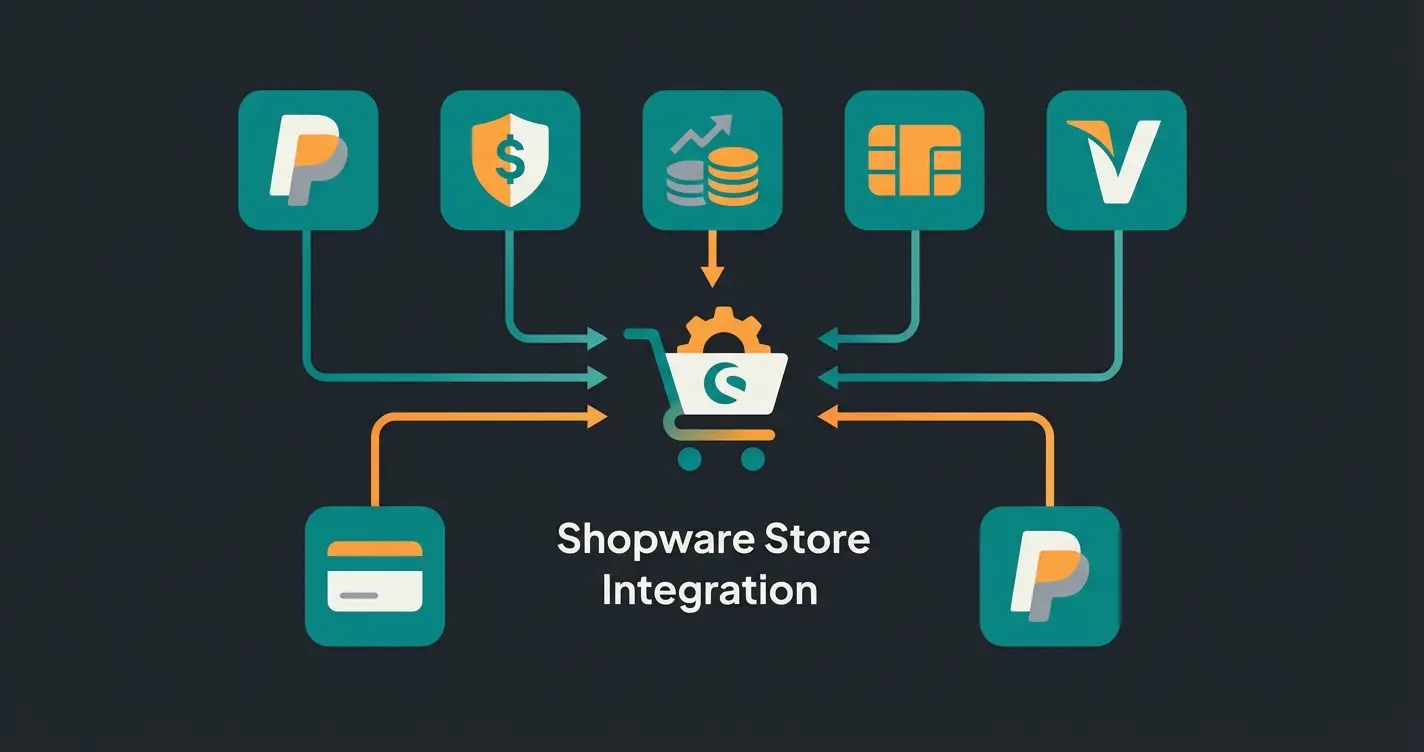
PSP Comparison Table for Shopware 6 (2025)
| Provider | Target Group | Fee Model (approx.) | Specialty | Shopware Integration |
|---|---|---|---|---|
| PayPal | All (Required) | High (~2.99% + €0.39) | Highest customer trust | Native / Top Plugin |
| Mollie | SMB / Startups | Medium (1.8% + €0.25 CC) | No fixed costs, excellent UX | Excellent |
| Stripe | Tech / SaaS / Int. | Low (1.4% + €0.25 EU) | Best API, subscription focus | Very Good |
| Adyen | Enterprise | Individual (Interchange++) | Scalability, POS integration | More Complex |
| Klarna | B2C Retail | High (risk premium) | BNPL market leader | Via PSP or Direct |
Strategic Selection: Which Payment for Which Store?
The mere availability of payment methods isn't enough. You must strategically decide what you offer to whom. This is where professional shops differentiate themselves from amateurs. Understanding how AI chatbots are transforming customer interactions can help inform these strategic decisions.
B2C Fashion and Retail: Speed and Flexibility
Here, "checkout anxiety" (the fear of spending money) is greatest with impulse purchases. Must-haves: PayPal, Apple Pay / Google Pay (for mobile shopping), Klarna (invoice/installments). Strategy: Offer "Express Checkout" buttons directly on the product page. Use wallets to skip the entry of address data.
B2B and Technical Products: Trust and Processes
In B2B, things work differently. Here, a purchaser often orders who cannot pay immediately (missing corporate credit card) or is not allowed to (approval processes). The problem is that classic B2C methods (PayPal, instant transfer) often don't work here. Prepayment is unacceptable. The solution is digital invoice payment. This is where AI consultation closes the gap between complex product selection and confident purchasing decisions.
Specialized providers like Billie or Mondu offer plugins for Shopware according to Onlinemarktplatz B2B reports and the Shopware marketplace. These providers check the creditworthiness of business customers in real-time (real-time scoring). You receive your money immediately (minus fee). The business customer has 30-90 days payment terms. Result: B2B conversion rates often increase by 20-30% because the media break (request quote -> manual invoice) is eliminated.
Leading payment method in German e-commerce
With BNPL providers like Billie/Mondu
Due to missing payment options
Transaction costs vary significantly by provider
The Consultation-to-Payment Approach (Your AI Advantage)
This is your opportunity for differentiation. Many Shopware shops sell products requiring explanation (e-bikes, machinery, expensive electronics). Understanding Shopware AI features is crucial for implementing this approach effectively.
The Scenario: A customer uses your AI consultant to find the perfect product. They've developed trust in the consultation. The Break: At checkout, they're confronted with an anonymous "credit card mask." The Strategy: Use the data from the consultation.
- High-Trust: If the customer chose a high-priced product, proactively offer them "invoice payment" to eliminate final doubts about product quality ("Test first, pay later").
- Low-Friction: If the customer chose accessories, push "Apple Pay" for quick completion.
- AI-Driven Matching: Let your AI Product Consultation system analyze customer behavior and automatically suggest the most appropriate payment method.
Technical Tutorial: Setting Up Payments in Shopware 6
The setup in Shopware 6 is modular. We'll walk through the process step by step, including the powerful Rule Builder. This connects directly to effective Shopware workflow automation practices.
Step 1: Installation and Activation
Download the plugin from your chosen provider (e.g., Mollie or PayPal) from the Shopware Store. Go to `Extensions > My Extensions` and install/activate it. Enter the API keys (you'll find these in the payment provider's dashboard). Understanding your Shopware hosting costs is important when calculating total operational expenses including payment processing fees.
Step 2: Basic Settings in Admin
Navigate to `Settings > Shop > Payment Methods` as described in the Shopware payment documentation. Here you'll see all available methods. Activate: Switch the toggle to "Active." Position: Determine the order (lower number = higher up). Tip: Put the most popular method (usually PayPal or Invoice) at position 1. Logo & Description: Customize these to build trust (e.g., "Pay securely with buyer protection").
Step 3: Assignment to Sales Channel (Important!)
A common mistake: The payment method is active but not visible in the frontend. According to SW-SimplyWorks, you must go to your sales channel (left menu). Scroll to "Payment Methods." Add the new method and define a default method if needed.
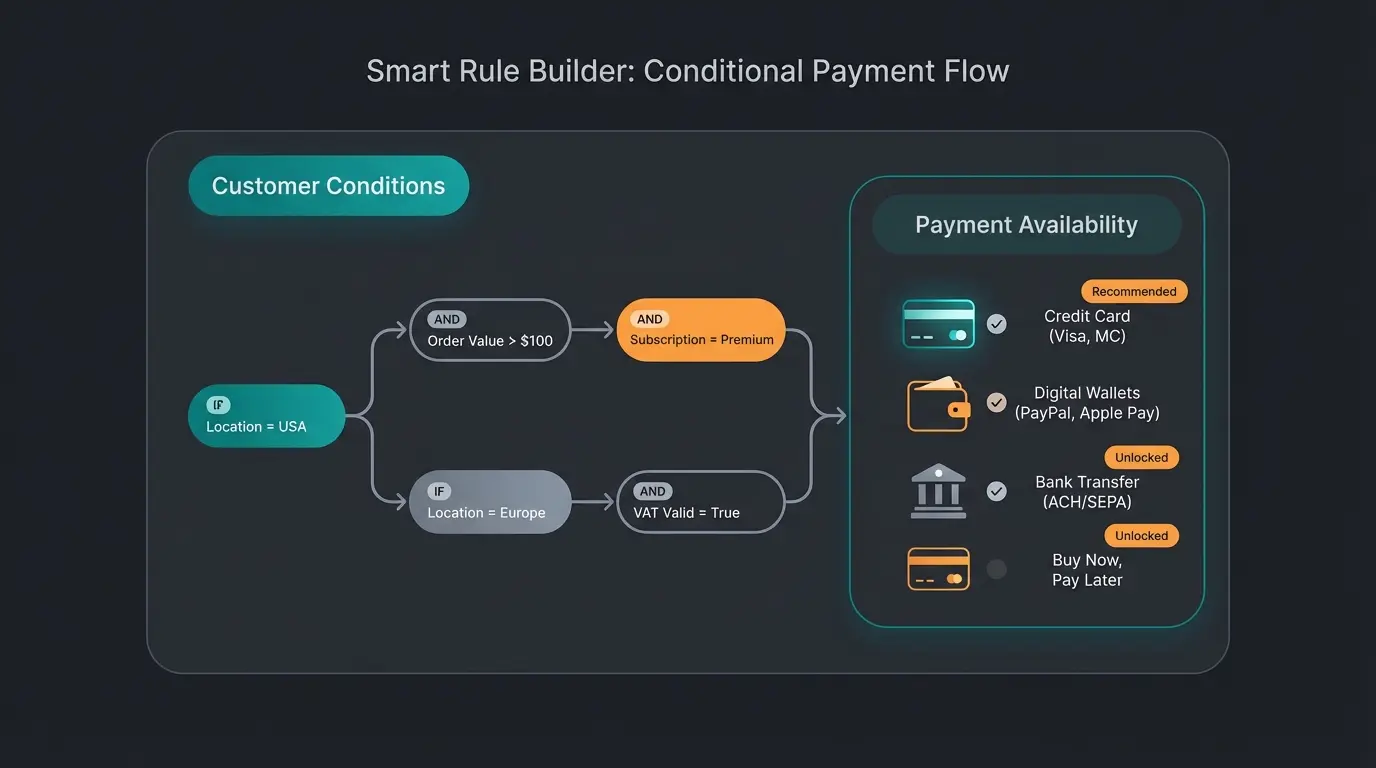
Step 4: The Game Changer – Shopware Rule Builder
This is where the wheat is separated from the chaff. With the Rule Builder (`Settings > Shop > Rule Builder`) you can build complex logic according to the official Shopware documentation and the technical guide.
Scenario A: Risk Minimization (Restricting Invoice Payment) — You want to offer "Purchase on Invoice" (without PSP) only to regular customers. Create a rule: "Is Regular Customer" with condition: `Number of Orders` >= `3`. Go to the "Invoice" payment method. Enter the rule "Is Regular Customer" under "Availability Rule." Result: New customers don't see the "Invoice" option at all. This is a strategy that Rhiem Intermedia recommends for risk management.
Scenario B: Cart Value Control (Saving Costs) — PayPal is expensive. With very small carts (under €10), the fixed fee eats your margin. Create a rule: "Cart Under €10" with condition: `Cart Value` < `10`. Create a rule: "Cart Over €10." Assign PayPal only to the "Cart Over €10" rule (or use surcharges, though these are often legally problematic).
Scenario C: Country-Specific Methods — iDEAL only works in the Netherlands. According to Mollie's regional documentation and Kennersoft, create a rule: "Customer from NL" with condition: `Billing Address: Country` = `Netherlands`. Assign iDEAL to this rule. This way you don't confuse German customers with irrelevant options.
Create rules based on order history, location, or cart value
Set specific triggers like 'Orders >= 3' or 'Cart > €50'
Link rules to specific payment options as availability conditions
Verify rules work correctly before going live
Track conversion rates and adjust rules based on data
Combine intelligent product consultation with smart payment recommendations. Our AI helps customers find the right product AND the right payment method.
Start Free TrialAdvanced Strategy: Reducing Checkout Abandonment
Technical availability is the baseline; psychological guidance is the art. This is where understanding AI product consultation becomes essential for maximizing conversions.
The Pre-Checkout Bridge
Competitors often only talk about payment methods when the customer is already in checkout. But the decision is made earlier.
- Trust Badges: Display logos of available payment methods (PayPal, Visa, Invoice) in the footer and on the product detail page. This signals: "You can shop safely and easily here."
- Express Buttons: Use the Shopware feature to display PayPal/Apple Pay buttons directly on the detail page ("Off-Canvas Cart"). This skips 3-4 clicks.
- Pre-emptive Communication: Mention flexible payment options early in the customer journey, especially for high-ticket items.
AI-Powered Payment Control (Using Tomorrow's Tech Today)
If you use AI tools for personalization, you can create customer segments. This approach is similar to how an AI Employee in E-Commerce can transform customer interactions:
- The "Hesitator": Has viewed the terms page 3 times. -> Prominently offer them "Invoice Payment" at checkout.
- The "Quick Buyer": Comes via Instagram ads. -> Prioritize Apple Pay / PayPal.
- The "Researcher": Spent 15+ minutes on product pages. -> Offer installment payments for high-value items.
- The "B2B Professional": Logged into a business account. -> Default to invoice with net payment terms.
Consider how AI Employee Flora demonstrates the power of personalized AI interactions—the same principles apply to payment method recommendations.
Handling Declines Gracefully
What happens when a credit check (e.g., with Klarna or Billie) fails? Shopware allows "fallback" scenarios. Make sure the error message is friendly: "Unfortunately, invoice payment is not currently available. Please choose one of our secure alternatives like PayPal or credit card." Avoid technical error codes that confuse and frustrate customers.
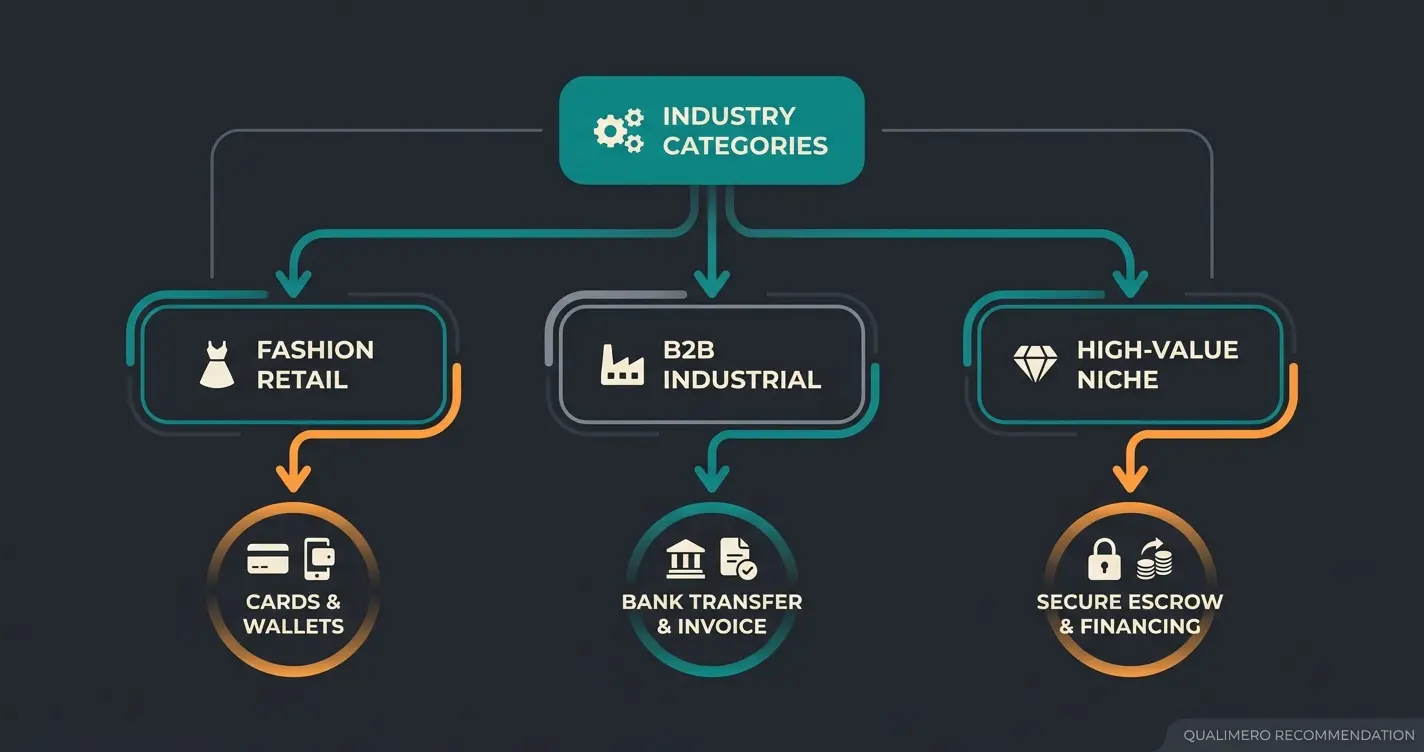
Industry Payment Mix Recommendations
Based on conversion data and customer expectations, here are the optimal payment method combinations by industry segment. Implementing the right mix is part of effective KI E-Commerce strategy.
Focus on BNPL and wallets for impulse buyers
Net terms and corporate cards for procurement
Trust-building options for considered purchases
Multi-currency with regional payment preferences
FAQ: Common Shopware Payment Method Questions
Here we answer the questions that come up most frequently in agency briefings and forums.
The cheapest external method is often SEPA Direct Debit via providers like Stripe or Mollie (approximately €0.25 - €0.35 fixed). The absolutely cheapest is Prepayment (free), but it costs you revenue through cart abandonments. A good middle ground is credit card payments via Stripe (1.4% + €0.25).
Use the Rule Builder. Create a rule "Customer from Country X" or "Customer NOT from Country Y." Then go to the payment method settings and assign this rule as an "Availability Rule." Shopware automatically hides the method for non-matching customers.
Yes, but they're not priority #1. More and more companies use "Corporate Cards" (P-Cards) for procuring C-parts (office supplies, etc.). If you don't accept these, you lose this quick revenue. Priority #1 remains invoice payment (possibly via Billie/Mondu) for larger orders with approval processes.
The Name is what the customer sees (e.g., "Credit Card"). The Technical Name (e.g., `mollie_credit_card`) is used internally by Shopware and for interfaces (ERP connection). Never manually change the technical name when using plugins, as this can cause errors during updates.
For 99% of shops: No. Demand in the mass market is too low, and the tax complexity is high. However, for niche shops (tech gadgets, privacy products), it can be a differentiating feature (e.g., via CoinGate Plugin).
Conclusion: The Perfect Mix Drives Revenue
There is no "best" payment method. There's only the best mix for your target audience. Start with the Big 3: PayPal, Credit Card (via Stripe/Mollie), and Invoice (via Klarna/Ratepay/Billie). Use the Rule Builder to reduce costs and minimize risks. Think B2B and B2C separately: What end customers like (Klarna) is often irrelevant to business customers (they need a clean invoice for accounting).
Your Next Step: Check your current checkout abandonment rates. Are they higher than 3-5% on the last page? Then adjust your payment mix accordingly.
Startup Checklist for Payment Implementation
- PayPal account connected?
- PSP contract (Mollie/Stripe/Adyen) completed?
- API keys entered in Shopware?
- Rule Builder rules for countries/shipping methods created?
- Test order completed (frontend & backend)?
- Invoice texts/emails checked (do bank details appear)?
Combine AI-powered product consultation with intelligent payment recommendations. Reduce cart abandonment and boost conversions with personalized customer journeys.
Get Started Now
Lasse is CEO and co-founder of Qualimero. After completing his MBA at WHU and scaling a company to seven-figure revenue, he founded Qualimero to build AI-powered digital employees for e-commerce. His focus: helping businesses measurably improve customer interaction through intelligent automation.