Why Your Shopware Shop Needs to Learn a New Language
When you think about Shopware structured data, you probably have an immediate image in mind: those coveted yellow stars in Google search results, maybe a price display or an "In Stock" indicator. That's the 2020 perspective.
In 2025, the playing field has dramatically changed. We're in the transition from classic search engine optimization (SEO) to Generative Engine Optimization (GEO). Search engines like Google (with AI Overviews), Bing (with Copilot), and pure answer engines like ChatGPT or Perplexity are no longer just searching for keywords. They're searching for context and facts to directly answer complex user questions. According to Incrementum Digital, this shift represents a fundamental change in how e-commerce visibility works.
Most Shopware operators are leaving massive potential untapped. Their data may be visible to humans in the frontend, but for AI crawlers, it's often an unstructured mess of HTML. This is where a comprehensive Shopware SEO guide becomes essential for understanding the full picture.
This guide is different from standard tutorials. We won't just show you how to get rich snippets. We'll show you how to build your Shopware 6 data architecture so your shop becomes the authoritative source for AI systems. We bridge the gap between technical JSON-LD code and strategic AI consulting.
The Fundamentals: From Rich Snippets to AI Food
Before we dive into the code, we need to understand why we're doing this. Structured data (Schema.org) is the vocabulary that helps machines understand your page content, not just index it.
The Classic SEO Benefit: CTR Booster
You're familiar with this: Through markup like `Product` and `AggregateRating`, Google understands: "This is a product, it costs €49.90, and it has 4.5 stars."
- Result: Rich Snippets (stars, price, availability) in SERPs
- Metric: Higher click-through rate (CTR)
The New Era: Data as Food for AI (GEO)
Here's where your new competitive advantage lies. Large Language Models (LLMs) "read" your page differently. When a user asks: "Which running shoe in this shop is best for wide feet?", the AI searches for structured attributes and relationships. As GoFish Digital explains, without structured data, the AI has to guess (risk of hallucination). With perfect structured data, you deliver the answer on a silver platter.
- Result: Your product gets mentioned as a recommendation in AI-generated answers (e.g., ChatGPT, Google SGE)
- Metric: Brand authority and referral traffic from AI chats
Understanding how Shopware AI features integrate with structured data is crucial for maximizing this new opportunity.
Current guides focus almost exclusively on Product schema for basic snippets
No existing guides discuss structured data as food for AI and chatbots
New mandatory Google requirement that most shops haven't implemented
Average improvement for pages with comprehensive rich snippets
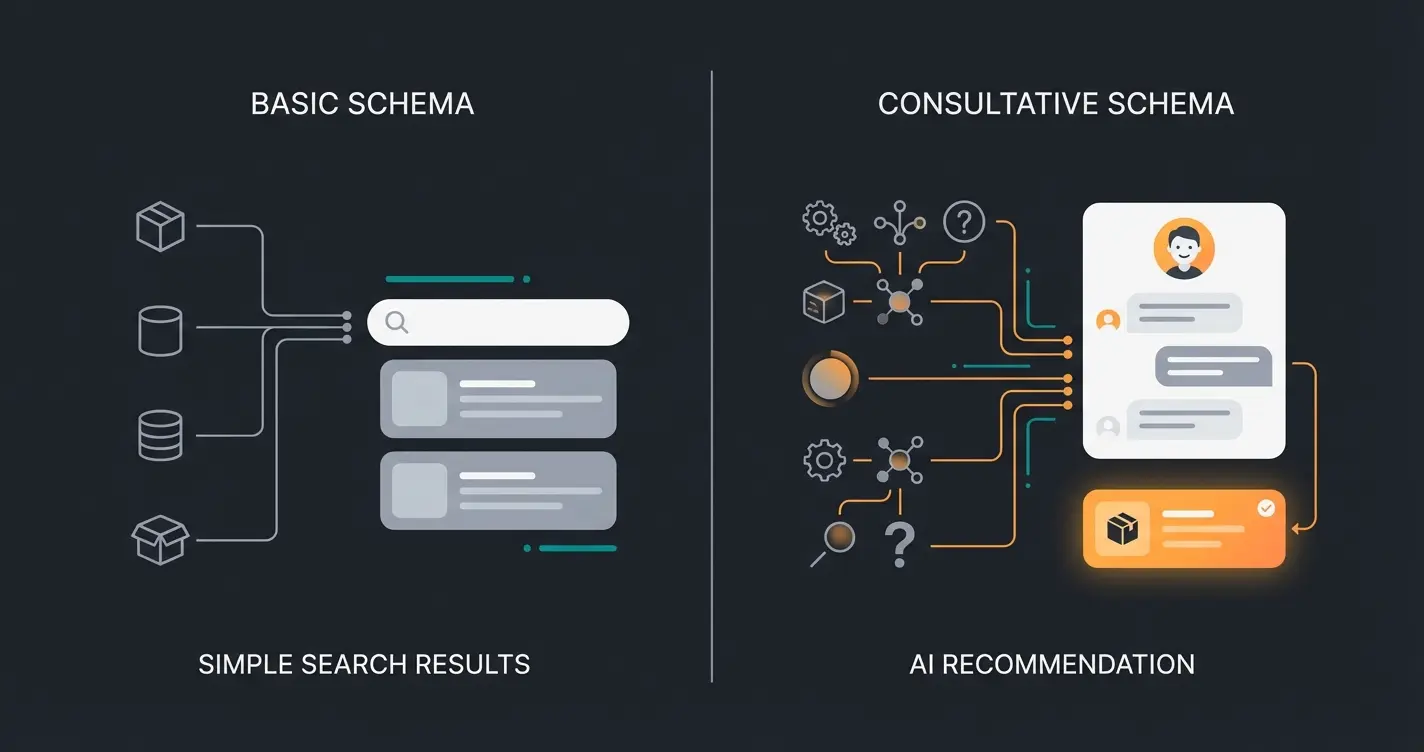
Core Schema Types: The Consultant Mix for Shopware
Most Shopware plugins only cover the transactional basics (price, name, stock). To rank in 2025, we need a consultative mix. We must provide data that replaces human consultation.
Product & Offer: The Foundation
This is the standard. Here you define name, SKU, GTIN (EAN), price, and currency.
MerchantReturnPolicy: New Google Requirement 2025
This is where many shops currently fail. Google has massively tightened requirements for return policies. It's no longer sufficient to just enter them in Merchant Center; they must be present as structured data on the page. According to Marketing Now and Kahunam, this is a critical update that affects all e-commerce sites.
FAQPage: The Consultant Lever
This is your biggest lever for differentiation. Use the `FAQPage` schema not just on a general help page, but dynamically on product detail pages (PDPs). This approach aligns perfectly with AI product consultation strategies.
- Scenario: A customer frequently asks: "Is this material dishwasher safe?"
- Solution: Maintain this question in a custom field in Shopware. Output it as `FAQPage` schema.
- AI Effect: When someone asks Google "Is Product X dishwasher safe?", Google can extract the answer directly from your structured data and display it as a Featured Snippet or AI answer.
As KI-Company.ai reports, this type of consultative schema implementation dramatically improves AI visibility and customer experience.
ProsAndCons: For Comparison Portals
An underestimated schema. You can explicitly mark a product's pros and cons. AI systems love this data for generating comparison tables ("Product A vs. Product B"). This is particularly valuable when customers are comparing options like Shopware vs Shopify or Shopware vs WooCommerce.
| Schema Type | Standard Usage | AI-Consultant Usage |
|---|---|---|
| Product | Basic product info for Google Shopping | Complete attribute mapping for AI recommendations |
| FAQPage | General help/support page only | Product-specific Q&A on PDPs for instant AI answers |
| MerchantReturnPolicy | Not implemented or Merchant Center only | On-page markup with country-specific policies |
| ProsAndCons | Rarely used | Explicit markup for AI comparison algorithms |
| HowTo | Tutorial content only | Product usage guides for AI consultation |
Implementation in Shopware 6: The Technical Deep Dive
You have two paths: The convenient plugin route or the flexible "pro" path via manual Twig adjustments. Both have their place depending on your resources and needs.
Option A: Plugins (The Quick Way)
For shop operators without developer resources, plugins are the standard approach. This is similar to how Shopware 6 chatbots can be implemented through various methods.
Well-known providers:
- Repertus: Offers solid basic functions according to the Shopware Store
- PremSoft: Known for good support and regular updates as noted on PremSoft.de
- Codiverse: Focuses strongly on JSON-LD Rich Snippets per the Shopware Marketplace
Disadvantage: Plugins are often "black boxes." If Google demands a new field like `returnPolicyCountry` tomorrow, you have to wait for the plugin manufacturer's update. Additionally, individual "consulting" schemas like product-specific FAQs are often missing.
Option B: Manual Twig Implementation (The Pro Way)
This is the recommended path for maximum control and SEO performance. We inject the JSON-LD directly into your theme's template. Understanding Shopware URL structure helps provide context for where this fits in your overall technical SEO strategy.
Finding the Right File
In Shopware 6 Storefront, the base for the `<head>` area (where JSON-LD belongs) is in `meta.html.twig`. We want to extend this file in our own theme.
Path: `custom/plugins/YourTheme/src/Resources/views/storefront/layout/meta.html.twig`
The Code: The Perfect Shopware 6 JSON-LD Snippet
Here's a copy-paste ready example that covers modern requirements (including `MerchantReturnPolicy`). It uses Shopware 6's Twig variables as documented on Stack Overflow and the official Shopware Documentation.
```twig {% sw_extends '@Storefront/storefront/layout/meta.html.twig' %} {% block layout_head_meta_tags_json_ld %} {{ parent() }} {# Only output on product pages #} {% if page.product %} {% set product = page.product %} {# Price calculation and currency #} {% set price = product.calculatedPrice %} {% set currency = context.currency.isoCode %} <script type="application/ld+json"> { "@context": "https://schema.org/", "@type": "Product", "name": "{{ product.translated.name|replace({'"': '\\"'}) }}", "description": "{{ product.translated.description|striptags|replace({'"': '\\"'})|raw }}", "image": [ {% if product.cover.media.url %} "{{ product.cover.media.url }}" {% endif %} ], "sku": "{{ product.productNumber }}", {# GTIN/EAN is mandatory for Google Merchant Listings #} {% if product.ean %} "gtin13": "{{ product.ean }}", {% endif %} "brand": { "@type": "Brand", "name": "{{ product.manufacturer.translated.name|default('YourShopName') }}" }, "offers": { "@type": "Offer", "url": "{{ seoUrl('frontend.detail.page', { productId: product.id }) }}", "priceCurrency": "{{ currency }}", "price": "{{ price.unitPrice }}", "priceValidUntil": "{{ "now"|date_modify("+1 year")|date("Y-m-d") }}", "itemCondition": "https://schema.org/NewCondition", "availability": "{% if product.availableStock > 0 %}https://schema.org/InStock{% else %}https://schema.org/OutOfStock{% endif %}", {# NEW: MerchantReturnPolicy - Mandatory for 2025 #} "hasMerchantReturnPolicy": { "@type": "MerchantReturnPolicy", "applicableCountry": "DE", "returnPolicyCountry": "DE", "returnPolicyCategory": "https://schema.org/MerchantReturnFiniteReturnWindow", "merchantReturnDays": 30, "returnMethod": "https://schema.org/ReturnByMail", "returnFees": "https://schema.org/FreeReturn" }, "shippingDetails": { "@type": "OfferShippingDetails", "shippingRate": { "@type": "MonetaryAmount", "value": "4.90", "currency": "{{ currency }}" }, "shippingDestination": { "@type": "DefinedRegion", "addressCountry": "DE" } } } {# Here you could dynamically add FAQ data from Custom Fields #} } </script> {% endif %} {% endblock %} ```
Explanation of Code Components
- `sw_extends`: We inherit from the original template to avoid overwriting anything Shopware or other plugins do there, as explained in the Shopware troubleshooting documentation and theme extension guides.
- `page.product` Check: The script only loads when we're on a product detail page.
- `striptags`: Removes HTML from the product description since JSON-LD expects plain text.
- `MerchantReturnPolicy`: Here you see the new fields `returnPolicyCountry` and `applicableCountry` (hardcoded to "DE" here – this could be solved dynamically via `context` if you sell internationally). Google Search Central provides detailed documentation on these requirements.
- `shippingDetails`: Another signal for Google to display total costs directly in search, as detailed by Pemavor.
Don't just structure data for Google—structure it for your customers. Our AI solution turns your product data into active, automated consultation that answers customer questions 24/7.
Start Your AI ConsultationCommon Errors & Troubleshooting in Shopware 6
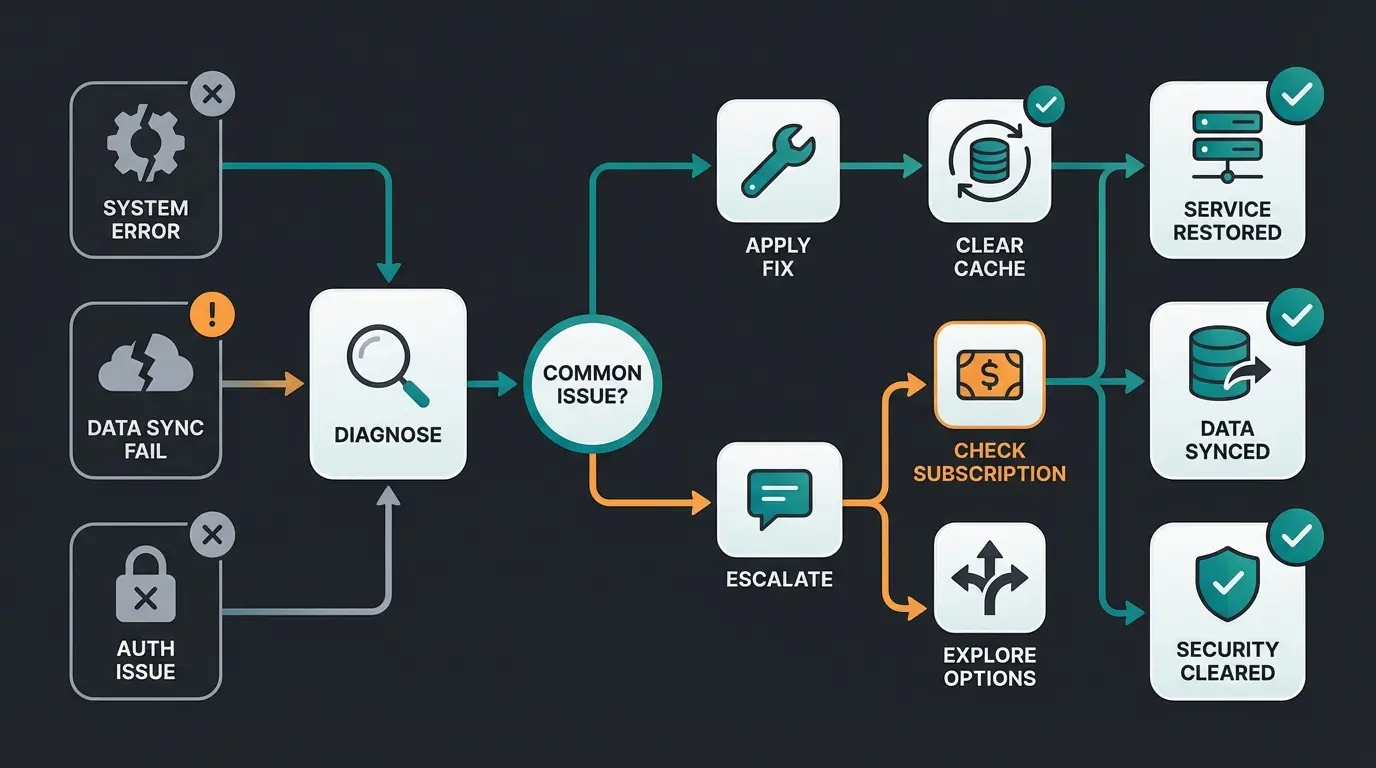
Even with good code, things can go wrong. Here are the most common pitfalls we see in practice. Having access to Shopware technical support resources can be invaluable during implementation.
The Cache Devil
Shopware 6 has very aggressive caching. If you make changes to `meta.html.twig` and don't see them in the frontend:
Missing Global Identifiers (GTIN/EAN)
Google often warns in the Rich Results Test about "Missing field 'hasMerchantReturnPolicy'" or "Missing field 'gtin'."
- Problem: Many shop operators don't maintain EANs.
- Solution: If you manufacture your own products, use `identifier_exists: no` (must be added to the code). However, it's always better to maintain a valid GTIN, as this is the "key" for Google Shopping and AI comparisons.
Currency Formatting Issues
Shopware sometimes outputs prices with a comma instead of a period (depending on locale). However, JSON-LD strictly requires a period as the decimal separator (e.g., `19.99`).
Fix: In the Twig code above, we use `price.unitPrice`, which usually delivers the raw float value. If there are problems, use the filter `|number_format(2, '.', '')`.
Variant Chaos
For variant products (e.g., T-shirt in Red/Blue), Shopware often displays the data of the "parent product" by default.
Solution: Make sure `page.product` really points to the selected variant. Shopware 6 does this correctly on the PDP by default, but some themes override this logic. This is an area where AI sales agents can provide additional support through intelligent product matching.
Validation: Trust is Good, Control is Better
Never rely on the code "looking good." Validate it thoroughly to ensure everything works as expected.
Add JSON-LD to your Twig template and clear cache
Test your URL for Merchant Listings and Product Snippets validation
Check logical structure and how AI systems read your data
Track enhancement reports for structured data errors over time
Google Rich Results Test
Use Google's official tool. Either copy your product's URL or the generated HTML code.
- Goal: Green checkmarks for "Merchant Listings" and "Product Snippets"
- Note: Warnings (yellow) are okay (e.g., missing reviews), errors (red) are critical
Schema Markup Validator (Schema.org)
This tool is less strict than Google but better shows the logical structure and how an AI "reads" the data. This validation step is crucial for AI-powered product consultation implementations.
Advanced Implementation: FAQPage Schema on Product Pages
As highlighted in the content gap analysis, implementing FAQPage schema directly on product detail pages is a major differentiator. Here's how to extend the basic implementation:
```twig {# Add this within your JSON-LD block after the Product schema #} {% if product.customFields.faq_questions is defined %} , "mainEntity": [ {% for faq in product.customFields.faq_questions %} { "@type": "Question", "name": "{{ faq.question|replace({'"': '\\"'}) }}", "acceptedAnswer": { "@type": "Answer", "text": "{{ faq.answer|replace({'"': '\\"'}) }}" } }{% if not loop.last %},{% endif %} {% endfor %} ] {% endif %} ```
This approach requires setting up custom fields in Shopware 6 to store FAQ data per product. The result is that AI systems can instantly answer specific questions like "Does this ski fit wide boots?" or "Is this compatible with model X?" This is where KI E-Commerce strategies truly shine.
SEO Product Page Optimization with Structured Data
Implementing structured data is just one component of a comprehensive Shopware SEO product strategy. The combination of proper schema markup with optimized content creates a powerful foundation for both traditional search and AI visibility.
When working with AI product consultation solutions, the quality of your structured data directly impacts how well the AI can assist customers. Think of it this way: Bad data equals stupid AI. Comprehensive, accurate structured data enables intelligent, helpful responses.

Conclusion: Data is the New Oil for AI
Implementing Shopware structured data in 2025 is no longer a pure SEO task. It's a strategic investment in the future viability of your e-commerce business.
By transitioning from simple "rich snippets" to a complex, consultative data model (including return policies, FAQs, and detailed product attributes), you make your shop ready for the era of AI search. You feed the algorithms of Google, ChatGPT, and others with exactly the information they need to not just list your products, but actively recommend them.
Action Steps
- Immediately check your current rich snippets for the missing `MerchantReturnPolicy` (country code!)
- Decide: Plugin or code? If you want to grow, take the step to manual Twig customization for maximum flexibility
- Think like a consultant: What questions do your customers ask? Bring these answers via `FAQPage` schema directly into your product page code
The future of e-commerce is no longer just visual – it's structured. Embrace this shift and position your Shopware shop as the authoritative source that AI systems trust and recommend.
Frequently Asked Questions
Structured data (Schema.org markup) is the code you add to your pages to help search engines understand your content. Rich snippets are the visual enhancements (stars, prices, availability) that appear in search results as a result of that structured data. Think of structured data as the input and rich snippets as one possible output.
Both options work. Plugins like Repertus, PremSoft, or Codiverse offer quick implementation without coding knowledge. However, manual Twig implementation gives you maximum control and flexibility, especially important when Google introduces new requirements like the MerchantReturnPolicy. For growing businesses, we recommend the manual approach.
Google tightened requirements in 2025 to improve the shopping experience. The returnPolicyCountry field explicitly tells Google which country's return policy applies, preventing confusion for international shoppers. Without it, your products may not qualify for Merchant Listings in search results.
AI systems like ChatGPT, Google's AI Overviews, and Perplexity use structured data to understand product context accurately. When a user asks 'Which running shoe is best for wide feet?', AI can extract and recommend products with matching structured attributes instead of guessing. This is called Generative Engine Optimization (GEO).
Validate after every change to your templates or product data structure. Additionally, perform monthly audits using Google Search Console's enhancement reports to catch any new errors. When Google announces schema changes, immediately test affected pages with the Rich Results Test tool.
Stop losing customers to competitors with better data. Our AI consulting solution transforms your structured data into an automated sales consultant that answers questions, provides recommendations, and drives conversions around the clock.
Get Started Free
Kevin is CTO and co-founder of Qualimero. As an AI architect with over 15 years of experience as CTO and CPO in the tech industry, he designs the AI systems that automate tens of thousands of customer interactions daily for Qualimero's clients — reliably, securely, and at scale.