Introduction: Beyond Basic Integration
Connecting weclapp to Amazon to save time on invoices? That's a good start. But if you're only using the interface to upload invoices and sync inventory levels, you're leaving the biggest potential completely untapped.
Most online retailers use their ERP (Enterprise Resource Planning) system to tame the operational chaos – packages out, invoices in. But what about the number one revenue driver: customer communication? In an era where e-commerce margins are under pressure from rising ad costs (PPC) and logistics fees, automating pure "administration" is only half the battle.
This guide is for ambitious FBA and FBM sellers who want to look beyond the standard documentation. We'll show you not only how to technically set up the weclapp Amazon integration flawlessly (while avoiding the pitfalls that 80% of users fall into), but also how to use your weclapp data to turn mere visitors into loyal buyers through Artificial Intelligence (AI). If you're exploring similar integrations for your shop system, check out our comprehensive Shopware Amazon integration guide for additional insights.
Welcome to 2026 – where your ERP doesn't just manage, but actively sells.
Core Features: What the Standard Integration Delivers
Before we dive into advanced strategies, we need to understand the foundation. weclapp offers a native interface to Amazon that's far more than a simple data export. It functions as the central nervous system of your e-commerce operations.
The integration is based on the modern Amazon Selling Partner API (SP-API), which replaced the old MWS interface and enables faster, more secure data exchange according to weclapp and Amazon Services.
The Difference: FBA vs. FBM in weclapp
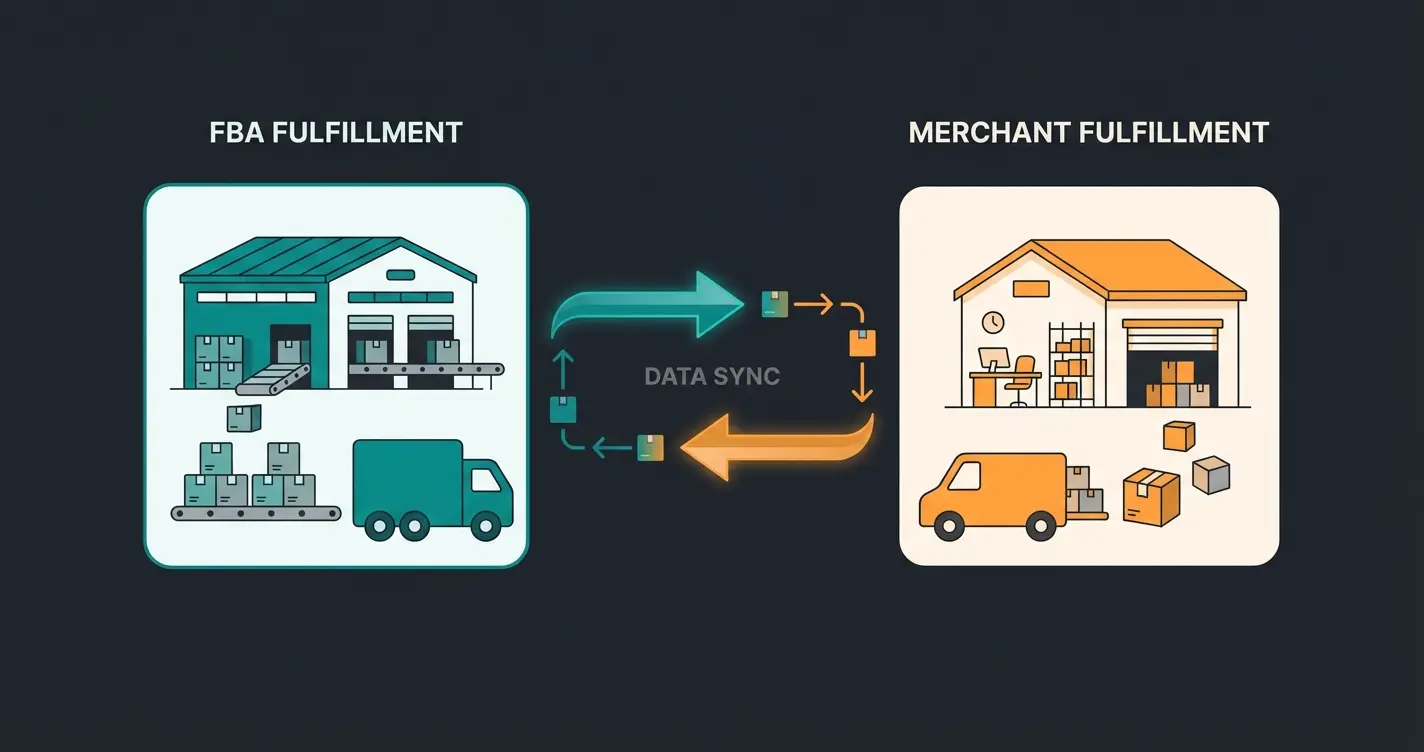
How weclapp handles your orders depends massively on whether you handle shipping yourself (FBM) or outsource it to Amazon (FBA). Here's a direct comparison of how the processes are mapped in the software:
| Feature | Amazon FBA (Fulfillment by Amazon) | Amazon FBM (Merchant Fulfillment) |
|---|---|---|
| Order Import | Automatically as 'delivery without order reference' or order (depending on settings) | Automatically as normal order for further processing |
| Inventory | weclapp mirrors Amazon inventory (often delayed by ~1 hour) | weclapp is the 'master'. Inventory changes are pushed live to Amazon |
| Shipping Process | Amazon ships physically. weclapp only imports the 'Shipped' status | You create delivery notes and labels in weclapp. Tracking ID is transmitted to Amazon |
| Invoice Creation | Automatic via weclapp (or Amazon VCS). Upload back to Seller Central is mandatory | Automatic via weclapp. Upload to Seller Central via the interface |
| Returns | Amazon decides on return acceptance. weclapp imports return reports | You decide and create returns manually or via scan in weclapp |
The Three Pillars of Standard Automation
1. Bidirectional Inventory Synchronization: The most important feature for FBM merchants. As soon as an order comes in through your Shopify store or via eBay, weclapp reduces available inventory and reports the new quantity to Amazon according to weclapp documentation. This prevents the dreaded oversells that can quickly lead to Amazon account suspension.
2. Automated Invoice Upload (VCS & IDU): Amazon requires that invoices for business customers (B2B) be available in Seller Central within 24 hours of shipping. weclapp can be configured to automatically generate invoices and transmit them via IDU (Invoice Document Uploader) to Amazon as detailed by Amazon. This is essential for VAT calculation, especially if you use the Amazon VAT Calculation Service (VCS) or store in other EU countries (PAN-EU).
3. Prime Shipping by Seller: If you use the 'Seller Fulfilled Prime' program, you must meet strict shipping requirements. The weclapp interface allows you to generate Prime shipping labels directly from the system, which greatly accelerates the process and minimizes errors in label creation according to weclapp.
Step-by-Step: How to Connect Amazon to weclapp
The official documentation is often very technical. Here's the practice-oriented, compressed process to get your connection 'live' quickly and cleanly. For a deeper understanding of ERP integrations in general, our Shopware ERP integration guide provides excellent foundational knowledge.
Phase 1: Preparation in Seller Central
Before you start in weclapp, make sure you have the necessary permissions in Amazon Seller Central. Since the switch to the SP-API, you must authorize weclapp as a third-party app.
- Log in to Amazon Seller Central
- Navigate to 'Partner Network' > 'Manage Apps and Services'
- Search for weclapp or authorize a new developer if you're planning a custom connection (for the standard interface, the login flow from weclapp is usually sufficient)
Phase 2: Setup in weclapp
Go to Global Settings > Integration > Marketplaces in your weclapp instance.
- Add Connection: Click '+ Add Connection' and select the Amazon logo
- Authorization: You will now be redirected to Amazon. Confirm access. This is the critical OAuth handshake that activates the SP-API
- Define Basic Settings: Set order import date (don't go too far back to avoid duplicates), standard warehouse for FBM orders, and payment mapping to weclapp booking accounts
Phase 3: FBA Configuration (The 'Secret Tip')
Many users fail at correctly mapping FBA warehouses. Here are your options:
Option A (Simple): You don't use a separate FBA warehouse in weclapp. Inventory is only displayed as an info value. Good for small merchants.
Option B (Pro - Recommended for PAN-EU): Create a virtual warehouse in weclapp for each Amazon logistics center (or at least per country: DE, FR, IT, etc.). Why? Only this way can you correctly book goods movements (transfers) and cleanly separate taxes between countries. If goods are moved from Amazon DE to Amazon PL, weclapp needs to know this according to weclapp.
Log in and authorize weclapp as third-party app in Partner Network settings
Add Amazon connection via Global Settings > Integration > Marketplaces
Complete the SP-API handshake by confirming access on Amazon
Configure import date, warehouse assignment, and payment mapping
Create virtual warehouses per Amazon logistics center for PAN-EU compliance
Common Pitfalls & Limitations (The 'Real Talk' Section)
In marketing brochures, everything sounds like 'Plug & Play'. In reality, there are stumbling blocks you need to know before they cripple your business.
1. The Vendor Central Problem
A massive misconception affects merchants who supply Amazon not as a marketplace (Seller Central), but as a supplier (Vendor Central). Plain talk: The standard weclapp interface does not support Vendor Central (EDI connection) according to Navaya.
The consequence: If you're a Vendor (Amazon buys your goods and sells them themselves), you cannot import orders (Purchase Orders) through the standard interface. The workaround: You need third-party middleware (e.g., Synesty or custom EDI converters) that mediates between Amazon Vendor Central and the weclapp API.
2. SKU Chaos and Tracking IDs
The most common mistake at startup: Differing item numbers. For sync to work, the `SKU` (Stock Keeping Unit) in Amazon Seller Central must exactly match the `Item Number` in weclapp.
The problem: In weclapp the item is called 'NIKE-SHIRT-L', on Amazon 'Nike Shirt Large'. The solution: Maintain the Amazon SKU in weclapp in the 'Item Number' field or use mapping fields if available. A discrepancy here causes orders not to be imported or – worse – inventory not to be synchronized, leading to oversells.
3. The Latency Trap
The inventory sync is not real-time in the millisecond range. While the SP-API is fast, depending on settings and server load, it can take 15-60 minutes until an FBA sale is visible in weclapp. Impact: Don't rely on weclapp inventory as a second-by-second monitor for 'Lightning Deals' with extremely high throughput.
4. Problems with Return Assignment
FBA returns are often booked as 'not saleable', but sometimes end up in normal inventory in weclapp if the workflow isn't cleanly defined. Regularly check 'Inventory Movements Without Order Reference' to ensure that defective returns aren't used again as available inventory for shop sync.
The Missing Puzzle Piece: AI-Powered Product Consultation
Up to this point, we've talked about logistics – the backbone of your commerce. But logistics no longer wins customer hearts in 2026; it's expected. The true competitive advantage lies in the intelligent use of your data.
Here's where your content gap comes into play: Most merchants are sitting on a goldmine of data in weclapp (item attributes, inventory, delivery times, historical purchases), but don't use it for customer consultation. Implementing AI-powered customer service can transform this data into actionable customer interactions.
The Problem: The Marketplace 'Service Desert'
Amazon customers have questions: 'Does this replacement part fit my 2018 Audi?', 'Is the material BPA-free?', 'When will size L be back in stock?'
Status Quo: An employee clicks through weclapp, searches for the data sheet, checks inventory, and responds 24 hours later. Too late. The customer has long since bought from a competitor.
The Standard Bot Solution: A dumb chatbot says: 'Please contact support@company.com'. Understanding the difference between basic bots and intelligent solutions is crucial, which is why we've created a detailed guide on AI employee comparisons.
The Solution: weclapp + AI as Product Advisor
Imagine placing an intelligent layer over your weclapp data. An AI solution that has read-only API access to your master item data and inventory levels.
Your weclapp instance is the 'Single Source of Truth' with attributes like material, compatibility, dimensions, and current inventory
An AI agent (like specialized e-commerce GPTs) is connected to this data via API
Customer asks: 'Is this bike rack suitable for e-bikes?'
AI checks the 'Load Capacity' and 'Suitability' attributes in the weclapp item master in real-time
'Yes, the rack has a 60kg load capacity and is explicitly approved for e-bikes. We currently have 4 units ready to ship from Frankfurt warehouse.'

Comparison: Standard Support vs. AI-Enhanced
| Scenario | Standard weclapp User | With AI Integration |
|---|---|---|
| Customer asks about stock | Employee must manually check the system. Response time: hours | AI checks live inventory via API. Response time: seconds |
| Technical detail questions | Employee must search PDF data sheets | AI 'knows' all attributes stored in weclapp or linked documents |
| Availability | Mon-Fri, 9am-5pm | 24/7, including Sundays and holidays |
| Scalability | More inquiries = More staff needed | Unlimited scalability without additional costs |
Why this matters for SEO and ranking: Amazon measures 'Response Time' on customer inquiries. A fast, precise answer not only increases conversion rate but also signals excellent customer service to the algorithm. By making weclapp data accessible to AI, you transform an administrative tool into a sales machine. Our guide on conversational commerce for 2025 explores this transformation in depth.
Stop letting valuable product data sit idle. Our AI solution connects to your ERP and provides instant, accurate customer consultation 24/7.
Discover AI Product ConsultationBest Practices for Multi-Channel Growth
For the AI magic and logistics described above to work smoothly, data hygiene is paramount. A computer (or an AI) is only as smart as the data you feed it. For comprehensive strategies on managing multiple sales channels, explore our Shopware multi-channel strategy guide.
1. The 'Golden Record' Principle
Treat weclapp as your sole source of truth. Never change item data directly in the Amazon backend or in your Shopify shop when you use weclapp. Always create new items in weclapp first. Use the attribute properties in weclapp extensively. Carefully fill in fields like 'Weight', 'Country of Origin', and 'Customs Tariff Number'. This data is fuel for your international expansion and for AI systems.
2. Use Inventory Buffers
To avoid Amazon penalties for cancellations, use inventory rules in weclapp marketplace settings. Example: 'Always transmit inventory minus 2'. If you physically have 2 items left in stock, weclapp reports '0' to Amazon. This protects you from inventory discrepancies or damage during packing that would otherwise lead to an unfulfillable order.
3. Maintain Automation Rules
Use the weclapp Workflow Designer. Scenario: An Amazon order comes in with the note 'Express'. Rule: weclapp recognizes the shipping type and automatically assigns the logistics provider 'DHL Express' and prioritizes the order at the top of the picking list. This saves manual intervention in the warehouse office. For similar automation approaches, our Shopware API automation guide provides valuable insights.
With proper inventory buffer rules in weclapp marketplace settings
When AI has access to properly maintained product attributes
Through workflow automation and proper data hygiene practices
AI-enhanced support vs. traditional manual customer service
The Automated Amazon Order Lifecycle
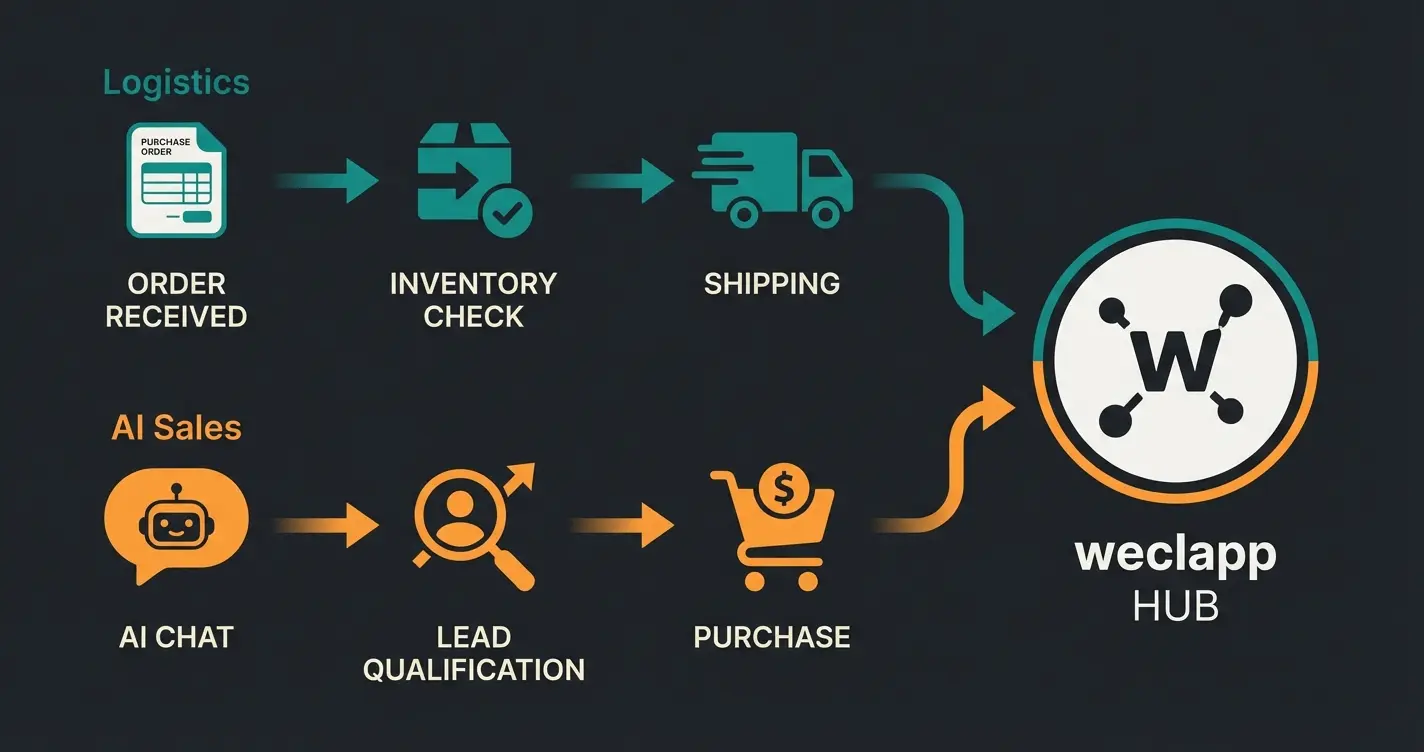
Understanding how weclapp functions as a central data hub is crucial for maximizing both logistics efficiency and sales potential. The order lifecycle now has two distinct paths that work in harmony.
Path A (Logistics): Customer orders → SP-API Import → weclapp Order → Invoice created & uploaded → Inventory -1 → Tracking ID to Amazon. This is the standard automation that every properly configured weclapp instance handles.
Path B (Sales/AI - New): Customer asks question → AI accesses weclapp inventory & attributes → Instant response → Customer purchases → continues to Path A. This is where intelligent AI chatbots revolutionize the customer experience. If you're exploring broader marketplace strategies, our guide on Shopware marketplace connections offers additional strategic insights.
Compliance and Data Privacy Considerations
German and European users rightly value data privacy. When implementing AI solutions that access your weclapp data, ensure compliance with GDPR (DSGVO) requirements. Your AI product consultation system should explicitly handle customer data according to privacy standards.
Additionally, be aware of the EU AI Act compliance requirements that affect commercial AI implementations. Tax compliance is equally important – the weclapp Amazon integration handles VAT calculations, OSS procedures, and country-specific tax rules, but proper configuration is essential. According to Xentral, misconfigurations in cross-border VAT settings are among the most costly mistakes for multi-country sellers.
Conclusion & Next Steps
Conclusion & Next Steps
The integration of weclapp and Amazon is no longer optional in 2026 – it's mandatory for any merchant who wants to scale. It takes the burden of manual invoicing off your shoulders, synchronizes your inventory across all channels, and ensures tax compliance.
But technology doesn't stand still. While the standard integration secures your logistics foundation, connecting AI solutions to your weclapp data is the next evolutionary step. Those who begin today to use their ERP data not only for the warehouse but for automated, intelligent customer consultation will secure a decisive advantage in the fiercely competitive Amazon marketplace.
For a comprehensive understanding of AI-powered product consultation, our complete AI product consultation guide provides the full strategic picture.
Summary of Next Steps
- Audit: Check your current weclapp-Amazon connection for errors (SKUs, tax settings)
- Optimize: Set up virtual FBA warehouses cleanly if not already done
- Innovate: Begin maintaining your weclapp item data so it's 'AI-ready' – structured, detailed, and complete
- Transform: Explore how AI product consultation can turn your static data into active sales conversations
Troubleshooting: 5 Things to Check When Amazon Sync Fails
When orders are missing or inventory doesn't match, it's almost always one of these 5 points. Use this list for troubleshooting:
- SKU Match: Is the `Item Number` in weclapp identical (including upper/lowercase) to the `Seller SKU` in Amazon Seller Central?
- Time Period Filter: Have you set an 'Import from' date in the marketplace settings that's in the future or too far in the past?
- API Authorization: Has the token expired? Check in Seller Central under 'Third-Party Apps' whether weclapp still has 'Active' status (usually needs to be renewed annually)
- Shipping Method Mapping: Are Amazon shipping methods (e.g., 'Std DE Dom') correctly mapped to weclapp shipping providers? No mapping = no delivery note
- Warehouse Assignment: Is the correct picking warehouse assigned to the marketplace? If the warehouse is empty, orders may not be imported (depending on settings)
FAQ: weclapp Amazon Integration
No, the standard weclapp interface does not support Vendor Central (EDI connection). If you're a Vendor and Amazon buys your goods to sell themselves, you'll need third-party middleware like Synesty or custom EDI converters to mediate between Amazon Vendor Central and the weclapp API.
The inventory sync is not real-time in the millisecond range. While the SP-API is fast, depending on settings and server load, it can take 15-60 minutes until changes are reflected. For FBA, expect approximately 1 hour delay. Don't rely on weclapp as a second-by-second monitor for high-velocity Lightning Deals.
SKU mismatches are the most common integration problem. If the Item Number in weclapp doesn't exactly match the Seller SKU in Amazon Seller Central (including case sensitivity), orders won't import correctly and inventory won't synchronize, potentially leading to oversells and account suspension.
Yes, through API integration, AI solutions can have read-only access to your weclapp master item data and inventory levels. This enables instant, accurate responses to customer questions about compatibility, specifications, and availability 24/7 without manual intervention.
Create virtual warehouses in weclapp for each Amazon logistics center or at least per country (DE, FR, IT, etc.). This allows correct booking of goods movements and clean tax separation between countries. Pay meticulous attention to OSS settings and delivery thresholds to avoid incorrect VAT calculations.
Transform your weclapp data from passive administration into active sales intelligence. Our AI solution integrates seamlessly with your ERP to provide instant customer consultation.
Start Your Free Trial Today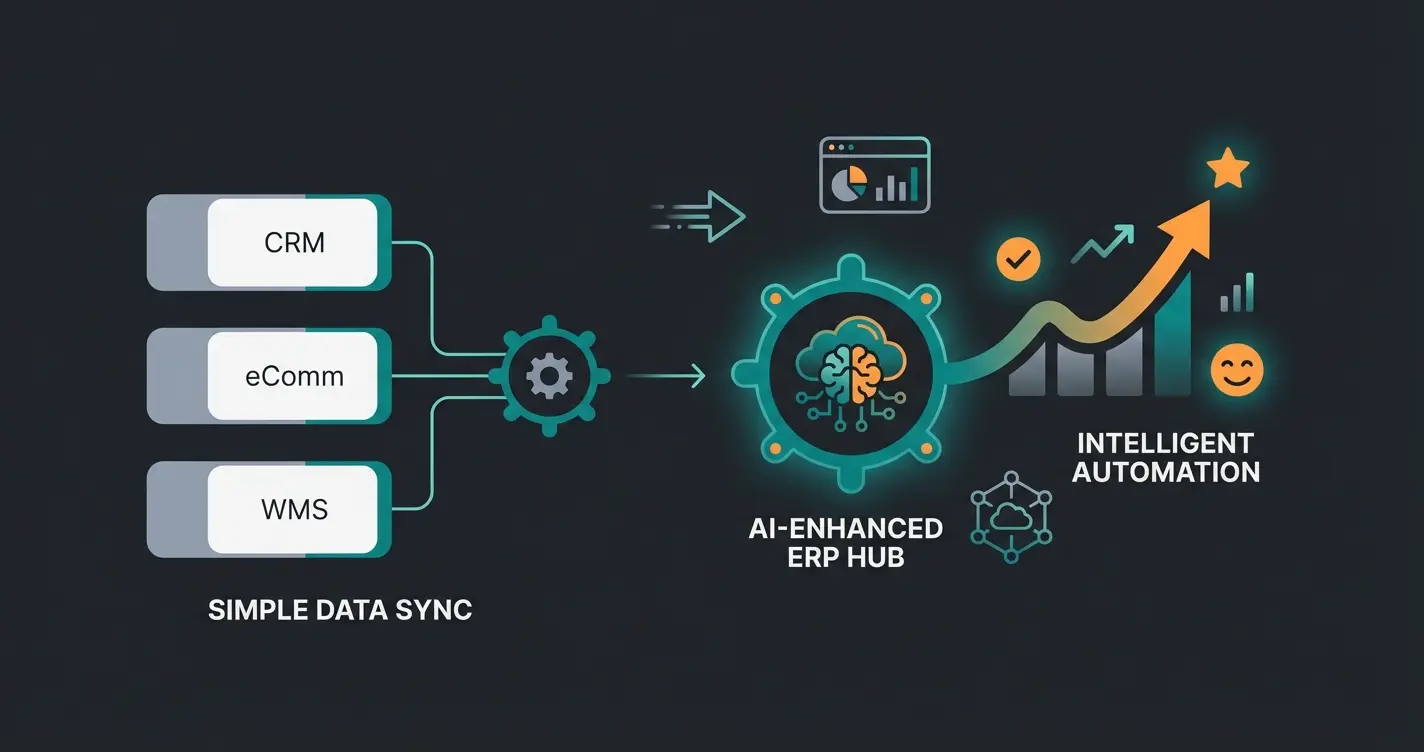

Lasse is CEO and co-founder of Qualimero. After completing his MBA at WHU and scaling a company to seven-figure revenue, he founded Qualimero to build AI-powered digital employees for e-commerce. His focus: helping businesses measurably improve customer interaction through intelligent automation.