Introduction: Why Simply Creating a Store Is No Longer Enough
Anyone searching for how to create a Shopware store in 2025 typically has a clear goal: setting up a powerful e-commerce system that is scalable and future-proof. Shopware 6 is undoubtedly the best choice for the DACH region. However, the rules of the game have changed dramatically. See also our guide on What is Shopware. See also our guide on Shopware Online Shop. See also our guide on Shopware 6 Demo.
Most tutorials online show you how to install Shopware, select a theme, and upload products. The result is often a technically flawless but "silent" store. It waits for customers to click through filters and serve themselves. In an era where customers are pampered by AI assistants and hyper-personalization, simply "providing" merchandise is no longer sufficient. See also our guide on Shopware Free Edition. See also our guide on Shopware Account. See also our guide on Cookie Consent Setup.
This guide is different. We walk through the technical process step by step—from the new system requirements for 2025 to installation. But we don't stop there. We show you how to configure your Shopware store so that it's not just a warehouse, but a digital sales consultant. We bridge the gap between technical setup and real conversational commerce.
Phase 1: Planning & Costs – The Truth About Budget 2025
Before we touch a single line of code, we need to talk about money and licenses. Significant changes have occurred in 2025 due to Shopware's new pricing policy and the "Fair Usage Policy."
1.1 The Licensing Model: Community Edition vs. Commercial
For a long time, the mantra was: "The Community Edition (CE) is free, no matter how big you grow." According to Shopware, that changed in March 2025.
- Shopware Community Edition (Open Source): €0 license fees. The catch (Fair Usage Policy): Once you exceed a gross merchandise volume (GMV) of €1 million per year, you must switch to a paid plan. Below this threshold, it remains free but offers no manufacturer support and no access to certain "Rise" features like the extended Flow Builder. Ideal for startups and small SMEs targeting their first €500,000 to €1M in revenue.
- Shopware Rise (from approx. €600/month): The entry point to the commercial world. Includes the AI Copilot (for backend processes), extended support, and social shopping features. Ideal for growing B2C brands requiring professional support.
- Shopware Evolve (from approx. €2,400/month): B2B focus. Includes the powerful B2B Suite (rights & roles, budgets) and Advanced Search. Ideal for wholesalers and manufacturers.
- Shopware Beyond (from approx. €6,500/month): Enterprise-level. Includes Multi-Inventory (multiple warehouses) and Digital Sales Rooms (video consultation).
1.2 Hosting Costs: Don't Skimp on the Foundation
A common mistake when creating a Shopware store is choosing cheap shared hosting. Shopware 6 is a performance beast that consumes resources. For proper Shopware hosting, you need to invest appropriately.
- Minimum: Managed vServer or cloud hosting
- Costs: Budget for €50 to €150 per month for a setup that can handle traffic spikes
- Technology Stack: Ensure your host offers Redis (for caching) and Elasticsearch/OpenSearch (for search). Without these services, your store will noticeably slow down starting around 5,000 products
1.3 Hidden Costs to Consider
- Plugins: A professional store typically needs 5-10 paid plugins (SEO, payment, ERP integration). Budget: approximately €1,500 initial + €100 monthly
- Legal texts: Subscriptions with Händlerbund or IT-Recht Kanzlei (approximately €30 monthly)
Community Edition free up to €1M GMV, Rise starts at €600/month
Minimum for AI-ready infrastructure with Redis and Elasticsearch
Essential plugins for SEO, payment processing, and ERP integration
Ongoing plugin maintenance and legal text subscriptions
Phase 2: Technical Installation – Laying the Foundation
This is where the wheat separates from the chaff. Anyone setting up a Shopware store in 2025 must meet stricter system requirements than two years ago. Outdated servers aren't just a security risk—they also prevent the use of modern AI tools.
2.1 System Requirements for Shopware 6.6+ (2025 Standards)
Before starting the installer, verify your server meets these hard facts:
| Component | Minimum Requirement | AI-Readiness Recommendation | Why Important? |
|---|---|---|---|
| PHP | Version 8.2 | PHP 8.3/8.4 (with JIT Compiler) | PHP 8.1 is no longer sufficient for SW 6.6. JIT massively accelerates computational processes. |
| Database | MySQL 8.0+ / MariaDB 10.11+ | MariaDB 11.4 | Older versions (MySQL 5.7) are no longer supported. |
| Node.js | Version 20 | Version 20 (LTS) | Essential for compiling the frontend and administration. |
| RAM | 4 GB | 8 GB+ | AI processes and imports require significant working memory (memory_limit > 512M). |
| Caching | Standard | Varnish & Redis | Without Redis, the shopping cart becomes a bottleneck under high traffic. |
2.2 Step-by-Step Installation Summary
We're not reinventing the wheel here, just summarizing the most efficient path:
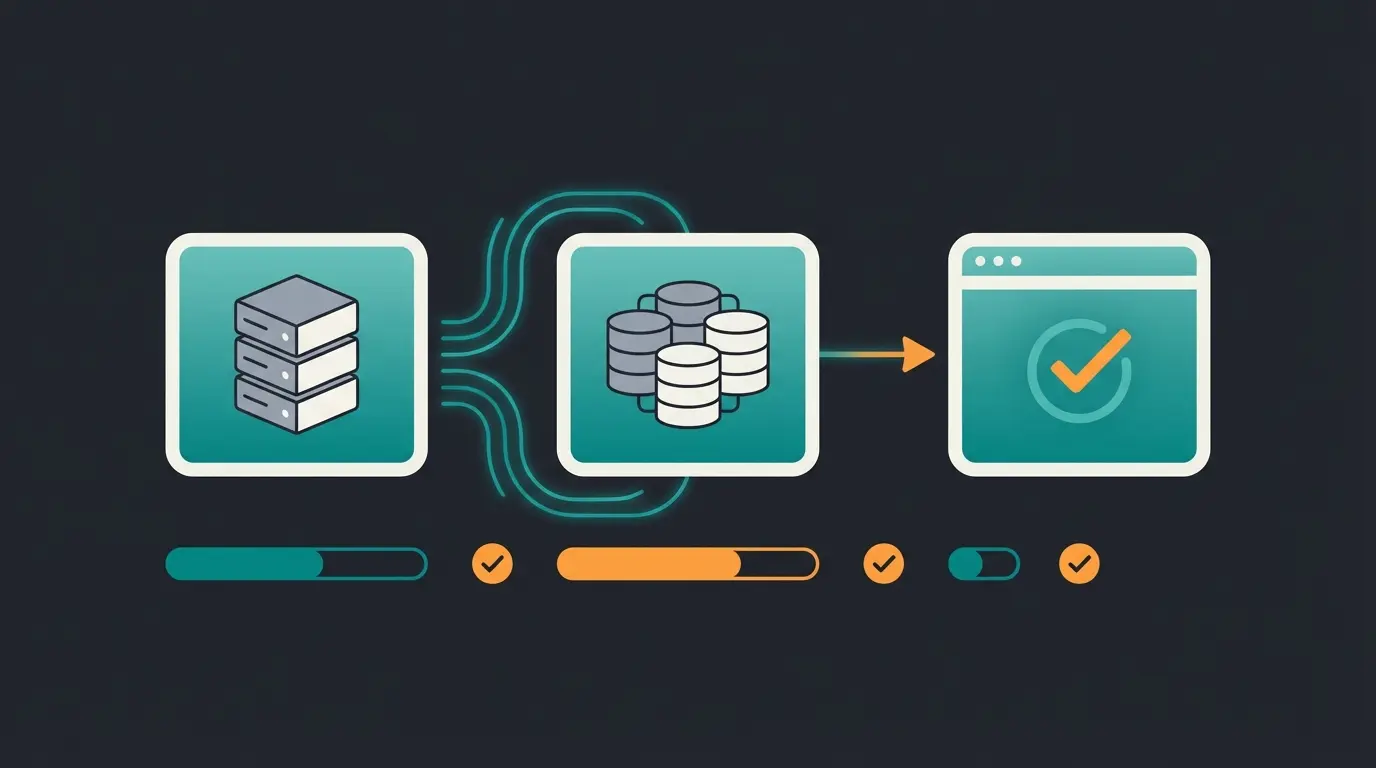
- Download: Download the Shopware 6 Installer from the official website.
- Upload: Upload `shopware-installer.phar.php` to your web space.
- Access: Call `your-domain.com/shopware-installer.phar.php` in your browser.
- Wizard: The assistant checks system requirements. Pro Tip: If red warnings appear (e.g., missing PHP extensions like `intl` or `dom`), abort and contact your host. Ignoring these will cause errors later.
- Database: Enter your MySQL credentials.
- Configuration: Select language (German/English) and currency.
Phase 3: Design & Shopping Experiences – UX Reimagined
After installation, you have a functioning but empty store. Now it's time for the "look and feel." Shopware 6 uses Shopping Experiences (Erlebniswelten) for this purpose.
3.1 The Problem with Standard Design
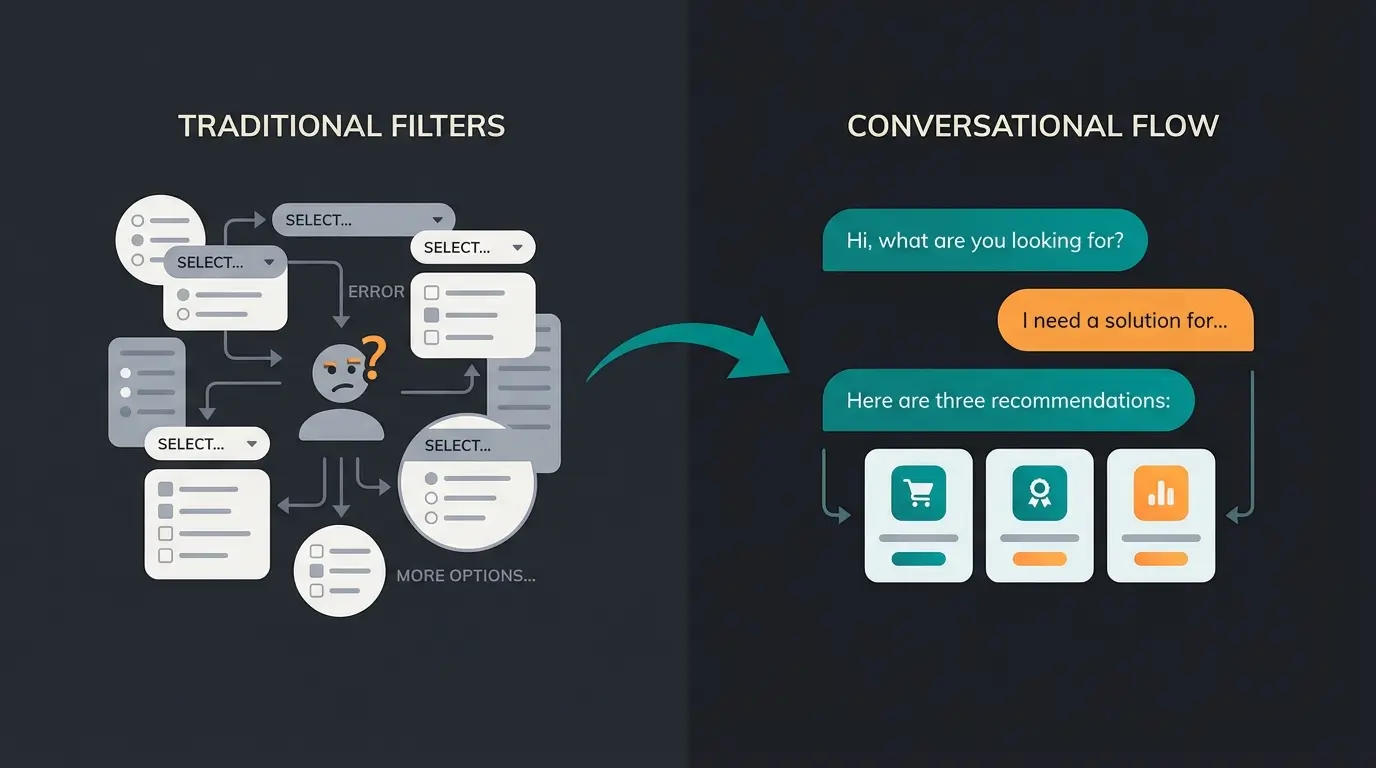
By default, Shopware presents products in grids (tile views). Here's the problem: A customer searches for "hiking boots." They get 200 results. They must filter by size, color, material. This is exhausting. Studies show that too many options (the Paradox of Choice) actually reduce purchase probability.
3.2 Using Shopping Experiences Strategically
Use Shopware's drag-and-drop editor not just for colorful images, but for guidance:
- Category Pages: Don't build pure product lists. Use CMS blocks to ask questions above the product list (e.g., "What type of hiker are you?").
- Mobile First: 70% of traffic comes from mobile. Always check Shopping Experiences on smartphone first.
- Storytelling: Connect products with use cases. Shopware allows you to tag products directly in images (Image Mapping).
Phase 4: The Game Changer – Integrating Intelligent Consultation
Here we leave the territory of standard tutorials. Most stores don't fail at technology—they fail because they don't sell, they only display.
4.1 Why Filters Are Dead and Consultation Is the Future
In a physical store, a salesperson asks: "What do you need the shoes for? High mountains or forest trails?" In an online store, the customer clicks "Category: Shoes" -> "Filter: Brown." The gap between these two experiences is the Consultation Gap. This is where AI product consultation becomes essential.
4.2 Shopware AI Copilot vs. Consultative AI
It's important to distinguish two things that are often confused when exploring Shopware AI features:
- Shopware AI Copilot (Native Features): This is built into Shopware (from the "Rise" plan). What it does: It helps you (the merchant). It generates product texts, summarizes reviews, creates keywords for images. Limitation: It doesn't directly help the customer make decisions in the frontend.
- Consultative AI (Your Competitive Advantage): This is an integration you create additionally (e.g., via plugins or external services). What it does: It conducts a dialogue with the customer. Learn more about Shopware AI integration possibilities.
4.3 Strategy: Building the Digital Sales Consultant
To create a Shopware store that actually converts, you need to make your data AI-readable. This is the foundation for implementing AI guided selling capabilities.
Step A: Optimizing Data Structure for AI
An AI can only recommend what it "understands."
- Bad Data: Product description: "Great shoe, leather, brown."
- AI-Ready Data: Use Shopware's Custom Fields:
- Field: `Usage_Area` (Value: "High mountains")
- Field: `Foot_Shape` (Value: "Wide")
- Field: `Maintenance_Level` (Value: "Medium")
These structured data are the fuel for any recommendation engine or AI search (like Doofinder or Klevu). Proper AI product finder implementation depends on this foundation.
Step B: Integrating a Guided Selling Solution
There are plugins like "Guided Selling" or "AI Product Advisor" in the Shopware Store. You can also implement Shopware 6 chatbots for enhanced customer interaction.
- How it works: You create a questionnaire (funnel).
- Question 1: "Who are you shopping for?"
- Question 2: "How often will you use the product?"
- The result: The store filters dynamically in the background but presents the customer not with a technical list, but with "Your 3 perfect matches."
4.4 Comparison: Filter Search vs. AI Consultation
| Feature | Standard Shopware Store | AI-Optimized Store (Consultative) |
|---|---|---|
| Entry Point | Search bar or menu tree | "What would you like to accomplish today?" (Dialogue) |
| Interaction | Customer sets technical filters (e.g., "Gore-Tex") | Customer describes problem ("Wet feet") |
| Result | List with 50 products | 3 recommendations with reasoning ("Because you said X...") |
| Conversion | ~2-3% | ~5-8% (through higher relevance) |
| Returns | High (wrong orders) | Low (better understanding before purchase) |
Understanding the difference between Shopware vs Shopify becomes crucial here—Shopware's flexibility allows for deeper AI integration that competitors struggle to match.
Stop losing customers to filter fatigue. Our AI product consultation solution increases conversion rates by up to 150% while reducing returns.
Start Free TrialPhase 5: Legal Compliance in Germany
A Shopware store in Germany must be watertight. The risk of legal warnings is real. This section covers essential requirements for AI consulting in e-commerce compliance.
5.1 The "Big Three" of Legal Texts
- Impressum (Legal Notice): Must be reachable from every page with a maximum of 2 clicks.
- Privacy Policy (GDPR): Shopware provides good standard CMS pages for this. Important: If you use AI tools or tracking, these must be explicitly mentioned.
- Terms & Conditions and Cancellation Policy: Use interfaces to providers like Trusted Shops or IT-Recht Kanzlei. These plugins automatically update texts when laws change.
5.2 Cookie Consent & Tracking
Shopware 6 comes with its own cookie manager. Caution: When integrating external services (Google Analytics, Facebook Pixel), these must be configured in the cookie manager. They may only fire after the customer has consented.
5.3 New for 2025: E-Invoicing Requirement (B2B)
Since January 1, 2025, Germany has mandated e-invoicing for B2B transactions (receiving obligation). If you sell to other businesses, your store must be able to create invoices in ZUGFeRD or XRechnung format.
According to Splendid Internet, Shopware doesn't yet fully support this natively in document creation. You will need a plugin (e.g., from Codebarista or ERP integrations) to invoice in compliance with regulations, as noted by Host Europe.
Phase 6: Launch & Marketing – Generating Visibility
The store is up, the AI advises, the legal texts are in place. Now traffic needs to come. Implementing proper Shopware SEO practices is essential.
6.1 SEO Basics in Shopware 6
Shopware is very SEO-friendly out of the box, but you need to utilize it:
- SEO Templates: Under `Settings > SEO` you can define templates for meta titles and descriptions. Tip: Use variables: `{{ product.name }} | {{ product.manufacturer.name }} | Buy Now`
- Image SEO: The AI Copilot can help you automatically generate alt tags for images. Use it! Google can read images increasingly well, but alt tags remain a ranking factor.
6.2 Performance as a Ranking Factor (Core Web Vitals)
Google penalizes slow stores. Check your Shopping Experiences. Large, uncompressed images kill your LCP (Largest Contentful Paint). Use WebP format (Shopware can convert automatically).
6.3 Understanding the Shopware Ecosystem
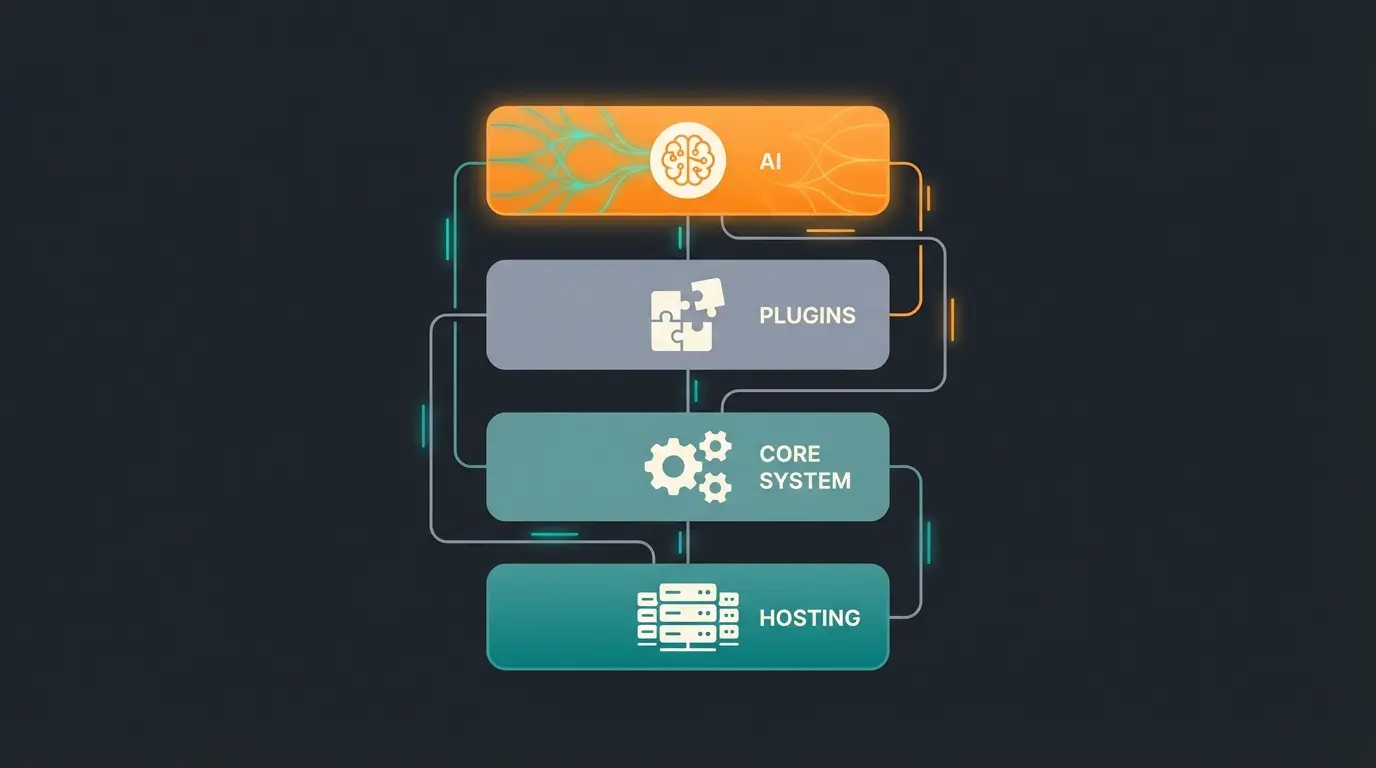
Understand your store as an ecosystem built in layers:
The foundation—performance, security, and reliability for all operations
Shopware 6—the logic engine handling products, orders, and business rules
Specialized functions for payment, shipping, ERP integration, and more
The intelligence—consultation, personalization, and automated customer guidance
Only when all four layers harmonize will you rank on Google and retain customers. The AI layer represents implementing AI product consultation for maximum impact.
The Manual vs. Automated Sales Process
Understanding the difference between traditional and AI-enhanced customer journeys illustrates why consultative commerce matters:
Customer navigates through multiple category levels, often getting lost
User attempts to narrow 200+ results using technical filter options
Customer opens multiple tabs, struggles to identify key differences
Customer describes their situation: 'I need hiking boots for wide feet'
AI asks clarifying questions about terrain, frequency, budget
AI presents 3 ideal products with clear reasoning for each recommendation
Frequently Asked Questions About Creating Shopware Stores
Yes, but with limitations. The Community Edition remains free for stores with less than €1 million annual GMV (Gross Merchandise Volume). Once you exceed this threshold, you must transition to a paid plan like Shopware Rise. Additionally, the free version lacks manufacturer support and certain advanced features like the extended Flow Builder.
Shopware 6.6+ requires PHP 8.2 or higher (8.3/8.4 recommended for AI features), MySQL 8.0+ or MariaDB 10.11+, Node.js 20 LTS, minimum 4GB RAM (8GB+ recommended), and ideally Redis for caching and Elasticsearch/OpenSearch for search functionality.
Standard chatbots typically answer predefined FAQs or route customers to human support. AI product consultation actively guides customers through a needs analysis, understands context and preferences, and provides personalized product recommendations with explanations—similar to an in-store sales consultant.
German stores must have a legally compliant Impressum, GDPR-compliant privacy policy, proper terms and conditions with cancellation policy, cookie consent management, and for B2B transactions, the ability to generate e-invoices in ZUGFeRD or XRechnung format as required since January 2025.
Budget for €50-150 monthly hosting, €1,500+ initial plugin costs plus €100+ monthly maintenance, €30+ monthly for legal text services, and potentially €600-6,500+ monthly for commercial Shopware plans depending on features needed. Custom development or agency support adds significantly to these base costs.
Conclusion: Build a Solution, Not Just a Store
Creating a Shopware store in 2025 has become technically more demanding (system requirements, e-invoicing), but also more promising than ever before.
The days when you simply put products online and hoped for buyers are over. The market is saturated with "warehouses." But it hungers for consultation.
By completing the technical homework (Phases 1-3) and then boldly investing in intelligent product consultation (Phase 4), you differentiate yourself from 90% of the competition. You're not just building a store—you're building a digital assistant that understands your customers.
Your Next Steps
- Check your budget (Remember the Fair Usage Policy!)
- Find AI-ready hosting with proper infrastructure
- Structure your product data (Custom Fields) for the AI future
- Start the installation
- Integrate consultative AI to transform browsers into buyers
Good luck building your digital flagship! The future of e-commerce belongs to those who don't just display products but actively guide customers to the perfect purchase.
Join hundreds of merchants who've transformed their conversion rates with intelligent product consultation. Get started in minutes, not months.
Start Your Free Trial Today
Lasse is CEO and co-founder of Qualimero. After completing his MBA at WHU and scaling a company to seven-figure revenue, he founded Qualimero to build AI-powered digital employees for e-commerce. His focus: helping businesses measurably improve customer interaction through intelligent automation.