Introduction: The Data Connection Problem in E-Commerce AI
Have you ever wondered why most e-commerce chatbots still fail to answer a simple question like "Which tent fits in my backpack and can withstand Scottish rain?"
The answer isn't a lack of intelligence in AI models—GPT-4 and Claude 3 are smart enough. The problem lies in data connectivity. Most developers view the Shopware API merely as a tool for backend synchronization: ERP connections, inventory reconciliation, or PIM updates.
But that's a missed opportunity.
In this comprehensive guide, we flip the perspective. We examine the Shopware API not as an administrative interface, but as the brain of your sales team. We'll show you how to specifically use the Store API to not just retrieve static data, but to build a genuine AI Product Consultant—an AI that doesn't just find products but understands and advises on them. This approach enables AI-powered product consultation that transforms browsing into buying.
We bridge the gap between technical documentation and strategic application for modern AI commerce solutions. According to Shopware, the platform is already moving toward what they call "Agentic Commerce"—and understanding the API is your first step to participating in this revolution.
The Paradigm Shift: From Search to Consultation
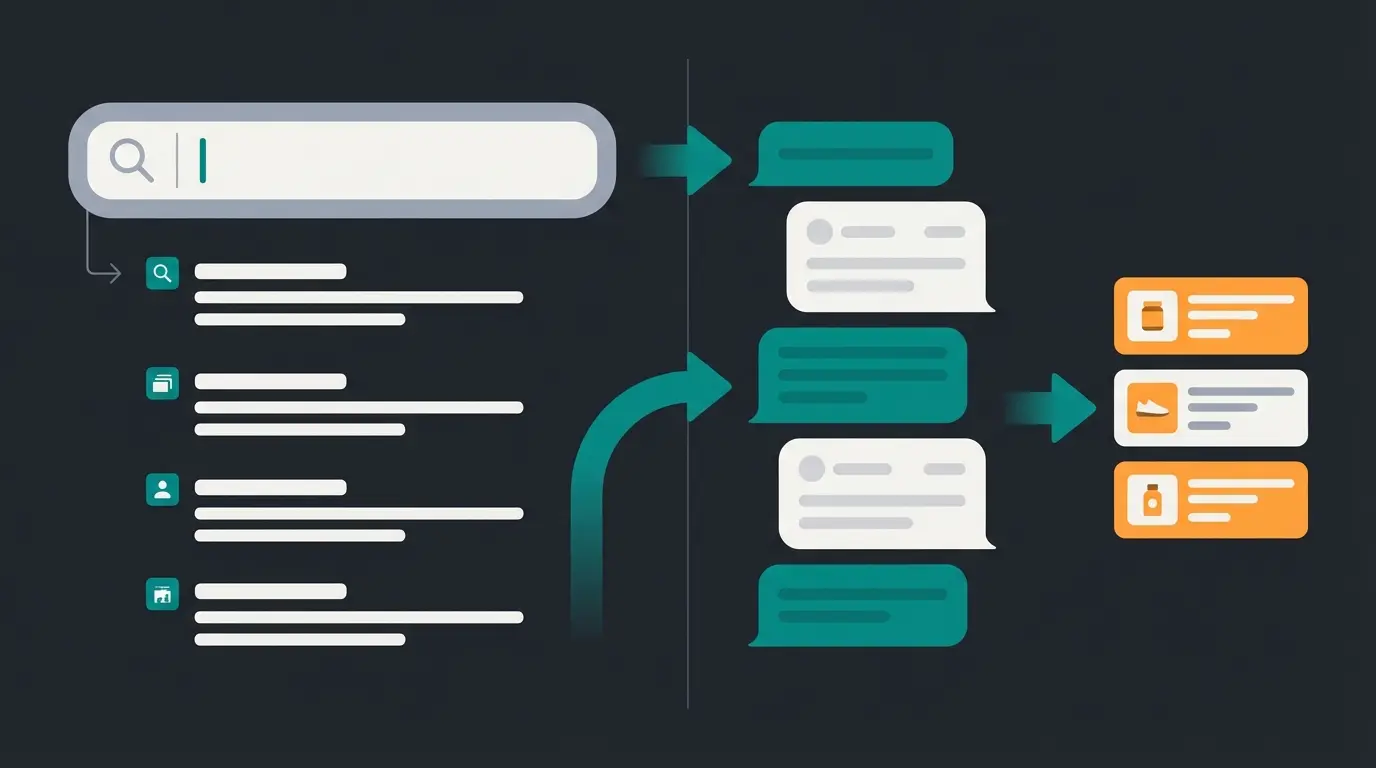
E-commerce is facing a massive transformation. The classic search bar ("keyword search") has become obsolete for complex purchasing decisions. Customers don't want a list of 50 products containing the word "waterproof." They want to know which of those 50 products is suitable for their specific use case.
This is where the Shopware API comes into play.
While Shopware itself has already taken initial steps toward AI in the admin area with the Shopware Copilot (e.g., generating product descriptions or export assistants), the real potential for revenue growth lies in the frontend: in direct interaction with the customer through AI sales assistants.
Why Standard Search No Longer Suffices
The standard Shopware search (based on Elasticsearch or MySQL) works deterministically:
- Input: "red running shoes"
- Output: List of all products with category "running shoes" and property "red"
An AI Consultant works semantically and contextually:
- Input: "I'm starting to jog, but I have knee problems and usually run on asphalt."
- Process: The AI analyzes the problem ("cushioning required," "hard surface") and uses the Shopware API to filter technical properties (e.g., `cushioning_level: high`).
- Output: A recommendation of 3 specific models with an explanation of why they protect the knees.
This article is your technical and strategic guide to building exactly this architecture with Shopware 6. The goal is implementing AI-driven consultation that understands customer needs and matches them to your product catalog.
The Basics: Admin API vs. Store API (The Critical Difference)
Before we write code, we need to clear up a critical misunderstanding that leads to security vulnerabilities or poor performance in many integration projects: choosing the right API.
Shopware 6 follows a strict API-First approach, as explained on API Conference. This means that almost every function of the system is accessible via an interface. However, there are three main endpoints, and for our AI bot, only one is the right choice.
The Admin API (Backend-Facing)
The Admin API is the powerful tool for administration.
- Purpose: Synchronization of ERPs, PIMs, CRM systems, and warehouse management, as detailed by 2hatslogic.
- Authentication: OAuth2 (Client ID & Client Secret).
- Access: Full read and write access to sensitive data (purchase prices, customer data, system configurations).
- Why NOT for AI bots: A frontend bot should never have access to the Admin API. If the API key were compromised, an attacker would have full control over your shop. Additionally, the Admin API is not optimized for the high request loads of user interactions.
The Store API (Sales Channel API / Customer-Facing)
This is our tool of choice. The Store API (formerly Sales Channel API) is designed exactly for frontend applications—whether a Single Page Application (SPA), a mobile app, or an AI sales agents system.
- Purpose: Display products, manage shopping carts, place orders.
- Authentication: `sw-access-key` (identifies the sales channel) and `sw-context-token` (identifies the session), as documented on Stoplight.
- Data: Delivers only data intended for customers (e.g., calculated prices including tax, active products).
- Performance: Highly optimized for fast read access and caching.
The Sync API
A part of the Admin API, optimized for bulk import/export (e.g., 300 products per second). Irrelevant for our live consultant, but good to know for initial training of a vector database.
The Architecture of an AI Consultant with Shopware
What does the data flow look like when we use Shopware not as a monolithic shop, but as a headless data source for an AI? This architecture enables 24/7 product consultation without human intervention.
The AI Sales Loop Model
Instead of a linear search, we build a cycle. Here's the logic you need to implement:
The customer asks a question in the chat widget: 'Do you have a jacket I can use for skiing that doesn't look sporty?'
The AI model analyzes the intent. Intent: Product Search. Filters: Category: Jackets, Property: Winter/Ski, Style: Urban/Casual.
The agent translates these filters into a JSON payload for the /store-api/product endpoint.
Shopware returns a list of 5 matching products including technical properties.
The AI reads the product properties and compares them with the customer request.
The AI formulates the answer with specific recommendations and reasoning.
Why This Architecture Is Superior
Most "AI plugins" simply index all product data into a vector database (Pinecone, Weaviate). The problem: data freshness. When a price changes or a product sells out, the vector database often doesn't know immediately.
By querying the Shopware Store API live, we guarantee that the AI only recommends products that are currently available and have the correct price. This is what makes AI-powered product consultation truly effective—it reduces returns by ensuring accurate, real-time information.
Technical Deep Dive: Authentication & Setup
Let's get technical. To use the Store API, we need the right access credentials.
Finding the API Key
Unlike the Admin API, you don't need to go through complex OAuth flows. Access is public but protected by a key that identifies the sales channel.
- Log into the Shopware Administration.
- Select your sales channel (e.g., "Storefront") in the sidebar.
- Scroll to the API Access section.
- Copy the API Access Key (`sw-access-key`), as described by WBFK.
The Context Token (`sw-context-token`)
This is a common stumbling block. The `sw-access-key` only identifies the shop. But to manage a shopping cart or save a customer's login status, you need a Context Token.
- What is it? Think of it as a session ID.
- How do you get it? On the first request, Shopware often returns a token in the header. Or you explicitly call `/store-api/context`. On login (`/store-api/account/login`), you receive a new token linked to the customer account.
Example header for every request:
```json { "Content-Type": "application/json", "sw-access-key": "SWSCYOURACCESSKEY...", "sw-context-token": "Jb2Vw..." // Optional for pure search, required for cart } ```
REST vs. GraphQL: Choosing the Right Protocol for AI
While most Shopware API examples focus on REST endpoints (which we've shown above), there's a compelling case for using GraphQL when building AI applications. Here's why:
| Aspect | REST API | GraphQL |
|---|---|---|
| Data Fetching | Returns fixed response structure | Request exactly the fields you need |
| Token Efficiency | May include unnecessary data | Minimize payload for LLM context |
| Multiple Resources | Requires multiple requests | Single query for related data |
| Learning Curve | Simpler, more documented | Steeper, but more powerful |
| Best For | Simple integrations, standard use cases | AI applications with token limits |
For AI Product Consultation, GraphQL's ability to fetch only specific product properties (name, description, custom fields) can reduce your LLM token usage by 80% compared to REST responses that include SEO URLs, timestamps, and version IDs.

The Art of Filtering: JSON Payloads for AI
Here's where we separate the wheat from the chaff. An AI is only as good as the data it receives. If you give the AI all products, you'll blow the context window (token limit) and slow down the response. We need to filter precisely.
The Shopware 6 API uses a powerful criteria language (Criteria Class), which is also represented via the API as JSON, as documented on Stoplight.
Scenario: AI Searches for "Red Sneakers Under €100"
Instead of the AI loading all shoes and filtering itself, we let Shopware do the work. This is faster and saves API costs at the LLM provider.
Endpoint: `POST /store-api/product`
Payload: ```json { "limit": 5, "filter": [ { "type": "equals", "field": "category.name", "value": "Sneaker" }, { "type": "range", "field": "price", "parameters": { "lt": 100 } }, { "type": "equals", "field": "properties.name", "value": "Red" } ], "includes": { "product": ["id", "name", "description", "price", "cover"] } } ```
The "Includes" Trick: Saving Tokens
Note the `includes` object in the code above. By default, Shopware returns huge JSON objects (including SEO URLs, creation dates, version IDs, etc.). For an AI, 90% of this data is noise.
With `includes`, you define an "allowlist" of fields to be returned, as explained on Stack Overflow.
Using includes filters out unnecessary fields from API responses
Optimized JSON uses ~200 tokens vs 2000 for standard responses
Store API delivers fast responses for real-time chat applications
Why this is critical for AI:
- Reduced Traffic: Smaller JSON responses = faster transmission.
- Token Efficiency: A standard product JSON can consume 2000 tokens. An optimized JSON only 200. This reduces your OpenAI costs by a factor of 10!
Filtering by Technical Properties
For real consultation ("waterproof," "Bluetooth 5.0," "vegan"), you need to access `properties`. Shopware stores these in a nested structure. A filter on `propertyGroupOption` is often necessary.
Pro Tip: Use `multi` filters with `operator: "and"` to map complex requirements (e.g., "Color: Red" AND "Size: XL"), as discussed in Stack Overflow threads. This enables sophisticated Store API integration for complex product queries.
Performance & Caching Strategies
Performance & Caching for AI Applications
When building AI consultants, response time is critical. Users expect instant answers, and every millisecond of latency reduces engagement. The good news: Shopware's Store API is built for speed.
Shopware aggressively caches Store API responses. To leverage this effectively:
- Use consistent parameters: Avoid dynamic values that invalidate caches
- Batch related queries: Fetch multiple product types in one request where possible
- Implement client-side caching: Store frequently accessed product data locally
- Monitor cache hit rates: Ensure your query patterns maximize cache usage
This optimization ensures AI eliminates waiting times for your customers, delivering instant responses that feel natural and helpful.
Stop building simple chatbots. Start creating intelligent AI consultants that understand your products and drive real revenue. Our platform handles the Shopware API integration for you.
Start Building NowComparison: Copilot vs. Digital Sales Rooms vs. Custom AI
You don't have to reinvent the wheel if solutions already exist. But does the standard solution fit your goal?
Shopware offers powerful tools with the AI Copilot and Digital Sales Rooms. Here's the differentiation showing why a custom API-based agent is often the better choice for scaling, enabling true AI Selling at scale.
| Feature | Shopware AI Copilot | Digital Sales Rooms | Custom AI Agent (via Store API) |
|---|---|---|---|
| Primary Focus | Admin efficiency (backend) | Human interaction (video) | Automated customer consultation |
| Availability | In admin panel | Appointment-based / Live | 24/7 instantly available |
| Technology | Generative AI for text/images | Video streaming & co-browsing | LLM + Store API |
| Scalability | High (for merchant tasks) | Low (requires personnel) | Infinite (server capacity) |
| Costs | Part of license (Rise/Beyond) | License + staff time | API costs + development |
| Use Case | "Write me a product description" | "I need a personal demonstration" | "Which product suits me?" |
According to Shopware's Digital Sales Rooms documentation, human-led sales rooms excel for high-ticket B2B scenarios. However, for B2C at scale, custom AI agents win.
Analysis Conclusion
- Use the Copilot to keep your data clean (descriptions, properties).
- Use Digital Sales Rooms for high-ticket sales (B2B machinery, luxury goods) where a human closes the deal, as Bay20 notes in their analysis.
- Build a Custom AI Agent via the API for the mass B2C market to advise thousands of customers simultaneously and individually.
Challenges and Best Practices
Building such a system isn't trivial. Here are the most common pitfalls from practice and how to avoid them.
Performance & Latency
An LLM needs time to "think" (token generation). If a slow API query is added, the customer bounces.
- Solution: Leverage the fast response times of the Store API (often <100ms).
- Caching: Shopware caches Store API requests aggressively. Use this! Don't send unnecessary parameters that could invalidate the cache.
Avoiding Hallucinations
AIs tend to make things up when they lack data. This is where AI Compliance becomes critical—ensuring your AI only states facts.
- Grounding: Force the AI (via system prompt) to use only information from the API JSON response.
- Fallback: If the API returns 0 results (`total: 0`), the AI must say: "Unfortunately, I couldn't find anything for that," instead of inventing a product.
Variant Logic
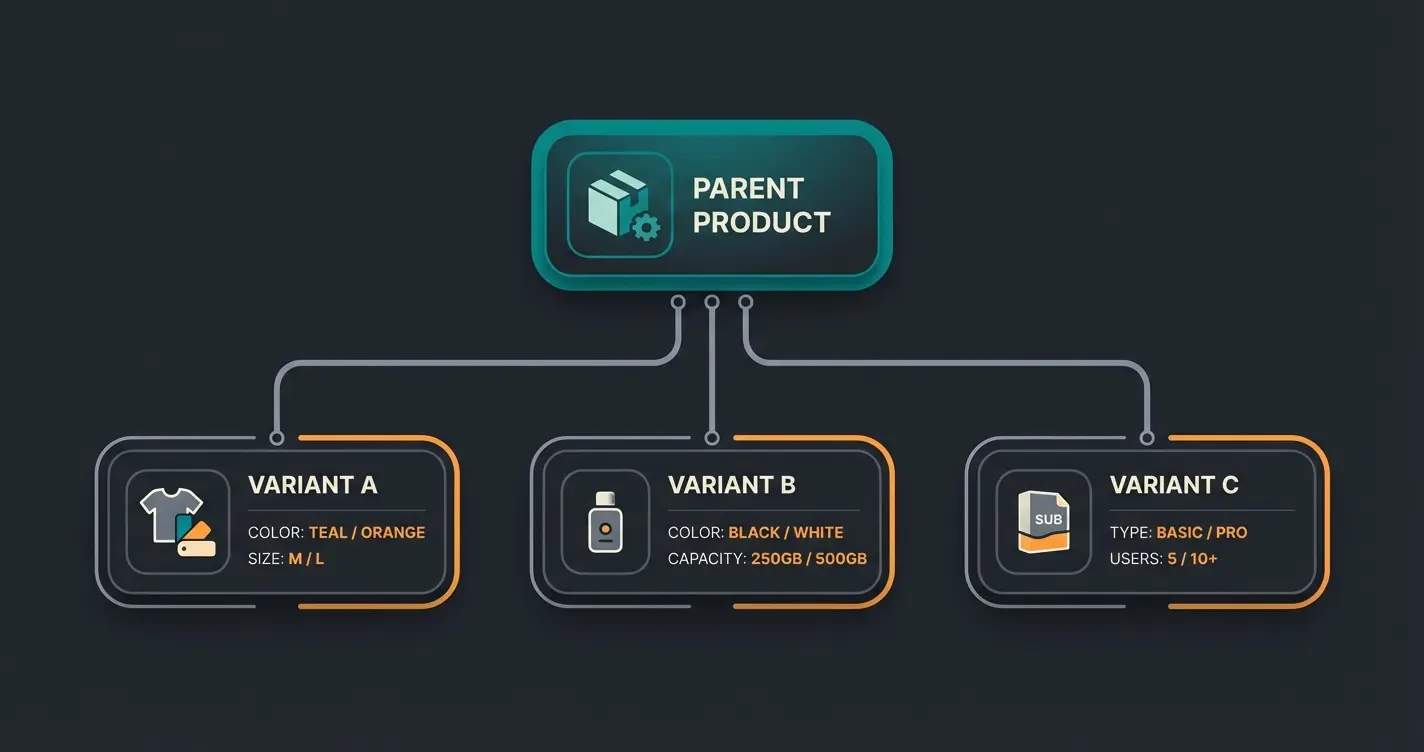
Shopware 6 has complex logic for variants (parent/child products).
- Problem: The search often returns only the "parent" (main product), but the customer wants the red variant in size L.
- Solution: Use `associations` in the API call to directly load `children` (variants), or filter directly at the level of variant properties, as explained in Stack Overflow discussions.
Frequently Asked Questions
No, you should never use the Admin API for customer-facing AI applications. The Admin API has full read and write access to sensitive data including purchase prices, customer information, and system configurations. If the API key were compromised, an attacker would have complete control over your shop. Always use the Store API for frontend AI implementations—it's designed for customer interactions, delivers only appropriate data, and is optimized for high request volumes.
Yes, the Store API is included with your Shopware 6 installation at no additional cost. You can access it with any Shopware 6 setup, including the free Community Edition. However, certain advanced features like the AI Copilot require the Rise or Beyond subscription tiers. Your costs will come from LLM API usage (OpenAI, Anthropic, etc.) and server infrastructure, not from Shopware itself.
Shopware 6 uses a parent/child structure for variants. By default, product searches return parent products. To include variants, use the 'associations' parameter in your API call to load 'children' data, or filter directly on variant-level properties. For AI consultants, it's often best to query at the variant level when customers specify attributes like size or color.
REST is simpler and better documented, making it ideal for standard integrations. GraphQL allows you to request exactly the fields you need, which is crucial for AI applications where token limits matter. For AI product consultants, GraphQL can reduce your LLM token usage by up to 80% by fetching only the specific product properties needed for the AI context window.
By querying the Shopware Store API in real-time rather than relying solely on vector databases, your AI always receives current inventory status. The Store API returns only active, available products with correct pricing. Implement checks for the 'available' and 'availableStock' fields in your API responses to ensure recommendations are always purchasable.
Conclusion: The API Is Your Most Powerful Employee
The Shopware API is far more than a technical interface for data exchange. It's the gateway to a new era of e-commerce where Agentic Commerce becomes reality, as Shopware's vision outlines.
By using the Store API, you give your AI eyes and ears. You enable it to not just make small talk, but to generate real revenue by filling the shopping cart and recommending products based on hard facts (inventory, properties, price).
Summary of Steps
- Forget the Admin API for frontend bots—security and performance demand it.
- Use the Store API with `sw-access-key` for all customer-facing AI interactions.
- Implement intelligent filter logic (JSON Criteria) to deliver precise data to the AI.
- Optimize payloads with `includes` to reduce costs and latency by up to 90%.
- Consider GraphQL for maximum token efficiency in AI applications.
- Position your bot as a scalable complement to manual Digital Sales Rooms.
The technology is there. The API is documented. Now it's up to you to transform the static shop into an interactive consultant.
Further Resources & Documentation
- Official Store API Documentation: shopware.stoplight.io
- Shopware AI Copilot Features: shopware.com/ai
- Developer Community: DEVM.io Shopware Resources
(Note: This article is based on the technical state of Shopware 6.7, as of mid-2025. Features and endpoints may evolve in newer versions.)
Our AI product consultation platform comes with pre-built Shopware Store API integration. Get enterprise-grade AI selling capabilities without months of development work.
Get Started Free
Kevin is CTO and co-founder of Qualimero. As an AI architect with over 15 years of experience as CTO and CPO in the tech industry, he designs the AI systems that automate tens of thousands of customer interactions daily for Qualimero's clients — reliably, securely, and at scale.