Introduction: When Every Second Costs Margin
Imagine a tradesman standing on a construction site, or a procurement manager sitting in front of an Excel spreadsheet with 200 line items. Both have the same goal: they want to order goods, and they want to do it immediately. They don't want to see inspiring banners, click away cross-selling popups, or navigate through nested category trees.
This is exactly where the Shopware quick order comes into play. In the world of B2B e-commerce, time is the hardest currency. While B2C customers enjoy browsing, professional buyers want only one thing: to get things done. The 'Shopware Schnellbestellung' (Quick Order) is therefore not merely a feature, but a decisive revenue driver. However, the classic quick order has a problem: it assumes perfect knowledge.
At its core, the quick order function (also referred to as 'direct order' or 'fast order') is a tool that radically shortens the path to the shopping cart. Instead of calling up products individually, it enables the entry of article numbers (SKUs) and quantities in a list view or the upload of entire order lists via CSV file.
The Dilemma of 'Dumb' Forms
As powerful as this tool is, it has a fundamental weakness that is rarely discussed in the industry: It is 'dumb.' The classic quick order only works when the customer knows the exact article number. A transposed digit? A missing hyphen? A vague request like 'I need the gaskets from last week, but in 5mm'? This is where conventional plugins and native functions fail.
The result: the customer must leave the form, use the search function, find the product, copy the SKU, and return. The speed advantage is gone. This comprehensive guide takes you deep into the subject of Shopware quick order functionality. We examine why speed determines loyalty in B2B, what Shopware 6 (B2B Components & Suite) can do natively, when you should rely on plugins, and how AI-powered product consultation revolutionizes quick ordering (Quick Order 2.0).
Why Quick Order Is the #1 Revenue Driver in B2B
Before we dive into the technical implementation in Shopware, we need to understand the 'why.' Implementing a high-performance quick order system is not a matter of convenience but of economics.
Time-to-Cart as the Most Important KPI
In B2C, we often measure 'time-on-site' as a positive indicator of engagement. In B2B, it's exactly the opposite. A high dwell time here can mean that the buyer is frustrated because they can't find their products. According to commercebuild, current statistics show that 80% of B2B buyers use their mobile devices for research and purchasing.
On a small smartphone display, clicking through catalogs is torture. A quick order form that can ideally scan barcodes via camera reduces 'time-to-cart' from minutes to seconds.
Use mobile devices for B2B purchasing decisions
B2B buyers prefer online channels for reorders
Time reduction with optimized quick order vs. catalog browsing
The Expectations of the 'Amazon Generation' in B2B
B2B buyers are also consumers in their private lives. They are accustomed to one-click checkouts and intelligent search. If your Shopware store forces them to add 50 items individually to the cart, they will switch to the competitor who offers CSV upload. Research from klizer confirms that 79% of B2B buyers prefer online channels for repeat orders. This is where quick ordering is essential since the products are already known.
Manual entries lead to errors. A CSV import or intelligent SKU recognition minimizes return rates caused by incorrect orders. This aligns perfectly with AI e-commerce solutions that understand customer intent beyond simple data matching.
Mobile Usage and the 'Warehouse Use Case'
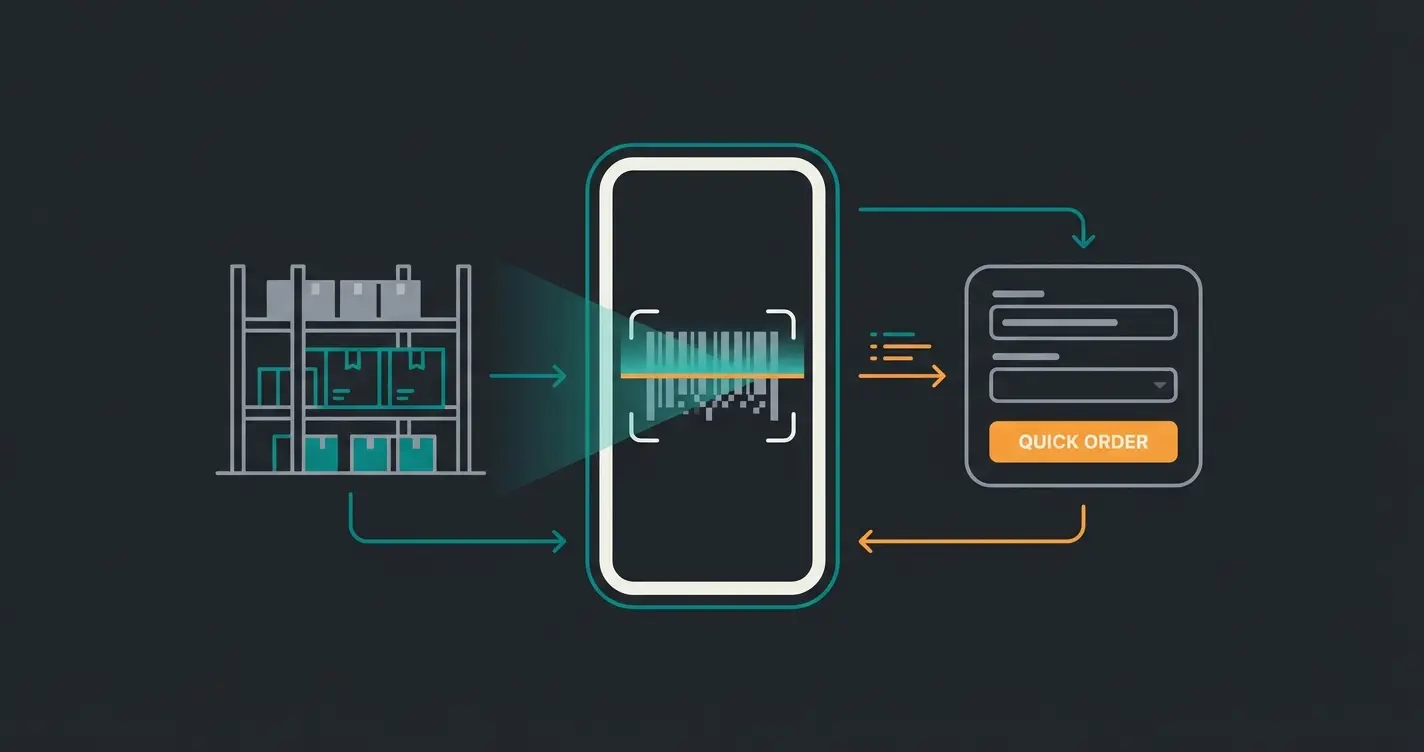
An often overlooked aspect is the context of the order. Many B2B orders are not placed in the office but directly at the point of need—in the warehouse, in the workshop, or on the construction site. A mobile-optimized Shopware quick order enables the warehouse employee to scan the barcode on the shelf (or type in the number) and submit the order before they're back at their desk.
Shopware 6 Options: Native Features vs. Plugins
Shopware 6 offers a flexible architecture. For implementing a quick order function, you essentially have three paths available: the classic B2B Suite, the new B2B Components, and third-party plugins.
The Transition: B2B Suite vs. B2B Components
There is often confusion here. Shopware is in a transition phase. The Shopware B2B Suite (Legacy) was long the standard solution for complex B2B requirements. It is a comprehensive extension that covers budgets, roles, and quick ordering. Important: According to Shopware, the B2B Suite will no longer be supported from Shopware version 6.8. It will not be further developed.
The Shopware B2B Components (Future) represent the new, modular approach (available from the Evolve and Beyond plans). Instead of a monolithic block, you can use individual components. This modular architecture works seamlessly with Shopware AI capabilities for enhanced functionality.
Native Quick Order in B2B Components
The 'Quick Order' component in Shopware 6 (B2B Components) offers solid basic functions as documented by Shopware: Input form for entering article number and quantity, CSV upload for importing files (usually CSV or XLS) to fill the cart in bulk, Drag & Drop functionality to simply drag files into the browser, and Integration with seamless connection to the shopping cart and order lists.
The advantage is deep system integration with no conflicts during updates and an API-first approach. The disadvantage is often visually plain design and functionality limited to the essentials (exact SKU required).
Third-Party Plugins (Store Extensions)
The Shopware Store is full of plugins for 'Quick Order' or 'Schnellbestellung.' Providers like Blackpoint or PremSoft offer solutions that often close specific gaps in the standard functions, as listed in the Shopware Store.
Typical added value from plugins includes: Extended search functionality where some plugins search not only by SKU but also by parts of the name or EAN within the quick order form. Scanner support with optimized interfaces for barcode scanners (cursor automatically jumps to the next field). Design customizations with better display on mobile devices or table views with product images. Compatibility often with older Shopware versions or Community Editions that don't have access to B2B Components.
Feature Comparison: Native vs. Plugins vs. AI Solution
To make the right decision, a direct comparison of the different levels helps:
| Feature | Standard Plugin (Store) | Shopware B2B Components | AI-Powered Solution (Quick Order 2.0) |
|---|---|---|---|
| SKU Entry | Yes | Yes | Auto-Detected |
| CSV Import | Yes | Yes | Yes (plus analysis) |
| Input Requirement | Exact Article Number | Exact Article Number | Description / Natural Language |
| Error Tolerance | Low (Typo = Error) | Low | High (AI understands context) |
| Search Logic | Database Match | Database Match | Semantic Understanding |
| Ideal For | Repeat list orderers | Admin-managed teams | Uncertain buyers & Maximum Speed |
This comparison clearly shows where traditional solutions fall short—they require perfect data input. For businesses looking to automate beyond simple form filling, the Shopware Flow Builder offers additional workflow automation capabilities.
The Limitations of Classic Quick Order (The Gap)
Why do companies still search for better solutions despite having installed plugins? Because the classic quick order has a data problem.
The 'SKU Problem'
The assumption of all classic tools is: The customer knows the article number. The reality in B2B often looks different: The customer uses their own article numbers, not yours. The customer only has an old package with a torn-off number. The customer only knows: 'I need the 10mm screws, but in stainless steel.'
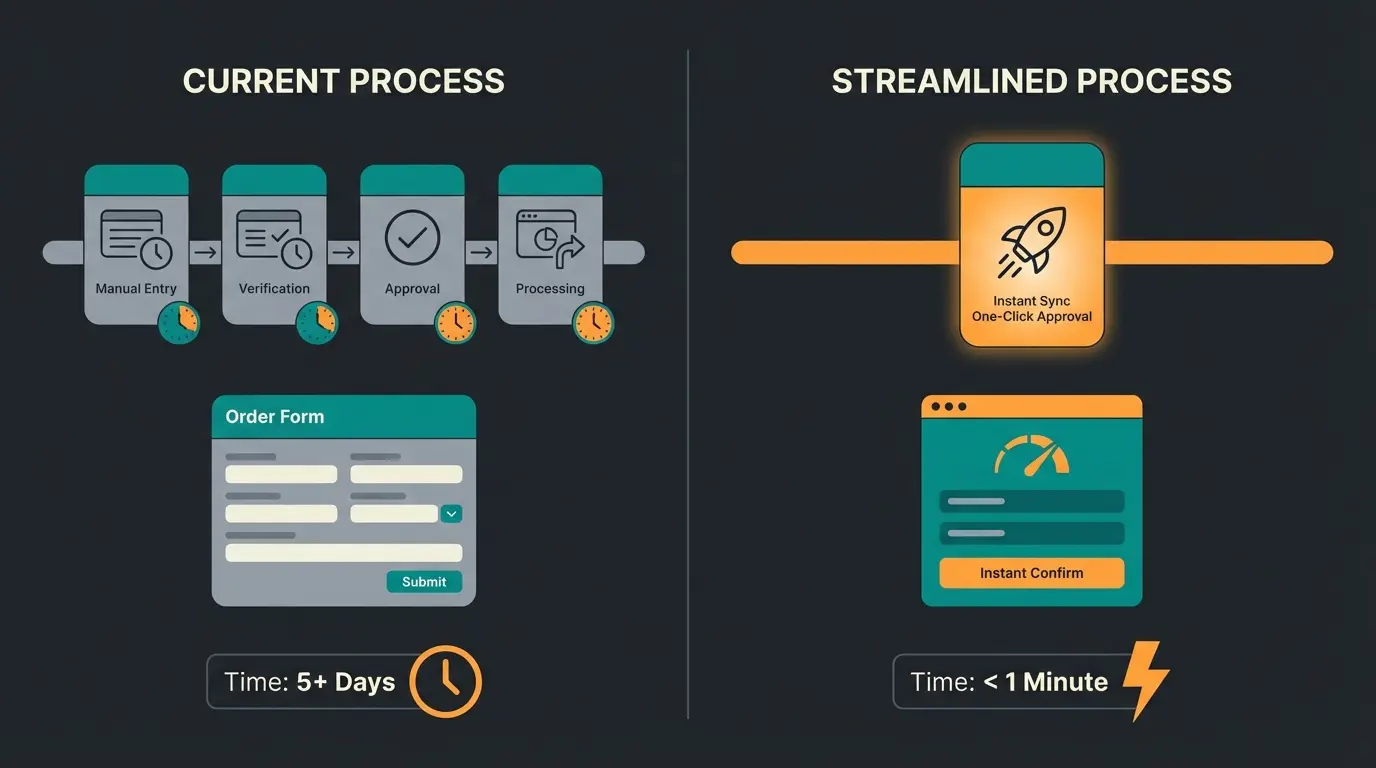
As soon as the customer doesn't know the number, the 'quick order' process breaks down. They leave the form. They open the search. They type 'screw stainless steel 10mm'. They scroll through results. They click on the product to find the SKU. They copy the SKU. They go back to the quick order.
That's not quick. That's friction.
Customer exits quick order to search
Navigate to product search function
Type product description without SKU
Scroll through multiple product listings
Click product to locate SKU
Manually copy article number
Navigate back and paste SKU
Missing Consultation Competence
A form cannot provide advice. When an item is 'End of Life' (EOL), the classic quick order often only shows 'Article not found.' An intelligent salesperson would say: 'This item is no longer available, but here is the successor.' Current technical solutions in Shopware's standard do not replicate this human intelligence. They are purely transactional.
This is where AI consulting in e-commerce becomes essential—bridging the gap between transactional forms and consultative selling experiences.
Don't let SKU friction slow down your customers. Discover how AI-powered product consultation turns quick order forms into intelligent sales assistants.
Start Your Free TrialThe Next Level: AI-Powered Product Consultation
Here opens the door for true innovation that sets you apart from the competition. Shopware is investing heavily in AI (Shopware AI Copilot), offering features like image-based search or checkout messages according to communicode. But the real game-changer for quick ordering is semantic understanding.
Redefining 'Quick': Finding Instead of Typing
We need to redefine 'quick order.' It's not about how fast someone can type, but how quickly the right product ends up in the cart. The concept of the AI solution: Instead of a rigid table with columns for 'SKU' and 'Quantity,' you offer an intelligent input field.
The customer types (or speaks): 'I need 50x the gaskets for Machine X, plus matching lubricant and 2 replacement filters.' This represents the evolution toward conversational AI in B2B commerce.
How AI Bridges the Gap
An AI-powered solution acts as a translator between vague human language and Shopware's strict database logic. The process involves several sophisticated steps:
- Intent Recognition: The AI recognizes that this is an order request
- Entity Extraction: It extracts '50x gaskets', 'Machine X', 'lubricant'
- Mapping: It matches this information with your product catalog, even without a SKU being mentioned. It understands synonyms (e.g., 'gasket' = 'O-ring')
- Action: It automatically fills the cart or presents a pre-filled quick order list for confirmation
This approach leverages AI-based guided selling principles to transform passive forms into active sales assistants.
The 'Zero-Friction' Advantage
This positions standard plugins as 'Technology 1.0' that requires manual prep work. Your AI solution is 'Technology 2.0'—the digital assistant. Error tolerance means typos are automatically corrected. Cross-selling enables the AI to proactively suggest accessories ('You ordered gaskets, do you also need the mounting grease?'), which a dumb form cannot do.
Similar to how Shopware chatbot solutions handle customer service inquiries, AI-powered quick order understands context and intent beyond exact matches.
Best Practices for Integration in Shopware 6
Whether you use B2B Components, install a plugin, or connect a custom AI solution—placement and UX are crucial.
Visibility Is Everything
Don't hide the link to quick order in the footer or deep in the 'My Account' area. Header placement means the 'Quick Order' link or a lightning icon should be permanently visible next to the cart or search. Sticky button ensures that on mobile devices, a 'Quick Order' button should always be reachable in the thumb zone.
Data Quality for CSV Import
If you use CSV import (which is essential for large customers), make sure you offer clear templates for download. Pro tip: According to prateeksha, offer a 'mapping tool' with the import. If the customer's CSV names the column 'Art-No.' instead of 'SKU,' the system should be able to learn this instead of throwing an error.
Performance Optimization
A quick order that loads slowly is a contradiction in itself. Use Elasticsearch or OpenSearch (standard in Shopware Enterprise environments) to ensure that live validation of article numbers occurs in milliseconds. Nothing is more frustrating than a loading bar after every digit entered.
Mobile UX for Barcode Scanners
If your customers are standing in the warehouse, they often use Bluetooth scanners connected to their tablet. Ensure that the input field after scanning (which often sends an 'Enter' signal) automatically jumps to the quantity field or directly opens a new line. This often requires JavaScript customizations in the frontend.
For comprehensive customer support integration, explore how Shopware customer support systems can complement your quick order implementation.
The Future of B2B Ordering: AI Product Finder
Looking beyond basic quick order functionality, the AI Product Finder represents the next evolution in B2B e-commerce. This technology doesn't just match SKUs—it understands product relationships, compatibility requirements, and customer purchasing patterns.
When combined with AI chatbots for customer service, businesses can create a seamless experience where customers receive intelligent assistance throughout their entire ordering journey—from initial inquiry to final checkout.
The integration of AI product consultation capabilities transforms quick ordering from a simple data entry task into a consultative experience that builds customer loyalty and increases order values.

Conclusion: Give Your Customers an Assistant
The Shopware quick order is a hygiene factor in B2B e-commerce. Those who don't offer it lose customers to competitors who have made the purchasing process more efficient. But the future doesn't belong to those who have the best form, but to those who best solve the customer's problem.
Level 1: Use the Shopware B2B Components (or plugins) to cover the basic requirement (SKU entry & CSV). This is mandatory. Level 2: Optimize the UX for mobile and scanner use. Level 3 (The Excellence): Implement AI-powered solutions that transform your quick order from a data entry form into an intelligent sales consultant.
Do you want to evolve your B2B shop from a pure processing platform into an intelligent partner? Don't settle for standard plugins that force your customers to memorize article numbers. Start the era of Quick Order 2.0.
FAQ: Common Questions About Shopware Quick Order
A quick order (Schnellbestellung) is a function that allows customers to add products directly to the shopping cart by entering article numbers (SKUs) and quantities, without having to visit the product detail pages. This often includes importing CSV files for bulk orders.
There are numerous plugins in the Shopware Store, for example from providers like Blackpoint or PremSoft. Alternatively, Shopware offers native 'B2B Components' in the Evolve and Beyond plans, which include a quick order function.
Classic solutions require an article number. However, novel AI-powered solutions enable quick ordering via natural language input (e.g., '50 M10 screws'), where artificial intelligence identifies the matching products and adds them to the cart.
No, the free Community Edition does not include quick order functionality. You must either add it via a plugin from the Store or upgrade to a commercial plan (Shopware Rise/Evolve/Beyond) to access B2B functions.
The Shopware B2B Suite will no longer be supported from version 6.8. Shopware recommends migration to the new 'B2B Components,' which are modularly structured and will be developed long-term.
Transform your B2B ordering experience with AI-powered product consultation. Let your customers describe what they need in natural language—our AI handles the rest.
Get Started Free