Introduction: From Searching to Finding
Have you ever wondered why customers leave your store, even though you carry exactly the product they're looking for?
The answer often lies not in price or design, but in discoverability. In the world of e-commerce, the "Paradox of Choice" reigns supreme: too many options without clear guidance lead to purchase paralysis. A standard WooCommerce filter plugin is the tool of choice for organizing this chaos. But in 2026, offering customers technical checkboxes alone is often no longer enough.
In this comprehensive guide, we analyze the market-leading WooCommerce product filter plugins, illuminate their strengths and weaknesses specifically for the German market (GDPR, Germanized), and demonstrate why a new generation of AI product search plugins (AI product consultants) is revolutionizing conversion rates. As AI selling is becoming the standard, understanding these technologies becomes essential for every store owner.
The Evolution of E-Commerce Navigation
Imagine walking into a massive electronics store. You're looking for a laptop.
- Scenario A (The Classic Filter): No one speaks to you. You stand in front of a shelf with 50 laptops. Signs only say "8GB RAM," "16GB RAM," "Intel," "AMD." You have to know what you need yourself.
- Scenario B (AI Consultation): A friendly employee approaches you and asks: "What would you like to use the laptop for? Video editing or just office work?"
Most WooCommerce stores are still stuck in Scenario A. They use a WooCommerce filter plugin to technically sort products. That's important, but often not enough. According to research from Medium, mobile users particularly struggle with traditional filter interfaces.
Why Passive Filtering No Longer Suffices
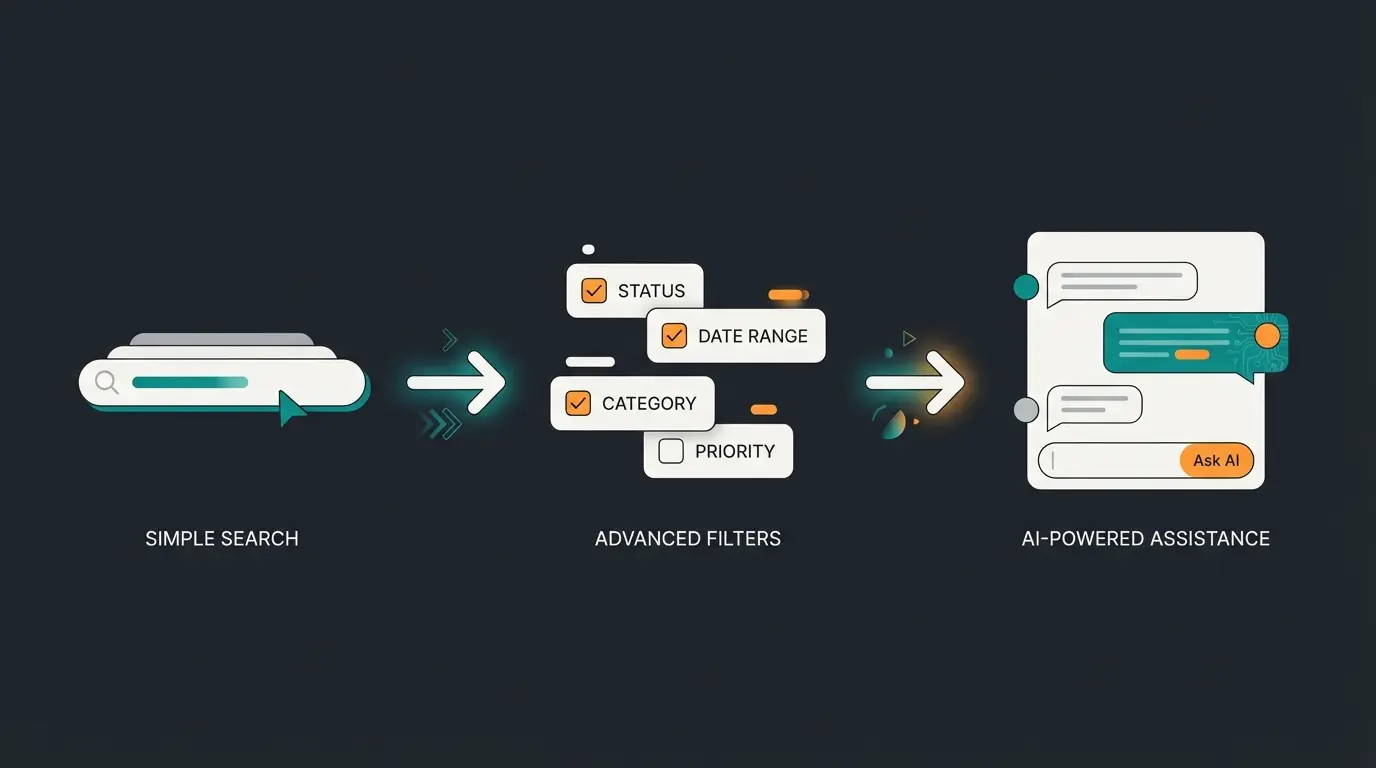
Traditional filters are based on the exclusion process (faceted search). The customer clicks on attributes, and products disappear. This assumes the customer knows exactly which technical attributes solve their problem.
The trend for 2026, however, is moving toward "Active Consultation." This isn't just about hiding products but suggesting the right products based on user need (intent). When AI transforms conversion, stores see dramatic improvements in customer satisfaction and sales.
In this article, we compare the best technical tools (like YITH, WOOF, FacetWP) with new AI solutions and show you how to equip your store for maximum revenue.
What Makes an Excellent Product Filter Plugin? (Criteria)
Before we examine the plugins, we need to define what a WooCommerce product filter must deliver in 2026. Especially in the German market (DACH region), stricter requirements apply than in the USA.
1. Speed & AJAX (No Page Reload)
Nothing kills conversion faster than a page that reloads after every click.
- AJAX (Asynchronous JavaScript and XML): A must-have. It allows filtering without reloading the entire page.
- Pre-Indexing: For large stores (10,000+ products), the plugin should create its own index in the database to process queries in milliseconds (e.g., FacetWP).
2. Mobile UX & Thumb Fatigue
Over 70% of traffic comes from mobile devices. Research from Depict.ai confirms that mobile optimization is crucial for e-commerce success.
- The Problem: Standard filters are often long lists of checkboxes in a sidebar. On smartphones, this leads to "thumb fatigue" from endless scrolling and tapping.
- The Requirement: Slide-out panels, large touch targets, and intelligent reduction of options are essential.
3. Logic & Flexibility
- AND / OR Logic: Can a customer select "Red" AND "Blue" (to see both) or does one exclude the other?
- Dynamic Adjustment: When I choose "Pants," the "Sleeve Length" filter should disappear.
4. German Market Requirements (GDPR & Germanized)
This is often ignored in international comparisons but is vital for your survival in the EU market. According to Independent WP and WP-GDPR.eu, compliance with European data protection laws is non-negotiable.
- GDPR: Many AJAX filters set cookies to store user selections. These must be blockable in your cookie consent tool (e.g., Borlabs, Cookiebot) until consent is given.
- Germanized Compatibility: In Germany, unit prices (price per unit, e.g., "€10 / 100ml") must often be displayed. Many international filter plugins "forget" this line during AJAX reload, which creates legal liability.
The Standard Market Leaders Under Test
Here's an overview of the established WooCommerce filter plugins that currently dominate search results. These tools are solid "workhorses" for technical filtering. According to Barn2 and Flycart, these remain the most popular choices.
1. YITH WooCommerce Ajax Product Filter
The "all-rounder" for established stores. YITH is known for its massive ecosystem.
- Advantages: Very stable, excellent integration with other YITH plugins (e.g., Wishlist), offers "Presets" (different filters for different categories).
- Disadvantages: The premium version is relatively expensive (approx. €90/year). The design sometimes appears somewhat "blocky" and needs CSS customization.
- Verdict: Solid choice for stores that prioritize stability over innovation.
2. HUSKY (formerly WOOF) – Products Filter for WooCommerce
The developer's favorite. As noted by GPL Plugins, this plugin offers unparalleled customization options.
- Advantages: Extremely flexible. You can customize almost everything via shortcode and API. It offers detailed statistics about what users filter (valuable for SEO!).
- Disadvantages: The backend is complex and cluttered ("cockpit feeling"). Often intimidating for beginners.
- Verdict: The best WooCommerce filter plugin for developers who need full control.
3. FacetWP
The performance king. According to CodeCarbon and PremiumWP, FacetWP leads in handling large catalogs.
- Advantages: FacetWP uses its own index table. This makes it extremely fast for large catalogs (50,000+ products). It works not only for WooCommerce but for any WordPress Post Type.
- Disadvantages: Not pure "plug-and-play." You need to manually create facets and often edit templates. Expensive ($99/year).
- Verdict: The only choice for high-performance stores with massive data volumes.
Comparison Table: The Top Players
| Feature | YITH Ajax Filter | HUSKY (WOOF) | FacetWP |
|---|---|---|---|
| Price | ~€90 / Year | Free / $42 | $99 / Year |
| Target Audience | Shop Managers | Developers | Performance Pros |
| Speed | Good | Medium | Excellent (Index-based) |
| Setup | Easy | Complex | Medium (requires knowledge) |
| Germanized Support | Good | Manual adjustment needed | Via Hooks possible |
Percentage of e-commerce visits from mobile devices
Typical conversion rate with standard filters
Maximum acceptable filter response time
Potential improvement with AI-guided selling
The Problem with Standard Filters (The Pivot)
If these plugins are so good, why do conversion rates often stagnate at 2-3%? Because standard filters have a fundamental problem: They assume expertise. Research from CXL confirms that this knowledge gap is a major conversion killer.
1. The Knowledge Gap
A customer is looking for a camera for "sports photography in low light."
- A standard filter forces the customer to filter by "ISO sensitivity," "shutter speed," and "sensor size."
- If the customer doesn't know this, they can't use the filter. They leave the store.
This is where AI product consultation becomes invaluable—bridging the gap between technical specifications and customer needs.
2. The Zero-Results Problem
This is conversion killer #1.
A user clicks: Brand: Nike + Color: Red + Size: XL + Material: Cotton.
Result: "No products found."
Most plugins show an empty page here. That's a dead end. The customer thinks "They don't have anything for me" and goes to Amazon. An intelligent solution would need to say: "We don't have a red cotton jacket, but we have a red synthetic jacket that comes very close to your criteria."
3. Mobile Frustration
On an iPhone 15, space is limited. A sidebar with 50 brand checkboxes is a UX catastrophe. Dropdowns are often fiddly. This leads to mobile users filtering less frequently and thus buying less often.

Discover how AI-powered product consultation eliminates dead-end searches and transforms frustrated visitors into happy customers. See conversion improvements in days, not months.
Start Free TrialThe Solution: AI Product Consultation
Here we enter 2026. A WooCommerce product search plugin with AI support (like StoreAgent or similar new tools) doesn't act as a bouncer keeping products out but as a salesperson recommending products. According to Visser and WC Vendors, AI integration is rapidly becoming the standard for competitive e-commerce.
How Conversational Filtering Works
Instead of clicking checkboxes, the user interacts with the system (via chat or dynamic search bar). The AI analyzes the intent (the purpose) and maps this to the technical attributes in the background. An AI product finder represents this next evolution in e-commerce navigation.
Example Scenario
- User Input: "I'm looking for a gift for my father; he likes wine and hiking."
- Standard Filter: Helpless. There's no "Father" or "Hiking" category for wines.
- AI Solution: Understands the context.
Analysis: Hiking -> Outdoor -> Robust / Picnic-suitable. Wine -> Enjoyment.
Suggestion: Shows a high-quality backpack with integrated wine cooler or a shatterproof wine glass set for outdoors.
The Benefits of AI Consultation
When consultative AI boosts customer interactions, stores see remarkable improvements:
- No "Zero-Results" Dead Ends: If the exact combination is missing, the AI suggests alternatives ("I don't have X, but Y is very similar because...").
- Guided Selling: The AI asks follow-up questions. "Should the laptop be light for travel or powerful for gaming?" – This imitates the sales conversation in a store.
- Mobile First: A chat interface or intelligent search bar needs much less space than 50 checkboxes. The "thumb fatigue" problem is solved.
- SEO Boost Through Long-Tail: Since users search in natural language, you generate valuable data about how your customers really speak. This helps you optimize your product descriptions.
This approach to AI-driven consultation fundamentally changes how customers interact with your catalog.
Simple keyword matching with limited results accuracy
Checkboxes and price sliders for attribute-based sorting
Recently viewed items and similar product recommendations
Intent-based filtering with conversational product guidance
Comparison: Static Filters vs. AI Consultation
Understanding the fundamental differences between these approaches helps you make the right choice for your store. An AI product consultant operates on entirely different principles than traditional filtering.
| Feature | Standard Filter Plugin | AI Product Consultant |
|---|---|---|
| Input Method | Clicks (Checkboxes) | Natural Language / Dialog |
| Logic | Exclusion (No, No, No) | Recommendation (Yes, because...) |
| Zero Results Handling | Shows "Nothing found" | Suggests alternatives |
| Mobile UX | Often long scrolling | Compact chat/search interface |
| Setup | Manual tagging required | Automated indexing (often) |
| Customer Knowledge Required | High (must know attributes) | Low (describe needs naturally) |
Hybrid Strategy: When to Use Which Approach
Should you delete all filters now and only use a chatbot? No.
The most successful stores in 2026 employ a hybrid strategy where AI powered sales technology complements traditional tools.
1. The Commodity Buyer (Standard Filter)
When a customer knows exactly what they want (e.g., "Levi's 501, Size 32/32, Blue"), a classic filter (FacetWP or YITH) is unbeatable fast. The customer doesn't want consultation here; they want efficiency.
- Recommendation: Keep sidebar filters for category pages with simple products (fashion, replacement parts).
2. The Discovery Buyer (AI Consultant)
When the customer has a problem but doesn't know the solution (e.g., "Skin cream for dry patches in winter"), the filter is overwhelmed.
- Recommendation: Integrate the AI module prominently as a "Product Finder" or "Purchase Advisor" on the homepage and empty category pages.
This is where AI guided selling technology truly shines—understanding customer needs and matching them to products.
Implementation Best Practices
When AI consultation boosts your customer service capabilities, you need to integrate it thoughtfully:
- Position AI consultation prominently on high-traffic pages
- Use standard filters for category pages with straightforward products
- Deploy AI for complex products requiring expertise
- Track which approach performs better for different product categories
- Continuously train the AI with customer interaction data

Technical Implementation Considerations
Implementing AI-powered consultation alongside traditional filters requires careful technical planning. According to GoInFlow and CuriousM, successful implementations follow specific patterns.
SEO-Friendly URL Structure
One often-overlooked aspect of filter implementation is URL handling. As Straight Up Search points out, faceted navigation can create significant SEO challenges:
- Avoid duplicate content from multiple filter combinations
- Use canonical tags to point filtered pages to main category pages
- Consider implementing robots.txt rules for filter combinations
- Monitor crawl budget consumption from filter pages
Performance Optimization
Whether using standard filters or AI consultation, performance remains critical:
- Pre-index product data for instant filter responses
- Implement lazy loading for filter options
- Use CDN caching for frequently accessed filter states
- Monitor server response times under load
Conclusion: The Future Belongs to Consultation
The market for WooCommerce filter plugins is saturated with good technical solutions like YITH, HUSKY, and FacetWP. These tools are basic hygiene for every store. But to remain competitive in 2026—especially against giants like Amazon or specialized niche stores—you need to offer more than just checkboxes. As noted by WooCommerce and Essential Addons, the platform continues to evolve toward more intelligent solutions.
The integration of AI-powered product consultation bridges the gap between the technical catalog and the human needs of the customer. It catches visitors who don't know which attribute to filter by and transforms frustrating "No Results" pages into sales conversations.
This is exactly how AI sales consultation is transforming e-commerce across platforms—not just WooCommerce, but the entire industry.
Our Recommendations for Your Store
- Foundation: Install a solid, GDPR-compliant filter plugin (e.g., FacetWP for performance or YITH for features) for "power users."
- Upgrade: Supplement this with an AI Product Finder that acts as a "Digital Salesperson."
- Check: Regularly verify compatibility with "Germanized for WooCommerce" to stay on the legal safe side.
- Monitor: Track zero-result searches to identify opportunities for AI intervention.
- Optimize: Use AI sales consultation data to improve product descriptions and categories.
Are you ready to transform your store from a silent shelf to an active consultant?
Start today by analyzing your "zero-results" search queries and discover the potential you've been missing.
Frequently Asked Questions
For stores with 50,000+ products, FacetWP is the top choice due to its index-based architecture that ensures millisecond response times. It creates its own database index, making it significantly faster than plugins that query the WordPress database directly for each filter action.
Traditional filters use an exclusion approach—customers click attributes to remove products from view. AI product finders use a recommendation approach—they understand natural language queries like "gift for my hiking-loving father" and suggest relevant products even when exact category matches don't exist. They also handle zero-result situations by offering alternatives instead of empty pages.
Not all of them by default. Many AJAX filters set cookies to store user selections, which requires consent under GDPR. Before implementation, verify that the plugin can be blocked until cookie consent is given, loads fonts locally (not from US servers), and doesn't transmit data to servers outside the EU.
Yes, and this hybrid approach is recommended for 2026. Use traditional filters for category pages with simple products where customers know exactly what they want (size, color, brand). Deploy AI consultation on homepages, search pages, and complex product categories where customers need guidance to find the right solution.
Most standard filter plugins simply display an empty page with "No products found"—a major conversion killer. AI-powered solutions instead suggest alternatives, explaining why similar products might meet the customer's needs. This transforms dead-end searches into sales opportunities.
Join hundreds of WooCommerce stores using AI consultation to eliminate zero-result pages, reduce cart abandonment, and boost conversions by up to 3x. Setup takes minutes, not months.
Get Started Free
Lasse is CEO and co-founder of Qualimero. After completing his MBA at WHU and scaling a company to seven-figure revenue, he founded Qualimero to build AI-powered digital employees for e-commerce. His focus: helping businesses measurably improve customer interaction through intelligent automation.