What is the Shopify newsletter and why it matters
Open the analytics dashboard of any mid-sized Shopify store and look at the channel breakdown. Social drives awareness, Shopify SEO drives discovery, and paid search drives clicks. But email drives repeat purchases, and repeat purchases are where the real margins live.
A Shopify newsletter is a recurring email sent to your store's subscribers through Shopify Email or a third-party app like Klaviyo or Omnisend. It covers product launches, promotions, educational content, and brand updates, all managed from your Shopify admin. For most e-commerce stores, it is the single most profitable owned marketing channel available.
The numbers back that up. According to the Litmus State of Email 2025 report, 35% of marketing leaders see a return between $10 and $36 for every $1 spent on email. Another 30% report returns between $36 and $50. No other digital channel delivers that kind of ROI consistency, particularly for stores with repeat-purchase products.
I have worked with Shopify stores that generate 30 to 40% of their monthly revenue from email alone. Not from complex funnels or expensive tools, just a consistent weekly newsletter with relevant product recommendations. Unlike social media, where algorithms control distribution, email is an owned channel where you control the audience, the timing, and the message. For a broader look at how newsletters fit into your overall Shopify email marketing strategy, that guide covers the full picture.
How to set up a newsletter in Shopify
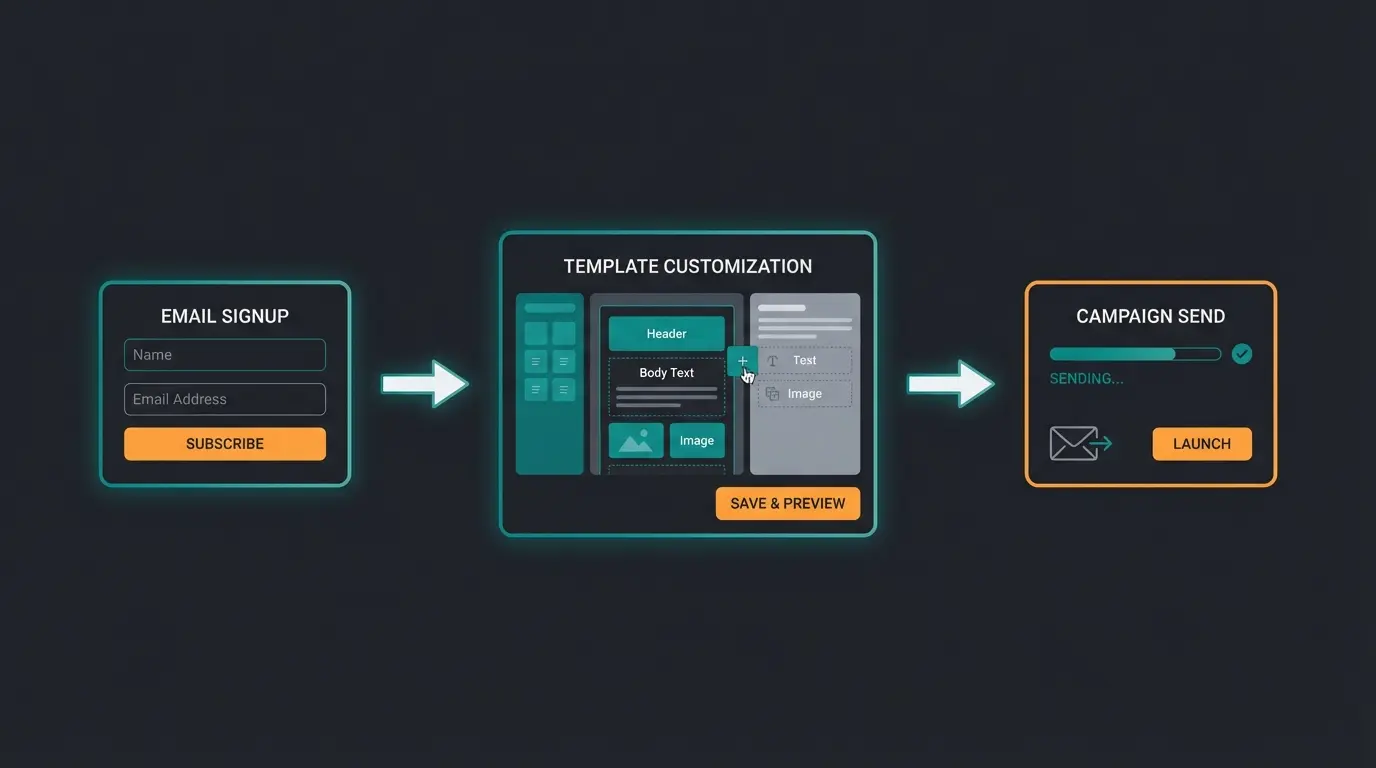
Setting up a Shopify newsletter takes about 20 minutes if you know the sequence. Here is the process from signup form to first campaign, including a custom Liquid form for stores that need more control than the default theme editor provides.
- Add a newsletter signup section in your theme editor. Navigate to Online Store > Themes > Customize, then add an 'Email signup' or 'Newsletter' section to your homepage or footer. This is the fastest way to start collecting subscriber emails.
- Install the Shopify Email app from the Shopify App Store. It is free to install and included with every Shopify plan. No third-party account required.
- Create your first campaign. In your Shopify admin, go to Marketing > Create campaign > Shopify Email. Choose a template that matches your intent: product launch, seasonal promotion, or regular newsletter update.
- Set up your brand template. Shopify Email automatically pulls your store logo, brand colors, and product images. Adjust fonts and layout to match your brand identity so every email looks consistent.
- Write your email content. Keep subject lines under 50 characters, include one clear call to action, and write body copy that provides genuine value before asking for a click.
- Segment your subscriber list. Use the Customers tab in your Shopify admin to filter by purchase history, location, or signup date. Segmented campaigns consistently outperform generic blasts by a wide margin.
- Configure double opt-in for GDPR and CAN-SPAM compliance. This is mandatory for stores selling to EU customers and strongly recommended everywhere else. It also improves list quality significantly.
- Send a test email, check formatting on both desktop and mobile, then schedule or send. Over half of all email opens happen on mobile devices, so always verify the mobile view before launching.
The test email step is not optional. I have seen campaigns go out with broken product links, images cut off on mobile, and subject lines displaying template placeholder text. Five minutes of testing prevents the kind of mistakes that erode subscriber trust permanently.
If the default theme signup section is too limited, you can add a custom newsletter form using Liquid. This gives you full control over field placement and styling. Here is a minimal working example based on the Shopify Help Center newsletter guide:
<form method="post" action="/contact#contact_form" id="contact_form" accept-charset="UTF-8">
  <input type="hidden" name="form_type" value="customer" />
  <input type="hidden" name="utf8" value="✓" />
  <input type="email" name="contact[email]" placeholder="Your email address" required />
  <input type="hidden" name="contact[tags]" value="newsletter" />
  <button type="submit">Subscribe</button>
</form>
The hidden contact[tags] field with value 'newsletter' automatically tags subscribers in your Shopify customer list. This lets you separate newsletter subscribers from checkout-only email captures, which matters once you start sending targeted campaigns to different segments.
Best newsletter tools for Shopify compared
Shopify Email is the obvious starting point, but it is not the only option. Depending on your list size, automation requirements, and whether you need SMS alongside email, a dedicated platform might serve you better. Here is how the four most popular tools compare on the details that actually matter for Shopify stores.
| Feature | Shopify Email | Klaviyo | Omnisend | Mailchimp |
|---|---|---|---|---|
| Free tier | 10,000 emails/mo | 250 contacts, 500 emails/mo | 250 contacts, 500 emails/mo | 500 contacts, 1,000 emails/mo |
| Starting price | $1 per 1,000 emails | From $20/mo | From $16/mo | From $13/mo |
| Automation | Basic flows | Advanced multi-step | Advanced + SMS flows | Basic to intermediate |
| Segmentation | Basic | Behavioral + predictive | Advanced + lifecycle | Intermediate |
| SMS marketing | Yes (Shopify Messaging) | Yes (from $35/mo) | Yes (built-in) | No native SMS |
| Shopify integration | Native (built-in) | Deep via app | Deep via app | Via app |
| AI features | Shopify Magic (subject lines, send time) | Predictive analytics, AI segments | AI subject lines, send-time | Basic AI assistant |
| Best for | Small stores, beginners | Data-driven growth brands | Omnichannel (email + SMS) | Multi-platform businesses |
For stores under 500 subscribers, Shopify Email is hard to beat. Ten thousand free emails per month, zero setup friction, and no additional app to manage. The templates pull your brand assets automatically, and Shopify Magic handles subject line optimization out of the box.
The tipping point usually comes around 1,000 to 2,000 active subscribers. At that stage, you need behavioral triggers based on browsing history, cart activity, and purchase frequency to keep your emails relevant. Sending the same newsletter to your entire list stops working once the audience grows past the point where everyone shares the same interests. That is when Klaviyo's predictive segments or Omnisend's lifecycle automation start earning back their subscription cost.
Newsletter popup setup and conversion optimization
A signup form in your footer collects emails passively. A well-timed popup collects them actively. The difference in conversion rates is substantial, and most Shopify stores leave this entirely on the table.
Three popup formats work consistently for e-commerce. Exit-intent popups trigger when the cursor moves toward the browser close button, making them effective for desktop visitors about to leave. Timed delay popups fire after 6 to 10 seconds on page, which is the sweet spot according to conversion data. Scroll-triggered popups appear after the visitor passes 50-60% of the page, capturing people who have already shown genuine interest in the content.
Offering 10-15% off for signup consistently doubles conversion rates
Spin-the-wheel formats outperform traditional modal popups across verticals
Mobile-optimized popups convert 57% higher than desktop-only designs
The native Shopify Forms app handles basic popups without third-party tools. For more advanced targeting, exit-intent logic, and A/B testing, Privy and Justuno are the two most widely used options in the Shopify ecosystem. Both offer free tiers that work for stores with under 5,000 monthly visitors. Each one also adds JavaScript to your storefront, so watch what it does to your Shopify page speed: a slower store loses visitors before the popup ever fires.
A/B test one variable at a time. Start with the incentive: 10% off versus free shipping versus exclusive content access. Then test timing: immediate display versus 5-second delay versus 10-second delay. Then test format: center modal versus slide-in versus bottom bar. Most stores never iterate past their first popup variant. The ones that test consistently see conversion rates double within 60 days.
The most underrated tactic: exit-intent popups with a content-based incentive instead of a discount. Offering a free guide, checklist, or exclusive product preview preserves your margins while still capturing the email. Stores with premium positioning often see better long-term subscriber engagement from content incentives than from percentage-off codes.
A Qualimero AI employee turns those new subscribers into buyers, with real-time product consultation that lifts cart values by up to 35%.
Book a demoAI-powered newsletter automation
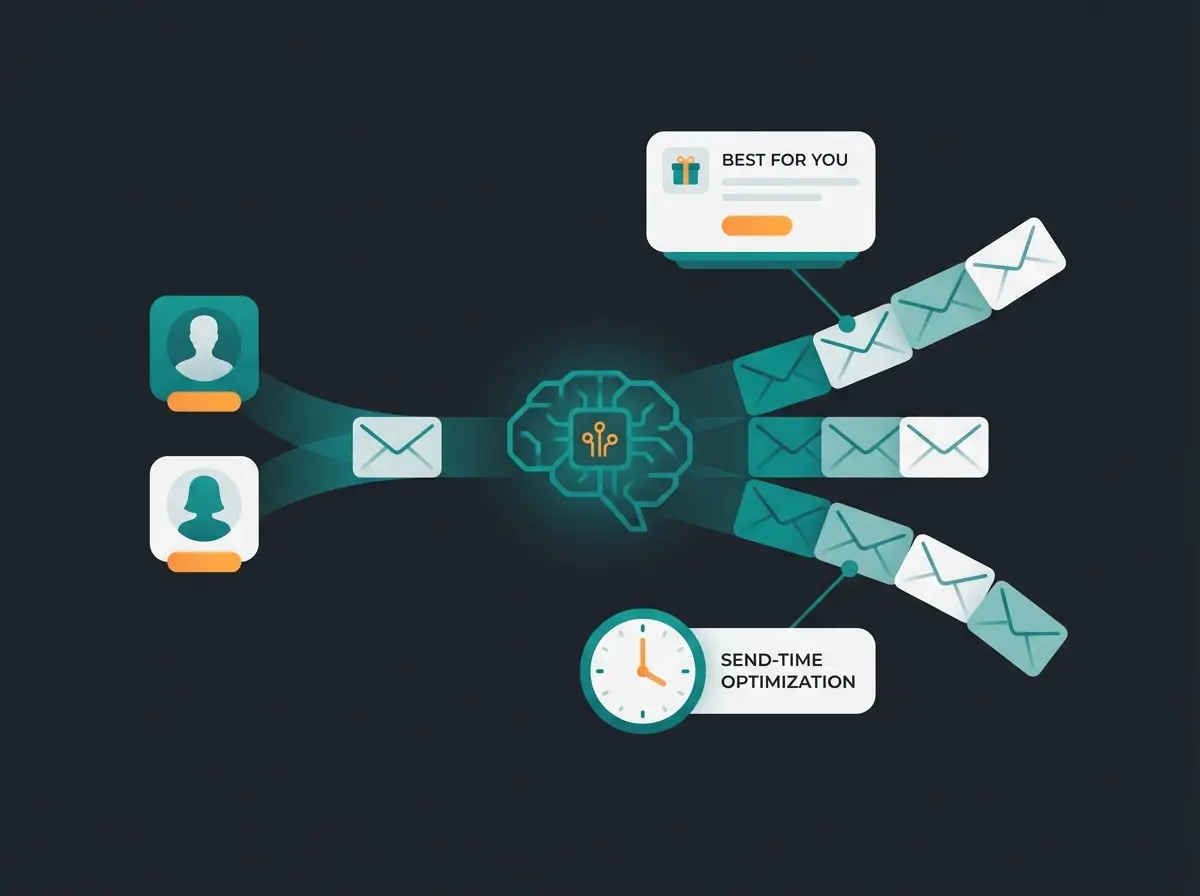
The real shift in e-commerce email is not better templates or higher send frequency. It is personalization that reflects what each individual customer actually wants. AI-driven email personalization can lift revenue by up to 41% and increase click-through rates by 13.44%, according to recent industry benchmarks.
Shopify Magic, built into Shopify Email, now handles subject line suggestions, copy refinement, and send-time optimization based on your store's historical performance data. Klaviyo goes further with predictive analytics that forecast customer lifetime value and churn risk, letting you build segments based on what customers are likely to do next, not just what they did last.
The practical difference between basic and advanced AI in email comes down to data depth. Shopify Magic uses your store's aggregate performance metrics. Dedicated tools like Klaviyo analyze individual customer behavior, predicting who will reorder, who is drifting toward inactivity, and which product each subscriber is most likely to want. Both levels are useful. The question is whether your list is large and varied enough to benefit from individual-level prediction.
One area where this gets particularly interesting for Shopify stores: AI-generated product recommendations in emails based on real-time inventory and browsing data. A subscriber who viewed three types of garden tools last week gets a newsletter featuring those exact categories, plus complementary products, at prices that reflect current stock levels. That level of relevance is what separates an email that gets opened from one that gets archived.
But email is only one touchpoint. Plenty of stores bolt on a chatbot as a service subscription, get a widget that answers shipping questions, and wonder why conversion never moves. The real leverage comes when your entire customer interaction, from first site visit to post-purchase follow-up, is handled by an AI that genuinely understands your product catalog.
AI product consultation at scale is what separates stores that send newsletters from stores that convert through them. Signed, an online retailer for custom decorative signs, deployed a Qualimero AI employee for product advisory and saw an 18x ROI, 70% support automation, and a 30% increase in upselling. Read the full Signed success story for the implementation details.
Connecting newsletter with other marketing channels
A newsletter works best when it feeds and is fed by your other channels. In a coherent Shopify marketing mix, no channel runs in isolation. The strongest Shopify stores repurpose content across the board: blog posts become newsletter features, email promotions align with Google Shopping campaigns, and social media drives signups that grow the subscriber list.
Setting up a Shopify blog gives you a content engine that supplies your newsletter with fresh material every week. Cross-promoting featured products through Google Shopping brings in high-intent traffic that your email popups can convert into subscribers. And keeping your sitemap optimized ensures that search engines index the landing pages where those signups happen, which is usually the first thing a Shopify SEO agency fixes in a technical audit. Each channel reinforces the others, and the newsletter sits at the center as the retention layer.
The key insight most store owners miss: your newsletter subscriber list is your warmest audience for any new initiative. Running a Google Shopping campaign? Email your subscribers about the featured products first. Launching a blog? Your newsletter list gives you guaranteed initial readership that sends quality signals to search engines. The newsletter is not just a channel. It is the connective tissue between all your other channels.
Qualimero's AI employees consult your customers in real time, recommend the right products, and increase conversion by up to 7x. Start with a free demo.
Book your demoFAQ: common questions about Shopify newsletters
Yes. Shopify includes Shopify Email as a native email marketing tool on every plan. You can create, send, and track newsletters directly from your Shopify admin dashboard with branded templates, basic automation, and 10,000 free emails per month.
Shopify Email includes 10,000 free emails per month on every plan. After that, pricing is $1 per 1,000 emails up to 300,000, then $0.65 per 1,000 up to 750,000, and $0.55 per 1,000 beyond that. Abandoned checkout automations are always free and do not count toward the limit.
More relevant than ever. Email open rates rose to 30.7% in 2025, up from 26.6% the year before. Unlike social media, email is an owned channel where you control reach and timing fully. For e-commerce stores, it remains the highest-ROI marketing channel available.
Shopify Email has a limited template library (around 33 pre-built designs), a basic drag-and-drop editor, and only simple automation triggers compared to tools like Klaviyo. Segmentation works but lacks behavioral and predictive features. For stores with complex automation needs or lists above 2,000 subscribers, a dedicated platform is usually a better fit.
It depends on store size and goals. Shopify Email works well for beginners and stores under 500 subscribers. Klaviyo is the strongest option for data-driven brands needing advanced segmentation and predictive analytics. Omnisend is best for omnichannel stores combining email and SMS in one platform.
Go to Online Store > Themes > Customize in your Shopify admin. Add an 'Email signup' section to your homepage or footer. For more control, add a Liquid form with form_type set to 'customer' and contact[tags] set to 'newsletter' to tag subscribers automatically for segmentation.

Lasse is CEO and co-founder of Qualimero. After completing his MBA at WHU and scaling a company to seven-figure revenue, he founded Qualimero to build AI-powered digital employees for e-commerce. His focus: helping businesses measurably improve customer interaction through intelligent automation.